3 Time-based scheduling in Airflow
This chapter deepens the reader’s understanding of time-based scheduling in Airflow by showing how to run pipelines at regular or irregular moments, process data incrementally, and safely reprocess historical periods. It introduces the core schedule components—start_date, end_date, schedule, and catchup—and explains how these define when runs are eligible and whether past periods are included. Using a simple user-events scenario, the chapter motivates why reliable scheduling matters for analytics and highlights important changes in Airflow 3 (e.g., catchup disabled by default and clearer, explicit timetable classes) that influence how you configure recurring runs.
The chapter first explores trigger-based timetables: Cron-like schedules and handy presets (such as @daily) for running at precise time points, as well as frequency-based variants for “every N units” patterns that Cron cannot express cleanly. It shows how logical_date can be templated into commands to persist per-run outputs and avoid overwriting prior results. Next, it shifts to interval-based timetables for incremental processing, where runs execute at the end of each interval and the runtime context provides data_interval_start and data_interval_end for fetching exactly the data in that window. This enables efficient partitioned storage and per-interval computation; the same idea works with both Cron- and delta-based interval definitions. For irregular calendars, the EventsTimetable triggers runs on a finite list of specific timestamps (optionally restricting manual runs), though it does not provide data intervals and is thus less suited to incremental slicing without extra logic.
With the scheduling foundations in place, the chapter covers backfilling: enabling catchup to load or recompute historical intervals, its limits when source systems constrain retention, and practical controls (max_active_runs and max_active_tasks) to prevent overwhelming Airflow or dependencies during large backfills. It closes with two reliability properties for well-behaved tasks. Atomicity ensures each task either fully succeeds or cleanly fails without leaving partial outputs, often achieved by splitting loosely coupled steps (e.g., emailing results) into separate tasks. Idempotency guarantees that rerunning a task with the same inputs produces the same outcome; partitioned outputs and overwrite/upsert patterns are emphasized as simple ways to keep reruns safe and predictable.
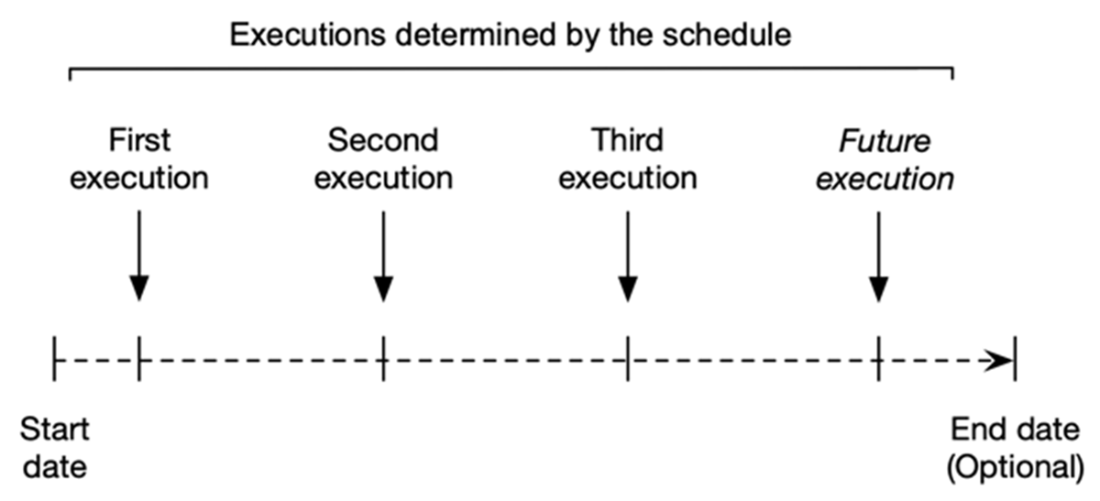
Example of a regular time-based schedule in Airflow, in which the pipeline is executed at regular intervals (the schedule) between the given start and end dates. If no end date is given, the pipeline will be executed indefinitely.
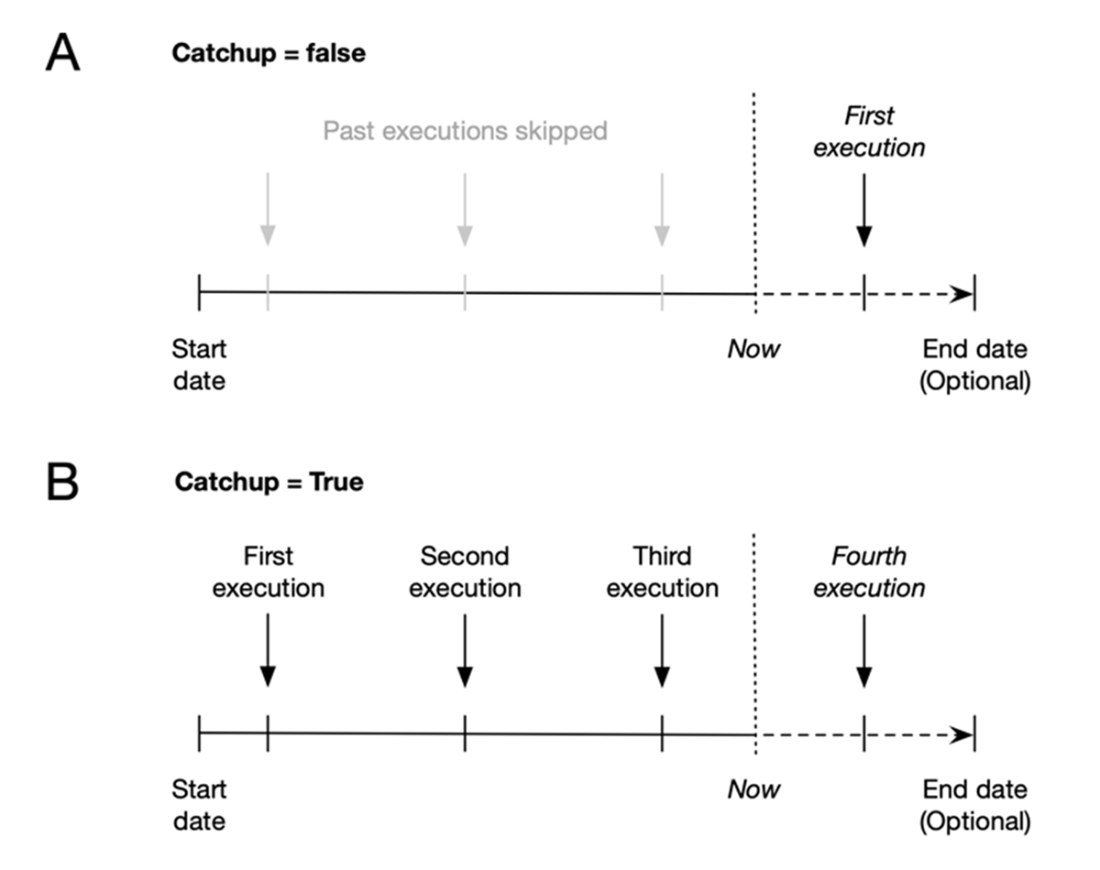
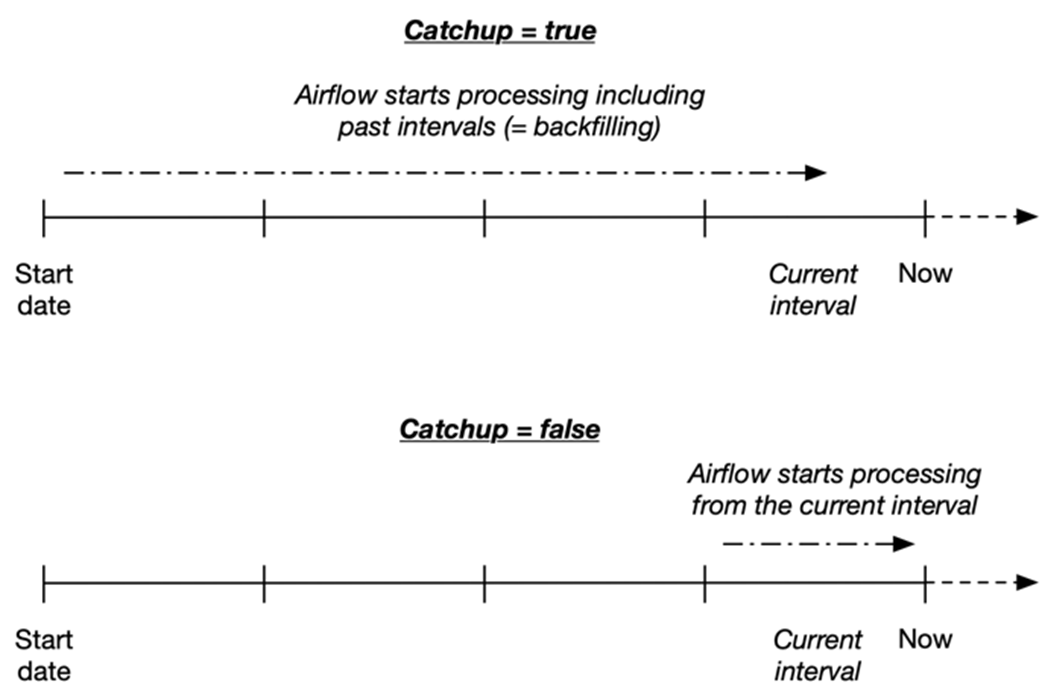
The effect of the catchup parameter on scheduling in Airflow. With catchup = False (panel A), Airflow will not execute the pipeline for any historical time points that had already passed by the time the pipeline was enabled. With catchup = True (panel B), Airflow will schedule runs for these past time points.
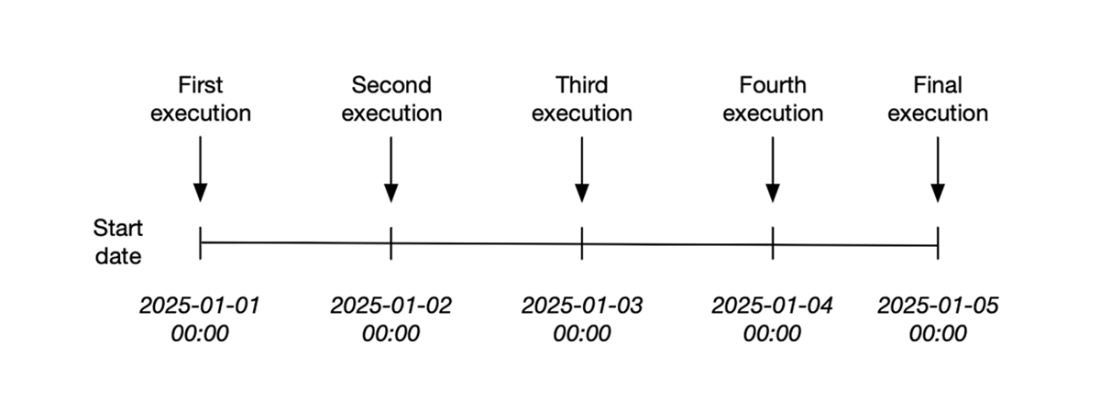
Executions for a daily scheduled DAG with specified start (2025-01-01) and end dates (2025-01-05), which prevents the DAG from executing beyond this date.
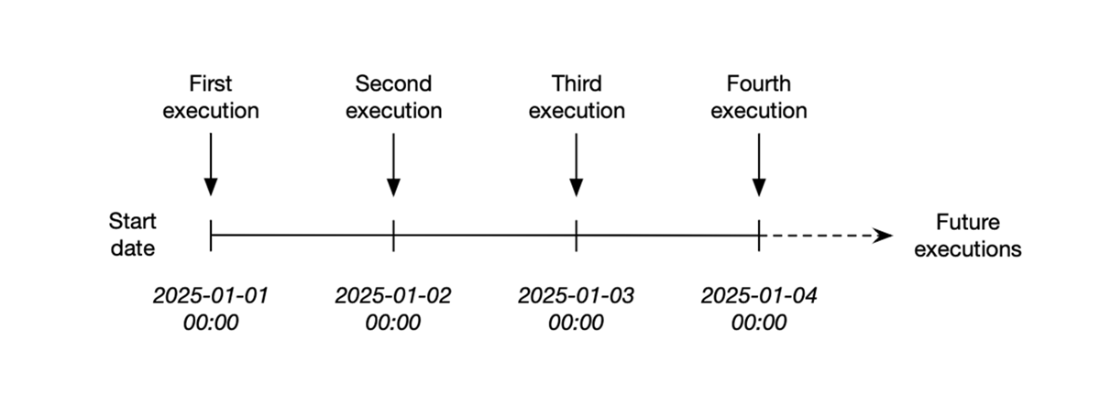
By omitting the end date you can keep the DAG running indefinitely.
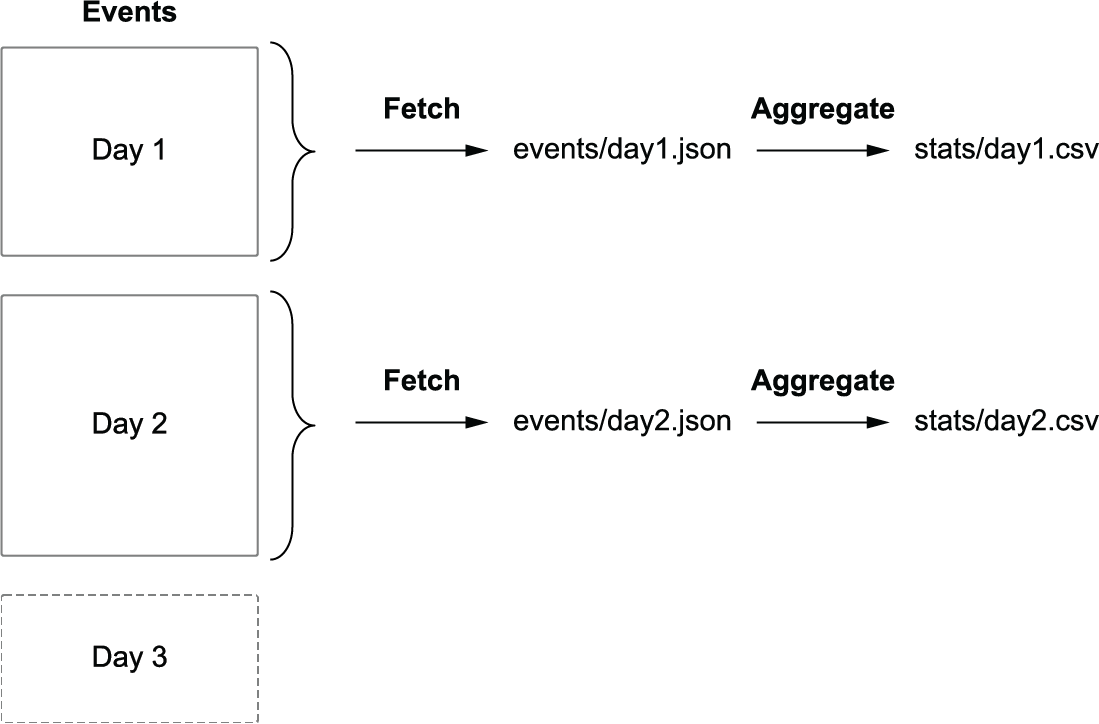
Fetching and processing data incrementally by splitting time into daily blocks and having each execution process the data of a specific day.
Incremental processing in interval-based scheduling windows (e.g., Airflow) versus windows derived from trigger schedules. For incremental (data) processing, time is typically divided into discrete time intervals that are processed as soon as the corresponding interval has passed. Interval-based scheduling approaches (such as Airflow) explicitly schedule tasks to run for each interval while providing exact information to each task concerning the start and the end of the interval. In contrast, time point–based scheduling approaches only execute tasks at a given time, leaving it up to the task itself to determine for which incremental interval the task is executing.
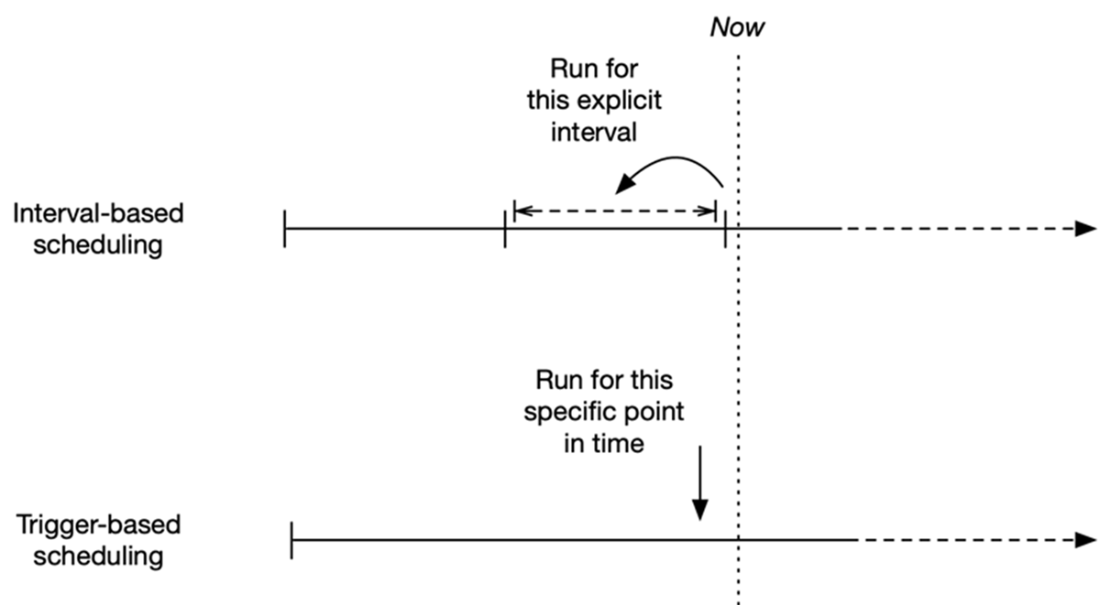
Illustration of schedule interval values in Airflow. DAGs are triggered at the end of the given interval, with data_interval_start pointing to the start of the interval and data_interval_end pointing to the end.
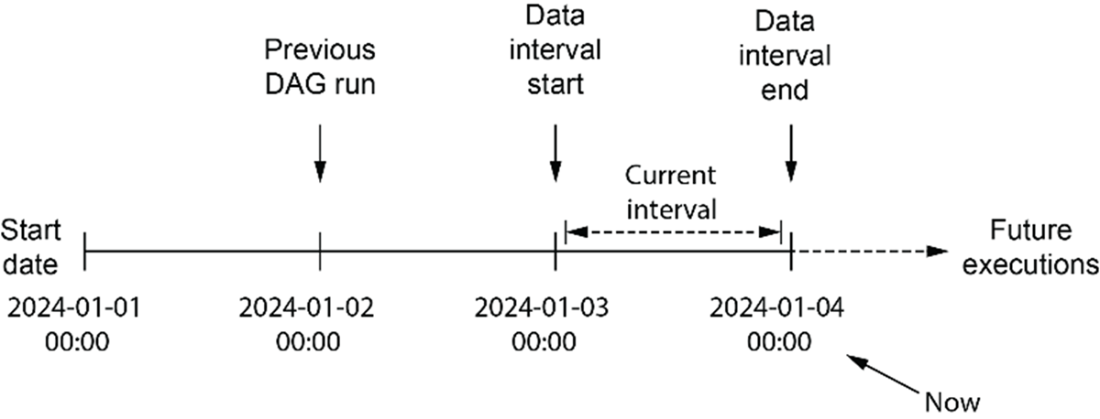
Time represented in terms of Airflow’s scheduling intervals. Assumes a daily interval with a start date of 2024-01-01. Execution happens at the end of the interval (e.g. the DAG run for the first interval is executed at 2024-01-02 00:00).

Backfilling in Airflow. By default, Airflow 3 will not run tasks for all past intervals up to the current time. This behavior can be changed by setting the catchup parameter of a DAG to true, in which case Airflow will also include historical runs.
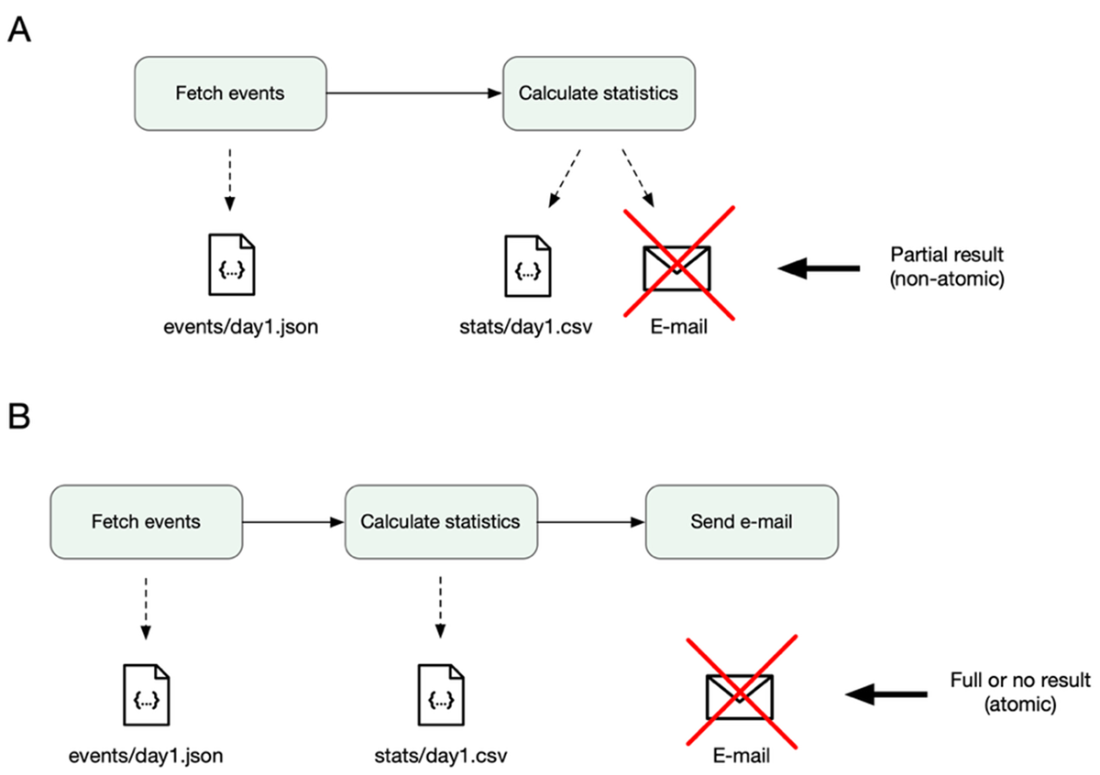
Atomicity ensures either everything or nothing completes. No half work is produced, and as a result, incorrect results are avoided down the line.
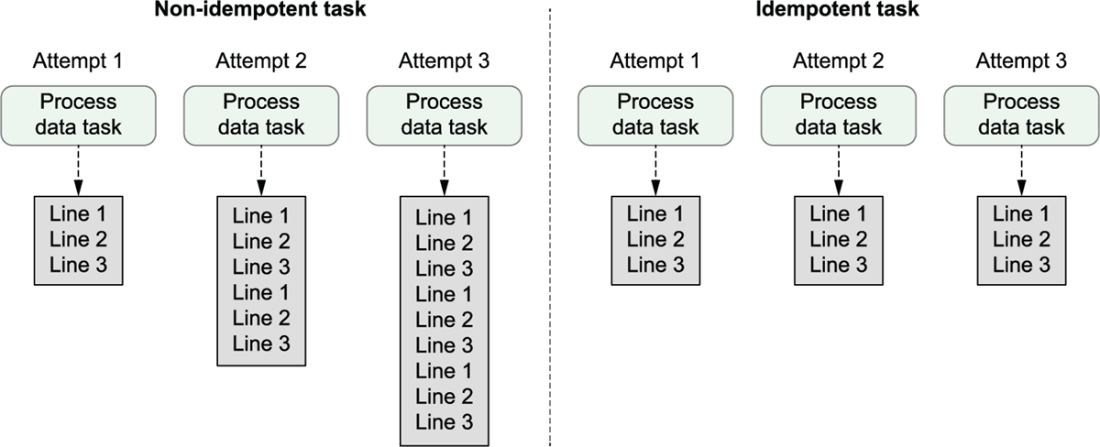
An idempotent task produces the same result, no matter how many times you run it. Idempotency ensures consistency and the ability to deal with failure.
Summary
- In Airflow, scheduling is a fundamental feature that allows for the automated triggering of workflows.
- There are two main types of scheduling used for triggering DAGs in Airflow. Time-based schedules (handled in this chapter) trigger DAGs at regular or irregular intervals at given points in time. Asset-based schedules (discussed in the next chapter) use a different approach.
- Time-based schedules are defined using four main parameters: the start date (when the scheduling begins), the schedule (defines the frequency of runs), an optional end date (marks when the scheduling ends) and catchup (determines if executions will be scheduled for past timepoints).
- Trigger-based time schedules allow you to execute DAGs at regularly occurring points in time. Execution of a DAG happens at the specific point in time defined by the schedule (e.g., midnight). During execution, the schedule provides the logical_date parameter with the exact point in time for which the DAG is executing.
- Data interval-based schedules are ideal for incremental processing as they divide time into discrete intervals. DAG execution for a given date happens at the end of an interval. Information about the start/end of the interval is provided by the data_interval_start and data_interval_end parameters.
- Both trigger- and data interval-based schedules can be defined using Cron expressions, relative time offsets (timedeltas) and Airflow shorthand expressions (e.g., @daily).
- Irregular time schedules can be implemented using the EventsTimeTable, which allows you to trigger DAGs at an arbitrary list of moments in time.
- The process of backfilling (controlled by the catchup parameter) enables the execution of workflows for past intervals to process historical data by running DAGs retrospectively from a chosen start date.
- Atomicity ensures that a series of operations are treated as a single unit, completing entirely or not at all, while idempotency means rerunning a task with unchanged inputs does not alter the result.
- Airflow 3 made considerable changes to the default scheduling behavior, moving from data interval-based schedules to trigger-based schedules as the default and switching the default catchup behavior from True to False. We recommend being explicit in your schedules to avoid nasty surprises, especially when migrating from Airflow 2 to 3.
FAQ
What parameters define an Airflow schedule?
An Airflow DAG’s time-based behavior is controlled by four parameters: start_date (required) — when Airflow begins considering runs; end_date (optional) — when it stops; schedule (required) — the timetable that defines when to run; and catchup (optional) — whether to create runs for past intervals since start_date.
Why doesn’t my newly enabled daily DAG run for past days?
In Airflow 3, catchup is disabled by default. The scheduler will only create future runs. Set catchup=True on the DAG (or configure scheduler.catchup_by_default) to backfill runs from start_date up to now.
What’s the difference between trigger-based and interval (data-interval) schedules?
Trigger-based timetables fire at specific points in time (like Cron). Runs are scheduled immediately after the time point passes, and you get logical_date but no interval bounds. Data-interval timetables split time into contiguous intervals and schedule the run at the end of each interval, providing data_interval_start and data_interval_end to support incremental processing.
How do I run a DAG daily at midnight?
Use CronTriggerTimetable with a daily Cron or the @daily preset. Example: schedule=CronTriggerTimetable("@daily", timezone="UTC"). Provide a start_date, and set catchup as needed to control historical runs.
How do I run a DAG every N units (e.g., every 2 days or every 10 minutes)?
Use frequency-based timetables with pendulum.duration: DeltaTriggerTimetable for point-in-time triggering, or DeltaIntervalTimetable for interval semantics. Example: schedule=DeltaIntervalTimetable(pendulum.duration(days=2)). For time zones, set the tz on start_date.
What are logical_date, data_interval_start, and data_interval_end?
logical_date identifies the run’s nominal time (often the interval start). With interval schedules, data_interval_start and data_interval_end give the exact inclusive/exclusive bounds of the interval. You can template them in tasks (e.g., {{ logical_date | ds }}, {{ data_interval_start | ds }}, {{ data_interval_end | ds }}) to parameterize queries and filenames.
How do I implement incremental daily processing and avoid overwriting results?
Use an interval-based timetable (e.g., CronDataIntervalTimetable with @daily). Fetch only the interval’s data using the templated data_interval_start/end, and write outputs partitioned by date (e.g., /data/events/{{ logical_date | ds }}.json and /data/stats/{{ logical_date | ds }}.csv). This avoids reprocessing full history and prevents overwriting prior results.
How can I schedule runs on irregular dates (like holidays)?
Use EventsTimetable with a finite list of event datetimes. Assign it to schedule to trigger exactly at those times. Optionally set restrict_to_events=True to prevent arbitrary manual runs and constrain them to the nearest defined event.
What is backfilling and how do I control it safely?
Backfilling means creating runs for past intervals since start_date. Enable it with catchup=True. Be mindful of source data retention (you can only backfill what the source still holds). Control load with max_active_runs and max_active_tasks on the DAG (and optionally pools) to limit parallelism during catchup.
What are atomicity and idempotency for tasks, and why do they matter?
Atomicity: a task should either complete all its work or leave no partial side effects. Split loosely coupled steps (e.g., compute stats vs. send email) into separate tasks to avoid half-done results. Idempotency: re-running a task with the same inputs should not change the overall outcome (e.g., overwrite or upsert a partition instead of appending duplicates). Both properties make retries, backfills, and reruns safe and predictable.

 Data Pipelines with Apache Airflow, Second Edition ebook for free
