15 Operating Airflow in production
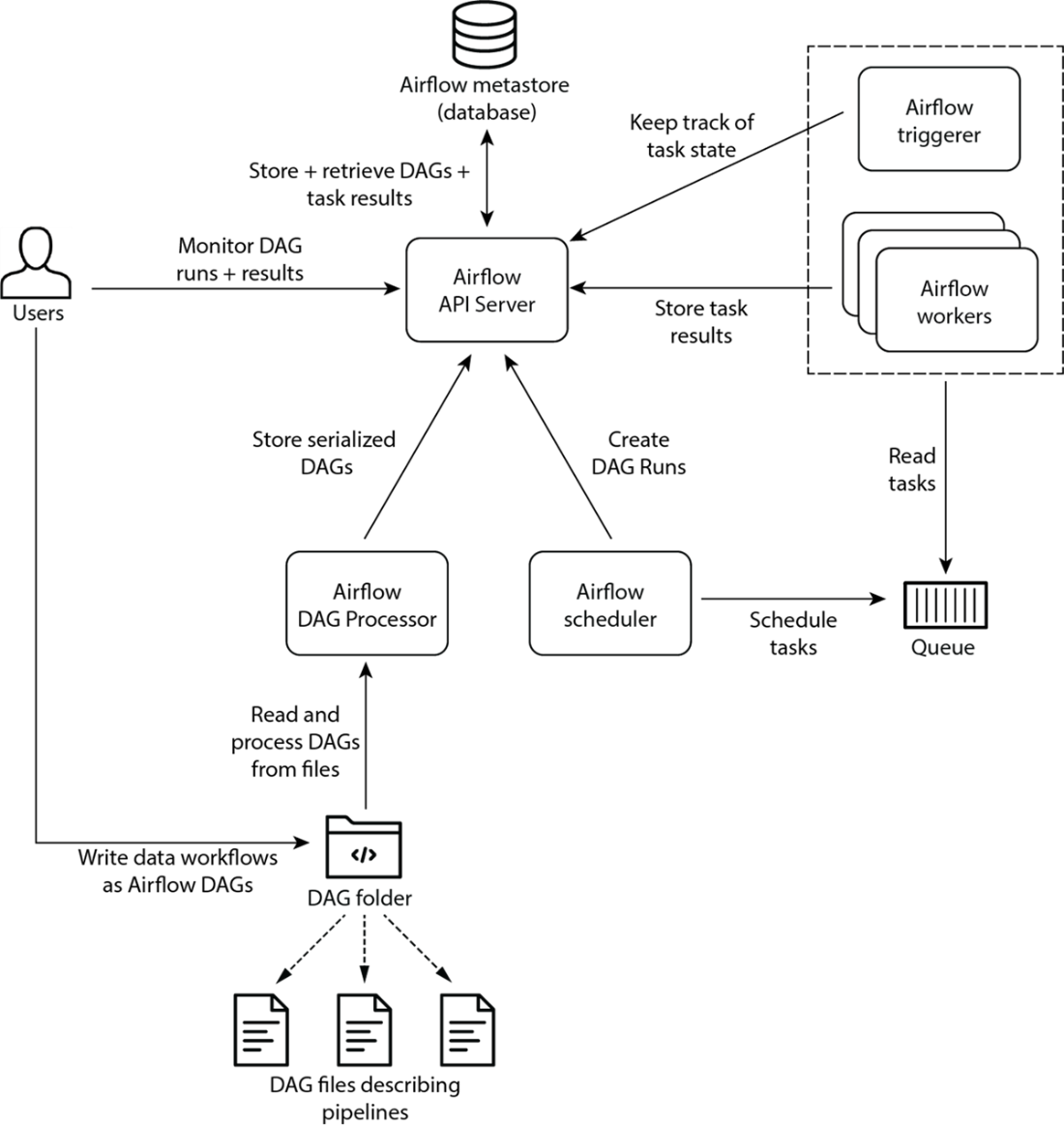
This chapter shifts from building pipelines to operating Apache Airflow reliably at scale. It revisits the core components and their roles in production: the API server as the central gateway, the scheduler that decides and queues work, the standalone DAG Processor that parses and serializes DAGs, workers that execute tasks under an executor, the optional triggerer for deferrable work, and the metastore that persists all state. It emphasizes Airflow 3’s architectural direction (API server–mediated access and a required standalone DAG Processor), practical database choices with SQLAlchemy-backed PostgreSQL or MySQL, and the implications of making DAG code visible to all components.
A large portion focuses on scaling and execution models. It compares executors—Local (simple, single machine), Celery (distributed with a broker and optional Flower monitoring), Kubernetes (pod-per-task on a cluster), and Edge (remote workers outside the main environment)—and explains when to use which, including careful guidance on hybrid/multi-executor setups and task-level executor selection. It covers production setup concerns such as distributing DAGs in Celery and Kubernetes, configuring and validating executors, and tuning the metastore. It details how the scheduler advances tasks from scheduled to queued to running, how to run multiple schedulers safely via database row-level locking, and how to tune performance and concurrency with key settings (global and per-DAG limits, pools, Celery worker concurrency). It also shows how to tune the DAG Processor Manager’s refresh and parsing intervals to balance responsiveness and CPU use.
Operational excellence is rounded out with observability and alerting. The chapter explains the three log types (API server, scheduler, task), default file locations, and how to ship logs to remote backends. It shows how to instrument metrics with StatsD or OpenTelemetry, and a common flow to expose, collect, and visualize Airflow metrics using a StatsD exporter, Prometheus, and Grafana, plus what to monitor across latency, load, errors, and saturation. For notifications, it demonstrates callbacks for DAGs and tasks, built-in email-on-failure with SMTP configuration, and provider-based integrations. Finally, it examines when to scale beyond a single instance—contrasting a shared multi-team deployment (cost-efficient but with shared risk and governance challenges) versus per-team instances (isolation and autonomy at higher cost and with cross-instance triggering considerations)—to help choose the right operating model.
High-level Airflow architecture
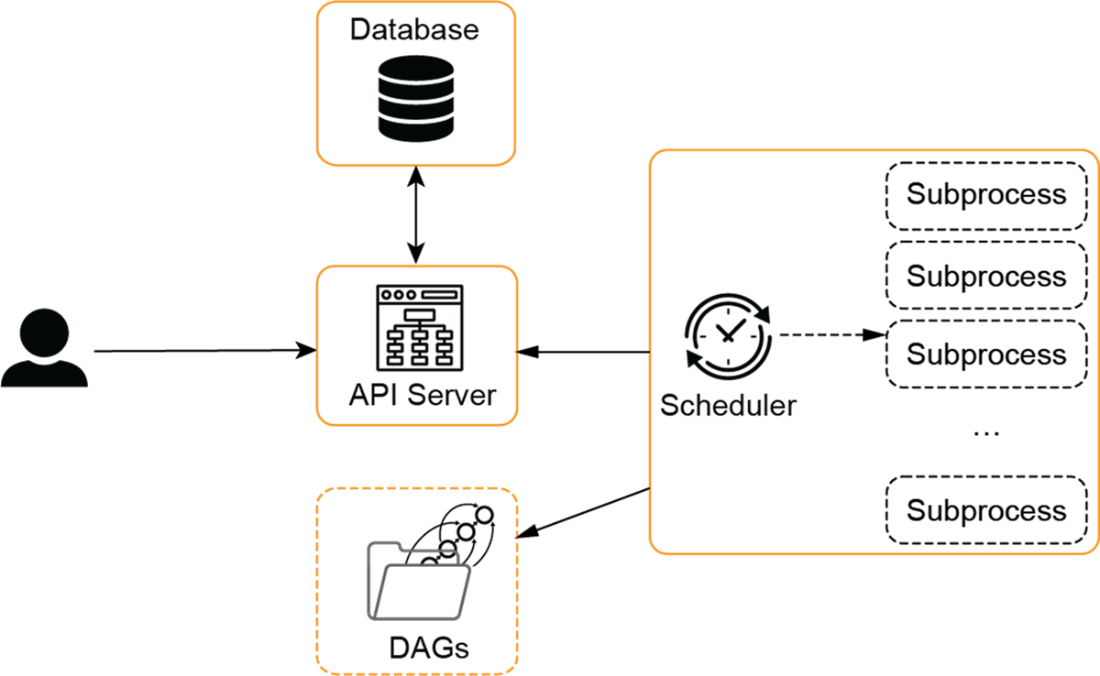
With the LocalExecutor all components can run on a separate machine. However, subprocesses created by the scheduler all run on one single machine.
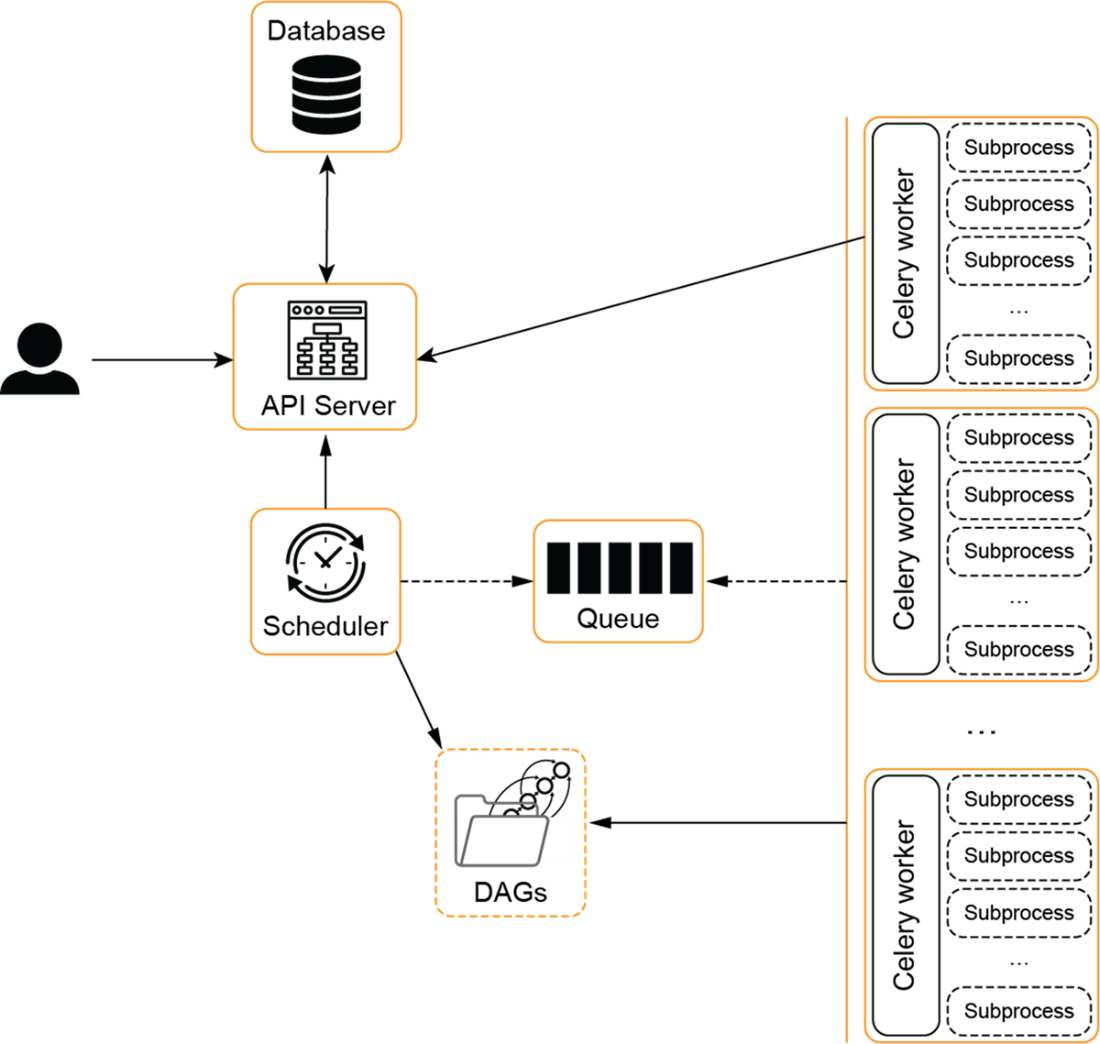
In the CeleryExecutor, tasks are divided among multiple machines running Celery workers. The workers wait for tasks to arrive on a queue.
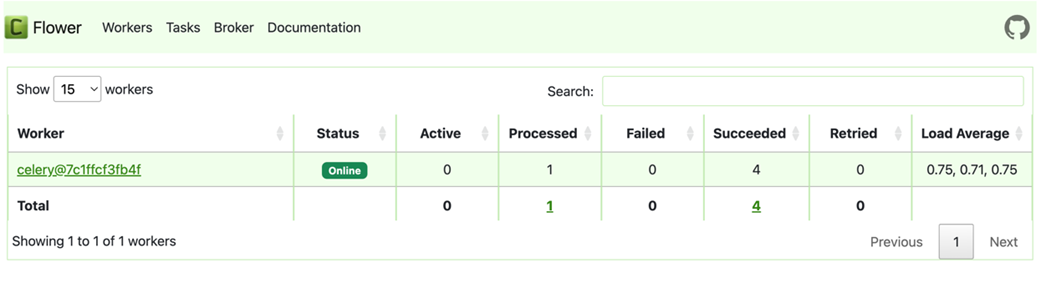
The Flower dashboard shows the status of all Celery workers.
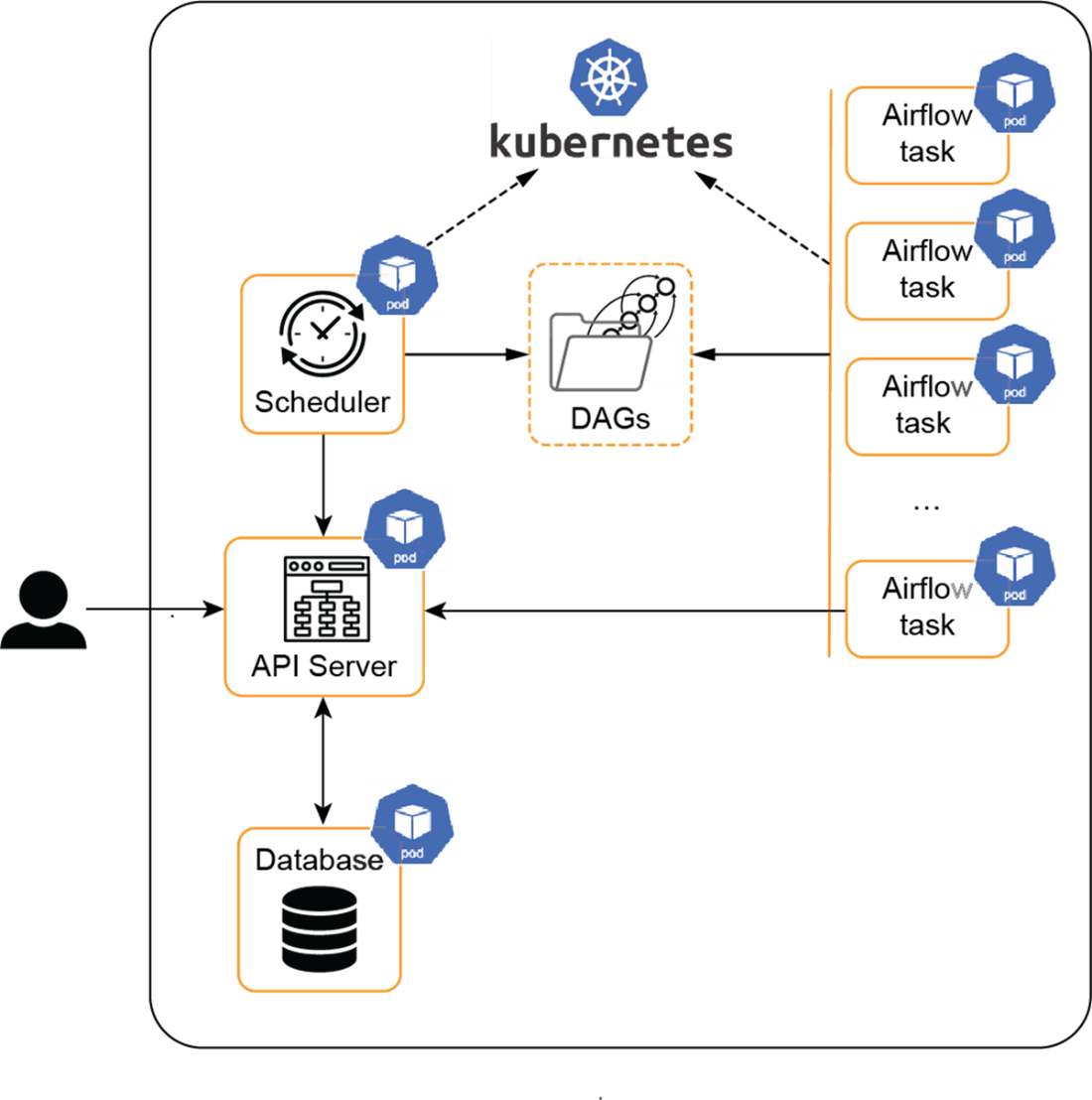
With the KubernetesExecutor, all tasks run in a pod in Kubernetes. While it is not necessary to run the API server, scheduler, and database in Kubernetes, it is sensible to also run it there when using the KubernetesExecutor to reduce the complexity of the setup.
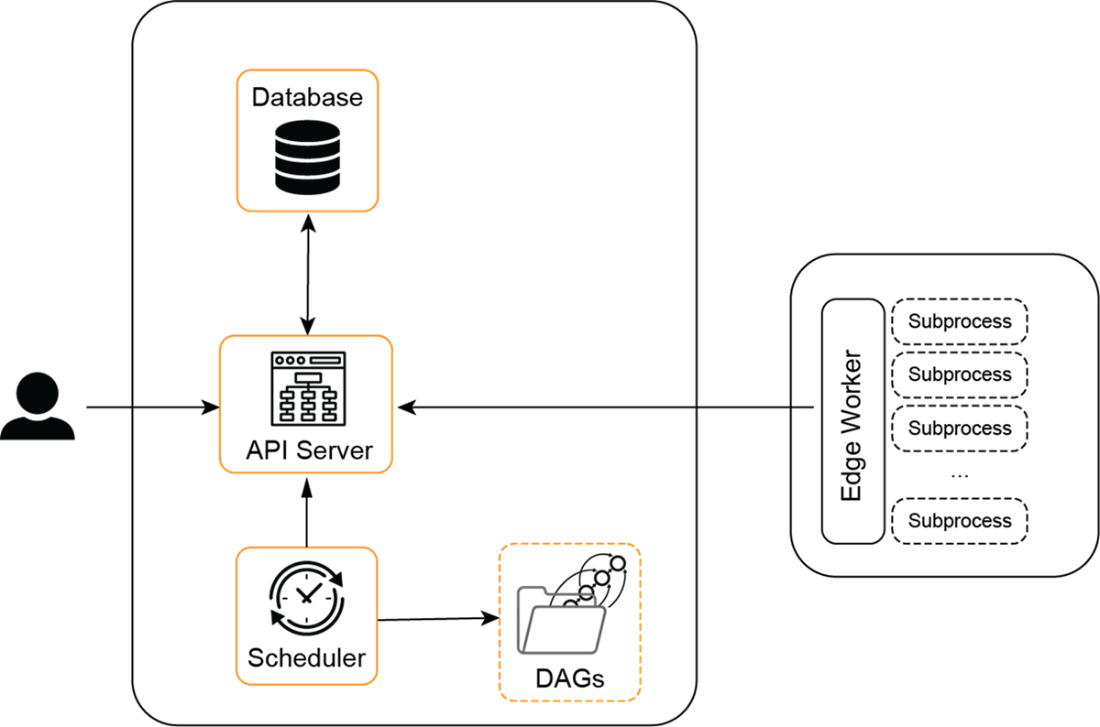
With the EdgeExecutor, the worker runs in a separate environment, outside the environment in which Airflow itself runs.
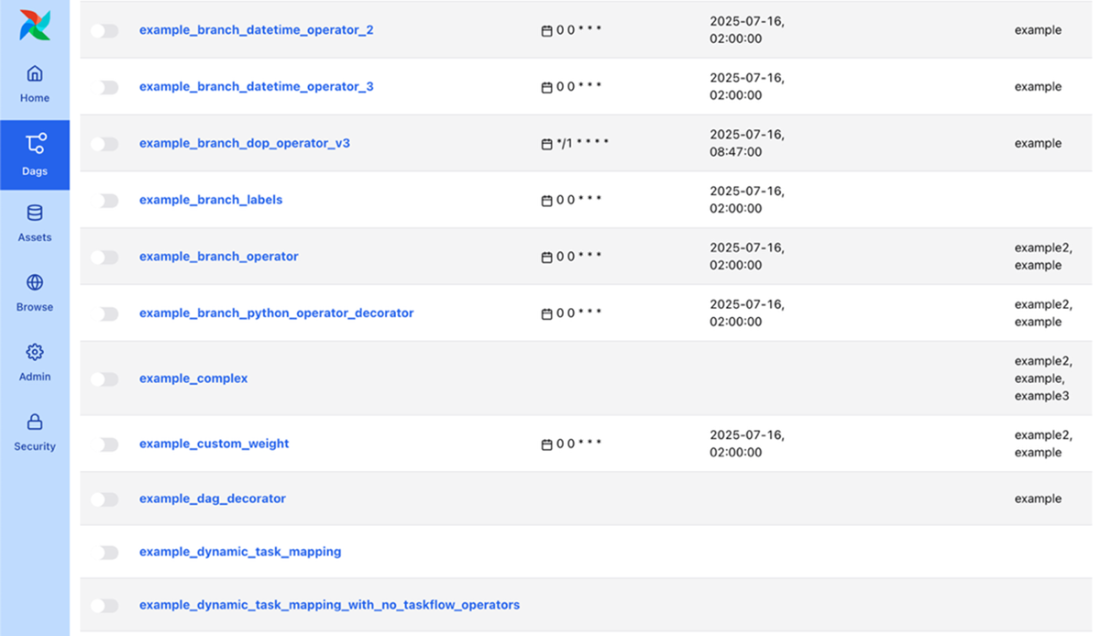
By default, Airflow will load example DAGs (and connections, not displayed here).
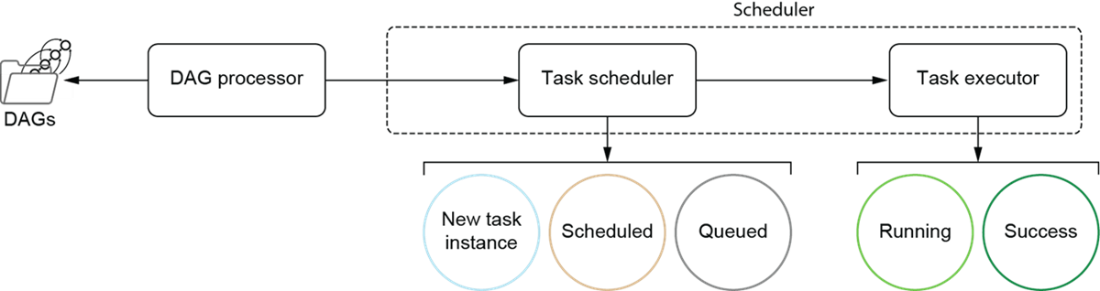
The ideal flow of a task and the task state for which the components of the scheduler are responsible. The dotted line represents the full scheduler responsibility. When running the SequentialExecutor/LocalExecutor mode, this is a single process. The CeleryExecutor and KubernetesExecutor run the task executor in separate processes, designed to scale over multiple machines. Note that this excludes the Triggerer component as previously mentioned. Additionally, note that if something goes wrong (during task execution, during scheduling, etc.) your task may end up in another state. This diagram only shows the ideal flow.
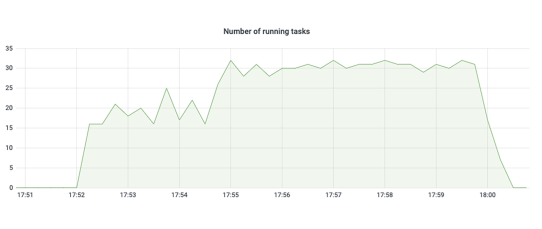
An example visualization of the number of running tasks. Here, the parallelism had the default value of 32, to which we sometimes see the number of tasks spike.
Software and steps required for collecting and visualizing metrics from Airflow. Prometheus collects metrics, and Grafana visualizes metrics in dashboards. The Prometheus StatsD exporter translates StatsD metrics to Prometheus’s metrics format and exposes them for Prometheus to scrape.

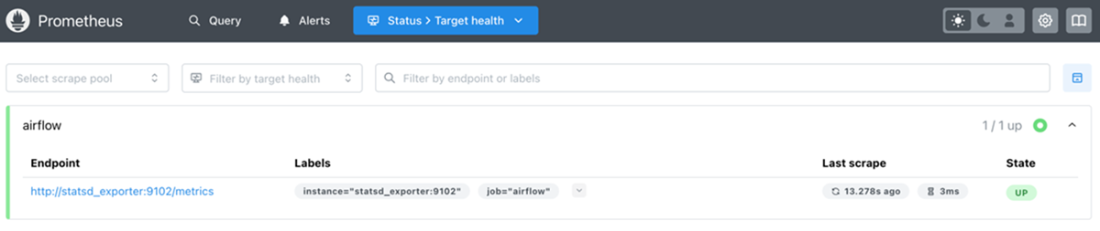
If all is configured correctly, the targets page in Prometheus should display the state of the Airflow target as UP. If the target cannot be reached, it is considered unhealthy.
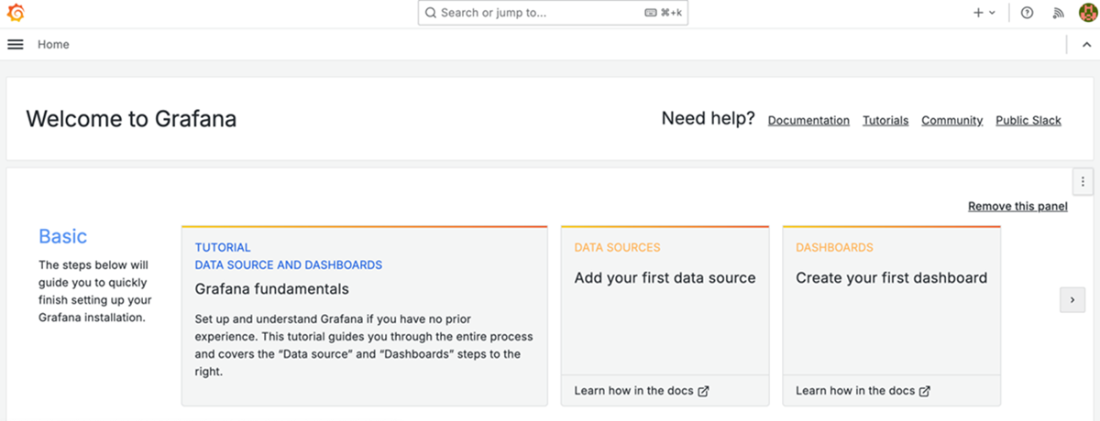
Grafana welcome screen
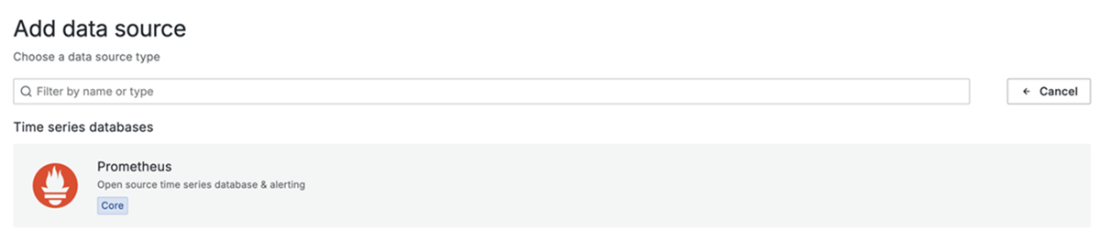
In the “Add data source” page, select Prometheus to configure it as a source to read metrics from.
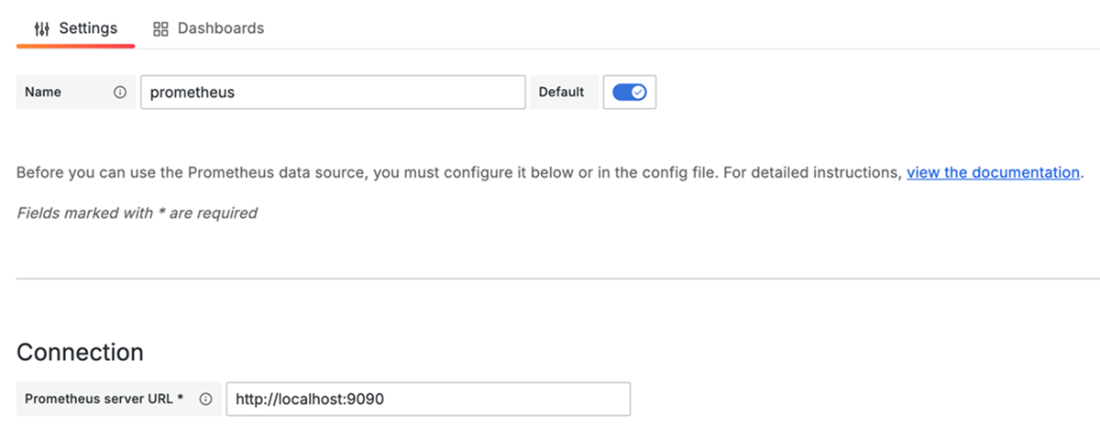
Point Grafana to the Prometheus URL to read from it.
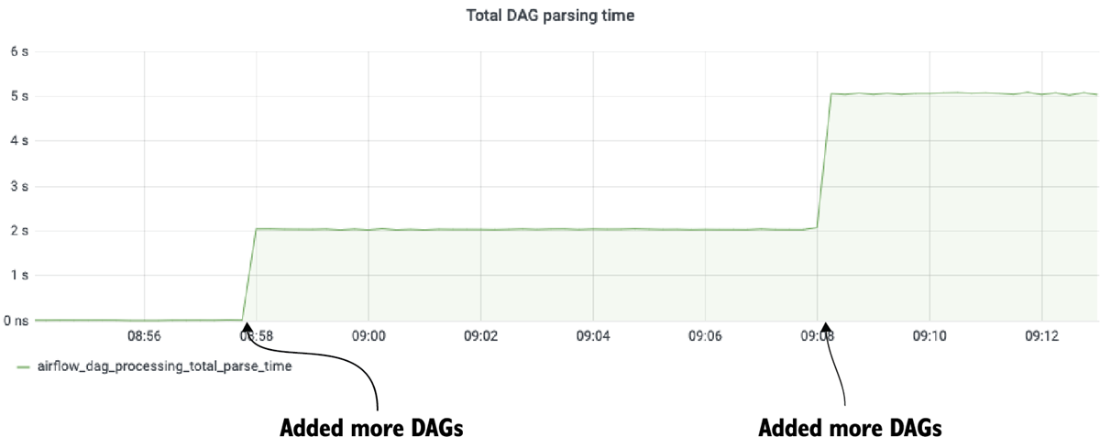
Plot of the number of seconds to process all DAG files. We see two change points at which more DAG files were added. A large spike in this graph could indicate a problem with the Airflow scheduler or a DAG file.
Example email alert notification

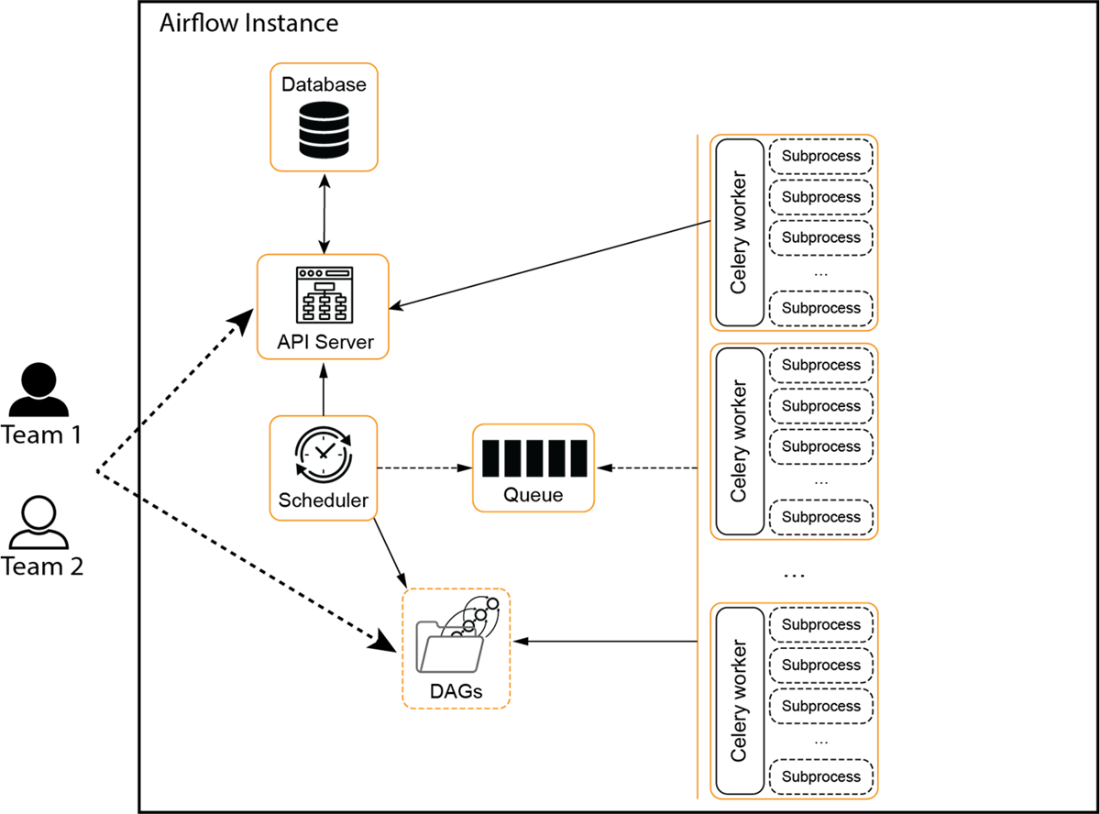
Two teams sharing an Airflow instance. In this case, the environment uses the Celery Executor, but this is interchangeable with other executors.
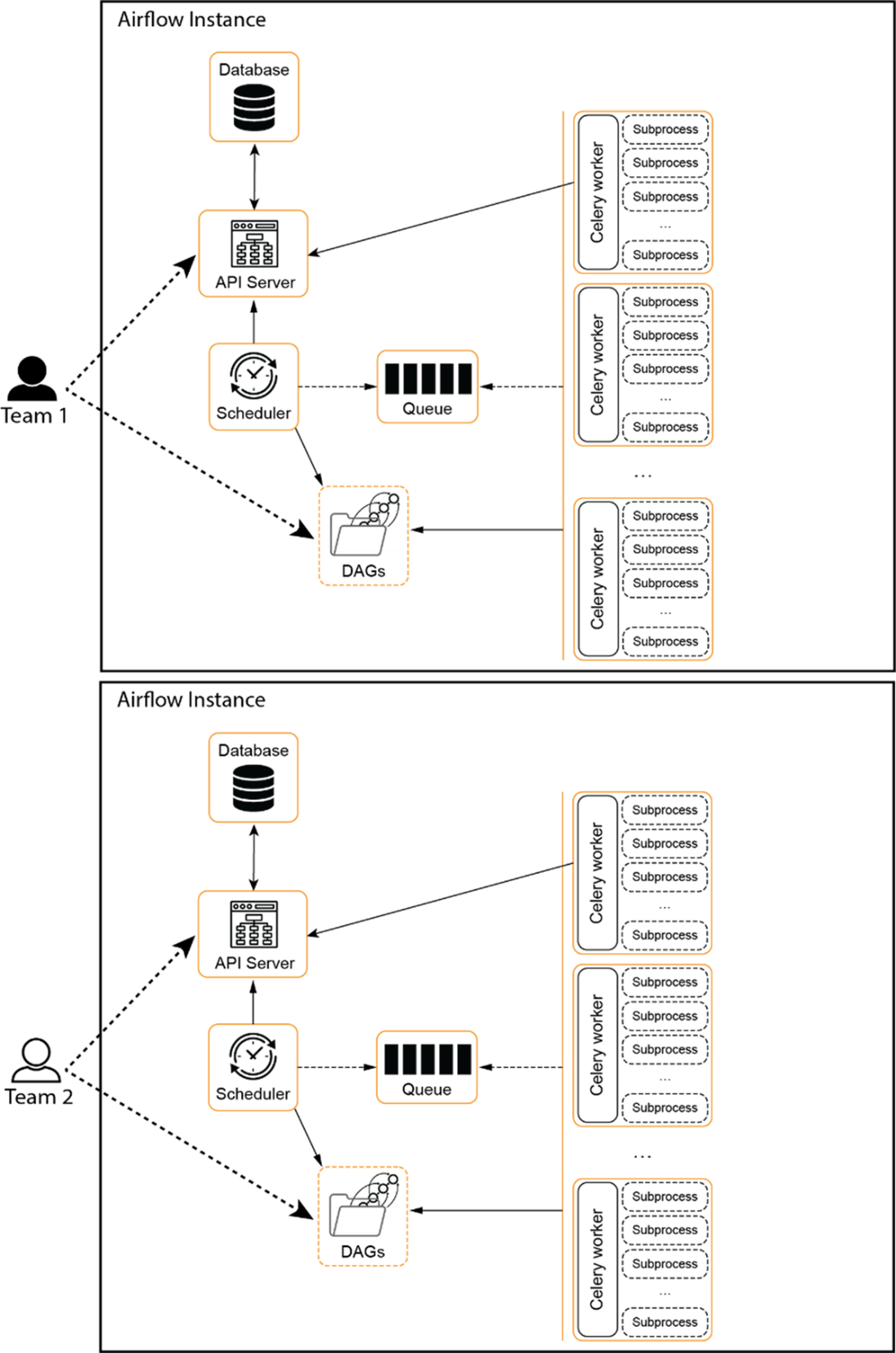
Two teams with their own Airflow instance. Note that now each team could configure their own Airflow instance. For instance, Team 1 could use the Kubernetes Executor instead of the Celery Executor without impacting Team 2.
Summary
- Airflow supports different types of executors with their own characteristics. When bringing Airflow to production it’s important to choose the executor that suits your workloads and environment.
- The SequentialExecutor and LocalExecutor are limited to one single machine but are easy to set up. The SequentialExecutor should only be used for demo purposes. The LocalExecutor is slightly more production-ready, but only for simple, small-scale setups.
- The CeleryExecutor and KubernetesExecutor take more work to set up but allow scaling tasks over multiple machines. If Kubernetes is already a component of your environment, using the KubernetesExecutor makes a lot of sense. It offers great isolation, but does come at a higher cost in terms of overhead. For this reason, even on Kubernetes sometimes, the CeleryExecutor can still be a great choice.
- The EdgeExecutor offers something different by being able to run outside the main Airflow environment. This can be particularly useful if you need to run a (set of) task(s) in a specific environment in which Airflow is not running. Note that the EdgeExecutor is still experimental.
- You can configure multiple executors simultaneously so you can mix and match characteristics of multiple executor types.
- Airflow offers multiple ways to configure parallelism and performance. These settings can be set via environment variables or directly in airflow.cfg.
- Prometheus and Grafana can be used for storing and visualizing metrics from Airflow. The data for these tools can be provided by using either StatsD or OpenTelemetry to instrument Airflow.
- Failure callbacks can send emails or custom notifications in case of certain events.
- Airflow can be configured to scale by setting a number of parameters to increase parallelization. It’s also important to consider when multiple instances of Airflow make more sense as the organization and use of Airflow grow.
FAQ
What are Airflow’s main components in production and how do they interact?
- API server: UI and API gateway that intermediates all component access to the metastore (introduced in Airflow 3).
- Scheduler: Decides which tasks should run and puts them on a queue.
- DAG Processor: Parses DAG files, serializes DAGs, and stores them in the metastore so other components don’t need to parse code.
- Database (metastore): Stores Airflow metadata (DAGRuns, tasks, datasets, triggers) and serialized DAGs.
- Workers: Execute tasks; their implementation depends on the chosen executor.
- Triggerer: Executes deferrable operators asynchronously.
- Executor: The execution mechanism used by the scheduler/worker layer (e.g., Local, Celery, Kubernetes, Edge).
Which executor should I choose for production?
- LocalExecutor: Non-distributed, easy to install; good for single-machine setups.
- CeleryExecutor: Distributed, moderate complexity; scale across multiple machines using a broker (Redis, RabbitMQ, AWS SQS).
- KubernetesExecutor: Distributed, higher complexity; great if you already run containers on Kubernetes and want per-task isolation (one task per pod).
- EdgeExecutor: Distributed outside the Airflow environment; useful when tasks must run in a different network or on-prem while Airflow runs elsewhere (noted limitations, e.g., logging, as of writing).
Can I use multiple executors at the same time and choose per task?
- Yes. Configure multiple executors as a comma-separated list in
[core] executor(e.g.,LocalExecutor,CeleryExecutor). - Select the executor for a specific task using the operator’s
executor=argument (e.g.,executor="LocalExecutor"or the full path for Edge). - Avoid older statically coded HybridExecutors (e.g., CeleryKubernetesExecutor), which are not recommended.
How do I set up the LocalExecutor and control parallelism?
SetAIRFLOW__CORE__EXECUTOR=LocalExecutor. Key knobs:AIRFLOW__CORE__PARALLELISM(default 32): Max concurrent task processes on the machine.AIRFLOW__CORE__MAX_ACTIVE_TASKS_PER_DAGandMAX_ACTIVE_RUNS_PER_DAG: Per-DAG limits.- Pool slots (default_pool=128) also cap global concurrency.
apache-airflow[postgres] or apache-airflow[mysql]. When LocalExecutor no longer suffices, consider CeleryExecutor or KubernetesExecutor.How do I install and configure the CeleryExecutor?
- Install extras and set executor:
pip install "apache-airflow[celery]",AIRFLOW__CORE__EXECUTOR=CeleryExecutor. - Configure broker:
AIRFLOW__CELERY__BROKER_URL(e.g., Redisredis://..., RabbitMQamqp://..., AWS SQS). - Configure result backend:
AIRFLOW__CELERY__RESULT_BACKEND(e.g.,db+postgresql://...ordb+mysql://...). - Make DAGs available to workers (shared filesystem or bake into images).
- Start services: API server, scheduler, then
airflow celery worker. - Monitor with Flower:
airflow celery flower(default athttp://localhost:5555). - Worker sizing:
AIRFLOW__CELERY__WORKER_CONCURRENCYcontrols per-worker processes; account for memory and task resource needs.
How do I run with the KubernetesExecutor and keep DAGs in sync?
- Set
AIRFLOW__CORE__EXECUTOR=KubernetesExecutor. - Each task runs in its own Kubernetes pod; you’ll typically deploy Airflow components in the same cluster.
- DAG distribution options:
- Shared PersistentVolume for DAGs.
- Git-sync init container to pull DAGs (with a sync interval trade-off).
- Bake DAGs into the Docker image (requires redeployment for code changes).
- Helm is the most common way to install and operate Airflow on Kubernetes.
How do I configure the metastore for production and remove example content?
- Set
AIRFLOW__CORE__SQL_ALCHEMY_CONNto your Postgres/MySQL URI, then runairflow db migrate. - For a clean database, set before migrating:
AIRFLOW__CORE__LOAD_EXAMPLES=FalseandAIRFLOW__CORE__LOAD_DEFAULT_CONNECTIONS=False. - If you forget and see example DAGs/connections, remove them from the metastore or reinitialize appropriately.
- Useful CLI:
airflow db check,db clean,db shell,db downgrade(use with care).
Can I run multiple schedulers for scalability and HA?
- Yes. Airflow uses database row-level locking (e.g.,
SELECT ... FOR UPDATE) to coordinate schedulers, so you can simply start additionalairflow schedulerprocesses. - Supported DBs for this: PostgreSQL 9.6+ and MySQL 8+.
- Disable locking only if you will not run multiple schedulers (not recommended for HA).
How do I capture and centralize logs (API server, scheduler, tasks)?
- API server: Use
airflow api-server --log_config <file>(Gunicorn config) and setaccessloganderrorlogpaths. - Scheduler logs: Written under
$AIRFLOW_HOME/logs/scheduler; DAG Processor logs underlogs/dag_processor_manager. - Task logs: Stored per DAG/task/run attempt under
$AIRFLOW_HOME/logs. - Remote logging:
AIRFLOW__LOGGING__REMOTE_LOGGING=True, setAIRFLOW__LOGGING__REMOTE_LOG_CONN_ID, andAIRFLOW__LOGGING__REMOTE_BASE_LOG_FOLDER(e.g.,s3://,gs://). Backends include S3, GCS, Azure Blob, Elasticsearch/OpenSearch, Alibaba OSS, Redis.
How do I monitor Airflow with metrics and what should I watch?
- Enable StatsD:
pip install "apache-airflow[statsd]", setAIRFLOW__METRICS__STATSD_ON=True,STATSD_HOST,STATSD_PORT=9125,STATSD_PREFIX=airflow. - Common stack: Airflow → StatsD Exporter → Prometheus (scrapes
/metrics) → Grafana dashboards. - Key metrics to start with:
- Reliability:
ti_failures,dag_processing.import_errors. - Performance:
dag_processing.total_parse_time,executor.running_tasks,executor.queued_tasks,executor.open_slots,dagrun.*.first_task_scheduling_delay. - Freshness:
dag_processing.last_run.seconds_ago.[filename].
- Reliability:
- Add system exporters (node, DB, Celery, Redis, Kubernetes) for full observability.
How do I set up alerts for failures (email, callbacks, Slack/PagerDuty)?
- Callbacks: Use
on_failure_callbackon DAGs and tasks (viadefault_args) to run custom alerting functions; alsoon_success_callback/on_retry_callback. - Email alerts: By default
email_on_failure=Trueon BaseOperator. Configure SMTP viaAIRFLOW__SMTP__*, set credentials in an Airflow connection (e.g.,smtp_default), and provide destinationemailin DAGdefault_argsor per-operator. - 3rd-party tools: Use provider packages (e.g., Slack, PagerDuty) inside callbacks to post alerts.

 Data Pipelines with Apache Airflow, Second Edition ebook for free
