14 Project: Keeping family traditions alive with Airflow and Generative AI
This chapter frames Generative AI’s promise through a personal, durable use case: preserving and enlivening family recipes. It contrasts costly, opaque fine-tuning with Retrieval-Augmented Generation (RAG), where a general LLM consults an external, searchable knowledge base. By transforming recipes into embeddings and storing them in a vector database, the system can ground answers in trusted sources, support multilingual output and substitutions, and keep provenance clear—making it a practical path to high-quality, traceable results at lower cost and with faster iteration.
The project centers on an Airflow-orchestrated “Recipe Vault” that ingests, preprocesses, and manages recipe content end to end. Recipes are uploaded to object storage, consolidated into a daily dataframe, split into meaningful chunks (ingredients and instructions), and assigned deterministic UUIDs to enable idempotent, incremental updates. Airflow tasks then ensure a Weaviate collection exists with the proper schema and vectorizer configuration (using an embedding model such as text-embedding-3-large), compare incoming records to existing ones, delete outdated objects, and batch-insert new or changed chunks. Containerized tasks (via DockerOperator) keep the orchestration clean, portable, and secure, while the schema and UUID strategy provide consistency, deduplication, and efficient change detection.
Once indexed, the RAG workflow retrieves the most relevant chunks to a user query through vector similarity (cosine similarity on shared embeddings), and composes a response with an LLM guided by a structured prompt. Prompt templates (implemented with LangChain) inject the question, chat history, and retrieved context, enforce grounded answers, and request a consistent JSON-like output for downstream use. A simple chat UI demonstrates the experience: users ask for recipes, translations, or ingredient-based suggestions, and the assistant responds based on the indexed family collection—combining reliable sourcing, adaptability, and a smooth path to keeping culinary traditions alive.
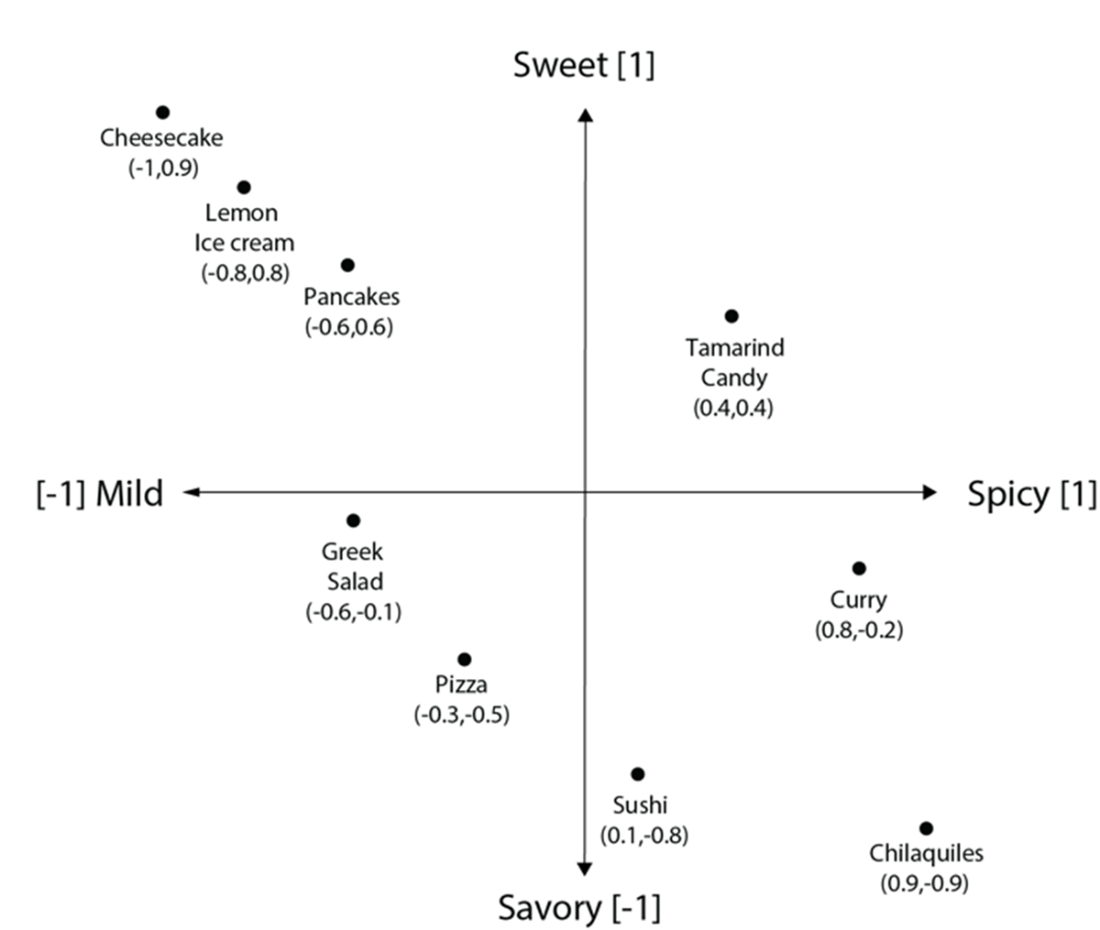
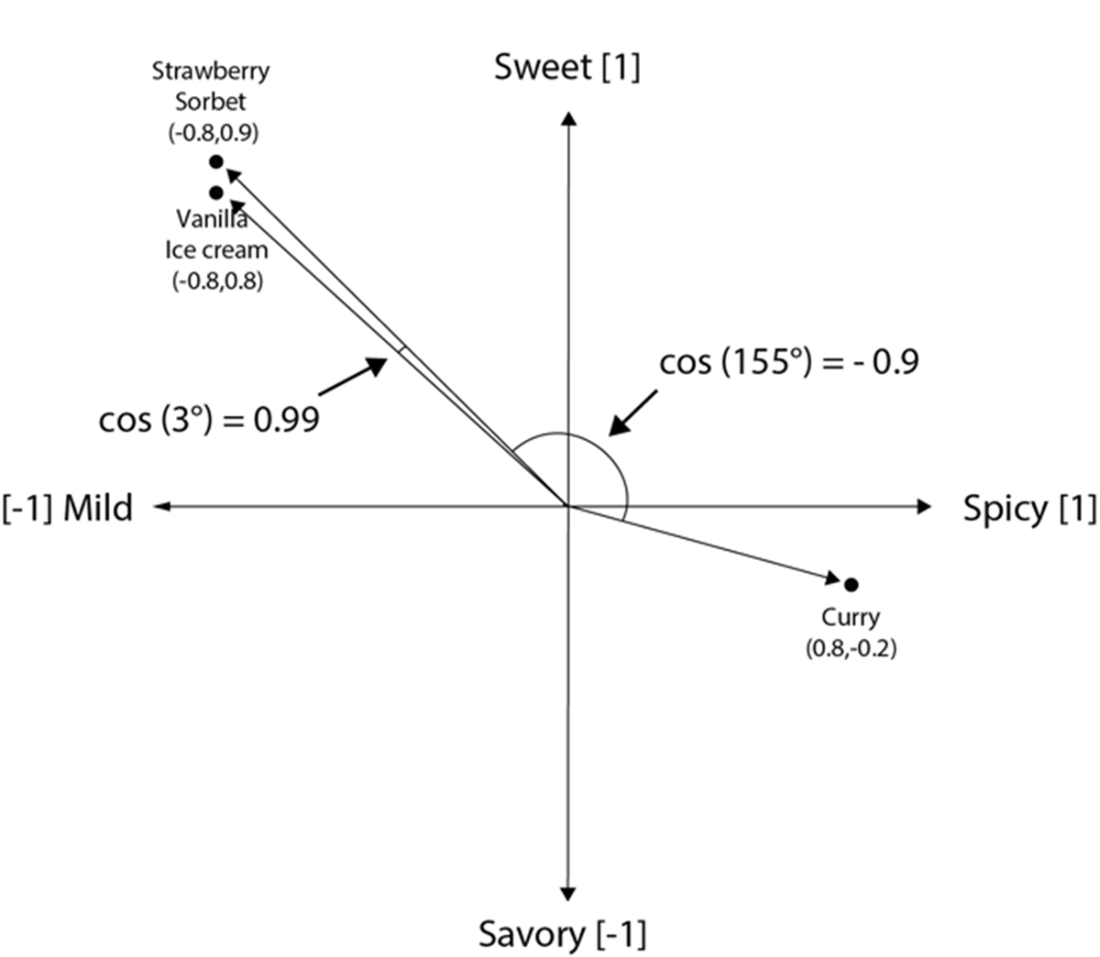
Flavor vector space representation of mildness/spiciness and sweet/savory taste for our recipe collection.
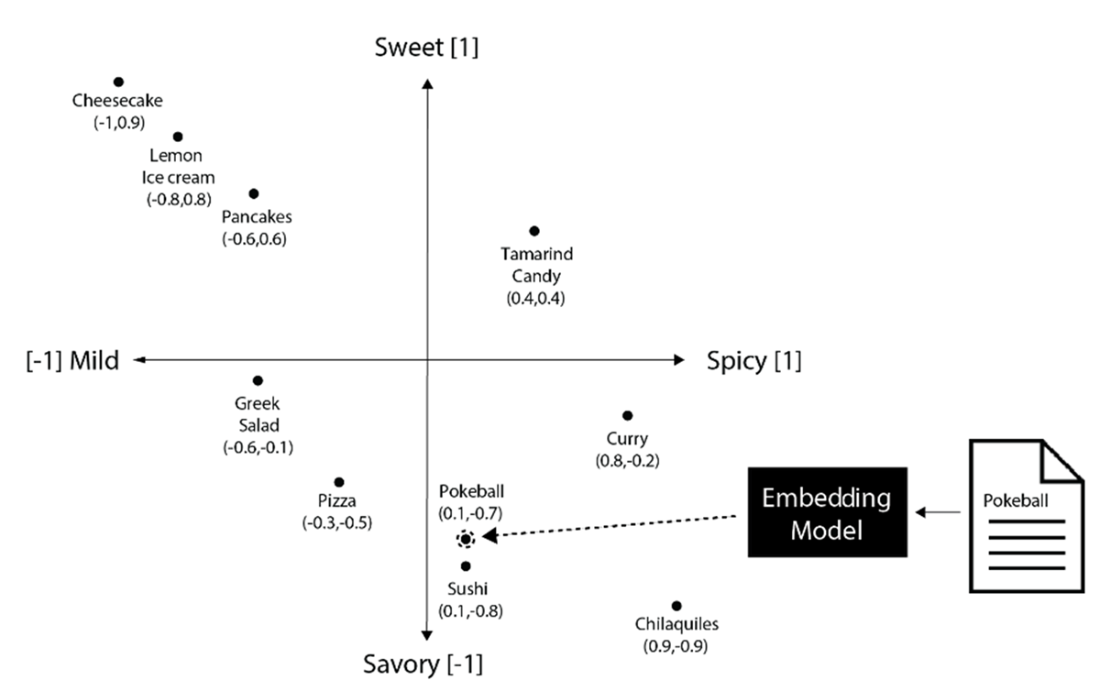
A user could input a Pokebowl recipe into the embedding model and discover that sushi is the most similar recipe in the vector database.
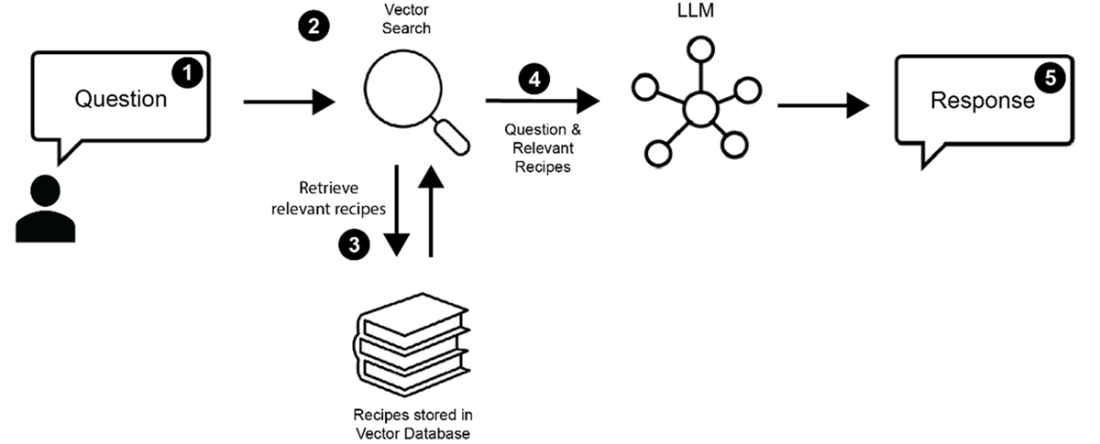
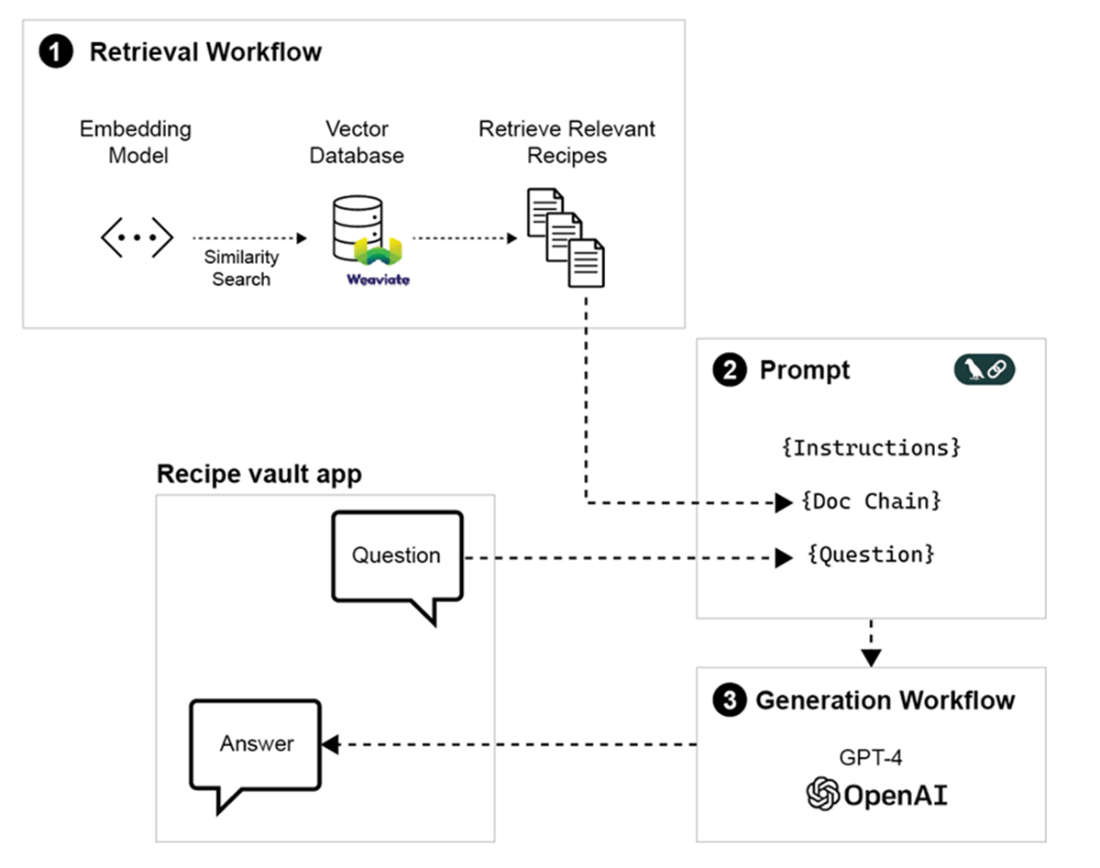
Simplified representation of a RAG workflow: (1) A user asks a question about a recipe. (2) Vector search retrieves (3) the most relevant recipes. (4) The question and retrieved recipes are combined and sent to an LLM, which (5) generates an answer based on the relevant context.
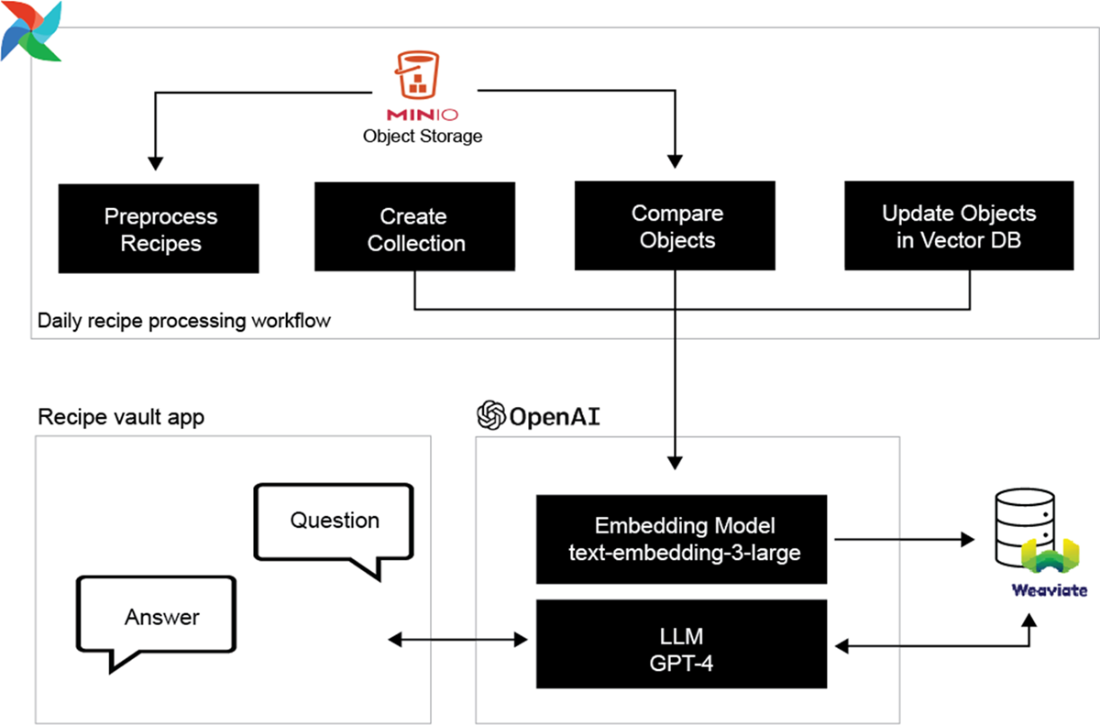
This project implements a RAG workflow where Airflow manages recipe processing and communication with the vector database. Via the Recipe vault app, users can interact with an LLM to retrieve recipes stored in the vector database and generate an answer based on the most relevant recipes.
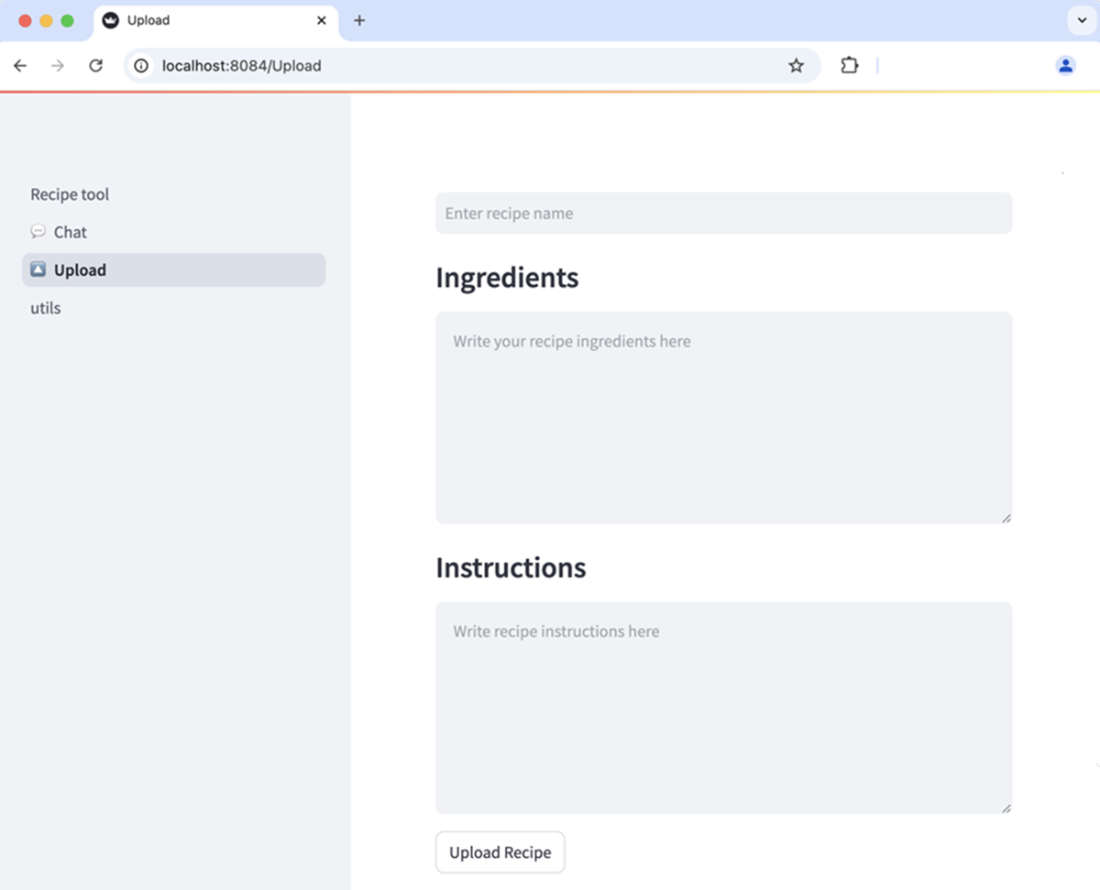
The Recipe Vault UI is available for you to start uploading recipes, and it is available at http://localhost:8084/Upload.
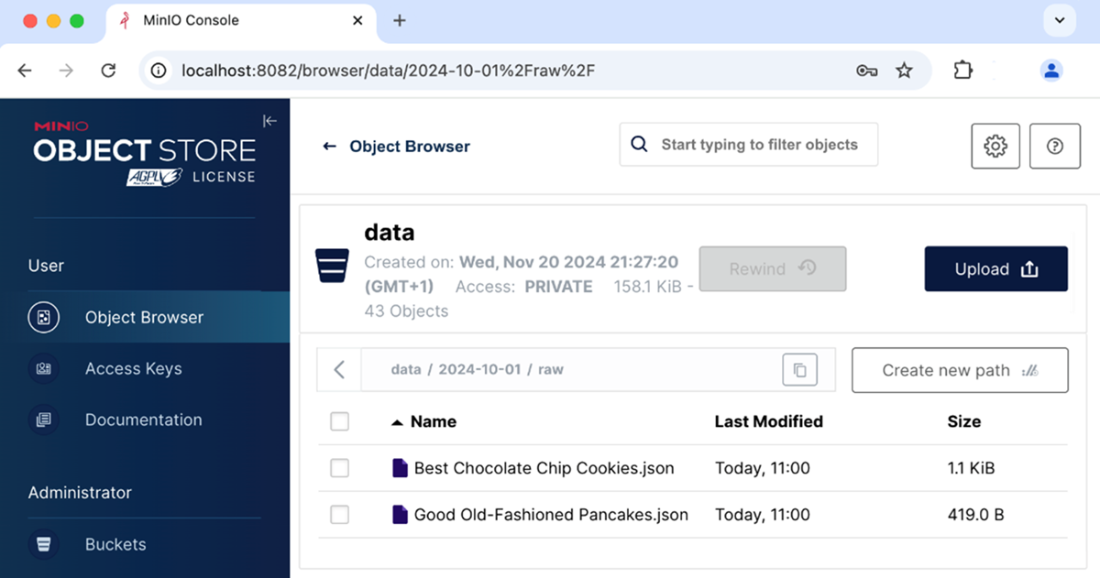
Recipes uploaded to MinIO in JSON format
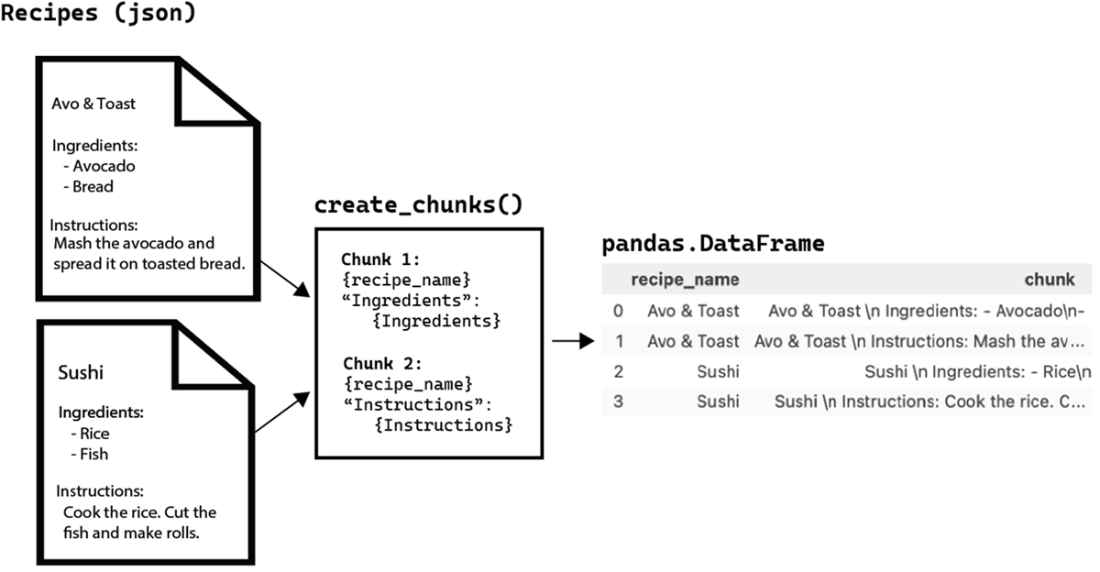
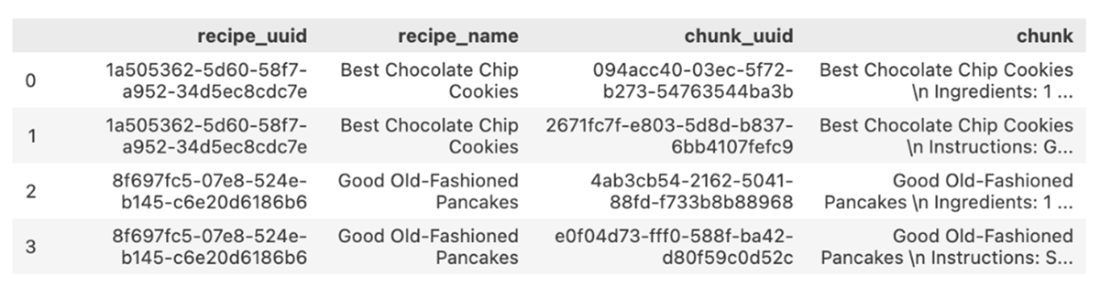
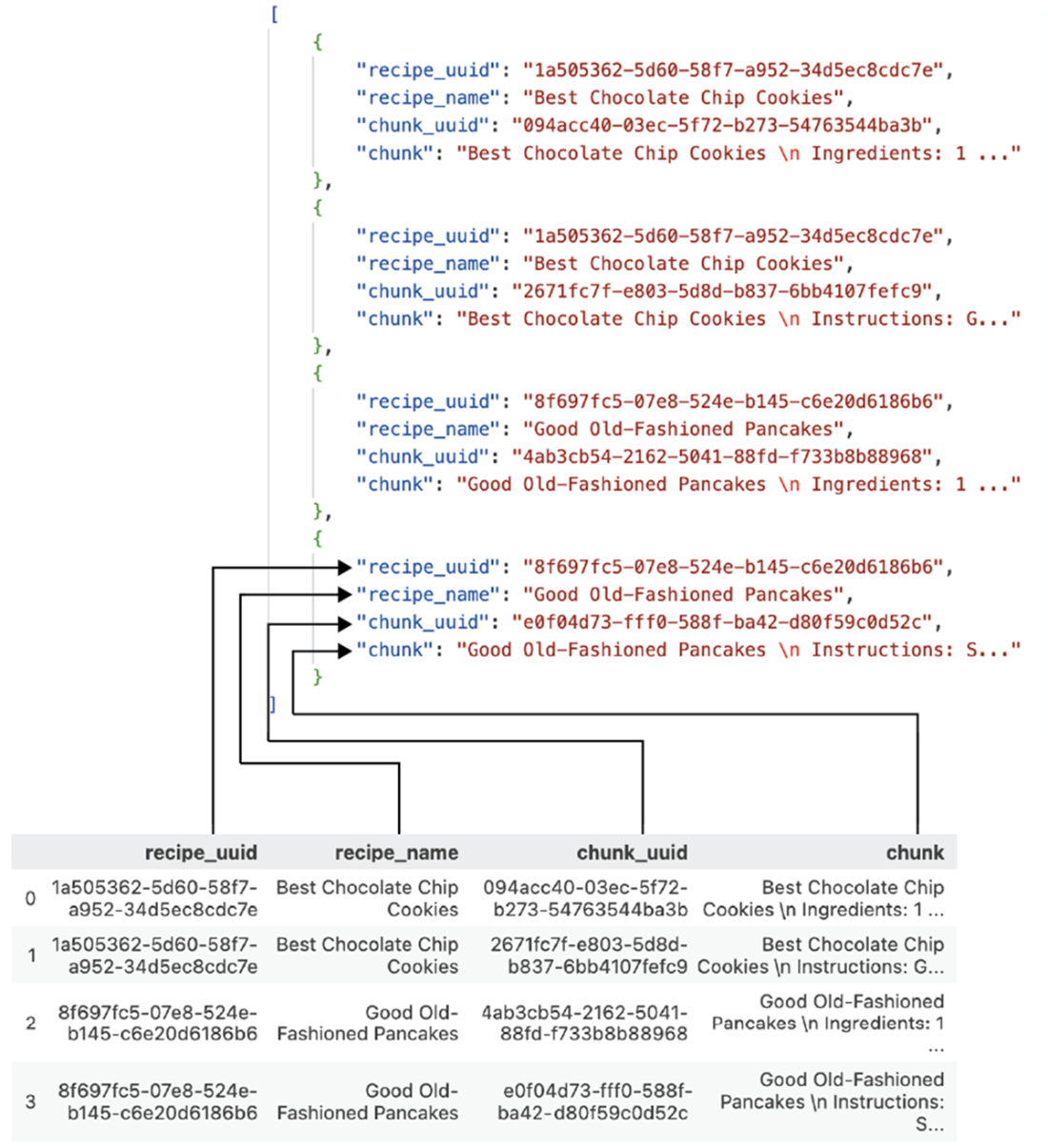
Each recipe is divided into two parts (chunks). The first part includes the recipe's name and the ingredients. The second part includes the recipe's name and the instructions. All these parts are combined into one Pandas dataframe for the date when the recipes are processed.
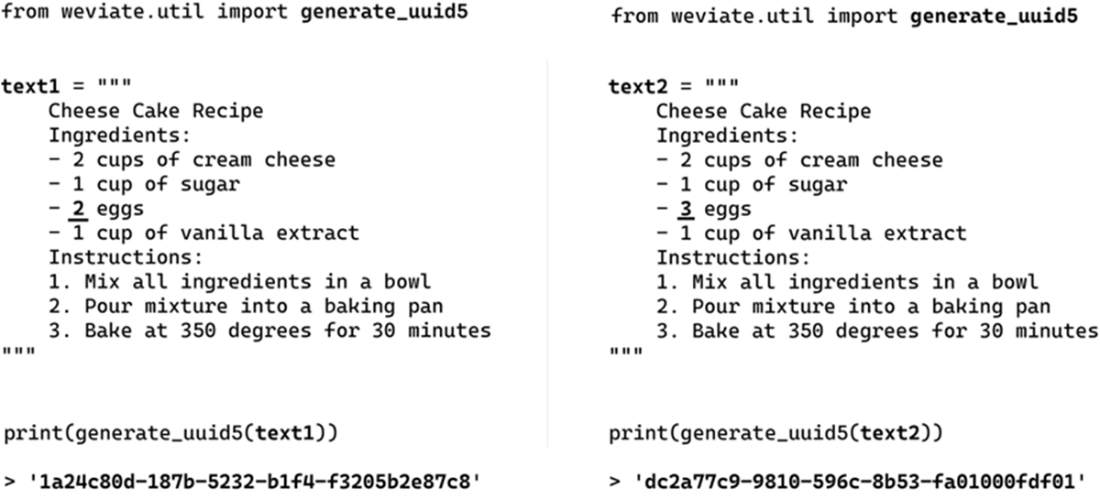
The string on the left only differs from the one on the right by the number of eggs. Two nearly identical strings will generate a completely different UUID.
Processed recipes are incorporated into a single Pandas dataframe
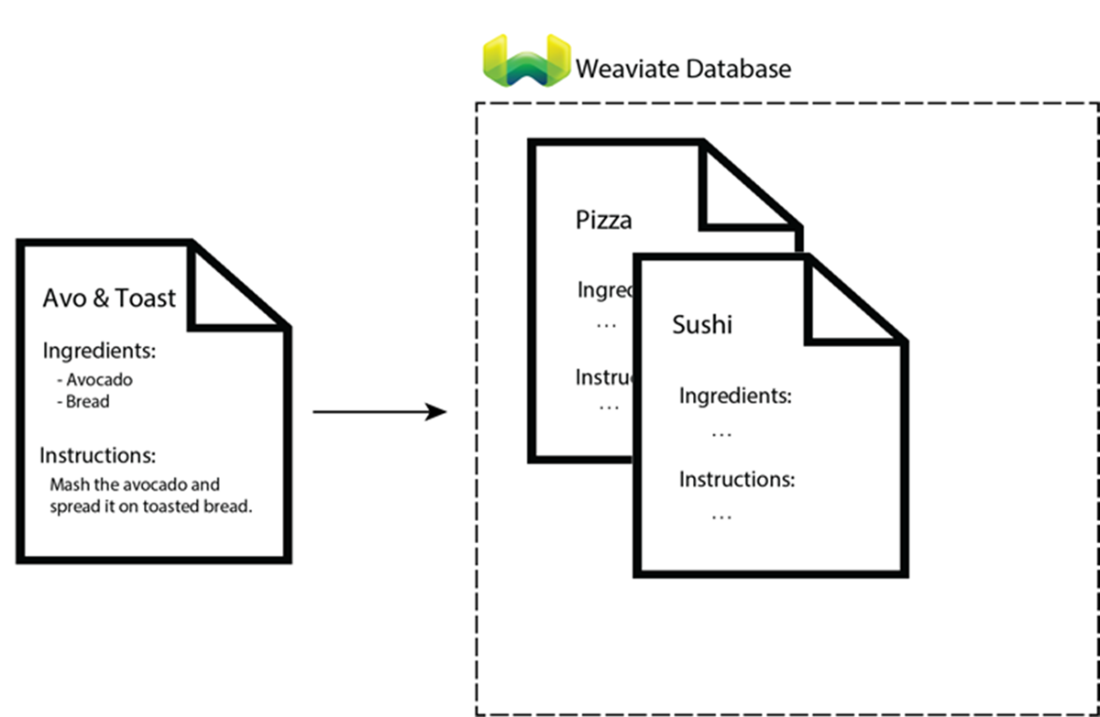
The recipe we are trying to upload is not in the vector database, so we mark it as “create” in the tracking dataframe, indicating that we're trying to add a new recipe.
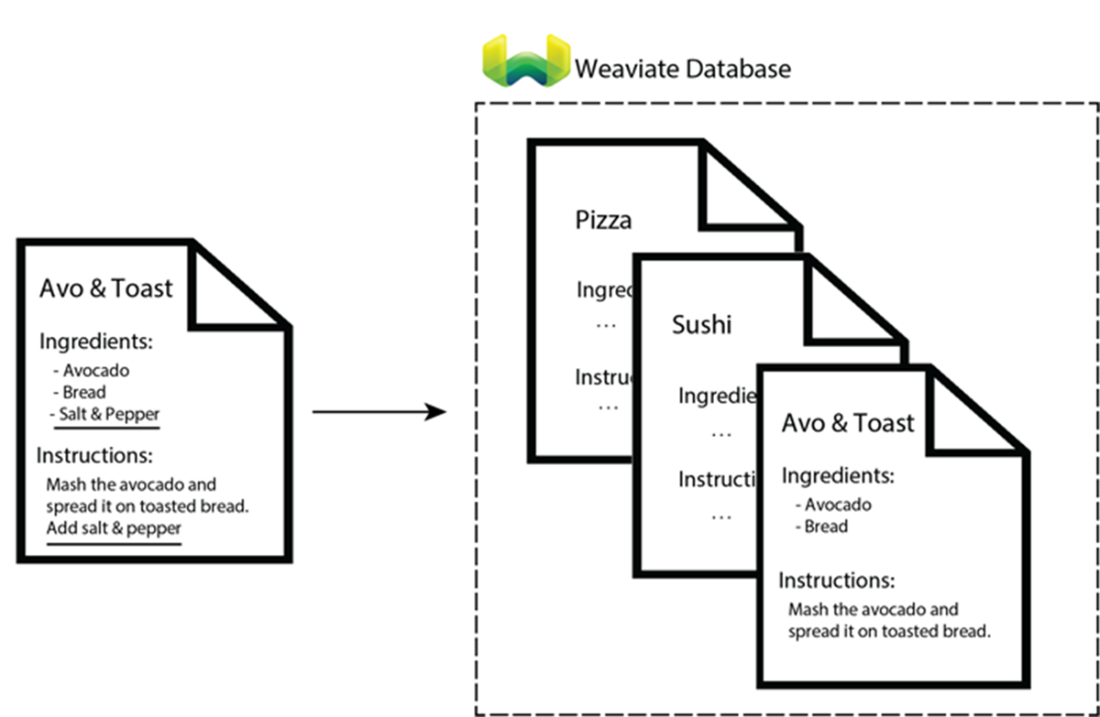
The recipe we are trying to upload is already in the vector database, but we have a different version. In this case, the version in the vector database did not include “salt & pepper” and the new recipe does. We mark it as “update” in the tracking dataframe.
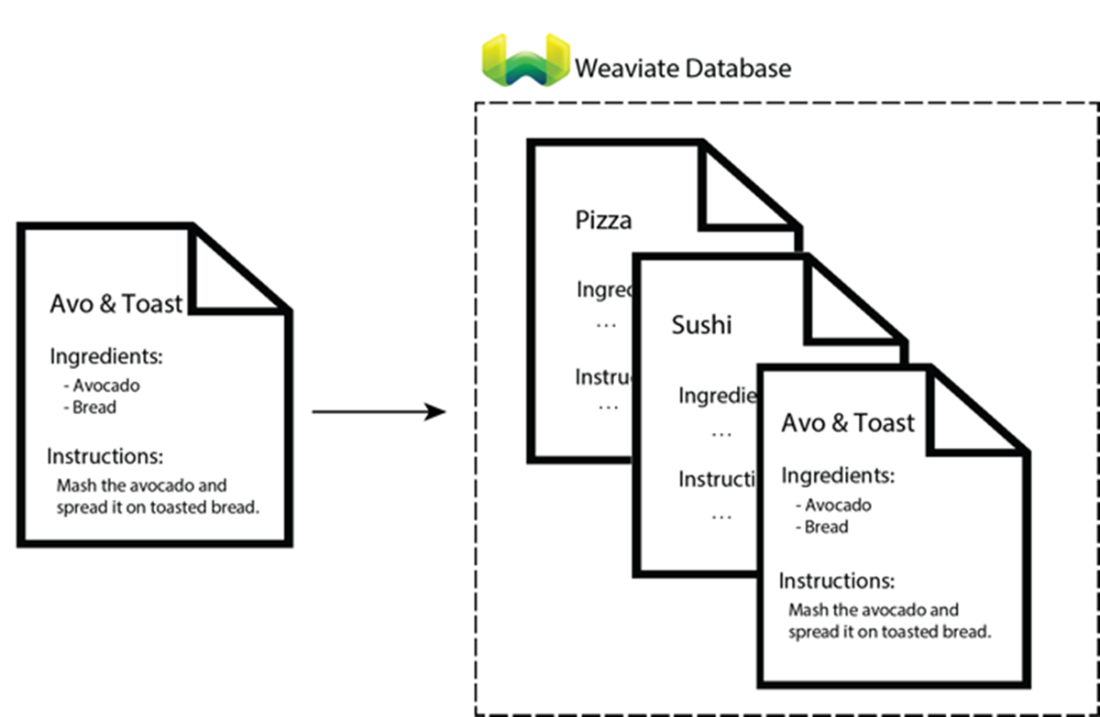
The recipe we are trying to upload is already in the vector database, and both are the same version. Since the recipe is already in the dataset, we don’t need to process it. For this reason, we delete these records from the tracking dataframe.
Each row in the dataframe is converted into a dictionary.
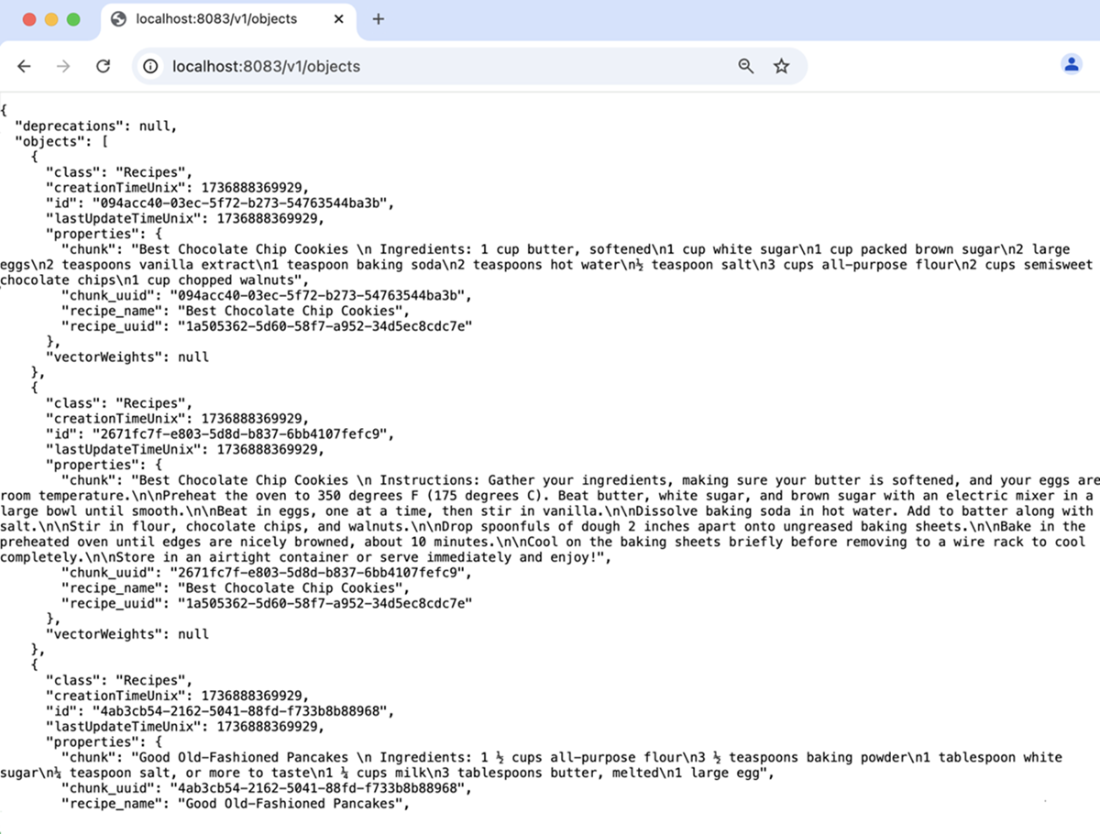
On http://localhost:8083/v1/objects you can review the objects uploaded to the vector database.
Upload our recipes to the vector database using the 02_ingestion DAG

Similar recipes, such as ice cream and sorbet, point in the same direction and have a cosine similarity close to 1. As the two recipes become more dissimilar, their similarity decreases. It is also possible to have negative similarity, which indicates that the two recipes are very different from each other.
In the retrieval workflow, we can embed a user's question and perform a similarity search in the database using cosine similarity. The vector database will then return the documents that are most relevant to the question.
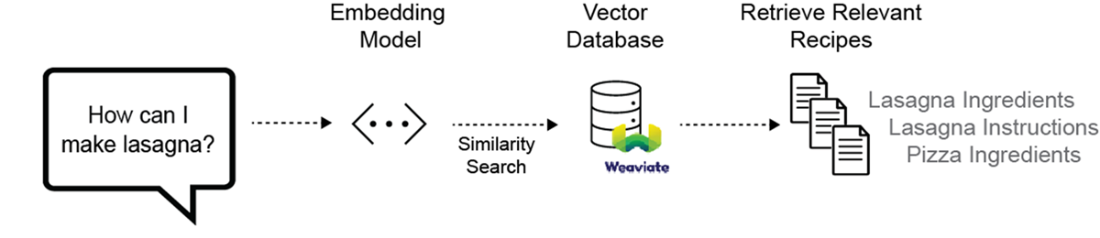
Complete RAG process
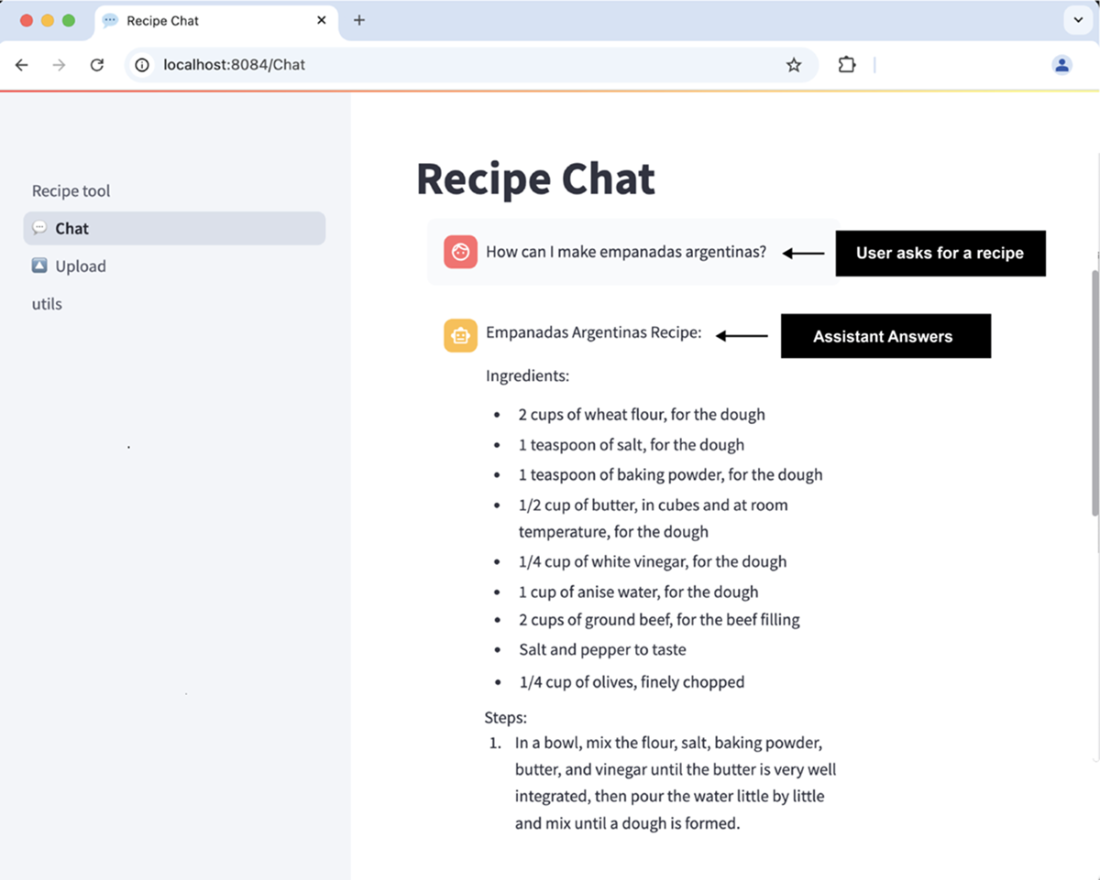
In Recipe Chat, users can interact with an LLM to retrieve or generate new recipe suggestions, leveraging recipes they have previously stored in the vector database.
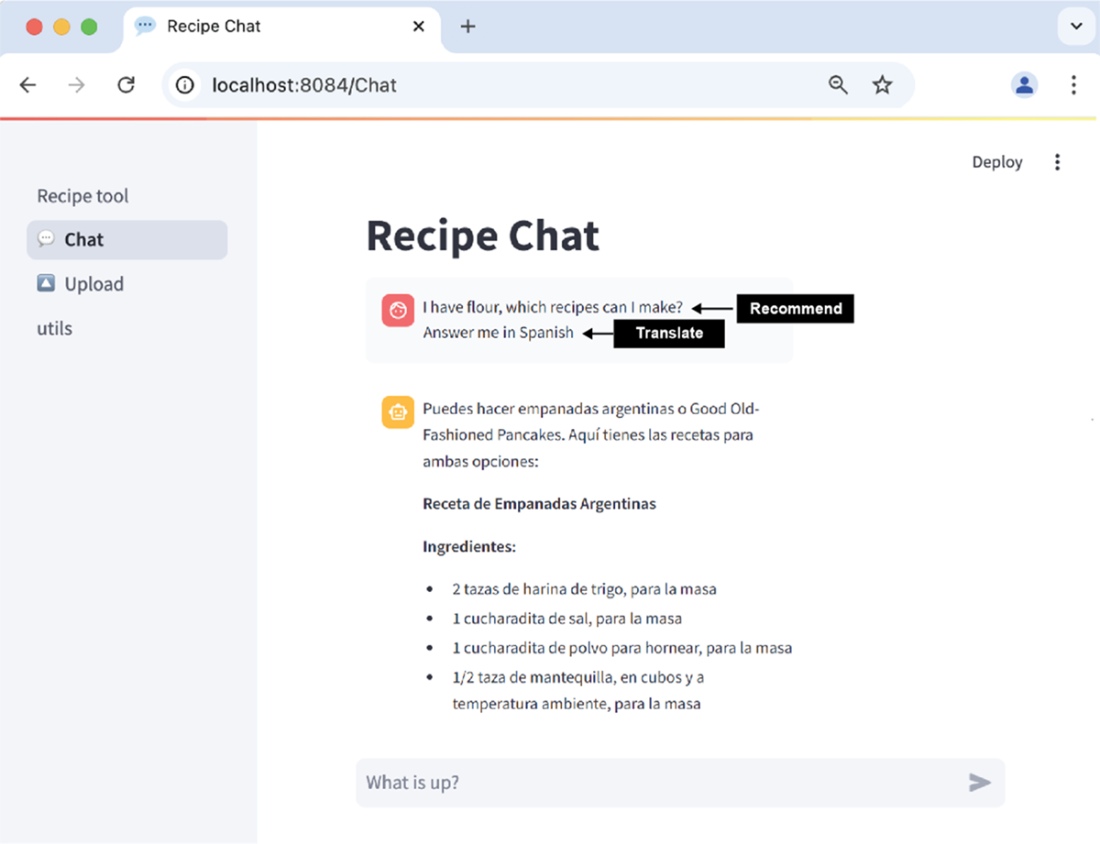
The Recipe Chat can translate user-stored recipes and provide tailored recommendations. This is achieved through the RAG framework, which integrates the language understanding and generation abilities of LLMs with efficient recipe storage and retrieval using a vector database.
Summary
- The rise in Generative Artificial Intelligence, particularly Large Language Models (LLMs), has revolutionized various fields. LLMs, trained on vast public data, excel in natural language tasks, making them increasingly popular in today's tech landscape.
- Retrieval-augmented generation (RAG) empowers language models to access an external library, eliminating the need for constant retraining with new data additions. RAG operates in a vector space, making it efficient compared to storing data as text, which can be unworkable with large data volumes.
- In a RAG system, text is broken down into smaller pieces, or chunks, to enhance retrieval efficiency. Despite converting data into vectors, RAG systems can reference the source. Incorrect chunk sizes in a RAG system can lead to inefficiencies. Too large a chunk can make it challenging to pinpoint the source, while too small a chunk can lead to inefficient querying and source redundancy.
- An embedding model translates text into a numerical vector representation. This facilitates the efficient processing of text data on natural language tasks.
- Weaviate is an open-source vector database that offers robust capabilities for vector search, making it highly effective for language processing tasks. Weaviate organizes data into "collections," similar to tables in traditional databases, containing fields associated with business entities. Collections group together related objects, like the data we aim to vectorize.
- UUIDs, created via an algorithm, generate a unique 32-length key for every text combination, accelerating the search process in Weaviate. Regardless of text length, UUIDs maintain consistent length, enabling similarity comparison.
- Airflow is an effective tool for building RAG systems by automating tasks like data ingestion, chunking, embedding generation, and updating a vector database. It schedules and monitors the entire workflow, ensuring scalability, reliability, and efficient handling of new data, making the RAG system easier to maintain.
FAQ
What is Retrieval-Augmented Generation (RAG) and how is it different from fine-tuning an LLM?
RAG lets an LLM “read” from an external knowledge base (a vector database) at query time, so you don’t retrain the model when content changes. Compared to fine-tuning, RAG is cheaper to maintain, updates instantly with new data, and preserves source clarity because responses are grounded in retrieved documents from your own collection. Fine-tuning, by contrast, is costly, must be repeated as data changes, requires hosting a custom model, and blends sources so attribution is unclear.Which services make up the Recipe Vault project and what does each one do?
- Airflow: Orchestrates the end-to-end pipeline (ingestion, preprocessing, compare/update, save).
- MinIO: Object storage for raw JSON recipes and intermediate parquet files.
- Weaviate: Vector database to store and query recipe embeddings.
- vectorflow (custom package/image): CLI that preprocesses, chunks, assigns UUIDs, and interacts with Weaviate.
- recipe_vault (UI): Streamlit app to upload recipes and chat with the LLM.
How are recipes ingested and preprocessed before vectorization?
Recipes are uploaded via the Recipe Vault UI to MinIO as JSON (or preloaded with a starter DAG). The preprocess_recipes task then: 1) reads that day’s JSON files, 2) creates two chunks per recipe (ingredients, instructions), 3) assigns deterministic UUIDs to recipe_name and each chunk, and 4) saves a consolidated preprocessed.parquet back to MinIO.Why split recipes into chunks, and how big should a chunk be?
Chunking improves retrieval efficiency and source traceability. If chunks are too large, attribution is unclear; too small, you get many fragments for one answer. The chapter’s strategy splits each recipe into exactly two chunks: one for ingredients and one for instructions. This balances precision in retrieval with simplicity.What are UUIDs used for, and how are they generated?
UUIDs provide stable, content-based identifiers to deduplicate and detect updates. The pipeline uses generate_uuid5 to create: 1) recipe_uuid from recipe_name and 2) chunk_uuid from each chunk’s text. Identical text (including punctuation/spacing) always yields the same UUID, which the pipeline uses to compare against what’s in Weaviate.How do you define the Weaviate collection (schema and vectorizer)?
The create_collection task creates a “recipes” collection with properties: recipe_uuid (UUID, not vectorized), recipe_name (TEXT), chunk_uuid (UUID, not vectorized), and chunk (TEXT). The vectorizer_config points to an embedding model (e.g., text-embedding-3-large). You can configure OpenAI API or Azure OpenAI via env vars (OPENAI_CONN_TYPE, AZURE_OPENAI_ENDPOINT, AZURE_OPENAI_RESOURCE_NAME) and even define multiple vectorizers if needed.How does the pipeline decide when to create, update, or skip records in the vector database?
The compare_objects task loads preprocessed.parquet, queries Weaviate by recipe_name, and compares sets of chunk_uuid values: if none exist, mark “create”; if the set differs, mark “update”; if identical, skip. Then delete_outdated_objects removes all chunks for recipes marked “update”. Finally, save_recipes_to_weaviate uploads new and updated records in batches; failures raise an error so you can retry.How does retrieval work at query time (similarity search)?
The user’s question is embedded with the same embedding model used for indexing. Weaviate performs a vector similarity search (cosine similarity) to find the most relevant chunks. Those chunks, plus the question (and optional chat history), are fed to the LLM to generate a grounded answer. High dimensional embeddings (e.g., 3072 dims) capture nuanced semantics beyond exact wording.How are prompts structured to guide the LLM’s answer?
The project uses a LangChain PromptTemplate that: 1) instructs the model to answer only from the provided context (and say “don’t know” otherwise), 2) enforces a consistent JSON-like output with “answer” and “provided_recipe”, and 3) prefers recipe-style formatting (ingredients, then steps). It accepts three inputs: input (the user question), chat_history, and context (retrieved recipe chunks).How do I run and use the system locally end to end?
- Start everything: docker-compose up in the chapter’s project folder.
- Optionally preload sample recipes: trigger the preload DAG and backfill the provided dates; verify JSON in MinIO.
- Run the ingestion pipeline: preprocess, create_collection, compare, delete outdated, and save to Weaviate.
- Explore data: MinIO UI (http://localhost:8082), Weaviate objects (http://localhost:8083/v1/objects).
- Use the app: upload via http://localhost:8084/Upload and query via http://localhost:8084/Chat.

 Data Pipelines with Apache Airflow, Second Edition ebook for free
