Overview

11 Running tasks in containers

This chapter explains how running tasks in containers can simplify Airflow deployments that otherwise rely on many specialized operators and sprawling, conflicting dependencies. It motivates a move toward a generic, container-based execution model where each task runs inside an isolated image, giving a uniform interface for orchestration while reducing the cognitive load of learning multiple operator APIs. The chapter introduces containers and their lightweight isolation compared to virtual machines, then shows how Airflow can execute containerized tasks via Docker or Kubernetes to improve reliability, portability, and maintainability.

With Docker, the chapter walks through the lifecycle: building images that package task code and dependencies, running containers with commands and arguments, and persisting outputs using mounted volumes or networked storage. It demonstrates converting task logic into small CLI-style scripts, assembling minimal images, and invoking them from the DockerOperator, emphasizing a consistent pattern for inputs, outputs, and logging. A recommended workflow separates image development from DAG authoring: images are built and pushed (often via CI/CD), then referenced in DAGs, enabling better testability, safer dependency boundaries, and easier reuse across tasks.

For scalability and cluster scheduling, the chapter transitions to Kubernetes, outlining core concepts (control plane, nodes, pods) and resources for storage and services. It shows how to adapt the same tasks to the KubernetesPodOperator, including mounting persistent volumes, setting namespaces, and controlling image pull policies, as well as diagnosing stuck or pending pods using kubectl commands and events. Key differences from the Docker-only approach include task execution on separate cluster nodes, storage provisioned through Kubernetes primitives, and richer resource management. The result is a consistent, container-first pattern that scales from a single host to a cluster while preserving clean dependency isolation and a uniform task interface.

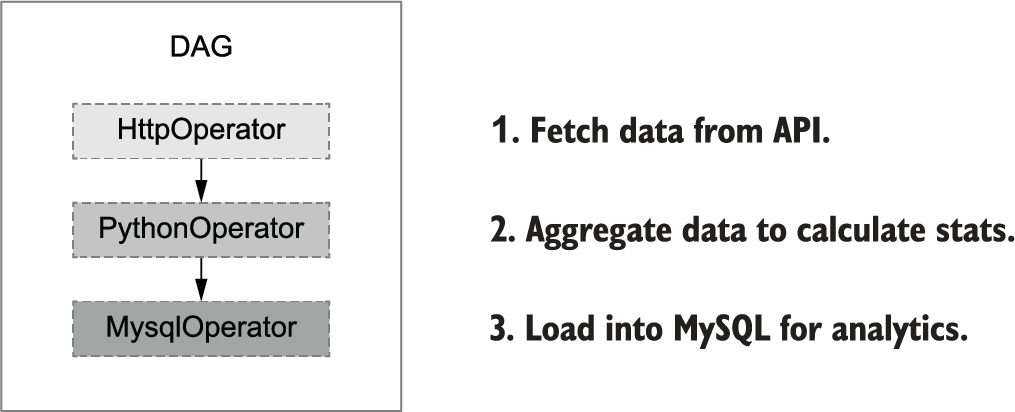
Illustration of our movie recommender DAG. The DAG fetches movie recommendations, uses them to rank movies, and stores the result in a database. Each of these steps involves a different operator, thus adding complexity to the development and maintenance of the DAG.
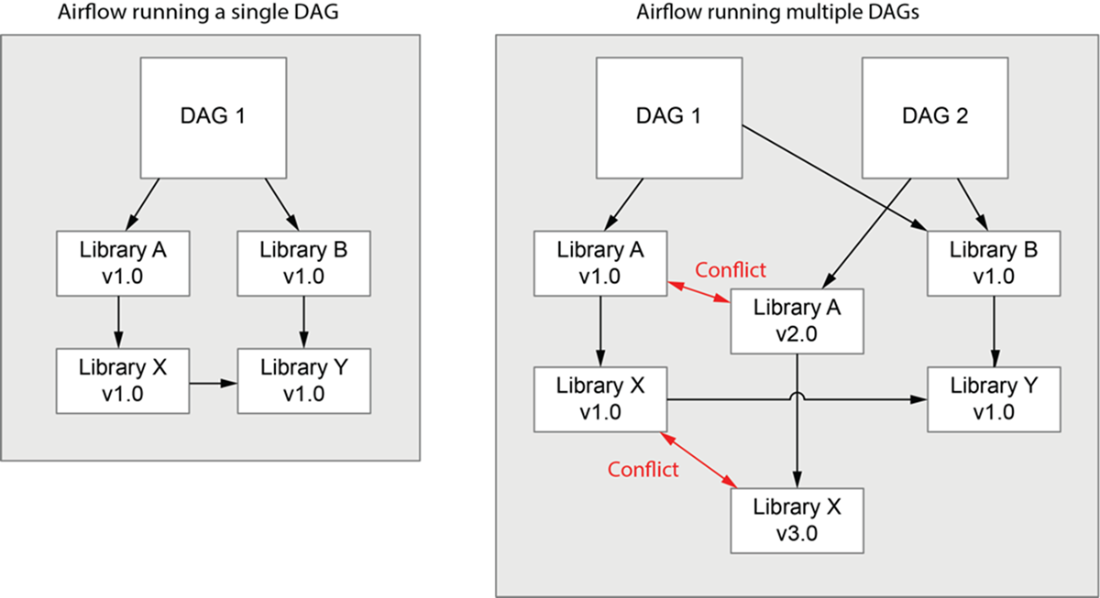
Complex and conflicting dependencies between Airflow tasks or DAGs. Running many DAGs in a single environment can lead to conflicts when DAGs depend on different versions of the same (or related) packages. Python in particular does not support installing different versions of the same package in the same environment. This means that any conflicts in packages (right) would need to be resolved by rewriting the DAGs (or their dependencies) to use the same package versions.
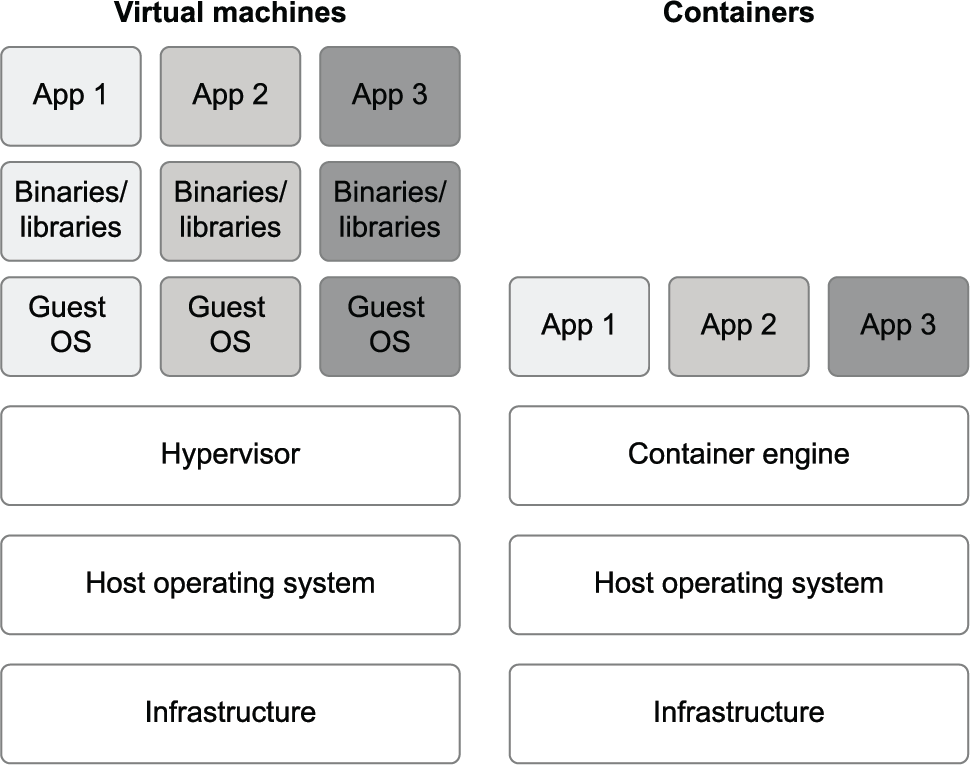
Comparison between virtual machines (VMs) and containers. Note that containers are much more lightweight as they don’t require running a full guest OS for each application.
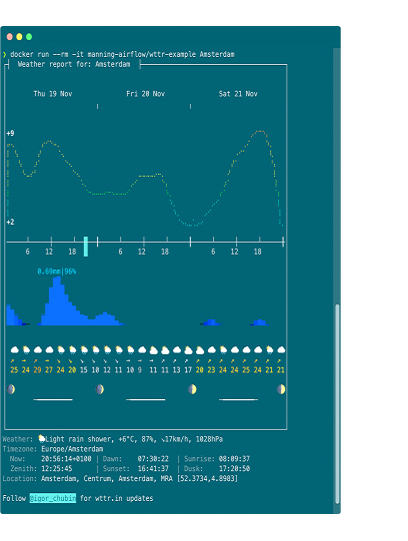
Example output from the wttr-example container for Amsterdam
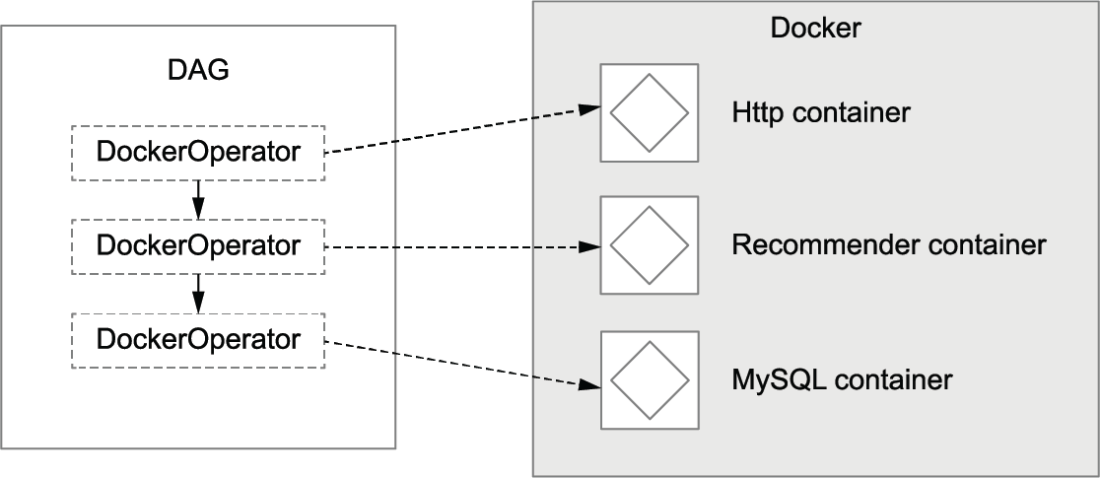
Docker version of the recommender DAG from figure 11.1
Managing dependencies across different tasks using containers
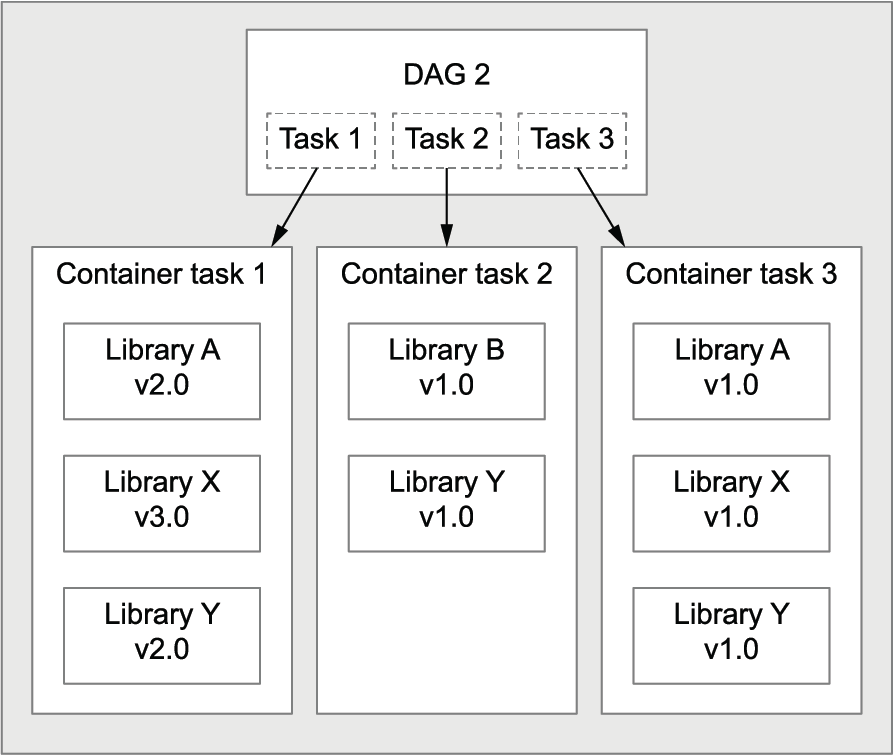
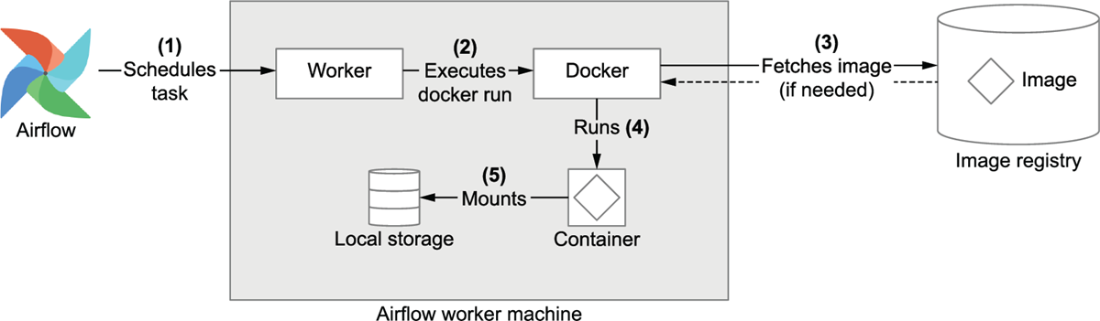
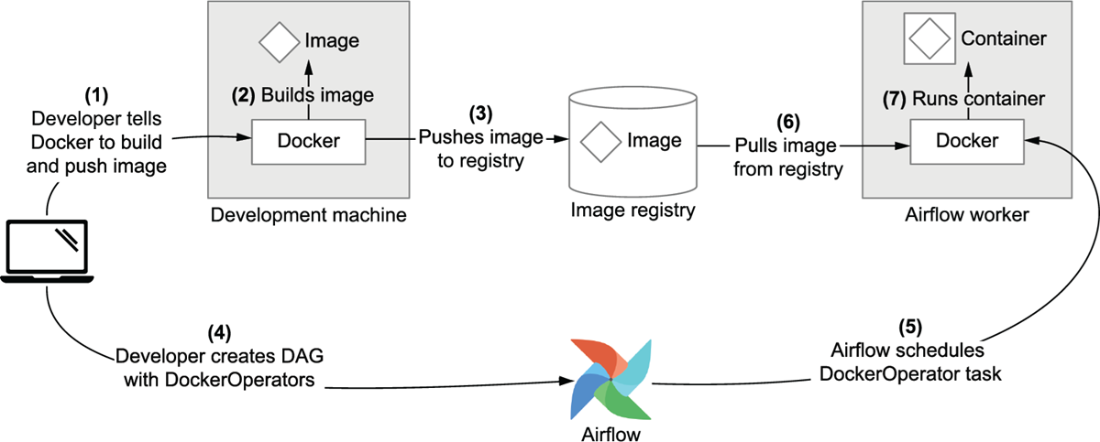
Illustration of what happens when a task is executed using the DockerOperator. The image registry stores a collection of Docker images This can be a private registry (containing our own images), or a public registry like DockerHub (which is used by default when fetching images). Images are cached locally when fetched so that you only have to do it once (barring any updates to the image).
The Docker-based DAG in the Airflow UI
Common workflow for working with Docker images in Airflow
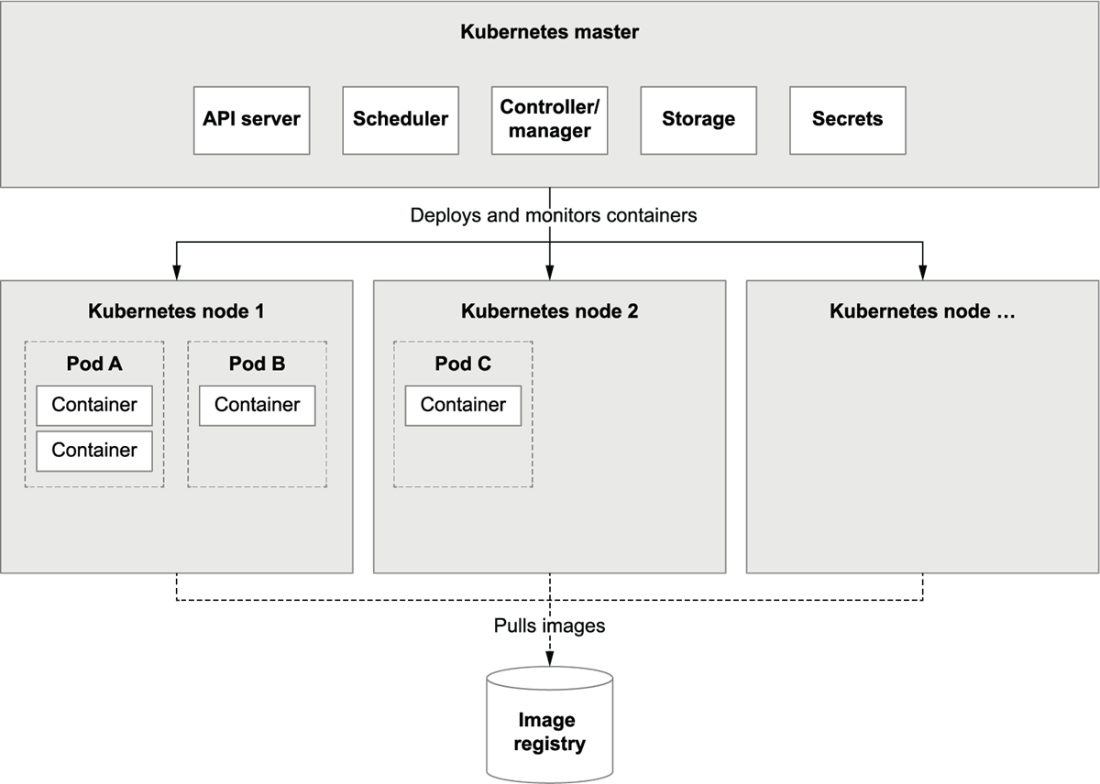
High-level overview of Kubernetes
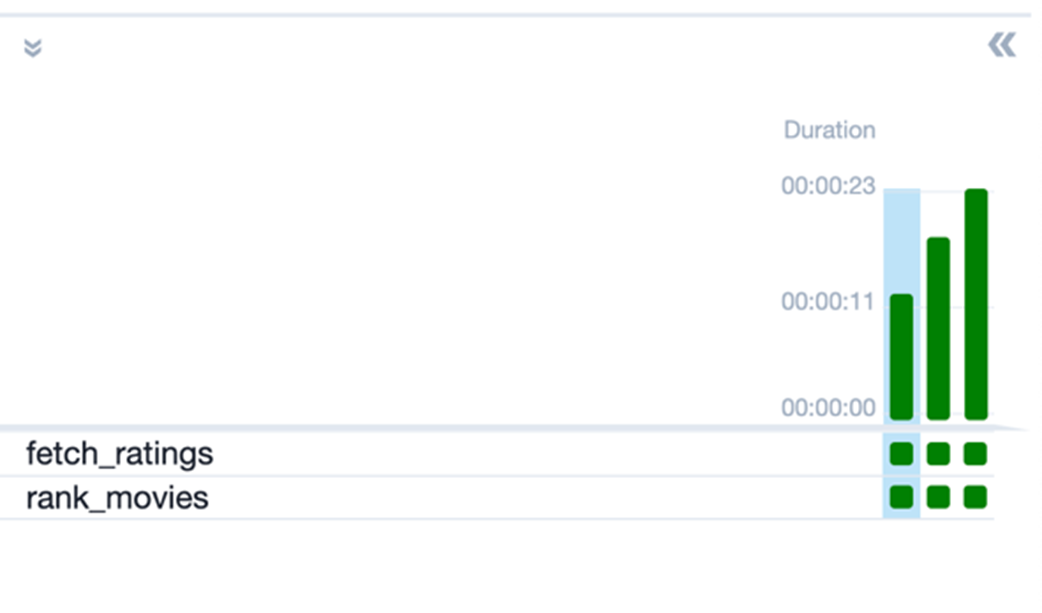
Several successful runs of the recommender DAG based on the KubernetesPodOperator
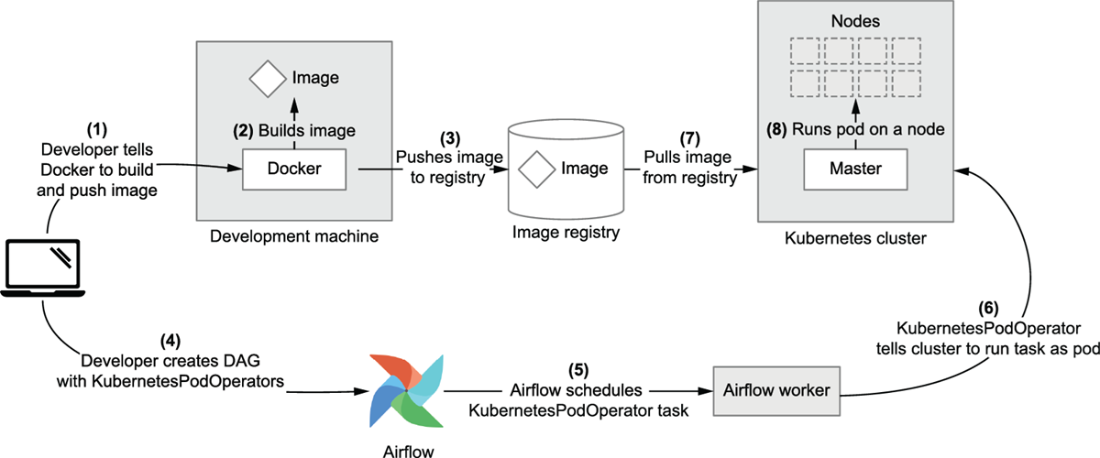
Workflow for building DAGs using the KubernetesPodOperator
Summary

  • Airflow deployments can be difficult to manage if they involve many different operators, as this requires knowledge of the different APIs and complicates debugging and dependency management.
  • One way of tackling this issue is to use container technologies such as Docker to encapsulate your tasks inside container images and run these images from within Airflow.
  • This containerized approach has several advantages, including easier dependency management, a more uniform interface for running tasks, and improved testability of tasks.
  • Data can be shared between containers using volume mounts.
  • Using the DockerOperator, you can run tasks in container images directly using Docker, similar to the docker run CLI command.
  • You can use the KubernetesPodOperator to run containerized tasks in pods on a Kubernetes cluster.
  • Kubernetes allows you to scale your containerized tasks across a compute cluster, which provides (among other things) greater scalability and more flexibility in terms of computing resources.

FAQ

Why can using many different Airflow operators be challenging?Each operator has its own interface, configuration, and dependency set. In larger deployments with many DAGs, this leads to a steep learning curve, more places for bugs, and a higher maintenance burden. It also increases the chance of dependency conflicts on worker/scheduler environments because all operator-specific packages must coexist there.
How do containers help simplify dependency management in Airflow DAGs?Containers isolate task dependencies inside images. Each task can ship exactly what it needs (Python libs, system packages) without polluting the Airflow worker environment. This avoids version conflicts across tasks and reduces the security and maintenance surface on workers to just what’s required to run the container engine and the container-based operator.
What’s the key difference between containers and virtual machines for this use case?VMs virtualize a full guest OS per application, which is heavy. Containers virtualize at the host OS kernel level, so multiple apps can run with isolation without their own OS. For Airflow tasks, this means faster startup, lower resource use, and simpler packaging and distribution of task runtimes.
How do I run a simple task in Docker and persist outputs?- Build or pull an image that contains your code and dependencies. - Run the container with a volume mount to a host path (for example, map host “data” to container “/data”). - Have your task write to the mounted path so files persist after the container exits. This mirrors how you’ll mount volumes in Airflow’s DockerOperator.
What is the DockerOperator and when should I use it?DockerOperator (from apache-airflow-providers-docker) runs a container on the worker host similar to “docker run”. Use it when a single machine (the Airflow worker host) is sufficient, you want uniform task interfaces, and you prefer per-task images that encapsulate their dependencies. You’ll provide the image, command/args, and any mounts (for example, host path → “/data”).
How do I pass data between containerized tasks in Airflow?- Use a shared storage location both tasks can access. - With DockerOperator, mount the same host directory into each container and read/write files there. - With KubernetesPodOperator, attach a PersistentVolume (via a PersistentVolumeClaim) to both pods at a common mount point. - Alternatively, use network/cloud storage (S3, GCS) accessible by both tasks.
What’s the recommended workflow for building Docker-based DAGs?- Develop task code as CLI scripts or entrypoints. - Create Dockerfiles per task image and build them locally or in CI. - Push images to a registry. - In your DAG, replace task implementations with DockerOperators referencing those images. - Schedule/run the DAG; workers pull images and execute containers with the provided args and mounts.
When should I use the KubernetesPodOperator instead of DockerOperator?Use KubernetesPodOperator (from apache-airflow-providers-cncf-kubernetes) when you need cluster-level scheduling, autoscaling, or specialized resources (CPU/memory requests/limits, GPUs). Tasks run as pods on Kubernetes nodes (not on the Airflow worker host), and you can rely on Kubernetes primitives for storage, networking, secrets, and resource management.
How do I mount persistent storage to Kubernetes task pods?Create a PersistentVolume and a PersistentVolumeClaim in your cluster. In the DAG, pass a V1Volume (pointing to the claim) and a V1VolumeMount (with mount_path such as “/data”) to the KubernetesPodOperator via its volumes and volume_mounts parameters. Tasks then read/write under that path, and data persists beyond the pod’s lifetime.
How do I troubleshoot Kubernetes tasks stuck in Pending/Running forever?- Check the Airflow task logs for pod status hints. - Use kubectl to list pods (kubectl get pods -n ) and describe the affected pod (kubectl describe pod …). - Common issues include missing PersistentVolumeClaims, image pull problems, or insufficient cluster resources. - Fix the root cause (for example, apply missing storage YAML, grant image pull access, or adjust resource requests) and rerun the task.

pro $24.99 per month

  • access to all Manning books, MEAPs, liveVideos, liveProjects, and audiobooks!
  • choose one free eBook per month to keep
  • exclusive 50% discount on all purchases
  • renews monthly, pause or cancel renewal anytime

lite $19.99 per month

  • access to all Manning books, including MEAPs!

team

5, 10 or 20 seats+ for your team - learn more


choose your plan

team

monthly
annual
$49.99
$499.99
only $41.67 per month
  • five seats for your team
  • access to all Manning books, MEAPs, liveVideos, liveProjects, and audiobooks!
  • choose another free product every time you renew
  • choose twelve free products per year
  • exclusive 50% discount on all purchases
  • renews monthly, pause or cancel renewal anytime
  • renews annually, pause or cancel renewal anytime
  • Data Pipelines with Apache Airflow, Second Edition ebook for free

choose your plan

team

monthly
annual
$49.99
$499.99
only $41.67 per month
  • five seats for your team
  • access to all Manning books, MEAPs, liveVideos, liveProjects, and audiobooks!
  • choose another free product every time you renew
  • choose twelve free products per year
  • exclusive 50% discount on all purchases
  • renews monthly, pause or cancel renewal anytime
  • renews annually, pause or cancel renewal anytime
  • Data Pipelines with Apache Airflow, Second Edition ebook for free
choose your plan

team

monthly
annual
$49.99
$499.99
only $41.67 per month
  • five seats for your team
  • access to all Manning books, MEAPs, liveVideos, liveProjects, and audiobooks!
  • choose another free product every time you renew
  • choose twelve free products per year
  • exclusive 50% discount on all purchases
  • renews monthly, pause or cancel renewal anytime
  • renews annually, pause or cancel renewal anytime
  • Data Pipelines with Apache Airflow, Second Edition ebook for free