Generative AI is presented as a practical accelerator for cybersecurity metrics: it helps teams analyze complex data, surface patterns, and communicate results with clarity. The chapter emphasizes hands-on, real-world applications—such as risk assessment, compliance monitoring, and incident trend evaluation—so both specialists and newcomers can apply AI effectively. It highlights how synthetic data, guided analysis, and AI-generated narratives can reduce effort while improving the consistency and usefulness of security reporting and decision-making.
The chapter explains how generative models work and shows how to deploy them to simulate threats, generate reports, and transform raw logs into insights. It compares open-source tools for local use—LM Studio for its approachable GUI and Ollama for API/CLI-centric workflows—while outlining when to consider more powerful cloud models. Readers are guided through prompt engineering principles to improve accuracy and formatting, then walked through end-to-end examples: creating synthetic failed-login datasets, parsing them for analysis, visualizing patterns, and turning results into stakeholder-ready summaries. It also demonstrates automating incident response recommendations and trend charts, illustrating how AI can prioritize issues and standardize response playbooks. Throughout, the focus is on turning data into action with minimal friction.
Equally, the chapter underscores governance: selecting models based on privacy, task complexity, cost, and customization; preferring local inference when handling sensitive security data; and mitigating risks of data exposure. It details the limitations of generative AI—imperfect accuracy, lack of deep context, potential bias—and stresses validation, explainability, and human-in-the-loop review for high-stakes outcomes. Ethical use, adherence to regulations, and clear documentation are presented as non-negotiables. The conclusion frames AI as a decision-support ally, not an autonomous decision-maker, and offers practical steps to experiment safely, measure impact, and mature AI-enabled cybersecurity metrics over time.
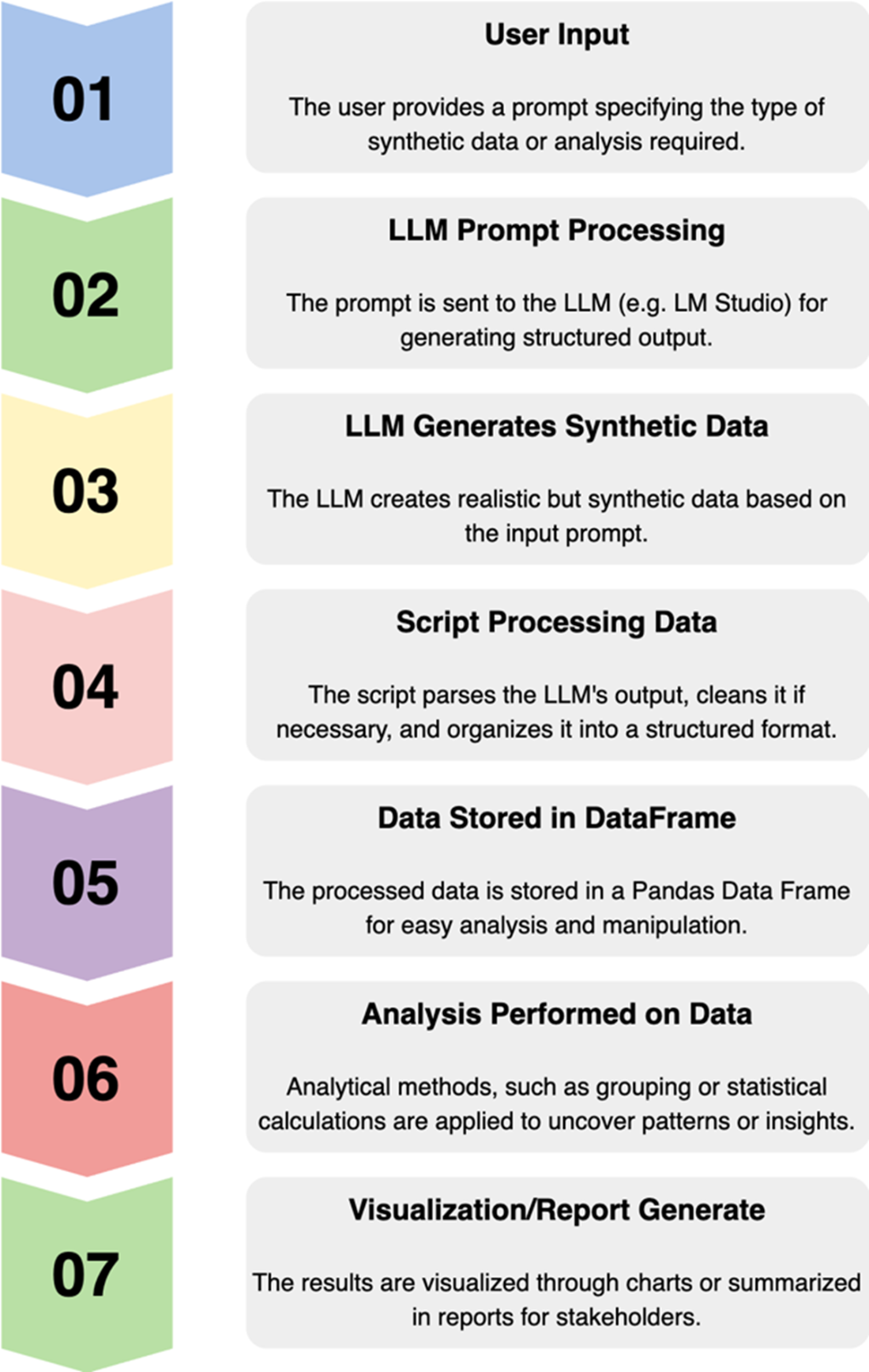
AI synthetically generated pipeline.
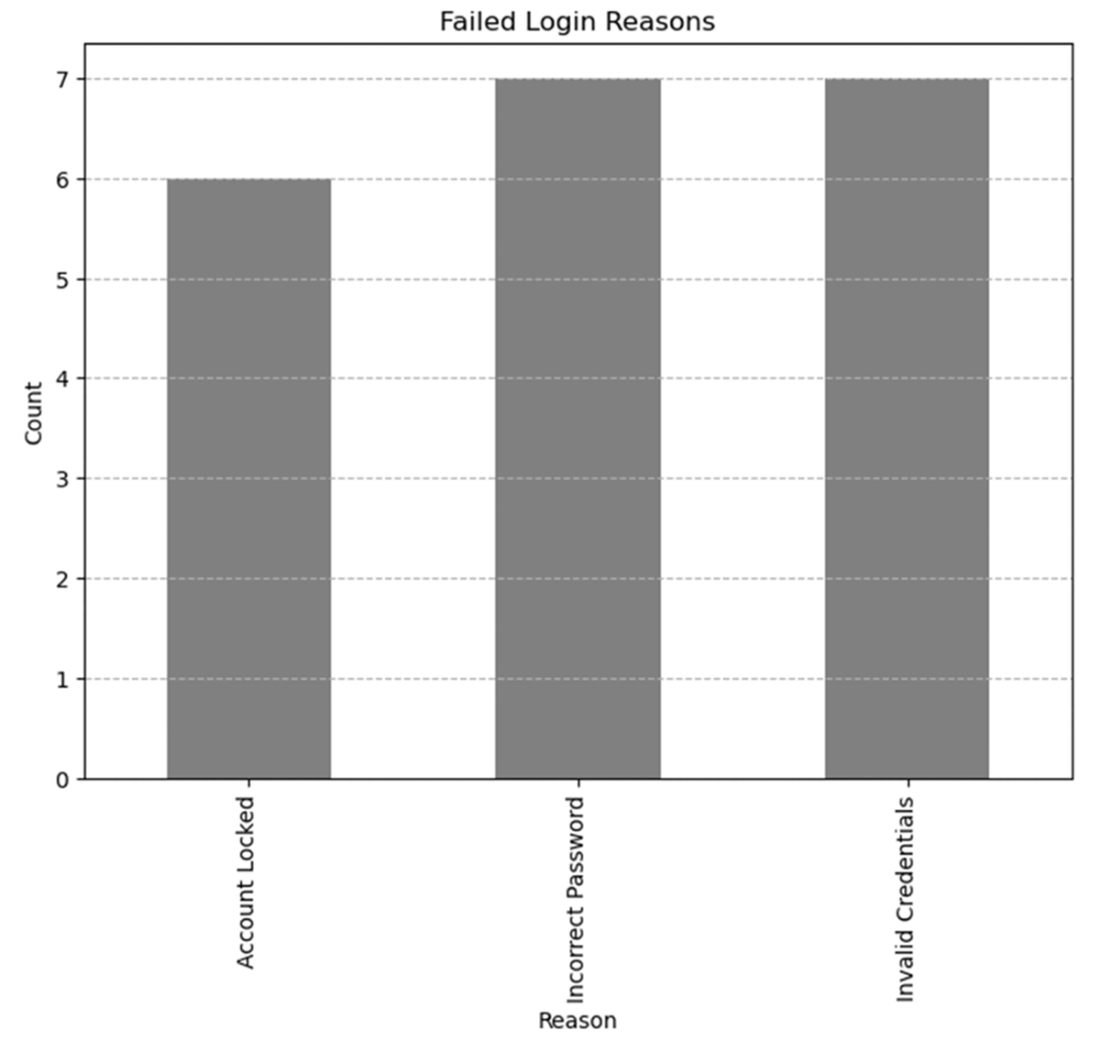
Gen AI-generated data and analysis for failed login attempts.
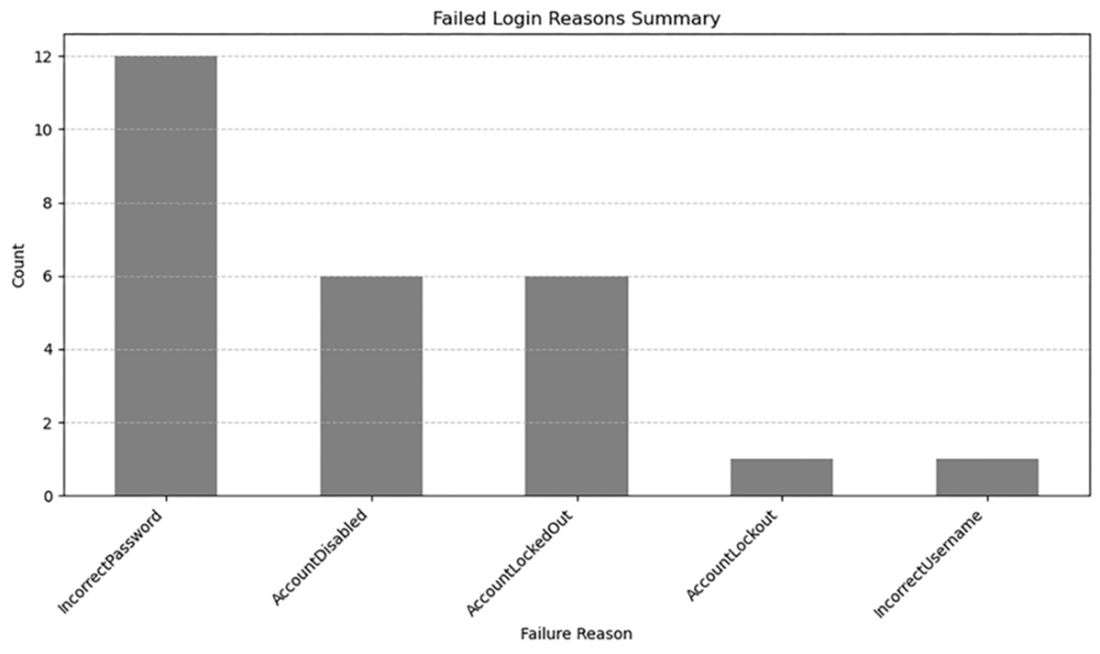
Failed login reasons summary showing Incorrect Password as the most common failure.
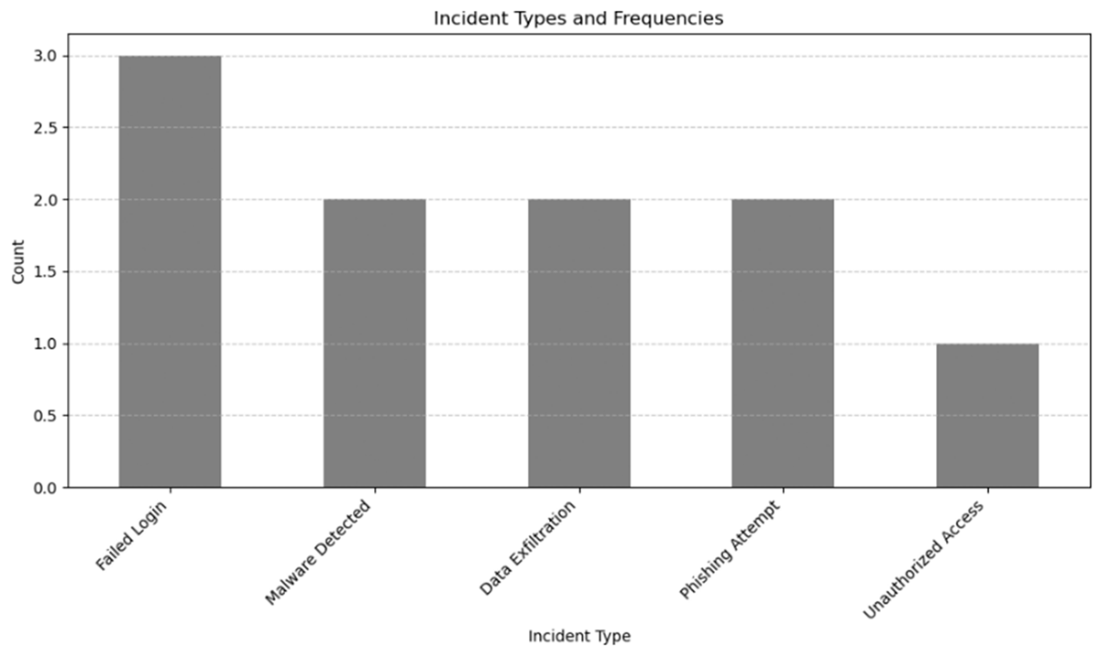
Incident types and frequencies from the sample code.
Summary
Generative AI introduces new opportunities to analyze data, simulate potential threats, and streamline reporting for cybersecurity metrics.
Generative AI can generate, analyze, and visualize cybersecurity data through real-world scenarios.
Open-source tools like LM Studio and Ollama enable the use of local models, providing flexibility, privacy, and cost-effectiveness compared to cloud-based AI systems.
For those who prefer cloud-based Generative AI solutions, OpenAI’s API remains a leading choice for accessibility and reliability.
AI can automate incident response and identify trends in security metrics.
Prompt engineering involves crafting effective instructions to guide a language model’s output. When creating prompts, be specific, set the context, guide the format, then iterate and refine as needed.
Check generative AI outputs for accuracy and reliability; be aware of the data quality used. Be aware of bias and data privacy concerns when using generative AI.
FAQ
What is generative AI and how does it improve cybersecurity metrics?Generative AI creates new content based on patterns learned from data. In cybersecurity metrics it helps by:
- Analyzing complex datasets to reveal trends and anomalies
- Simulating realistic threats and scenarios with synthetic data
- Automating reporting and stakeholder-ready summaries
- Supporting decisions in risk assessment, compliance monitoring, and incident trend analysisWhy use open-source tools like LM Studio or Ollama instead of cloud AI?Open-source/local tools give you:
- Privacy: Data stays on-premises, reducing exposure risk
- Control: Configure models and infrastructure to your needs
- Cost efficiency: No per-call API fees (hardware costs apply)
- Flexibility: Choose and customize open models for specific tasks
Cloud AI (e.g., GPT-4) offers higher capacity and breadth of knowledge, which can be better for complex tasks but may raise data governance concerns.How do LM Studio and Ollama differ, and which should I choose?- LM Studio: GUI-driven, easy model selection and parameter tuning, real-time feedback; ideal for beginners and non-coders. Chosen in the chapter for accessibility.
- Ollama: CLI/API-focused, lightweight, developer-friendly; ideal for integrating LLMs into custom apps.
Pick LM Studio for an approachable, visual workflow; pick Ollama for programmatic integration and automation.How should I select between local LLMs and cloud models like GPT-4?Consider:
- Privacy and security: Local for sensitive data; cloud relies on third-party infrastructure
- Task complexity: Larger cloud models often perform better on nuanced tasks
- Cost: Cloud charges per API call; local entails hardware costs but no recurring usage fees
- Customization: Open-source models offer more fine-tuning flexibility
Match the model to your security, performance, and budget constraints.What are the core principles of prompt engineering for cybersecurity use cases?- Be specific: State exactly what you need analyzed or generated
- Set context: Include relevant data details, objectives, and constraints
- Guide the format: Specify output schemas (e.g., JSON fields) and validate the result
- Iterate: Refine prompts based on results to improve accuracy and utility
Strong prompts drive precise insights for metrics, reports, and pattern discovery.How do I switch code between OpenAI, LM Studio, and Ollama backends?Change only the base URL and API key:
- OpenAI base URL: https://api.openai.com/v1
- LM Studio base URL: http://localhost:1234/v1
- Ollama base URL: http://localhost:11434/v1
Ensure the local server is running, specify a valid local model name, and keep keys secure.How can I safely generate and analyze synthetic cybersecurity data?- Use a local LLM (e.g., via LM Studio) to generate structured JSON (e.g., failed login attempts with fields like User ID, Login Hour, Device Type, Reason)
- Parse and validate the JSON before analysis (handle decoding errors)
- Load into a DataFrame to summarize counts, spot patterns, and visualize (e.g., bar charts)
Synthetic data enables scenario testing and training without exposing real sensitive data.How can generative AI enhance reporting and visualization for security metrics?- Auto-generate summaries, executive highlights, and recommendations from metrics
- Create structured outputs that feed charts/dashboards (e.g., failed login reasons)
- Standardize report formats across teams to save time
- Support stakeholder-tailored narratives while keeping raw data private (local inference)Can AI help automate incident response and trend analysis?Yes. You can:
- Classify incidents and draft immediate recommendations based on type and severity
- Aggregate incident types to reveal recurring issues (e.g., spikes in failed logins)
- Prioritize responses and resources using trend insights
Always validate AI-generated actions with human review before execution.What are the main limitations and ethical considerations, and how do we mitigate them?Risks:
- Accuracy and context limits can yield misleading conclusions
- Bias in training data may skew outputs
- Data exposure when using public/cloud LLMs
- Potential misuse (e.g., generating deceptive content)
Mitigations:
- Prefer local processing for sensitive data; anonymize when needed
- Validate findings statistically and operationally; keep human-in-the-loop
- Ensure explainability and review mechanisms
- Adhere to regulations (GDPR, CCPA) and enforce access controls and secure storage
pro $24.99 per month
access to all Manning books, MEAPs, liveVideos, liveProjects, and audiobooks!

 Data-Driven Cybersecurity ebook for free
