7 Analyzing audio data
This chapter shows how modern speech recognition and generation have made voice a practical, near-human way to work with data. It focuses on three core capabilities—transcribing audio, translating speech, and generating speech—and demonstrates end-to-end mini-projects powered by OpenAI models. With only a few lines of Python, readers build voice-driven tools that turn recordings into text, query databases by speaking, and perform real-time speech-to-speech translation.
After a brief setup (microphone plus Python libraries such as sounddevice, scipy, playsound, and requests), the chapter introduces Whisper for fast, accurate transcription from common audio formats. It then extends transcription into a voice interface for querying relational data: record short audio snippets (e.g., 5 seconds at 44.1 kHz), transcribe them with Whisper, translate the resulting text into SQL via GPT-4o using a schema-aware prompt, execute queries in SQLite, and display results. The implementation emphasizes practical details like schema extraction from sqlite_master, interactive loops, handling microphone permissions, error checking, and the cost considerations of processing audio.
The final project builds a speech-to-speech translator: capture spoken input, transcribe with Whisper, translate with GPT-4o into a user-specified target language or style, synthesize speech with the tts-1 model (configurable voices), and play it back. The tool supports flexible outputs (from French to “English in the style of Shakespeare”), stores generated audio for reuse, and notes language support and pricing trade-offs. Collectively, these projects illustrate a complete audio pipeline—record, transcribe, translate, and speak—that turns voice into a versatile interface for analytics and communication.
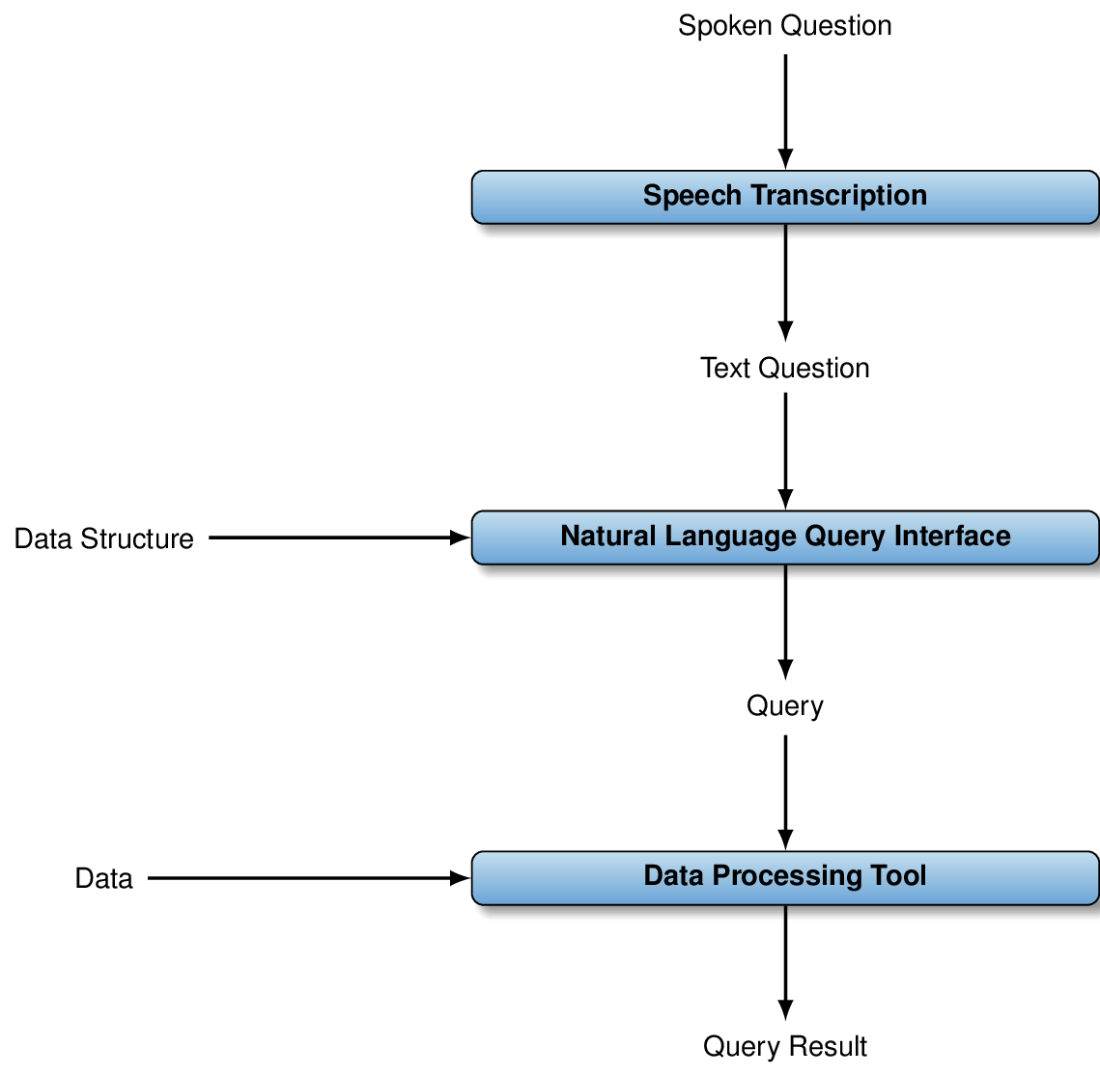
Our voice query interface transcribes spoken questions into text, then translates text questions into SQL queries, and finally processes those queries and displays the query result.
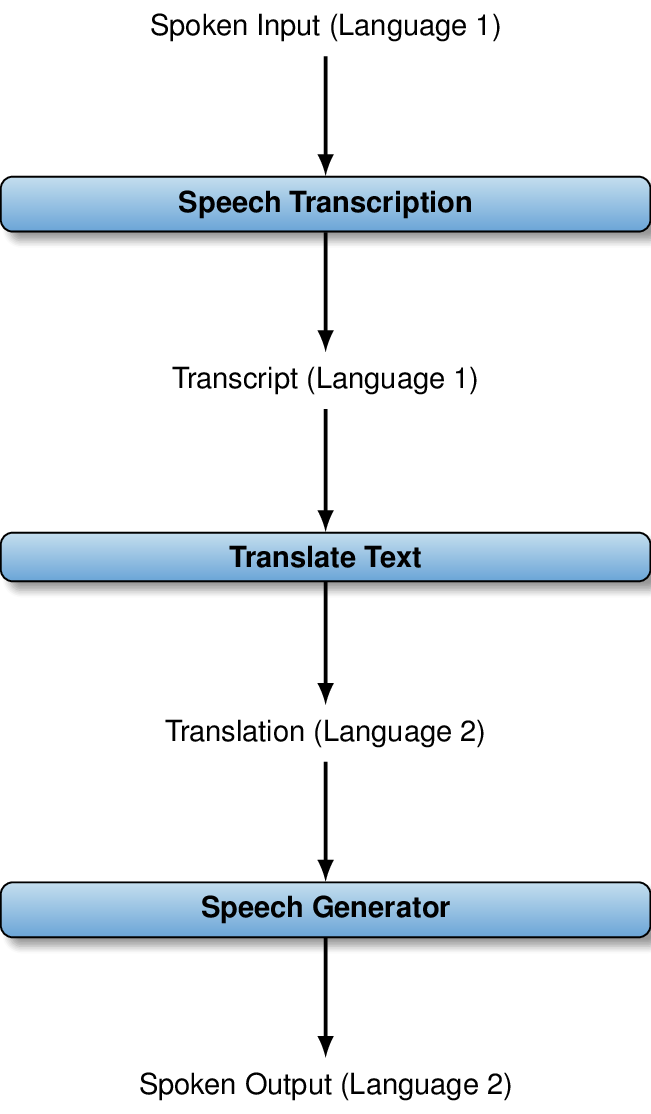
Our translator tool records spoken input in a first language, transcribes input to text, translates that text into a second language, and finally generates spoken output.
Summary
- OpenAI’s Whisper model transcribes speech input to text.
- Access transcription via the audio transcriptions endpoint.
- Pricing for transcription is based on the number of minutes.
- OpenAI offers several models for generating speech from text.
- You can choose the voice and quality for generated speech.
- Speech generation pricing depends on the number of tokens.
FAQ
What software and hardware do I need to follow Chapter 7?
• A working microphone (built-in or external).
• Python libraries: sounddevice==0.4, scipy==1.11, playsound==1.3, requests==2.31.0, plus the OpenAI Python SDK from earlier chapters.
• On macOS you may also need PyObjC==10.0 for audio playback.
• For the voice-to-SQL project, install SQLite and ensure the sqlite3 Python module is available.
How do I transcribe an audio file with OpenAI’s Whisper?
• Open the audio file in binary mode, then call client.audio.transcriptions.create(file=..., model='whisper-1').
• Read the result from transcription.text.
• Supported formats include mp3, mp4, mpeg, mpga, m4a, wav, and webm; file size is limited to about 25 MB.
Which audio formats and sizes are supported for transcription?
• Formats: mp3, mp4, mpeg, mpga, m4a, wav, webm.
• Typical upload size limit: ~25 MB per file (check current docs for updates).
• If your file is larger, split it into smaller chunks before sending.
How much does transcription cost and how can I control spending?
• At the time of writing, Whisper via OpenAI costs about $0.006 per minute.
• Keep costs down by trimming silence, transcribing only relevant segments, and avoiding unnecessarily long recordings.
• Always check OpenAI’s pricing page for current rates.
How do I record a short voice query from my microphone in Python?
• Use sounddevice to record and scipy to save:
— sample_rate = 44100; nr_frames = 5 * sample_rate
— recording = sounddevice.rec(nr_frames, samplerate=sample_rate, channels=1)
— sounddevice.wait(); scipy.io.wavfile.write('question.wav', sample_rate, recording)
• Adjust the 5-second duration or channels to match your mic and needs.
My transcriptions are empty or incorrect—how do I troubleshoot?
• Verify microphone permissions in your OS; many systems block mic access by default.
• Listen to the saved WAV (e.g., question.wav) to confirm audio was captured and is audible.
• Reduce background noise and speak clearly; confirm the correct channel count (try channels=1 first).
• Ensure the recording duration is long enough to capture your full question.
How does the voice-to-SQL interface work end to end?
• Steps: (1) record audio → (2) transcribe with Whisper → (3) create a prompt that includes the database schema and the question → (4) have GPT-4o generate an SQL query → (5) execute it with sqlite3 → (6) display results.
• Include exception handling when executing SQL, since LLM-generated queries can occasionally be invalid.
How do I give the LLM enough context about my database schema?
• Extract CREATE TABLE statements from SQLite using: select sql from sqlite_master where type='table'.
• Join these DDL statements into a text block and include it in the prompt before the user’s question.
How can I build a speech-to-speech translator from this chapter’s components?
• Pipeline: record audio → transcribe to text (Whisper) → translate text (GPT-4o) using a prompt that specifies the target language → convert translated text to speech with client.audio.speech.create(model='tts-1', voice='alloy') → save the audio (e.g., MP3) and play it with playsound.
Can I choose different languages, dialects, or styles for translation and speech?
• Yes. Pass a free-form string for the target language/style (e.g., "French" or "English in the style of Shakespeare"); it’s inserted into the translation prompt.
• Whisper and the TTS model support a broad set of common languages; check current docs for the latest list.
• You can also change the TTS voice (e.g., 'alloy').

 Data Analysis with LLMs ebook for free
