Overview

6 Analyzing images and videos

This chapter broadens data analysis beyond text and tables to the visual world, showing how large language models, specifically a multimodal model, can interpret images and videos from natural-language instructions alone. It outlines three mini-projects—answering free-form questions about images, tagging people in photos, and generating titles for videos—to demonstrate practical capabilities and design patterns. A minimal setup adds OpenCV for image/video handling and a simple HTTP client for direct API calls. Throughout, the core technique is to build multimodal prompts that mix text with one or more images (or video frames), enabling flexible tasks without task-specific training.

The first project builds a question-answering tool for images: users supply a picture and a natural-language question, and the model returns a textual answer. This generalizes classical, narrowly trained vision models by letting you specify tasks at inference time (for example, specialized classifications) through prompt wording. The implementation uses the chat completions interface with a message that combines text and an image reference, and it supports multiple images if needed. The chapter also highlights cost control: image processing fees depend on resolution and detail settings, with a low-detail mode to reduce expense and a high-detail mode whose price scales with image size, reminding readers to be mindful when processing large collections.

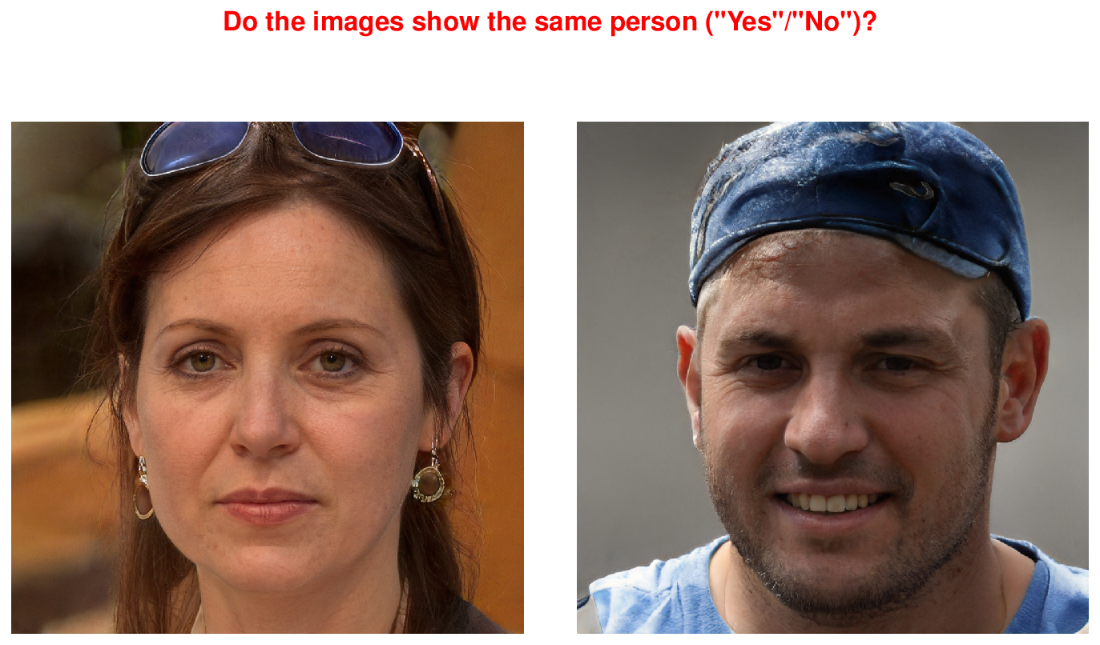
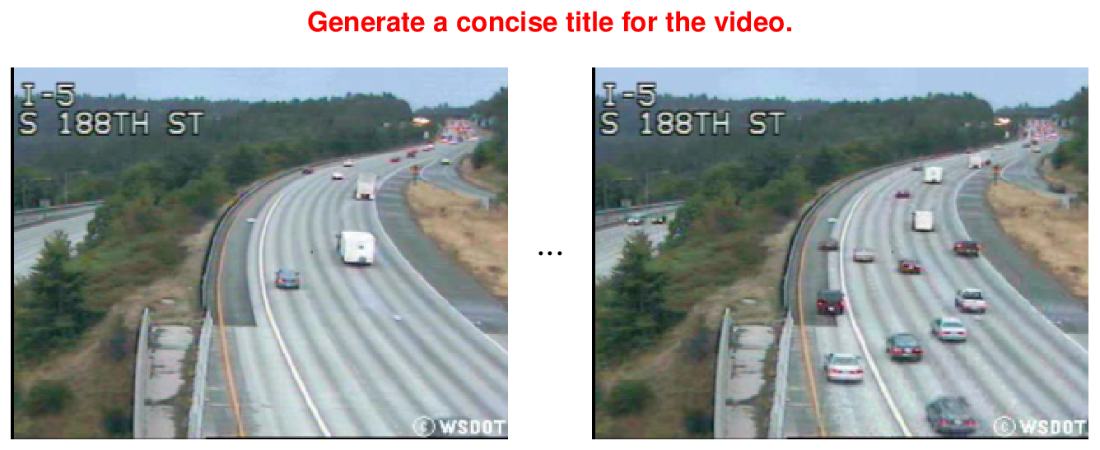
The second project automates tagging people in photos by comparing a reference portrait to each candidate image via a two-image prompt that asks if they depict the same person; matching images are copied to an output folder with a name prefix that serves as the tag. To keep photos private while still usable by the model, images stored locally are converted to base64, UTF-8 strings, and embedded as data URLs in the prompt; the code also illustrates constructing HTTP requests directly to the API. The third project generates concise video titles by extracting a small set of frames with OpenCV, encoding them like images, and prompting the model to propose a title—trading comprehensive coverage for affordability by limiting frames. Together, these patterns show how a few lines of code can deliver practical visual analytics while balancing privacy, performance, and cost.

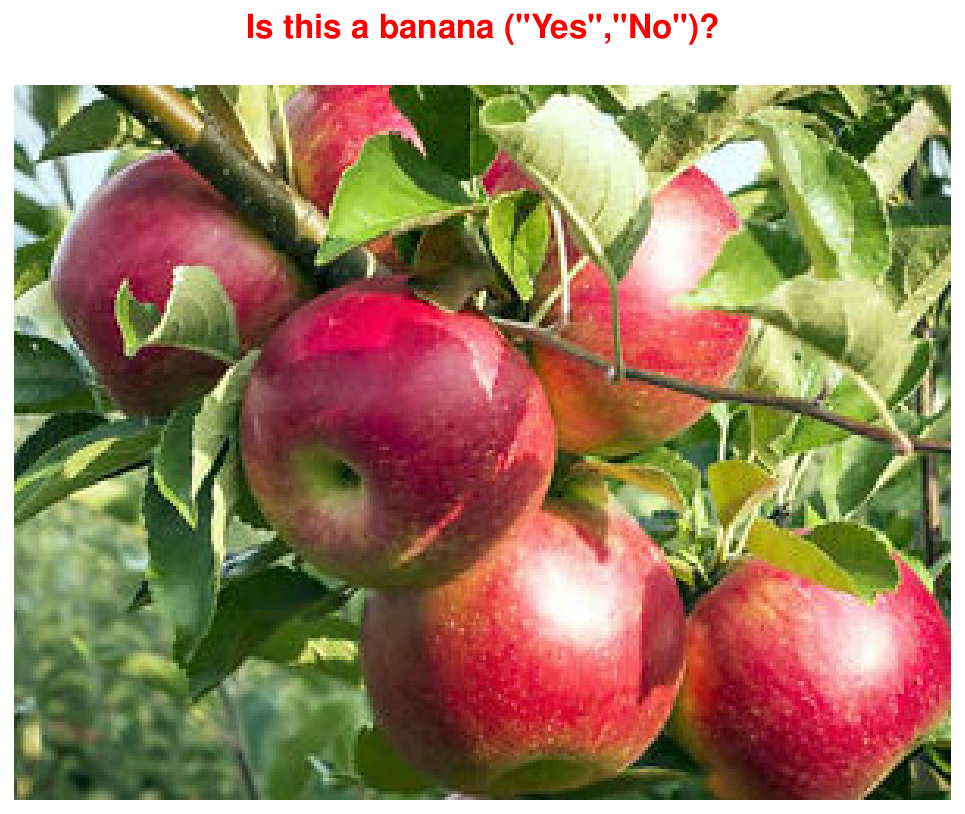
Multimodal prompt containing an image and text: the prompt instructs the language model to decide whether the picture shows a banana. In this case, the expected output is “No” (otherwise “Yes”).
figure
Multimodal prompt containing two images and text: the prompt instructs the language model to check whether the two pictures show the same person (expected answer: “Yes”) or not (expected answer: “No”).
figure
Multimodal prompt for video processing: based on a selection of video frames, the language model is instructed to generate a suitable title.
figure

Summary

  • GPT-4o processes images as well as text.
  • Prompts can integrate text snippets and images.
  • GPT-4o supports multiple image formats.
  • Images can be specified via a public image URL.
  • Locally stored images can be uploaded to OpenAI.
  • GPT-4o processes images in string encoding.
  • Processing images is costly, compared to processing text.
  • The costs of image processing may depend on the image size.
  • Processing images with a low degree of detail reduces costs.
  • The base64 library can encode images as strings.
  • Decompose videos into their frames to send them to GPT-4o.
  • The OpenCV library can be used to extract frames from videos.

FAQ

What libraries do I need to set up for analyzing images and videos?Install opencv-python==4.8.1.78 (for image/video IO and frame extraction) and requests==2.31.0 (for direct HTTP calls to the OpenAI API).
How do I create a multimodal prompt that asks a question about an image?Send a chat.completions request with a single user message whose content is a list including text and an image URL, for example: {'type':'text','text':question} and {'type':'image_url','image_url':{'url': image_url}}.
Can I include multiple images in one prompt?Yes. A message content can contain multiple elements of the same type, so you can add multiple {'type':'image_url', ...} entries to compare or analyze several images at once.
How can I reduce the cost of processing images with GPT-4o?- Use 'detail':'low' in the image_url object to lower cost - Reduce image resolution/size before sending - Limit the number of images/frames per prompt - Remember that high detail cost scales with the number of 512×512 tiles after internal downscaling
How do I send locally stored images without uploading them publicly?Read the file as bytes, base64-encode it, decode to UTF-8, then pass a data URL as the image source, e.g., image_url = {'url': 'data:image/png;base64,' + base64_string}. Supported formats include PNG, JPEG, WEBP, GIF (≤ 20 MB per image).
How does the “tagging people in images” app work?For each person image and each photo to tag, build a prompt with text like “Do the images show the same person (‘Yes’/‘No’)?” and the two images. If the LLM answers “Yes,” copy the photo into the output folder with the person’s name prefixed to the filename.
How do I call the OpenAI API directly with requests for local images?POST to https://api.openai.com/v1/chat/completions with headers {'Content-Type':'application/json','Authorization':'Bearer YOUR_KEY'} and a payload containing 'model':'gpt-4o', 'messages':[{'role':'user','content': prompt}], and (optionally) 'max_tokens':1 for Yes/No outputs.
How are video frames extracted and prepared for title generation?Use OpenCV: open with cv2.VideoCapture, loop video.read() to grab up to ~10 frames, convert each frame to JPEG via cv2.imencode, base64-encode and UTF-8 decode, then include frames and a brief instruction like “Generate a concise title for the video.” in the prompt.
What are common pitfalls and how can I make the apps more robust?- Add retries with backoff for API/network errors - Ensure OPENAI_API_KEY is set - Keep images under size limits and in supported formats - Match file extensions your loader expects (e.g., .png in the sample) - Limit frames/images to control latency and cost
How do I run the example scripts from the chapter?- Image Q&A: python script.py [IMAGE_URL] 'Your question' - Tagging: python listing2.py /path/people /path/pics /path/output - Video titles: python listing3.py /path/video.mp4

pro $24.99 per month

  • access to all Manning books, MEAPs, liveVideos, liveProjects, and audiobooks!
  • choose one free eBook per month to keep
  • exclusive 50% discount on all purchases
  • renews monthly, pause or cancel renewal anytime

lite $19.99 per month

  • access to all Manning books, including MEAPs!

team

5, 10 or 20 seats+ for your team - learn more


choose your plan

team

monthly
annual
$49.99
$499.99
only $41.67 per month
  • five seats for your team
  • access to all Manning books, MEAPs, liveVideos, liveProjects, and audiobooks!
  • choose another free product every time you renew
  • choose twelve free products per year
  • exclusive 50% discount on all purchases
  • renews monthly, pause or cancel renewal anytime
  • renews annually, pause or cancel renewal anytime
  • Data Analysis with LLMs ebook for free

choose your plan

team

monthly
annual
$49.99
$499.99
only $41.67 per month
  • five seats for your team
  • access to all Manning books, MEAPs, liveVideos, liveProjects, and audiobooks!
  • choose another free product every time you renew
  • choose twelve free products per year
  • exclusive 50% discount on all purchases
  • renews monthly, pause or cancel renewal anytime
  • renews annually, pause or cancel renewal anytime
  • Data Analysis with LLMs ebook for free
choose your plan

team

monthly
annual
$49.99
$499.99
only $41.67 per month
  • five seats for your team
  • access to all Manning books, MEAPs, liveVideos, liveProjects, and audiobooks!
  • choose another free product every time you renew
  • choose twelve free products per year
  • exclusive 50% discount on all purchases
  • renews monthly, pause or cancel renewal anytime
  • renews annually, pause or cancel renewal anytime
  • Data Analysis with LLMs ebook for free