Structured data—such as tables and graphs—holds a large share of the world’s information, yet traditional analysis tools require users to learn formal query languages like SQL or Cypher. This chapter shows how large language models can act as a universal natural language interface: users ask questions in plain language, the model translates them into the appropriate formal queries, and specialized engines execute those queries efficiently at scale. The approach emphasizes practicality (leveraging existing data systems for performance and scale) and safety (recognizing that LLMs can be fallible and advising safeguards such as verification and backups).
For tabular data, the chapter walks through building a text-to-SQL interface. It begins by loading a video game sales dataset into SQLite and offering a brief SQL primer to help validate generated queries. A first prototype constructs prompts that include the database schema and the user question, calls the model, and extracts the SQL to run separately. The interface is then generalized: Python executes the returned queries directly via sqlite3, dynamically extracts schema metadata from the database itself (using the internal schema catalog) so it can work with arbitrary databases, and runs interactively so users can ask multiple questions without restarting. Error handling and the need to review results are highlighted.
For graph data, the chapter adapts the same pattern to Neo4j and the Cypher language. After introducing graphs as nodes with properties connected by labeled relationships and covering Cypher basics (MATCH patterns, RETURN projections, and aggregates), it builds a text-to-Cypher translator. The prompt encodes key schema cues—node labels, relationship types, and property keys—alongside the user’s question, enabling the model to produce Cypher that users can execute in Neo4j. Across both tabular and graph scenarios, the core recipe remains: provide schema context, ask for a target language, translate with an LLM, and execute with the right engine—while validating outputs and protecting data.
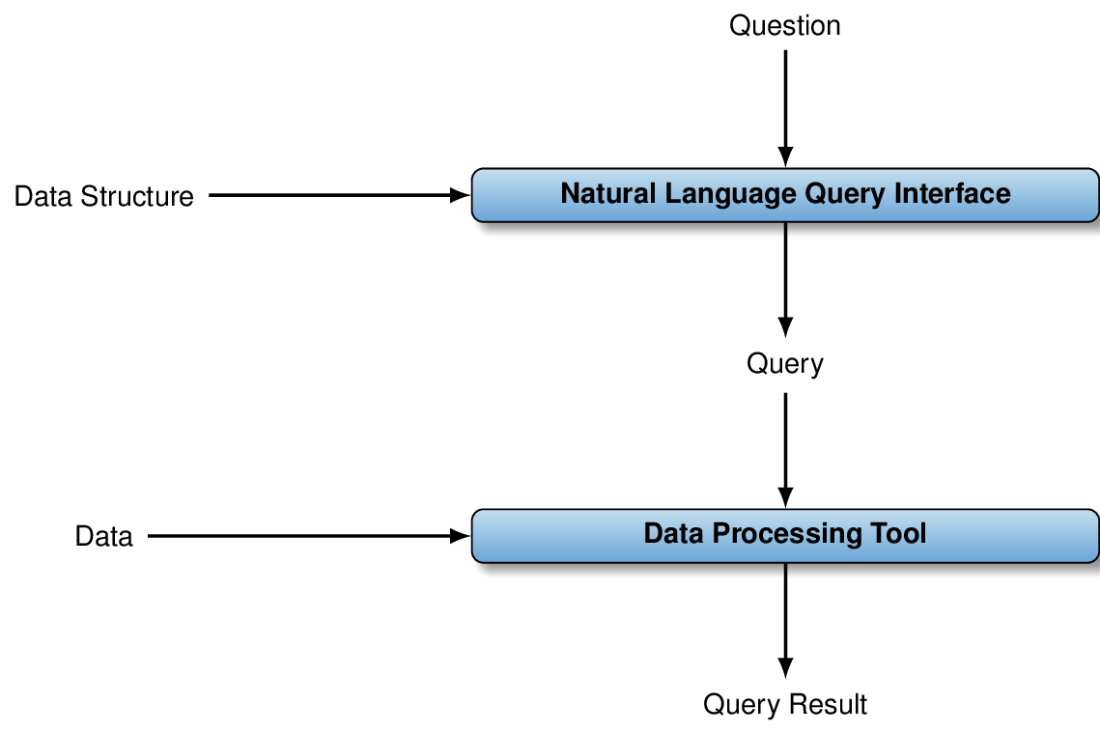
A natural language query interface translates questions in natural language into formal queries, taking into account the data structure. Formal queries are then processed on data by a specialized tool, generating a query result.
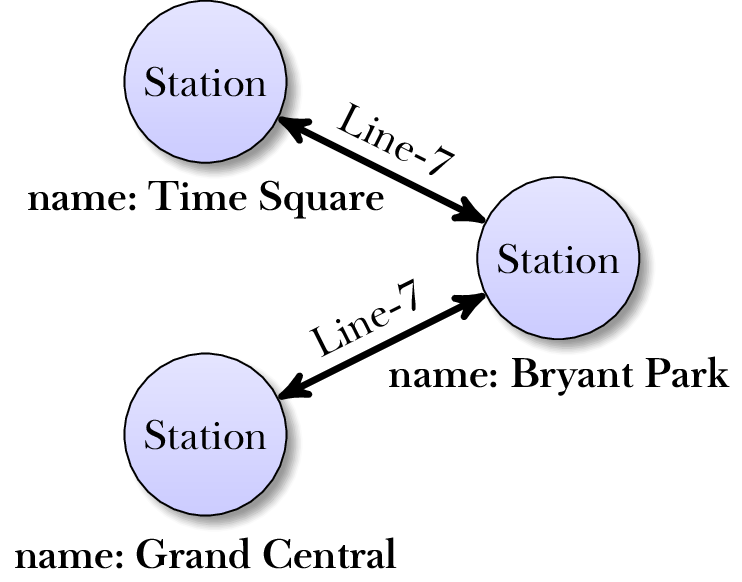
An example graph representing a small part of the metro network in New York City. Nodes, drawn as circles, represent metro stations and are associated with a property, assigning them to the name of the represented metro station. Edges, drawn as arrows, represent direct connections via specific metro lines. Edges are labeled by the metro line connecting the stations.
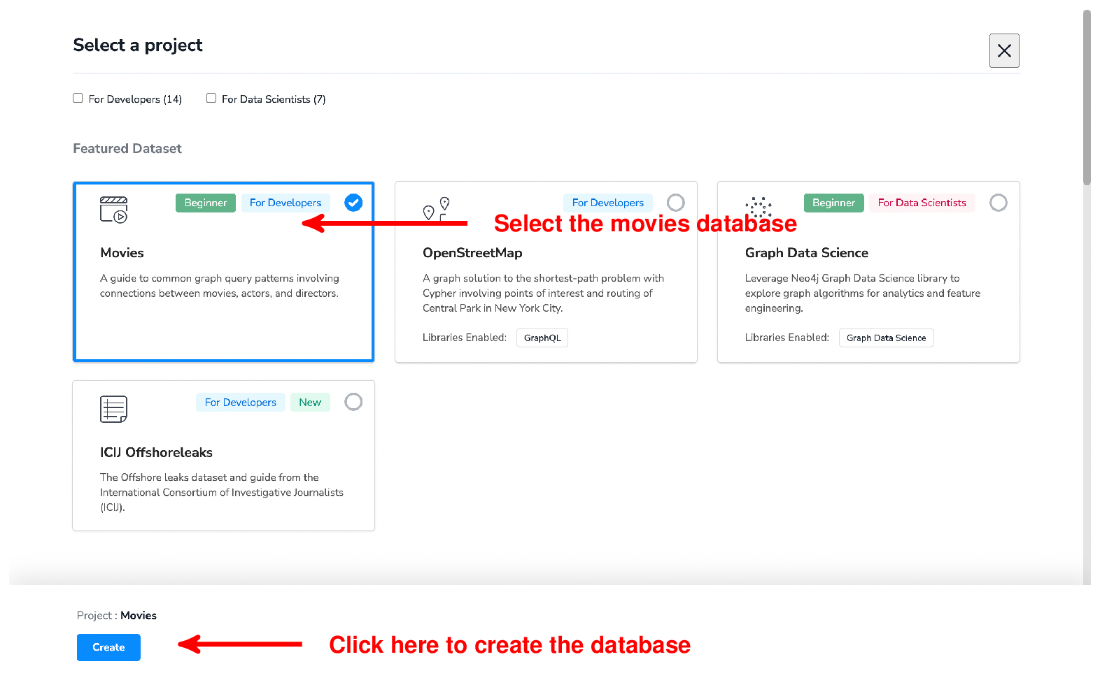
Select the movies database and click on “Create” to create a corresponding instance.
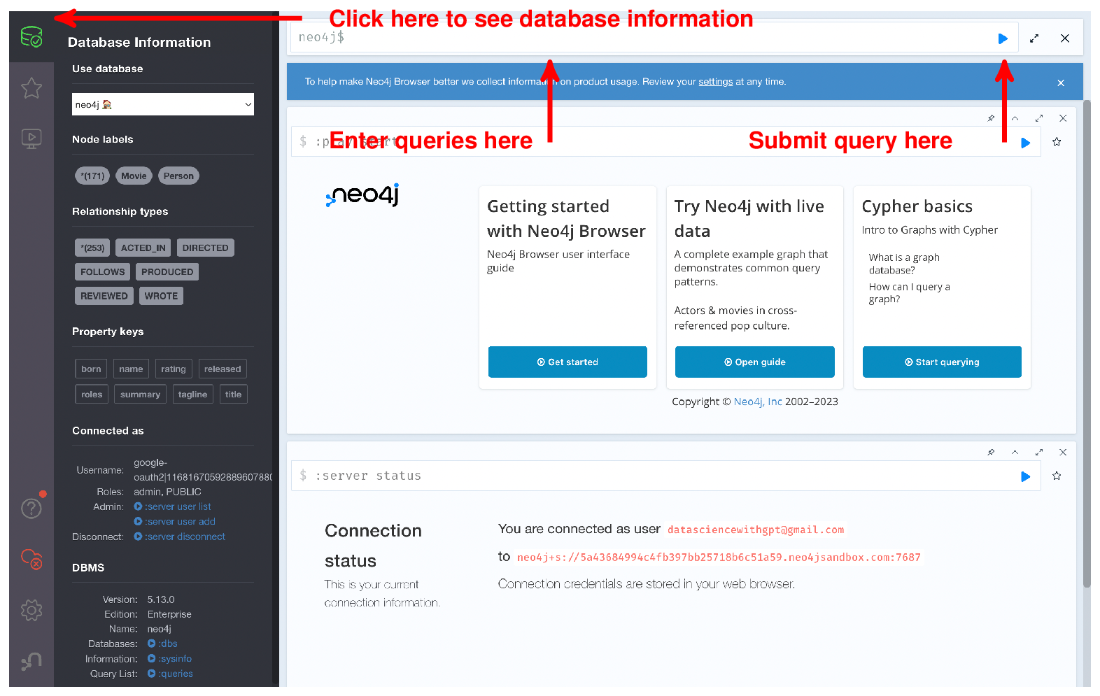
Click on the database icon (left upper corner) to access information about the current graph database, including the types of nodes and edges.
Summary
Structured data follows a standard format, making it easier to parse.
Examples of structured data include tabular data and graphs.
Structured data is often processed via specialized tools.
Relational database systems process tabular data and typically support SQL queries.
Graph data management systems process data representing graphs.
Language models translate natural language to many formal query languages.
Besides a question, prompts for query translation specify the database structure.
Copy your database before executing queries generated by language models.
Do not blindly trust your language model to generate accurate queries.
FAQ
What does this chapter mean by “structured data,” and why does it matter?Structured data is information stored in standardized formats that computers can process efficiently. Common types are tables (like spreadsheets or relational databases) and graphs (entities and relationships, e.g., social networks). A large share of the world’s information lives in these formats, so being able to analyze them easily is valuable.Why use large language models for analyzing structured data if tools like SQL and graph databases already exist?Existing tools are powerful but require learning specialized query languages (SQL, Cypher, etc.). LLMs can translate natural language questions into those formal languages, acting as a universal interface across different systems and data types.Why not let the LLM analyze the data directly instead of relying on external tools?Efficiency and scale. LLMs are expensive to run and have input size limits; large datasets won’t fit into the model context. Databases are optimized to process large structured data efficiently. The LLM is best used as a translator, not as the execution engine.How does a natural language query interface work end-to-end?- User asks a question in natural language.
- The LLM translates the question into a formal query (e.g., SQL or Cypher), given the target language and the data’s structure.
- A specialized tool (RDBMS or graph DB) executes the query.
- The system returns the results to the user.What information must be included in the prompt for accurate translation to SQL or Cypher?- The question itself.
- The target system/language (e.g., SQLite/SQL or Neo4j/Cypher).
- A description of the data structure:
- For tables: table names, column names, and data types (e.g., the CREATE TABLE statement).
- For graphs: node labels, relationship types, and key properties.How do I set up the example SQLite “games” database and verify the load?- Ensure SQLite 3 is installed (sqlite3 --version).
- Create the table with the specified schema (CREATE TABLE games(...)).
- Import the CSV (use .mode csv and .import /path/videogames.csv games).
- Verify row count via SELECT count(*) FROM games; which should return 16599 if all data loaded correctly.What SQL basics are used in the chapter’s examples?- Query template: SELECT … FROM … WHERE …
- WHERE filters rows; conditions can be combined with AND/OR.
- SELECT may list columns, expressions (e.g., eusales + japansales), or aggregates (COUNT(*), etc.).
- GROUP BY groups rows for aggregates.
- Use quotes for strings (publisher = 'Activision') and plain numbers for numerics (year = 2017).How can I generalize the text-to-SQL interface to any SQLite database?- Extract schema automatically from sqlite_master:
- select sql from sqlite_master where type = 'table';
- Include the extracted CREATE TABLE statements in the prompt instead of hard-coding a schema.
- Execute the generated SQL from Python using sqlite3: connect, cursor.execute(query), cursor.fetchall().
- Wrap execution in try/except to avoid crashes on invalid queries.How do I extract the model-generated query and run it safely?- Ask the model to format queries within code fences (e.g., ```sql ... ``` or ```cypher ... ```).
- Extract the content with a regex like ```sql(.*)``` or ```cypher(.*)``` using DOTALL to capture newlines.
- Print and, if needed, manually review the query.
- Execute in a controlled environment:
- Prefer read-only connections or datasets.
- Catch errors (try/except).
- Keep backups; never assume model outputs are always correct.How do I adapt the approach to graph data with Neo4j and Cypher?- Use Neo4j’s Movies example (via the online Sandbox) for quick setup.
- Prompt includes database type, node labels (e.g., Movie, Person), relationship types (ACTED_IN, DIRECTED, etc.), and key properties (name, title, released, etc.).
- Cypher basics: MATCH patterns to bind nodes/relationships, RETURN to emit results, and COUNT(*) for aggregates. Example: MATCH (p:Person {name: 'Tom Cruise'})-[:ACTED_IN]->(m:Movie) RETURN m.title.
- Ask the LLM for a ```cypher``` query and extract it as with SQL.
pro $24.99 per month
access to all Manning books, MEAPs, liveVideos, liveProjects, and audiobooks!

 Data Analysis with LLMs ebook for free
