Overview

4 Analyzing text data

Text is everywhere, yet historically hard to analyze computationally; recent large language models make core text analytics—classification, information extraction, and clustering—practical with concise code. This chapter shows how to apply LLMs directly to common tasks by crafting clear prompt templates, constraining outputs for reliable downstream processing, and adding simple robustness (e.g., retries). It also outlines a minimal toolkit: OpenAI’s Python client for chat and embeddings, pandas for tabular I/O, and scikit-learn for clustering.

For classification, the chapter builds a sentiment analyzer for reviews that demonstrates a reusable pattern: generate a prompt that states the task and enforces a strict answer schema, call a chat model with retry logic, and aggregate results. It highlights why specifying the output format matters (to avoid unpredictable variations), and how parameters like temperature, max tokens, and logit bias can improve consistency. The same approach generalizes to multi-class email triage or content moderation. For information extraction, the workflow shifts to turning free text (e.g., applications or biographies) into rows with named attributes: the prompt lists target fields, embeds the source text, and requests a lightweight, delimiter-based table with placeholders for missing values. A small post-processor then slices the model’s response between markers and splits on lines and pipes to return clean rows for CSV.

For clustering, documents are first mapped to semantic vectors via an embeddings model and then grouped with K-means to discover topical structure without predefined labels. The code shows a compact embedding function with retries, a thin wrapper around scikit-learn’s KMeans, and a script that reads text, computes embeddings, assigns cluster IDs, and writes results. The chapter encourages experiments with the number of clusters and different models, and closes by noting broader embedding uses beyond clustering—such as semantic retrieval and outlier detection—making embeddings a versatile foundation for text-centric data pipelines.

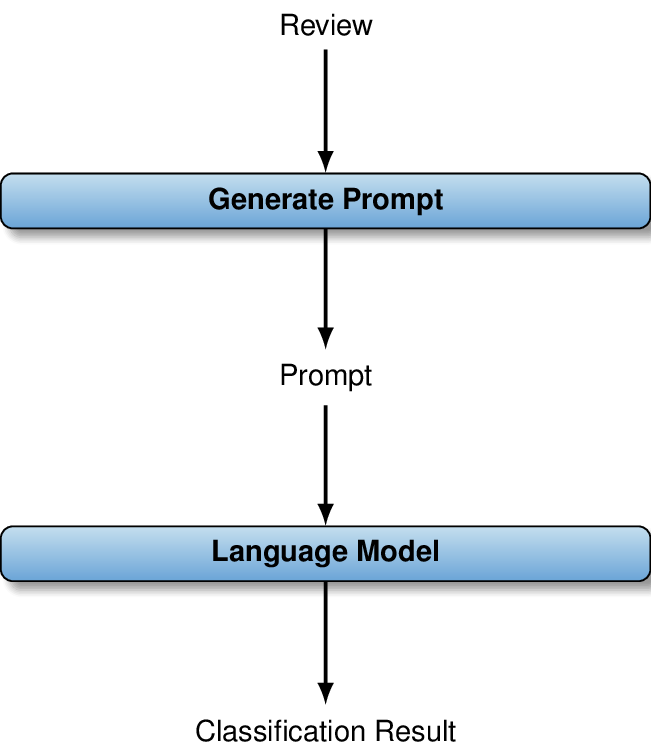
For each review, we generate a prompt that contains the review, together with instructions describing the classification task. Given the prompt as input, the language model outputs a class label for the review.
figure
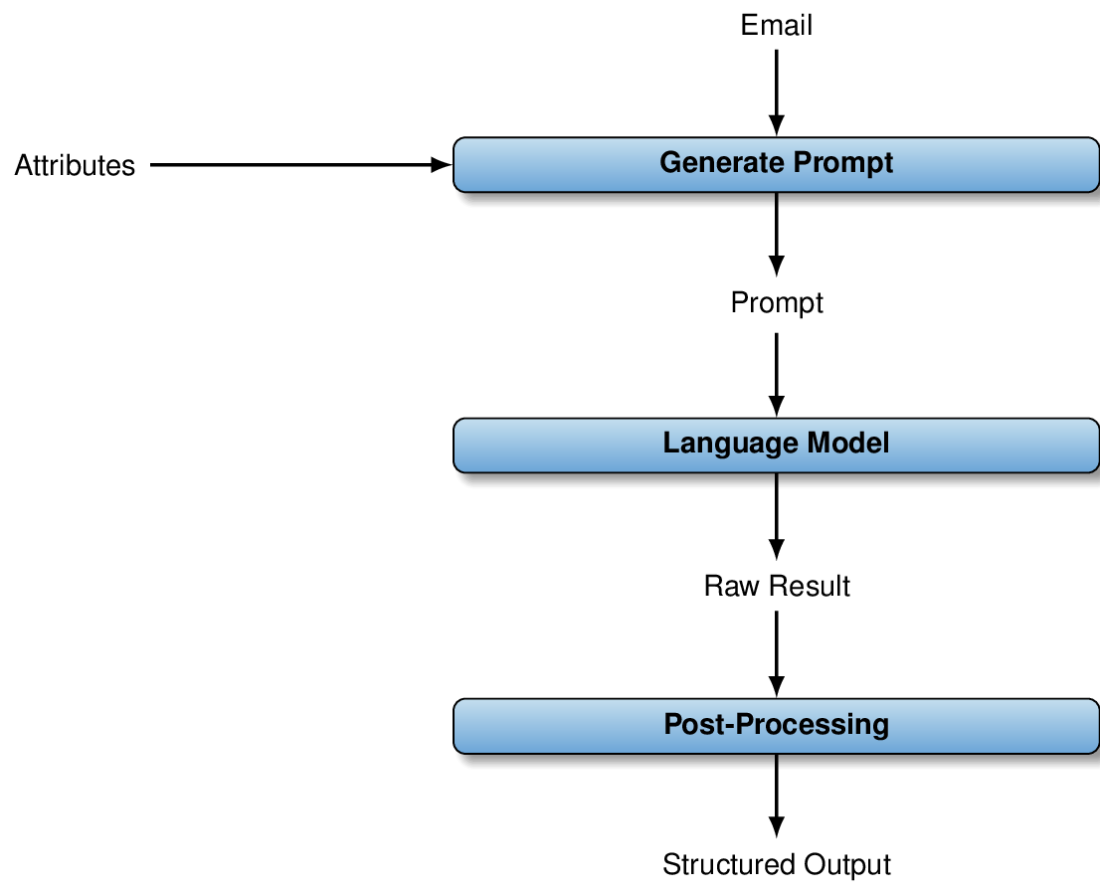
For each email, we generate a prompt that contains the email and a description of the extraction task. This description references the attributes to extract, specified by the user. Given the prompt as input, the language model generates an answer text that contains extracted values for the attributes. Via post-processing, we extract those values from the raw answer text.
figure
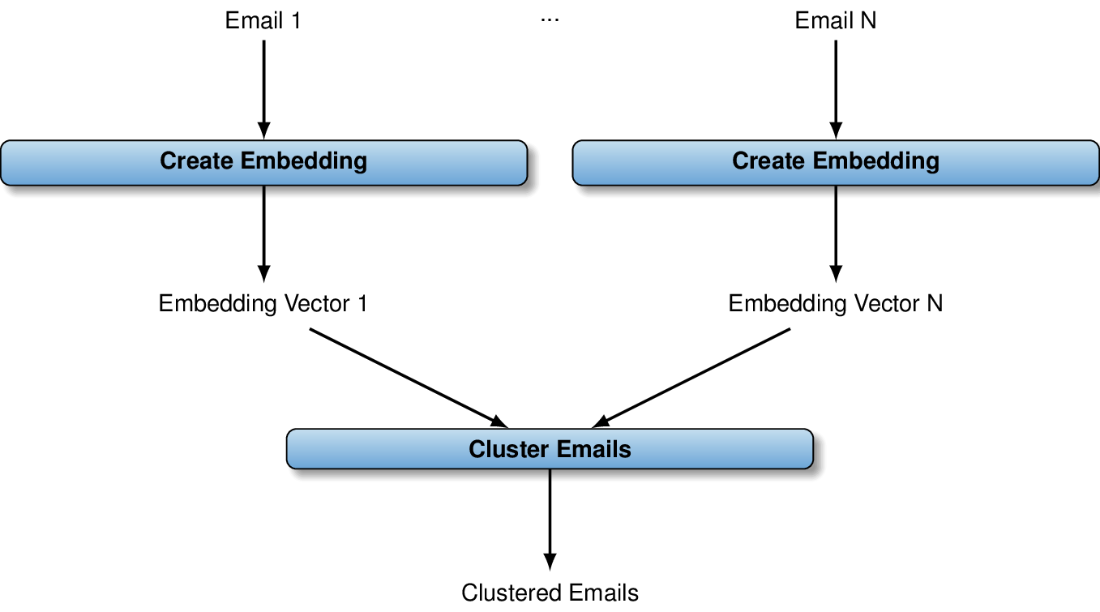
Clustering emails: we first calculate embedding vectors for all emails. Then, we cluster those vectors in order to assign emails with similar content to the same cluster.
figure

Summary

  • You can apply language models directly for analyzing text data.
  • Often, you can use a text completion endpoint for text analysis.
  • Prompts typically contain text to analyze, along with instructions.
  • Instructions describe the task to solve as well as the output format.
  • You can use completion for classification, extraction, and question answering.
  • Raw model output may need post-processing to change the format.
  • Language models can transform a text into embedding vectors.
  • Create embedding vectors via the embedding endpoint.
  • Comparing embedding vectors is relatively efficient.
  • You can use embeddings for clustering, retrieval, and outlier detection.

FAQ

What are the main text analysis tasks covered in this chapter?The chapter focuses on three core tasks: classifying text (e.g., sentiment of reviews), extracting structured information from text (e.g., attributes from emails/biographies), and clustering documents using embeddings.
Which libraries and versions do I need to run the examples?The code was tested with OpenAI’s Python library (v1.29), pandas (2.2), and scikit-learn (1.3). Install pandas via "pip install pandas==2.2" and scikit-learn via "pip install scikit-learn==1.3".
How does the sentiment classification workflow work?For each review in a CSV (column "text"), the code builds a prompt that asks if the sentiment is positive or negative and enforces a strict answer format. It calls GPT-4o through the chat completions API, collects labels, prints counts, and writes results to result.csv.
Why is it important to specify the output format in the prompt?Constraining the output (e.g., exactly "Positive" or "Negative") avoids inconsistent responses like abbreviations or full sentences. Consistent outputs make downstream aggregation and analysis simpler and more reliable.
How does the code handle flaky network calls to the API?Each model call is wrapped with up to three retries and an increasing sleep between attempts. If all retries fail, the function raises an exception.
How can I customize or improve the classifier?You can change categories by editing the prompt, switch models (e.g., a cheaper GPT-3.5 variant), and tune parameters such as temperature (set to 0 for more deterministic outputs), max_tokens (to cap answer length), and logit_bias (to favor specific labels).
How is information extraction from text implemented?The prompt lists the attributes to extract and provides the source text, then requests a pipe-delimited table wrapped in <BeginTable>...<EndTable>, using <NA> for missing values. The code post-processes the model’s output with regex and string splits to produce rows for a CSV.
How do I run the extraction script on sample data?Use a command like: python listing2.py biographies.csv "name|city of birth|date of birth". The script reads the "text" column, extracts the requested attributes, and writes result.csv with one row per extracted entity.
How do embeddings and clustering work for grouping documents?Each document’s embedding vector is computed (e.g., with text-embedding-ada-002). These vectors are clustered using K-Means from scikit-learn. You choose the number of clusters, and the resulting cluster IDs are added to the data and saved to result.csv.
What else can I do with embedding vectors besides clustering?Common applications include semantic search/retrieval (RAG) by finding documents with vectors closest to a query embedding, and outlier detection by spotting vectors that are far from the rest.

pro $24.99 per month

  • access to all Manning books, MEAPs, liveVideos, liveProjects, and audiobooks!
  • choose one free eBook per month to keep
  • exclusive 50% discount on all purchases
  • renews monthly, pause or cancel renewal anytime

lite $19.99 per month

  • access to all Manning books, including MEAPs!

team

5, 10 or 20 seats+ for your team - learn more


choose your plan

team

monthly
annual
$49.99
$499.99
only $41.67 per month
  • five seats for your team
  • access to all Manning books, MEAPs, liveVideos, liveProjects, and audiobooks!
  • choose another free product every time you renew
  • choose twelve free products per year
  • exclusive 50% discount on all purchases
  • renews monthly, pause or cancel renewal anytime
  • renews annually, pause or cancel renewal anytime
  • Data Analysis with LLMs ebook for free

choose your plan

team

monthly
annual
$49.99
$499.99
only $41.67 per month
  • five seats for your team
  • access to all Manning books, MEAPs, liveVideos, liveProjects, and audiobooks!
  • choose another free product every time you renew
  • choose twelve free products per year
  • exclusive 50% discount on all purchases
  • renews monthly, pause or cancel renewal anytime
  • renews annually, pause or cancel renewal anytime
  • Data Analysis with LLMs ebook for free
choose your plan

team

monthly
annual
$49.99
$499.99
only $41.67 per month
  • five seats for your team
  • access to all Manning books, MEAPs, liveVideos, liveProjects, and audiobooks!
  • choose another free product every time you renew
  • choose twelve free products per year
  • exclusive 50% discount on all purchases
  • renews monthly, pause or cancel renewal anytime
  • renews annually, pause or cancel renewal anytime
  • Data Analysis with LLMs ebook for free