3 The OpenAI Python library
This chapter motivates moving from the web interface to programmatic access so you can scale beyond single, manual prompts, embed GPT calls inside larger workflows, and combine language models with other tools. It introduces OpenAI’s Python library, notes that similar libraries exist for other providers, and walks through getting your environment ready: having a recent Python (3.9+), ensuring pip works, installing a pinned library version, and obtaining an API key. It emphasizes safe key handling—prefer environment variables and avoid hard-coding—and reassures that cloud notebooks can be used if local setup is troublesome.
Once set up, you install the specified library version and create a client to make requests. You can list available models and select by model ID (with a brief note that some IDs may be private fine-tuned models). The core capability used throughout is chat completion: you supply a list of messages, each with a role (user, assistant, or optional system) and text content, and the model returns a reply. The response contains choices (completions), termination info, and usage statistics such as prompt, completion, and total tokens. Because costs scale with tokens and vary by model, the chapter urges choosing models and prompt sizes judiciously.
The chapter then shows how to steer outputs with configuration parameters. You can bound or end generations with max_tokens and stop sequences; shape repetitiveness with presence_penalty and frequency_penalty; bias or forbid specific tokens with logit_bias (token IDs obtainable via a tokenizer tool); and control randomness via temperature or top_p (tuning only one at a time is recommended). When variability is useful, you can request multiple candidates with n and pick the best downstream. Practical guidance includes setting sensible token limits to cap cost, using stop conditions when appropriate, encouraging or discouraging repetition depending on the task, and selecting an appropriate model (the examples use a multimodal model while focusing on text).
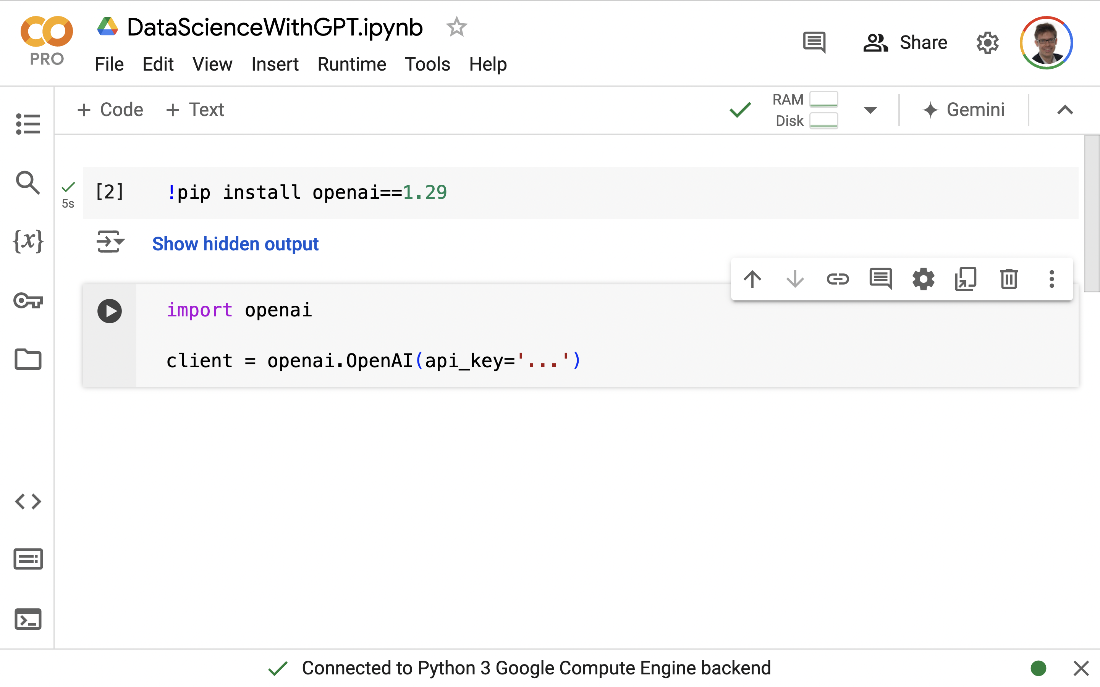
The Google Colab platform can be used to run the following examples.
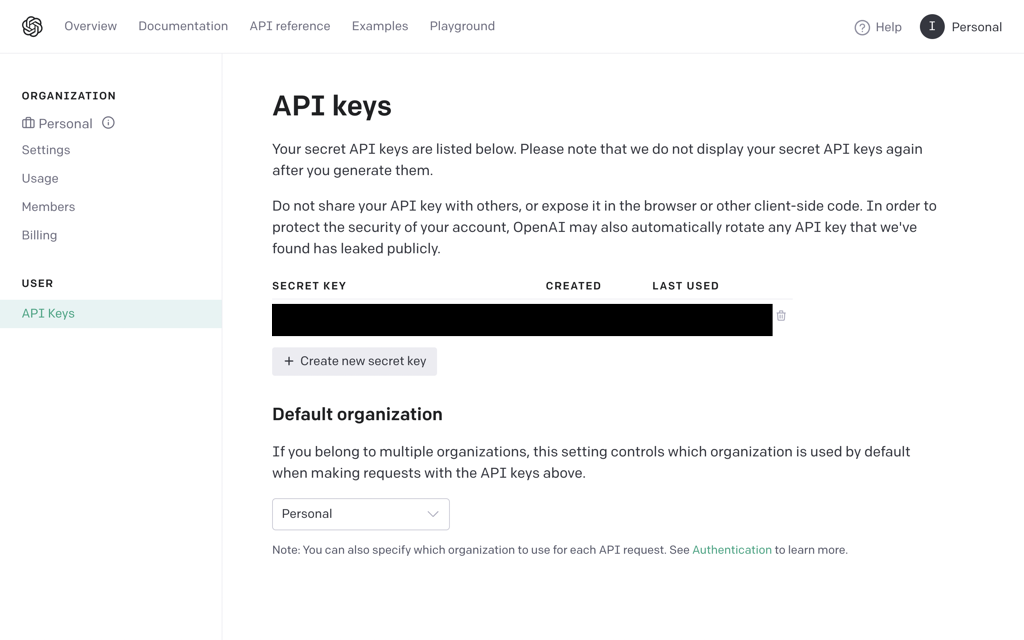
Managing secret keys for accessing the OpenAI API.
Summary
- You can use OpenAI’s language models via a Python API.
- Other providers offer similar libraries for accessing their models.
- To use OpenAI’s library, create a client object.
- You can use OpenAI’s models to complete chats.
- Chats to complete are specified as a list of messages.
- Each chat message is characterized by content and a role.
- Roles can be one of
user,assistant, andsystem. - Obtain chat completions via the
chat.completions.createfunction. - You can configure models using various parameters.
- The
max_tokensparameter limits the number of tokens generated. - Alternatively,
stopallows defining phrases that stop text generation. - You can penalize or encourage specific tokens via
logit_bias. - The
presence_penaltyparameter penalizes repetitive output. - The
frequency_penaltyparameter penalizes repetitive output. - The
temperatureparameter chooses the degree of randomization. - Parameter
top_pdetermines the number of output tokens considered. - Parameter
nchooses the number of generated completions.
FAQ
What are the prerequisites to use the OpenAI Python library in this chapter?
- Python 3.9 or newer. Check with:
python --version(orpython3 --version). - pip installed and up to date. Check with:
pip --version, update via:python -m pip install --upgrade pip. - Optional: an IDE such as PyCharm or PyDev to make development easier.
How do I install the OpenAI Python package and why pin version 1.29?
Install with: pip install openai==1.29. The code in this chapter was tested against 1.29, and small syntax differences exist across versions, so pinning avoids incompatibilities.
How do I create and store my OpenAI API key?
- Sign in at https://platform.openai.com/, add a payment method (Billing), and fund it.
- Generate a key at https://platform.openai.com/account/api-keys.
- Copy and store it securely; you cannot view the full key again after closing the dialog.
What are the ways to provide the API key to my Python code?
- Recommended: environment variable
OPENAI_API_KEY(e.g.,export OPENAI_API_KEY=...on Linux/macOS). - Per-invocation: prefix the command, e.g.,
OPENAI_API_KEY=... python listing1.py. - In code (last resort):
Never commit or share code that contains your secret key.import openai client = openai.OpenAI(api_key="...")
What if my local environment doesn’t work? Can I still run the examples?
Yes. Use Google Colab at https://colab.research.google.com/ to run the notebooks in the cloud (you can install the OpenAI package in a cell and execute the chapter code there).
How do I list available OpenAI models from Python, and what does owned_by mean?
import openai
client = openai.OpenAI()
models = client.models.list()
for m in models.data:
    print(m)
Each model has an id (e.g., GPT-4o), creation time, and owned_by. Most are owned by OpenAI (e.g., system), while some may be private fine-tuned models owned by your account; only the owning account sees those.
What is chat completion, and how should I structure the messages?
Chat completion asks a model to respond to a chat history represented as a list of messages. Each message has:
role:user,assistant, orsystem(guidelines for behavior).content: the text (in this chapter we use text only).
[{
  "role": "user",
  "content": "Tell me a story!"
}]
How do I make a minimal chat completion call with GPT-4o?
import openai
client = openai.OpenAI()

result = client.chat.completions.create(
    model="GPT-4o",
    messages=[{"role":"user", "content":"Tell me a story!"}]
)

# First reply text:
print(result.choices[0].message.content)
How do I interpret the chat completion response (choices, finish_reason, usage)?
choices: list of alternative completions (default 1). Each has amessagewith the model’s text.finish_reason: why generation stopped (e.g.,stopvs hitting a length limit).usage: token counts:prompt_tokens,completion_tokens,total_tokens. Costs scale with tokens, typically with generated tokens priced higher than input tokens.
Which parameters control when output stops?
max_tokens: cap on generated tokens. Must be less than the model’s total context limit minus prompt tokens.stop: a string or list (up to 4) of token sequences that end generation when encountered. You can use bothmax_tokensandstoptogether.
Which parameters let me customize output (randomness, repetition, allowed tokens, multiple replies)?
- Randomness:
temperature(0–2; higher = more random), ortop_p(0–1; higher = more candidates). Avoid changing both at once. - Multiple replies:
ncontrols how many alternatives to return inchoices. - Repetition:
presence_penalty(-2 to 2) discourages/encourages reusing seen tokens;frequency_penalty(-2 to 2) penalizes frequent repeats more strongly. - Allowed/banned tokens:
logit_biasmaps token IDs to biases (-100 to 100). Find token IDs using the tokenizer tool: tokenizer.

 Data Analysis with LLMs ebook for free
