10 Software frameworks
This chapter motivates moving beyond basic provider SDKs toward higher-level frameworks when data analysis needs multi‑step workflows, heterogeneous data, and reusable components. It introduces two leading options: LangChain, a general-purpose framework for composing LLM applications, and LlamaIndex, a retrieval-focused framework that helps LLMs interact with large, diverse datasets. The narrative frames the need for orchestration, tool use, and data indexing so that complex tasks can be decomposed into reliable, repeatable pipelines rather than single prompts.
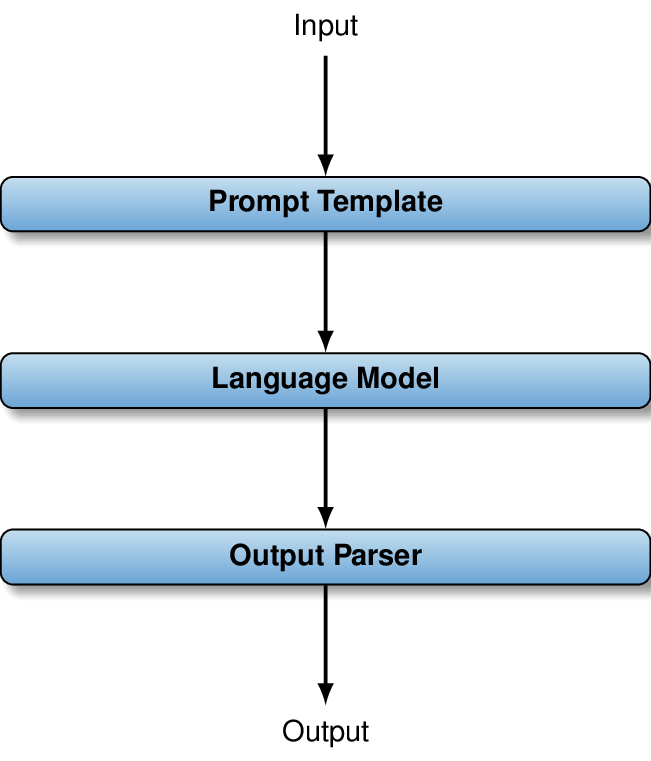
With LangChain, applications are built from composable steps—prompt templates, model calls, parsers, and other “runnables”—connected via a concise expression language. A simple sentiment classifier illustrates how prompt management, invocation, batching, and output parsing fit together cleanly. The chapter then elevates to agents: LLM-driven planners that choose and sequence tools autonomously, such as listing tables, inspecting schemas, validating and executing SQL, and augmenting answers with web search. It shows how to spin up a SQL-aware agent rapidly and how to extend it with custom tools (for example, a currency converter) by exposing clear function signatures and documentation so the agent can invoke them safely and interpret results, all while emitting verbose traces of its reasoning and actions.
LlamaIndex targets scenarios where relevant context must be retrieved from large, multimodal corpora. It streamlines ingestion and preprocessing of varied files, chunks them, and builds vector indexes using lightweight embedding models, enabling fast similarity search at query time. A compact example loads a directory of reports in mixed formats, constructs an index, and uses a query engine to find pertinent snippets and generate answers with a larger LLM. The chapter closes by contrasting the frameworks—LangChain for broad application composition and agent tooling, LlamaIndex for retrieval over indexed data—while noting their rapid evolution and advising that simple tasks may still be best served by low-level provider libraries.
Components in LangChain classification chain.
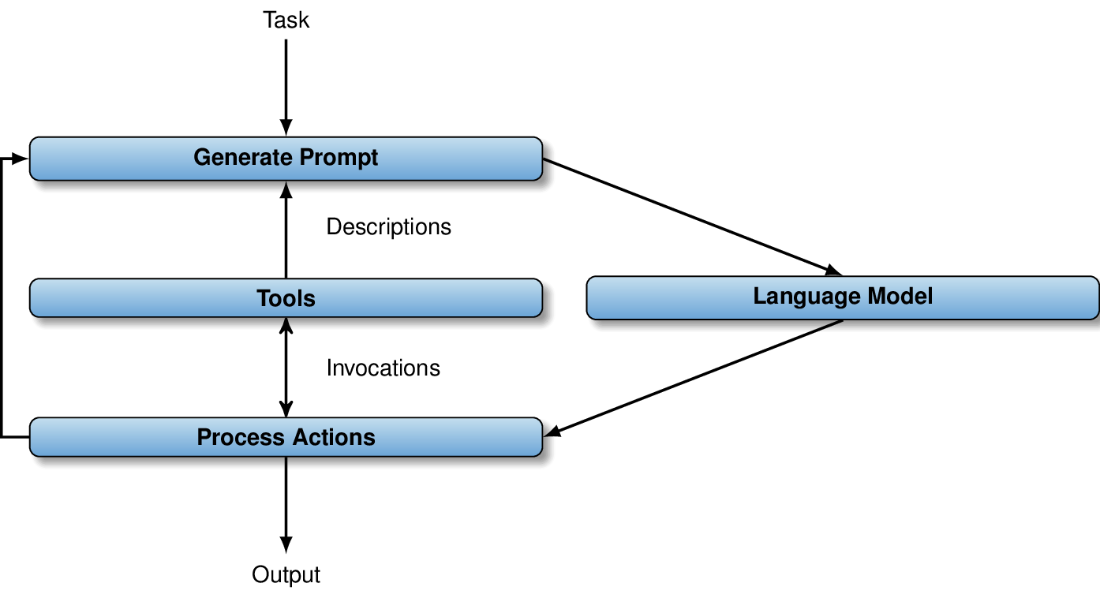
Using language models as agents: given a prompt describing the task and available tools, the language model decides on termination and tool invocations. Results of tool invocations are added to the prompt used for the next iteration.
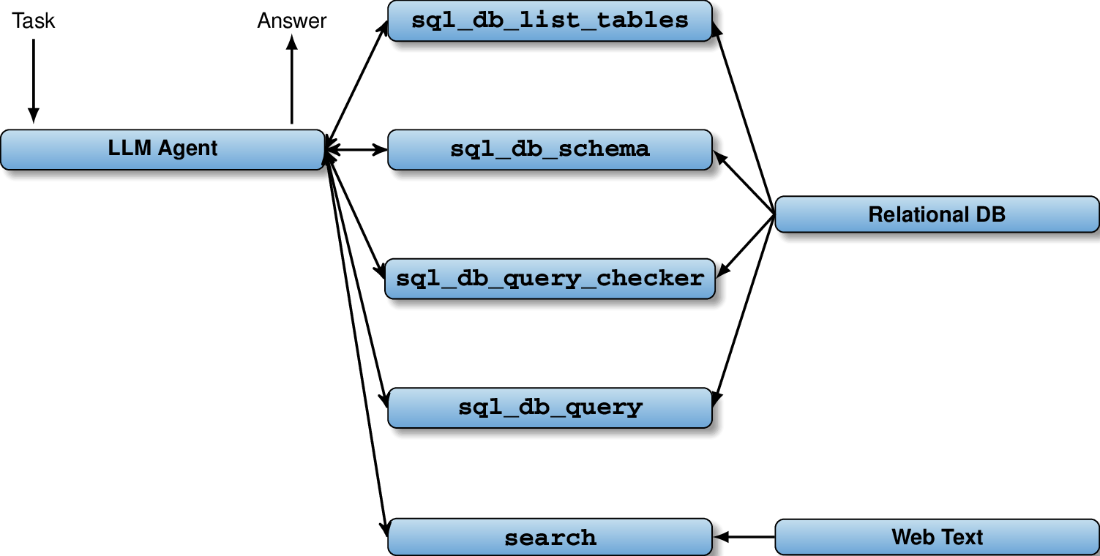
The data agent uses multiple tools to explore the structure and to query a relational database. In addition, the agent can retrieve Web text via the Web search tool.
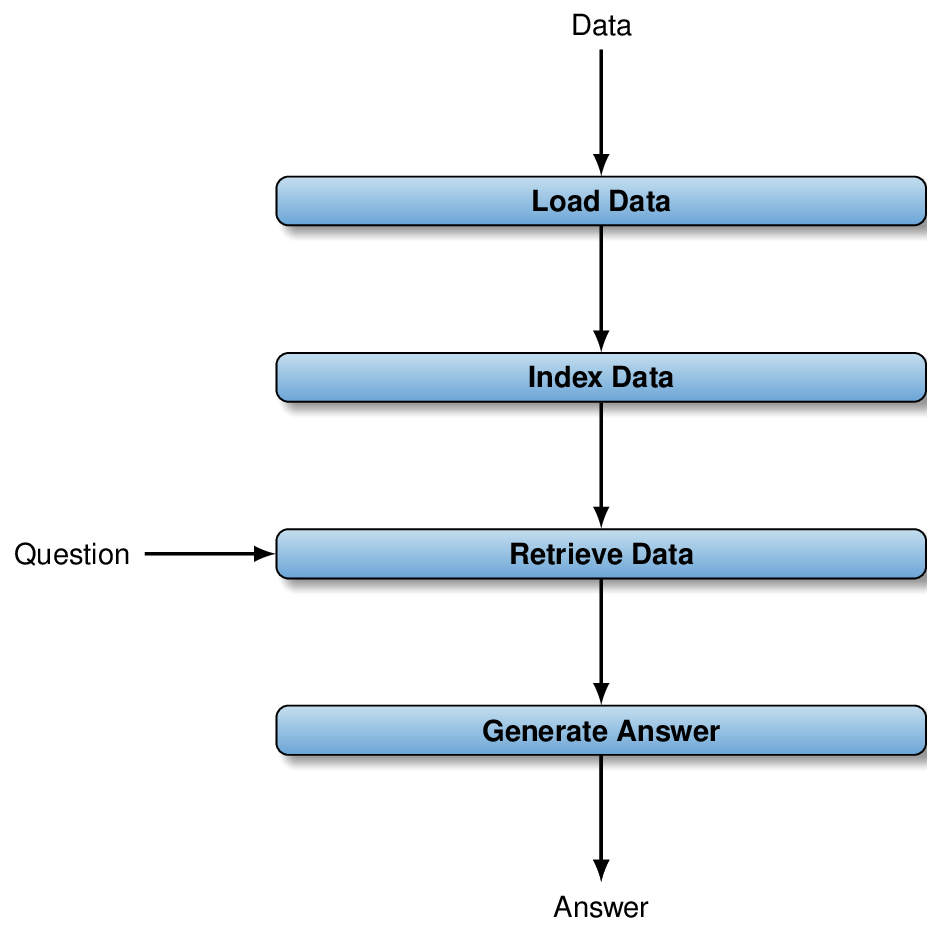
Primary steps of typical LLamaIndex data processing pipeline: LlamaIndex loads and indexes data to enable fast retrieval. Given a question, LlamaIndex identifies relevant data items and submits them, together with the input question, to a language model to generate an answer.
Summary
- LangChain and LlamaIndex enable complex applications on top of language models.
- Agents use language models to control invocations of various tools.
- Agents can solve complex tasks if given access to suitable tools.
- LangChain and LlamaIndex make it easy to create agents.
- Agents can use standard tools as well as custom tools.
- In LangChain, use the
@tooldecorator to turn functions into tools. - LlamaIndex indexes various data types by creating embedding vectors.
- LlamaIndex makes it easy to explore and query indexed data.
FAQ
What problems do LangChain and LlamaIndex solve that basic LLM SDKs don’t?
They make it easier to build complex, multi-step applications that go beyond a single prompt/response. LangChain focuses on composing chains, using agents with tools, logging, batching/streaming, and orchestration. LlamaIndex focuses on ingesting and indexing large, heterogeneous datasets and retrieving only the most relevant chunks for a task. Both reduce glue code and provide batteries-included components for common patterns.How do I install the exact versions used in the chapter?
Run:pip install langchain==0.1.13 and pip install langchain-openai==0.1.1. For the LangChain Hub: pip install langchainhub==0.1.15. The chapter stresses version pinning because interfaces change quickly.What is a “chain” in LangChain, and how do I build the sentiment classifier example?
A chain is a connected set of steps (prompt → LLM → parser) composed with the LangChain Expression Language (LCEL). For sentiment classification: useChatPromptTemplate to format the task, ChatOpenAI(model='gpt-4o', temperature=0, max_tokens=1) to generate, and StrOutputParser to extract the string. Wire them with {'text': RunnablePassthrough()} | prompt | llm | parser and run in batch via chain.batch(list_of_texts).What is LCEL and why is it useful?
The LangChain Expression Language uses the pipe operator to compose “runnables” into DAG-like workflows. It supports simple linear flows as well as parallel and conditional execution. LCEL yields concise, readable wiring between prompts, models, parsers, and custom functions.What are LangChain agents and when should I use them?
Agents delegate orchestration to the LLM: given a task and a set of described tools, the model decides which tool to call, in what order, with which inputs, and when to stop. They’re ideal when the sequence of steps isn’t known upfront and may involve multiple tools (e.g., DB lookups plus web search). LangChain commonly uses ReAct-style prompting (Thought → Action → Observation) to structure agent reasoning.How do I create an SQL data-analysis agent with web search in LangChain?
Steps: (1) Create an LLM:ChatOpenAI(temperature=0, model='gpt-4o'). (2) Create a DB: SQLDatabase.from_uri(f'sqlite:///{dbpath}'). (3) Load web search via SerpAPI: extra_tools = load_tools(['serpapi'], serpapi_api_key=..., llm=llm). (4) Build the agent: create_sql_agent(llm=llm, db=db, agent_type='openai-tools', verbose=True, extra_tools=extra_tools). (5) Invoke with agent.invoke({'input': task}). The SQL tools (list tables, schema, query checker, query) are auto-added.How do I add a custom tool (e.g., a currency converter) to an agent?
Define a typed Python function, document it well, and decorate it with@tool. Example signature: def convert_currency(USD_amount: float, currency: str) -> Union[float, str]. Include clear docstrings and defensive error messages for invalid inputs. Append it to the tools list (e.g., extra_tools.append(convert_currency)) before creating the agent.How can I see what an agent is doing under the hood?
Setverbose=True when creating the agent. You’ll get a step-by-step log of the agent’s Thought/Action/Observation loop, including tool names, parameters passed, and results returned. This is helpful for debugging tool specs and prompt design.What is LlamaIndex and how does its retrieval pipeline work?
LlamaIndex ingests multi-format data, chunks it, and builds a vector index using embeddings (typically with smaller, cheaper models). At query time, it embeds the question, retrieves the most similar chunks, and sends them along with the question to a larger model to generate the answer. This targets relevant context efficiently while keeping costs lower.How do I set up the simple LlamaIndex QA example and required dependencies?
Install core:pip install llama-index==0.10.25. For PDFs/PPTs and related formats: pip install torch==2.1.2 transformers==4.36.0 python-pptx==0.6.23 Pillow==10.2.0. Code flow: load data with SimpleDirectoryReader(datadir).load_data(), build the index with VectorStoreIndex.from_documents(...), get a query engine via index.as_query_engine(), and run engine.query(question).
 Data Analysis with LLMs ebook for free
