Overview

1 When PyTorch just isn’t enough

Large language models demand enormous amounts of compute, and the difference between slow training or inference and practical performance often comes from how well the GPU is used. This chapter frames CUDA as the low-level layer beneath PyTorch on NVIDIA hardware, explaining why learning it matters when built-in framework operations are not fast enough, not flexible enough, or not tailored to a specific workload. It emphasizes that although higher-level tools can be powerful, understanding raw CUDA gives you direct control over what the GPU actually executes.

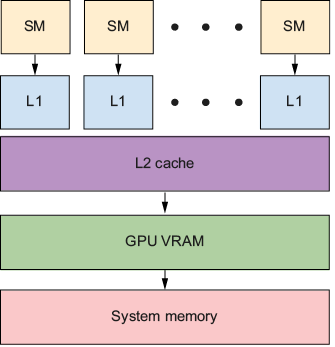
The chapter introduces the core CUDA mental model: a CPU host coordinates work, while the GPU device carries out massively parallel computation in its own memory space. CUDA kernels are functions launched across thousands of threads, with each thread handling one small part of the problem. The key insight is to recognize data-parallel patterns, where the same operation is applied independently to many values, as in activations, convolutions, attention, and gradient updates. It also explains that performance depends heavily on the GPU memory hierarchy, where global memory is large but slow, shared memory and L1 are faster, and registers are fastest, so efficient programs keep data as close to the compute units as possible.

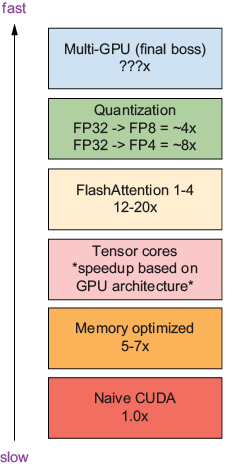
The chapter also sets expectations for optimization: first kernels will usually be slower than PyTorch, but the book will show how to climb a ladder of improvements through better memory access, reduced traffic, tensor cores, kernel fusion, quantization, and eventually multi-GPU scaling. It highlights when GPUs help most and when CPU execution may still be better, such as with tiny problems, low arithmetic intensity, or irregular branching. By the end, the reader is prepared to think like a performance engineer, understand why custom kernels can beat standard libraries in specific cases, and build a foundation for writing and optimizing their own high-performance GPU code.

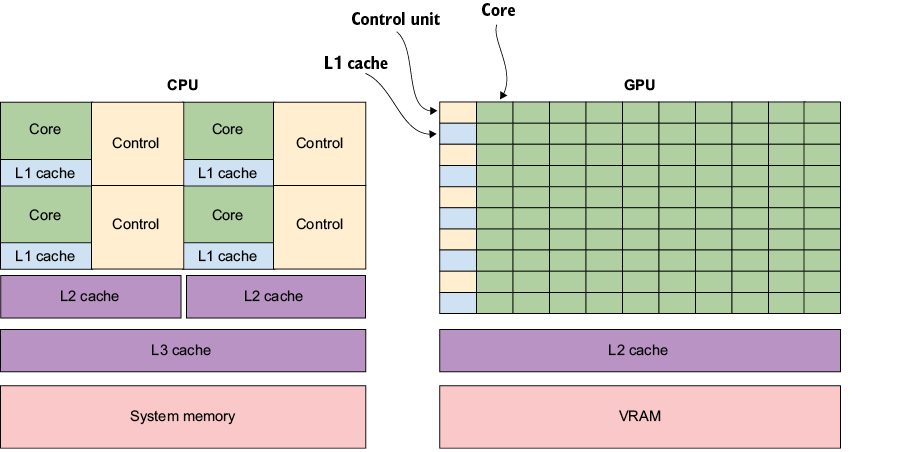
A CPU dedicates more area to caches and control logic for a few powerful cores; a GPU dedicates more area to many simpler arithmetic cores.
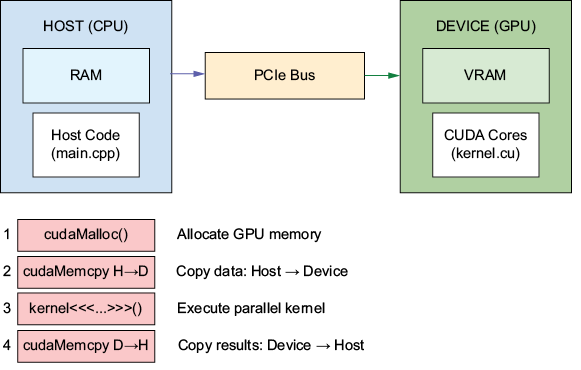
The four-step CUDA workflow: allocate GPU memory, copy data to the device, execute the kernel, and copy results back.
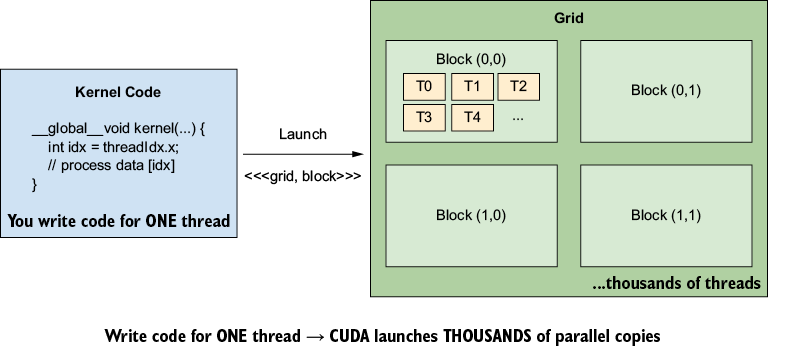
Write code for one thread; CUDA launches thousands of parallel copies, each with a unique thread index.
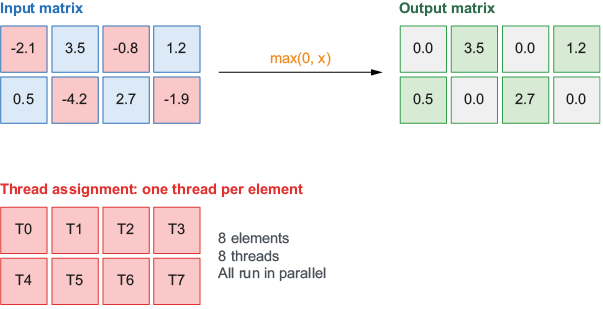
 Element-wise ReLU: each matrix element is processed by a dedicated thread running the same operation.
Memory hierarchy on a GPU
The optimization ladder shows multipliers at each level of optimization covered throughout the book. These represent the compound effects on efficiency and performance from latency, memory savings, occupancy, throughput, and cost savings.
Summary

  • GPUs excel at throughput by running the same instruction across massive data sets in parallel, making them ideal for deep learning workloads.
  • Host code (CPU) orchestrates work while device code (GPU) executes it. Every CUDA project involves explicit memory transfers between CPU RAM and GPU memory.
  • CUDA launches thousands of threads organized into grids and blocks. Each thread computes a unique index to determine which data element it processes.
  • Matrix multiplications, convolutions, activations, and attention computations all fit the “same operation, different data” pattern. Recognizing these opportunities is the first skill of a CUDA performance engineer.
  • Fast kernels respect the GPU memory hierarchy: registers and shared memory are scarce but fast, and global memory is plentiful but slower. The key optimization strategy is to keep data in the fastest memory tier for as long as possible.
  • The rest of this book climbs an optimization ladder, from writing your first CUDA program in chapter 2 to applying advanced memory and computation techniques in later chapters.

FAQ

What is CUDA, and how is it related to PyTorch on NVIDIA GPUs?CUDA is NVIDIA’s programming model for writing code that runs directly on the GPU. PyTorch uses CUDA under the hood when you move a model to a GPU, for example with model.to("cuda"). In other words, PyTorch often hides the low-level details, but CUDA is the layer that actually executes GPU work.
Why would someone need custom CUDA kernels if PyTorch already works well?Most of the time, PyTorch is enough. But custom CUDA becomes useful when a built-in operation is a bottleneck, when you need a new operation that the framework does not provide, or when you want to target special hardware features and squeeze out more performance than the default libraries deliver.
What kinds of jobs benefit most from writing custom CUDA code?Custom CUDA is especially valuable for framework contributors, kernel engineers, edge deployment engineers, and researchers building novel architectures. These roles often need support for new attention variants, very long sequences, fused operations, lower latency, or memory savings that standard framework ops cannot provide.
What is the basic difference between the host and the device in CUDA?The host is your CPU and system memory, where your main program runs and coordinates work. The device is the GPU and its video memory, where the parallel computation happens. CUDA programs typically move data from host to device, run a kernel, and then copy results back.
What is a CUDA kernel?A CUDA kernel is a function that runs on the GPU. Unlike a normal function that runs once, a kernel is launched across many threads at the same time. You write the logic for one thread, and CUDA executes thousands of copies of it in parallel.
What kinds of deep learning operations are good candidates for GPU parallelization?Operations that apply the same computation to many independent values are ideal for GPUs. Examples include activation functions like ReLU, convolutions, gradient calculations, matrix multiplications, and attention mechanisms. These workloads involve large amounts of repeated, data-parallel work.
What is the difference between SIMD and SIMT?SIMD means Single Instruction, Multiple Data, where many lanes execute the same instruction together. SIMT means Single Instruction, Multiple Threads, which is the GPU model used by CUDA. SIMT is similar, but it allows threads to branch independently when needed, giving more flexibility than pure SIMD.
What is the GPU memory hierarchy, and why does it matter?GPU memory is arranged from slowest and largest to fastest and smallest: global memory, L2 cache, shared memory/L1, and registers. Performance often depends on keeping data in the fastest possible tier for as long as possible, because global memory is much slower than on-chip memory.
When does parallelism not help, and a CPU may be better?GPU acceleration may not help for small problems, low-arithmetic-intensity workloads, or irregular code with unpredictable branching. In those cases, the overhead of data transfer and kernel launches can outweigh the GPU’s parallel speed advantage.
What is the optimization ladder in this book?The book builds performance in layers: naive kernels first, then memory and compute optimization, tensor cores, kernel fusion, quantization, and finally distributed computing. These techniques compound, so each layer can multiply the gains from the ones before it.

pro $24.99 per month

  • access to all Manning books, MEAPs, liveVideos, liveProjects, and audiobooks!
  • choose one free eBook per month to keep
  • exclusive 50% discount on all purchases
  • renews monthly, pause or cancel renewal anytime

lite $19.99 per month

  • access to all Manning books, including MEAPs!

team

5, 10 or 20 seats+ for your team - learn more


Close
choose your plan

team

monthly
annual
$49.99
$499.99
only $41.67 per month
  • five seats for your team
  • access to all Manning books, MEAPs, liveVideos, liveProjects, and audiobooks!
  • choose another free product every time you renew
  • choose twelve free products per year
  • exclusive 50% discount on all purchases
  • renews monthly, pause or cancel renewal anytime
  • renews annually, pause or cancel renewal anytime
  • CUDA for LLMs CUDA for LLMs ebook for free
Close
choose your plan

team

monthly
annual
$49.99
$499.99
only $41.67 per month
  • five seats for your team
  • access to all Manning books, MEAPs, liveVideos, liveProjects, and audiobooks!
  • choose another free product every time you renew
  • choose twelve free products per year
  • exclusive 50% discount on all purchases
  • renews monthly, pause or cancel renewal anytime
  • renews annually, pause or cancel renewal anytime
  • CUDA for LLMs CUDA for LLMs ebook for free