9 Architecture: The graph of programs and wires
In practice, architecture is the map of a system’s moving parts: which programs run, which services they talk to, and which connections are local, remote, synchronous, or deferred. The chapter opens by showing how a vague repo becomes understandable once you stop thinking in files and start thinking in nodes and wires. That shift matters because the real failure points are usually hidden in configuration, third-party APIs, or background work that a quick glance at the tree would miss.
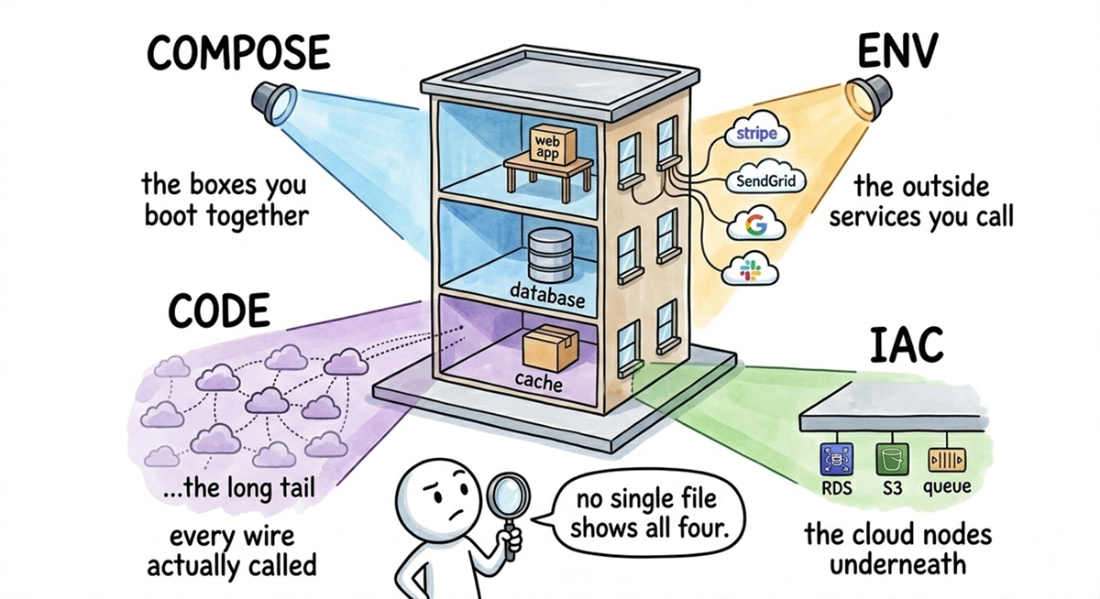
The core idea is to reconstruct a service graph from evidence spread across four sources: process declarations, environment variables, application code, and infrastructure-as-code. Compose files, Procfiles, and Kubernetes manifests reveal what runs together; env files hint at external vendors; code proves which integrations are live; and IaC shows the managed cloud resources underneath. The chapter emphasizes that these sources are complementary and incomplete on their own, so AI is used to gather them into a single inventory and classify each node by ownership and each edge by whether it is internal or public, sync or async.
Once the graph is built, the chapter shows how to make it useful in debugging by opening each box into its real tech stack and then tracing one real request end to end. That trace reveals where the user actually waits, where the system hands work off to background jobs, and how runtime state determines which services are touched for a given booking, payment, or integration. The larger lesson is that many impressive-sounding architectures reduce to simple primitives with known failure modes, and that the fastest way to understand a new codebase is to identify the exact components, their boundaries, and the request path that ties them together.
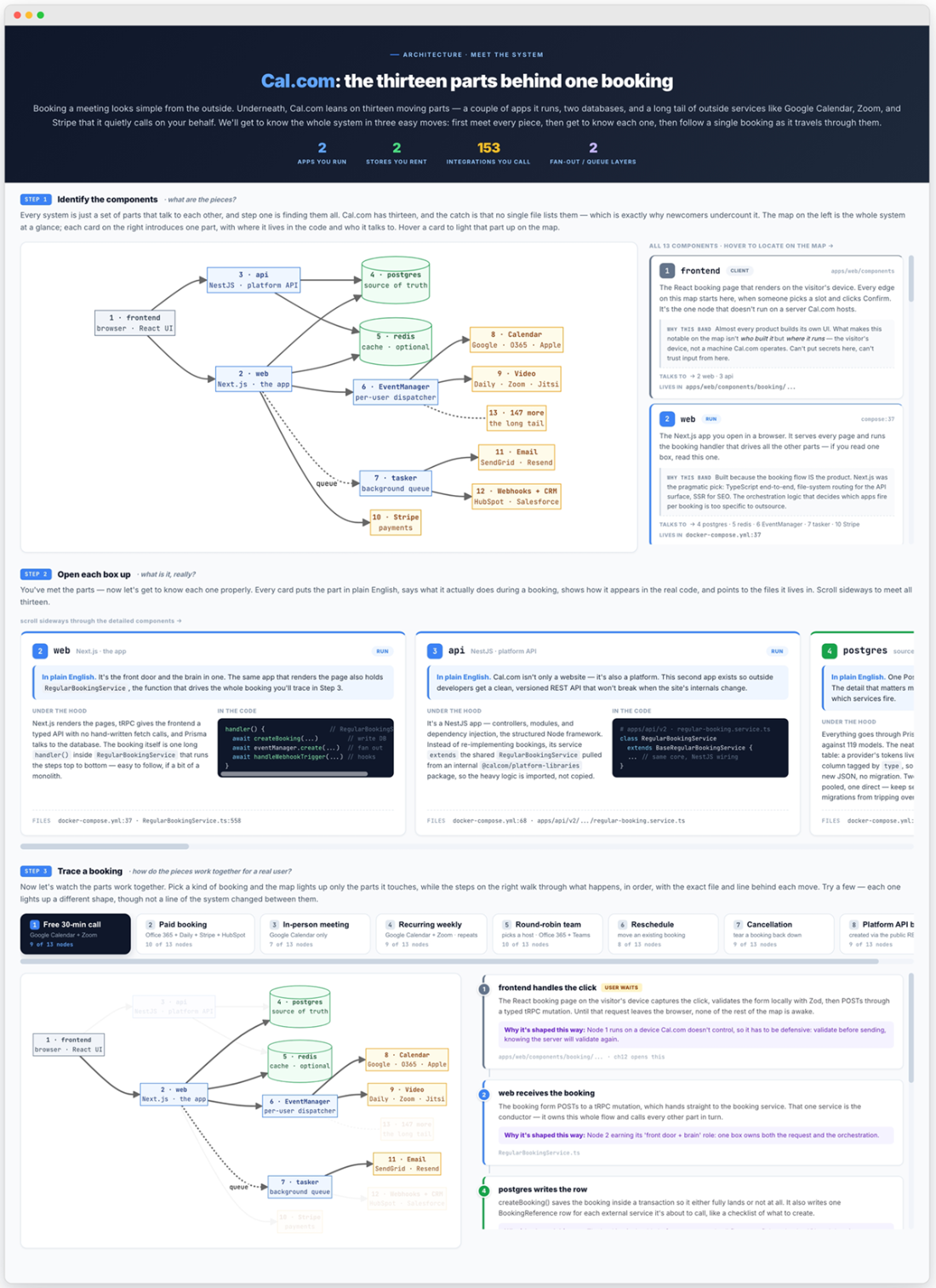
Three views of the Cal.com architecture: a map of its thirteen components (grouped into booker, apps, stores, and services), a look at each component's tech stack, and a trace of a single booking request to show which parts it touches.
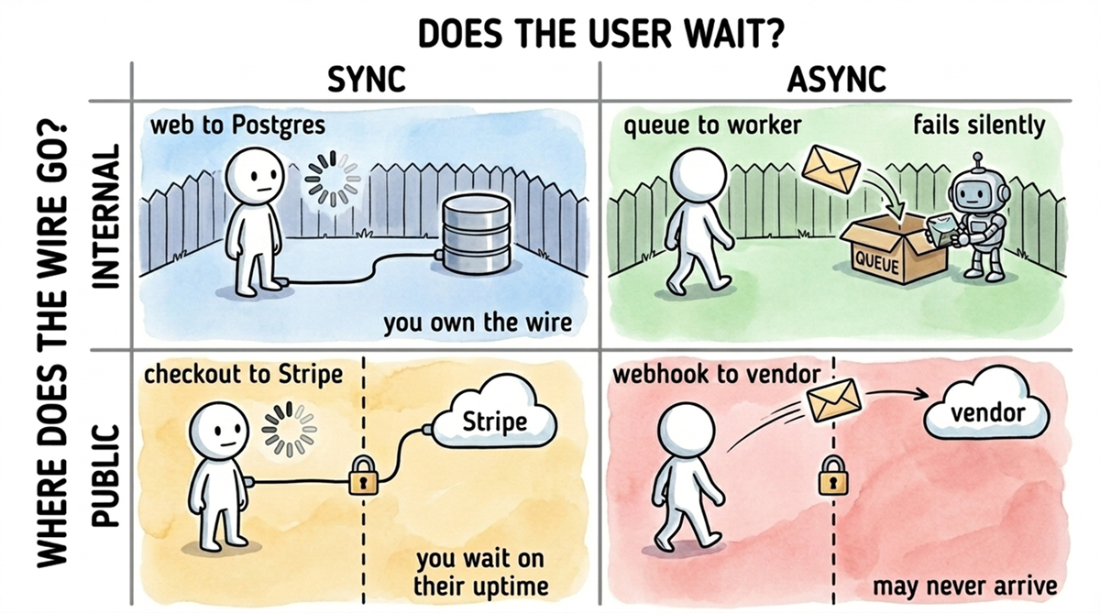
The four types of connections between programs, based on two questions: does the user wait (SYNC vs. ASYNC), and does the wire cross the internet (INTERNAL vs. PUBLIC)? Each quadrant has a distinct failure mode. INTERNAL+SYNC (web → Postgres): you control the wire. INTERNAL+ASYNC (queue → worker): fails silently to the user. PUBLIC+SYNC (checkout → Stripe): your uptime depends on a vendor's. PUBLIC+ASYNC (webhook → vendor): the message may never arrive.
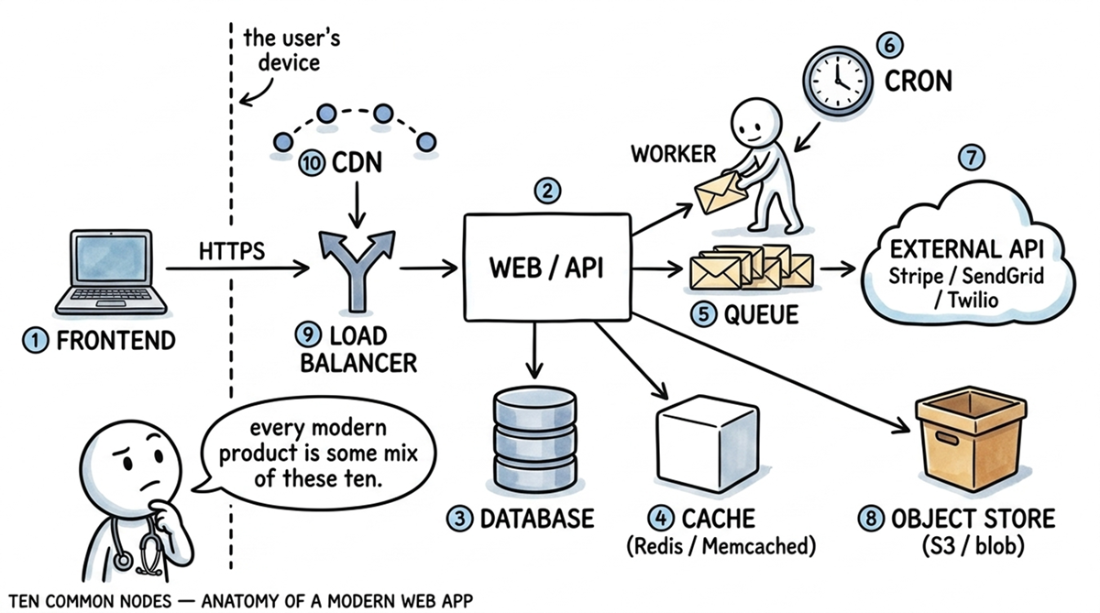
The ten components of a common web application architecture. The user's device (left) connects through a CDN and load balancer to a central web/API server, which reads from a cache and writes to a database. A queue, worker, and cron job handle asynchronous tasks, while external APIs (Stripe, SendGrid, Twilio) and an object store (S3) provide specialized services.
Four spotlights revealing different parts of a system, shown as a building cutaway. The COMPOSE beam lights the services that boot together (web app, database, cache). The ENV beam reveals the external APIs you call (Stripe, SendGrid, Google, Slack). The CODE beam uncovers integrations the env file misses. The IAC beam shows the cloud resources provisioned underneath (RDS, S3, queue). The developer in the center with a magnifying glass delivers the takeaway: "no single file shows all four."
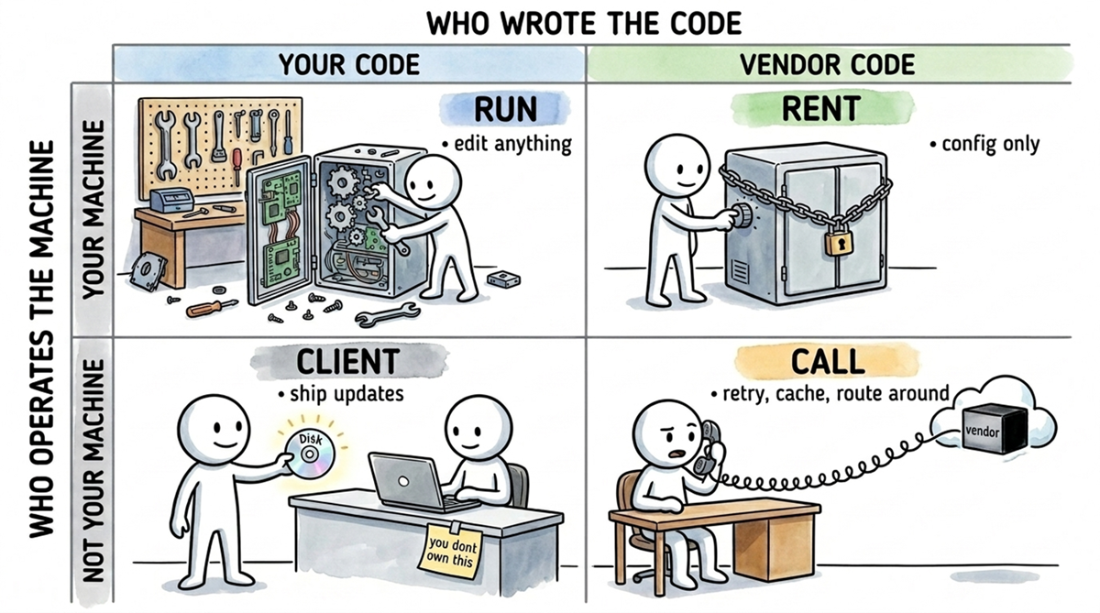
The four machine-ownership bands dictate your control. CLIENT: Your code on a machine you do not operate, letting you ship updates. RUN: Your code on your machine, where you can edit anything. RENT: Vendor code on your machine, limiting you to config changes. CALL: Vendor code on a vendor machine, where you can only retry, cache, or route around.
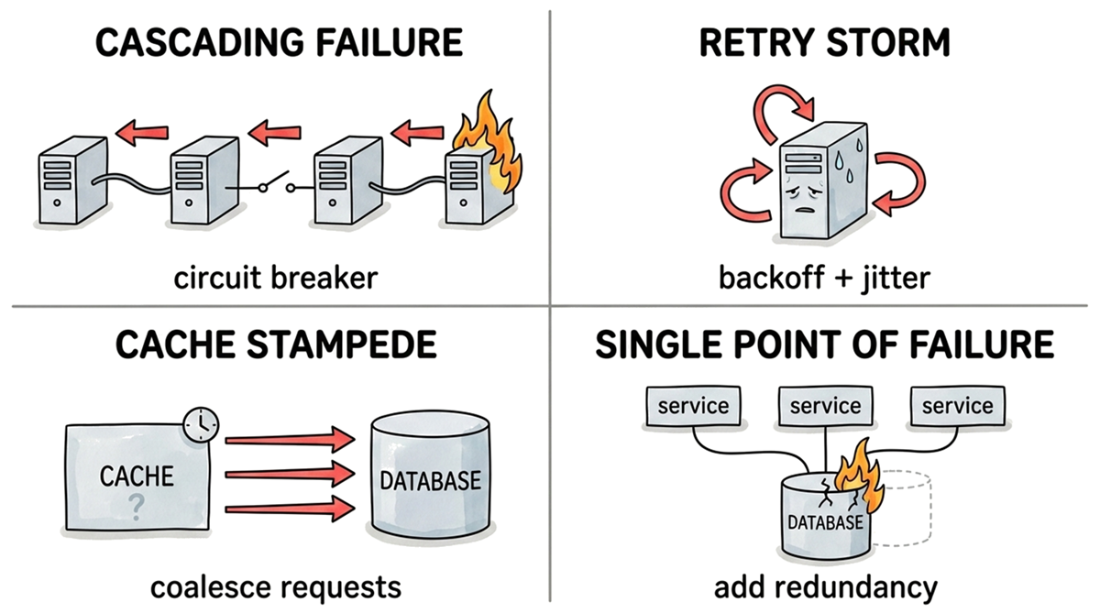
Four common failure modes and their standard mitigations: a cascading failure up a call chain (stopped by a circuit breaker); a retry storm overwhelming a struggling service (stopped by backoff with jitter); a cache stampede slamming a database (stopped by request coalescing); and a single point of failure, where multiple services depend on one component (fixed with redundancy).
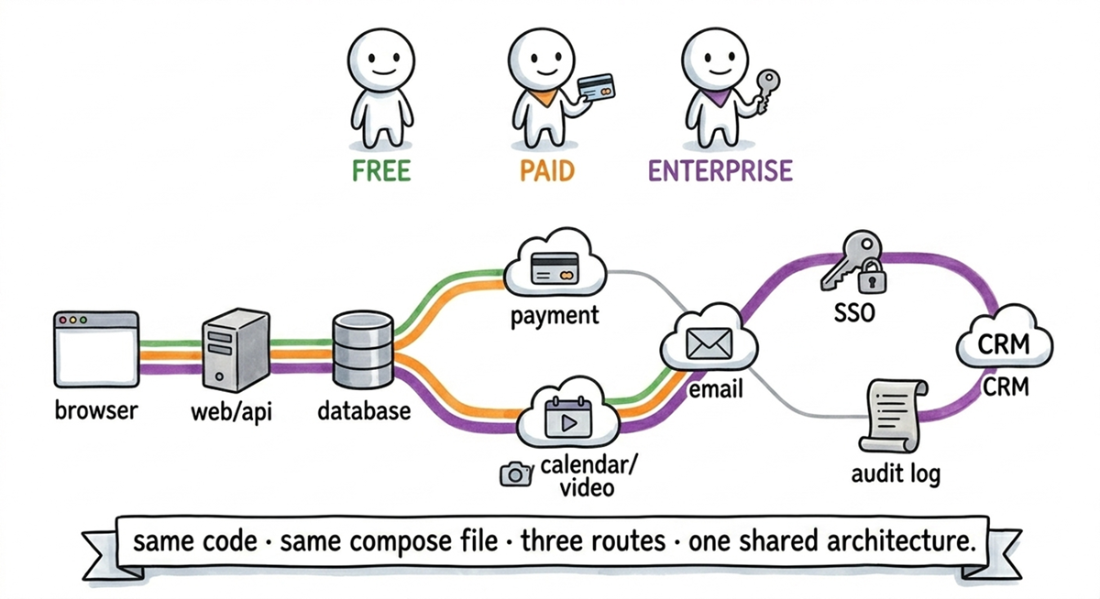
A subway map showing how requests from different user plans trace unique paths through the same shared architecture. The green "Free" route hits the core services: browser, web/api, database, calendar/video, and email. The orange "Paid" route adds a call to the payment processor. The purple "Enterprise" route touches every component, adding single sign-on (SSO), audit logging, and CRM syncs. A single value in the database (the user's plan) determines which path a given request follows at runtime.
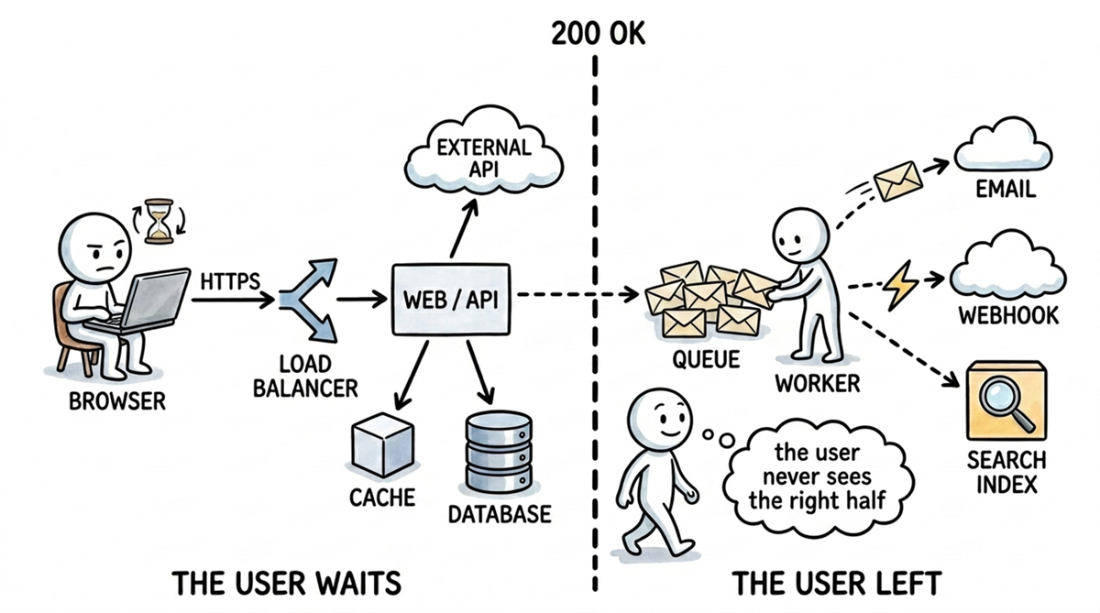
A request trace before and after the 200 OK response. The left side shows the synchronous work the user waits for: web server calls to the cache, database, and external APIs. The right side shows the asynchronous work that runs after the response is sent: a queue fans out jobs to workers that send email, fire webhooks, and update the search index.
Summary
- First, ask whether you're looking at one process or many. A library, a CLI, or a single-binary tool like PocketBase is one process. Its architecture is its internal module structure, which is covered in chapter 13. The rest of this chapter is for distributed systems: applications that boot multiple programs and wire them together.
- A system's architecture is never defined in a single file; you have to overlay four sources to get the full picture. Local execution files list the services you run directly, environment variables list the external services your code calls, infrastructure-as-code defines your managed cloud resources, and the application code itself holds every other connection. A missing source is a diagnostic signal about how the system is deployed, not a dead end.
- Start by listing every node in the system. Sort them into three categories: services you run, services you rent from a third party, and external APIs you call. This inventory gives you a flat list of every component in the architecture. A docker-compose.yml might declare four services when the system actually depends on thirteen. That gap is your first important discovery.
- Next, investigate each node by asking what it is, what it's built from, and where its code lives. This is how you discover that a single API facade actually calls multiple third-party services, or that a "critical component" is just a database table updated by a cron job. Finding these facts before an incident prevents surprises during one.
- Finally, trace a single user action from end to end. Following one request through every node it touches separates the synchronous path that the user waits for from the asynchronous jobs that run later. The trace also shows that the architecture is assembled dynamically from the runtime state for each request, not fixed in a static file.
- These three steps (inventory, investigate, and trace) let you build a working mental model of any system's architecture in an afternoon, not a quarter.
FAQ
What is an architecture in this chapter’s sense?
An architecture is a graph of programs and the wires between them. The programs are the nodes, and the communication paths between them are the edges.
How do I know whether I’m dealing with a single-process system or a multi-service one?
First ask whether the system runs as one process or many. If it’s a single executable or library, you’re mapping module-level architecture; if it boots multiple programs and talks over the network, you’re mapping a service graph.
What kinds of files reveal the architecture of a multi-service codebase?
The architecture is usually spread across four sources: compose files, environment variables, application source code, and Infrastructure-as-Code. Each source shows a different part of the system, and no single file tells the whole story.
Why are environment variables important when mapping architecture?
Environment variables often name the external services the app depends on, such as Stripe, SendGrid, or OpenAI. The names alone are clues, but the code must confirm whether those integrations are actually live.
Why is source code the strongest evidence for a dependency?
Because an import statement or client construction proves the application really calls that service at runtime. A compose file or .env file can only suggest intent; the code shows what actually runs.
What is the difference between a sync edge and an async edge?
A sync edge blocks the user while it runs, like a checkout call to Stripe. An async edge happens after the response leaves, like a background job sending a confirmation email.
Why does the chapter care whether a wire is public or internal?
Public edges cross the internet and define your security boundary and vendor risk. Internal edges stay inside your own system, so their failures are usually network or service issues you can control directly.
What are the four ownership bands used to classify nodes?
The four bands are CLIENT, RUN, RENT, and CALL. CLIENT is your code on a user’s machine, RUN is your code on your machines, RENT is vendor code on your machines, and CALL is vendor code on a vendor’s machine.
Why does the chapter say the type of edge matters more than the node?
Because the edge determines how the system breaks. A SQL query to your own Postgres fails differently from an HTTP call to Stripe, which can time out, rate-limit, or fail on the vendor’s side.
What is the main value of tracing one real request through the system?
A trace shows the exact path one user action takes through the architecture, including where the user waits and what happens in the background afterward. It reveals the runtime graph, not just the static list of services.

 Crack Any Codebase with AI ebook for free
