9 Prompt Engineering
Prompt engineering is presented as a core developer skill that turns general-purpose AI into a dependable coding partner. By supplying strong context, clear instructions, and well-chosen examples, developers can steer models toward accurate, useful outputs while reducing back-and-forth. Treating the model like an assistant—stating objectives, constraints, and expected formats—consistently outperforms vague requests and yields better code, clearer documentation, and improved coverage of edge cases.
The chapter surveys foundational prompt types and when to use them: zero-shot for speed and simplicity, few-shot to set patterns and style, open-ended for exploration, constrained for precision, and structured for comprehensive, formatted deliverables. It then introduces advanced methods that raise reliability and control: Chain of Thought to encourage stepwise reasoning, Recursive Prompting to iteratively refine results, Context Manipulation to prime behavior and style, Instruction Refinement to remove ambiguity, and Output Control to enforce structure, tone, and formatting. Together, these techniques counter model stochasticity, improve consistency, and align outputs with technical requirements.
Practical guidance for programmers emphasizes turning prompts into actionable specifications: define objectives, audience, and constraints; assign roles; decompose tasks; demand explicit formats (e.g., sections or machine-parseable blocks); call out tests, edge cases, error handling, security and performance requirements, and preferred coding standards. Use scenario-based and comparative prompts for design, request reasoning before implementation, and iterate—letting the model critique and optimize prompts themselves. With disciplined prompting and verification, developers can accelerate delivery, enhance maintainability and documentation, and make AI a reliable part of everyday software work.
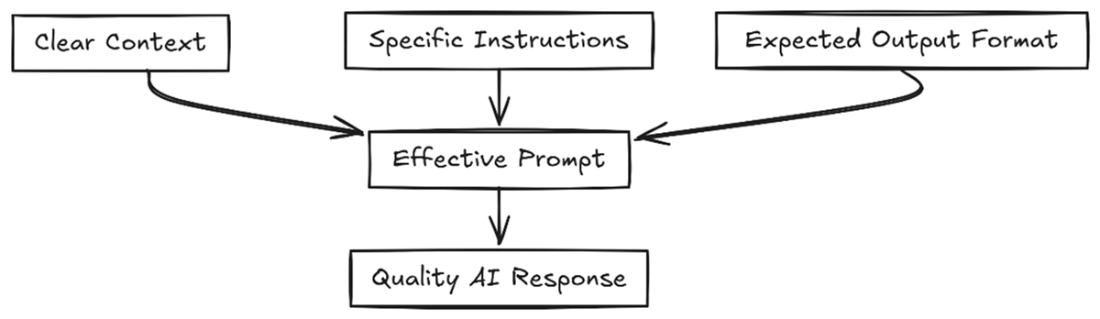
A quality prompt starts with clear context, specific instructions, and an expected format. The better quality the input, the better the result.
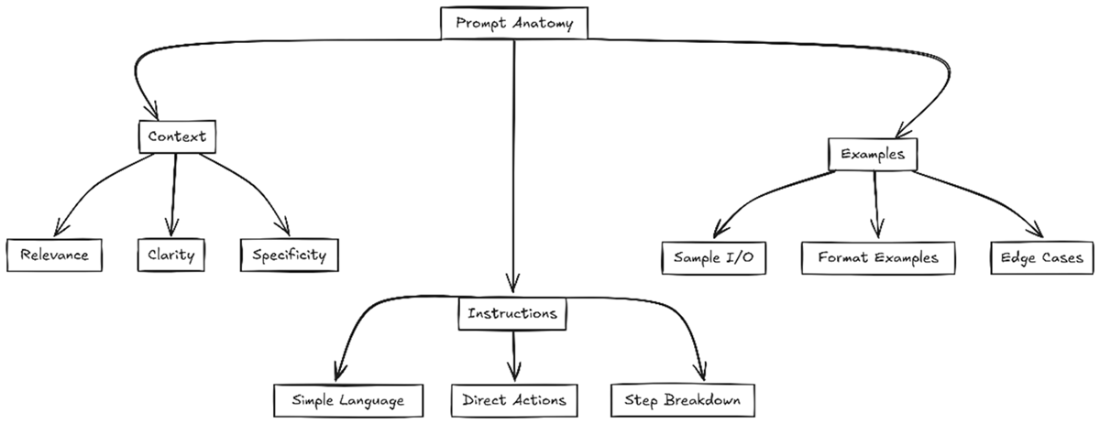
A good prompt starts as a query, and context is added in. If you supply clear instructions and some examples you can change the output drastically.

A good prompt starts with great context (usually provided by the tool). This includes your existing project. Then you add in good examples and clear instructions. It’s very similar to communicating verbally with a human.
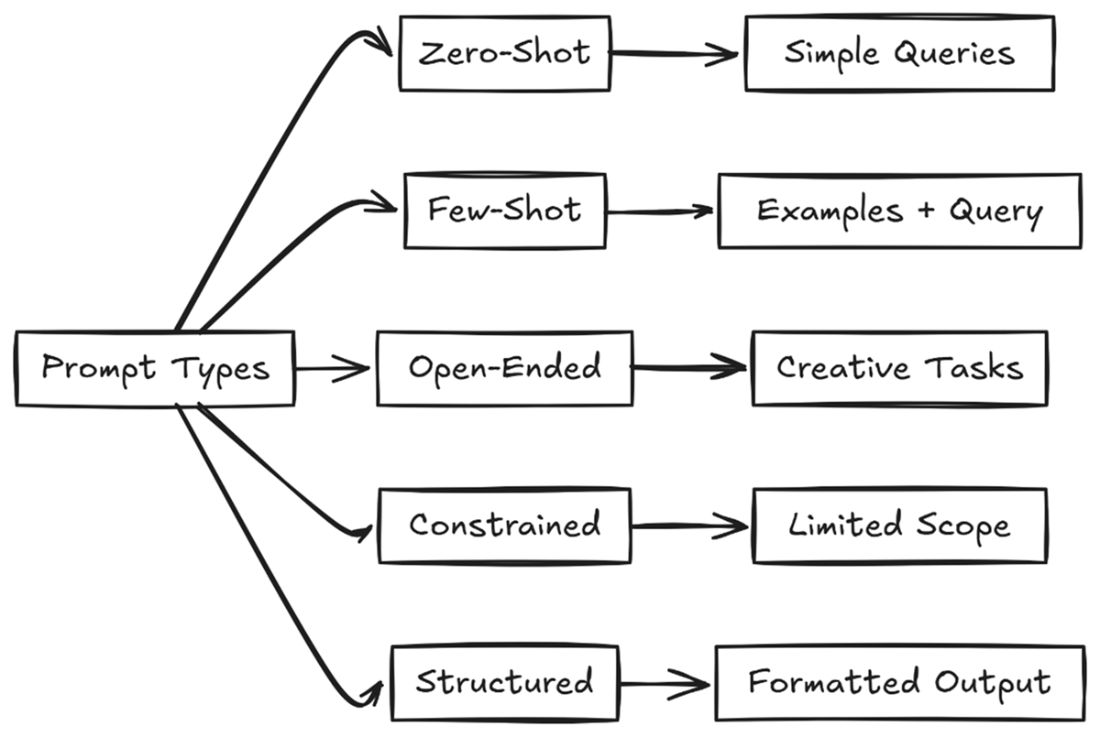
Most of your prompts will fall into one of these categories. The simplest being a zero shot prompt, with few shot and structured adding complexity. You can control the creativity with open ended or constrained prompts.
For advanced prompts you’ll need to provide a lot more information. You need to manipulate context and examples, refine your instruction and dictate the output. You can also use recursive and chain of thought prompting to get the model to “think” about the answers.
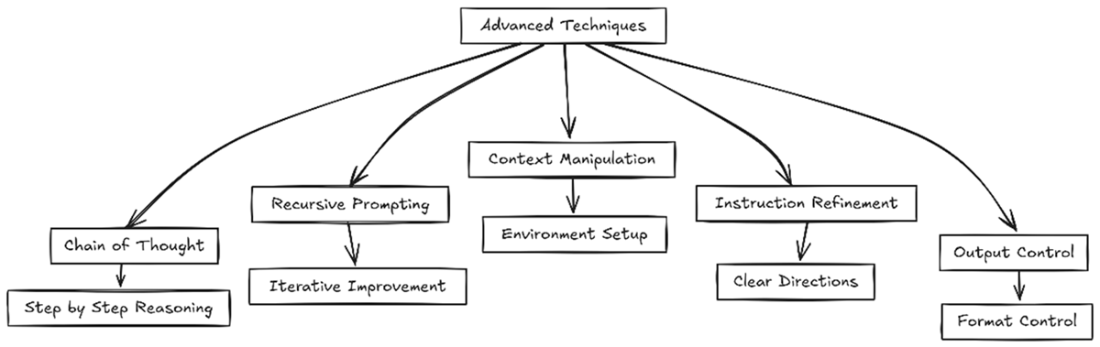
A chain of thought prompt gets the model to reason out a problem like a human would. You break down the problem and experiment with answers until you get the results you desire.

Recursive prompting works by breaking the answer down into stages
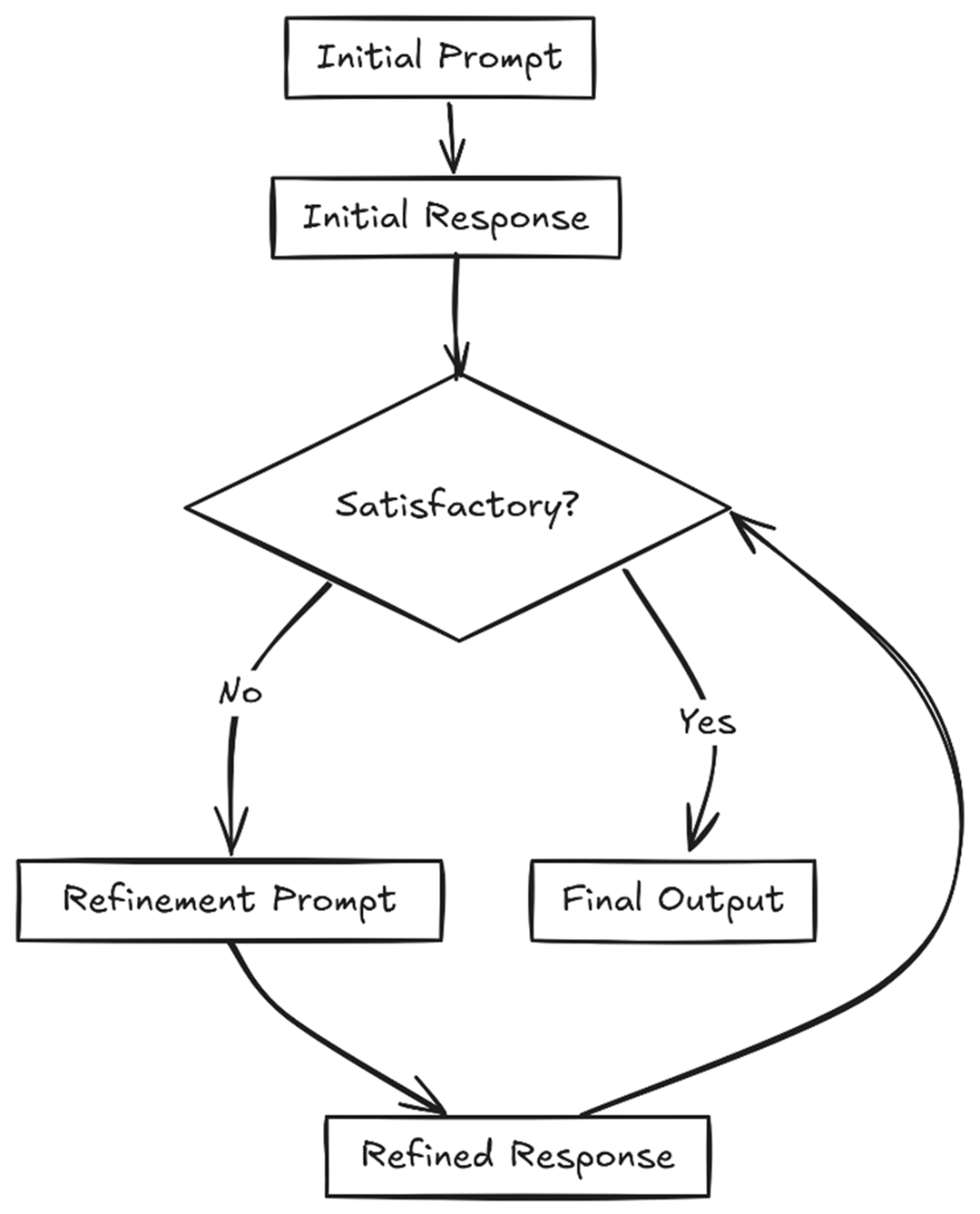
With context manipulation you can supply as much or as little context as you want, which will change your results. Creating proper context ensures the model has plenty of information to base it’s answer on.

Instruction refinement is a process where you get as specific as you can, break down your requirements and tell the model exactly what you expect for output.
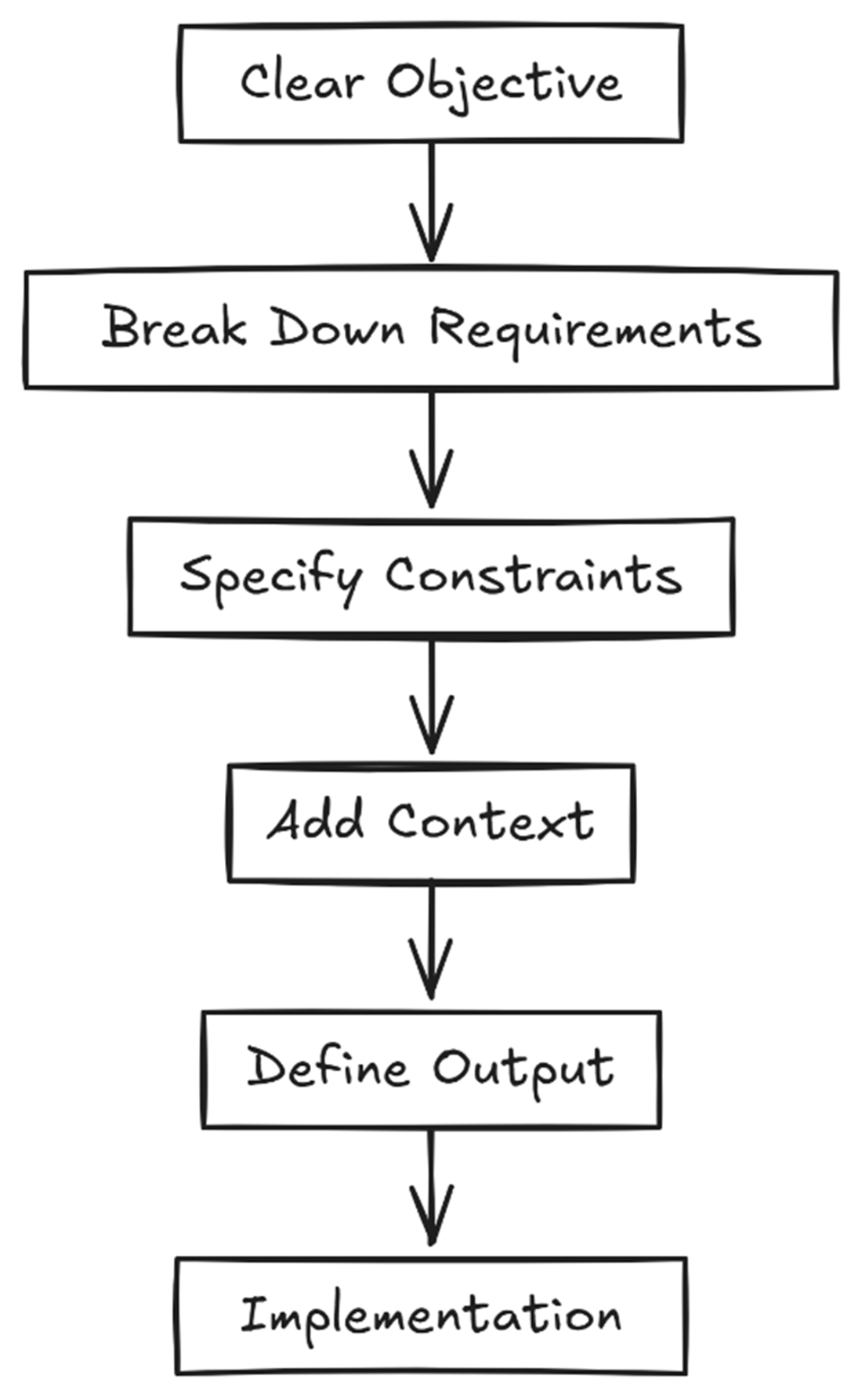
Output control is used when you need the response to fit into a particular format like JSON, SQL, or many other standard formats.

Summary
- Understand engineering fundamentals to effectively communicate with and get better results from LLMs and LLM based programming tools.
- Understand different prompt types—zero-shot, few-shot, structured, and constrained—and when to use each for optimal results.
- Utilize advanced techniques like chain of thought prompting and recursive prompting to break down complex problems and refine solutions iteratively.
- Implement context manipulation and instruction refinement to guide LLMs toward more accurate and relevant responses.
- Control output format and structure through specific prompting techniques to ensure consistent and usable results.
- Apply specialized programming prompts that focus on code architecture, testing, security, and documentation to improve development workflows.
- Leverage iterative approaches to prompt engineering, treating it as a refinement process rather than a one-shot solution.
- Combine multiple prompting techniques when needed to handle complex technical tasks and requirements.
- Maintain clear objectives and structural guidelines in prompts to ensure AI-generated content meets your specific needs.
- Remember that effective prompt engineering is an evolving skill that improves with practice and experimentation.
FAQ
What is prompt engineering and why does it matter for developers?
Prompt engineering is the craft of writing clear, effective instructions so AI models understand your intent and deliver accurate, useful results. For developers it reduces back-and-forth, improves code accuracy, saves debugging time, produces better documentation, and helps handle edge cases. Think of it like writing good requirements or teaching: the clearer you are, the better the output.What are the key components of an effective prompt?
- Context: background, constraints, technical requirements.
- Clear instructions: direct, step-by-step tasks and explicit deliverables.
- Examples (when helpful): sample inputs/outputs, preferred formatting, and edge cases.
How do zero-shot, few-shot, open-ended, constrained, and structured prompts differ?
- Zero-shot: minimal context; fast for simple tasks, relies on model’s general knowledge.
- Few-shot: include a few examples; improves style/format consistency and quality.
- Open-ended: broad exploration; great for brainstorming but less controllable.
- Constrained: narrow scope and rules (e.g., “exactly 3 items”); focused, less creative.
- Structured: predefined sections/format; ideal for docs, checklists, and multi-part outputs.
How can I turn a vague prompt into an effective one?
Include problem context, explicit requirements, and expected outputs. Break the task into steps, specify constraints (language, libraries, OS), and request tests or edge cases. State the output format (e.g., numbered steps, code, JSON). This shift—from “Write X” to “Do A, B, C and return Y format with tests”—dramatically improves results.What is Chain of Thought prompting and when should I use it?
Chain of Thought (CoT) prompting asks the model to reason step-by-step, mirroring how humans break down problems. Use it for complex tasks (debugging, algorithm design, architecture choices) where intermediate reasoning improves accuracy. Benefits include better problem-solving, easier error checking per step, and improved handling of edge cases.What is Recursive Prompting and how is it different from Chain of Thought?
Recursive prompting iteratively refines an answer across stages: generate, critique, improve, repeat. It’s a loop of targeted refinements (e.g., add error handling, then optimize, then analyze complexity). CoT focuses on step-by-step reasoning within a response; recursive prompting focuses on multi-round improvement of that response.How do I manipulate context to get more consistent, relevant outputs?
Prime the model with role, rules, and constraints; include relevant project details and preferred libraries; and provide short, in-pattern examples. This sets expectations and yields consistent style and structure (e.g., “Always use Pandas,” function name requirements, or code conventions). Context manipulation is especially helpful for code generation, troubleshooting, and documentation.What is Instruction Refinement and when should I use it?
Instruction refinement means making requirements precise and unambiguous: define objectives, break down steps, set constraints/preferences, add context, and specify the exact output format. Use it for non-creative, precision tasks like complex algorithms, boilerplate that must follow standards, strict refactors, and team-specific documentation.How can I control the output format for code and documentation?
Use output control: explicitly define structure (JSON, XML tags, numbered steps), length, style (PEP 8, snake_case), and filters (exclude irrelevant content). You can request sections (e.g., requirements, implementation, tests) or specific elements (e.g., bullet list, CSV layout). Combining output control with instruction refinement yields predictable, integration-ready results.What practical tips improve coding prompts right away?
- State role, audience, environment, and libraries upfront.
- Break tasks into steps and request tests plus edge cases.
- Provide a short example to set style/format (few-shot).
- Ask for clarifying questions if requirements are incomplete.
- Iterate: use recursive prompting to refine output quality.
- Specify output structure and style rules to ensure consistency.
- Leverage a meta-prompt: ask the model to optimize your prompt before using it.

 Coding with AI ebook for free
