9 Creating an agentic RAG-based chatbot
This chapter brings together several of DSPy’s most practical building blocks to show how they combine into realistic assistant systems. It moves from simple question answering toward more capable chatbots that can retrieve outside information, take actions with tools, remember past exchanges, and improve their own outputs. Using the WixQA dataset as a running example, the chapter illustrates how DSPy can be used to build customer-support style applications that are grounded in a company knowledge base rather than the model’s training data alone.
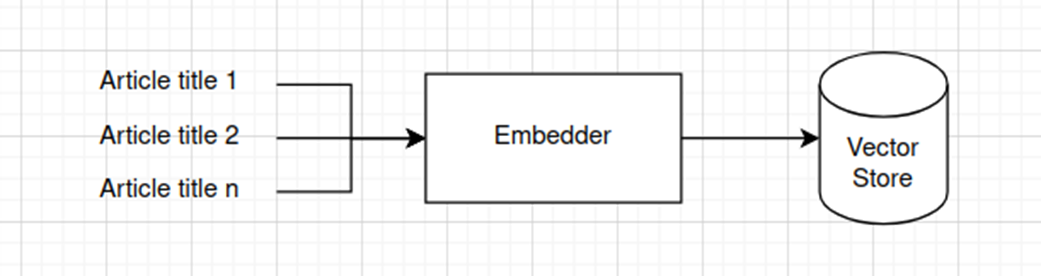
The first major focus is retrieval-augmented generation. The chapter shows how to embed knowledge-base article titles, store them in a vector retriever, and pass the most relevant articles to an LM so it can answer domain-specific questions. It then extends this baseline with evaluation using a judge model, followed by more advanced retrieval strategies such as multihop search and HYDE, which generate better search terms or hypothetical documents to improve recall. These methods are presented as practical ways to reduce retrieval failures and improve answer quality when a single retrieval pass is not enough.
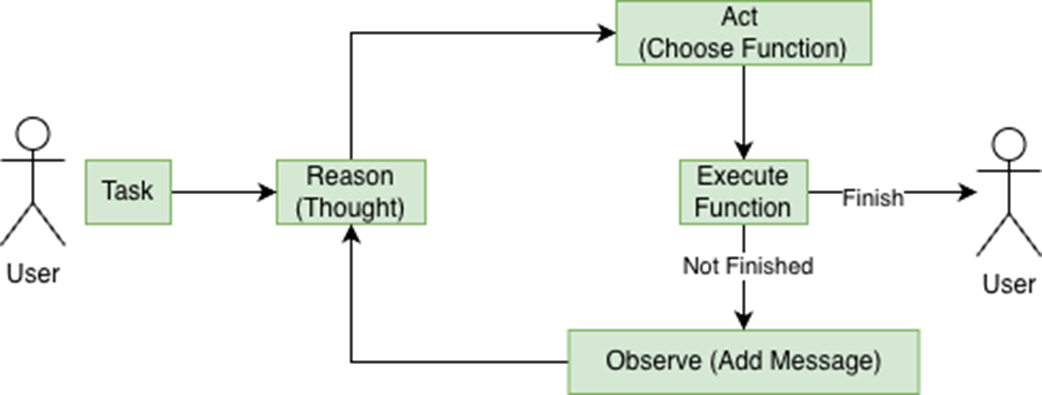
The second half of the chapter shifts to agents, memory, and system integration. It explains ReAct as a reasoning-and-action loop where the LM chooses tools, observes results, and iterates until it can answer or act successfully. Examples include a calculator agent, an agentic RAG workflow that retrieves and reads knowledge-base articles as needed, and a memory-enabled chatbot that uses conversation history to handle follow-up questions naturally. The chapter closes by showing how DSPy agents can connect to external services through MCP, and how DSPy’s Refine module can repeatedly improve answers by scoring and retrying them, making the overall chatbot stack more robust and flexible.
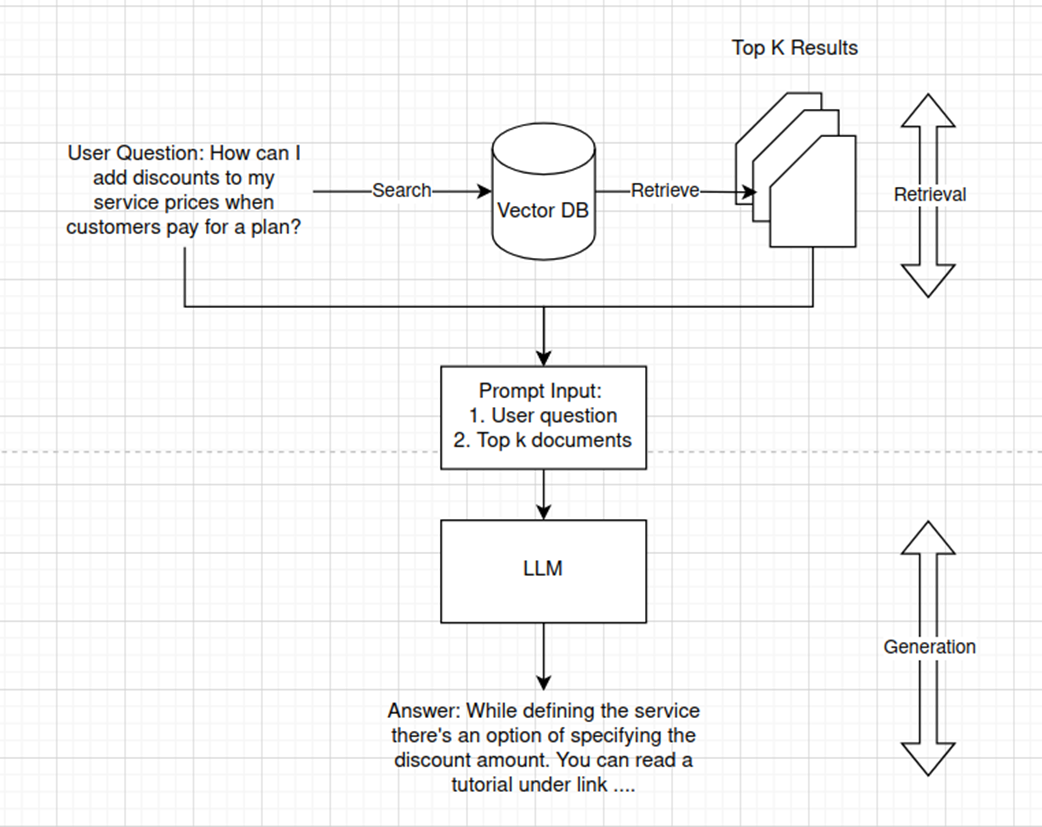
The two main stages of RAG: retrieval and generation. During the retrieval stage, we're searching for documents that are most similar to the query. Once we have these, we can prepare the prompt by injecting the top-k results along with the user query as input for the generation stage. The LM is then able to generate a grounded answer based on these documents. If requested, it may also quote the source documents.
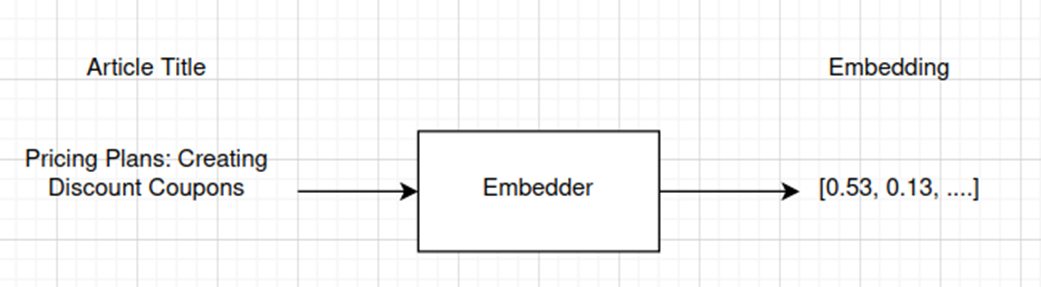
Transforming article titles to vectors through an embedder model. The input for the embedder is text, and the output is an n-dimensional vector.
Creating a vector store from the article titles. We vectorize each article title with an embedder and save its vector into a database-like structure.
In the ReAct cycle, we split the solution of complex problems into iterations. Each iteration starts with a thought step (similar to the thoughts in Chain of Thought), which leads to the LM choosing an action. The action is then executed, and its outcome is added to the chat history. This is used in the next cycle of ReAct, where the LM determines the next action to take. This continues until either the LLM decides it can finish the task, or it reaches a maximum number of iterations. In this figure, the LM is responsible for the Reason and Act steps, while the other steps are initiated by the user or the ReAct module.
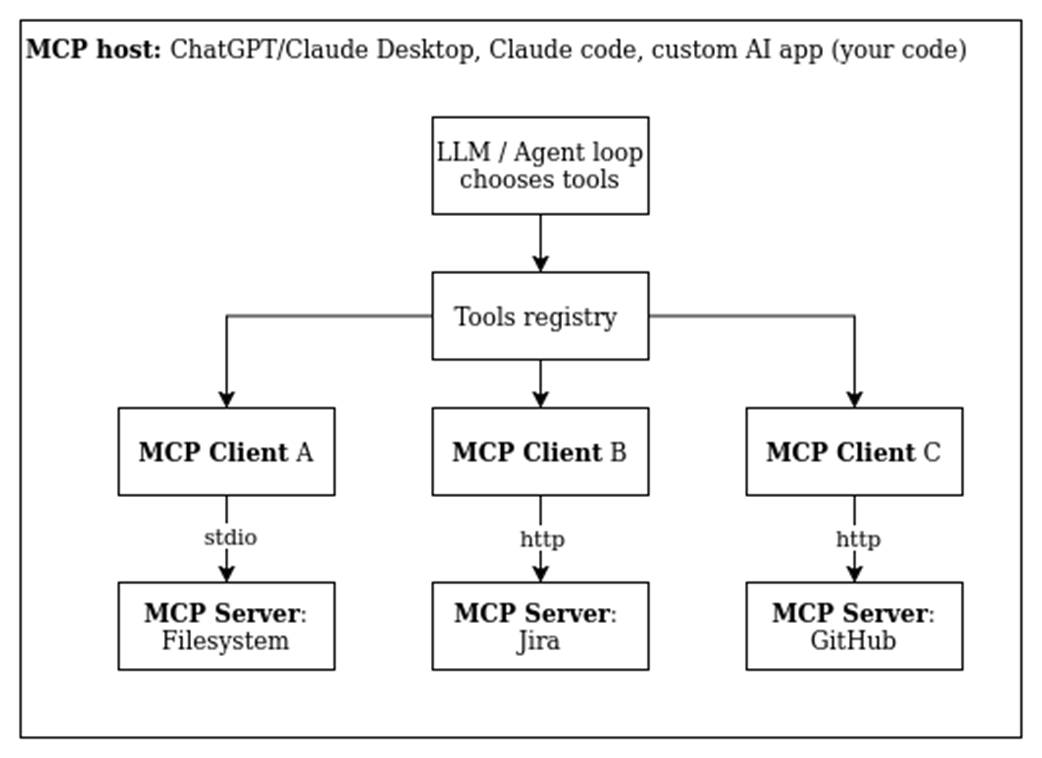
During the agent’s initialization, it connects to the set of MCP servers that may be used by the host, creating a pool of MCP clients to communicate with these. Whenever the agent chooses to execute an MCP-based tool, the appropriate MCP client communicates with its server, passing the necessary arguments and collecting the tool’s output.
Summary
- DSPy provides support for creating RAG-based applications, including providing infrastructure for working with vector stores and performing embedding-based search.
- DSPy RAG modules can be evaluated and optimized similarly to other DSPy modules.
- DSPy also provides a built-in ReAct module, which allows us to create agents that can reason and act.
- Using ReAct, users provide a set of tools wrapped in Python functions. The LM will choose which of these tools to use to complete the query.
- Where the LMs choose to use a tool, DSPy will also have them specify the parameters to be used.
- When using ReAct, DSPy tracks trajectories: histories of the reasoning, the tools selected, and outputs from the tool executions.
- Each iteration, ReAct uses the trajectories created so far to help it determine which tool to call next.
- When put in a long-running loop, this framework allows us to create an always-available agent.
- Chatbots can be implemented with a ReAct pattern as well as a RAG pattern. We often combine these.
- DSPy supports memory, which allows us to create applications that can maintain conversations over any number of queries.
- The MCP protocol allows agents to retrieve tool definitions from remote MCP servers. The execution of the tool will happen in a remote machine.
- MCP protocol defines hosts, clients and servers.
- DSPy supports creating MCP hosts (applications that use MCP tools) and MCP Servers (applications that provide and execute the MCP tools).

 Building LLM Applications with DSPy ebook for free
