Overview

4 Evaluating DSPy programs

Before putting an LM-based application into production, it needs to be evaluated both to guide optimization and to estimate how reliable it will be in real use. The chapter emphasizes that evaluation is especially important for prompt-based systems because model outputs can vary from call to call, making it hard to judge which prompt, model, or module is actually best without an automated testing setup. DSPy is presented as a practical way to handle this process, reducing manual effort and making it easier to compare baseline behavior, consistency, cost, and speed across many runs.

A central part of the evaluation workflow is preparing the right data and metric. The text explains how to build test examples with DSPy’s Example class, including the required inputs and gold labels, and how to assemble datasets from real, synthetic, or mixed sources. It also discusses how to split data into training, validation, development, and test sets so that optimization and final assessment remain separate. Because the metric is often the hardest piece to define, the chapter shows how to write a custom Python function that scores each prediction, starting with simple exact-match classification logic and then considering more flexible scoring options when needed.

Once the data and metric are in place, the chapter compares manual evaluation with DSPy’s Evaluate class. Manual loops can work, but Evaluate is cleaner and faster because it runs examples in parallel, manages progress reporting, and returns structured results automatically. The chapter then shows how to go beyond a single accuracy number by examining per-class performance, calculating F1, checking consistency by repeating examples, and comparing different models and prompting modules. Across these experiments, the main lesson is that evaluation should be repeated, multi-dimensional, and grounded in realistic data, since small data splits and stochastic model behavior can easily mislead conclusions.

The middle stage of prompt programming—Baseline Evaluation

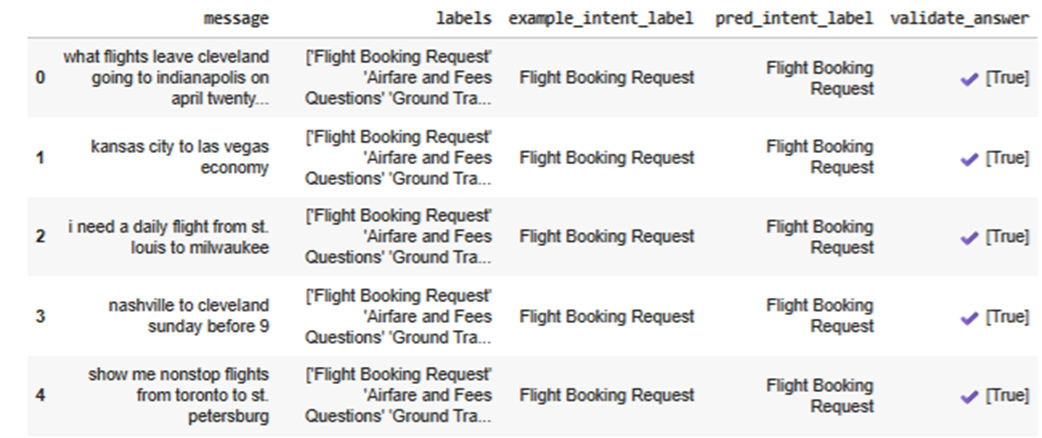
Sample of output from a call to Evaluate. For each of the 5 Examples, all fields are shown from the Example and from the Prediction (here, a single field in the pred_intent_label column), and the score is given by the metric function. With this metric function, the scores are boolean, so they will all be True or False.
Summary

  • Evaluation is central to prompt programming and is well-supported by DSPy.
  • Evaluation is important both to optimize models and to estimate how well they would perform if put into production.
  • We normally split the data we have into at least three sets: the train, validation, and test sets, though more sets may be used.
  • As well as real data, it’s common, and useful, to use both manually created and LM created synthetic data.
  • Defining a metric function is typically the most difficult part of working with DSPy, though it's straightforward with classification problems.
  • The metric function will score a single LM response for a single example.
  • Reducing the per-example scores to a meaningful overall score indicates how well the module performs on a given test set.
  • To determine if we’re improving the model, it’s useful to evaluate the first (baseline) model as well as other programs we create later.
  • For optimization, we use a single metric function, but for evaluation, we may want to use multiple functions to gain a fuller picture of how well the module performs.
  • It’s important to test the metric function before using it to evaluate a module.
  • Creating unit tests allows us to maintain a set of tests for the metric functions.
  • We can manually evaluate models, but using DSPy’s support for evaluation is generally easier, cleaner, and faster, leading to greater consistency.
  • We should be mindful of LM rate limits and also take advantage of our ability to execute the evaluation in parallel.
  • Evaluating LM-based applications without tools such as DSPy is possible, but requires more effort and more code.
  • As well as the quality of the LM responses, it’s useful to evaluate the consistency.
  • Currently, out of the LMs and modules tested so far, using gpt-4o-mini with Predict appears to be the best combination.
  • This result isn't conclusive at this point, as what’s most relevant is which combination, once optimized, performs best.

FAQ

What is the main goal of evaluating a DSPy program before production?It helps you determine how well the application performs in terms of accuracy, consistency, cost, and execution time, and it gives you a reliable basis for deciding whether the model is ready for production.
Why does this chapter emphasize using a test set with similar real-world distribution?A test set should resemble production data so the evaluation reflects how the model will behave in practice. If the test data is too different, the results may be misleading or overly optimistic.
What is a DSPy Example object used for in evaluation?An Example wraps one test case, including the input fields needed to run the program and the output fields needed to score the prediction. It behaves like a lightweight container for evaluation data.
Why do DSPy evaluation Examples need both input fields and output fields?The input fields are required to execute the DSPy program, while the output fields hold the ground truth needed to score the LM’s response. Without both, evaluation would be incomplete.
How do you define a custom evaluation metric in DSPy?You define a Python function that takes an Example, a Prediction, and an optional trace parameter, then returns a score such as True/False or a numeric value based on how good the prediction is.
What is the simplest metric for the airline intent classification example?The simplest metric is exact match: return True if the predicted intent label equals the example’s true intent label, and False otherwise.
Why are train, validation, development, and test sets sometimes separated in DSPy projects?Training data is used for demonstrations, validation data helps tune prompts during optimization, development data helps compare iterations during experimentation, and the test set is kept as a final hold-out set for unbiased evaluation.
What is the advantage of using DSPy’s Evaluate class instead of writing a manual loop?Evaluate automates and parallelizes evaluation, which makes it faster and cleaner than looping through examples one by one. It also provides useful output like per-example results and overall score.
How can you measure consistency of LM responses in this chapter’s approach?You can duplicate the same example multiple times and evaluate it repeatedly, then inspect how often the model returns the same prediction. Perfect consistency means all repeated runs produce the same answer.
Why compare multiple LMs and modules during evaluation?Different language models and DSPy modules can vary in accuracy, speed, token usage, and error rate. Comparing them helps identify the best combination for the task instead of assuming one setup will always be strongest.

pro $24.99 per month

  • access to all Manning books, MEAPs, liveVideos, liveProjects, and audiobooks!
  • choose one free eBook per month to keep
  • exclusive 50% discount on all purchases
  • renews monthly, pause or cancel renewal anytime

lite $19.99 per month

  • access to all Manning books, including MEAPs!

team

5, 10 or 20 seats+ for your team - learn more


choose your plan

team

monthly
annual
$49.99
$499.99
only $41.67 per month
  • five seats for your team
  • access to all Manning books, MEAPs, liveVideos, liveProjects, and audiobooks!
  • choose another free product every time you renew
  • choose twelve free products per year
  • exclusive 50% discount on all purchases
  • renews monthly, pause or cancel renewal anytime
  • renews annually, pause or cancel renewal anytime
  • Building LLM Applications with DSPy ebook for free

choose your plan

team

monthly
annual
$49.99
$499.99
only $41.67 per month
  • five seats for your team
  • access to all Manning books, MEAPs, liveVideos, liveProjects, and audiobooks!
  • choose another free product every time you renew
  • choose twelve free products per year
  • exclusive 50% discount on all purchases
  • renews monthly, pause or cancel renewal anytime
  • renews annually, pause or cancel renewal anytime
  • Building LLM Applications with DSPy ebook for free
choose your plan

team

monthly
annual
$49.99
$499.99
only $41.67 per month
  • five seats for your team
  • access to all Manning books, MEAPs, liveVideos, liveProjects, and audiobooks!
  • choose another free product every time you renew
  • choose twelve free products per year
  • exclusive 50% discount on all purchases
  • renews monthly, pause or cancel renewal anytime
  • renews annually, pause or cancel renewal anytime
  • Building LLM Applications with DSPy ebook for free