Overview

9 Deploying Aspire apps to production

The chapter explains how to move a .NET Aspire application from local development into production with confidence by making a few important design adjustments first. It shows how to plan for realistic deployment needs such as multiple replicas for busy services, different behaviors for local versus cloud environments, automated database migrations, and extra operational commands in the dashboard. These changes make the system easier to scale, maintain, and operate once it is live.

It then describes how Aspire applications are prepared for deployment by generating a manifest that captures the application’s resources, dependencies, and configuration in a structured JSON format. That manifest becomes the basis for deploying to Azure Container Apps, where Azure Developer CLI can initialize the project, log in, provision infrastructure, and deploy the app. The chapter also shows how the same deployment flow can be driven from Visual Studio, how generated infrastructure files can be customized, and how the manifest can be translated into Terraform for broader cloud support.

Finally, the chapter extends the deployment story to Kubernetes by using tools that convert the Aspire manifest into Kubernetes-friendly YAML and then applying it to a cluster with kubectl. It closes by emphasizing CI/CD automation, demonstrating how to scaffold pipelines in GitHub Actions and Azure DevOps, add build and test stages before deployment, and adapt the scripts for Kubernetes-based releases. The overall message is that Aspire apps can be prepared once, then deployed and automated across multiple environments with a consistent, repeatable process.

Hosting multiple services in Aspire
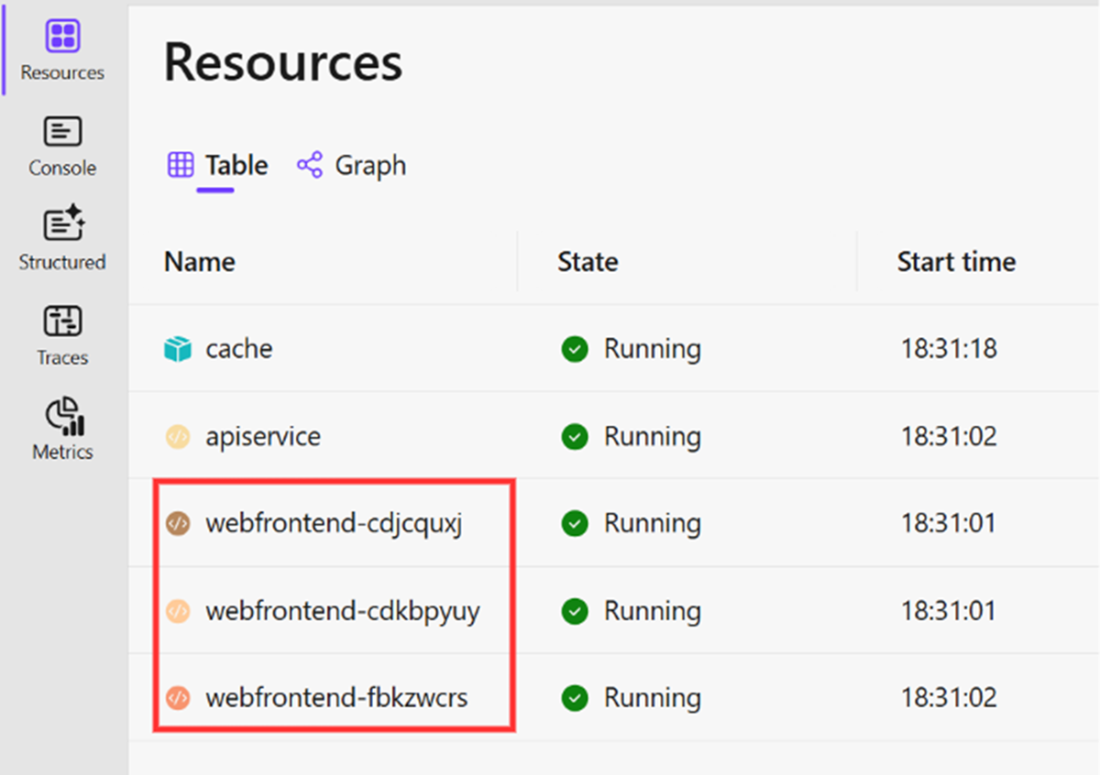
Looking at the internal HTTP ports of individual instances
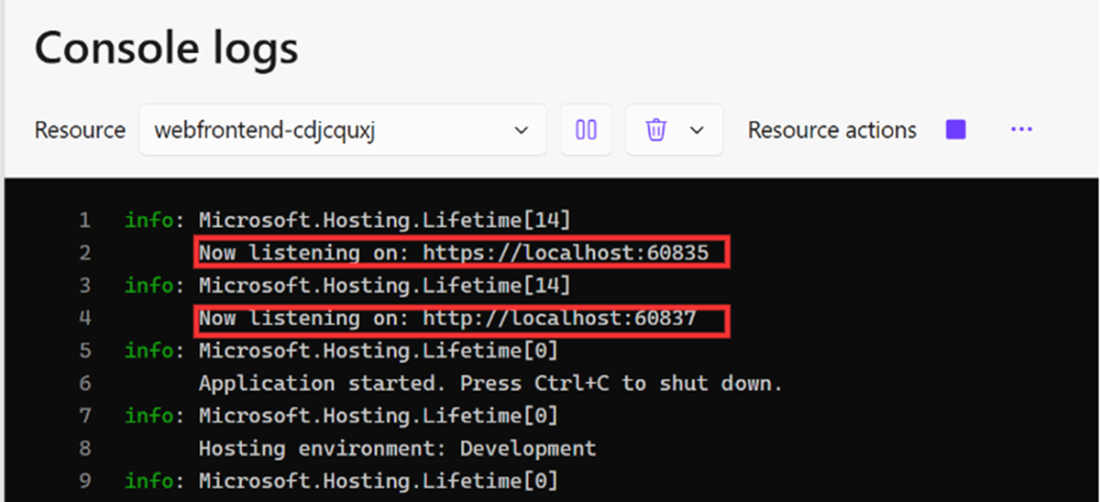
Accessing a custom command from the .NET Aspire dashboard
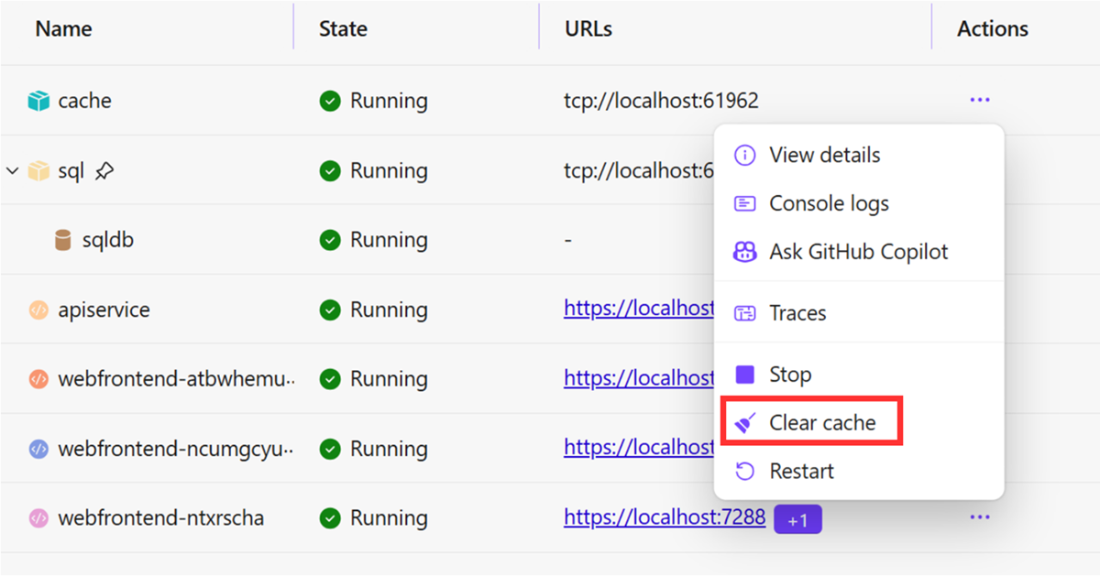
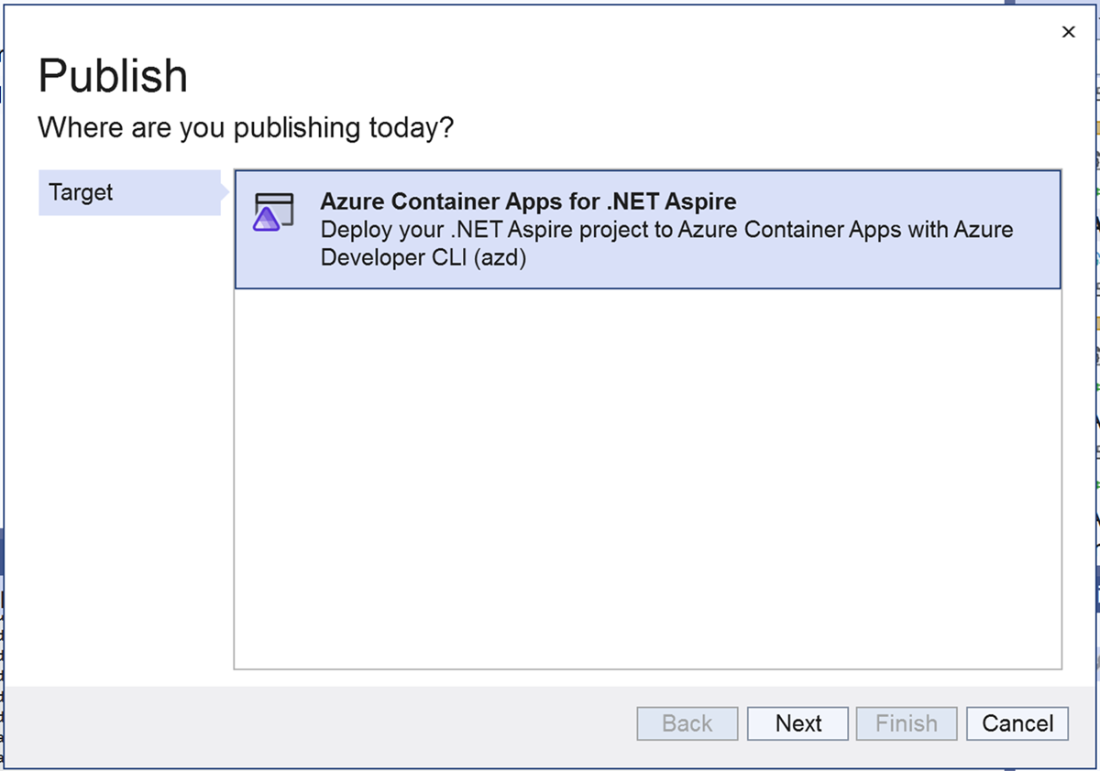
Publishing Aspire apps from Visual Studio
Selecting Azure Container App as a deployment target
Summary

  • .NET Aspire has the ability to scale individual services out by running multiple instances of them.
  • You can have separate logic for the local .NET Aspire instance and the deployed application.
  • The .NET Aspire dashboard can be extended with additional custom commands.
  • When hosting multiple instances of a service in Aspire, the load balancing is handled automatically.
  • .NET Aspire can be integrated with a variety of other tools to be deployed on various cloud environments, such as the Azure Developer CLI.
  • JSON files known as .NET Aspire manifests provide descriptions of all individual services hosted by Aspire.
  • Aspire can be deployed in Azure Container Apps via the Azure Developer CLI.
  • If we want to deploy it to a Kubernetes cluster in a cloud-agnostic fashion, we can convert Aspire manifests into YAML files that Kubernetes can understand by using a tool called Aspire8.

FAQ

How do you scale out a .NET Aspire service for production?You can configure a service to run multiple replicas by using the WithReplicas() method in AppHost.cs. This helps handle higher traffic by spreading requests across several instances behind a load balancer.
Why would you use different code paths for local and deployed Aspire apps?Some services used in production, such as Azure SQL or Azure-specific messaging services, cannot be emulated locally. Aspire lets you use local substitutes during development and switch to cloud-specific services when deployed by checking execution mode in the host.
How can Aspire apps apply database migrations automatically during deployment?You can create a background service, such as DataSeederService, that runs on startup and calls EF Core migration APIs like MigrateAsync(). This allows schema changes to be applied automatically whenever a new version is deployed.
What is the purpose of generating an Aspire manifest?The manifest is a JSON description of the application and its resources. It is the first step in preparing an Aspire app for deployment because it captures projects, containers, bindings, and configuration in a deployable format.
How do you generate the Aspire manifest file?Run the command dotnet run --publisher manifest --output-path manifest.json from the Aspire Host project folder. This creates a manifest file describing the distributed application.
What is the main deployment target supported by the Aspire manifest?At the time described in the chapter, the Aspire manifest is primarily used to deploy applications to Azure Container Apps. Other deployment targets are possible, but they require additional tooling or conversion steps.
How do you deploy an Aspire app to Azure Container Apps with AZD?Install Azure Developer CLI, run azd init in the App Host folder, log in with azd login, and then deploy using azd up. You can also use Visual Studio’s Publish workflow for the same target.
How can you convert an Aspire app for Kubernetes deployment?You can use the open-source Aspir8 tool. After installing it with dotnet tool install --global aspirate, run aspirate init and aspirate generate to produce Kubernetes YAML files.
What is the role of CI/CD pipelines in Aspire production deployments?CI/CD pipelines automate building, testing, provisioning infrastructure, and deploying the application. The chapter shows how to create pipelines in GitHub Actions and Azure DevOps, with tests placed before deployment to prevent broken changes from shipping.
How do you pass environment variables from a pipeline into a deployed Aspire app?Pipeline variables are not automatically forwarded into the app or Bicep templates. You must explicitly map them using a command like azd env set <in-application environment variable name> <pipeline environment variable>.

pro $24.99 per month

  • access to all Manning books, MEAPs, liveVideos, liveProjects, and audiobooks!
  • choose one free eBook per month to keep
  • exclusive 50% discount on all purchases
  • renews monthly, pause or cancel renewal anytime

lite $19.99 per month

  • access to all Manning books, including MEAPs!

team

5, 10 or 20 seats+ for your team - learn more


choose your plan

team

monthly
annual
$49.99
$499.99
only $41.67 per month
  • five seats for your team
  • access to all Manning books, MEAPs, liveVideos, liveProjects, and audiobooks!
  • choose another free product every time you renew
  • choose twelve free products per year
  • exclusive 50% discount on all purchases
  • renews monthly, pause or cancel renewal anytime
  • renews annually, pause or cancel renewal anytime
  • Building Distributed Applications that Work ebook for free

choose your plan

team

monthly
annual
$49.99
$499.99
only $41.67 per month
  • five seats for your team
  • access to all Manning books, MEAPs, liveVideos, liveProjects, and audiobooks!
  • choose another free product every time you renew
  • choose twelve free products per year
  • exclusive 50% discount on all purchases
  • renews monthly, pause or cancel renewal anytime
  • renews annually, pause or cancel renewal anytime
  • Building Distributed Applications that Work ebook for free