Overview

4 Adding order- tracking functionality with SignalR

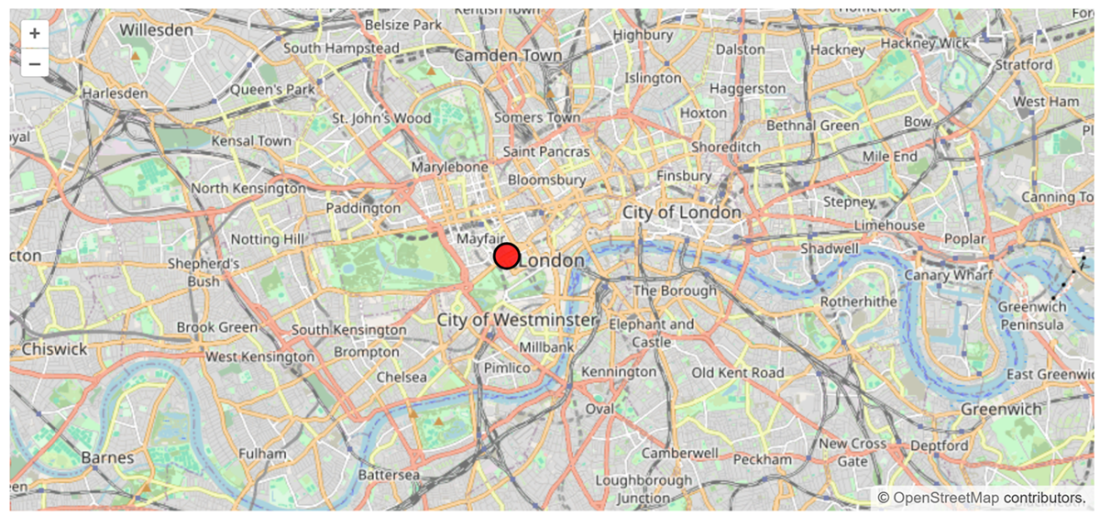
In this chapter, the application is extended into a real-time delivery-tracking experience similar to modern food and e-commerce services. The goal is to show a map in the browser, receive live driver-coordinate updates from the backend, and move a marker automatically without requiring refreshes or manual polling. Aspire provides the distributed application structure, while SignalR and OpenLayers supply the real-time communication and interactive mapping capabilities needed to make the experience feel immediate and dynamic.

The backend portion centers on a SignalR hub that broadcasts location changes to connected clients. The hub is registered in the API service, mapped to an endpoint, and paired with a background worker that simulates a moving driver by sending periodic latitude and longitude updates. This demonstrates how SignalR supports server-to-client pushes, bidirectional communication, and flexible transport options, while also fitting into scalable distributed systems through standard ASP.NET Core infrastructure and service registration.

On the frontend, the web project is configured to use the SignalR client package, JavaScript interop, and OpenLayers to render an interactive map and update it with new markers as messages arrive. The app enables interactive rendering so Blazor can call JavaScript at the right time, then initializes the map, connects to the hub, and listens for coordinate events. When an update arrives, the UI removes the old marker, adds a new one, and re-renders as needed, resulting in a complete end-to-end tracking workflow that connects backend events to a polished browser experience.

Displaying the marker on the map upon receiving the location update
Summary

  • In this chapter, we’ve built a fully interactive map where a user interface persistently connected to the back-end server can receive updated locations.
  • The persistent connection is managed by SignalR, a library built into ASP.NET Core that facilitates two-way real-time communication between client and server.
  • The location is displayed as a marker on an OpenLayers map, which can interact with JavaScript.
  • An important point to remember is that for Blazor to manage interactive map updates, it has to render in an interactive mode.
  • Interactive updates to an OpenLayers map in Blazor can be managed via Blazor JavaScript interop functionality.
  • Any updates to the UI from the Blazor code can be made only after the Razor component has been fully rendered.

FAQ

What is the main goal of the order-tracking feature built in this chapter?The goal is to build a delivery-tracking app where a map in the browser updates automatically as the delivery driver’s location changes, without requiring the user to refresh the page.
Why are SignalR and OpenLayers used together in this chapter?SignalR is used to push live location updates from the server to the browser in real time, while OpenLayers is used to render and update the interactive map in the user interface.
What problem does SignalR solve in a distributed web application?SignalR simplifies real-time two-way communication between server and client, allowing the server to push updates instantly instead of the client repeatedly polling for changes.
What transport mechanisms can SignalR use?SignalR primarily uses WebSockets, but if WebSockets are unavailable it can fall back to server-sent events or long polling.
What is a SignalR hub?A hub is a high-level SignalR API that enables remote procedure calls between server and client. It lets the server call client methods and clients call server methods easily.
How is the LocationHub implemented in the backend?The LocationHub class inherits from Hub and defines an UpdateLocation() method that sends latitude and longitude values to all connected clients through the ReceiveLocationUpdate client event.
How is the SignalR hub registered in the ASP.NET Core application?The hub is registered by calling builder.Services.AddSignalR() and mapping it to an endpoint with app.MapHub<LocationHub>("/locationHub") in Program.cs.
Why is a background service used in the backend?A background service is used to simulate periodic location updates for a delivery driver, sending several coordinate changes over time to connected SignalR clients.
Why does the frontend need the Microsoft.AspNetCore.SignalR.Client package?The client-side SignalR components are not included automatically, so the Microsoft.AspNetCore.SignalR.Client package must be installed to connect the Blazor app to the SignalR hub.
Why must the Blazor app use InteractiveServer render mode for this example?InteractiveServer render mode is required so the Blazor component can run lifecycle methods like OnAfterRenderAsync() and invoke JavaScript interop to initialize the map and update markers dynamically.

pro $24.99 per month

  • access to all Manning books, MEAPs, liveVideos, liveProjects, and audiobooks!
  • choose one free eBook per month to keep
  • exclusive 50% discount on all purchases
  • renews monthly, pause or cancel renewal anytime

lite $19.99 per month

  • access to all Manning books, including MEAPs!

team

5, 10 or 20 seats+ for your team - learn more


choose your plan

team

monthly
annual
$49.99
$499.99
only $41.67 per month
  • five seats for your team
  • access to all Manning books, MEAPs, liveVideos, liveProjects, and audiobooks!
  • choose another free product every time you renew
  • choose twelve free products per year
  • exclusive 50% discount on all purchases
  • renews monthly, pause or cancel renewal anytime
  • renews annually, pause or cancel renewal anytime
  • Building Distributed Applications that Work ebook for free

choose your plan

team

monthly
annual
$49.99
$499.99
only $41.67 per month
  • five seats for your team
  • access to all Manning books, MEAPs, liveVideos, liveProjects, and audiobooks!
  • choose another free product every time you renew
  • choose twelve free products per year
  • exclusive 50% discount on all purchases
  • renews monthly, pause or cancel renewal anytime
  • renews annually, pause or cancel renewal anytime
  • Building Distributed Applications that Work ebook for free