3 Using database and storage components
The chapter explains how Aspire can connect distributed applications to a wide range of storage technologies, from existing databases to managed services and locally hosted containers. It begins with the simplest case: linking an app to an already existing database by name through a connection string, so services can discover and use that connection without hardcoding it in each project. From there, it frames the chapter around an e-commerce sample app and shows how database choice affects only the infrastructure and data access layers, not the user interface.
Most of the chapter focuses on SQL-based systems and the common patterns they share. Aspire can host SQL Server, Oracle, PostgreSQL, and similar databases in containers or connect to managed cloud instances, while its consumer libraries support either raw SQL or Entity Framework. The chapter emphasizes persistent container lifetimes for local development, automatic database creation in newer Aspire versions, and the use of shared models and DTOs to separate persistence concerns from presentation. Examples show seeding data, querying products, and wiring resources through dependency injection and service references so apps start in the correct order and receive the right connection settings automatically.
The second half introduces NoSQL and cloud storage options, highlighting when they are a better fit than relational databases. MongoDB is presented as a document store well suited to flexible, nested product-review data, with Aspire hosting and client integration handled through MongoDB-specific libraries. Azure Cosmos DB is described as a globally distributed, multi-model service that can also run locally in emulator mode. The chapter closes with Azure Storage, covering Table Storage for flat metadata and Blob Storage for files such as CSV product specs, showing how Aspire can host the storage account, inject the proper clients, and let services read and write data using standard Azure SDK patterns.
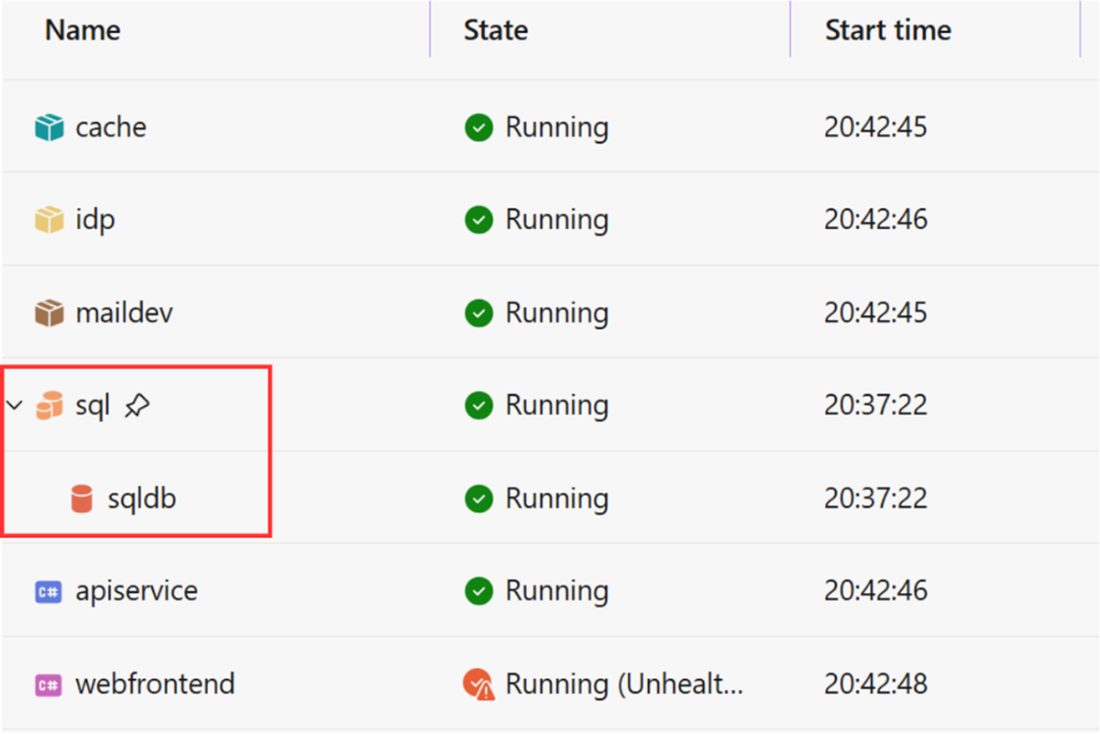
SQL Server component hosted in Aspire
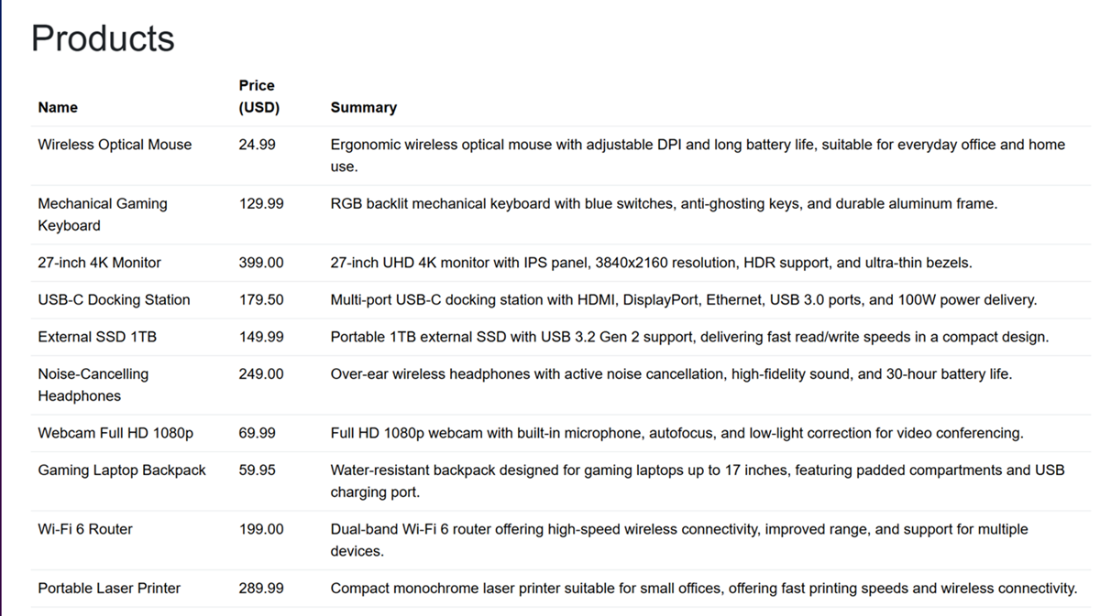
Products returned from the API endpoint
Summary
- The Aspire ecosystem has integrations for four major SQL-based database types: SQL Server, Oracle, PostgreSQL, and MySQL. Although all these integrations rely on different NuGet libraries for hosting inside Aspire, the setup syntax is similar across these libraries.
- When hosting libraries are used with client libraries to register database components, Aspire can generate connection strings automatically.
- All supported database integrations can be managed through Entity Framework, a relational object mapper that abstracts away SQL interactions in C# code.
- SQL Server, PostgreSQL, and MySQL integrations have client libraries that allow raw SQL database integrations. Oracle integration works only with Entity Framework.
- NoSQL doesn’t refer to any specific data storage format. Several database types are classed as NoSQL. Sometimes, NoSQL databases of the same type are set up differently.
- Aspire natively supports integrations with popular NoSQL databases and Azure-native data storage services.
- Various Azure services can use emulators, so we don’t have to connect our local development machine to a real Azure instance.
FAQ
How do I connect an Aspire app to an existing database instance?
Use the Aspire host to register a connection string resource withbuilder.AddConnectionString("database"). The name must match an entry in the host app’s ConnectionStrings section, where the actual connection string is stored. Services then resolve it through Aspire service discovery, so they do not need their own configured connection string.What is the difference between hosting a database in Aspire and connecting to an existing one?
Connecting to an existing database usesAddConnectionString() and relies on an already provisioned database. Hosting a database in Aspire means the host creates and manages the database resource itself, usually in a container locally or as a managed service in production.What are the two main library types used by Aspire integrations?
Each integration typically has a host library and a consumer library. The host library lets the Aspire app register, configure, and launch the component. The consumer library lets application services connect to and use that component.What database model classes should I create for SQL-based databases?
You generally create an entity model and a DTO. The entity model represents the database table structure, while the DTO carries only the data needed across service boundaries or to the UI.Why should I use a DTO instead of returning the database entity directly?
A DTO avoids sending unnecessary fields, such as database identity columns, and lets you shape the data specifically for the consumer. It also helps keep the UI and database layers separate and reduces coupling.How do I host and consume SQL Server in Aspire?
In the host project, installAspire.Hosting.SqlServer, register SQL Server with builder.AddSqlServer(...), and add a database with AddDatabase(). In the service project, install Aspire.Microsoft.Data.SqlClient or the EF package and register the client with builder.AddSqlServerClient("sqldb") or builder.AddSqlServerDbContext<TContext>("sqldb").Why is ContainerLifetime.Persistent important for hosted databases?
Without a persistent lifetime, Aspire may recreate the container each time you run the app, which can destroy the data in it. A persistent lifetime lets Aspire reuse the existing container so the stored data survives restarts during local development.How does Entity Framework fit into Aspire database integrations?
Entity Framework is used through an Aspire-specific package such asAspire.Microsoft.EntityFrameworkCore.SqlServer. You define a DbContext, register it with Aspire, seed data through the context, and query with LINQ as usual.What is the main idea behind NoSQL databases in this chapter?
NoSQL covers non-relational storage types such as document stores, key-value stores, graph databases, and column-family stores. The chapter explains that NoSQL is useful when relational tables are not the best fit, such as for flexible documents, caching, or highly connected data.How do Azure Table Storage and Azure Blob Storage work with Aspire?
Azure Storage is hosted throughAspire.Hosting.Azure.Storage. For Table Storage, you use AddAzureStorage(...).RunAsEmulator().AddTables(...) and interact through TableServiceClient. For Blob Storage, you add blobs with AddBlobs() and use BlobServiceClient to upload or download files such as CSV data.
 Building Distributed Applications that Work ebook for free
