Overview

10 Adding legacy apps to Aspire and working with AI agents

The chapter explains how to bring older Aspire-based systems forward to Aspire 13 and how to add non-Aspire applications into Aspire orchestration without rewriting everything from scratch. It begins by noting that Aspire 8 and 9 systems still exist in the wild, then shows that upgrading is straightforward: Aspire 8 typically requires a manual move to Aspire 9 first, while Aspire 9 can be updated with the Aspire CLI. The goal is to preserve existing behavior while modernizing the project structure, package references, and startup conventions.

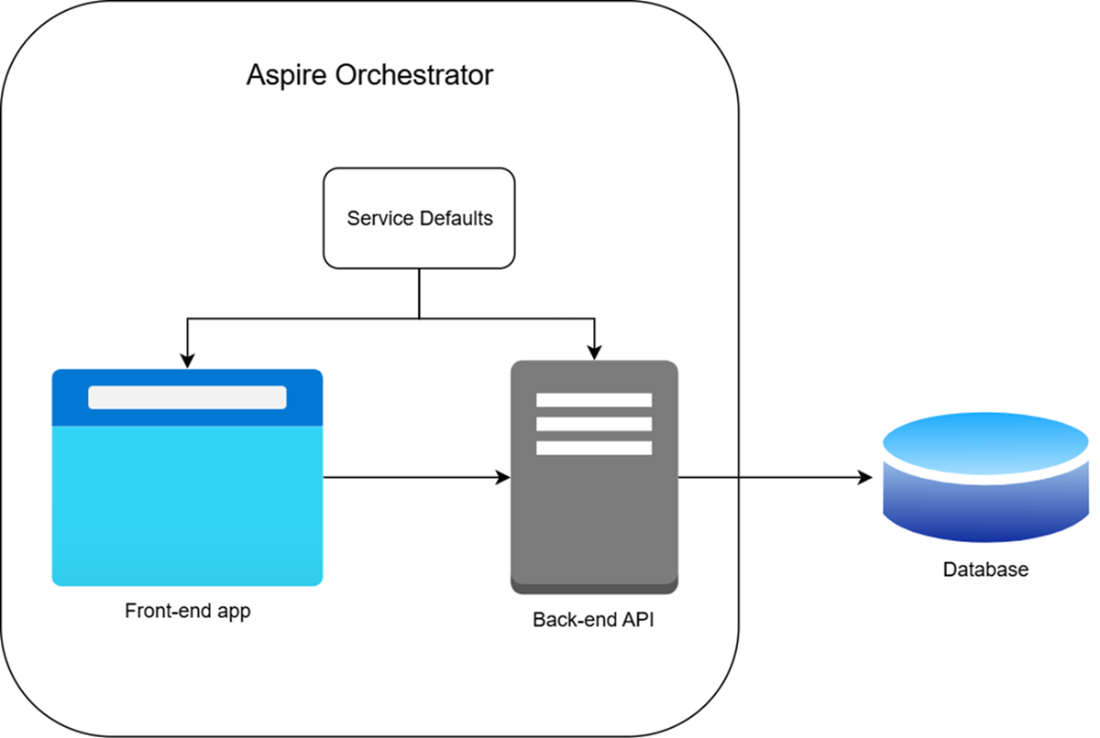
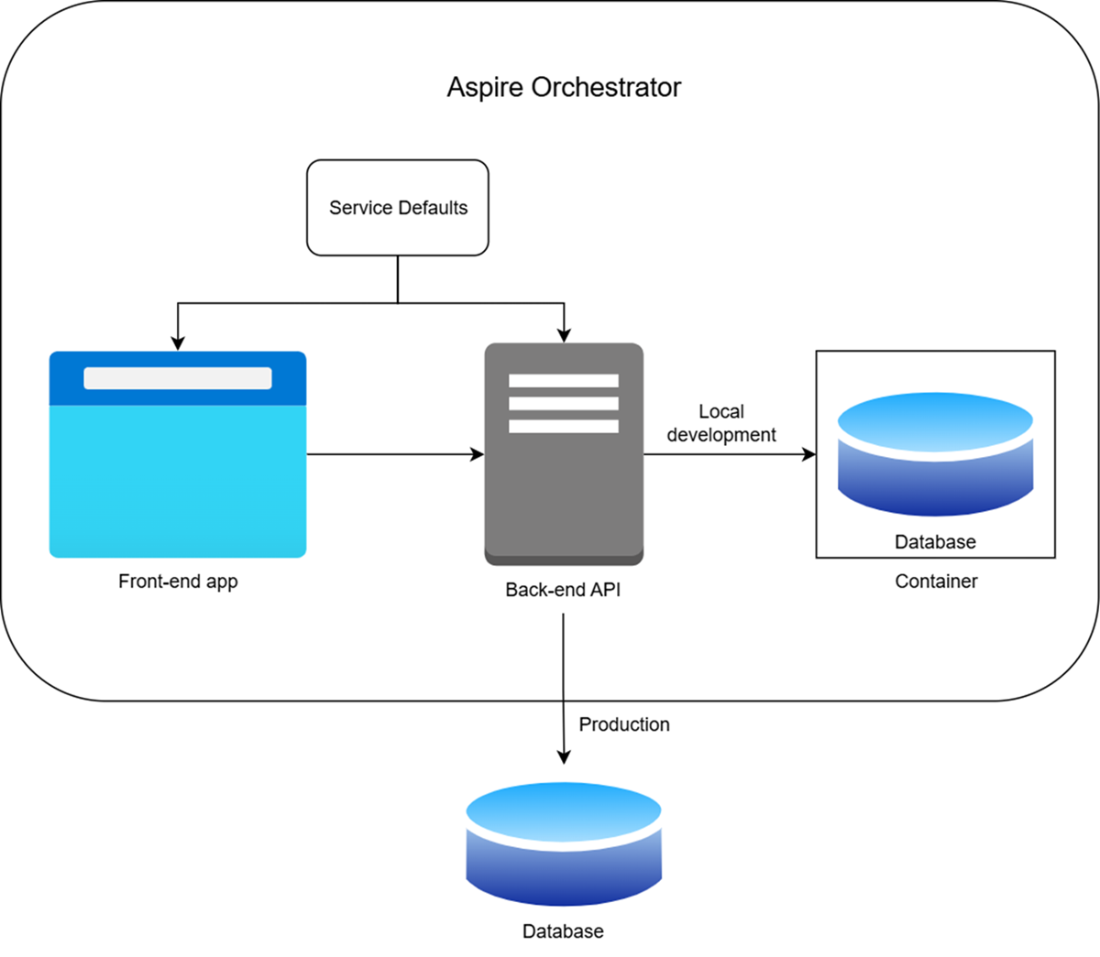
It then shifts to enrolling legacy applications into Aspire, emphasizing that Aspire can simplify local development for systems that previously depended on localhost wiring and manual deployment setup. The chapter walks through adding existing projects to an Aspire host, using service defaults, wiring references between services, and exposing health checks so the orchestrator can understand service readiness. It also shows how existing infrastructure like SQL Server can be moved into Aspire as an integration while still preserving a live production database path when needed, using conditional configuration so local runs use Aspire-managed resources and production keeps its external connection.

Finally, the chapter introduces the role of AI coding assistants in making these migrations less tedious. With Aspire’s MCP support, agents like Claude Code can inspect the solution, infer dependencies, suggest an AppHost model, and help implement changes incrementally. The chapter explains that MCP gives agents structured access to repository context, logs, traces, integrations, and app hosts, which helps them make better-informed changes. The core message is that AI can accelerate aspirification, but developers must still review and verify the results carefully before shipping.

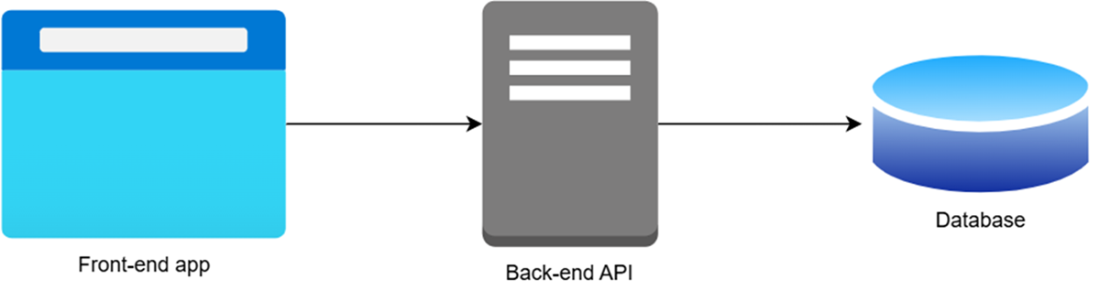
A system without Aspire orchestration
A system with the Aspire orchestrator added
Complete aspirified system with intact production database connection
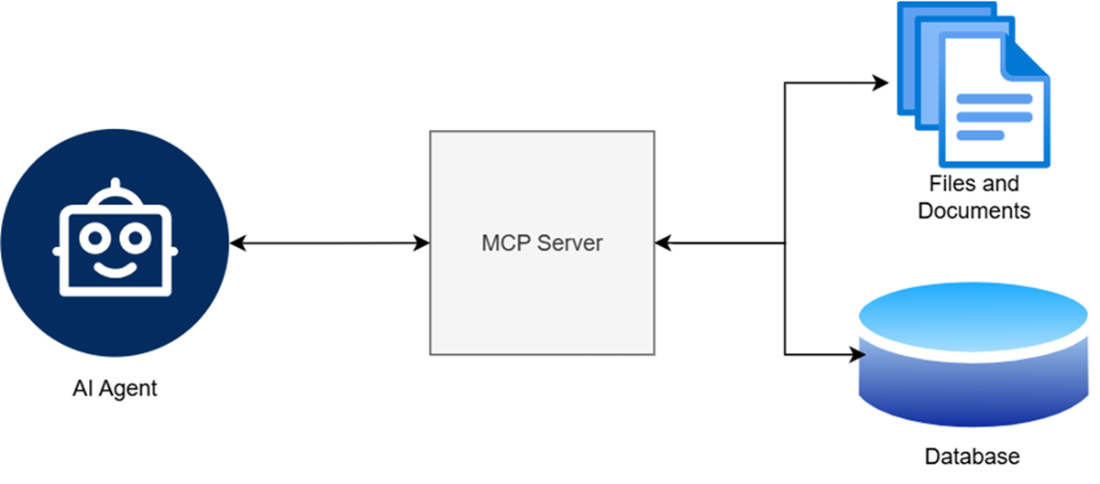
Data from between the agent and the MCP server
Summary

  • Upgrading Aspire from versions 8 and 9 to the evergreen version 13 can either be done manually by SDK and package update, or via the aspire CLI tool.
  • Aspirification is the process of adding non-Aspire applications to Aspire.
  • Aspirification is done by adding the Aspire host, service defaults, and integrating both of these projects with the existing projects.
  • Service defaults package doesn’t have to be added to the aspirified system, but it helps, as it comes with healthcheck and metrics.
  • The existing connection strings can be left intact for aspirified applications, so they still work with the existing production resources.
  • Aspire can be integrated with AI-based coding assistants via MCP and tool calling.

FAQ

What is the recommended way to upgrade a legacy .NET Aspire 8 app to Aspire 13?Aspire 8 apps should first be upgraded manually to Aspire 9, because the built-in one-step upgrade tools do not work directly from version 8. After that, Aspire 9 apps can be upgraded to Aspire 13 more easily.
What changes are needed in an Aspire 8 host project before migrating to Aspire 9?You typically add the Aspire.AppHost.Sdk 9.0.0 SDK element, update all Aspire package references to version 9, and usually move the host project toward a .NET 9 target as well.
How do you upgrade an Aspire 9 solution to Aspire 13?Install the aspire CLI tool and run aspire update from the solution folder. This updates the Aspire SDK, host package, and related client packages across the solution.
Can Aspire host startup code live in Program.cs or AppHost.cs?Yes. Aspire 8 used Program.cs, while Aspire 9 and Aspire 13 support both Program.cs and AppHost.cs for host startup code, but not both at the same time.
What does “aspirifying” an existing application mean?It means enrolling an existing app into Aspire orchestration by adding an Aspire host, wiring up the projects, and using Aspire to manage service discovery, dependencies, and observability.
How do you add an existing .NET solution to Aspire orchestration?You can use the aspire init command to create the Aspire host setup, then add your existing projects to the host and reference them in the AppHost model with AddProject, WithReference, and WaitFor.
How can a legacy app use Aspire-managed SQL Server without changing production?Use an Aspire SQL Server resource for local run mode, but keep the existing production connection string for production deployments. A run-mode condition such as IsRunMode lets you switch between the local container and the external database.
What if I do not want to use the Aspire-specific database client library?You can still integrate with Aspire by using the regular connection string pattern. Aspire injects the database connection string under the same name you used in the AppHost, so the app only needs to change the connection string key it reads.
What is MCP in the context of Aspire and AI coding agents?MCP, or Model Context Protocol, is the standard Aspire uses to expose tools and context to AI coding assistants. It helps agents discover resources, logs, traces, integration docs, and the current app host structure.
Why should AI-generated Aspire changes still be reviewed manually?Because AI agents can miss important details, such as health checks or dependency ordering. The book stresses that you should never trust agents blindly; verify their output before shipping, even if the code was generated by AI.

pro $24.99 per month

  • access to all Manning books, MEAPs, liveVideos, liveProjects, and audiobooks!
  • choose one free eBook per month to keep
  • exclusive 50% discount on all purchases
  • renews monthly, pause or cancel renewal anytime

lite $19.99 per month

  • access to all Manning books, including MEAPs!

team

5, 10 or 20 seats+ for your team - learn more


choose your plan

team

monthly
annual
$49.99
$499.99
only $41.67 per month
  • five seats for your team
  • access to all Manning books, MEAPs, liveVideos, liveProjects, and audiobooks!
  • choose another free product every time you renew
  • choose twelve free products per year
  • exclusive 50% discount on all purchases
  • renews monthly, pause or cancel renewal anytime
  • renews annually, pause or cancel renewal anytime
  • Building Distributed Applications that Work ebook for free

choose your plan

team

monthly
annual
$49.99
$499.99
only $41.67 per month
  • five seats for your team
  • access to all Manning books, MEAPs, liveVideos, liveProjects, and audiobooks!
  • choose another free product every time you renew
  • choose twelve free products per year
  • exclusive 50% discount on all purchases
  • renews monthly, pause or cancel renewal anytime
  • renews annually, pause or cancel renewal anytime
  • Building Distributed Applications that Work ebook for free