Appendix. Setting up the development environment
This appendix explains how to prepare a development machine for working with Aspire. It begins by outlining the basic prerequisites you need before you can build or run Aspire applications, then moves on to the tools required for day-to-day development across different operating systems.
The main requirement is the .NET 10 SDK or later, along with a suitable editor or IDE and a container runtime such as Docker or Podman. For a full IDE experience, Visual Studio is presented as the easiest option on Windows, while JetBrains Rider works across platforms but requires a paid license. Visual Studio Code is offered as a lightweight, free alternative that runs on all major operating systems, though it lacks some advanced IDE features.
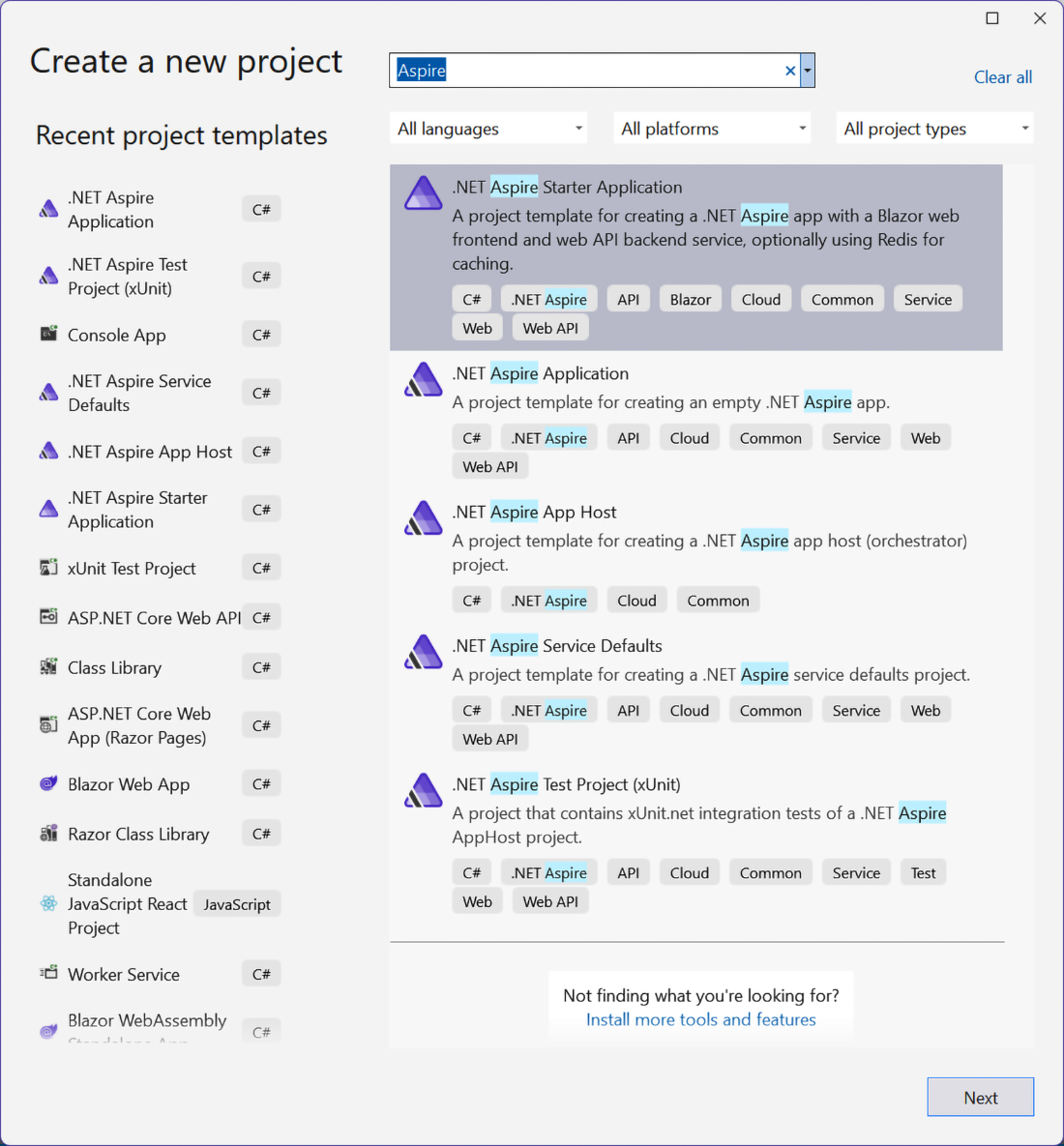
Once the environment is ready, the appendix shows how to install Aspire project templates if they are not already included by the chosen IDE. This is done with the dotnet CLI, and the installation can be checked by listing Aspire templates afterward. Finally, it walks through creating a new Aspire Starter Project either through Visual Studio, Rider, or the command line, and notes that local development may require trusting the HTTPS development certificate before the project is ready to use.
Figure A.1 Creating a new Aspire project in Visual Studio
FAQ
What are the minimal system requirements for setting up an Aspire development environment?
You need the .NET 10 SDK or later, a suitable IDE or code editor, and a container runtime such as Docker or Podman.
Why is the .NET SDK the main prerequisite for working with Aspire?
The .NET SDK is the core dependency because Aspire projects are created, restored, and managed through .NET tooling, so you should install the latest available version if possible.
Which IDEs or editors can be used to develop Aspire applications?
You can use Visual Studio, Visual Studio Code, or JetBrains Rider, depending on your operating system and preferred workflow.
What is the easiest way to start with Aspire on Windows?
The easiest path is Visual Studio, since the latest version includes the relevant components for Aspire and provides a smooth project creation experience.
Can Aspire be used on operating systems other than Windows?
Yes. JetBrains Rider and Visual Studio Code are available for operating systems that support .NET, making Aspire development possible beyond Windows.
How do you install Aspire project templates when using Visual Studio Code?
Use the .NET CLI command dotnet new install Aspire.ProjectTemplates to install the Aspire project templates.
How can you verify that the Aspire templates were installed successfully?
Run dotnet new list aspire. If the installation worked, the output should list templates that include aspire in their names.
How do you create a new Aspire Starter Project with the CLI?
Navigate to the folder where you want the project and run dotnet new aspire-starter.
Do you need to install anything extra in Rider before Aspire templates appear?
Yes. In JetBrains Rider, you need to install the Aspire plugin before the relevant project template becomes available.
Why might you need to trust a development TLS/SSL certificate when running Aspire locally?
Local Aspire apps may use HTTPS, and trusting the development certificate avoids browser and runtime warnings. With the CLI, you can trust it using dotnet dev-certs https --trust.

 Building Distributed Applications that Work ebook for free