8 Exceptions
This chapter turns MVP feedback into a focused push to make ACH exception handling first-class across the stack. It clarifies working definitions of errors, exceptions, and warnings, ties them to Federal Reserve accept/pend/reject statuses, and promotes short build–measure–learn cycles grounded in BDD/TDD. The near-term product goals are to let operators see and act on ACH exceptions, search transactions, and keep the dashboard performant and responsive while adding targeted functionality that users value.
On the backend, the team expands file-generation utilities to create ACH files with intentional issues at file, batch, and entry levels, refining the syntax to reduce friction and errors. A database-backed approach standardizes exception metadata via codes and severities, records exceptions at file/batch/entry granularity, and adds recovery options to guide operators. Parsing is strengthened with Pydantic validation, custom error translation to exception codes, and exception writes when records fail validation. Tests drive the work, queries shift from inner to left joins so files with exceptions still surface, and APIs deliver exceptions globally and per file, with an opt-in endpoint to fetch sensitive unparsed records. Care is taken to preserve auditability and to avoid over-notifying users.
On the UI, the dashboard gains an exceptions view powered by a DataGrid, an info action to retrieve the related unparsed record on demand, and a visual cue on recent uploads when a file contains exceptions. Exceptions rendering is refactored into a reusable component, the batch details page adds a statistics panel and an application column derived from transaction codes, and layouts are made responsive using MUI’s Grid and breakpoints. Throughout, the chapter emphasizes pragmatic refactoring, test coverage, performance safeguards, and handling NPI securely—so teams can expose clear exception insight without compromising usability, maintainability, or compliance.
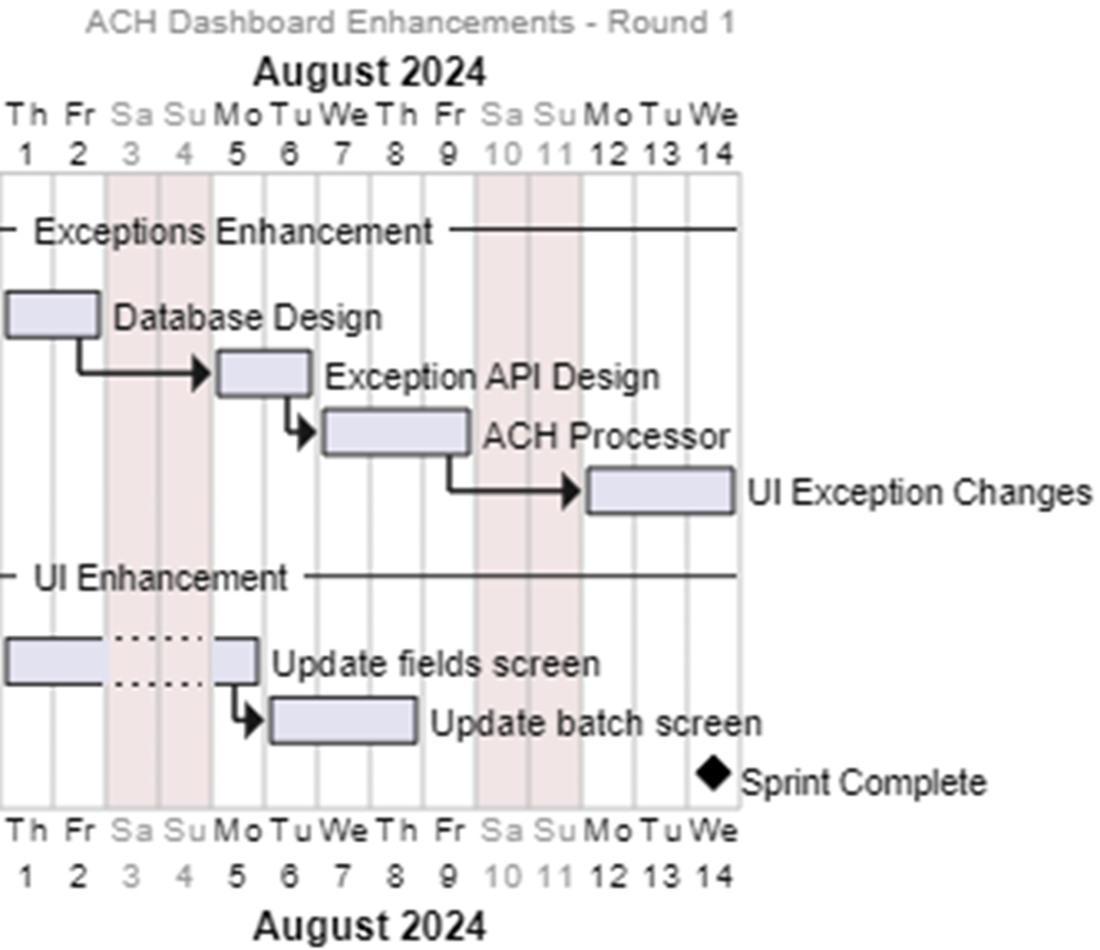
A Gantt Chart for our enhancements
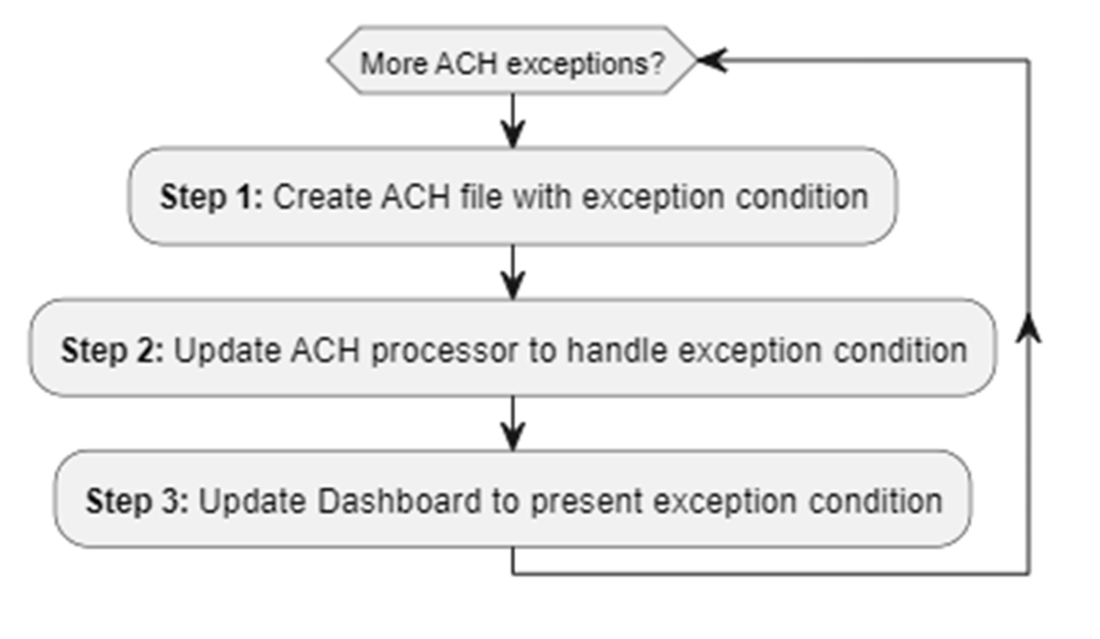
Flowchart for our representing our short development cycle
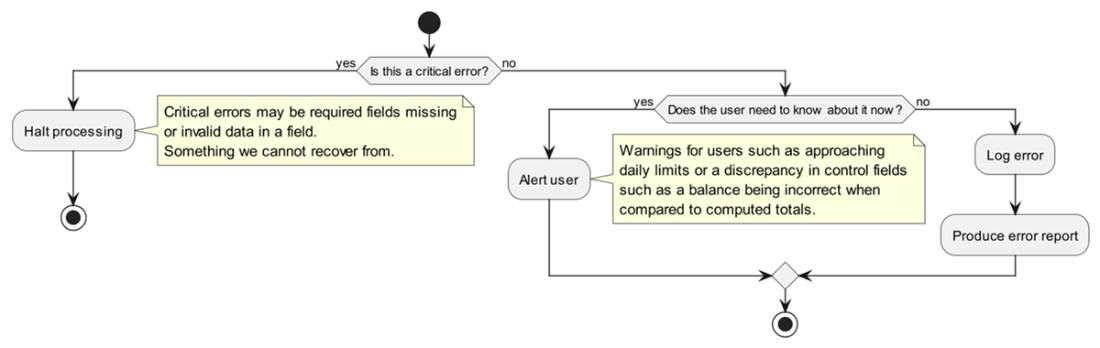
Flow chart for deciding how to handle errors
Visual Indication of an error on a file

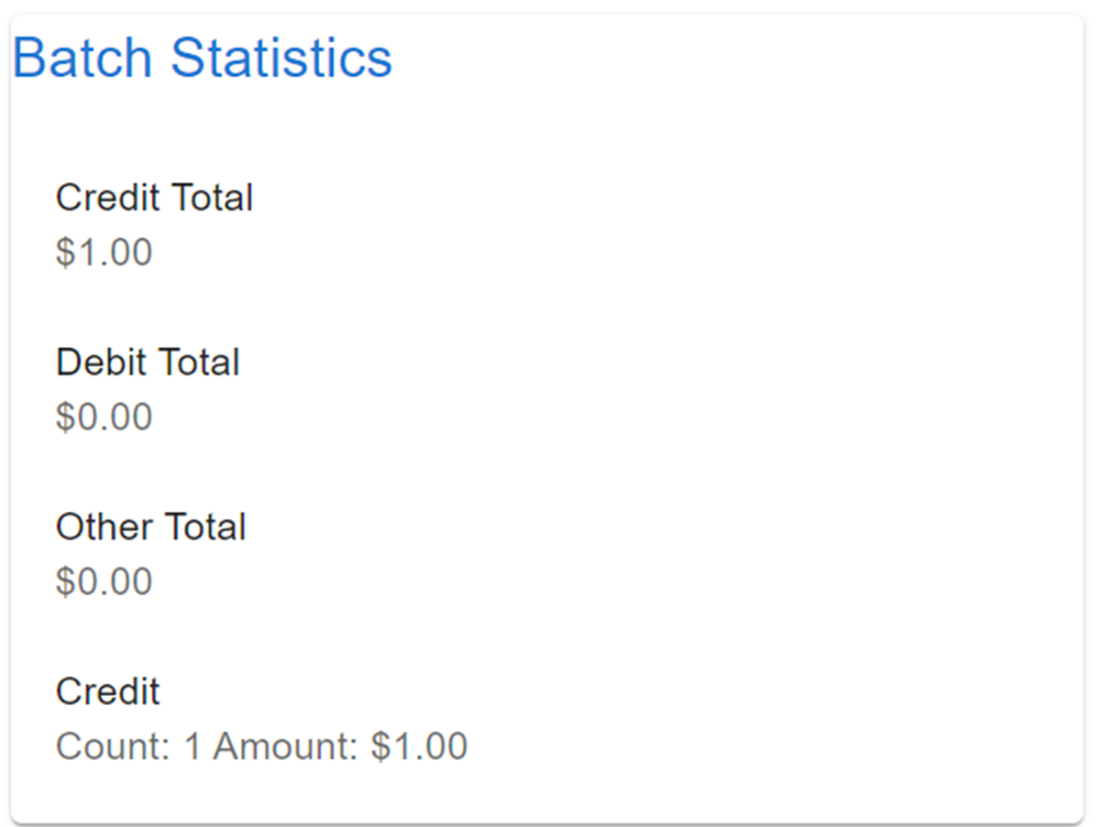
Batch Statistics Component
The batch entry screen with the added column

Summary
- After launching the MVP, user feedback highlighted both positive reception and areas for improvement, particularly the need for handling a wider variety of ACH-related exceptions.
- Planning enhancements involves prioritizing features based on user feedback and working on a timeline to implement ACH exceptions and search functionality.
- Exceptions in ACH processing can be categorized into errors, exceptions, and warnings, each with different severity and handling implications.
- Creating ACH files with exceptions involves extending BDD syntax to support file, batch, and entry-level exceptions for more robust testing and processing.
- Enhancing exception handling in ACH parsing includes using Pydantic for field validation and storing detailed exception information in the database.
- Exceptions API development focuses on enabling effective reporting and search capabilities, providing insights into file-specific errors.
- The UI is updated to display exceptions, incorporating components for viewing and filtering errors with features like DataGrid for interactive data presentation.
- Additional UI enhancements include creating reusable components, statistics for batches, and improving layout responsiveness using MUI grid system.
- Utilizing unit testing and BDD helps ensure robustness and flexibility in handling ACH exceptions, while UI updates enhance user experience and interaction with data.
FAQ
Why did exceptions become the top priority after the MVP?
Users reported that the MVP lacked visibility into ACH exceptions that block or delay processing. Since the solution focuses on PPD transactions (payroll, bill payments), unresolved exceptions risk real customer impact. This chapter prioritizes surfacing more ACH exception types, letting operators find and recover from them quickly via the UI, APIs, and parser improvements.What do “error,” “exception,” and “warning” mean in this project?
- Error: A technical condition that halts processing (for example, incomplete upload, invalid ACH record type).- Exception: A business condition requiring a stop in processing (for example, out-of-policy transaction amounts, flagged customers, invalid data).
- Warning: A business condition to notify on, but not necessarily halt processing (for example, tolerable control record mismatches).
Note: These are project-specific definitions (not Nacha standards). The Federal Reserve also classifies files as accept, pend, or reject.
How do we iterate on adding exceptions efficiently?
- Plan the enhancement (timeline/Gantt with PlantUML if needed).- Short development cycle: 1) create an ACH file exhibiting the exception with BDD syntax, 2) implement parser support using TDD/unit tests, 3) update the UI to display and search exceptions.
- Repeat per exception, refining tests, parser validations, and UI as you go.
Which file-level ACH exceptions are most important to detect?
- File ID Modifier not A–Z or 0–9 (lowercase can cause rejection or manual fix).- Immediate Destination not matching an FI-owned routing number (serious data exposure risk; maintain valid routing numbers list).
- Blocking Factor changed (shouldn’t change).
- Record Size not 094 when 94-byte records are assumed.
- File totals mismatch in File Control.
- File hashing (batch control hash roll-up) mismatch.
What are key batch- and entry-level exceptions and their impacts?
- Batch-level:- Invalid effective date (reject batch; likely requires a new file).
- Invalid batch totals (often a reject, but could be corrected).
- Bad SEC code (reject batch).
- Entry-level:
- Invalid account number (format or not found).
- Invalid amount (bad format like decimals/spaces).
- Insufficient funds (opens needs for account data and possible NSF fee logic).
Batch failures can cascade to file rejection or require resubmission.
How are exceptions modeled in the database and why?
- ach_exception_codes: stores unique codes, severity (ENUM: error, warning, info), description.- ach_exceptions: links to file and optionally to batch/entry (nullable FKs), record number, exception code.
- ach_recovery_options: zero-to-many textual recovery steps per exception code.
- Benefits: consistency (ENUM or lookup table), less redundancy, room for richer metadata/recovery. Tests should avoid truncating seed tables; consider Testcontainers for isolated DBs.
How does the parser detect and log exceptions?
- Use Pydantic for field-level validation (regex/length) and field_validator to check values at runtime (for example, Immediate Destination against DB routing numbers).- Wrap Pydantic ValidationError in a custom AchParsingValidationError that maps to exception codes.
- On exceptions, write ach_exceptions records; for unparseable lines, also store in an “invalid record” table to preserve evidence. Add non-field checks outside Pydantic (for example, monotonic trace numbers).
What API changes expose exceptions to the Dashboard?
- Files list query switched critical joins to LEFT JOIN so files with parse failures still appear.- Endpoints include:
- GET /api/v1/files/{file_id}/exceptions (list with code and description).
- GET /api/v1/files/exceptions (all exceptions).
- GET /api/v1/files/{file_id}/exceptions/{exception_id} (retrieve unparsed record).
- response_model_exclude_none avoids returning null batch/entry IDs. The unparsed record is a separate endpoint to control NPI access and enable auditing.
How does the UI help users see and act on exceptions?
- Exceptions page: MUI DataGrid lists exceptions (sortable/filterable). An info icon fetches and displays the unparsed record on demand.- Recent uploads: an error icon next to filenames with has_exceptions true (SQL and API updated to compute and return has_exceptions).
- Componentization: Exceptions table refactored into a reusable component for “all exceptions” and “file exceptions” views. Plan for pagination/filtering to keep the UX responsive.
What additional UI improvements were made (batch stats, application column, responsiveness)?
- Batch statistics component: computes debit/credit/other totals and per-transaction counts/amounts, displayed via MUI List.- Application column: server maps transaction_code to application (Checking, Savings, GL, Loan, Unknown) via CASE logic and returns it to the grid.
- Responsive layout: MUI Grid breakpoints (xs/sm/md/lg/xl) reorganize components for different screen sizes; custom breakpoints are supported via theme.

 Build Financial Software with Generative AI (From Scratch) ebook for free
