Overview

10 Company Information

This chapter describes an iteration that adds a company-level dashboard to the ACH processing application, turning previously file-centric capabilities into customer-focused insights for business clients. It lays out sprint goals and blockers, then incrementally delivers a Company Information view plus three operational widgets: Recent ACH Batches, Expected Files, and Company Limits. Along the way it highlights practical engineering choices—using Generative AI to seed realistic mock data, structuring isolated tests with Testcontainers, and balancing YAGNI/KISS against future extensibility—to keep development fast, testable, and user-centered.

The data foundation expands with normalized tables for companies, addresses, and phones, plus constrained enums for tax ID types, industries, address/phone/schedule types, and optional logo storage. The chapter shows how to expose this model through FastAPI and Pydantic, including list and detail endpoints, a flexible batches “search” endpoint, and SQL that leverages CTEs, JSON aggregation, and COALESCE for resilient joins when company context may be missing. It also covers building BDD inputs to generate company-specific ACH files, handling formatting issues like truncation/padding, reorganizing SQL bootstrap scripts for maintainability, and wiring a Next.js/Material UI interface that lists companies, validates base64 images, and uses route-driven navigation.

Each dashboard component is implemented end-to-end. Company Information returns a rich record with nested addresses and phones assembled either in application code or via SQL JSON aggregation. Recent Batches surfaces activity by company UUID, joining batch header/control data and fallback naming to handle non-customer batches. Expected Files introduces a schedule-driven tracker that computes next expected dates, marks whether a file arrived, and updates last-file timestamps on upload, with discussion of edge cases like weekends and holidays. Company Limits computes daily totals on the fly, flags breaches, and writes a structured exception during batch control parsing, then presents results with clear visual cues and an enhanced exception modal including company context and recovery guidance. The chapter closes by encouraging CRUD completion, performance profiling, and future extensions such as originating ACH files.

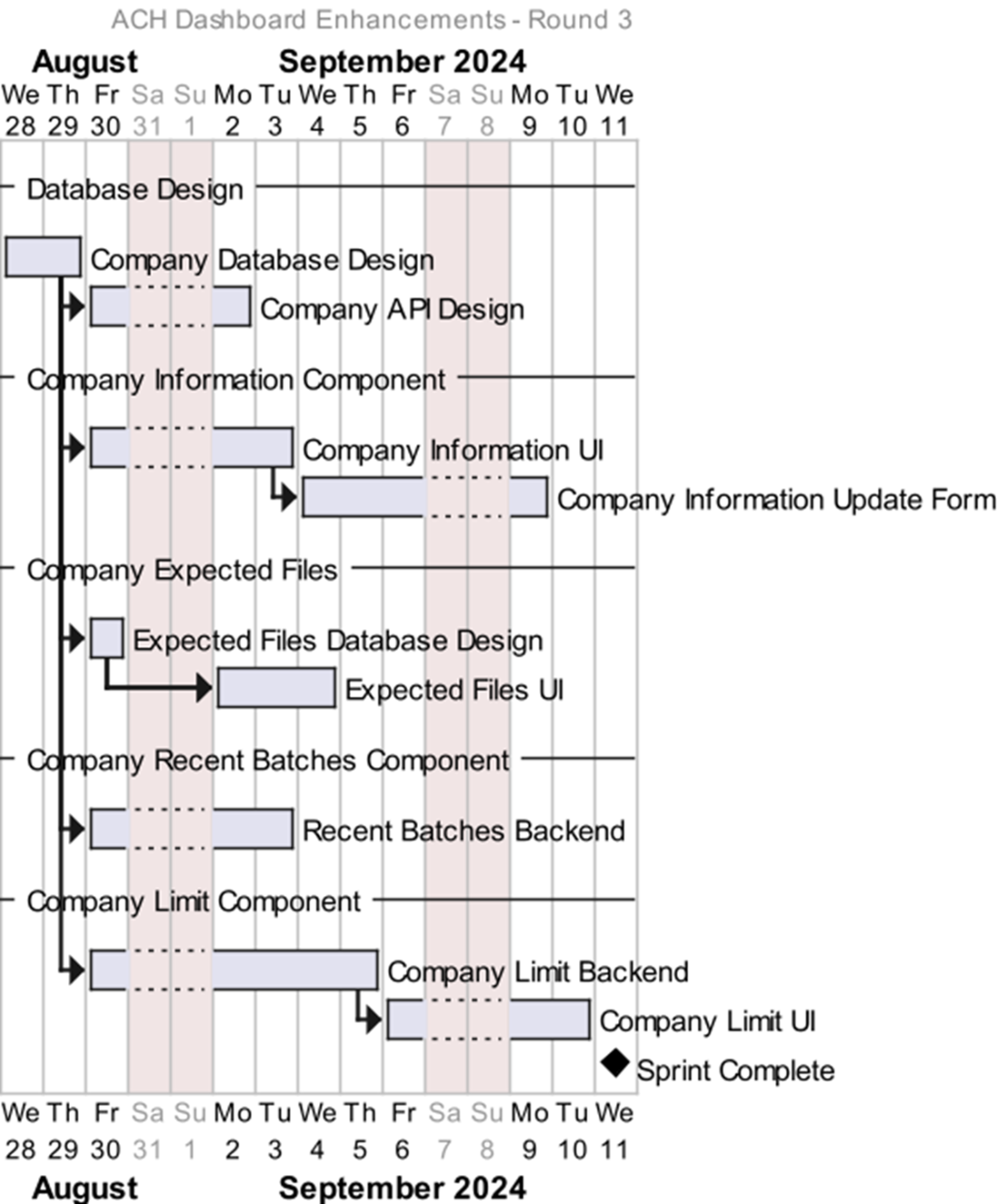
ACH Dashboard Enhancement Timeline
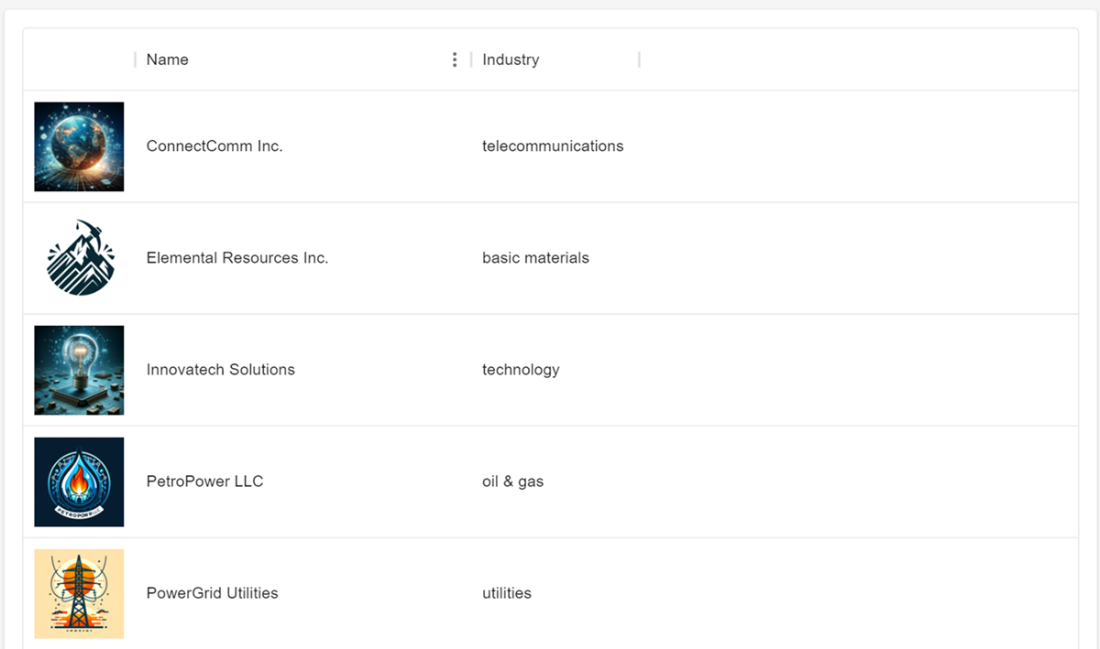
Component to list the companies
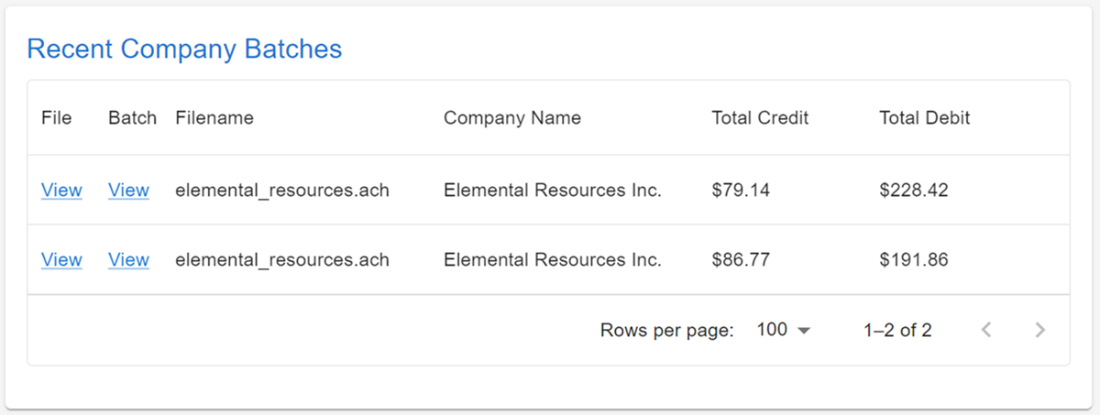
Recent Company Batches
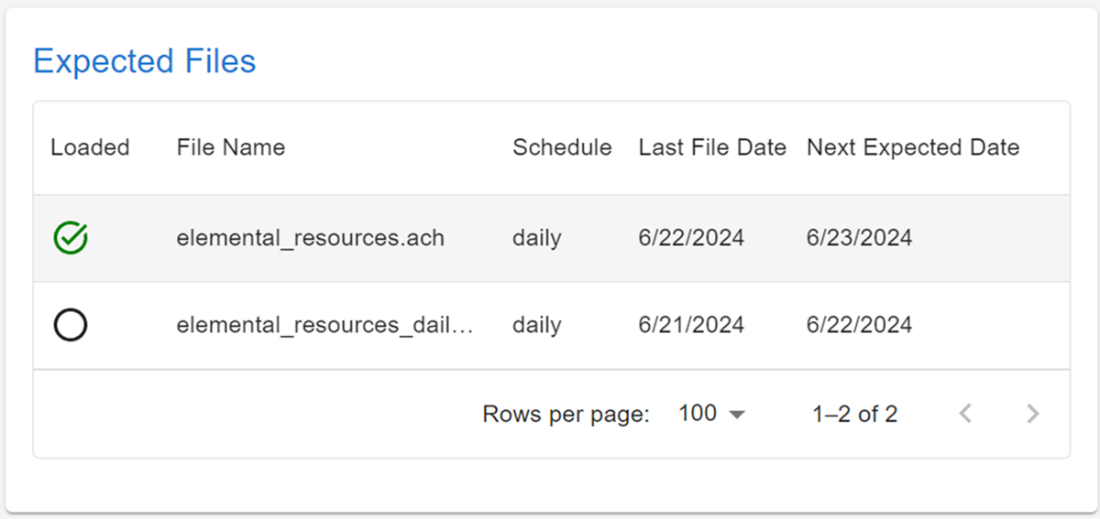
Expected Files Component
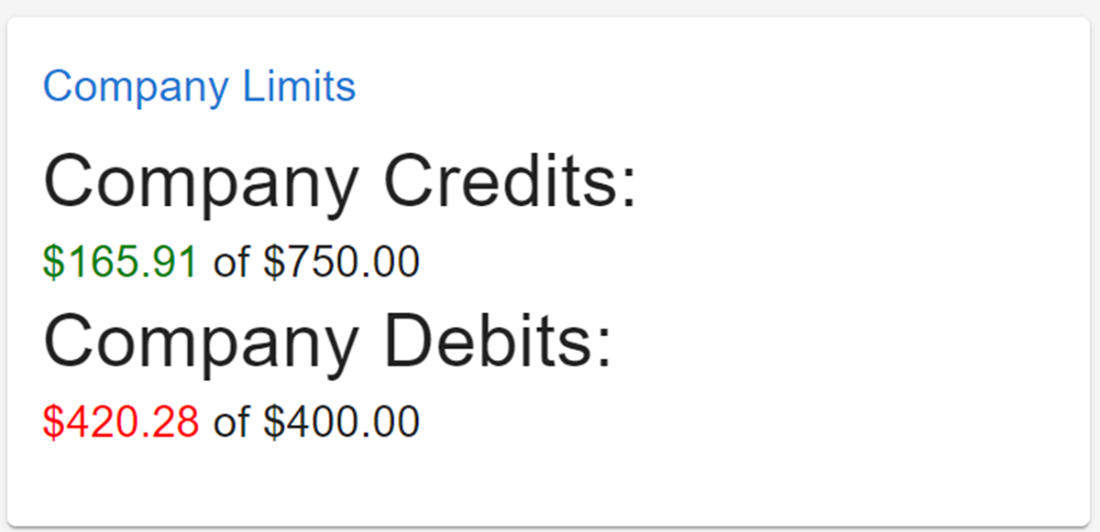
Company Limits Component
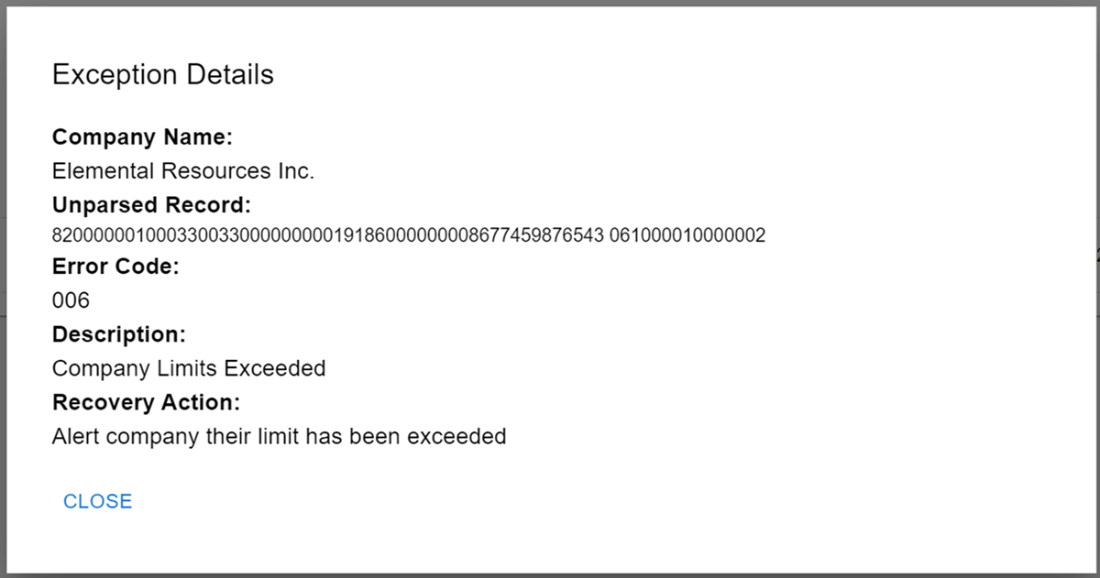
Exception Details Modal
Summary

  • Sprint planning focused on building key components: Company Information, Recent Batches, Expected Files, and Company Limits, emphasizing the importance of comprehensive data structure design.
  • We explored creating a company-level dashboard to address the need for storing and displaying detailed company information beyond the initial project scope.
  • Building robust company data management systems was underscored, providing a framework for enhancing ACH processing services for business customers who need detailed batch information.
  • Designing foundational company information tables as blockers highlighted their dependency for further development and the consideration of early work on some components to reduce rework.
  • Leveraging Generative AI helps create meaningful test data quickly, enhancing productivity by generating more than just typical name and address information, including logos.
  • Implementing a Company Dashboard demonstrated the necessity of organizing UI structures for efficient navigation and detailed data presentation for specific company metrics.
  • Creating detailed UI components for company overviews taught us the value of user-friendly interfaces facilitating seamless navigation and interaction at the company level.
  • Designing the API for company data retrieval reinforced the importance of well-structured responses and validation mechanisms for dynamic user interaction with dashboards.
  • Developing recent batch components highlighted the importance of flexible search functions for batch data retrieval to meet diverse business needs.
  • Creating expected file components stressed the need for alerting mechanisms and schedule compliance to ensure timely processing of crucial documents and mitigate risks.
  • Proactive monitoring of ACH files was explored to shift from reactive to proactive measures for improved customer service.
  • Company limit components emphasized configurable alerts and thresholds to safeguard against unauthorized or unexpected financial transactions.
  • We learned the importance of expanding exception functionality, such as alert generation, to notify customers through various channels if limits are exceeded.
  • Utilizing Testcontainers enhances testing reliability by ensuring isolated environments, eliminating dependency on developer-specific configurations, and allowing robust and portable tests.

FAQ

What were the goals of the “Company Information” sprint, and why were company tables a blocker?The sprint aimed to add a company-level dashboard with four components: Company Information, Recent Batches, Expected Files, and Company Limits. Company database tables were a blocker because most components depend on a company_id foreign key and core company fields. Some work (like Expected Files) could start early, but full functionality and correct displays required the company tables to exist first.
How is company data modeled in the database, and what is the role of ach_company_id?Company data is stored in a company table with fields like name, tax_id_type (e.g., EIN, SSN), tax_id_number, industry, website, DUNS, and an optional logo. Custom ENUM types (e.g., tin_type, industry_type) enforce valid values. The ach_company_id maps to the ACH Batch Header’s company identification (10 positions, typically zero-padded in files) and ties batches to companies.
Why store company logos in the database, and what are the trade‑offs?Storing logos in a BYTEA column keeps everything in one system and avoids introducing external storage like S3 or a CDN—simplifying setup and portability. The trade‑off is potential UI performance and payload size, since Base64-encoded images increase response sizes. For production scale, external storage plus URL references often perform better.
How are addresses and phone numbers modeled for a company?Addresses (mailing, street) are stored in a company_address table keyed by (company_id, address_type) to ensure at most one of each type per company. Phone numbers are stored in company_phone with a composite primary key (company_id, phone_type) and a unique constraint on (phone_number, extension). This enforces one “type” per company and prevents number reuse.
How can ENUM values (like tin_type) be exposed to the UI for dropdowns?Although ENUMs live in the database, they can be queried from system catalogs to produce a list of valid labels for UI controls. This allows building dynamic dropdowns consistent with the database’s allowed values, avoiding drift between front end and schema.
How are the company APIs designed and tested to be reliable across environments?APIs return typed Pydantic models (e.g., CompanyOverviewRecord and CompanyDetailRecord) and follow a predictable router layout (e.g., /api/v1/companies). Tests use Testcontainers to start/stop Dockerized dependencies, providing a fresh, isolated database per run and eliminating “works on my machine” issues—ideal for CI/CD.
How does the UI list companies and handle Base64 logos safely?The Companies page fetches an overview list and renders it in a MUI DataGrid with on-row click navigation to the dashboard. An ImageBase64 component validates the src using a regex (data:image/...;base64,...) and shows nothing if it is malformed, preventing broken or unsafe image rendering.
How are company‑specific ACH files created, and what formatting rules matter?BDD scenarios generate ACH files with batches tied to a company via company name and ach_company_id. Critical formatting includes truncating/padding company_name to 16 characters in the Batch Header and ensuring company identification is 10 characters (zero‑padded) to maintain ACH record alignment.
Why does the Recent Batches component use a generic search endpoint instead of /companies/{id}/batches?A general endpoint (/api/v1/files/batches/search) provides flexible criteria (amounts, ranges, company id/name, or UUID), enabling reuse across contexts (not just company dashboards). The query joins ACH batch tables and uses COALESCE to prefer the company name from the companies table, then the Batch Header, then an empty string, covering cases where a batch isn’t tied to a known customer.
How do the Expected Files and Company Limits components determine status and trigger alerts?Expected Files stores filename, schedule, and last_file_date; the API computes next_file_date via INTERVAL logic and marks file_loaded if a matching upload occurred, with optional weekend adjustments. Company Limits stores daily debit/credit limits, computes current totals from batch controls at runtime, and writes a COMPANY_LIMITS_EXCEEDED exception during batch control parsing when exceeded; the UI highlights exceeded totals and shows enhanced exception details (company name, recovery option).

pro $24.99 per month

  • access to all Manning books, MEAPs, liveVideos, liveProjects, and audiobooks!
  • choose one free eBook per month to keep
  • exclusive 50% discount on all purchases
  • renews monthly, pause or cancel renewal anytime

lite $19.99 per month

  • access to all Manning books, including MEAPs!

team

5, 10 or 20 seats+ for your team - learn more


choose your plan

team

monthly
annual
$49.99
$499.99
only $41.67 per month
  • five seats for your team
  • access to all Manning books, MEAPs, liveVideos, liveProjects, and audiobooks!
  • choose another free product every time you renew
  • choose twelve free products per year
  • exclusive 50% discount on all purchases
  • renews monthly, pause or cancel renewal anytime
  • renews annually, pause or cancel renewal anytime
  • Build Financial Software with Generative AI (From Scratch) ebook for free

choose your plan

team

monthly
annual
$49.99
$499.99
only $41.67 per month
  • five seats for your team
  • access to all Manning books, MEAPs, liveVideos, liveProjects, and audiobooks!
  • choose another free product every time you renew
  • choose twelve free products per year
  • exclusive 50% discount on all purchases
  • renews monthly, pause or cancel renewal anytime
  • renews annually, pause or cancel renewal anytime
  • Build Financial Software with Generative AI (From Scratch) ebook for free
choose your plan

team

monthly
annual
$49.99
$499.99
only $41.67 per month
  • five seats for your team
  • access to all Manning books, MEAPs, liveVideos, liveProjects, and audiobooks!
  • choose another free product every time you renew
  • choose twelve free products per year
  • exclusive 50% discount on all purchases
  • renews monthly, pause or cancel renewal anytime
  • renews annually, pause or cancel renewal anytime
  • Build Financial Software with Generative AI (From Scratch) ebook for free