8 Building a web UI with Streamlit
Streamlit is presented as the missing web interface for a local, voice-powered AI chatbot, making it possible to turn Python code into an interactive browser app without learning HTML, CSS, or JavaScript. The chapter emphasizes that Streamlit is especially well suited for data apps, dashboards, and lightweight tools, and that its appeal comes from being Python-only while still producing a polished interface with sensible defaults.
The core idea is simple: you write ordinary Python function calls such as st.title(), st.write(), and st.text_input(), and Streamlit automatically renders the matching web elements. A first app is built in a few lines, then expanded into an interactive greeting example that shows how user input is captured and used in conditional logic. This also introduces Streamlit’s execution model, where the whole script reruns from top to bottom whenever the user interacts with a widget, keeping the programming model straightforward and avoiding the need for callbacks or event handlers.
The chapter then surveys the most useful components for building richer interfaces: text display functions, inputs like text boxes, number fields, selectboxes, sliders, checkboxes, and radio buttons, plus buttons, sidebars, and column layouts. It shows how these pieces can be combined into a more complete app that uses settings in the sidebar and primary content in the main area, mirroring the structure of the chatbot that will be built later. Finally, it explains how to run and manage Streamlit apps during development, including the streamlit run command, auto-reload behavior, port selection, and a practical workflow for editing code and seeing updates immediately in the browser.
How Streamlit converts Python function calls into web page elements. Your Python script runs on the server, and Streamlit generates the HTML, CSS, and JavaScript that the browser displays.

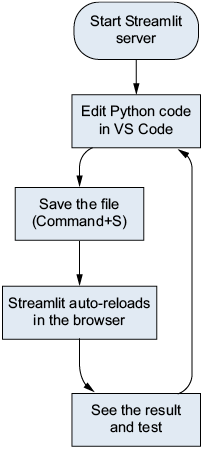
The Streamlit development workflow. Edit your Python file, save it, and the browser will update automatically—no manual refresh is needed.
Summary
- Streamlit is a Python framework that converts Python scripts into interactive web applications without requiring HTML, CSS, or JavaScript.
- A Streamlit app is built with functions like
st.title(),st.write(), andst.text_input()that both display interface elements and return user input values. - Core Streamlit components include text display (
st.title,st.header,st.write), user input (st.text_input,st.selectbox,st.slider), actions (st.button), and layout (st.sidebar,st.columns). - Streamlit reruns the entire Python script from top to bottom on every user interaction, which eliminates the need for callbacks or event handlers.
- The development workflow is fast: edit your Python file, save it, and Streamlit will automatically reload the page in the browser.
- The command
streamlitrunapp.pystarts the development server, and Ctrl-C stops it.
FAQ
What is Streamlit and why is it useful for building local AI web apps?
Streamlit is a Python framework that turns Python scripts into interactive web applications. It is especially useful for local AI projects because you can build a clean web UI without learning HTML, CSS, or JavaScript, making it a great fit for chatbot and data app interfaces on a Mac.How does Streamlit convert Python code into a web interface?
When you call functions likest.title() or st.text_input(), Streamlit generates the corresponding web page elements automatically. Your Python runs on the server, and Streamlit handles the HTML, CSS, and JavaScript behind the scenes.How do I create my first Streamlit app?
Create a file such asapp.py, import Streamlit with import streamlit as st, add a few display functions like st.title() and st.write(), then run it with streamlit run app.py.How do I install Streamlit in my project?
Activate your existing virtual environment in the project folder and install Streamlit withpip install streamlit. After that, save the dependency with pip freeze > requirements.txt so the project records the package version.How do I run a Streamlit app correctly?
Unlike a normal Python script, you do not usepython app.py. Instead, run the app with streamlit run app.py. Streamlit starts a local development server and opens the app in your browser.What happens when I interact with a Streamlit app?
Every user interaction reruns the entire script from top to bottom. This rerun model keeps apps simple because you usually do not need callbacks or event handlers.What are the most important Streamlit components for beginners?
The core beginner components include text display tools likest.title(), st.header(), and st.write(); input widgets like st.text_input(), st.text_area(), and st.selectbox(); buttons like st.button(); sidebars with st.sidebar; and layouts such as st.columns().How does st.text_input() work in a simple greeting app?
st.text_input() displays a text field and returns what the user typed. You can store that value in a variable, check whether it is empty with if name:, and then display a personalized message when input is provided.How do I add content to the sidebar in Streamlit?
Usewith st.sidebar: and place widgets or text inside that block. Everything indented under it appears in the sidebar instead of the main page area, which is ideal for settings such as model choice or temperature.
 Build Applications with Local AI Models on a Mac ebook for free
