14 Offline LLMs and their benefits
This chapter emphasizes a simple but powerful idea: a local chatbot should not just seem offline, it should be proven to work entirely without the internet. By walking through an airplane mode test, the chapter shows how to confirm that the model still answers normally after Wi-Fi and Bluetooth are disabled, demonstrating that all processing stays on the Mac and no data leaves the device.
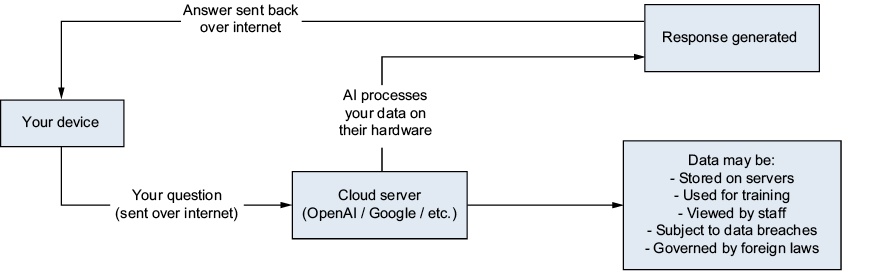
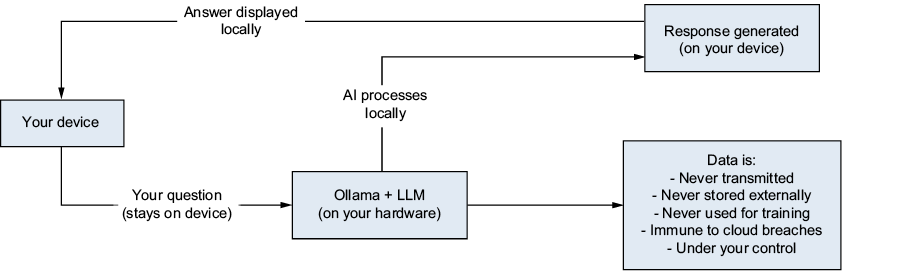
It then explains why that local data flow matters. Unlike cloud AI, which sends prompts to remote servers and may involve logging, retention, or third-party access, local AI keeps conversations on the user’s machine. That architectural difference offers stronger privacy, reduces security exposure, supports compliance in sensitive settings, and avoids dependence on external services that can change policies, go down, or be unavailable.
The chapter also compares costs and use cases. Cloud AI can be convenient and sometimes more capable, but subscriptions and usage-based pricing can become expensive over time, while local AI often has low software cost and modest running costs after the initial hardware purchase. It argues that local AI is especially valuable in healthcare, law, education, journalism, creative work, personal finance, enterprise environments, and offline or remote locations, and concludes that many users will benefit most from a hybrid strategy that uses local AI for everyday private tasks and cloud AI only when maximum capability is truly needed.
The cloud AI data flow: your prompt travels across the internet to a remote server for processing, and the response travels back.
The local AI data flow: your prompt stays on your device, is processed by the local model, and the response never leaves your machine.
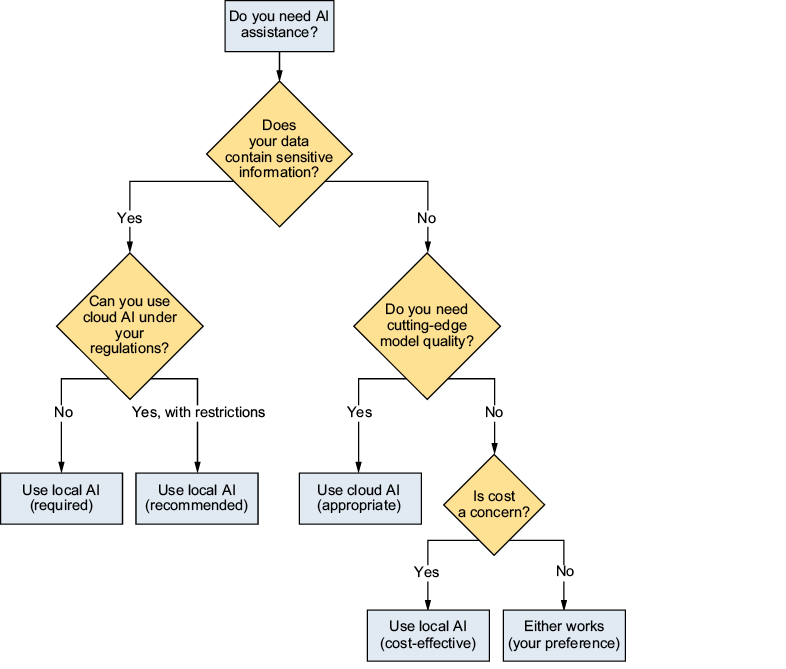
A decision tree for choosing between local and cloud AI based on data sensitivity, connectivity, and capability requirements
Summary
- Local AI truly works offline. The airplane mode test proves that no internet connection is needed for inference. You need the internet initially only to download the model.
- When the chatbot and all supporting components run locally, prompts and responses can remain on the device, reducing transmission and third-party storage risks. The protection depends on the surrounding application, operating-system, and network configuration.
- Cost advantages are substantial. Local AI eliminates per-user subscription fees. For teams and organizations, the savings can be dramatic, often paying for hardware within months.
- Specific industries need local AI. Healthcare, legal, education, journalism, and enterprise use cases often require local processing for regulatory compliance.
- The best approach is often hybrid. Use local AI for everyday and sensitive tasks. Use cloud AI for tasks requiring maximum capability. This gives you privacy where it matters and power when you need it.
FAQ
How can I verify that my local LLM works completely offline?
Turn off Wi-Fi and, if you want a stricter test, Bluetooth too. Then try loading a website to confirm there is no internet connection, and test your chatbot with several questions. If it still responds normally, your local AI is working fully offline.
Why is the airplane mode test important for local AI?
It proves that the model is truly running on your Mac rather than depending on a cloud service. If the chatbot still works with networking disabled, you know the prompts and responses are being handled locally.
Does local AI need the internet at all?
Only for the initial download of a model with ollama pull. After that, the model file stays on your drive and can run indefinitely without any network connection.
How does local AI provide better privacy than cloud AI?
With local AI, your prompts never leave your device, so there is no external transmission, no server-side retention, and no third-party access. That gives you architecturally guaranteed privacy.
What happens to my data when I use cloud AI instead of local AI?
Your prompt travels across the internet to a remote server, where it may be logged, retained, inspected, or exposed in a breach before the response is sent back. Local AI avoids that by keeping everything on-device.
Why is local AI especially useful for sensitive information?
It is useful when prompts include customer data, PII, source code, contracts, or internal strategy. Keeping that data on your Mac reduces the privacy, legal, and compliance risks of sharing it with a third party.
What real-world fields benefit most from local AI?
Healthcare, legal practice, education, journalism, finance, creative work, enterprise use, and offline or remote environments all benefit strongly from local AI because they often involve sensitive data or limited connectivity.
How can local AI help with legal, medical, or student records?
It lets you process confidential material without sending it to an external service. That matters for attorney-client privilege, protected health information, and student records governed by privacy regulations like HIPAA, APPI, GDPR, and FERPA.
Is local AI always cheaper than cloud AI?
Not always, but it can be much more cost-effective over time. Cloud AI often uses subscriptions or API billing, while local AI has upfront hardware costs but very low ongoing costs like minimal electricity and no monthly model fee.
When should I still choose cloud AI instead of local AI?
Choose cloud AI when you need the most powerful proprietary models, zero setup, or special features like web search integration, image generation, or document analysis. A hybrid approach often works best: local AI for private and routine tasks, cloud AI for demanding ones.

 Build Applications with Local AI Models on a Mac ebook for free
