13 System prompts and parameter tuning
The chapter explains how to move a chatbot beyond a generic assistant by shaping its behavior with system prompts and tuning generation parameters. A system prompt is introduced as the hidden instruction that comes before the conversation and strongly influences every reply, setting the model’s role, tone, priorities, and boundaries without changing the model’s underlying knowledge. With this approach, the same model can sound like a professional consultant, a friendly study buddy, a pirate tutor, a strict coding mentor, or a concise expert simply by changing the instructions it receives.
It then shows how response style is affected by sampling controls, especially temperature, along with related parameters such as top_k, top_p, and repeat_penalty. Lower temperature makes outputs more predictable and conservative, while higher values increase creativity and randomness, sometimes at the cost of coherence. The chapter frames top_k as a fixed shortlist, top_p as a flexible probability-based shortlist, and repeat_penalty as a way to reduce repetitive phrasing, while noting that temperature alone is often enough for many practical applications.
Finally, the chapter brings these ideas together with Ollama Modelfiles and a Streamlit interface. A Modelfile packages a base model, system prompt, and parameter settings into a reusable custom model that can be created, listed, inspected, run, and removed locally. The Streamlit chatbot example adds controls for choosing a model, adjusting temperature, and selecting or writing personality presets, allowing users to change the chatbot’s behavior from the sidebar while the app rebuilds the request with the chosen system prompt and settings for each new message.
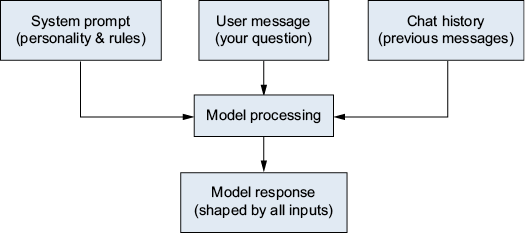
How the system prompt influences the conversation. The system message acts as a foundation that shapes every response the model generates.
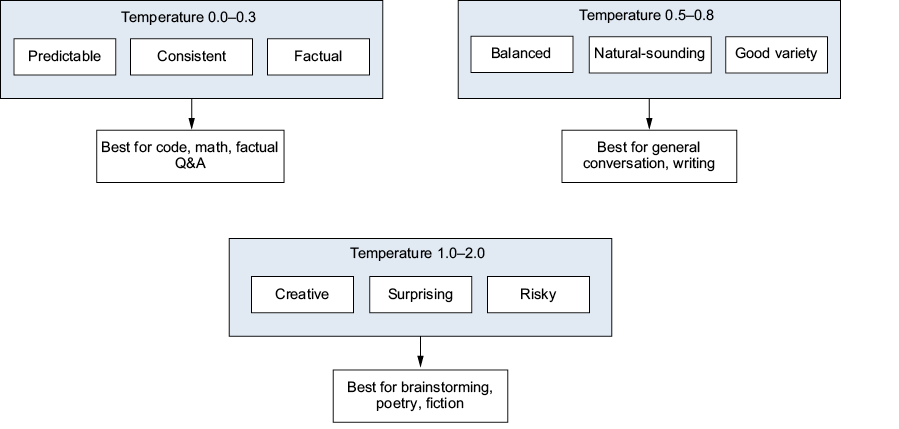
How temperature affects word-choice probability. Lower temperatures produce predictable text, while higher temperatures increase creativity and randomness.
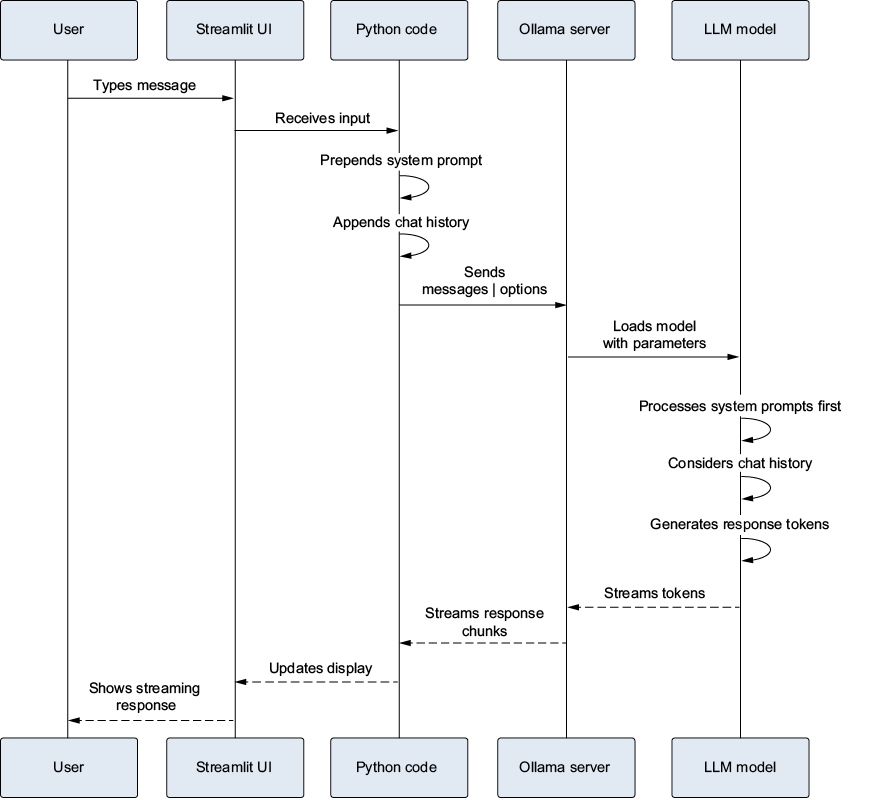
The complete pipeline, showing how the system prompt, user message, and parameters flow through the model to generate a response
Summary
- System prompts set the personality, tone, and behavior rules for the model. They are the single most powerful customization tool available to you.
- Temperature controls creativity: 0.0 for factual and predictable, 0.7 for balanced, 1.5+ for creative and risky.
- Other parameters (
top_p,top_k,repeat_penalty) offer fine-grained control for advanced users. - Modelfiles bundle a base model, system prompt, and parameters into a reusable custom model that you can run by name.
- Streamlit integration lets users switch personalities and adjust parameters through the UI without touching the code.
FAQ
What is a system prompt in an LLM conversation?
A system prompt is a special instruction sent before the conversation starts. It defines the model’s rules, personality, and boundaries, and it influences every response that follows.How does the system prompt affect chatbot behavior?
The system prompt acts as the foundation for the conversation. It can make the same model sound like a pirate, a study buddy, a coding mentor, or a concise expert without changing the model’s learned knowledge.Does a system prompt change what the model knows?
No. A system prompt changes how the model presents and prioritizes its answers, but it does not change the model’s weights or underlying knowledge. The model still knows the same facts; it just responds in a different style.What are some examples of personality presets you can create?
Examples include a professional consultant, a patient study buddy, a pirate tutor, a strict coding mentor, and a concise expert. Each preset shapes tone, structure, and response style for a different use case.Why would someone use a pirate tutor or other themed persona?
Themed personas add personality and can make learning more engaging and memorable. The model can still be accurate while speaking in a playful style, such as pirate dialect or a warm encouraging tone.What does temperature control in an LLM?
Temperature controls how strongly the model favors the most likely next words. Lower temperatures make responses more predictable and conservative, while higher temperatures make them more creative and varied.What happens when temperature is set very low or very high?
At very low values like 0.0, the model tends to choose the most probable word every time, producing stable and predictable output. At high values like 1.5 to 2.0, responses become more surprising and creative, but they may also become incoherent.What is the difference between top_k and top_p?
top_k limits the model to a fixed number of candidate words, such as the top 40. top_p uses a flexible set of candidates based on cumulative probability mass, making it more adaptive to the context.What is a Modelfile in Ollama?
A Modelfile is a plain-text configuration file used to create a custom model from a base model. It can include aFROM instruction, a SYSTEM prompt, generation parameters, and other optional settings.
 Build Applications with Local AI Models on a Mac ebook for free
