Overview

12 Comparing and selecting LLM models

This chapter offers a practical way to navigate the crowded Ollama model library by focusing on the major open-weight families, their strengths, and the real-world tradeoffs that matter on a Mac. It introduces Llama, Gemma, Qwen, Mistral, and DeepSeek as the main options you are likely to encounter, then emphasizes that model names and rankings change quickly, so it is important to check what is installed locally and verify current tags before choosing a model.

The central decision is size versus quality: larger models generally perform better, but they also run slower and require more memory. The chapter explains how parameter counts, token throughput, and RAM limits shape what is practical on different machines, showing that 2B–3B models are often the sweet spot for 8 GB Macs, while 7B–8B models become reasonable on 16 GB systems. It also shows why benchmarks are useful but incomplete, and why the best choice is ultimately the model that works well for your specific tasks and hardware.

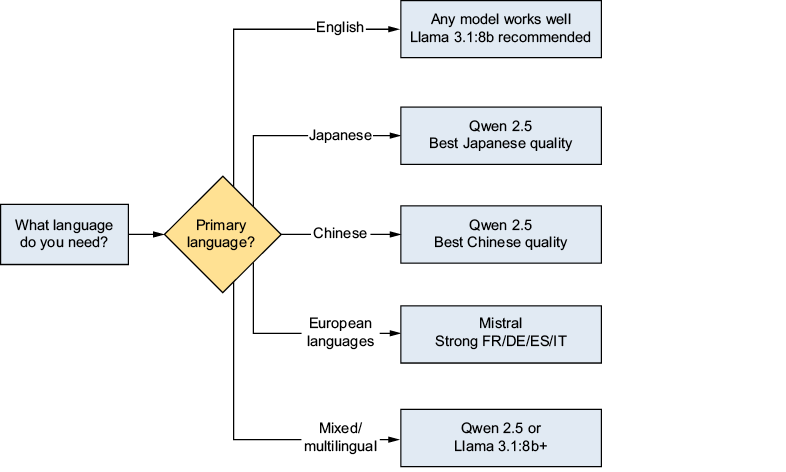
Language support is another key selection factor. Qwen is presented as the strongest choice for Asian languages, especially Japanese, Mistral as the best fit for European languages, and Llama as a reliable all-rounder for English and general use. The chapter then shows how easy it is to switch models in a local chatbot by changing a single model name or adding a sidebar selector in Streamlit, and it closes with a look at February 2026, when new mixture-of-experts models dramatically improved the open-model landscape by delivering frontier-level capability while keeping active computation relatively low.

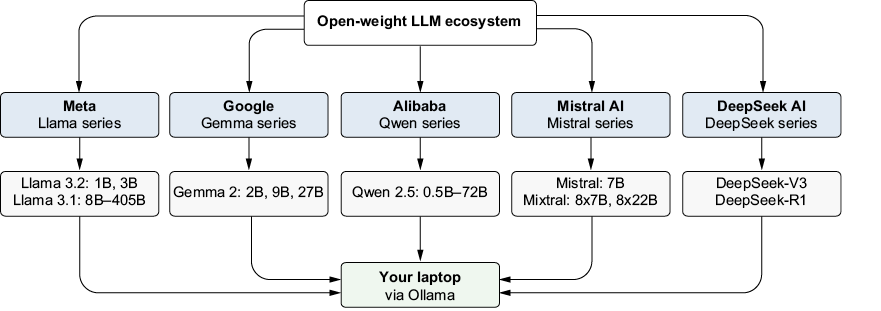
The five major open-weight model families discussed in this chapter and how they connect to your local machine through Ollama
Multilingual capability comparison across model families. Qwen excels at Asian languages, Mistral at European languages, and Llama is a strong all-rounder.
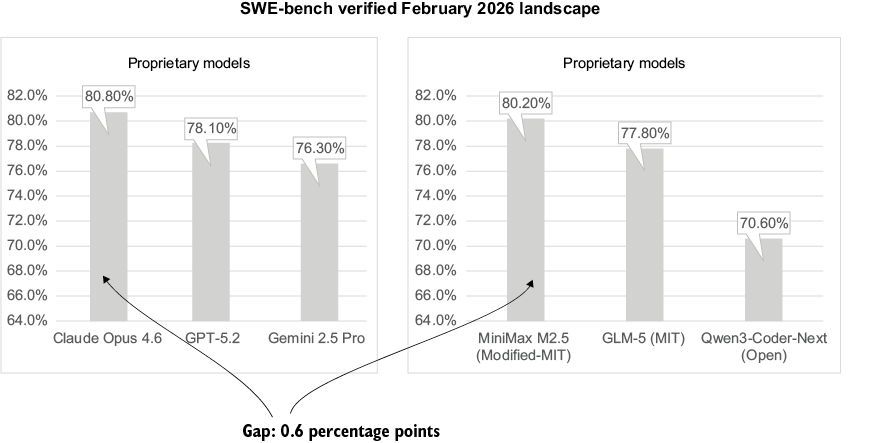
The February 2026 benchmark landscape, showing open models reaching parity with proprietary models on the hardest benchmarks. Reported results use different evaluation setups and should not be treated as a controlled head-to-head comparison.
Summary

  • Five major model families dominate the open-weight LLM landscape: Llama (Meta), Gemma (Google), Qwen (Alibaba), Mistral (Mistral AI), and DeepSeek (DeepSeek AI). Each has distinct strengths.
  • The model size (number of parameters) directly affects quality, speed, and RAM requirements. Bigger models are smarter but slower.
  • All five families perform well in English, although results vary by model size and task. Performance in other languages differs more noticeably: Qwen provides particularly strong support for several Asian languages, Mistral emphasizes European-­language coverage, and Llama offers broadly capable multilingual performance.
  • Switching models is trivial: change one line of code or add a UI dropdown. The Ollama API is the same for every model.
  • Benchmarks are guides, not gospel: always test models with your own use case.
  • February 2026 changed everything. Mixture of experts (MoE) models (GLM-5, Qwen3-Coder-Next, and MiniMax M2.5) achieved parity with proprietary models at a fraction of the cost, using far fewer active parameters than their total size suggests.
  • MoE is the new paradigm. The total number of parameters represents knowledge capacity, but the number of active parameters determines the compute cost. The gap between them is the key to running frontier AI locally.

FAQ

What are the five major open-weight model families covered in this chapter?The chapter focuses on five major open-weight model families: Llama, Gemma, Qwen, Mistral, and DeepSeek. Each family has different strengths, training emphasis, and ideal use cases.
How does model size affect quality, speed, and memory use?In general, larger models tend to be higher quality, but they also run slower and require more RAM. Smaller models are faster and lighter, making them better for modest Macs, while bigger models are better for more complex tasks if your hardware can support them.
Which model family is a safe starting point if you are unsure what to choose?Llama is described as a safe starting point because it performs well on general-purpose tasks, coding, reasoning, and instruction following. If you are not sure where to begin, Llama is a strong all-rounder.
Which model family is best for multilingual use, especially Asian languages?Qwen is the chapter’s top recommendation for Asian languages, especially Japanese, Chinese, and Korean. It was trained on a broad multilingual dataset and often produces the most natural-sounding output in those languages.
Which model family is strongest for European languages?Mistral is particularly strong in European languages such as French, German, Spanish, and Italian. It also performs well in reasoning and structured thinking tasks.
What model sizes are practical on an 8 GB Mac?On an 8 GB machine, the sweet spot is usually 2B to 3B models. These are fast enough to feel responsive and leave enough memory for macOS, Python, Streamlit, and a browser.
What model sizes are practical on a 16 GB Mac?With 16 GB of RAM, you can comfortably run 7B or 8B models. These usually offer a noticeable quality boost over smaller models while still being practical for local use.
How can you switch models in a Streamlit chatbot?You can switch models by changing the model name in the chatbot code, or by adding a sidebar dropdown that lists installed models. The Ollama API stays the same, so only the selected model changes.
Why are benchmark scores useful, but not enough to choose a model?Benchmarks help compare models on tasks like coding, reasoning, and general knowledge, but they do not capture every real-world use case. The chapter recommends using benchmarks as a rough guide and then testing models with your own prompts.
What changed in the February 2026 open-model landscape?February 2026 brought a major shift with frontier open models that rival proprietary systems on hard benchmarks. The chapter highlights MoE-based models such as GLM-5, Qwen3-Coder-Next, and MiniMax M2.5 as evidence that open models reached a new level of capability.

pro $24.99 per month

  • access to all Manning books, MEAPs, liveVideos, liveProjects, and audiobooks!
  • choose one free eBook per month to keep
  • exclusive 50% discount on all purchases
  • renews monthly, pause or cancel renewal anytime

lite $19.99 per month

  • access to all Manning books, including MEAPs!

team

5, 10 or 20 seats+ for your team - learn more


choose your plan

team

monthly
annual
$49.99
$499.99
only $41.67 per month
  • five seats for your team
  • access to all Manning books, MEAPs, liveVideos, liveProjects, and audiobooks!
  • choose another free product every time you renew
  • choose twelve free products per year
  • exclusive 50% discount on all purchases
  • renews monthly, pause or cancel renewal anytime
  • renews annually, pause or cancel renewal anytime
  • Build Applications with Local AI Models on a Mac ebook for free

choose your plan

team

monthly
annual
$49.99
$499.99
only $41.67 per month
  • five seats for your team
  • access to all Manning books, MEAPs, liveVideos, liveProjects, and audiobooks!
  • choose another free product every time you renew
  • choose twelve free products per year
  • exclusive 50% discount on all purchases
  • renews monthly, pause or cancel renewal anytime
  • renews annually, pause or cancel renewal anytime
  • Build Applications with Local AI Models on a Mac ebook for free
choose your plan

team

monthly
annual
$49.99
$499.99
only $41.67 per month
  • five seats for your team
  • access to all Manning books, MEAPs, liveVideos, liveProjects, and audiobooks!
  • choose another free product every time you renew
  • choose twelve free products per year
  • exclusive 50% discount on all purchases
  • renews monthly, pause or cancel renewal anytime
  • renews annually, pause or cancel renewal anytime
  • Build Applications with Local AI Models on a Mac ebook for free