Long chat sessions can make a local AI assistant seem forgetful or inconsistent, but the real issue is that language models do not retain memory between calls. Each request to the model is independent, so the application must resend the relevant conversation history every time. In a Streamlit chatbot, that visible history is stored in session state, which acts as application memory rather than model memory.
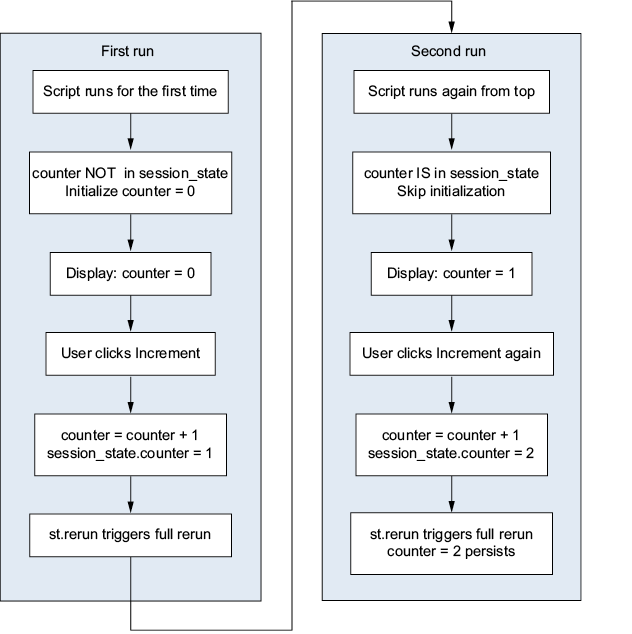
Streamlit’s session state is useful because the app reruns from top to bottom after every interaction, which would normally erase ordinary Python variables. By storing data in st.session_state, values such as counters, settings, and chat messages survive reruns until the browser tab is closed, the page is refreshed, or the server restarts. The chapter shows how to initialize values only once, how session state can hold many kinds of Python objects, and how this mechanism supports separate, independent conversations for different users.
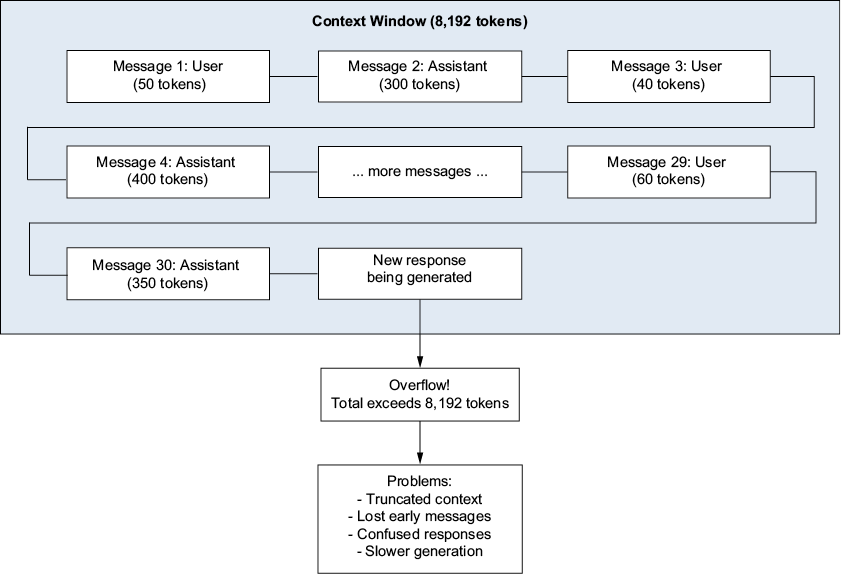
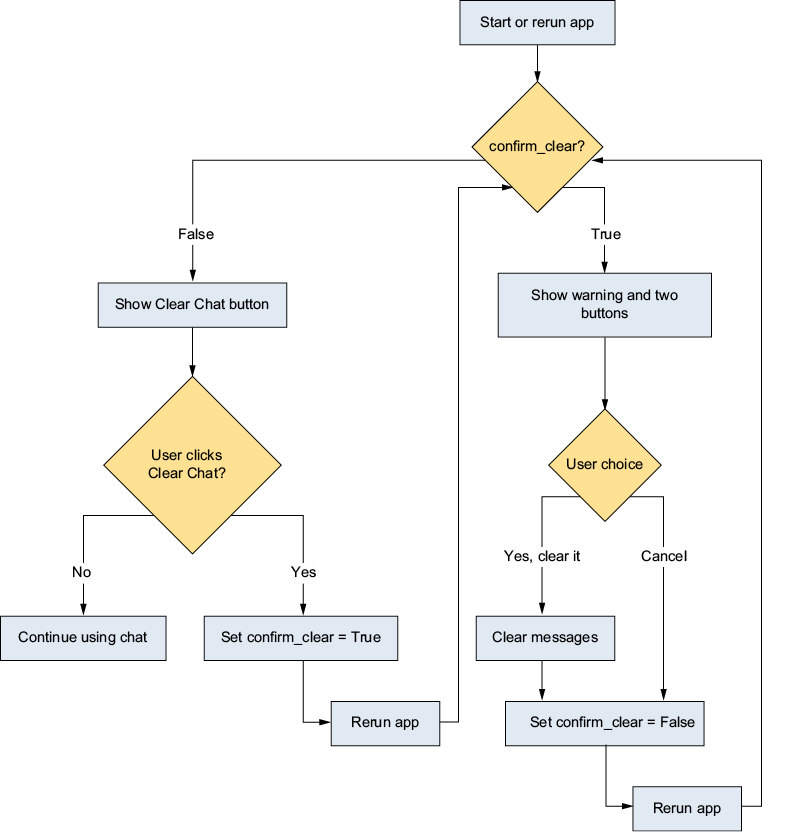
The chapter also explains how conversation history interacts with an LLM’s context window, the maximum amount of text the model can process at once. As more messages accumulate, responses can slow down, degrade in quality, or lose earlier context when the window is exceeded. To avoid this, the app can trim the history sent to the model while still displaying the full conversation in the interface, and it can add a safer reset flow with confirmation so users do not accidentally clear their chat. Additional patterns include tracking conversation duration and detecting model changes, all of which help make the chatbot more robust and user-friendly.
How Streamlit session state preserves data across reruns. The counter value persists in session state while the script re-executes from top to bottom.
What happens when conversation history exceeds the context window: the model loses access to earlier messages, and the response quality degrades.
How confirm_clear state transitions enable the two-step confirmation flow
Summary
st.session_state is a dictionary that persists across Streamlit’s rerun cycle. It is the mechanism that gives your app memory. Without it, all variables will reset every time the user interacts with the page.
Large language models do not remember previous conversations. The illusion of memory is created by sending the full conversation history with every request.
Every LLM has a context window with a limited size. When the conversation history exceeds this limit, the response quality degrades because the model cannot see the full context.
By trimming the messages sent to the model, while displaying the full history to the user, you prevent context-window overflow and maintain consistent response quality.
You can use session state to implement clear buttons with confirmation dialogs that prevent accidental data loss.
In a chat application, data flows from user input through session state to Ollama, through the LLM, and back to the browser with streaming.
FAQ
Why does a Streamlit chatbot need `st.session_state`?Streamlit reruns the entire script after each user interaction, so normal Python variables get reset. `st.session_state` is used to persist data like chat messages across reruns.Why are LLMs described as stateless?LLMs do not automatically remember past conversations between API calls. To make them seem conversational, your app must send the relevant message history with each request.What is the context window in an LLM?The context window is the maximum amount of text a model can process in one request, measured in tokens. It includes the conversation history and the response being generated.What happens when a chat conversation exceeds the context window?The model may drop earlier messages, become slower, or produce confused and contradictory responses. This usually causes the chatbot’s answer quality to degrade.How does `st.session_state` differ from model memory?`st.session_state` is application memory managed by Streamlit, while model memory does not exist in the LLM itself. The app stores chat history, then sends the needed portion to the model each time.What kind of data can be stored in `st.session_state`?You can store almost any Python object, including strings, numbers, lists, dictionaries, booleans, and chat message lists. It is commonly used to store conversation history and settings.When does Streamlit session state reset?Session state resets when the browser tab is closed, the page is refreshed, or the Streamlit server is stopped and restarted. Otherwise, it persists across reruns in the same session.How do you trim chat history before sending it to the model?One simple approach is to keep only the most recent message pairs. For example, you can slice the stored messages list to send only the last `max_history * 2 + 1` messages.Why is trimming history useful even if the user can still see the full chat?Trimming keeps the prompt smaller, which improves speed and reduces the chance of hitting the context window limit. The user can still see the entire chat in the UI, even if the model receives only the recent part.How can you add a safer reset button for chat history?Use a two-step confirmation flow in session state. First set a `confirm_clear` flag, then show a warning with Confirm and Cancel buttons before actually clearing the messages.
pro $24.99 per month
access to all Manning books, MEAPs, liveVideos, liveProjects, and audiobooks!

 Build Applications with Local AI Models on a Mac ebook for free
