Overview

5 Building knowledge bases with RAG

This chapter explains why AI agents need access to external knowledge bases instead of relying only on the model’s internal knowledge. Real tasks often involve private documents, code repositories, or large collections of files that must be searched selectively and added to context. The chapter frames retrieval-augmented generation as the overall process of finding relevant information, passing it to the LLM, and using that retrieved evidence to produce better answers.

It then compares several search approaches and shows when each one is useful. Keyword search is best for exact matches such as function names or error codes, while vector search is stronger for natural language and semantic similarity because embeddings place related meanings close together in vector space. Graph search is introduced for relationship-heavy questions, and structure-based search is presented as a practical method for exploring organized data like codebases and zip archives by using file names, folders, and other structural clues.

The chapter also walks through a full hands-on implementation of vector search, including embedding text, splitting long documents into chunks, calculating cosine similarity, and understanding why vector databases are needed for scale. A practical exercise shows how chunking and vector search can reduce thousands of tokens of web search content down to a tiny relevant subset. Finally, the chapter extends the agent with the Callback pattern, adding approval before dangerous tool use and automatic compression of search results, demonstrating that agents can gain powerful new behaviors without changing their core logic.

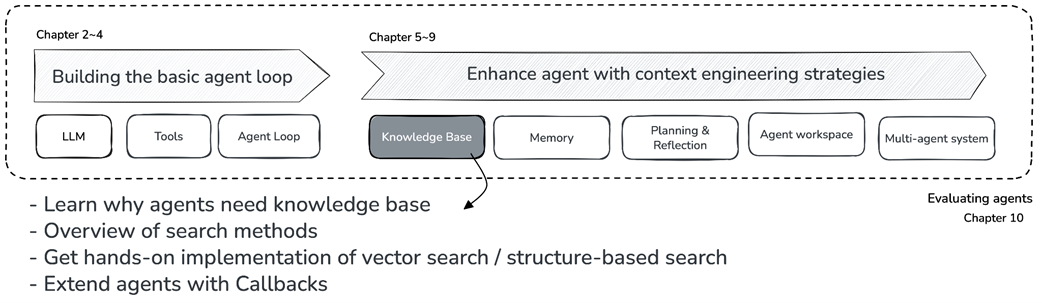
Book structure overview - Chapter 5 in focus.
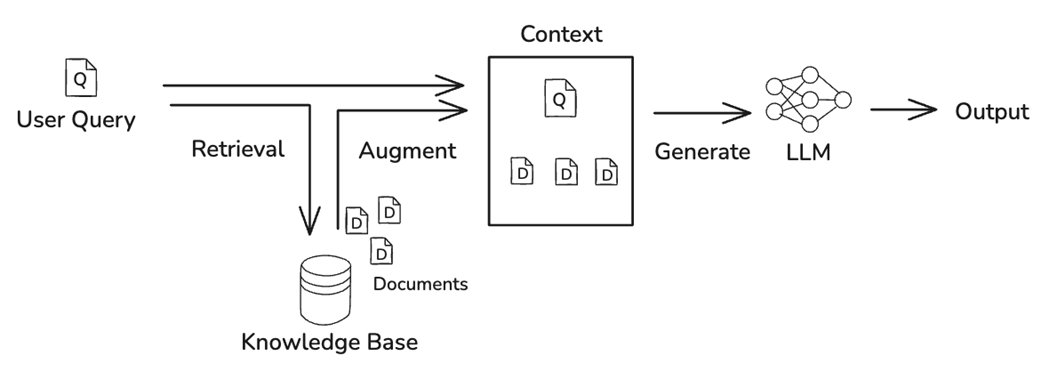
The overall flow of RAG (Retrieval-Augmented Generation). When a user question comes in, the system searches for relevant information from the Knowledge Base, then passes the search results along with the question to the LLM to generate a response.
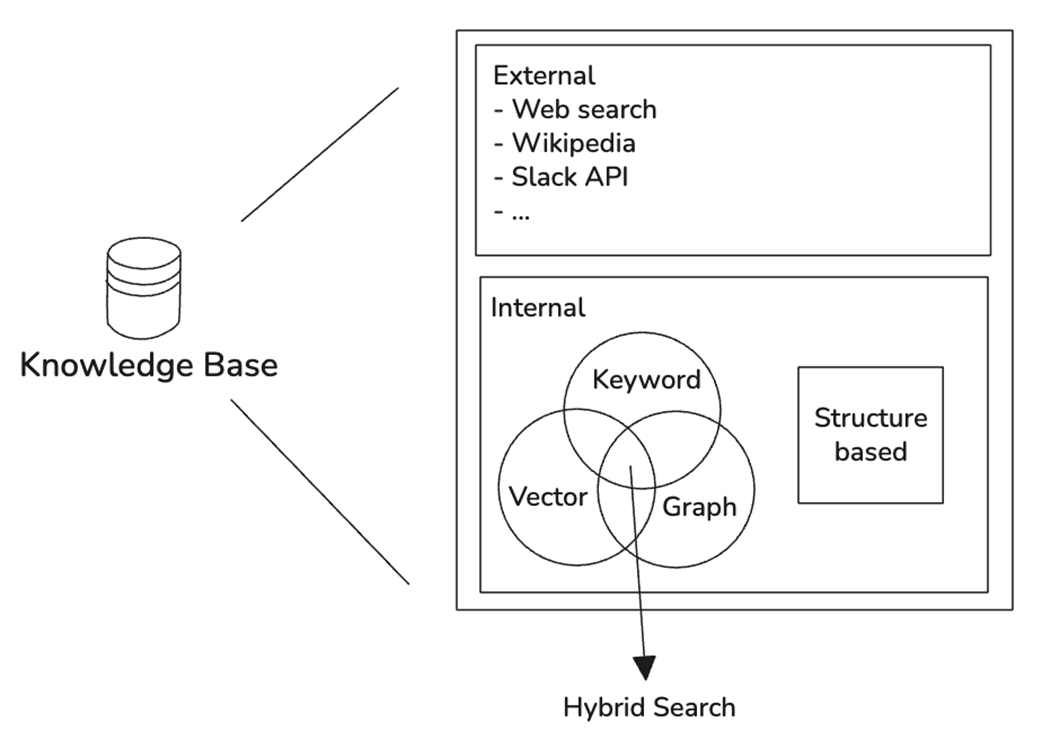
Types of Search - External/Internal repositories, Keyword/Vector/Graph search, and Structure-based search.
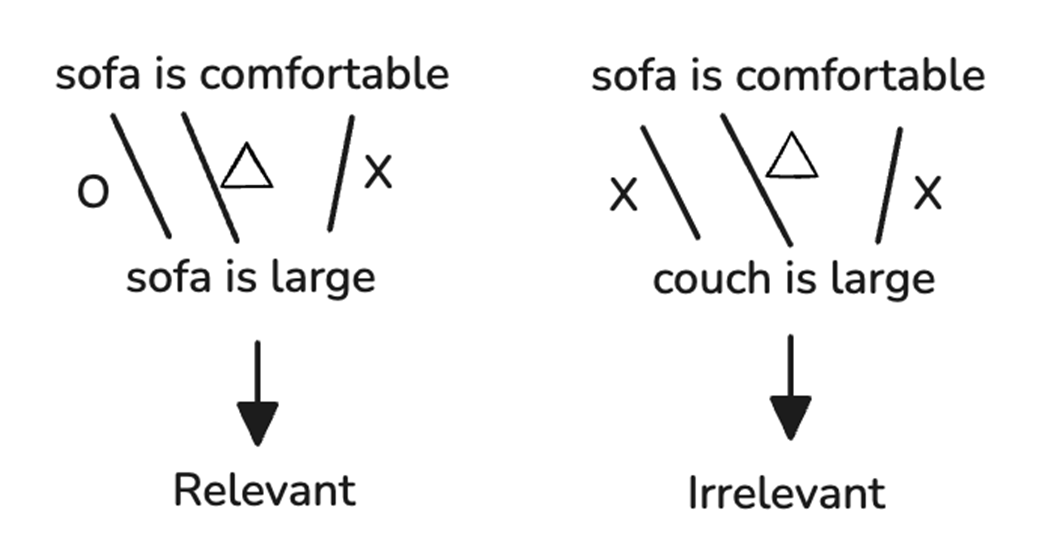
Keyword Search - While "sofa" and "couch" are similar words, a keyword search cannot determine their similarity without separate processing. Common expressions like "is" that appear frequently everywhere are not considered important (shown with triangles). The left example is judged relevant due to overlapping "sofa," but the right example is judged irrelevant despite semantic relevance.
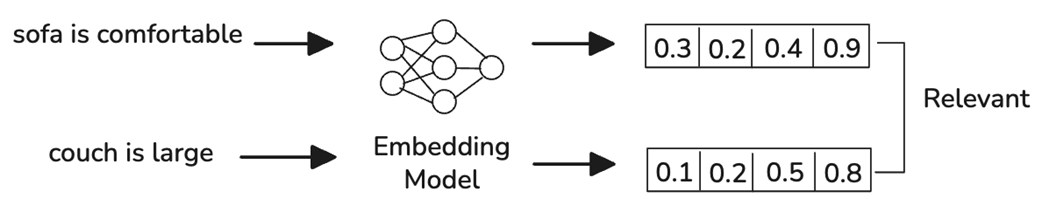
Vector Search Method - Determines relevance by converting data into vectors. Using a well-trained embedding model, it can determine that "sofa" and "couch" are similar without synonym processing.
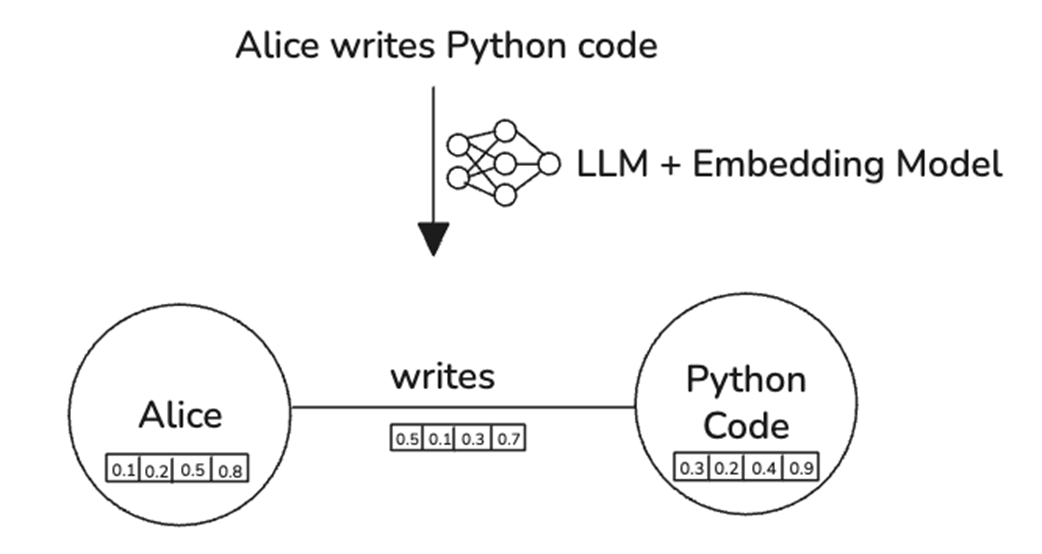
Graph Search Method - Extracts entities and relationships between entities from sentences and represents them as a graph. Each entity and relationship is sometimes converted to embedding vectors to utilize both vector search and graph search together.
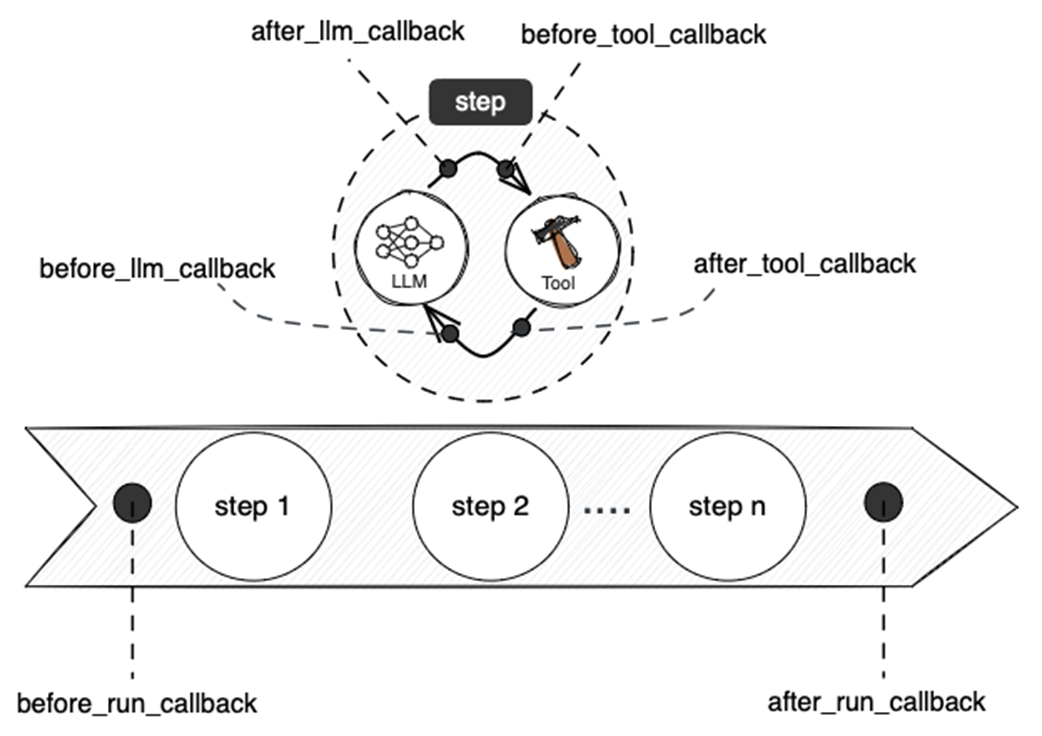
Points where Callbacks are inserted in the agent execution flow. LLM callbacks are called before and after think(), and tool callbacks are called before and after each tool execution within act().
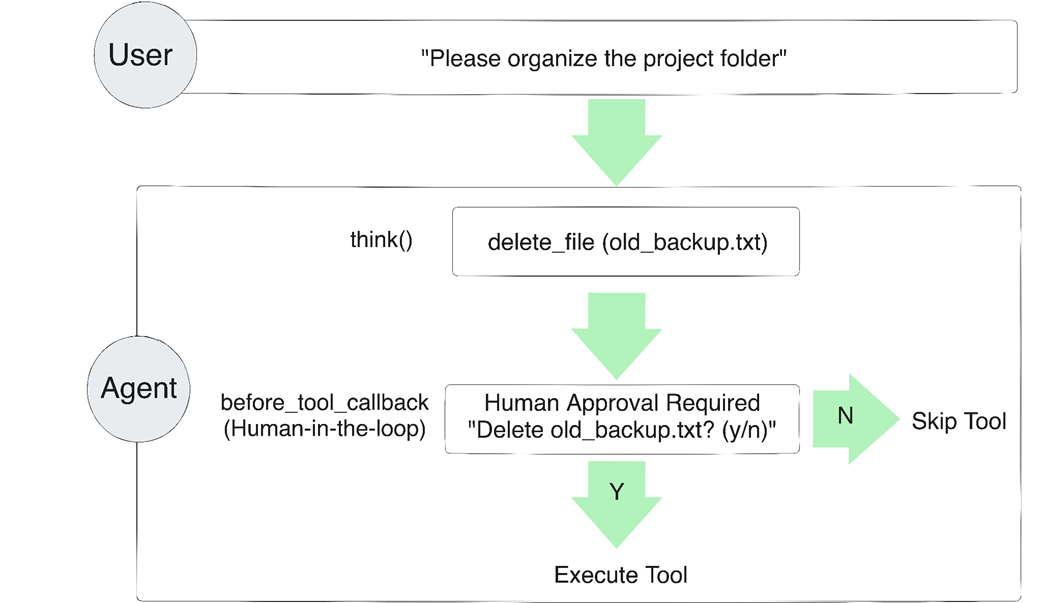
Tool execution approval flow in the Human in the Loop pattern. When a user requests "Clean up the project folder," the agent pauses when it tries to call the delete_file tool and requests approval from the user.
Summary

  • Internal data requires different approaches than web search. Single files can be read directly into context, but multiple files need exploration, and large-scale data requires search mechanisms to extract only relevant portions.
  • Four search methods serve different needs: keyword search for exact matching, vector search for semantic similarity, graph search for relationship traversal, and structure-based search for navigating organized file systems. Production systems often combine multiple methods.
  • Vector search converts text to numerical vectors where semantic similarity becomes geometric distance. The pipeline involves chunking long documents, generating embeddings, and calculating cosine similarity to find the most relevant content.
  • Structure-based search leverages file system organization as information itself. Folder names, file names, and directory hierarchies provide meaningful metadata that agents can navigate using simple tools like list_files and read_file.
  • The Callback pattern extends agent behavior without modifying core logic. before_tool_callback enables Human in the Loop approval for dangerous operations, while after_tool_callback enables automatic compression of search results.
  • Context engineering through search dramatically reduces token usage. In our exercise, extracting only relevant chunks reduced over 37,000 tokens to just 304 tokens, achieving a 99% savings rate while preserving the information needed to answer the query.

FAQ

Why do AI agents need external knowledge bases instead of relying only on the LLM’s internal knowledge?External knowledge bases let agents answer with up-to-date, private, or domain-specific information that is not reliably stored in the model. They also help the agent retrieve only the relevant parts of large data sources, such as company docs, codebases, or personal files, so the LLM can generate better answers with less noise.
What is RAG, and how does it work in an AI agent?RAG stands for Retrieval-Augmented Generation. The agent first retrieves relevant information from a knowledge base, adds that retrieved content to the LLM input, and then generates a response. This helps the agent overcome knowledge limits and use external data as context.
When is keyword search a good choice for retrieval?Keyword search is best when exact matching matters, such as searching for function names like get_user_by_id, error codes like 404, or specific configuration values. It is fast and effective for precise terms, but it struggles with synonyms and semantic similarity.
How is vector search different from keyword search?Vector search represents text as embeddings and compares meaning rather than exact words. This makes it useful for natural language queries and semantically related content, such as finding “persist data to storage” when the query is “how to store information in a database.”
Why is chunking necessary in vector search?Chunking splits long documents into smaller pieces before embedding them. This avoids token-limit issues, prevents multiple topics from being averaged into one embedding, and returns more relevant search results that use less context.
What does overlap do in chunking?Overlap lets adjacent chunks share some text so that context is not lost at boundaries. This helps preserve meaning when a sentence or idea is split across chunks. A typical overlap is around 10–20% of the chunk size.
How does a simple vector search implementation find the best results?It converts the query into an embedding, compares it with all chunk embeddings using similarity measures like cosine similarity, sorts results by score, and returns the top matches. This gives semantic search without needing a complex search algorithm.
Why are vector databases useful if vector search can be implemented directly?Direct vector search compares every chunk, which is slow for large datasets. Vector databases use approximate nearest neighbor algorithms for faster retrieval, store embeddings efficiently, and often support metadata filtering and production-scale performance.
What is structure-based search, and when should an agent use it?Structure-based search uses the organization of files and folders to guide exploration. It works well for codebases and zip archives because filenames, directory names, and file structure provide useful hints about where the answer is likely to be found.
How do callbacks extend an agent without changing its core logic?Callbacks let you intercept the agent before or after tool execution. A before_tool_callback can approve, block, or replace a tool call, while an after_tool_callback can modify results, such as compressing long search outputs. This makes it easy to add features like Human in the Loop approval and automatic search-result compression.

pro $24.99 per month

  • access to all Manning books, MEAPs, liveVideos, liveProjects, and audiobooks!
  • choose one free eBook per month to keep
  • exclusive 50% discount on all purchases
  • renews monthly, pause or cancel renewal anytime

lite $19.99 per month

  • access to all Manning books, including MEAPs!

team

5, 10 or 20 seats+ for your team - learn more


choose your plan

team

monthly
annual
$49.99
$499.99
only $41.67 per month
  • five seats for your team
  • access to all Manning books, MEAPs, liveVideos, liveProjects, and audiobooks!
  • choose another free product every time you renew
  • choose twelve free products per year
  • exclusive 50% discount on all purchases
  • renews monthly, pause or cancel renewal anytime
  • renews annually, pause or cancel renewal anytime
  • Build an AI Agent (From Scratch) ebook for free

choose your plan

team

monthly
annual
$49.99
$499.99
only $41.67 per month
  • five seats for your team
  • access to all Manning books, MEAPs, liveVideos, liveProjects, and audiobooks!
  • choose another free product every time you renew
  • choose twelve free products per year
  • exclusive 50% discount on all purchases
  • renews monthly, pause or cancel renewal anytime
  • renews annually, pause or cancel renewal anytime
  • Build an AI Agent (From Scratch) ebook for free
choose your plan

team

monthly
annual
$49.99
$499.99
only $41.67 per month
  • five seats for your team
  • access to all Manning books, MEAPs, liveVideos, liveProjects, and audiobooks!
  • choose another free product every time you renew
  • choose twelve free products per year
  • exclusive 50% discount on all purchases
  • renews monthly, pause or cancel renewal anytime
  • renews annually, pause or cancel renewal anytime
  • Build an AI Agent (From Scratch) ebook for free