Overview

4 Implementing a basic ReAct agent

The chapter explains how to turn an LLM with tools into a practical AI agent using the ReAct pattern, where reasoning and acting alternate in a loop until the problem is solved. Rather than trying to answer everything at once, the agent gathers missing information, uses tools, checks results, and adapts its approach when needed. This makes the system more flexible and resilient than a fixed script, and it forms the basis for the agents built later in the book.

To support that loop, the chapter builds a clean internal architecture centered on an execution state container. An ExecutionContext stores the full trace of what happened, including events, steps, IDs, scratch state, and completion status, so state does not have to be scattered across many variables. The chapter also unifies local Python functions and MCP tools behind a shared tool interface, then adds an LLM communication layer that translates between internal data structures and provider-specific API formats. This keeps the agent modular: the context stores everything, the request packages what the model needs, and the response standardizes what comes back.

With those pieces in place, the chapter implements the agent itself as a think-act orchestrator. The agent sets up tools, prepares each LLM request from context, calls the model, records responses, executes requested tools, and repeats until it reaches a final answer or hits a step limit. It also adds structured output by turning the final response into a special tool call, allowing the agent to return validated Pydantic models instead of free-form text. The chapter ends by showing that web search tools greatly improve performance on GAIA-style tasks, while also noting that more capabilities, such as file processing, are needed for broader problem solving.

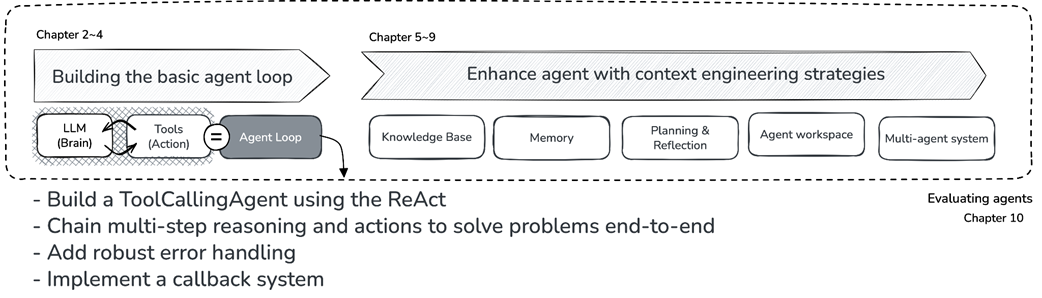
Book structure overview - Chapter 4 in focus.
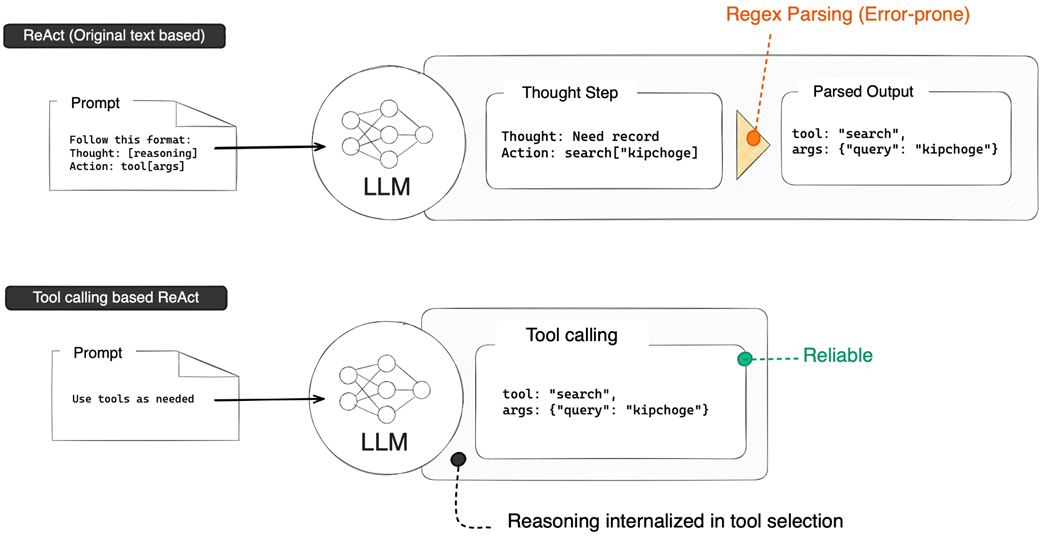
Evolution from text-based ReAct to tool-calling ReAct. The explicit "Thought" step has been internalized into the LLM's tool selection process, eliminating the need for fragile text parsing.
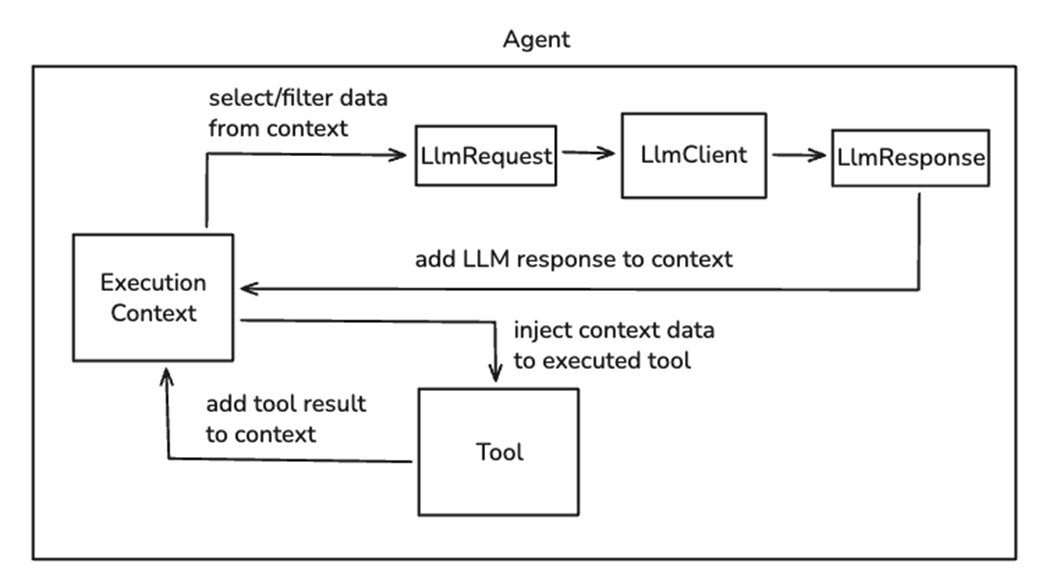
Information flow in the agent architecture. ExecutionContext sits at the center, managing all execution state. Arrows show: (1) Context to LlmRequest to LlmClient for outgoing LLM calls, (2) LlmResponse back to Context for incoming responses, and (3) bidirectional flow between Context and Tools for tool execution.
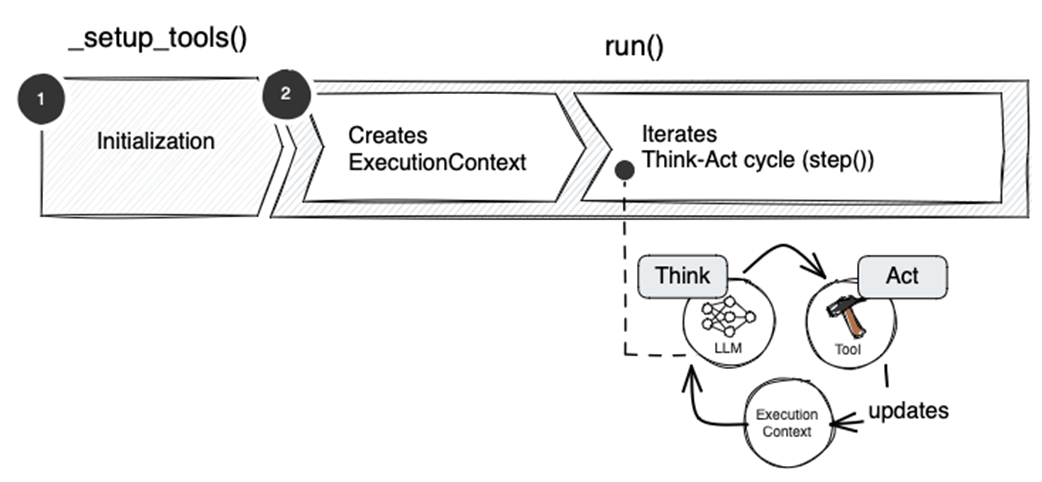
Agent implementation roadmap showing the five core methods and their execution flow. The numbered sequence illustrates how each component works together to solve problems.
Summary

  • ReAct (Reasoning + Acting) is the foundational pattern behind modern AI agents, where the LLM alternates between reasoning about what it needs and taking actions to get it. Modern implementations use tool calling instead of fragile text parsing.
  • ExecutionContext centralizes all execution state, including events, step count, execution ID, and flexible state storage. This design simplifies method signatures and enables context propagation to tools that need access to execution state.
  • Tool abstraction through BaseTool and FunctionTool provides a consistent interface for all tools. The @tool decorator wraps simple functions, while load_mcp_tools() integrates external MCP servers, allowing the agent to use both local and remote tools seamlessly.
  • The LLM communication layer separates concerns cleanly: LlmRequest packages what to send, LlmClient handles API communication via LiteLLM, and LlmResponse standardizes what comes back. This separation is where context engineering happens.
  • The Agent class orchestrates everything through five core methods: _setup_tools() prepares available tools, run() manages the execution loop, step() performs one think-act cycle, think() calls the LLM, and act() executes requested tools.
  • Structured output enables agents to return type-safe Pydantic models instead of free-form text. By creating a dynamic final_answer tool from the output schema, we leverage existing tool-calling infrastructure to guarantee format compliance.

FAQ

What is a ReAct agent and why is it important?ReAct stands for Reasoning + Acting. It is the core pattern behind modern AI agents because it lets an LLM alternate between thinking about what it needs and taking actions with tools until it can solve a problem.
How does the think-act cycle work in a ReAct agent?The agent repeatedly reasons about the next step, calls a tool if needed, observes the tool result, and then decides what to do next. This loop continues until the agent has enough information to produce a final answer.
Why did early ReAct systems rely on text parsing, and what was the problem with that approach?Early ReAct agents used strict text formats like Action: search["query"]. This was fragile because small formatting mistakes, such as missing brackets or extra spaces, could break parsing and cause failures.
How does Tool Calling improve on text-based ReAct agents?Tool Calling produces structured outputs instead of free-form text, so the API guarantees the format of tool requests. This removes the need for brittle parsing and makes agent behavior more reliable.
What is ExecutionContext and why does the agent need it?ExecutionContext is the central storage object for everything that happens during an agent run. It keeps track of events, the current step, the execution ID, custom state, and the final result, which helps avoid scattered variables and makes debugging easier.
What kinds of information are stored in the agent’s events?Events record the history of execution, including user messages, LLM responses, tool calls, and tool results. Each event also stores metadata such as execution ID, timestamp, and author.
Why does the chapter introduce a BaseTool interface?BaseTool gives all tools a consistent interface with a name, description, tool definition, and async execute method. This makes it easy for the agent to work with both local Python tools and wrapped external tools in the same way.
How does FunctionTool wrap regular Python functions?FunctionTool adapts a normal Python function to the BaseTool interface. It inspects the function signature, passes ExecutionContext only when needed, and automatically builds the tool schema from the function’s type hints.
How are MCP tools integrated into the agent?MCP tools are loaded from an external MCP server, wrapped in a Python function that calls the server, and then converted into FunctionTool instances. This lets the agent use remote MCP tools alongside local tools without special handling.
How does the agent support structured output with Pydantic models?When an output_type is provided, the agent dynamically creates a final_answer tool that matches that Pydantic schema. It then forces tool use, detects success from that tool, and returns the validated model instance instead of free-form text.

pro $24.99 per month

  • access to all Manning books, MEAPs, liveVideos, liveProjects, and audiobooks!
  • choose one free eBook per month to keep
  • exclusive 50% discount on all purchases
  • renews monthly, pause or cancel renewal anytime

lite $19.99 per month

  • access to all Manning books, including MEAPs!

team

5, 10 or 20 seats+ for your team - learn more


choose your plan

team

monthly
annual
$49.99
$499.99
only $41.67 per month
  • five seats for your team
  • access to all Manning books, MEAPs, liveVideos, liveProjects, and audiobooks!
  • choose another free product every time you renew
  • choose twelve free products per year
  • exclusive 50% discount on all purchases
  • renews monthly, pause or cancel renewal anytime
  • renews annually, pause or cancel renewal anytime
  • Build an AI Agent (From Scratch) ebook for free

choose your plan

team

monthly
annual
$49.99
$499.99
only $41.67 per month
  • five seats for your team
  • access to all Manning books, MEAPs, liveVideos, liveProjects, and audiobooks!
  • choose another free product every time you renew
  • choose twelve free products per year
  • exclusive 50% discount on all purchases
  • renews monthly, pause or cancel renewal anytime
  • renews annually, pause or cancel renewal anytime
  • Build an AI Agent (From Scratch) ebook for free
choose your plan

team

monthly
annual
$49.99
$499.99
only $41.67 per month
  • five seats for your team
  • access to all Manning books, MEAPs, liveVideos, liveProjects, and audiobooks!
  • choose another free product every time you renew
  • choose twelve free products per year
  • exclusive 50% discount on all purchases
  • renews monthly, pause or cancel renewal anytime
  • renews annually, pause or cancel renewal anytime
  • Build an AI Agent (From Scratch) ebook for free