Overview

6 Building AI workflows with Langchain.js

This chapter moves beyond single prompt-response interactions and shows how to build robust, multi-step AI workflows with LangChain.js. It introduces chains built from composable Runnables to orchestrate data transformations, tool calls, and LLM invocations with retries and fallbacks. The chapter also emphasizes structured prompt management—using templates and few-shot examples—to produce more reliable outputs, and demonstrates how these capabilities complement, rather than replace, a modern web stack by integrating with the Vercel AI SDK for responsive, streamable user experiences.

Through practical patterns, you learn to compose pipelines via pipe or sequence, manage prompts with ChatPromptTemplate and FewShotPromptTemplate, and stream chain results to the UI using createStreamableUI. The chapter then develops a retrieval workflow end to end: ingesting content with text splitters (notably the recursive splitter), generating embeddings, storing them in vector stores, and querying via retrievers that slot neatly into chains. It covers key cautions such as preserving the order of steps and matching inputs between components, selecting the correct embedding provider, and properly closing and accumulating streams. Conversation memory is added with ChatMessageHistory, BufferMemory, and ConversationChain to persist and leverage context across turns, along with guidance on customizing prompts and avoiding shared memory across chains.

Finally, the chapter introduces agents that implement the ReAct paradigm, enabling the model to decide when and how to call tools (including custom tools and retrievers) to accomplish multi-step goals. It illustrates streaming agent reasoning and results back to the UI, and calls out practical constraints like context window limits from tool descriptions and latency introduced by multi-layered pipelines. A brief module overview situates prompts, agents, vector stores, and parsers within the ecosystem, and advanced orchestration options—LCEL for declarative chain composition and LangGraph for stateful, loop-capable workflows—round out the toolkit for building scalable, context-aware, AI-enhanced web applications.

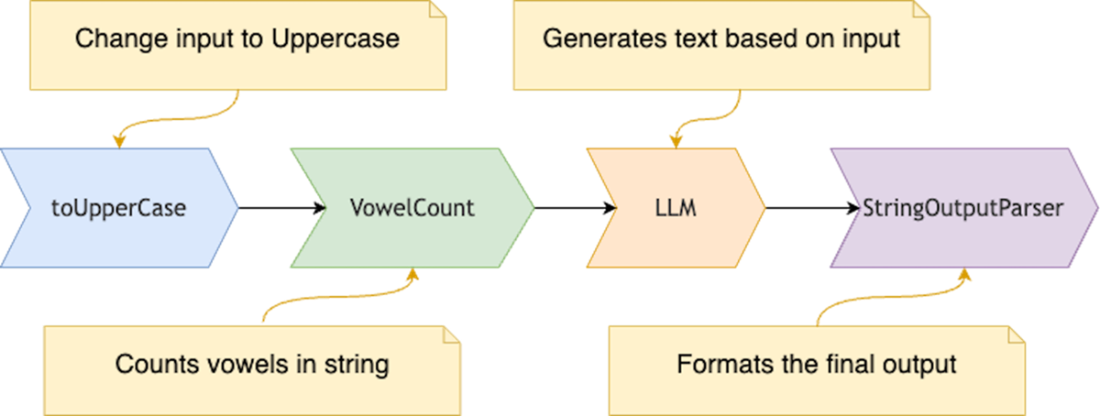
A typical LangChain operation chain where it processes data sequentially through a toUpperCase function, then a VowelCount function, then via the Language Model (LLM), and finally via the StringOutputParser to parse the output.
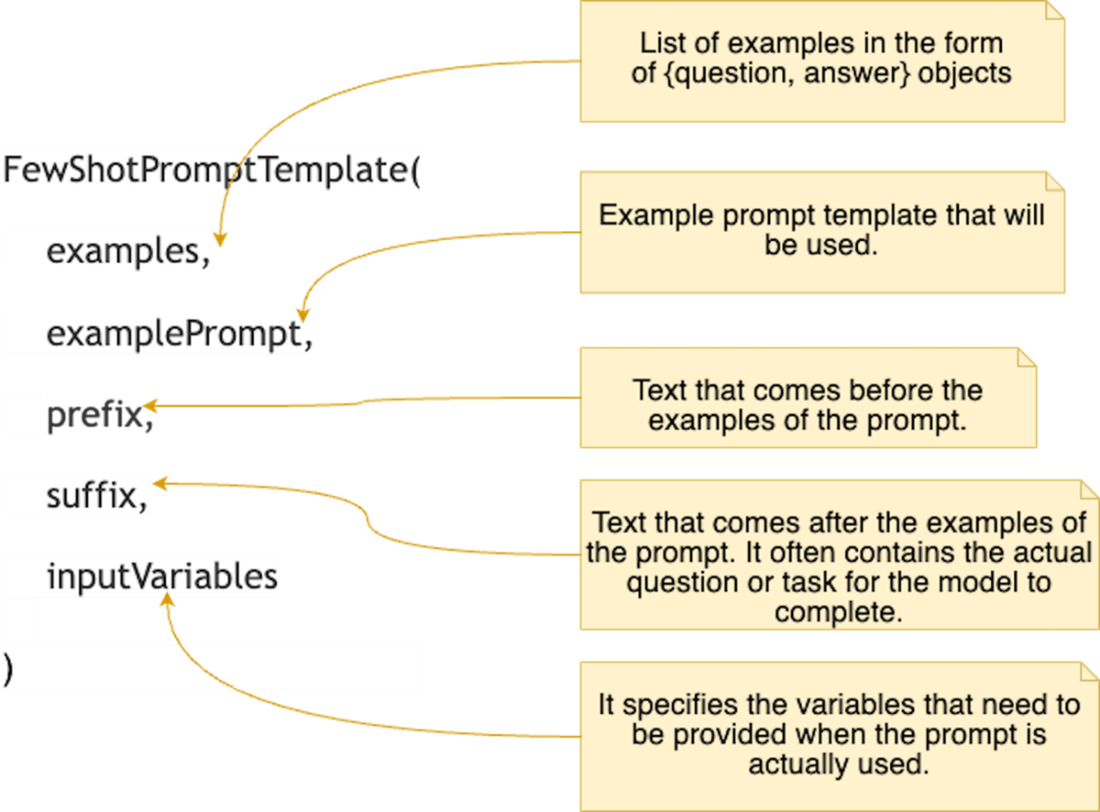
The FewShotPromptTemplate class takes five key parameters: 'examples' (a list of question-answer pairs serving as reference examples), 'examplePrompt' (a template for formatting each example), 'prefix' (introductory text preceding the examples), 'suffix' (concluding text following the examples, typically containing the main task or question), and 'inputVariables' (specifying the variables to be provided when the prompt is used).
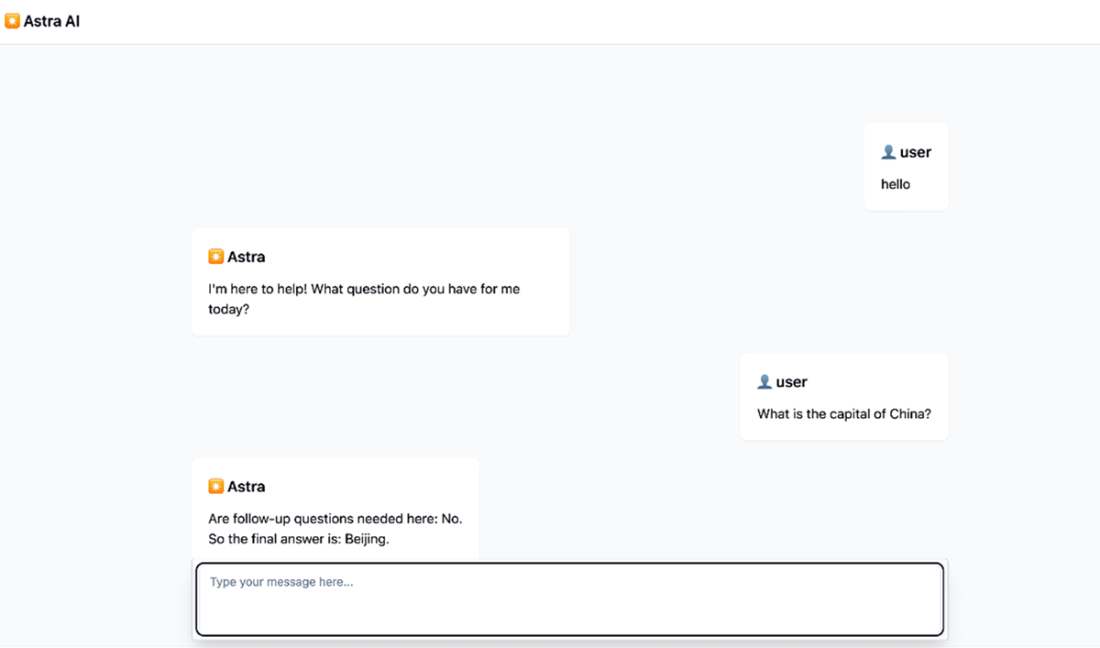
Sample interaction with our AI agent that formats the answers based on the examples we provided. Behind the scenes it utilized the FewShotPromptTemplate class from the LangChain.js project.
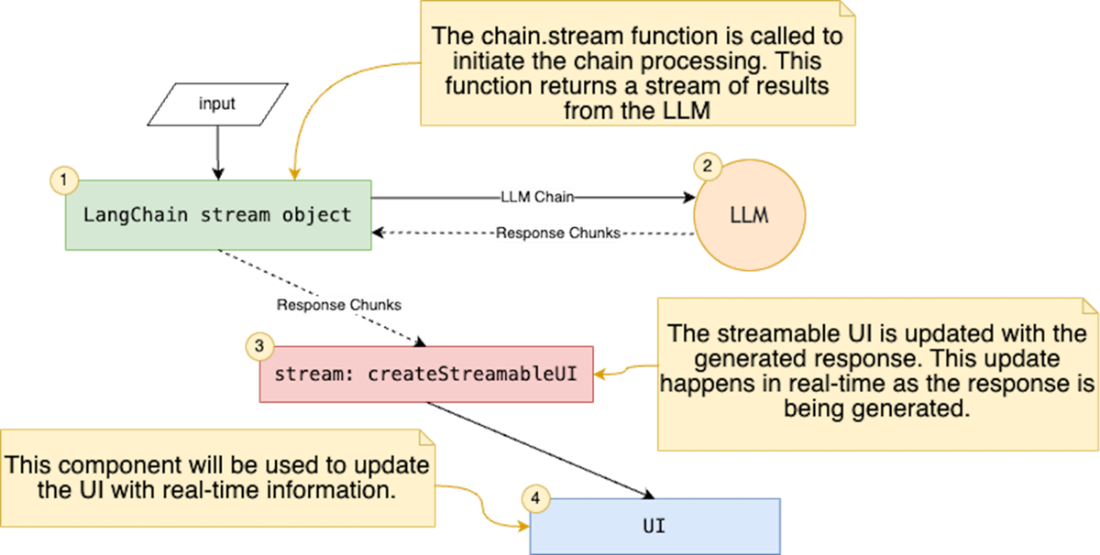
Step by step integration of the LangChain stream results with the createStreambleUI object. Everytime there is an update we push it to the uI stream which in turn updates the UI in real time.
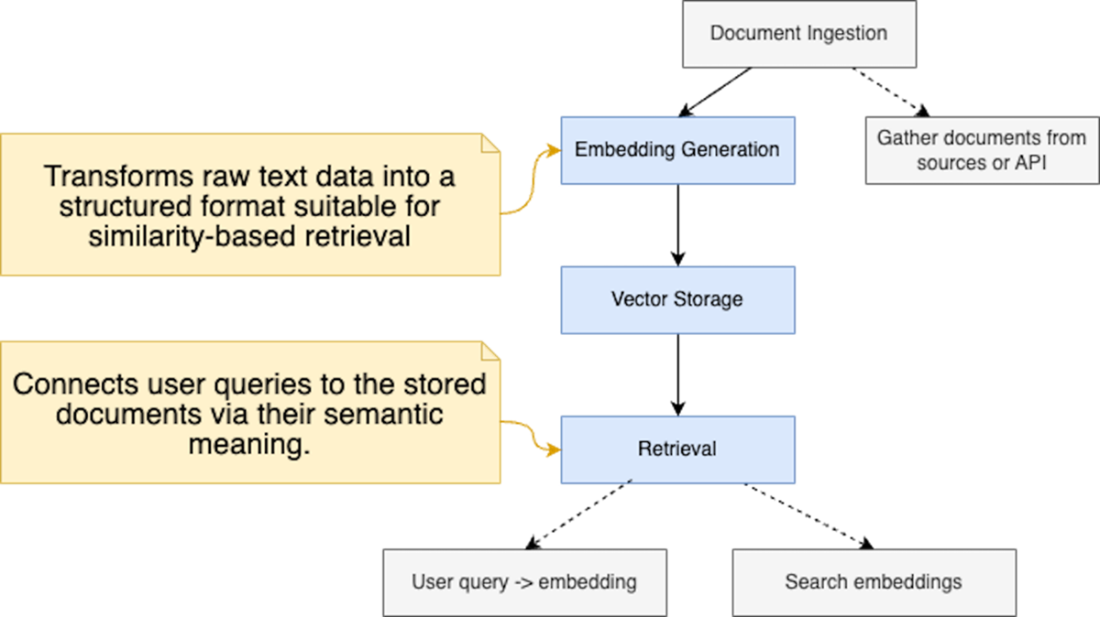
The diagram outlines the process of document embedding preparation and retrieval. It starts with document ingestion from various sources, followed by embedding generation using LangChain to create semantic vectors. These embeddings are stored in a vector database, enabling efficient similarity-based querying during the information retrieval stage.
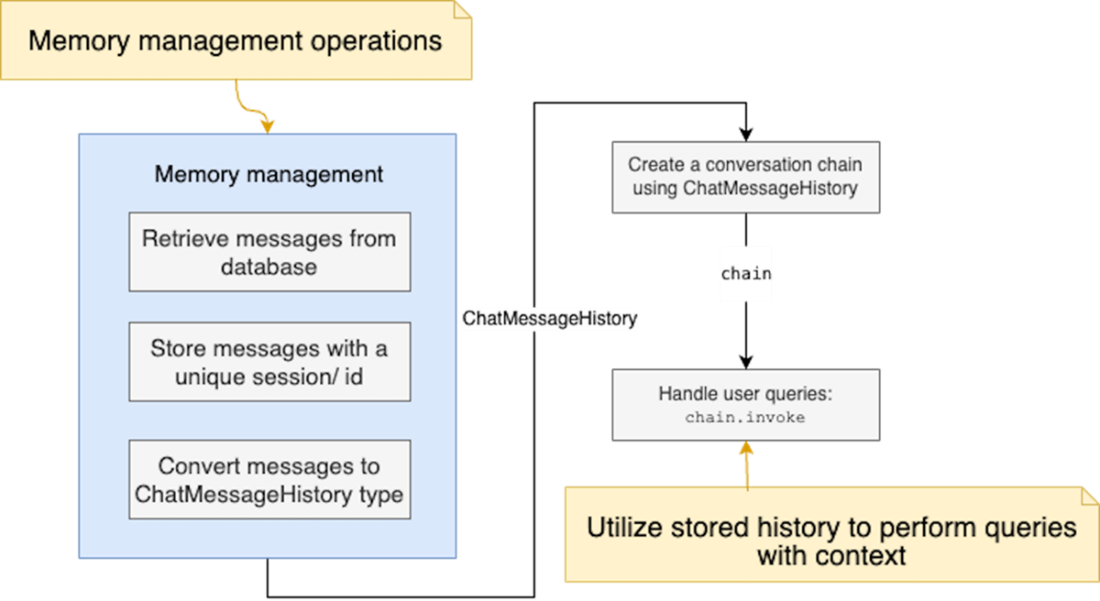
Managing user messages to improve conversation accuracy. Messages are retrieved from a database, stored with a unique session ID, and converted into a ChatMessageHistory format. This history is used to create a ConversationChain that handles user queries, using stored context to enhance response accuracy. The history is integrated into other prompts to refine the model’s performance.
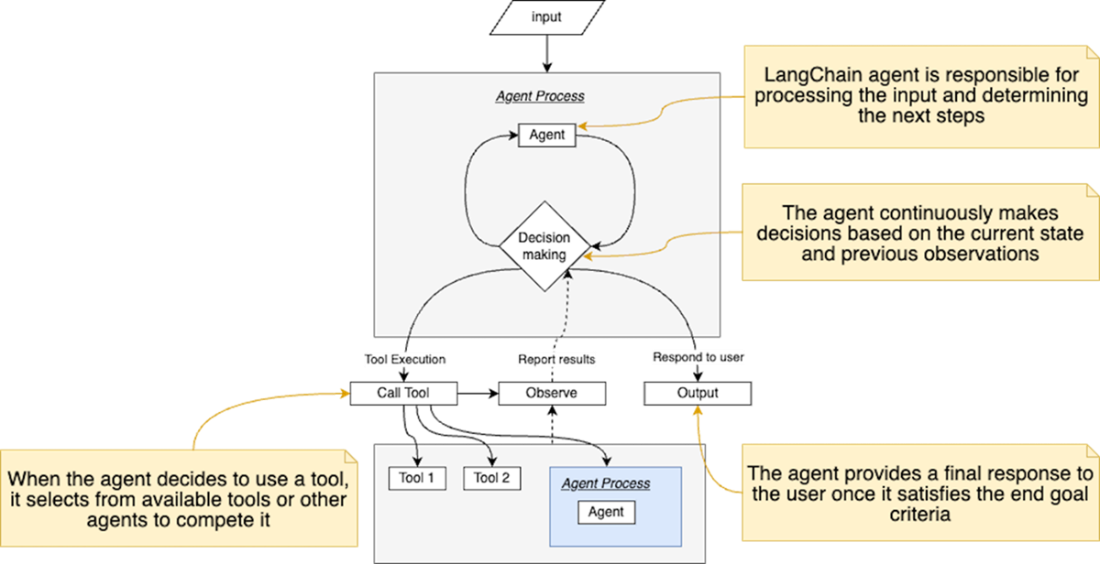
The iterative decision-making process of a LangChain agent. Starting with user input, the agent cycles through decision-making, tool execution, and observation phases. The agent can utilize multiple tools (represented as Tool 1, Tool 2, or other agents) as needed. This process continues until the agent determines it can provide a final response to the user.
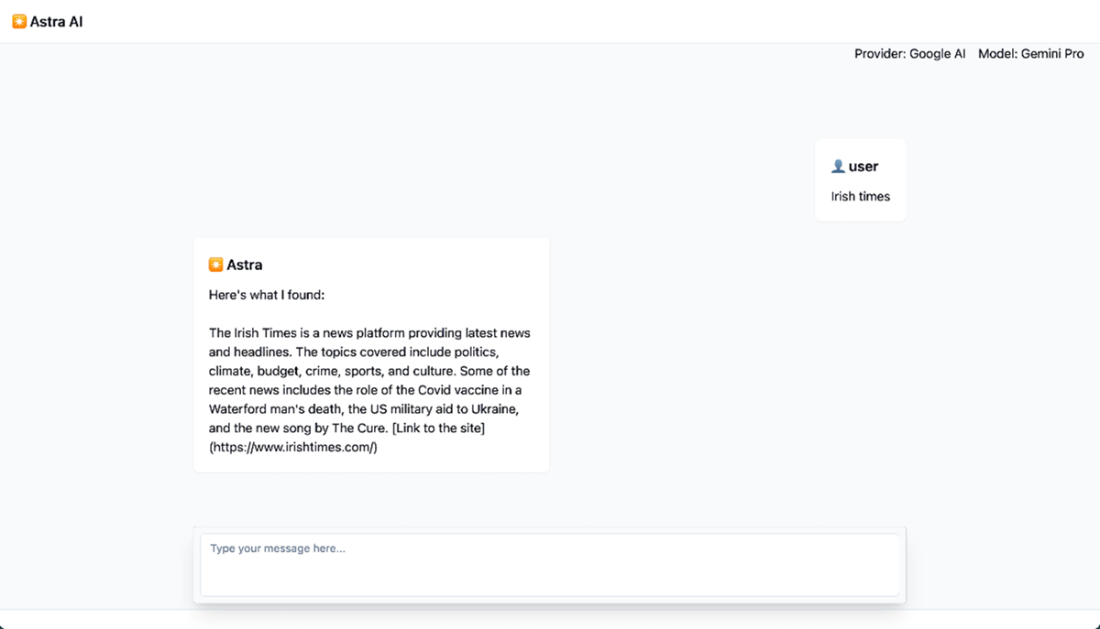
Sample interaction with our AI agent that uses Wikipedia Run engine to return a search result and display it to the user. Behind the scenes, the agent performs one or more calls to the provided tool to reach its end goals as instructed by the system prompt.
Summary

  • LangChain.js provides a framework for building context-aware AI applications, integrating features like agents, memory, and chains to enhance user interactions.
  • The framework allows for effective prompt management using tools like PromptTemplate and few-shot learning strategies, enabling developers to create more accurate and relevant AI responses.
  • The modular design of LangChain.js includes various packages that simplify different aspects of development, such as document loading, vector storage, and output parsing.
  • Runnables in LangChain enable flexible and composable workflows by allowing developers to chain together multiple operations for processing data efficiently.
  • The use of memory in LangChain enables applications to retain conversation history and enhance the contextual understanding of ongoing interactions with users.
  • Integration with Vercel AI SDK allows developers to combine the strengths of both platforms, leveraging LangChain's advanced features while utilizing Vercel's efficient UI updates and structured data handling.
  • Agents in LangChain can utilize both community driven and custom-made tools for real-time information retrieval, providing dynamic responses that enhance user experience.

FAQ

What is LangChain.js and why use it for AI workflows?LangChain.js is a framework that provides composable abstractions to chain multiple steps—prompting, tool calls, parsing, retrieval, and storage—into cohesive AI workflows. It handles API interactions, parsing/transforming content, and integrating with databases/vector stores, letting you focus on building reliable, context-aware applications.
What are Runnables and how do I compose chains in LangChain?Runnables are units of work that can be invoked, batched, or streamed. You compose them into chains using: - .pipe() to connect steps sequentially - RunnableSequence.from([...]) to declare all steps at once Both approaches create reusable pipelines that pass each step’s output to the next. LCEL (LangChain Expression Language) underpins these compositions with built-in retries and fallbacks.
How does LangChain.js differ from Vercel AI SDK, and how do I integrate them?Vercel AI SDK excels at UI streaming, tool integration, and server-component alignment, but leaves chaining, retrieval, and prompt management to you. LangChain provides those orchestration features. To integrate: - Use LangChain for chains (LLMs, tools, retrieval) - Use Vercel’s createStreamableUI for UI updates - Stream LangChain chain.stream(...) results into the UI stream Note: You can’t directly use Vercel’s streamUI with LangChain chains today.
How should I manage prompts with ChatPromptTemplate and FewShotPromptTemplate?Use ChatPromptTemplate to define structured prompts with placeholders for validation and reuse. For better model guidance, use FewShotPromptTemplate to include example Q&A pairs, plus optional prefix/suffix. This centralizes tone, style, and format so you can adjust prompts without refactoring the app.
How do I stream chain results to the UI and what pitfalls should I avoid?Pattern: - Build a Runnable chain and call chain.stream(input) - Create a UI stream with createStreamableUI() - Forward chain chunks to the UI stream and update progressively Caveats: - Close streams (stream.done(), aiState.done()) - Accumulate chunks to maintain a full response - Ensure chain order and input variables match downstream expectations
How do I prepare documents for retrieval with text splitters?Use LangChain text splitters to chunk content within model context limits while preserving meaning. The recommended splitter is RecursiveCharacterTextSplitter with: - chunkSize: max chars per chunk - chunkOverlap: shared chars between chunks for context continuity Other splitters include HTML, Markdown, Code, Token, and Character for format-specific splitting.
What are vector stores and retrievers, and how do I use them?Vector stores hold embeddings for fast semantic search. With LangChain: - Generate embeddings (e.g., OpenAIEmbeddings) - Ingest into a vector store (e.g., MemoryVectorStore for simplicity) - Convert to a retriever via asRetriever() Retrievers power similarity-based context fetching for downstream chains.
How do I build a retrieval-augmented chain (RAG) with LangChain?Typical pattern: - Create retriever = vectorStore.asRetriever() - Build a RunnableSequence that: - Maps { context: retriever.pipe(formatDocumentsAsString), question: RunnablePassthrough() } - Feeds into a prompt, then an LLM, then a StringOutputParser This takes a question, fetches relevant context, formats it, asks the LLM, and parses the final answer.
How do I add conversational memory in LangChain.js?Use: - ChatMessageHistory to hold past messages (System/Human/AI types) - BufferMemory (or other memory classes) to manage history - ConversationChain with an LLM and memory Tips: - If customizing, include {history} and {input} in the prompt - Keep unique memory instances per session/chain to avoid cross-talk - Persist messages in a DB if you need session continuity
What are LangChain agents, and what should I watch out for?Agents use an LLM for reasoning (e.g., ReAct) and call tools (search, retrieval, APIs) iteratively until they can answer. Create them with a system prompt, tools, and an LLM (e.g., createReactAgent). Considerations: - Context length: tool schemas/descriptions consume tokens - Latency: multiple reasoning/tool steps add delay—optimize and cache You can stream agent outputs and integrate with Vercel’s createStreamableUI for real-time updates.

pro $24.99 per month

  • access to all Manning books, MEAPs, liveVideos, liveProjects, and audiobooks!
  • choose one free eBook per month to keep
  • exclusive 50% discount on all purchases
  • renews monthly, pause or cancel renewal anytime

lite $19.99 per month

  • access to all Manning books, including MEAPs!

team

5, 10 or 20 seats+ for your team - learn more


choose your plan

team

monthly
annual
$49.99
$499.99
only $41.67 per month
  • five seats for your team
  • access to all Manning books, MEAPs, liveVideos, liveProjects, and audiobooks!
  • choose another free product every time you renew
  • choose twelve free products per year
  • exclusive 50% discount on all purchases
  • renews monthly, pause or cancel renewal anytime
  • renews annually, pause or cancel renewal anytime
  • Build AI-Enhanced Web Apps ebook for free

choose your plan

team

monthly
annual
$49.99
$499.99
only $41.67 per month
  • five seats for your team
  • access to all Manning books, MEAPs, liveVideos, liveProjects, and audiobooks!
  • choose another free product every time you renew
  • choose twelve free products per year
  • exclusive 50% discount on all purchases
  • renews monthly, pause or cancel renewal anytime
  • renews annually, pause or cancel renewal anytime
  • Build AI-Enhanced Web Apps ebook for free
choose your plan

team

monthly
annual
$49.99
$499.99
only $41.67 per month
  • five seats for your team
  • access to all Manning books, MEAPs, liveVideos, liveProjects, and audiobooks!
  • choose another free product every time you renew
  • choose twelve free products per year
  • exclusive 50% discount on all purchases
  • renews monthly, pause or cancel renewal anytime
  • renews annually, pause or cancel renewal anytime
  • Build AI-Enhanced Web Apps ebook for free