5 Prompt engineering in web applications
This chapter explains how to move beyond generic prompts and use prompt engineering to deliver precise, reliable AI behavior in web applications. It frames prompt engineering as the systematic design of instructions and context to guide models, then grounds the reader in core mechanics that affect quality and cost: tokenization, context-window and billing constraints, and the role of control tokens. It also clarifies how different prompt types work in the Vercel AI SDK—basic text prompts for single turns, richer message prompts (including compound and tool-call messages) for multi-turn interactions, and system prompts for setting global behavior and personas.
From there, the chapter turns to operational practices for managing prompts at scale. It recommends storing prompts outside of code for dynamic updates, access control, and versioning, and suggests semantic versioning schemes tied to model providers. Because deterministic unit tests are hard with probabilistic outputs, it proposes practical evaluation strategies: mocking LLM calls to test surrounding logic, semantic similarity scoring to check meaning rather than exact wording, and constraint validation to enforce formats and rules. The material also covers token counting approaches across providers and outlines a lightweight prompt management architecture that can evolve with product needs.
The chapter then dives into three high-impact techniques. Few-shot learning uses a handful of well-chosen examples to shape style, structure, and tone for tasks like support chat; chain-of-thought prompting improves reasoning by asking models to show step-by-step logic; and embeddings encode meaning as vectors to power semantic search and recommendations. It demonstrates embeddings in the Vercel AI SDK (embed and embedMany), explains why to store vectors for efficiency and cost, and shows how to retrieve relevant content via similarity (e.g., cosine) while noting caveats like model specificity and versioning. It closes by noting that these foundations are evolving and previews advanced strategies—Tree of Thoughts, Self-Refine, and LLM-as-a-Judge—before leading into broader orchestration with tools like LangChain.
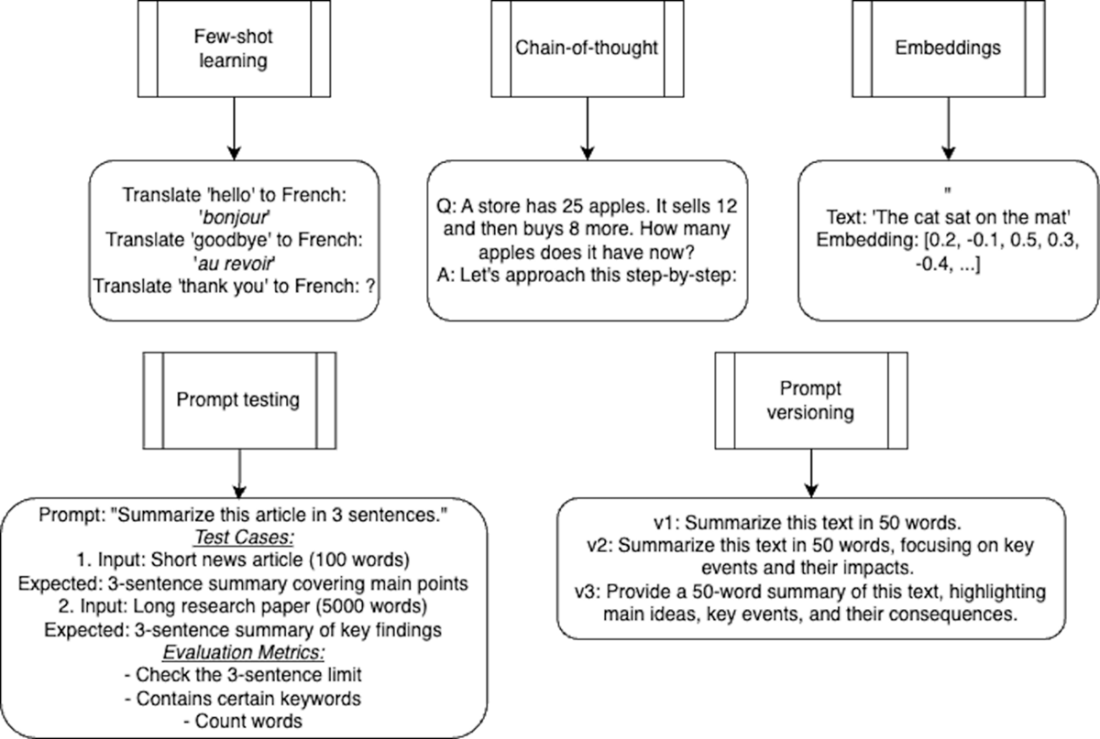
This chapter covers prompt versioning, focusing on the iterative refinement of prompts, and prompt testing, a method for evaluating prompt effectiveness across various scenarios. We'll then examine few-shot learning, which uses examples to guide AI responses, and chain-of-thought learning, which encourages step-by-step reasoning. Finally, we'll look into embeddings, which are numerical representations of text for AI processing.
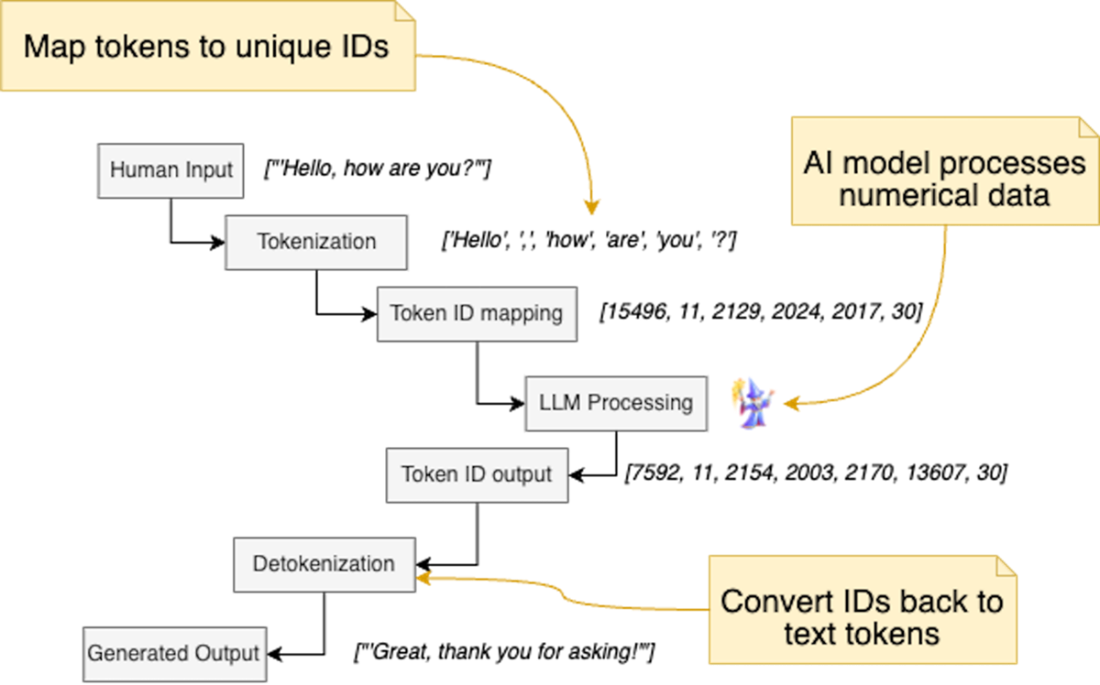
This diagram illustrates the end-to-end process of how human input is transformed, processed by a Large Language Model (LLM), and converted back into human-readable output.
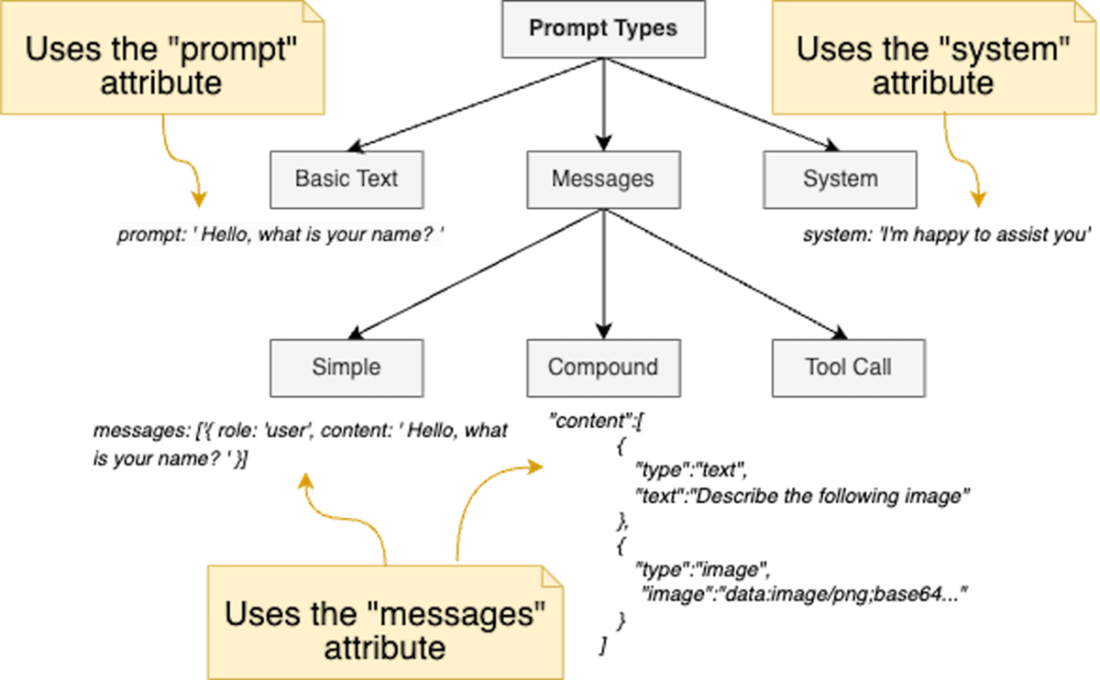
This diagram illustrates the classification of prompt types used in the Vercel AI SDK. At the top level, prompts are divided into three main categories: Basic Text prompts, Message prompts and System prompts. The Message prompts category is further subdivided into three types: Simple, Compound and Tool Call messages.
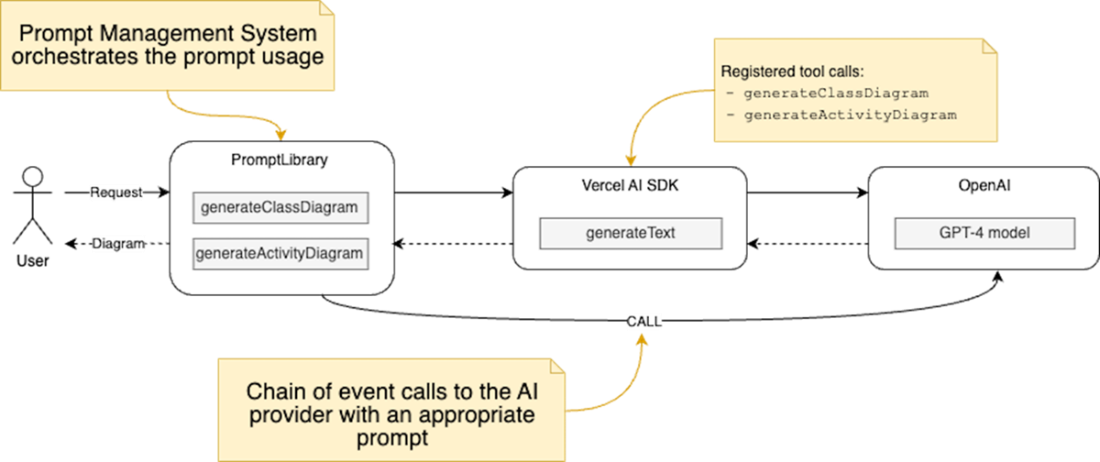
Architecture of the PlantUML diagram generation system using tool calls in the Vercel AI SDK. The system allows users to request diagrams, and the PromptLibrary class handles the generation process by creating prompts, determining the diagram type, and interacting with the Vercel AI SDK to generate the diagram using the AI (OpenAI gpt-4 or other) model and tool calls.
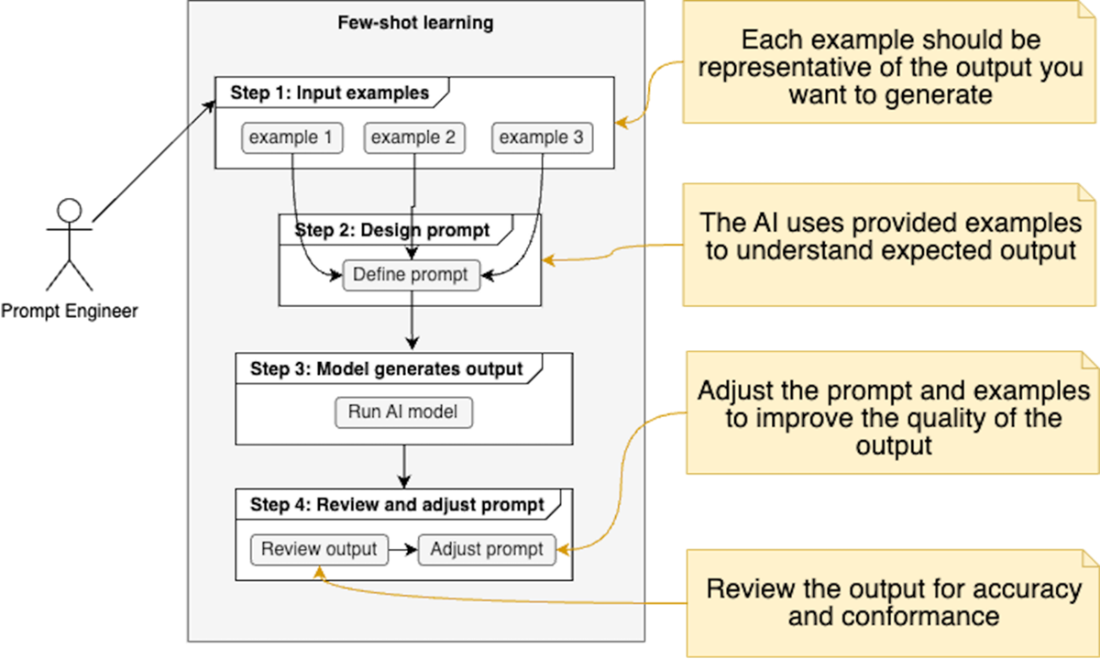
This diagram illustrates the step-by-step procedure for Few-Shot learning, where users provide a few examples to guide the AI model. The process involves compiling these examples into a prompt, generating output using the AI model, and then reviewing and adjusting the output as needed to achieve the desired results.
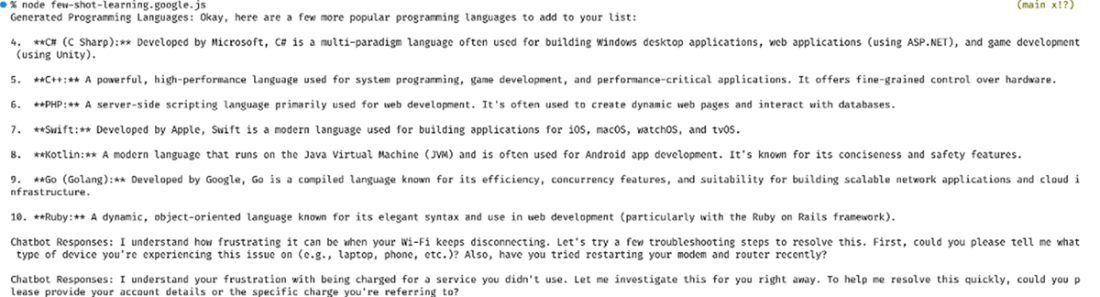
This screenshot depicts the output of the few-shot learning responses from the AI model.
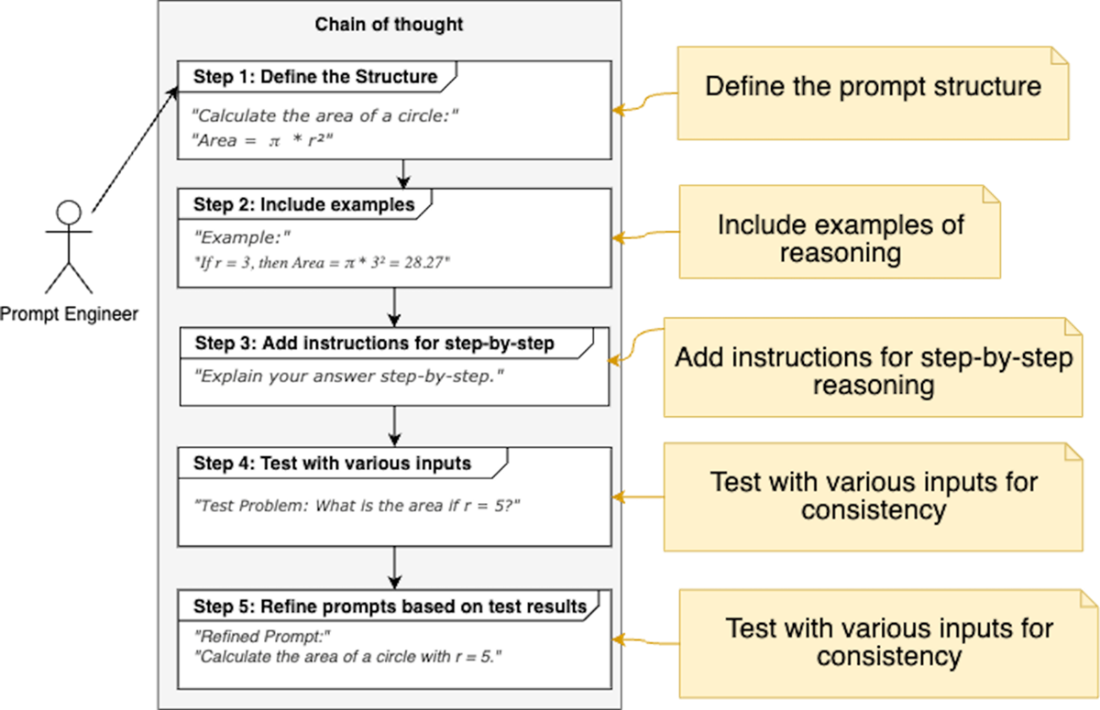
This diagram outlines the key steps involved in creating chain of thought prompts that encourage large language models to articulate their reasoning process step-by-step. We define the prompt structure, we provide examples, and we require step-by-step explanations, we test for consistency, and we iterate on the prompts to ensure a uniform user experience across different queries and applications.
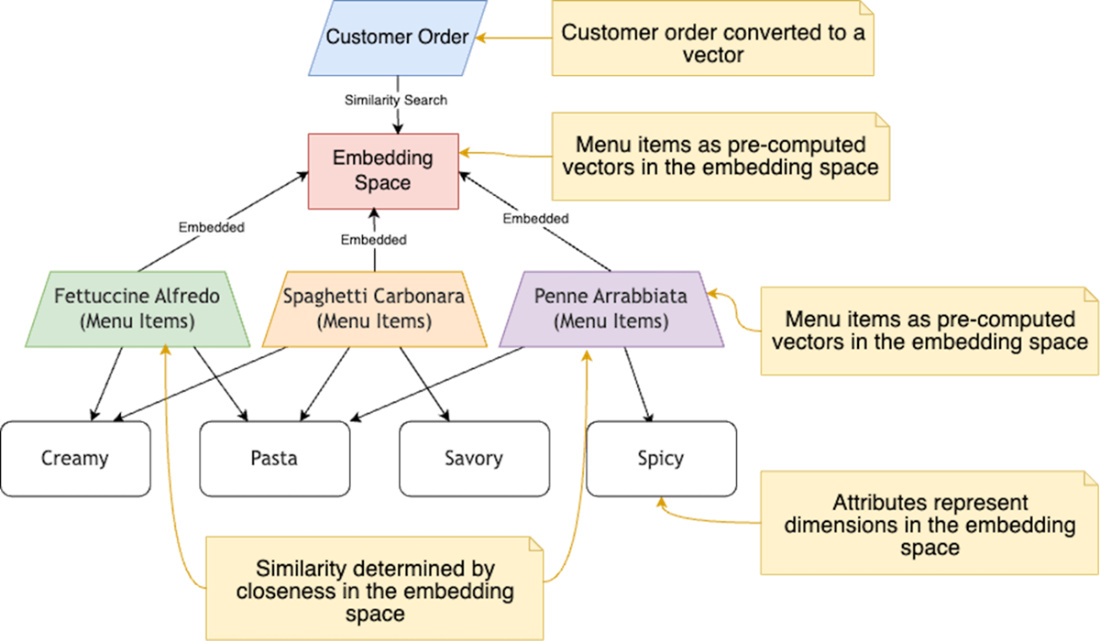
This diagram illustrates the concept of embeddings using a restaurant menu analogy. The "Embedding Space" represents a multidimensional space where both customer orders (queries) and menu items are mapped as vectors. Each menu item (e.g., Spaghetti Carbonara) is a pre-computed vector, while the customer order is converted to a query vector. Similarity between items is determined by their proximity in this space. Attributes like "Pasta" or "Creamy" represent dimensions of the embedding space. A similarity search finds the closest match and similar items to the query, mirroring how embedding-based systems in machine learning find relevant results for given inputs.
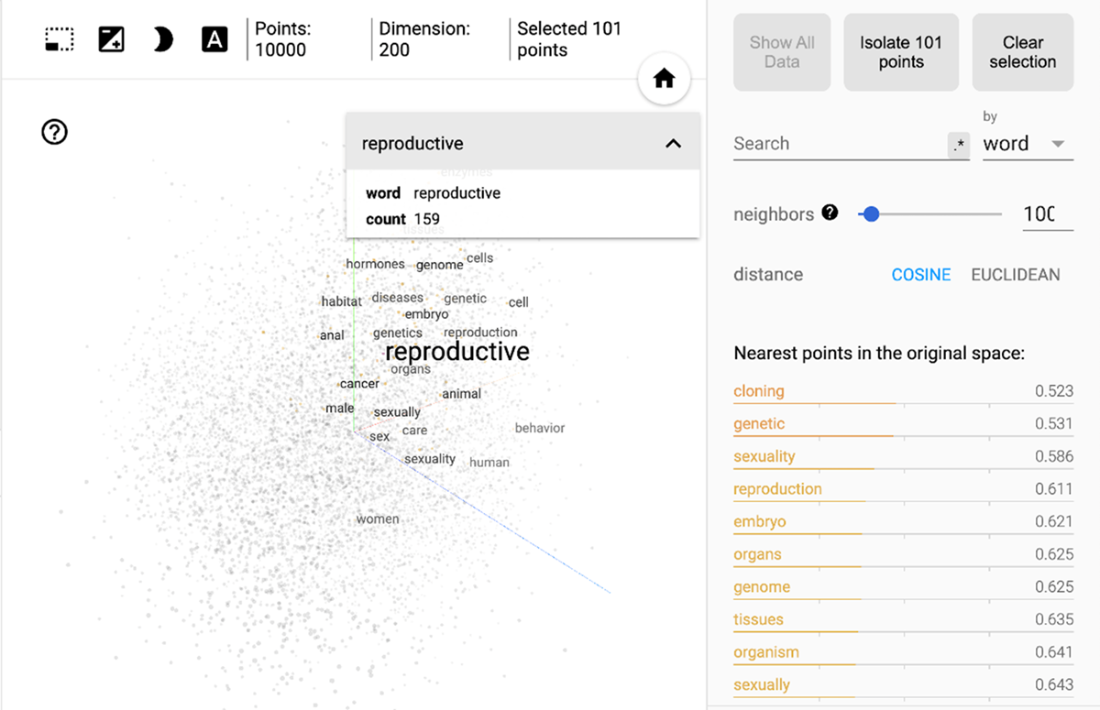
This figure displays a 2D projection of word embeddings in a 200-dimensional space, focusing on the term "reproductive" and its semantic neighbors. The visualization shows 10,000 points, with 101 points selected for detailed view. The right panel lists the 10 nearest neighbors to "reproductive" in the original space, with their cosine distances. This representation demonstrates how word embeddings capture semantic relationships together in the vector space. (src: https://projector.tensorflow.org/)
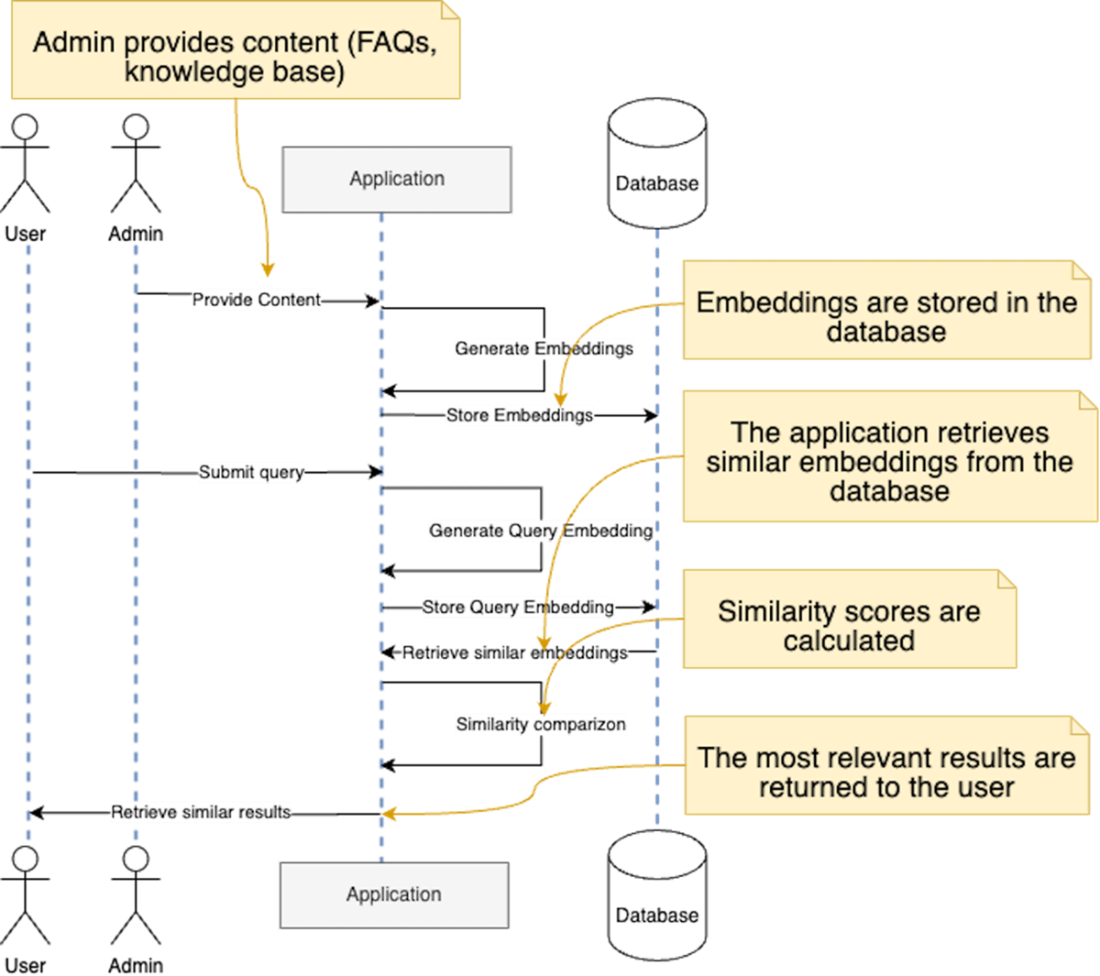
This diagram illustrates the workflow of an information retrieval system that utilizes embeddings to enhance user query responses. An admin provides content, such as common questions and knowledge base articles, to the application, which generates embeddings for this content and stores them in a database. When a user submits a query, the application generates a corresponding query embedding and stores it as well. The system then retrieves similar embeddings from the database and calculates similarity scores to identify the most relevant results. Finally, these results are returned to the user.
Summary
- Prompt engineering is a critical technique for optimizing AI model outputs in web applications, enhancing user interactions and experiences.
- Few-shot learning enables AI models to adapt quickly to new tasks by providing a limited number of examples, making it especially beneficial in scenarios with limited training data.
- Chain-of-thought prompting encourages AI models to engage in step-by-step reasoning, improving accuracy by breaking complex tasks into manageable components.
- Embeddings facilitate semantic search and content recommendations, allowing for more context-aware interactions and personalized user experiences.
- Tokenization transforms natural language instructions into a format that AI models can efficiently process, ensuring effective communication between users and models.
- Max tokens refer to the maximum number of tokens an AI model can process in a single interaction, encompassing both input and output, which is crucial for ensuring requests are not rejected.
- Control tokens guide the behavior and output of AI models, allowing developers to define specific rules and instructions within prompts.
- Different types of prompts include basic text prompts, message prompts, and system prompts, each designed for distinct use cases and interactions with AI models.
- Effective prompt management involves storing prompts in a database for dynamic updates, version control, scalability, and access control.
- Prompt versioning allows developers to track changes to prompts over time, assessing their impact on AI outputs and user experiences.
- The chapter establishes foundational concepts of prompt engineering, setting the stage for deeper exploration of advanced techniques and strategies in subsequent chapters.

 Build AI-Enhanced Web Apps ebook for free
