4 Managing conversation and state in your application
As AI-powered web applications mature, managing conversation and application state becomes central to reliability, performance, and security. This chapter frames the problem as one of coordinating fast, user-facing state with a trusted, canonical server state, then shows how React Server Components and the Vercel AI SDK simplify that coordination. By leaning on server actions, streaming, and server-first execution, teams can keep secrets and critical logic off the client, shrink bundles, and deliver responsive UIs that update in real time while the server maintains the authoritative conversation history.
The chapter advances a dual-state model that separates what the user sees (UI state) from what the model consumes (AI state). Practical patterns include streaming text and components from the server to the client, using helpers like createStreamableValue, readStreamableValue, streamUI, and createStreamableUI to incrementally render results. A unified context created with createAI exposes actions and typed state across the app, with getMutableAIState for server-side updates and useActions, useUIState, and useAIState for client access. This architecture improves responsiveness, reduces boilerplate, and enables persistence and synchronization strategies that keep UI and AI views consistent without complex client-side plumbing.
Beyond conversation flow, the chapter shows how to make AI outputs dependable and reusable by generating structured, type-safe data. With generateObject and streamObject, developers define Zod schemas that the model must satisfy, enabling direct JSON outputs suitable for validation and rendering. It then extends capability with tool and function calling, where the model requests externally executed functions (validated with Zod parameters) to fetch real-time data and return React components via streamUI—complete with loading and incremental updates. Together, schema-guided generation and tool calling yield more reliable, integrable, and extensible AI-enhanced interfaces.
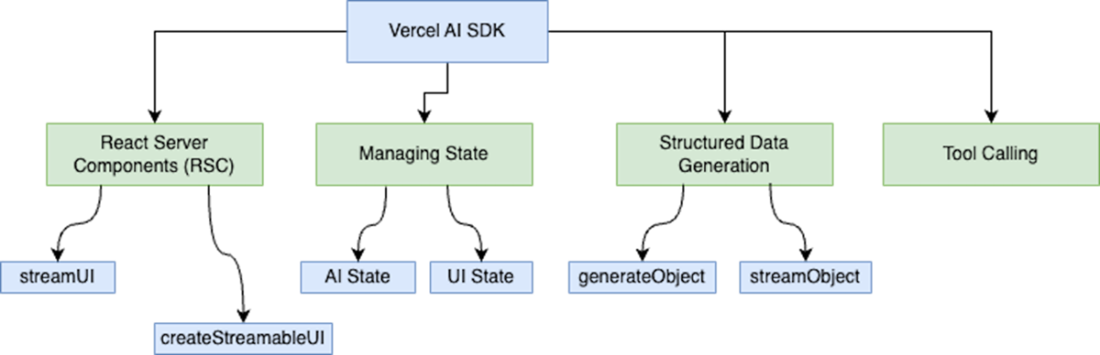
The four main topics that we'll take a closer look at in this chapter. We'll go over each topic in detail in the appropriate section.
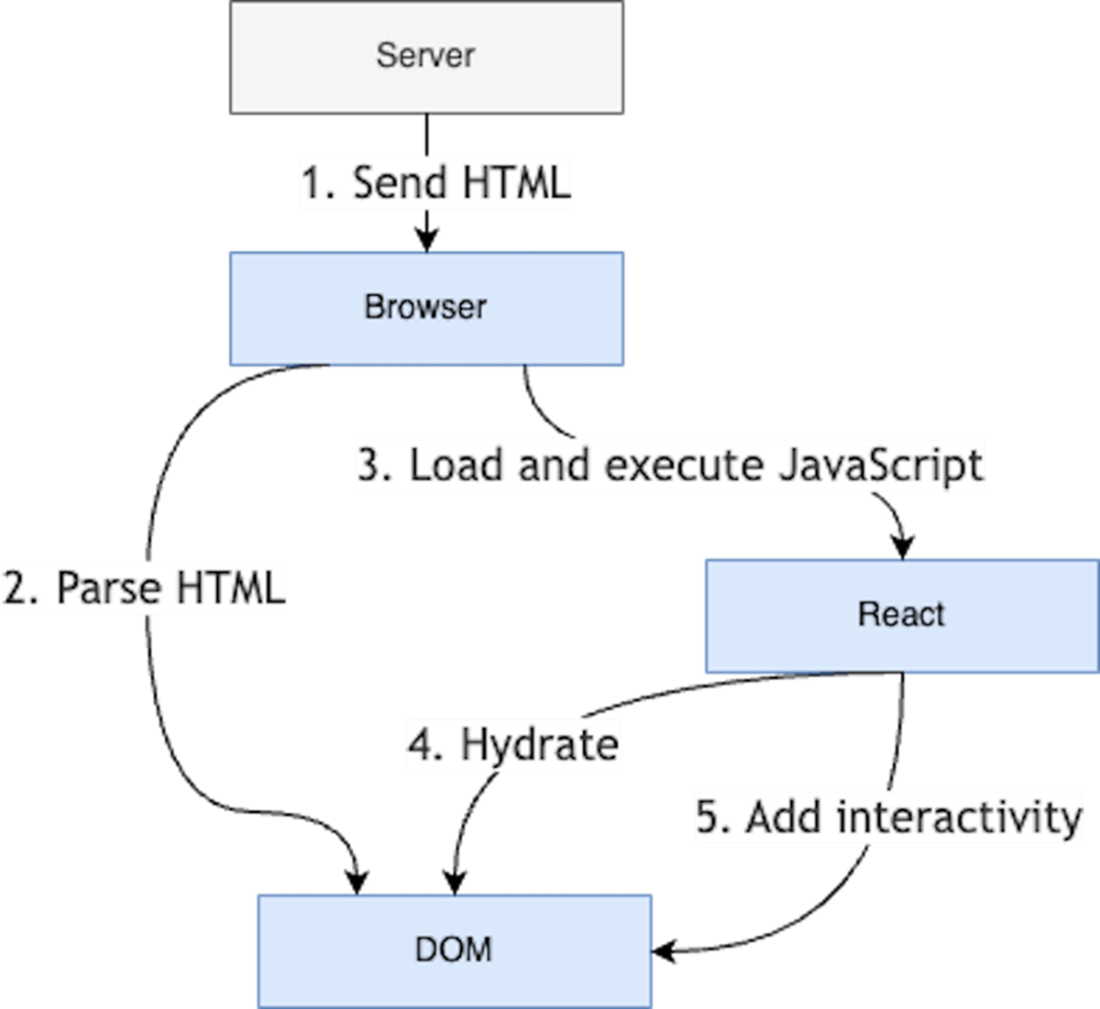
Overview of how a traditional React application renders. The React component tree is rendered on the browser. If using Server-Side Rendering (SSR), the whole component tree is rendered on the server and then presented to the client. The hydration process then adds interactivity elements to the page.
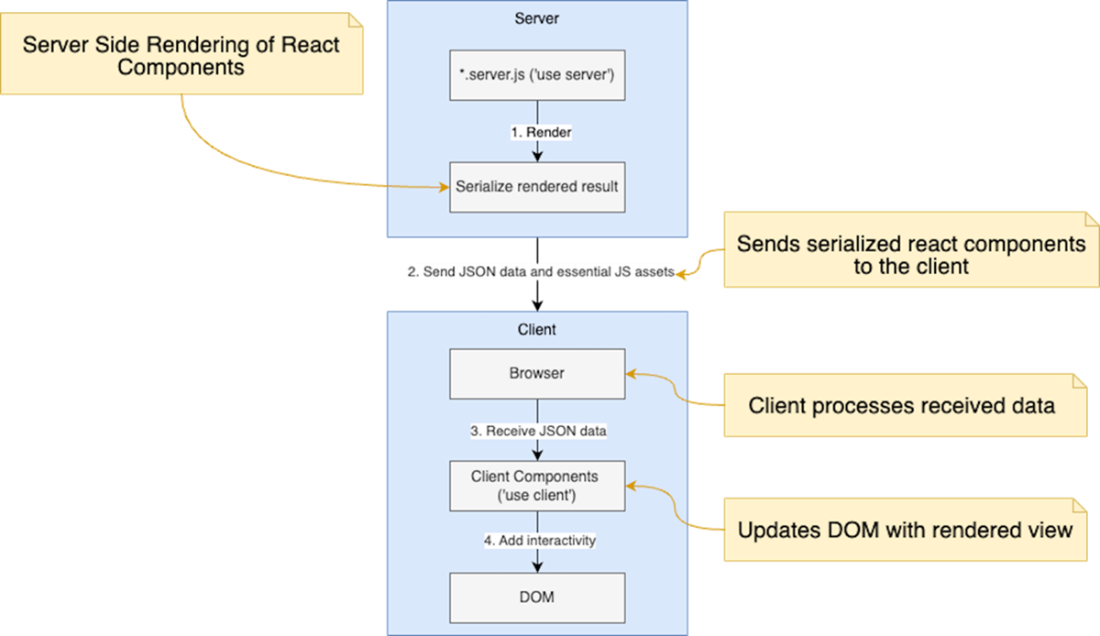
React Server Components allow specific parts of a React application to be rendered on the server. The components can be streamed to the client incrementally, allowing the client to begin rendering parts of the UI before the entire page is ready.
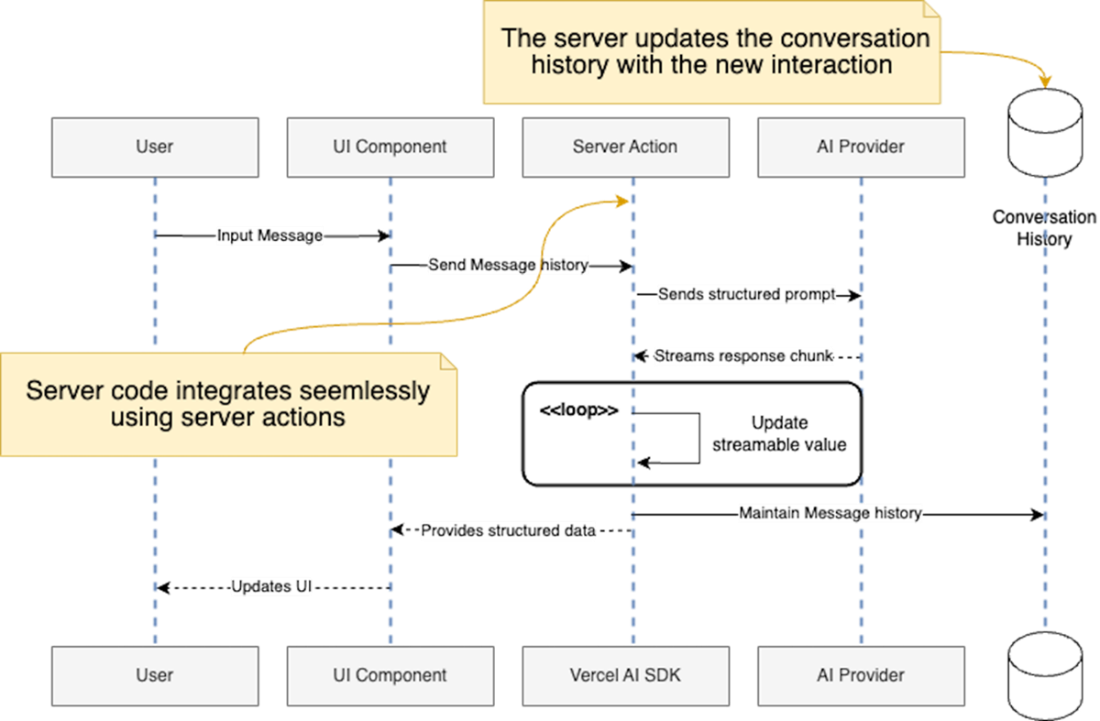
React server actions in action. User input travels from the prompt to the AI Provider . The response is streamed back in chunks, updating the client in real-time while maintaining the conversation state in memory.
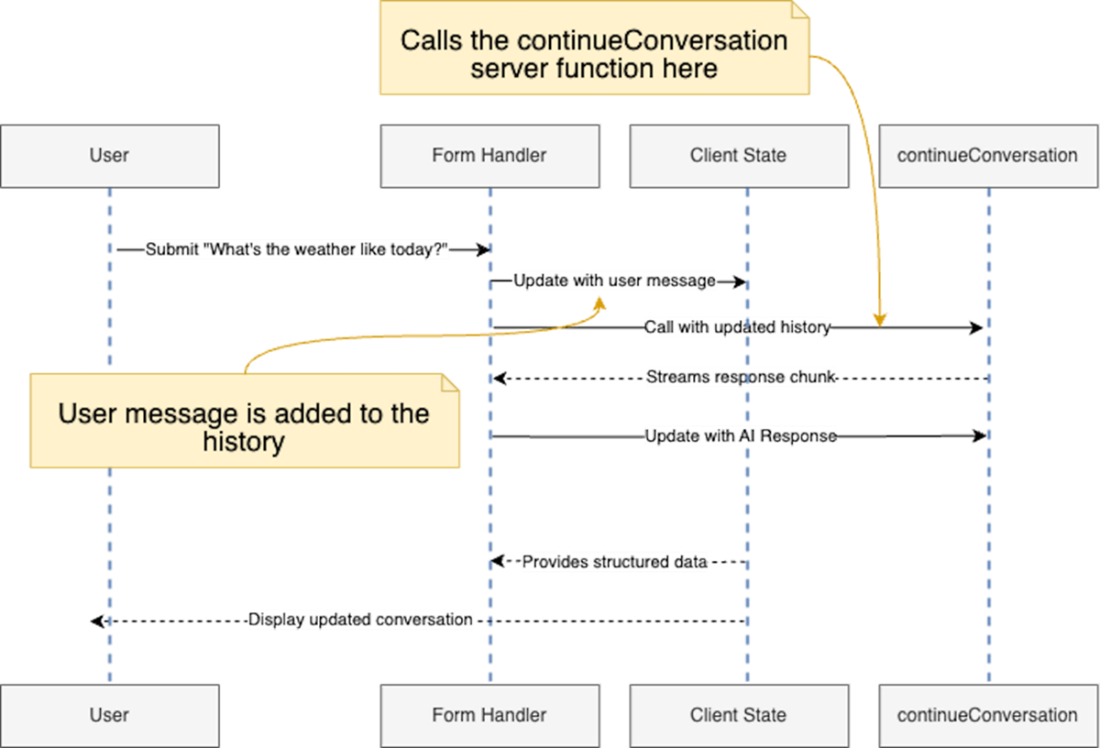
UI interaction using server actions. The user submits a message, and the form submission takes place. The call to the continueConversation server action happens on the server and streams the response back to the client in a seamless fashion.
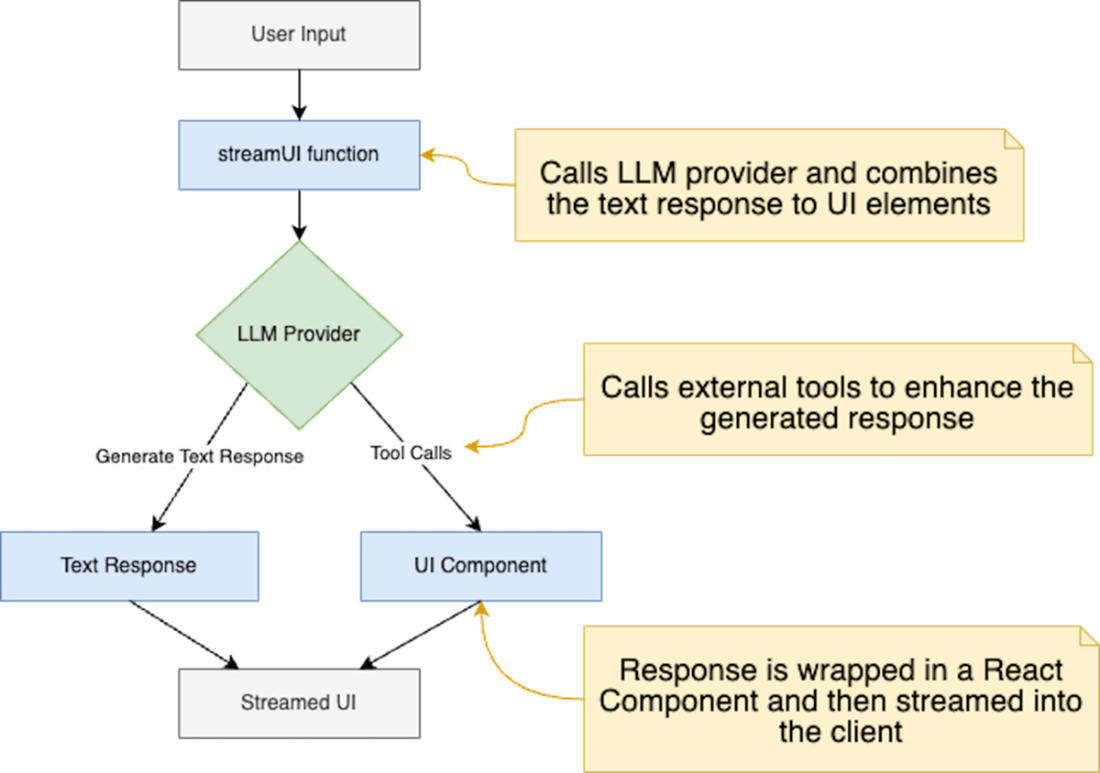
Example of how streamUI works. This function orchestrates the process of generating UI components based on LLM responses. It handles both simple text responses and more complex tool calls and then streams the fully rendered components as React nodes into the client
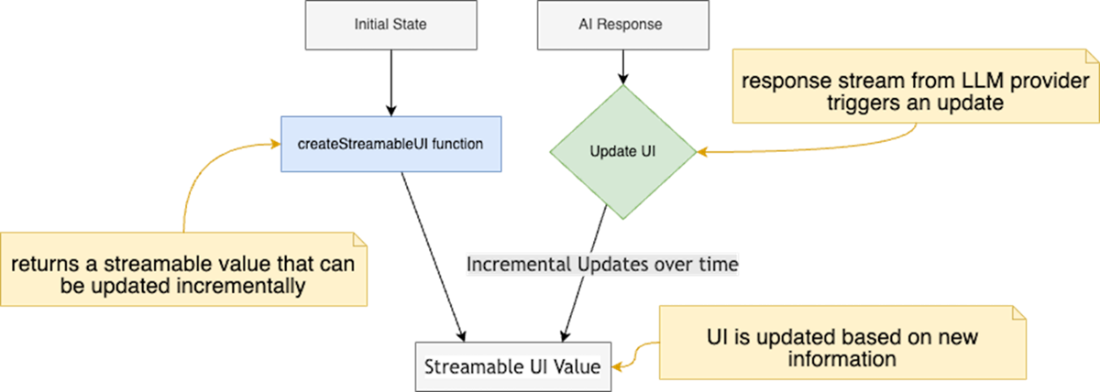
createStreamableUI enables the creation of UI components that can be updated incrementally. This capability enables real-time modifications to the user interface as new information is received from the LLM provider.
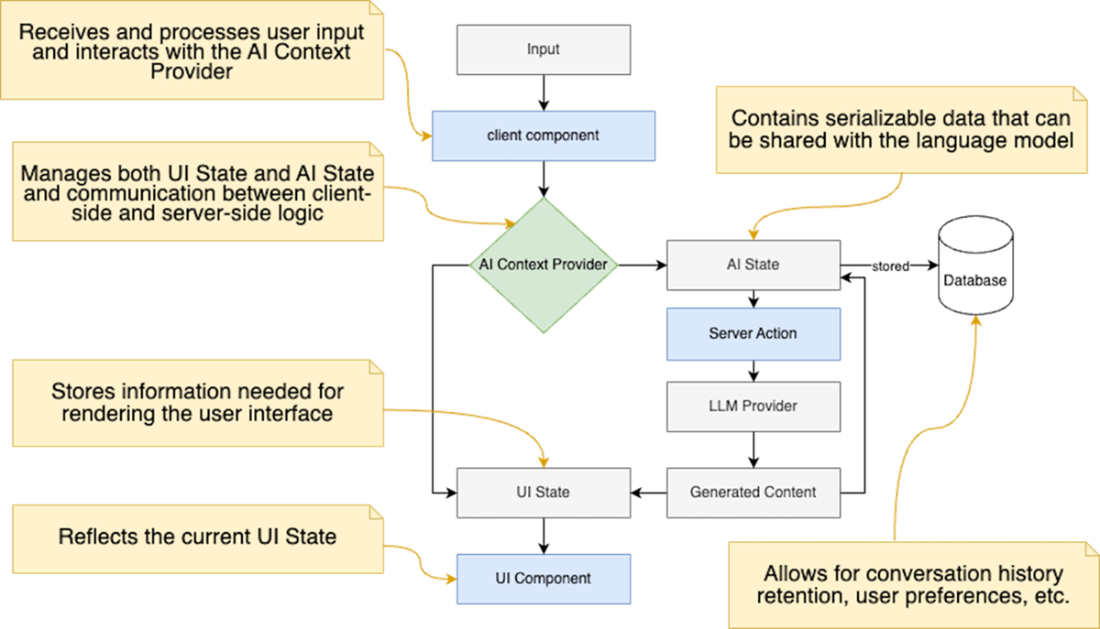
AI and UI State representation. Once the user submits a prompt, it goes through a pipeline of events and actions for the final output to be consistent.
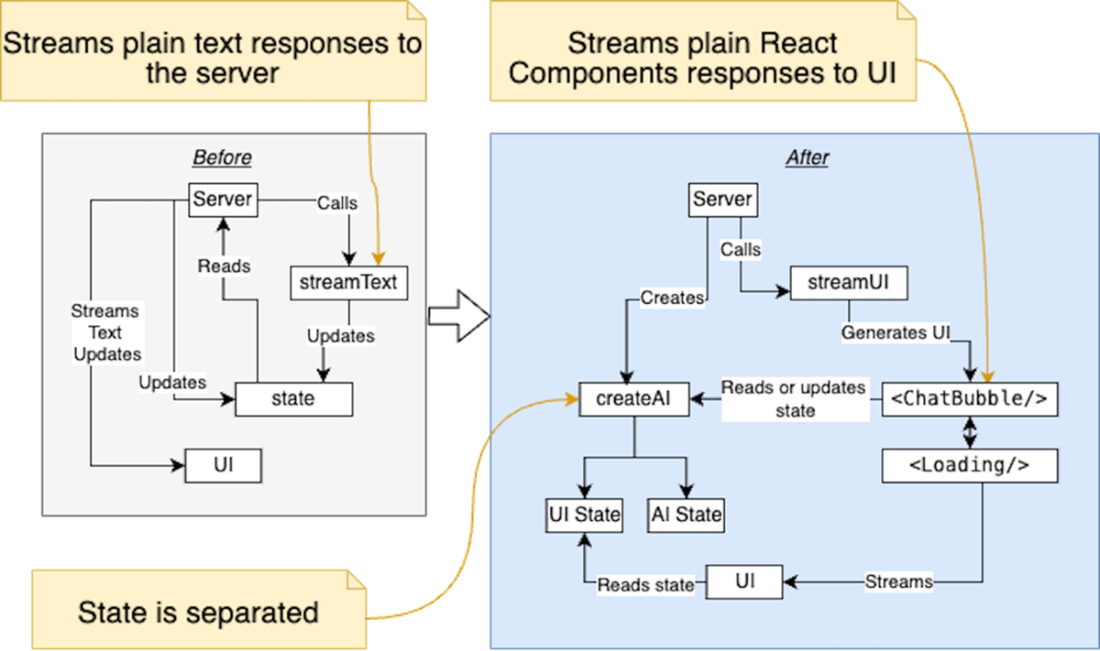
The diagram illustrates the transition from a system with separate management of UI and AI states using streamText for plain text responses, to a unified state management approach using createAI. In the new architecture, streamUI replaces streamText, enabling the streaming of React components and providing a consistent context for both AI and UI states through createAI. This shift enhances the application's ability to manage dynamic content and integrates state management more effectively.
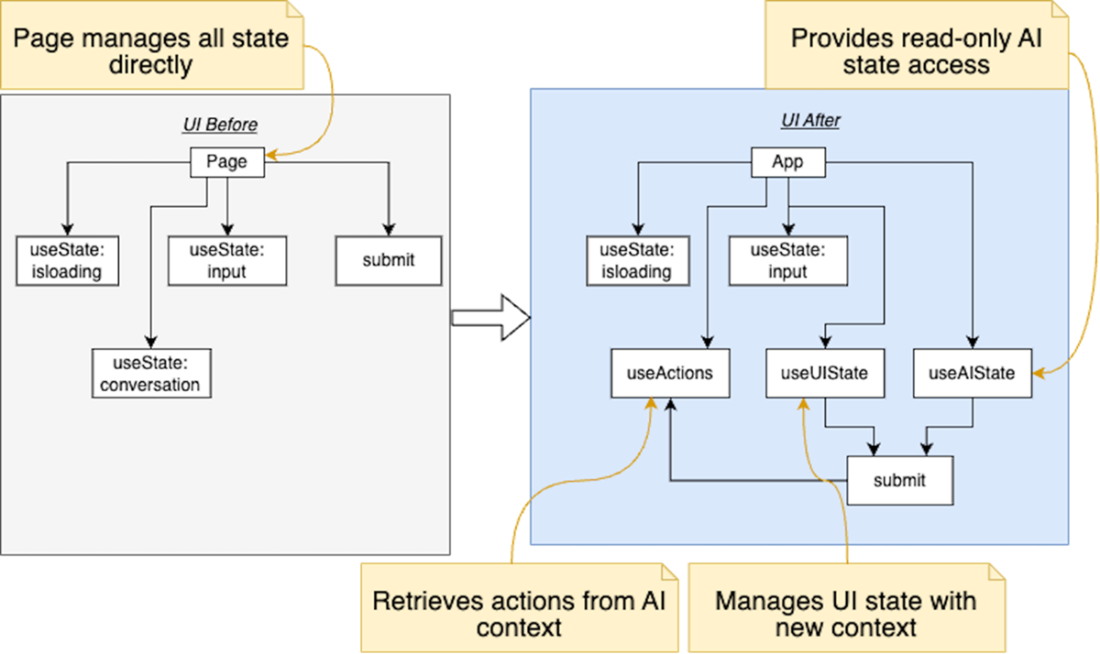
The diagram illustrates the evolution of the Chat page component's state management and server actions before and after adopting the new hooks and actions. Before, the component relied on traditional React useState hooks to manage input, loading state, and conversation history, with a separate function simulating AI response fetching. Then the updated implementation integrates the new useUIState, useAIState, and useActions hooks, which allows the app to delegate the logic inside those hooks.
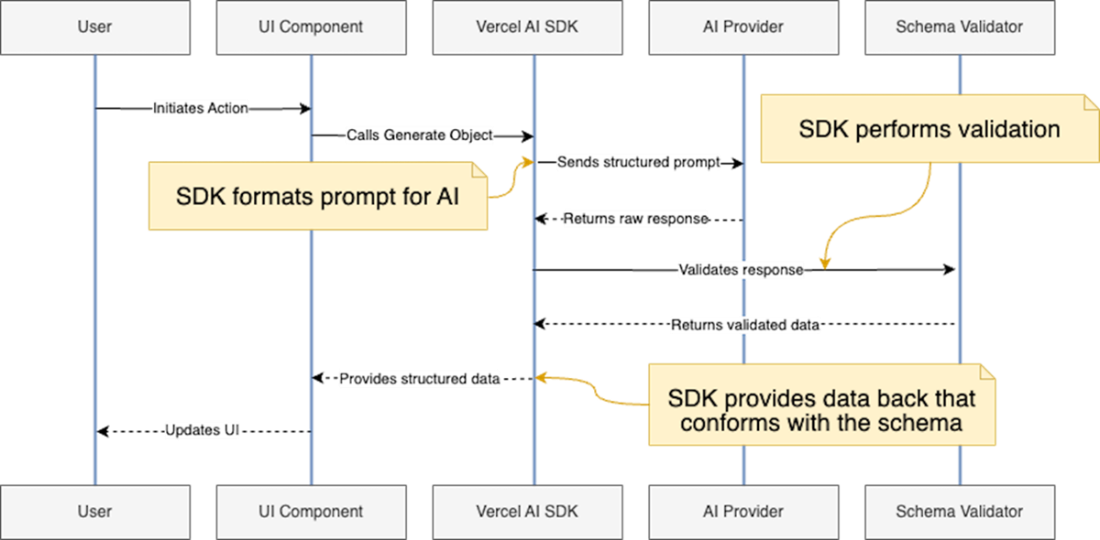
This sequence diagram illustrates the process of generating structured data from an AI model using the Vercel AI SDK. The flow begins with a user action and ends with the display of validated, structured data in the user interface. Key components include the React Component, Vercel AI SDK, AI Model, and the schema validator.
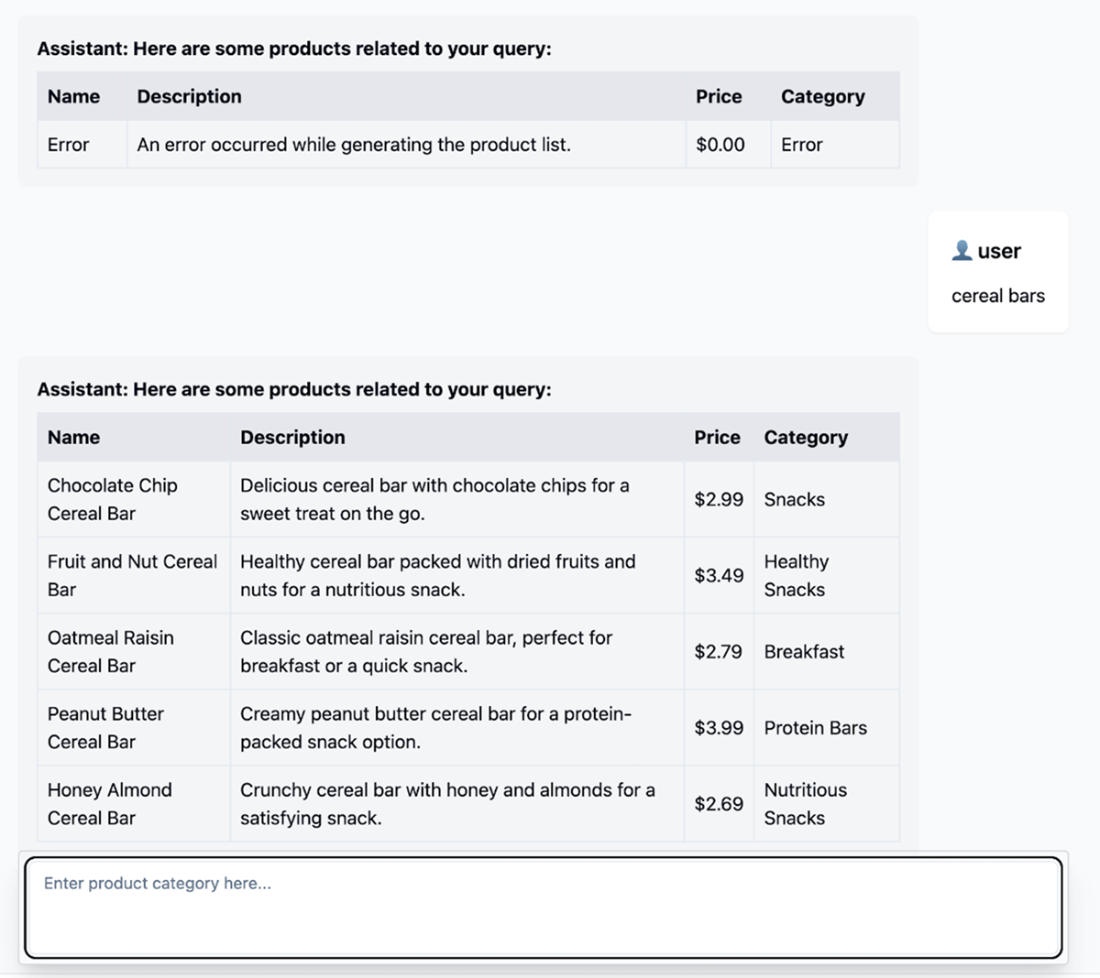
Structured data generation using generateObject function. The results of the prompt are printed using console.table to display them in a table format.

Our Astra AI web application can now respond with structured data. We can ask it to generate product categories which we render in a table format.
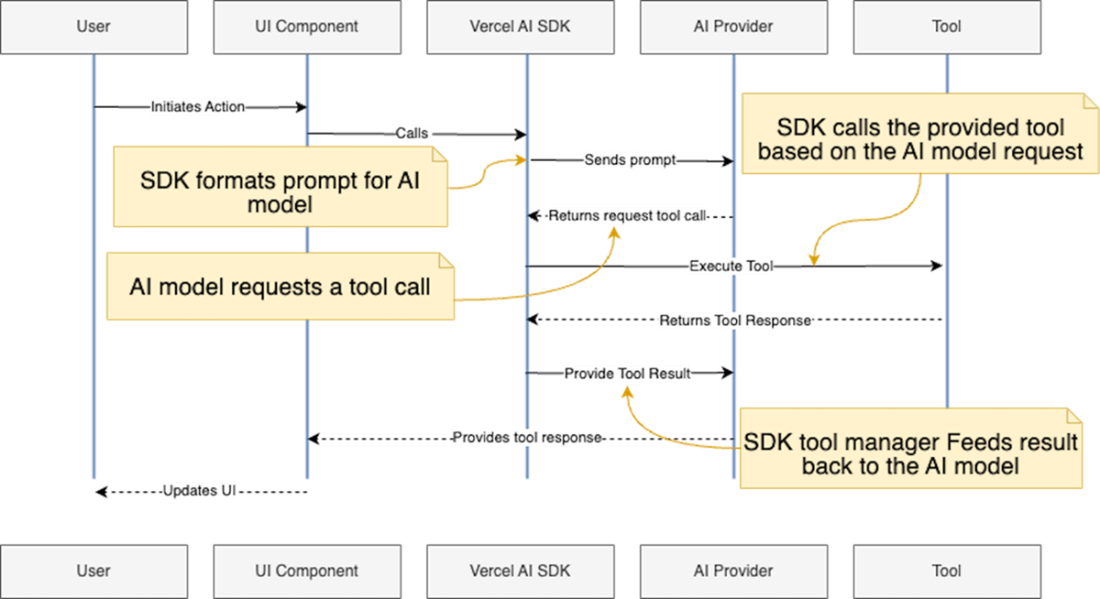
Activity diagram illustrating the process of tool calling in an AI-powered application using the Vercel AI SDK. It demonstrates how a user action initiates a prompt, which is formatted by the SDK and sent to the AI Provider. The AI model may request a tool call, which is then executed by the SDK. The tool's response is fed back to the AI model through the SDK, and finally, the result is used to update the UI for the user.
Summary
- React Server Components (RSC) enable server-side rendering of specific components, improving performance and simplifying data fetching in AI-powered applications.
- The Vercel AI SDK provides helpers like createAI, getMutableAIState, useActions, useUIState, and useAIState for managing AI and UI state in React applications.
- Separating AI state and UI state allows for more efficient handling of data, improved performance, and better synchronization between server and client.
- Structured data generation techniques like prompt engineering, function calling, and Zod schema validation enable AI models to produce organized, type-safe data instead of raw text.
- The generateObject and streamObject functions in the Vercel AI SDK facilitate the creation of type-safe, structured data from AI responses, enhancing reliability and usability.
- Tool calling and function calling capabilities allow AI models to interact with external resources, expanding their abilities beyond their initial training data.
- Implementing custom tools with the Vercel AI SDK involves defining functions, registering them with the SDK, and handling their responses as React components.
- The Vercel AI SDK's common interface for AI model interactions enables easy swapping of different AI models while maintaining consistent functionality across the system.
FAQ
What are React Server Components (RSC) and how do they benefit AI‑powered web apps?
RSC let you run selected React components entirely on the server and stream their rendered output to the client without hydrating those components. Benefits include faster initial loads (smaller client bundles), better SEO, stronger security (secrets stay server‑side), and simplified data fetching. With Vercel AI SDK, RSC also enables streaming AI‑generated content in real time, reduced client compute, and seamless Server Actions for cleaner code.How do Server Actions work in Next.js, and when should I use the ‘use server’ directive?
Server Actions are server‑side functions you can call directly from components (e.g., on form submit), removing the need for custom API routes. Add'use server' at the top of a file (or at the start of a specific async function) to ensure the code runs only on the server and is excluded from the client bundle. This keeps API keys and sensitive logic secure and pairs well with streaming helpers to return incremental updates to the client.What’s the difference between streaming text and streaming UI, and which helper should I choose?
- Streaming text: UsecreateStreamableValue() on the server and readStreamableValue() on the client with streamText for token‑by‑token text updates (chat bubbles, transcripts).- Streaming UI: Use
streamUI to generate and stream complete React nodes from LLM responses or tools, and createStreamableUI() when you need to imperatively update/append UI pieces (loading → partial → final).Choose text streaming for simple chat text; choose UI streaming when you need rich, progressively rendered components.
How should I manage conversation history between client and server?
Adopt a dual‑state approach: keep a small window (e.g., last 10 messages) on the client for instant rendering, and maintain the authoritative, full history on the server for context, integrity, and security. On submit: the client appends the user message locally and calls a Server Action; the server uses the full history to generate a response and streams it back; the client updates its local state from the streamed result.What’s the difference between AI State and UI State, and why separate them?
- AI State: Serializable data the model needs and the server uses (conversation messages, IDs/timestamps, JSON for generated components). It lives on the server and can be persisted in a database.- UI State: Client‑side data that directly affects what the user sees or interacts with (rendered React elements, flags like
isLoading, input values).Separating them improves performance, security, and synchronization while keeping the UI reactive to AI updates.
What does createAI provide, and how do I integrate it into my app?
createAI defines your AI context: server actions (e.g., continueConversation), initial AI/UI states, and optional persistence callbacks. It returns a React context provider (<AI>) you mount at your app’s layout root. Descendant components can then use useActions (invoke server actions), useUIState (read/write UI state), and useAIState (read AI state) with consistent typing and reduced boilerplate.How do I read and update AI state within server actions?
UsegetMutableAIState() inside a Server Action to access and mutate the current AI state. Typical flow: const history = getMutableAIState() → history.get() to read messages → generate a streamed response → call history.done(updatedHistory) when the response is complete. This removes the need to pass history explicitly from the client and keeps the authoritative state on the server.How can I generate type‑safe structured data (JSON) using the Vercel AI SDK?
UsegenerateObject for single, validated JSON outputs and streamObject for incremental, validated objects. Define a Zod schema describing the expected structure (e.g., a product list), pass it with your prompt and model, and the SDK validates the AI response. On success you get typed data you can render (tables, cards) or send to downstream services—no fragile manual parsing required.How do tool and function calling work with the SDK’s streamUI?
Provide atools object to streamUI. Each tool specifies a name, a Zod parameters schema, and an async generate function that can yield interim UI (e.g., a loading spinner) and return a final component (e.g., <WeatherCard />). The model decides when to call a tool based on prompt and context, and the SDK executes it server‑side, letting you safely fetch real‑time data and render structured UI in the response.What are best practices and common pitfalls when building AI apps with RSC and the Vercel AI SDK?
- Keep secrets and AI logic on the server ('use server').- Prefer Server Actions over bespoke API routes to reduce boilerplate.
- Stream UI for richer, progressive experiences; use text streaming for simple chats.
- Centralize state with
createAI; expose actions via useActions; store UI flags (e.g., isLoading) in UI state for consistency.- Persist AI state with
onSetAIState; restore it on load.- Validate structured outputs with Zod; handle errors with
ui.error() or graceful fallbacks.- Don’t trust client‑supplied history; treat the server copy as source of truth.
- Monitor performance: reduce client bundle size and offload heavy work to the server.

 Build AI-Enhanced Web Apps ebook for free
