2 Building your first generative AI web application
This chapter introduces building a simple, text-first conversational AI app named Astra to illustrate the core patterns of LLM-powered web experiences. It lays out a clear goal and flow: users type natural-language prompts, the UI sends them to a backend, the backend calls a hosted model (Google Gemini or OpenAI), verifies the result, and returns a response that updates the chat history. The first iteration emphasizes a single-page, minimal design with a welcome state, input box, scrollable history, basic error handling and security, ephemeral storage (no saved conversations), and a small unit-test suite, while noting practical setup items like Node.js and API keys.
On the frontend, the app uses React with a flat, feature-focused structure. The ChatPage component coordinates the interface, rendering ChatList for messages, a Textarea for input, and an AutoScroll helper to keep the latest reply visible. UX considerations center on readability and responsiveness to long outputs, with hooks handling core interaction and state: useEnterSubmit for keyboard UX, useFocusOnSlashPress for quick focus, and useChatFormSubmit to encapsulate form submission, message management, loading state, and backend calls. The project includes a basic test setup to validate initial rendering, input changes, and loading behavior, plus troubleshooting tips for API configuration and CORS.
The backend begins as an Express service that protects API keys, validates requests, invokes the model (via OpenAI or Gemini clients), and returns a normalized assistant message, with guidance on configuration, post-processing, and error handling. The chapter then highlights limits of the first cut—no persistent memory or contextual threading, no streaming, and no access control—and motivates a migration to Next.js for a more cohesive full-stack approach. Using the App Router, file-based routing, route groups, layouts, built-in environment variable handling, and route handlers, the app gains a cleaner structure and flexible caching/dynamic rendering options, with an overview of SSR, SSG, ISR, and performance optimizations. The chapter concludes by preparing for upcoming enhancements like streaming and richer interaction using the Vercel AI SDK.
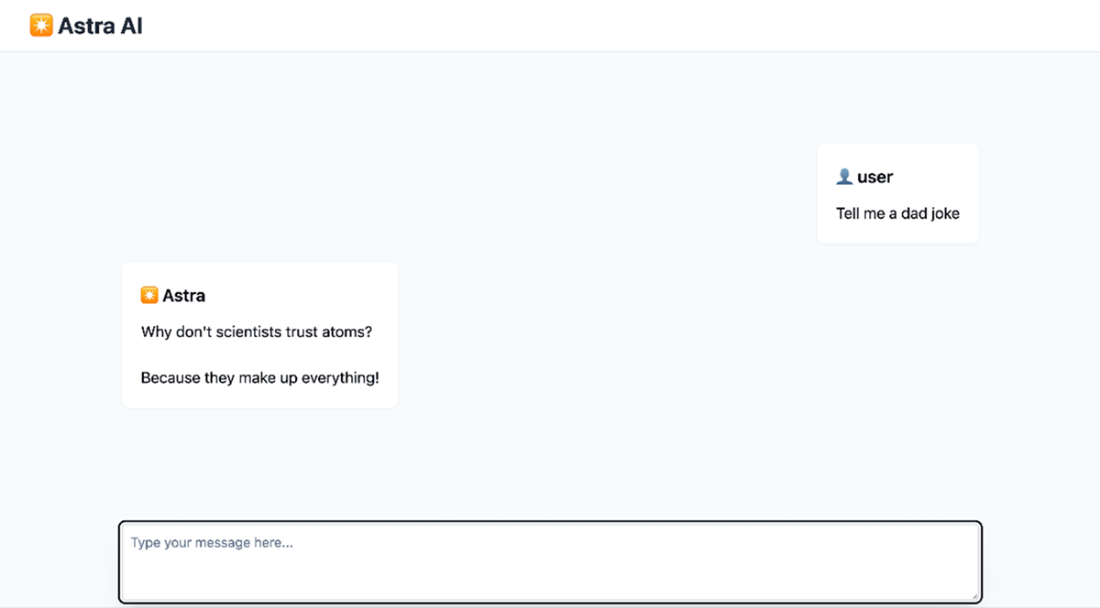
A simple conversational UI demonstrating a user query and an LLM-generated response.
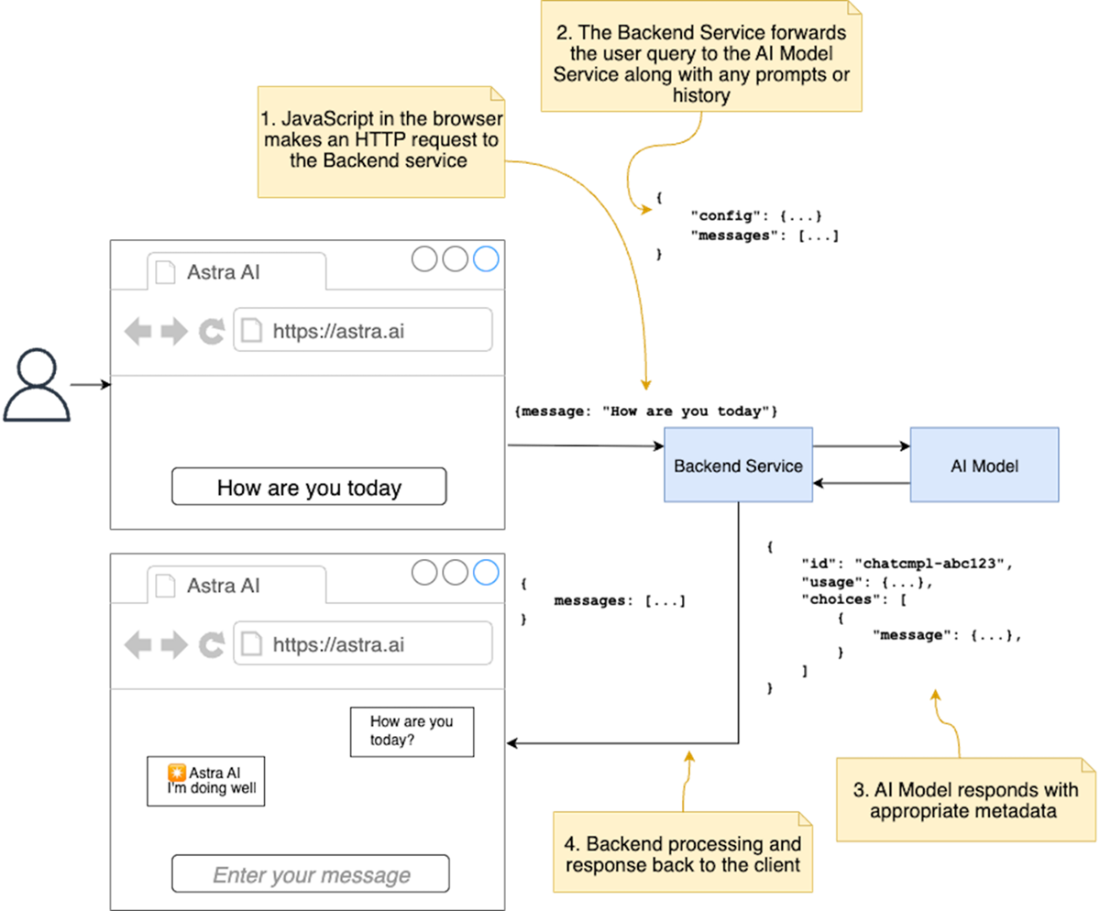
The user interaction flow in the chat application. The user types a question, and presses Enter. The web UI submits the question to the backend service, which processes it and sends it along with context to the AI model. The AI model responds with a query response, which the backend service verifies and sends back to the web UI for updating the conversation messages. This cycle allows for follow-up questions.
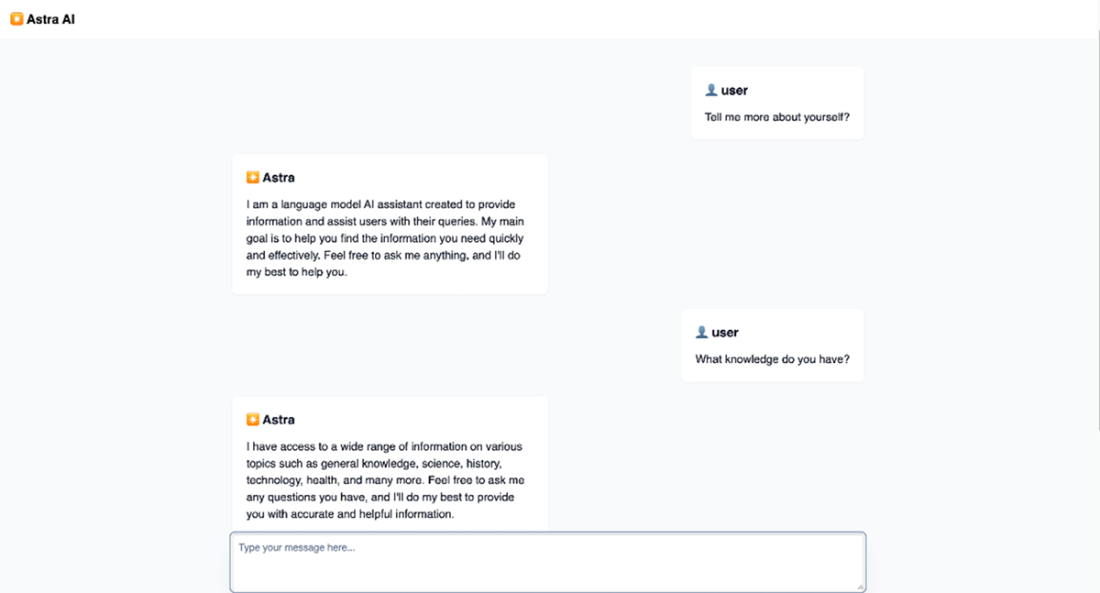
A screenshot of Astra AI in action. We can interact with the agent, and it will respond to us in a polite manner.
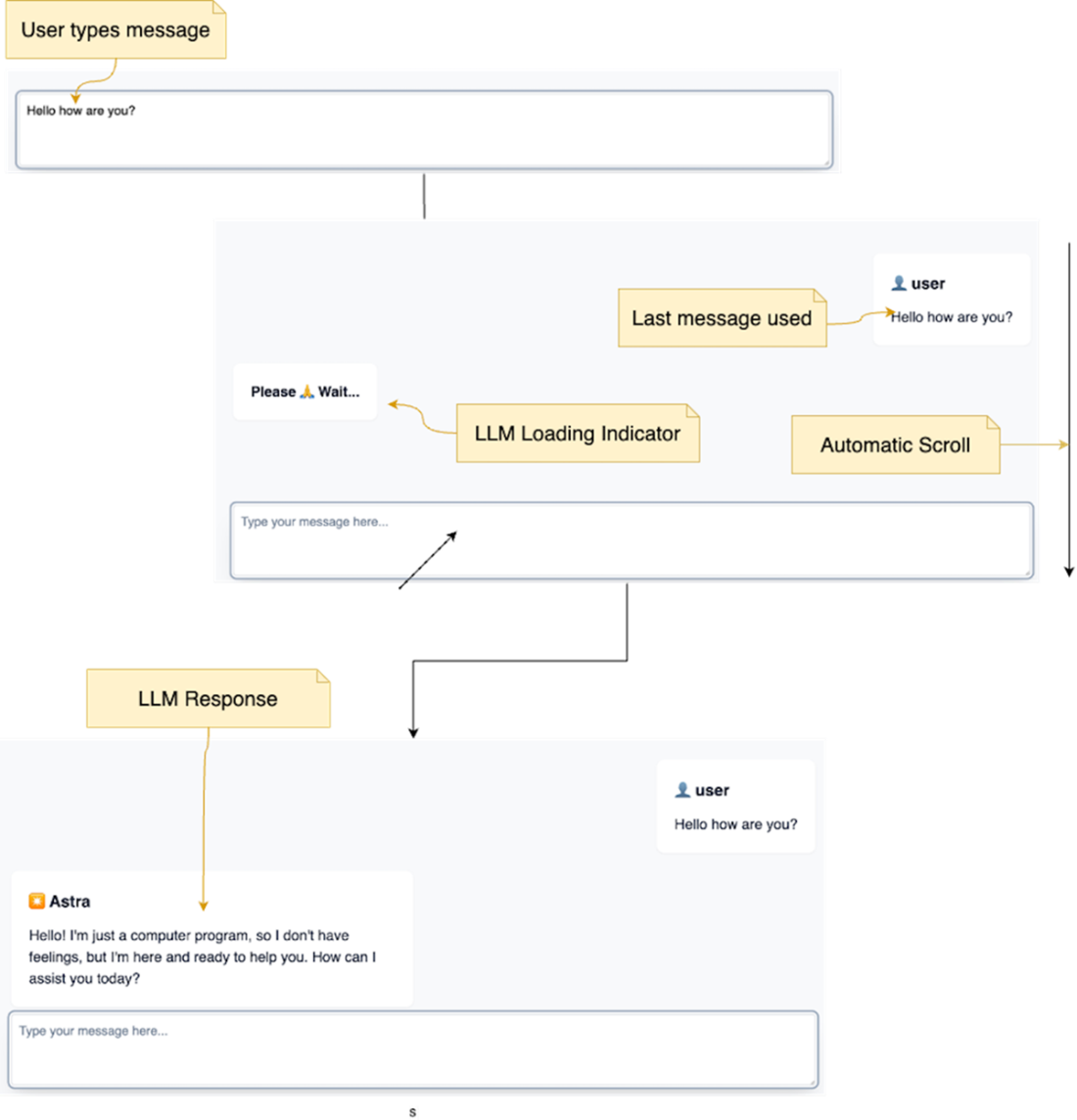
A screenshot of Astra's chat interface, showing a conversation history between the user and the AI. Notice the input prompt, a list of past messages, and a loading indicator while the AI (LLM) processes the request. Once a new message is posted, the page is automatically scrolled down.
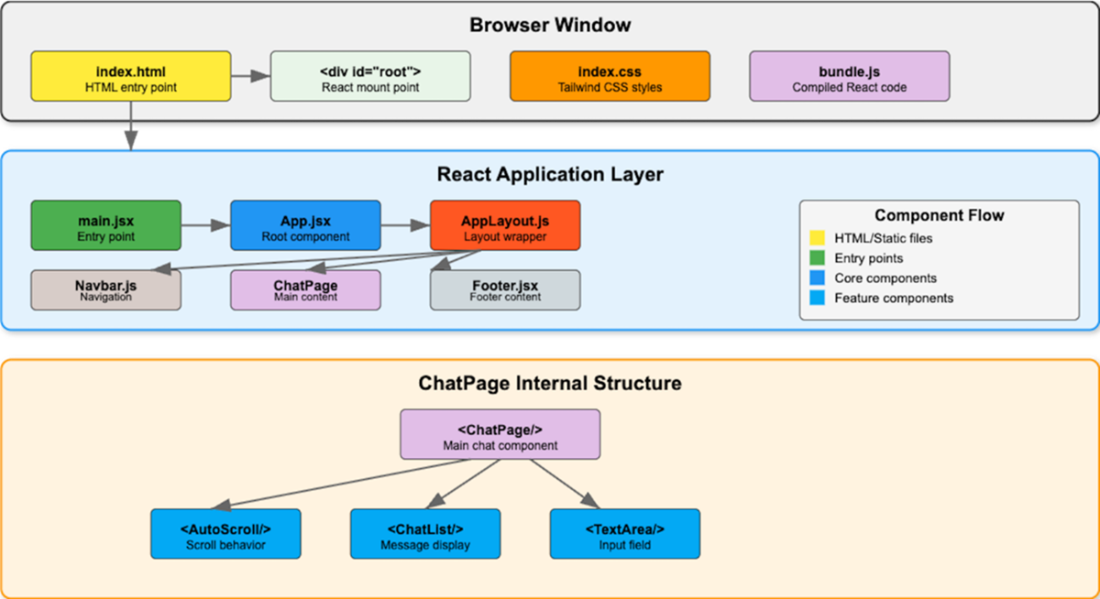
The browser loads index.html, which mounts the React application to a root div. The application starts with main.jsx (the entry point), rendering App.jsx. App.jsx uses AppLayout.js for the overall page structure, including Navbar.js, the central ChatPage content, and Footer.jsx. ChatPage further breaks down into three child components: AutoScroll (managing scroll behavior), ChatList (displaying conversation messages), and TextArea (handling user input). Data flows between these components, with ChatList holding the conversation history and TextArea managing the user's message prompt.
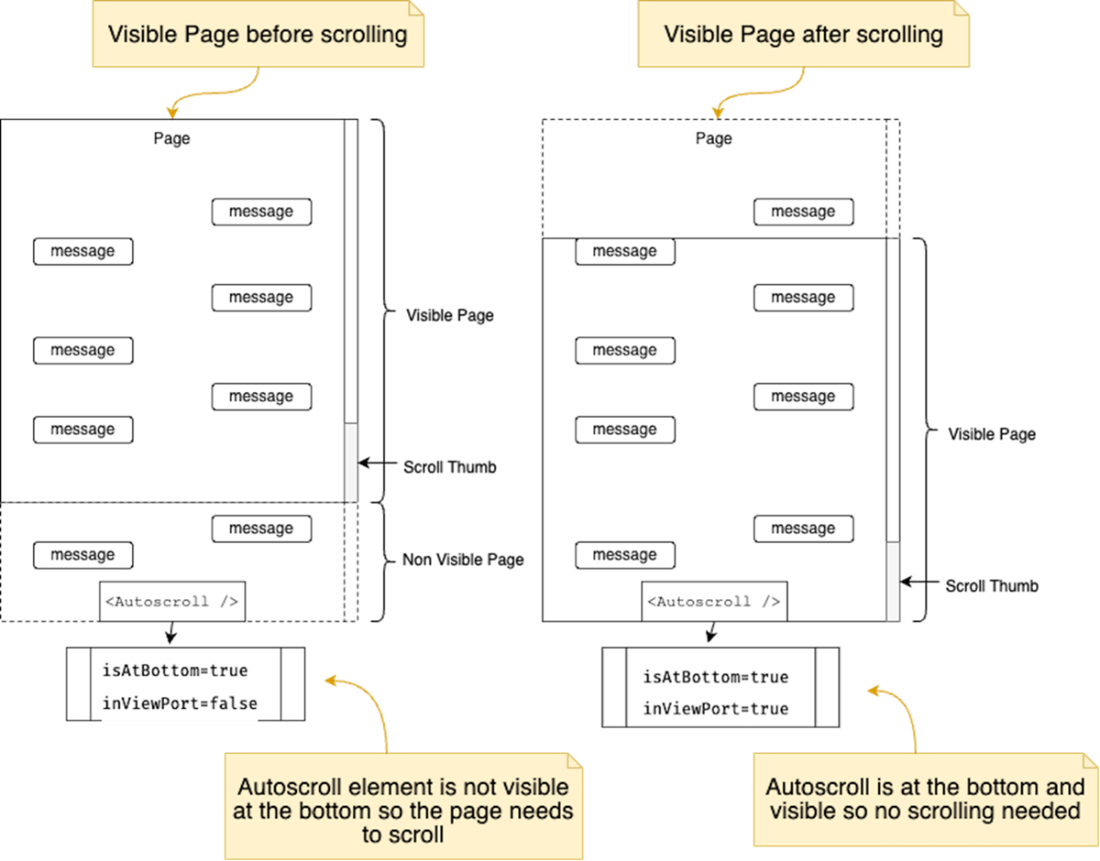
The <Autoscroll /> component works by triggering a scroll to bottom of the page. the criteria that trigger the auto-scrolling behavior are: The trackVisibility prop is set to true, the component is at the bottom of the viewport (determined by the useIsAtBottom hook) and the component is not currently in view (determined by the useInView hook).
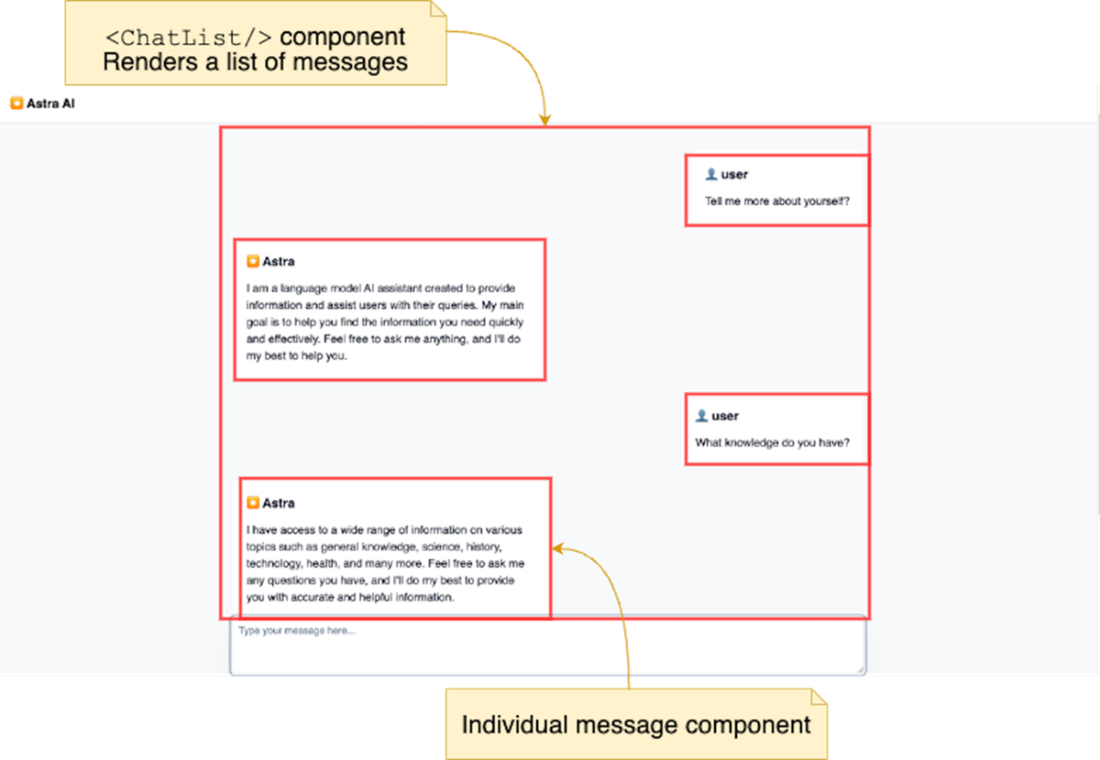
The <ChatList /> component is highlighted within the Chat page along with the chat message components.
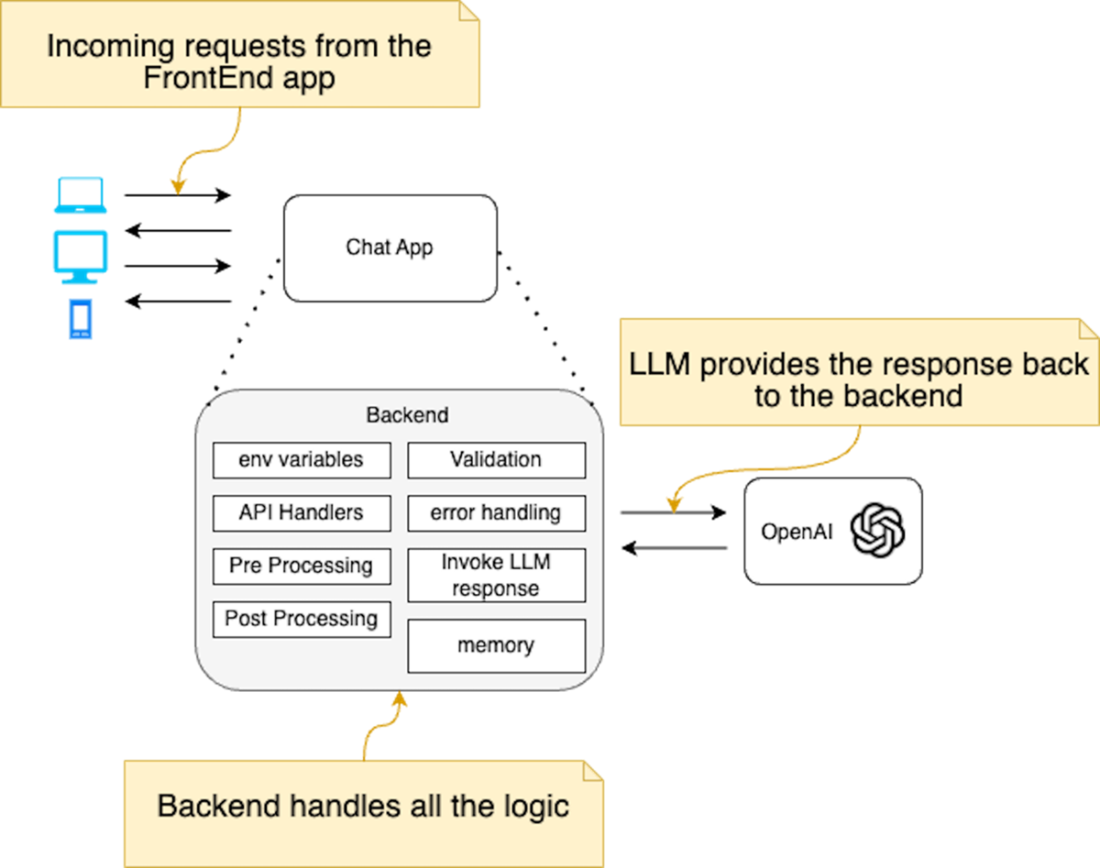
This figure shows the general responsibilities of the backend. The process involves data validation, interaction with the OpenAI API, response processing, and transmission of the generated response back to the frontend application.
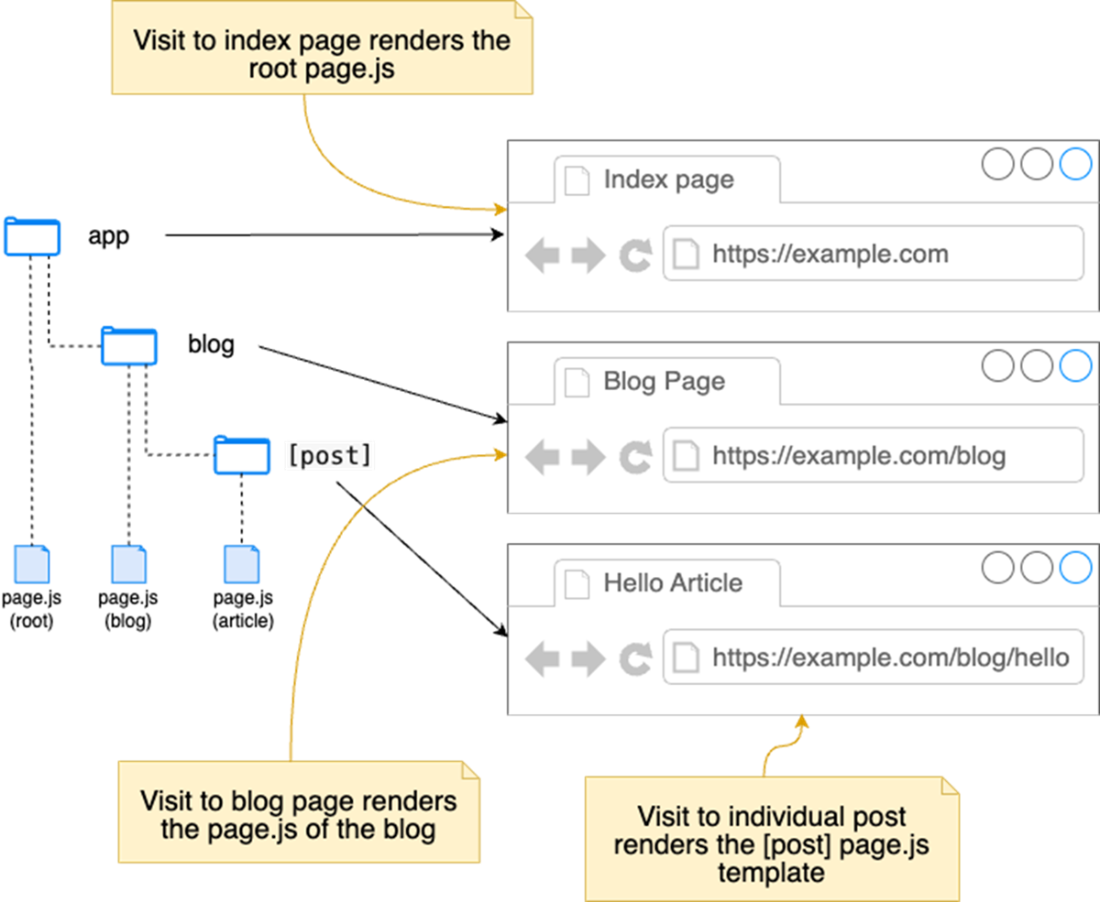
This diagram shows file-based routing in Next.js. The root page.js in app corresponds to the index page (/). The blog page.js in the blog folder corresponds to the blog path (/blog). Finally, the route segment that corresponds to individual articles (wrapped in brackets []) corresponds to the blog post path(/blog/hello).
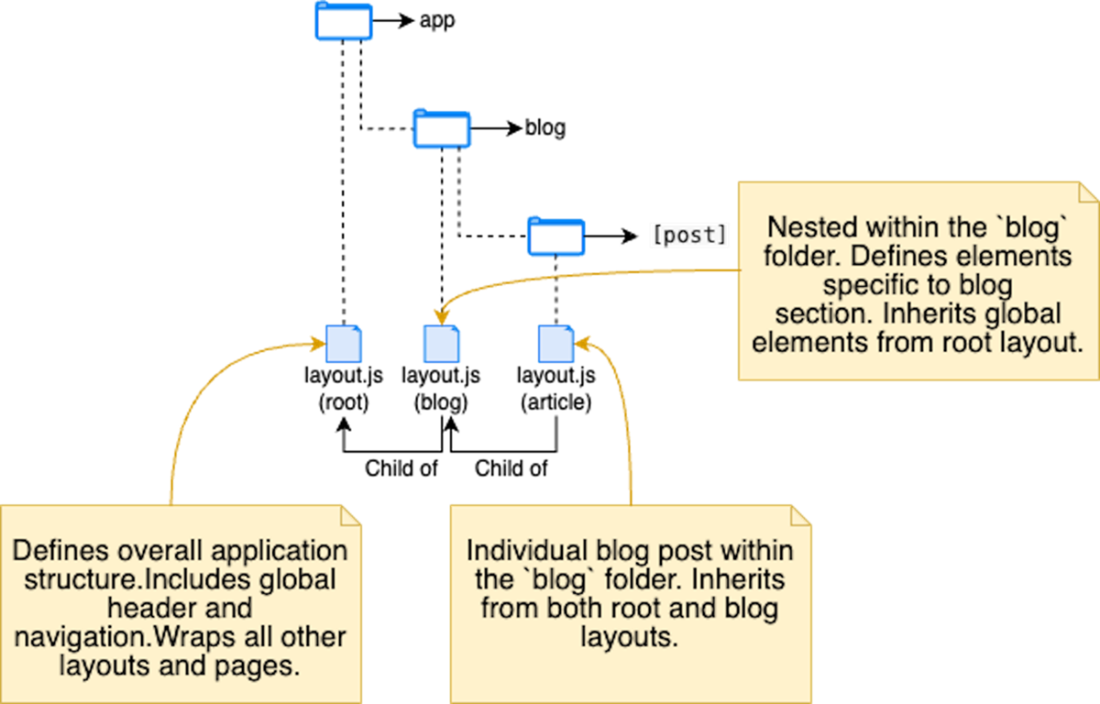
This diagram shows nested layouts in Next.js. The root layout wraps all content, while the blog layout adds elements specific to the blog section. Individual blog posts are inherited from both.
Summary
- Building generative AI applications involves several crucial steps. You need to plan a design, the key features it will offer, and how it will be delivered to your users. Then the implementation needs to leverage all the best practices of UX, security and testing to ensure it works as intended.
- The planning and design phase focuses on defining the desired features and functionalities of your application. Selecting the right tools to fulfill those needs is crucial for success.
- The simplest conversational chat web app features a way to accept user input (via a message box) and sending this to the backend.
- When building user interfaces for generative AI applications, user experience (UX) becomes paramount, especially when dealing with lengthy Large Language Model (LLM) responses.
- Security is a top priority for the backend, ensuring the safe handling of user data and application logic. Additionally, performance optimization becomes crucial as you scale your application and manage complex LLM interactions. Finally, selecting an appropriate Large Language Model that aligns with your application's specific needs is essential.
- While Next.js offers several advantages when building generative AI web applications, overall, it’s just a tool that you want to master.
- Next.js leverages a file-based routing system, where page routes directly correspond to files and folders within your project structure. This provides a familiar and organized approach to application development.
- Next.js allows you to embed backend logic directly within your application using API routes. These routes benefit from built-in caching mechanisms, optimizing performance and reducing server load for frequently accessed data.
FAQ
What does Chapter 2 build, and who is “Astra”?
We build a simple, text-based conversational AI web app that demonstrates the core LLM app flow. The AI agent is an approachable persona named “Astra,” which replies to user prompts in a chat-like UI. The first iteration focuses on text; later chapters add voice, images, tools, and private data integration.What are the goals and core features of the first iteration?
- Single-page chat interface with a welcome message- Text input for natural-language prompts
- Conversation history visible and scrollable during the session
- Simple visual design with basic error handling and input sanitization
- No authentication and no persistent storage yet (history is not saved across reloads)
Which technologies and services are used?
- Frontend: React.js (Vite dev server), Tailwind CSS- Backend: Node.js with Express (initial version)
- AI providers: Google Gemini (default) or OpenAI via public APIs
- Testing: Unit tests with vitest
- Environment: Node.js LTS recommended (v18.x)
How does the chat lifecycle work end-to-end?
1) User types a question and submits it. 2) The Web UI sends the request to the backend. 3) The backend validates input and calls the AI model (Gemini/OpenAI), adding any needed context. 4) The AI returns a response. 5) The backend post-processes and returns a cleaned message. 6) The UI updates the conversation and auto-scrolls to the latest message. 7) The user can ask follow-ups.How do I run the React + Express demo with Gemini or OpenAI?
- Gemini (default):• Command: npm run start -w ch02/client-chat
• .env:
GEMINI_API_KEY=<SECRET_KEY>- OpenAI:
• Command: npm run start:openai -w ch02/client-chat
• .env:
OPENAI_API_KEY=<SECRET_KEY>- Open the UI at http://localhost:5173. The Express backend listens on http://localhost:3000 (CORS enabled).
- Optional tests: npm run test:unit -w ch02/chat-client
How is the frontend organized, and what are the key components?
The ChatPage component orchestrates the UI: it shows a welcome state, renders the conversation via ChatList/ChatMessage, captures input with Textarea, and uses AutoScroll to keep the latest reply in view. Custom hooks include useEnterSubmit (submit on Enter), useFocusOnSlashPress (focus input on “/”), and useChatFormSubmit (state and submit logic).What does the useChatFormSubmit hook do?
It centralizes chat state and submit logic: tracks messages, inputValue, and isLoading; trims and rejects empty submissions; appends the user’s message; calls a helper (getAssistantResponse) to fetch the LLM reply; appends the assistant message; handles errors; and toggles loading state. This keeps ChatPage lean and the logic reusable.How does the backend talk to OpenAI/Gemini, and how are keys secured?
Express loads API keys from environment variables (e.g.,OPENAI_API_KEY, GEMINI_API_KEY) and never exposes them to the browser. It parses POST JSON, validates input, calls the provider client, and returns a normalized message. For OpenAI, it uses chat.completions.create with a system prompt, user content, model like gpt-3.5-turbo, stop: null, and max_tokens: 150. CORS is enabled to allow the React app at 5173 to connect.What common issues should I expect and how do I fix them?
- API keys: Ensure your.env is set (Gemini is the free default for examples). For OpenAI, you must add a card and have credits; otherwise you’ll see insufficient_quota.- CORS: If requests fail in the browser, confirm
app.use(cors(...)) is set correctly on the Express server.- Servers: Verify both frontend (Vite) and backend (Express) are running; check the browser console for errors.
Why migrate to Next.js, and what changes should I know?
Next.js simplifies full-stack development and deployment, and unlocks features like file-based routing and built-in API routes. Key concepts: (1) File-based routing insrc/app; (2) Route groups like (chat) for organization without affecting URLs; (3) Layouts via layout.js; (4) Route handlers (app/(chat)/api/route.js) with export async function POST() and optional export const dynamic = 'force-dynamic' for caching control; (5) Env vars from .env(.local) are auto-loaded (use NEXT_PUBLIC_ only for non-sensitive client-side values). Run the Next.js example with npm run dev -w ch02/chat-client-next; visit / for Gemini and /chat-openai for OpenAI.
 Build AI-Enhanced Web Apps ebook for free
