5 Generate images with diffusion models
This chapter introduces diffusion models as the current standard for high-quality image generation and uses a practical, build-from-scratch approach to make the concepts concrete. It explains the two complementary phases at the heart of diffusion: a forward process that gradually corrupts images with noise and a reverse process that learns to remove that noise step by step to synthesize new samples. The chapter positions these ideas as foundational for modern text-to-image systems and guides the reader toward hands-on implementation by generating grayscale clothing images, laying groundwork for conditional diffusion covered later.
The core mechanics are developed by first visualizing forward diffusion under different noise schedules and then learning how to invert it. Linear and cosine schedules are compared to show how the rate of noise addition influences learning and output quality, with the cosine schedule typically producing more stable training and better results. The reverse process is framed as learning to predict the injected noise at each timestep; a U-Net serves as the denoiser, taking a noisy image and its timestep as input and outputting the noise estimate. With this, the model can iteratively refine pure noise into a clean image.
Implementation centers on training a denoising U-Net with Fashion MNIST: images are resized and normalized, random timesteps are sampled per batch, and noise is added via a DDPM scheduler. The model is optimized to minimize the L1 difference between predicted and true noise using AdamW and mixed precision to improve speed. During and after training, sampling begins from random noise and proceeds through the scheduler’s timesteps, repeatedly applying the U-Net to remove noise and form recognizable clothing items. The results improve across epochs, demonstrating how the learned denoiser and scheduler together enable image synthesis and setting the stage for adding conditioning signals to control what the model generates.
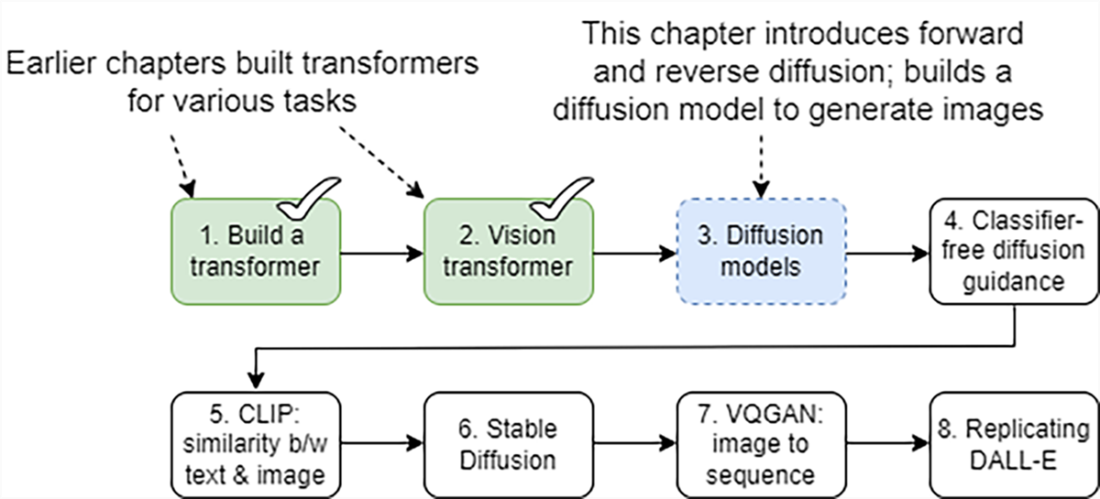
The eight-step roadmap for building a text-to-image generator from scratch. This chapter is dedicated to step 3: diving deep into the mechanics of forward and reverse diffusion, and developing a diffusion model capable of generating images from noise.
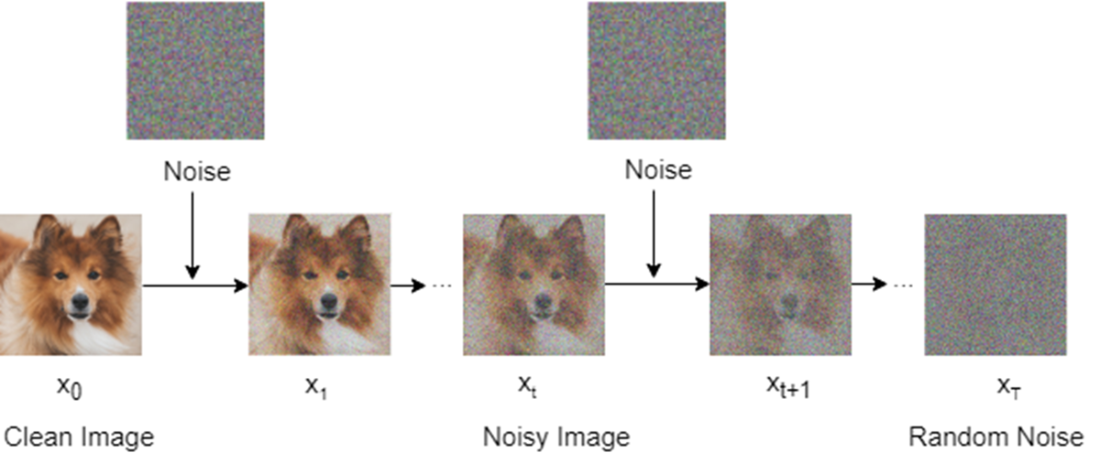
A diagram of the forward diffusion process. We start with a clean image (at time step 0) from the training set and add noise to it to form a noisy image (at time step 1). In the next time step, we inject more noise into the image. We repeat this process 1000 time steps until the image becomes random noise.
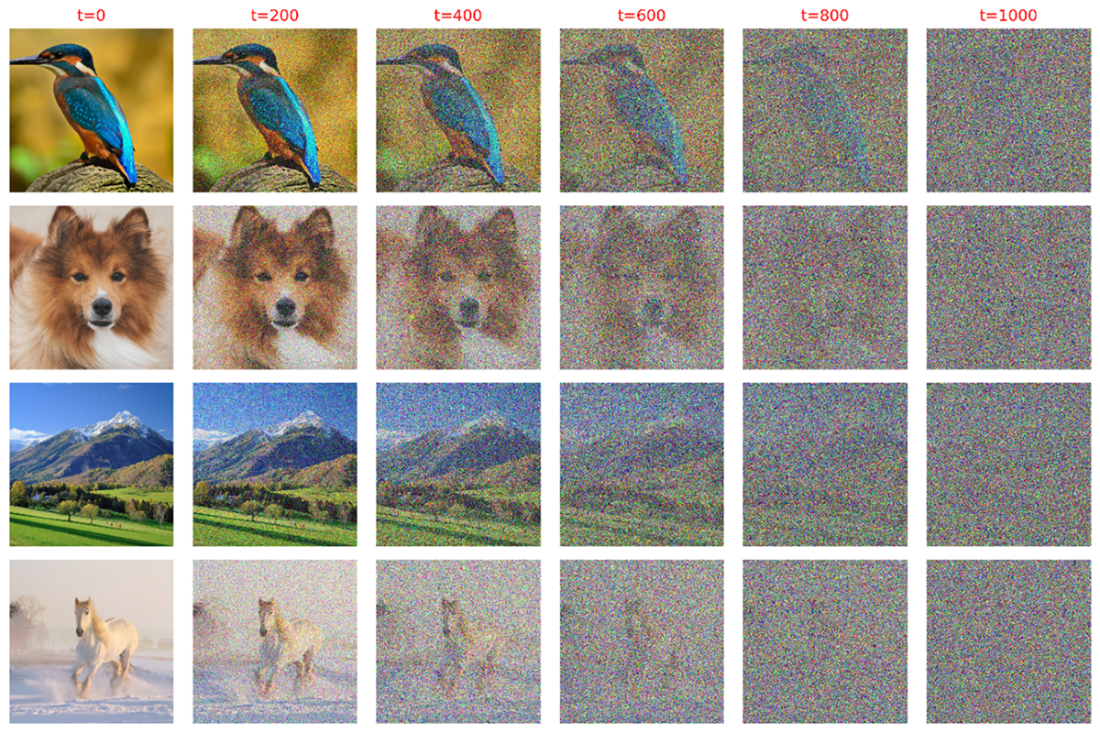
The forward diffusion process. The four images in the first column are the original clean images. We then gradually add noise to these images from time step 1 to time step 1000. As the time step increases, more and more noise is injected into the images. The four images in the second column are images after 200 time steps. The third column contains images after 400 time steps and they have more noise than those in the second column. The last column contains images after 1000 time steps and they are 100% random noise.
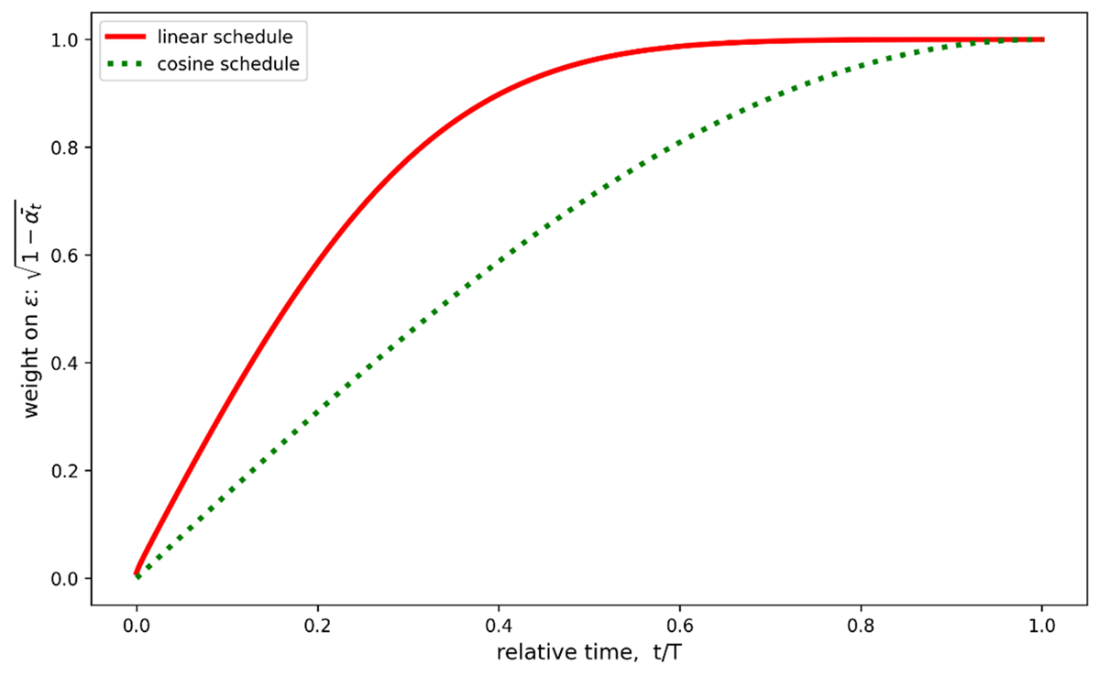
The weight placed on noise under linear and cosine diffusion schedules. The x-axis is the relative time step, t/T, which ranges from 0 to 1. The y-axis is the weight placed on the noise in the forward diffusion process. The solid line represents the linear diffusion schedule while the dotted line represents the cosine diffusion schedule. The weight on the noise under the cosine diffusion schedule increases over time more gradually compared to that under the linear diffusion schedule.
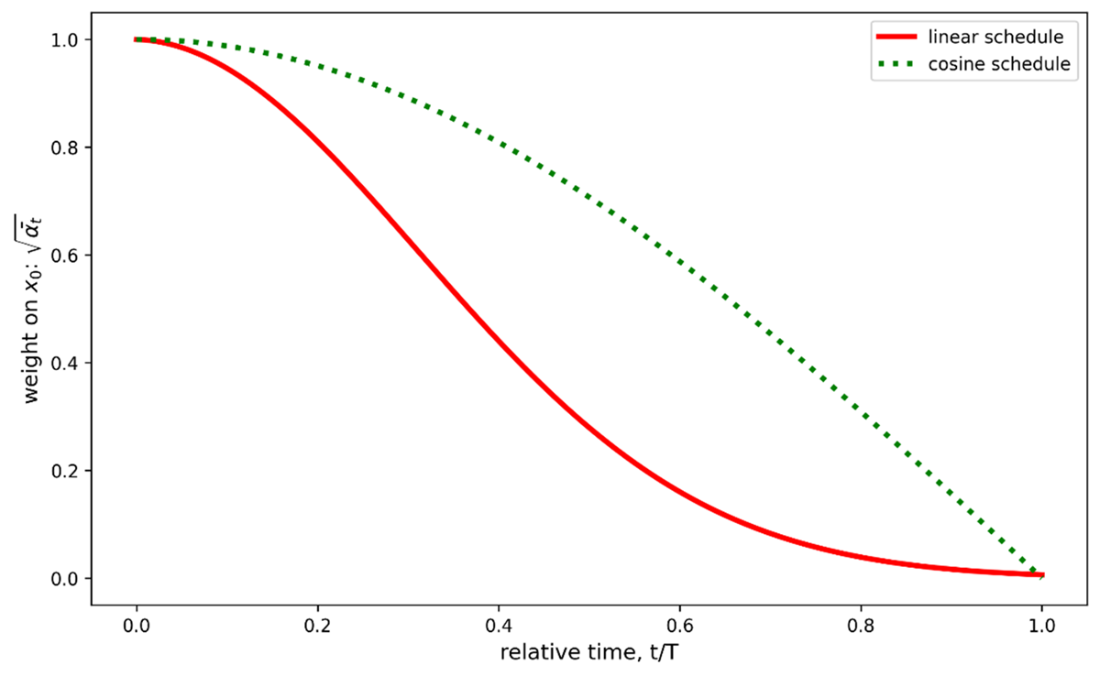
The weight placed on the clean image under linear and cosine diffusion schedules. The x-axis is the relative time step, t/T, which ranges from 0 to 1. The y-axis is the weight placed on the clean image in the forward diffusion process. The solid line represents the linear diffusion schedule while the dotted line represents the cosine diffusion schedule. The weight on the clean image under the cosine diffusion schedule decreases over time more gradually compared to that under the linear diffusion schedule.
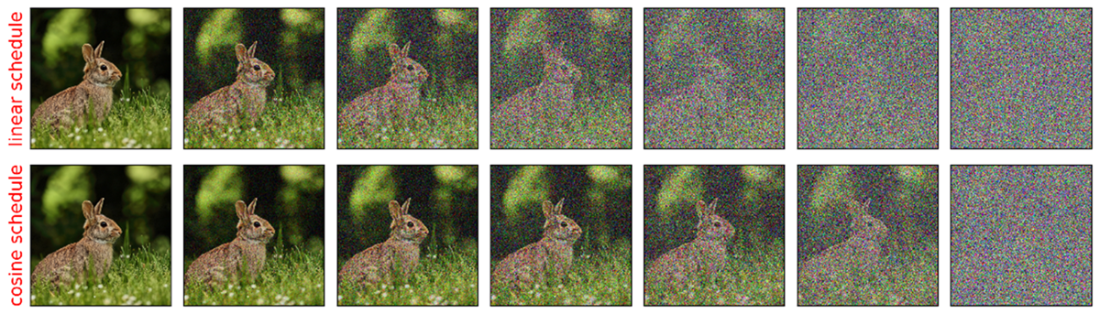
How noise is gradually added to images in the forward diffusion process under linear and cosine diffusion schedules. We gradually add noise to a clean image under a linear diffusion schedule (top row) and a cosine diffusion schedule (bottom row). The first column contains clean images (i.e., t=0). As we move to the right, the time steps are 166, 332, 498, 664, 830, and 996, respectively. The linear diffusion schedule adds noise to the image more quickly, while the cosine diffusion schedule adds noise more gradually over time.
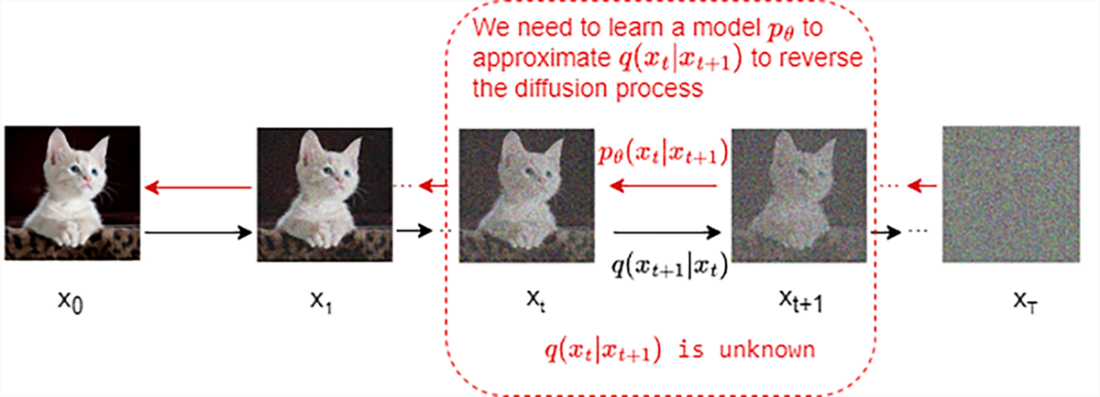
How the reverse diffusion process works. Upon observing xt+1, we cannot obtain xt because the function q(xt|xt+1) is unknown. Therefore, we need to use the training data to learn a model to approximate the conditional probability pθ(xt|xt+1), where θ are model parameters.
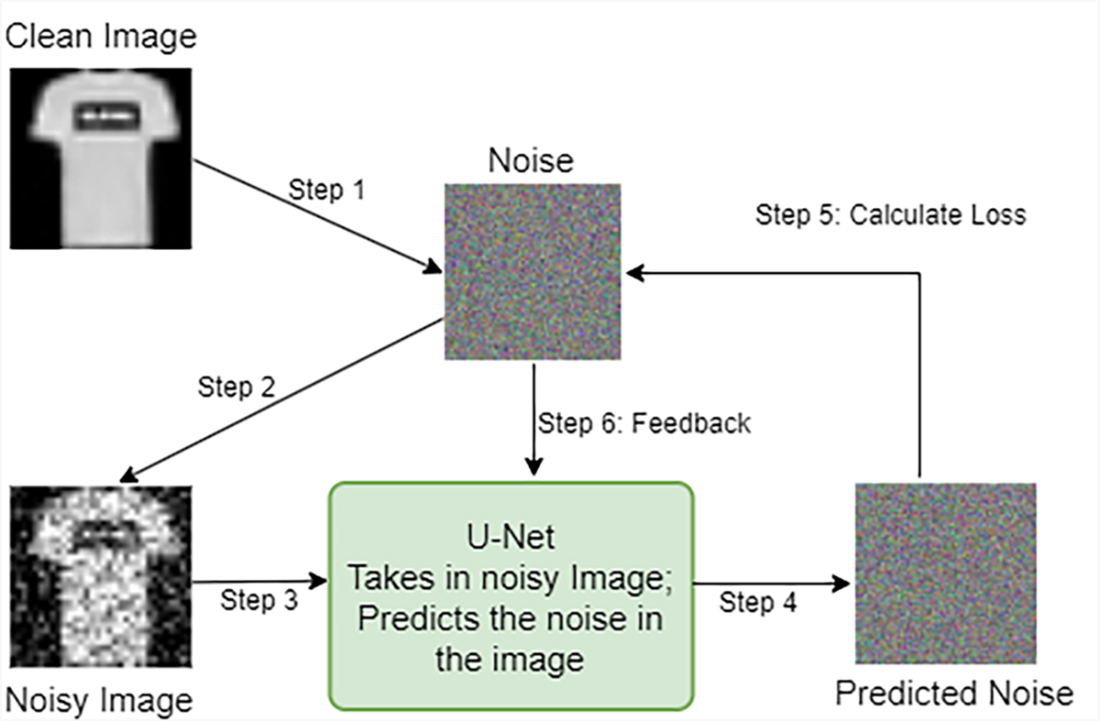
Steps to train a denoising U-Net model to remove noise from images. We first obtain clean clothing-item images as our training set. We add noise to clean images and present them to the U-Net model. The model predicts the noise in the noisy images based on the time step the image is in. We compare the predicted noise with the actual noise injected into the image and adjust the model weights to minimize the mean absolute error.
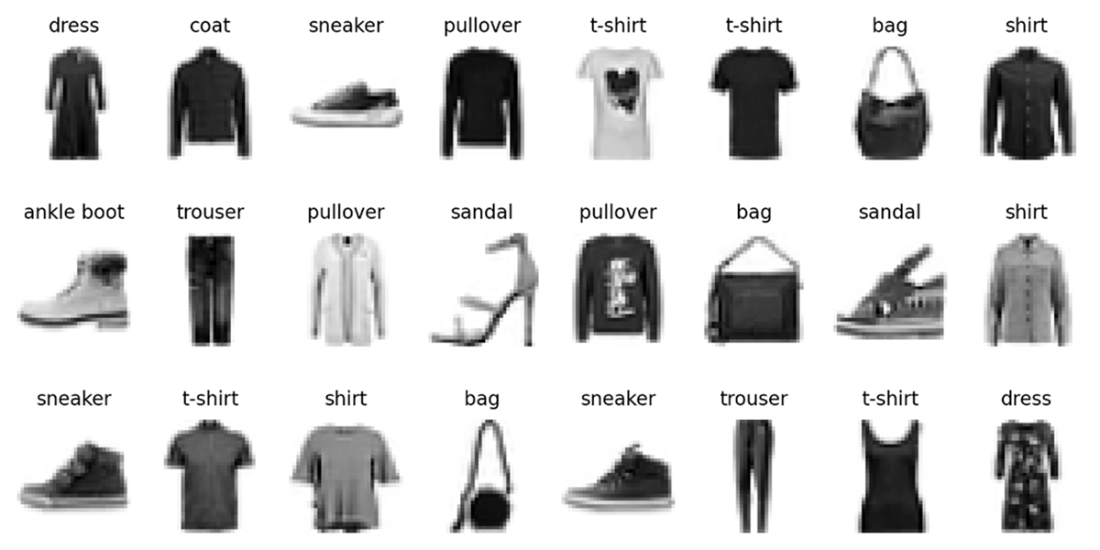
Grayscale images of clothing items in the Fashion MNIST dataset. There are ten different types of clothing items, labeled from 0 to 9. The ten text labels corresponding to the numerical labels 0 to 9 are 't-shirt', 'trouser', 'pullover', 'dress', 'coat', 'sandal', 'shirt', 'sneaker', 'bag', and 'ankle boot', respectively. The text label is on top of each image in this figure.
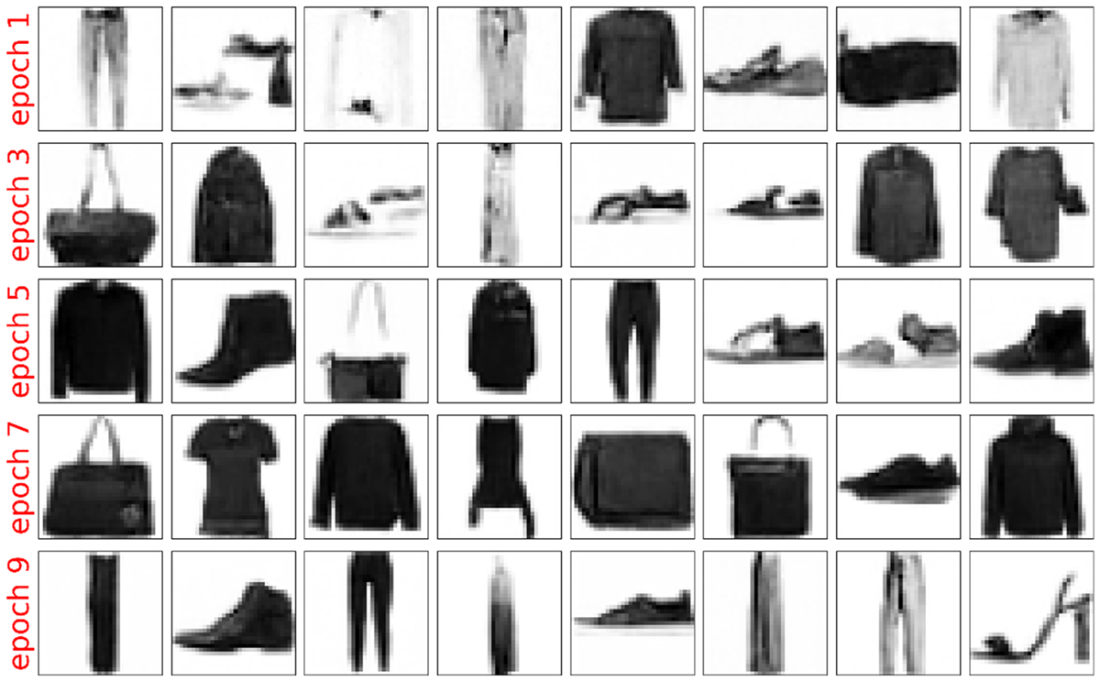
Clothing-item images generated by the denoising U-Net model after 1, 3. 5. 7, and 9 epochs of training. We train the model for 10 epochs. After each epoch of training, we use the model to generate clothing-item images. The top row shows the images after 1 epoch of training, the second shows those after 3 epochs of training, and so on. The bottom row shows the images after 9 epochs of training. As you can see, the quality of the generated images improves as the training progresses.
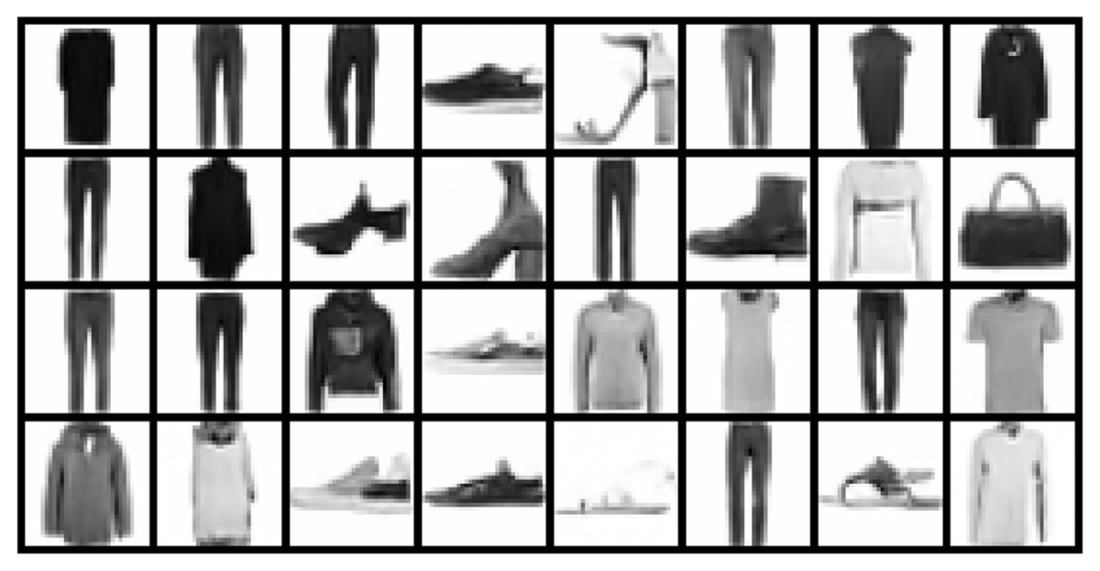
Generated clothing-item images with a trained denoising U-Net model. We train the model for ten epochs. We feed random noise to the trained model. The model iteratively removes noise from the noisy images for 1000 time steps and the result is shown in this figure.
Summary
- In the forward diffusion process, we start with a sample of clean images. We gradually introduce small amounts of random noise into these clean images. After many time steps of adding noise, the clean images become pure random noise.
- Two commonly used diffusion schedules in the forward process are the linear and cosine diffusion schedules.
- A linear schedule defines the variance of noise added in each time step as an increasing linear function of time. The linear noise schedule is simple and commonly used due to ease of implementation.
- The cosine schedule adjusts the noise variance in each time step using a cosine function. This leads to a non-linear progression where noise increases more gradually at first and then accelerates. The cosine schedule helps maintain finer details in initial diffusion steps, which can enhance model performance and output quality.
- In the reverse diffusion process (also called the denoising process), we train a model to reverse the forward diffusion process. We feed the model with random noise and ask it to produce a noisy image. We iteratively repeat the process for many time steps and the end result is a clean image.
- We usually use a U-Net as the denoising model. The U-Net has a symmetric shape with a contracting encoder path and an expansive decoder path, connected by a bottleneck layer. In denoising, U-Nets are adapted to remove noise while preserving details. U-Nets outperform simple convolutional networks in denoising tasks due to their efficient capturing of local and global features in images.

 Build a Text-to-Image Generator (from Scratch) ebook for free
