10 A deep dive into Stable Diffusion
This chapter presents a high-level, practical tour of Stable Diffusion, explaining how it refines latent diffusion to deliver fast, flexible, and high‑quality text‑to‑image generation. Built by CompVis, Stability AI, and LAION, the model scales the original latent diffusion approach with optimizations and a curated subset of the larger LAION‑5B dataset, enabling richer visual concepts while remaining openly available. A central theme is accessibility: through Hugging Face’s diffusers library, Stable Diffusion can be used in just a few lines of code, with simple controls for image size and classifier‑free guidance, making state‑of‑the‑art image synthesis approachable for both newcomers and practitioners.
Under the hood, the system combines three components: a CLIP text encoder that turns prompts into fixed‑length token embeddings, a conditional denoising U‑Net that iteratively removes noise in a compact latent space, and a VAE decoder that reconstructs final high‑resolution images. Operating in the latent domain dramatically reduces memory and compute cost while preserving detail through the VAE. The chapter walks through the end‑to‑end pipeline: tokenization to 77 tokens, 768‑dimensional embeddings, reverse diffusion over a set number of steps (e.g., 50), and decoding to RGB images. It also clarifies guidance via unconditional/conditional mixing (CFG) and the role of schedulers like DDIM and LMS, as well as practical details such as latent scaling (the 0.18215 factor) to keep training and inference distributions aligned.
From a user’s perspective, the chapter demonstrates image generation with StableDiffusionPipeline, batch prompting, resolution and guidance tuning, and GPU memory considerations. It then drills into the components directly: creating CLIP embeddings (including unconditional ones), generating latents with the K‑LMS scheduler, and decoding with the VAE, along with simple visualization utilities. A highlight is text‑embedding interpolation: blending embeddings from two prompts (e.g., “a lion” and “a tiger”) to produce smooth semantic transitions in the outputs. This technique offers creative control for hybrid imagery, parameter‑swept variations, and even animations, rounding out a clear, hands‑on deep dive into how Stable Diffusion turns language into images.
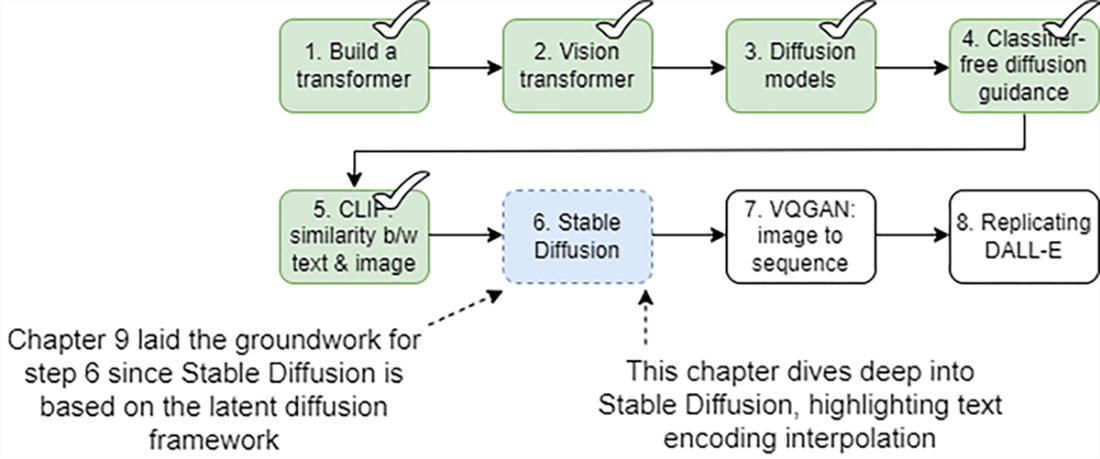
Eight steps for building a text-to-image generator from scratch. Here, we focus on step 6, Stable Diffusion, showing how this state-of-the-art generator builds directly on the latent diffusion models introduced in chapter 9. You’ll learn not just how to use Stable Diffusion, but also how to manipulate the text embeddings to create novel images.
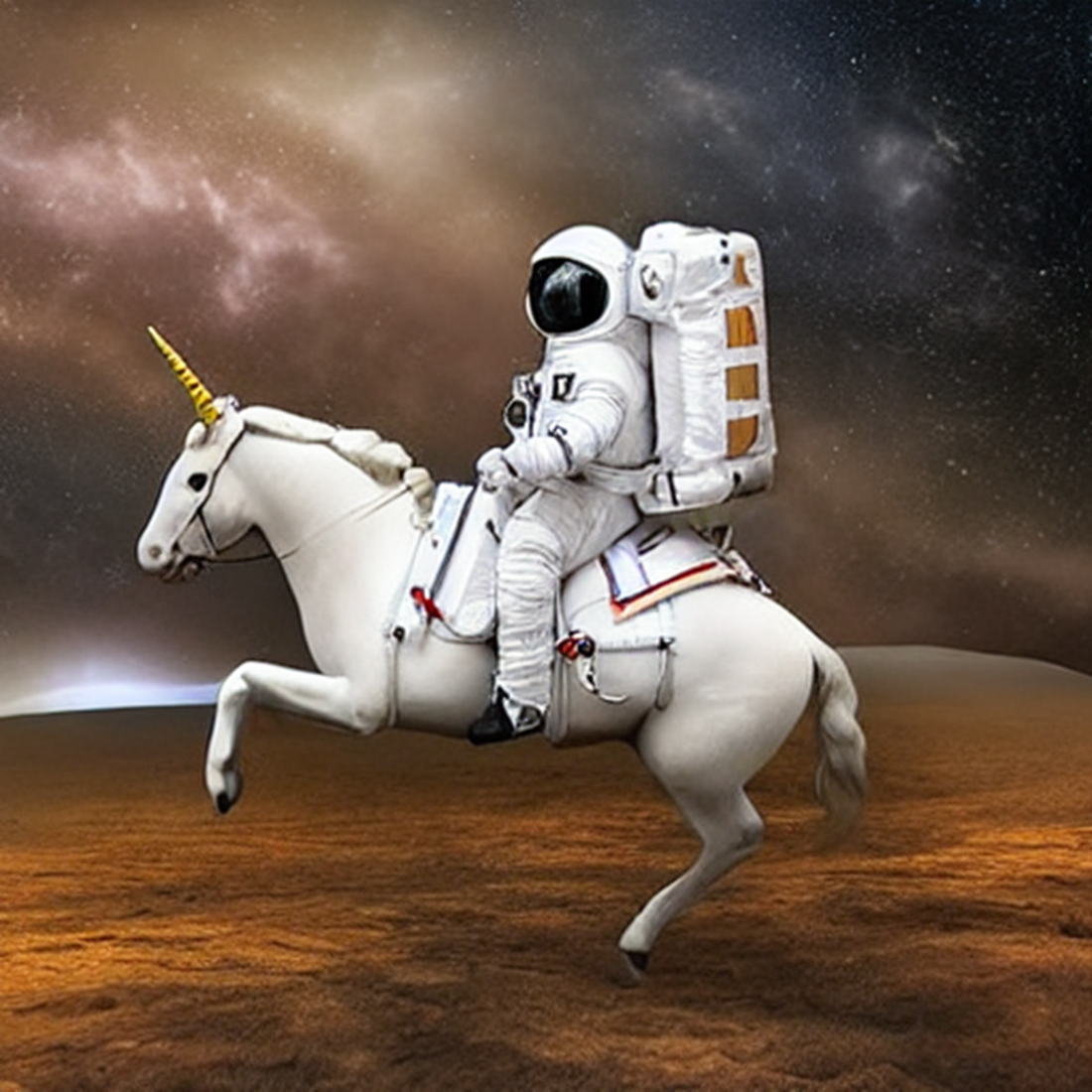
An image generated by the StableDiffusionPipeline package of the diffusers library using the text prompt "an astronaut in a spacesuit riding a unicorn."
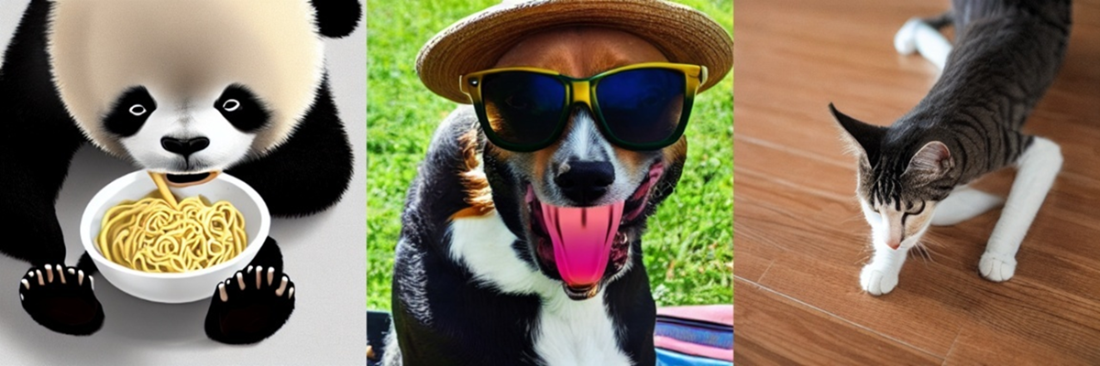
Three images generated by Stable Diffusion. The three text prompts are "a panda eating a bowl of noodles", "a dog with sunglasses and a straw hat", and "a cat stretching on the floor", respectively.
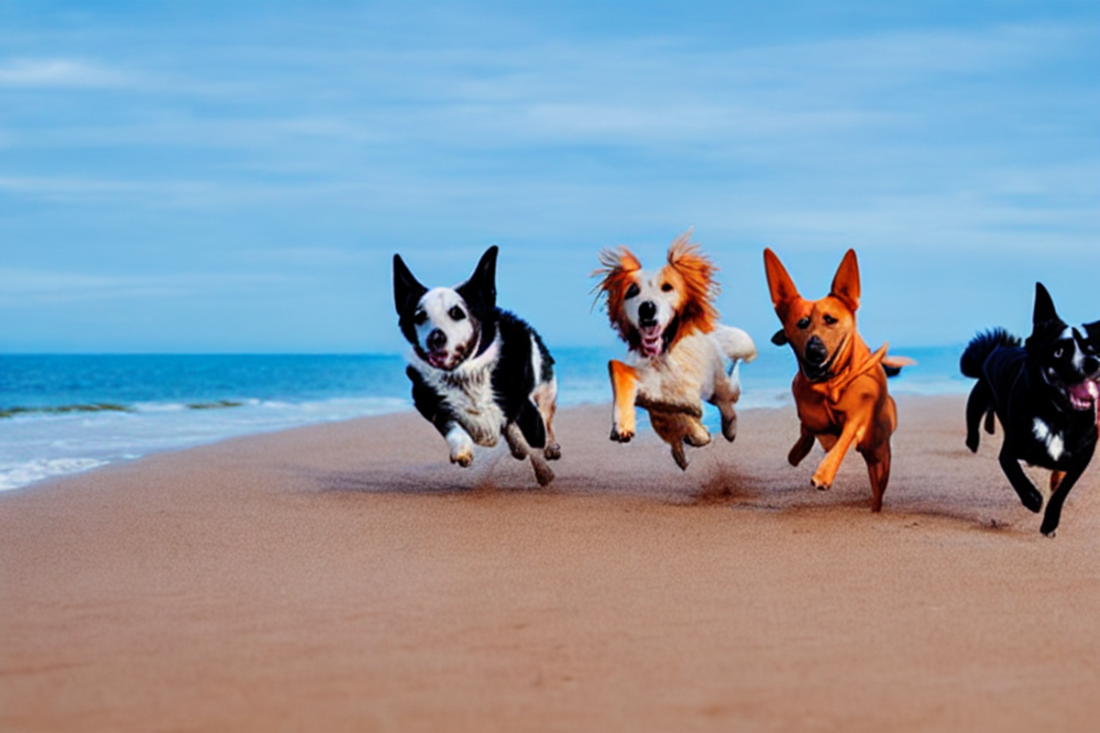
An image generated by Stable Diffusion using the prompt "dogs running on a sandy beach under blue sky." The image resolution is 768x512 and the classifier-free guidance parameter is set to 12.
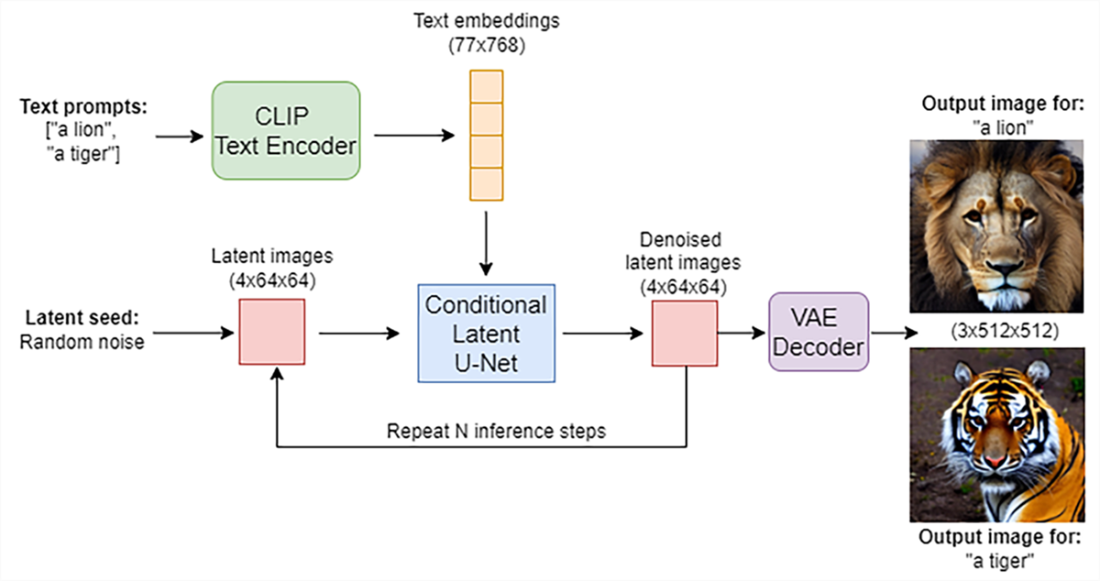
How Stable Diffusion converts text prompts to images. Stable Diffusion has three main components: a text encoder, a U-Net, and a VAE decoder. The text encoder converts text prompts such as “a lion” or “a tiger” into text embeddings. The U-Net conducts the reverse diffusion process in the latent space, using the text embeddings as the conditional information. The generated latent images are then converted by the VAE decoder into high-resolution images as outputs.
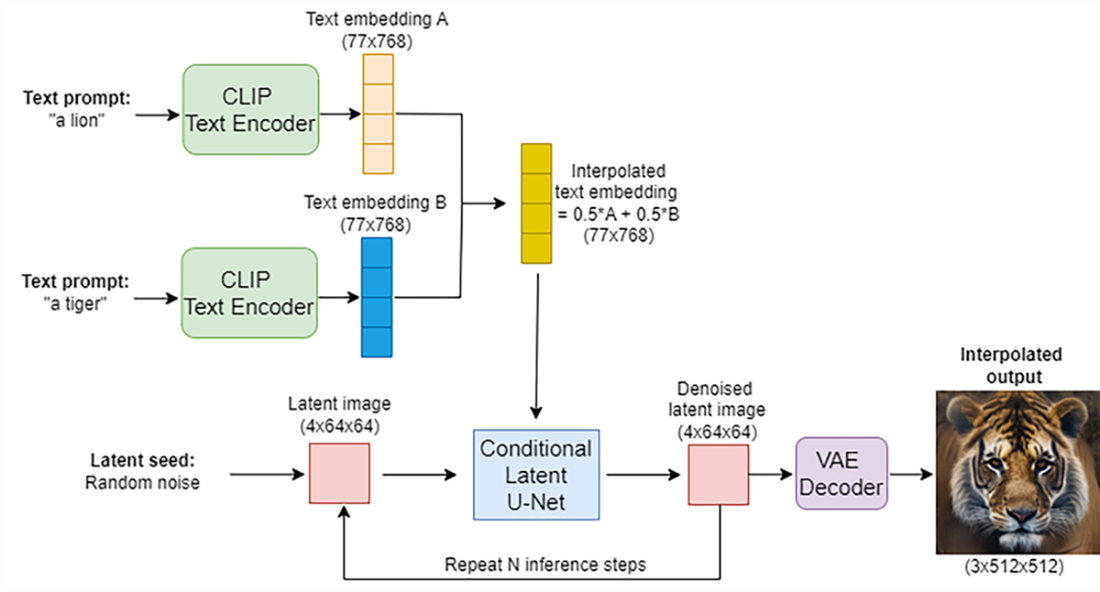
Using text embedding interpolation to create hybrid images in Stable Diffusion. Suppose you have two different prompts, “a lion” and “a tiger.” We first use the CLIP text encoder to convert them into two text embeddings, A, and B. We can blend A and B and create an interpolated text embedding, which is then used to guide the U-Net in the reverse diffusion process in the latent space. The generated latent images are then converted into high-resolution images as the final output, exhibiting characteristics of both a lion and a tiger (bottom right).
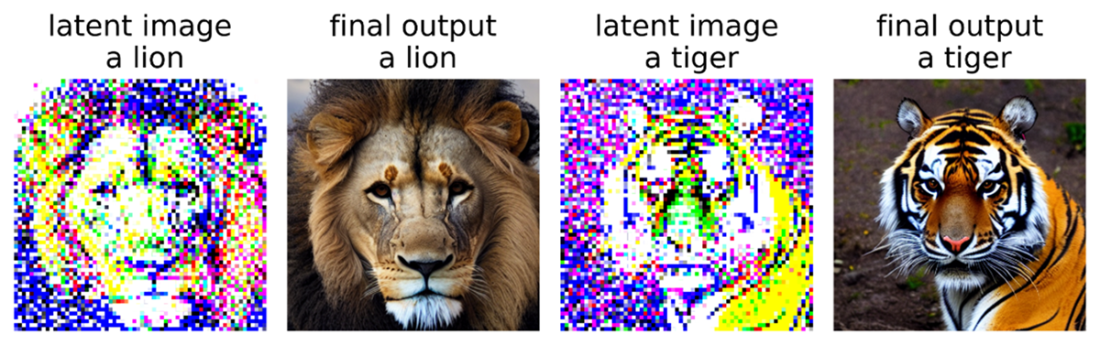
Latent images and final outputs from Stable Diffusion. We use “a lion” and “a tiger” as the text prompts. The Stable Diffusion model first converts the two prompts into two text embeddings. The model then conducts the reverse diffusion process in a latent space, guided by the text embeddings. The generated latent images are shown as the first and the third image in this figure. The latent images are converted to high-resolution ones by using a VAE decoder. The high-resolution final outputs are shown as the second and the fourth images in this figure.
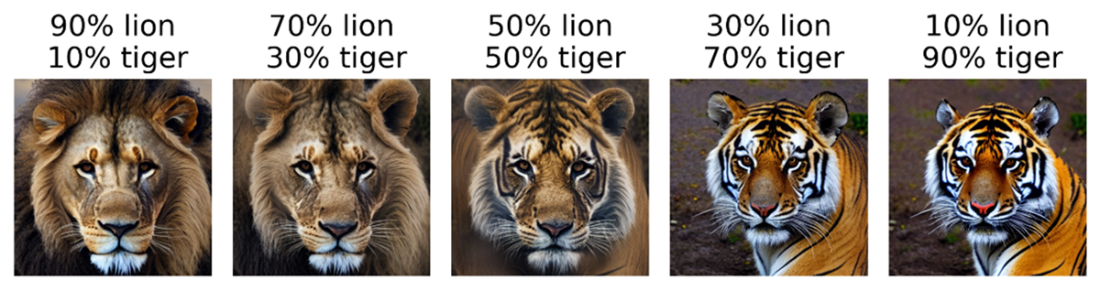
The text embeddings for “a lion” and “a tiger” are combined with different weights to form a series of interpolated text embeddings. The Stable Diffusion model then conducts the reverse diffusion process in the latent space, guided by the interpolated text embeddings. The latent images are converted to high-resolution ones by using a VAE decoder. The high-resolution final outputs are shown in this figure, with different weights placed on the two text embeddings.
Summary
- Stable Diffusion is based on the latent diffusion model (LDM) that we discussed in the previous chapter. It's one of the state-of-the-art text-to-image models, and the only one that is open-source and free for anyone to use.
- Stable Diffusion is developed jointly by CompVis, Stability AI, and LAION. Stable Diffusion has incorporated improvements that enhance both the model’s stability and performance, such as advanced training techniques and optimizations. While the original LDM was trained on the LAION-400M dataset (with 400 million image-text pairs), Stable Diffusion was trained on a subset of the even larger LAION-5B database.
- The StableDiffusionPipeline package in the diffusers library allows us to use Stable Diffusion as an off-the-shelf tool to generate extraordinary images in just a few lines of code.
- By blending the embeddings of two different text prompts, we can create an interpolated text embedding. If we use this embedding to guide the latent diffusion process, we can obtain an interpolated latent image, which can in turn be converted to an interpolated final output image. The output image will have characteristics of the two original text prompts. For example, interpolating between the embeddings for “a lion” and “a tiger” will produce an image with characteristics of both a lion and a tiger.

 Build a Text-to-Image Generator (from Scratch) ebook for free
