3 Preparing the groundwork
Preparing a bug bash begins with turning leadership’s informal approval into a practical plan. The chapter emphasizes that successful events depend on careful logistics: deciding what activities are needed, expanding the timeline, choosing whether the event will be onsite or remote, identifying who should participate, confirming access to tools and environments, preparing test scenarios, and planning how results will be reviewed and shared. The main idea is that participants should be able to focus on testing during the event rather than waiting for organizers to solve avoidable setup problems.
A large part of the groundwork involves selecting and preparing the working artifacts that will support the event. Organizers need a clear bug tracking system so attendees know where to report issues and can avoid duplicates; a central working document that contains key information such as scenarios, participants, environments, links, and instructions; and a communication channel for announcements, questions, timing reminders, and follow-up. The chapter’s Bash IT example shows how these decisions depend on existing company tools and culture: they choose a remote event, JIRA for bug tracking, Google Sheets as the main working document, and Slack as the communication channel.
The chapter also stresses that a draft timeline is not enough; it must be validated with product, engineering, and delivery leads. Organizers should present the plan clearly, explain the value of the bug bash, ask whether the proposed date and duration are workable, and listen for concerns about readiness, scenarios, or team availability. The timeline may need to change, and that is part of the process. What matters is reaching an agreed working plan, checking in regularly, leaving enough time to announce the event, and ensuring the organization is prepared to act on the bugs and feedback discovered.
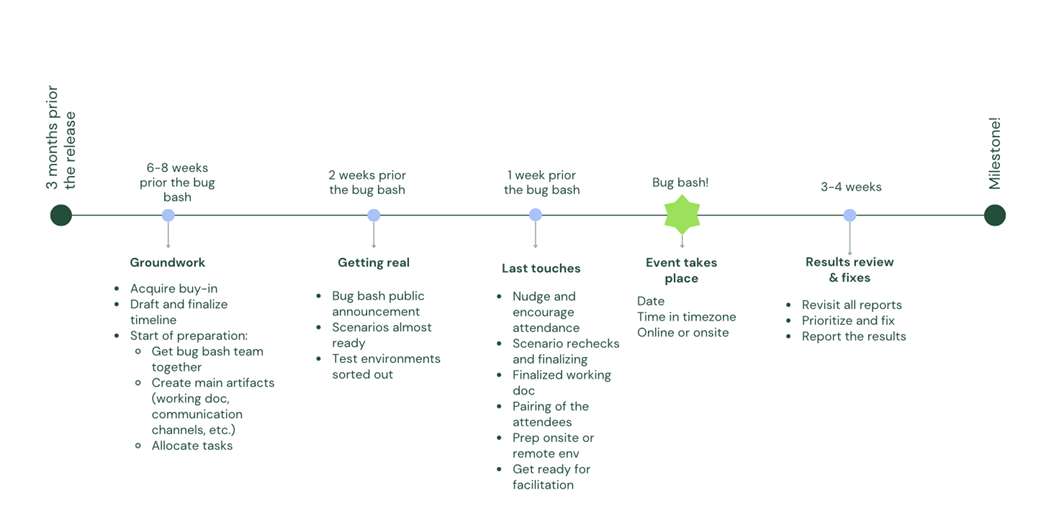
Bash IT’s expanded timeline, including activities they want to take.
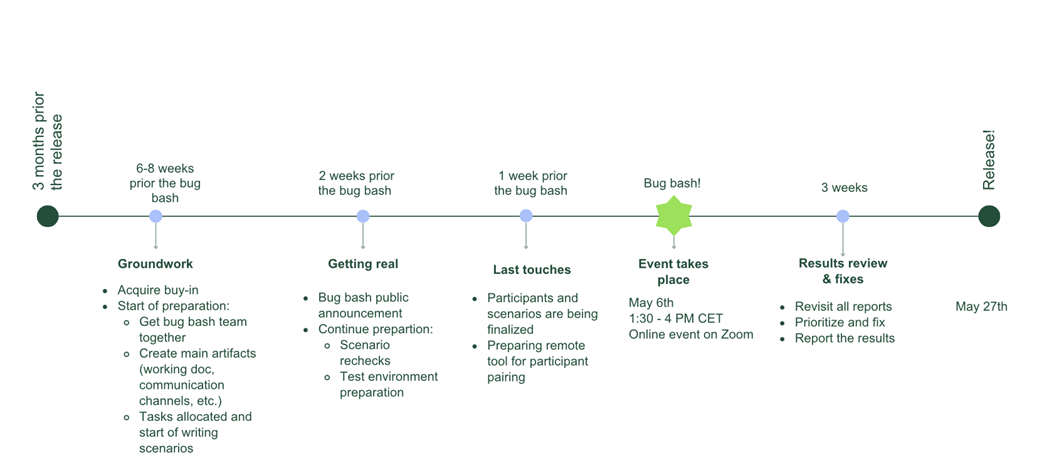
Screenshot of a working document’s first tab. The main information for the bug bash lives here.
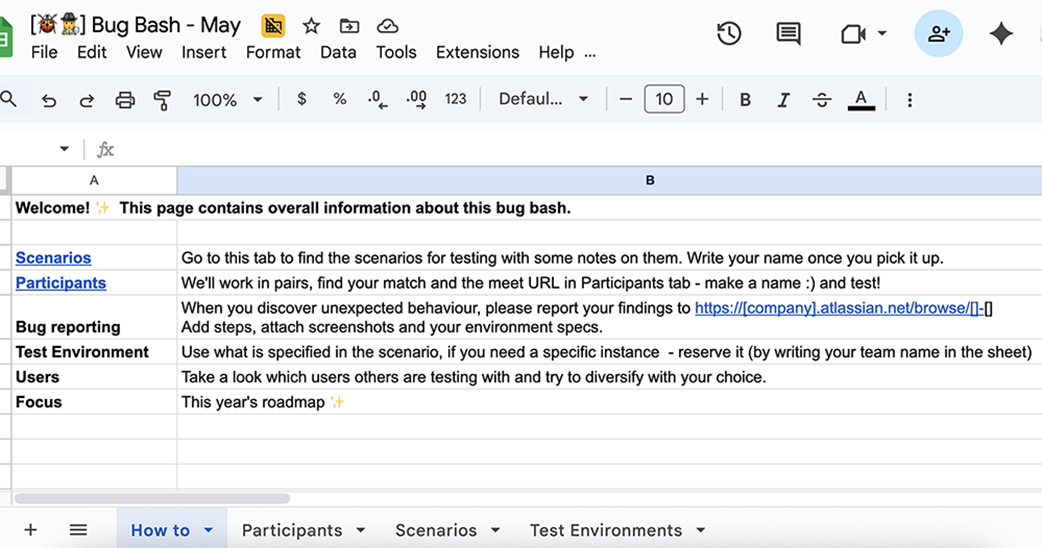
The timeline is adjusted: Bash IT decides to move the bug bash to a later date, reducing their time for review and fixing.
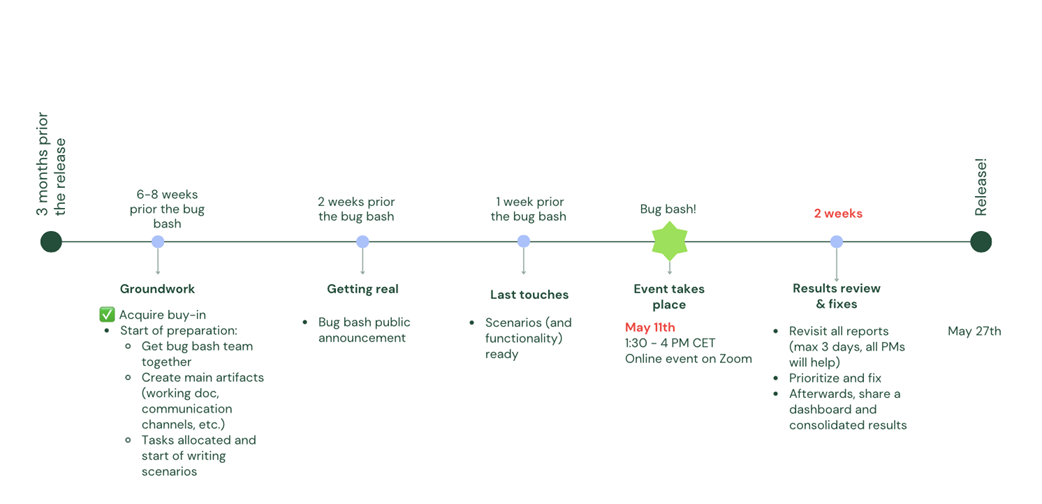
Timeline template example showing the tasks you may do in every stage of planning a bug bash.
Summary
- Visualize your bug-bash timeline, including the main activities, to aid you throughout the process.
- Final approval of the dates and activities should come from leadership. Use the timeline visual to facilitate more effective communication with them.
- Decide on the platform or space, and prepare the necessary tools (bug tracking system, communication channel)
- Prepare a main working document that combines all necessary information, so that all participants can use it in real time during the bug bash.
FAQ
Why is logistics planning important before a bug bash?
Logistics planning prevents small organizational issues from disrupting the event. If basics like location, access, tools, test environments, scenarios, and communication channels are not ready, participants may waste time waiting instead of testing. Good preparation helps the bug bash run smoothly and lets attendees focus on finding useful feedback and bugs.
What foundational activities should be considered when preparing a bug bash?
Key activities include arranging the bug bash location, identifying delivery-team contacts, clarifying required access, developing test scenarios, preparing test environments, deciding target participants, sending a public announcement, reviewing bug bash results, and consolidating outcomes to share with the organization. Not every activity is required for every bug bash, especially if the event is small, but each should be considered.
How should a bug bash timeline be expanded?
After choosing the activities that matter for your event, add them to your draft timeline. This helps you understand when each item must be ready. For example, Bash IT wanted test environments and scenarios ready one week before the bug bash, so they planned to start preparation six to eight weeks in advance and include a checkpoint two weeks before the event.
Should a bug bash be onsite or remote?
The choice depends on your organization and participants. An onsite bug bash can create strong energy, collaboration, and team bonding, but it may also become noisy or chaotic. A remote bug bash can include distributed employees and different markets, but organizers may need to work harder to confirm engagement. In both cases, you should plan the space, communication tools, and online materials in advance.
What should be prepared for an onsite bug bash?
For an onsite bug bash, book a suitable room or space where participants can sit comfortably, consider whether an open office area is enough, and decide whether to provide snacks such as pizza. You may also need help with event-space organization. Inform support people about your needs early, confirm the room booking, and order any necessary items ahead of time.
What should be prepared for a remote bug bash?
For a remote bug bash, choose a reliable video conferencing tool for the main call and consider whether you need breakout rooms, private calls, or other online collaboration tools. You should also prepare online materials such as a working document, bug tracking links, scenarios, and communication channels so participants can find information easily during the event.
What working artifacts are needed for a smooth bug bash?
The chapter highlights three main working artifacts: a bug tracking system, a main working document, and a communication channel. The bug tracking system is where participants report findings. The main working document stores key information such as scenarios, participants, links, and test environments. The communication channel helps organizers announce updates, answer questions, and coordinate timing before, during, and after the event.
Why is a bug tracking system important during a bug bash?
A bug tracking system gives participants a clear place to report bugs and helps everyone see bugs already reported, reducing duplicates. It also helps organizers review, prioritize, and hand over findings after the event. The chapter recommends using the tool your company already uses, such as JIRA or Azure DevOps, and creating a dedicated epic or area for the bug bash.
What should be included in the main working document?
The main working document should provide most of the information participants need, such as general instructions, test scenarios, participant or pairing information, URLs, test environments, and links to the bug tracking system. It can also act as a sign-up place. The chapter suggests using tabs such as “How to” or “General Info,” “Participants,” “Scenarios,” and “Test Environments,” depending on what your event needs.
How should the bug bash plan be finalized with leadership?
After drafting the plan and timeline, present it to product and engineering leads or an equivalent management group. Ask whether the proposed duration is appropriate, whether the date works, and whether teams can support the timeline. Share materials in advance if possible, listen to concerns, and be ready to adjust the plan. The goal is to leave with alignment, clear next steps, and an approved working timeline.

 Bug Bash ebook for free
