appendix E Docker and Kubernetes
This appendix introduces the container and cluster tools used later in the book to run API services and gateways locally and in orchestration environments. It explains that Docker packages software into portable containers built from images, with a container runtime such as the Docker Engine turning an image into a running container. Unlike virtual machines, containers virtualize the operating system layer rather than the hardware, giving applications isolated access to resources while making them easier to build, test, and deploy.
The text then shows how Docker Desktop and Docker Compose support working with multiple related services at once. Docker Compose uses a YAML file to define an application’s containers and lets you start, inspect, and stop them with simple commands. In the example, a compose file brings up the Kong API gateway and the Apicurio API registry, which are used as part of the deployment pipeline and can be run locally in the background for testing.
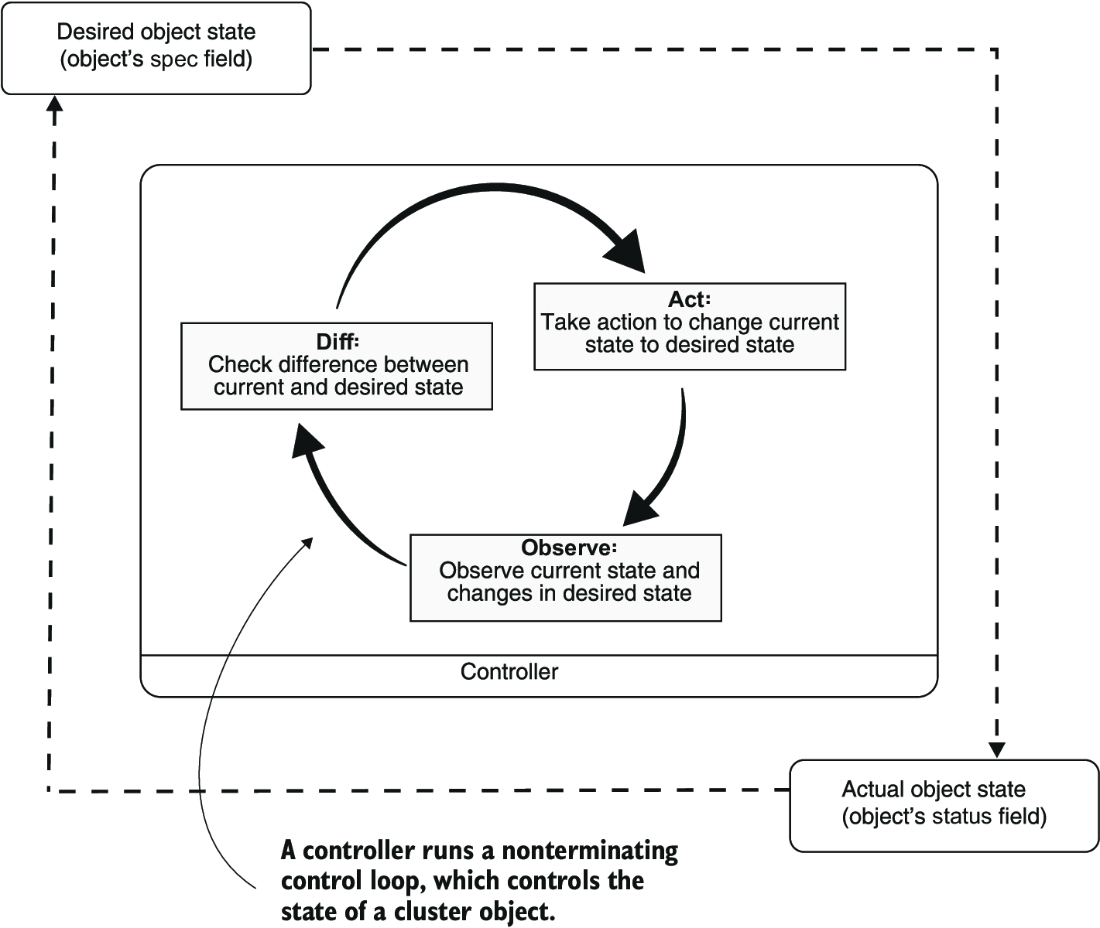
The appendix also gives a concise introduction to Kubernetes as the platform for orchestrating containerized applications across a cluster. It describes the control plane, worker nodes, pods, deployments, services, ingress objects, and controllers, emphasizing the desired-state model expressed through manifests with fields such as apiVersion, kind, metadata, and spec. Finally, it notes how kubectl is used to manage Kubernetes resources and provides basic installation and verification steps for different operating systems.
Figure E.1 Container runtimes like the Docker Engine provide OS-level virtualization and run containers that have access to isolated system resources.
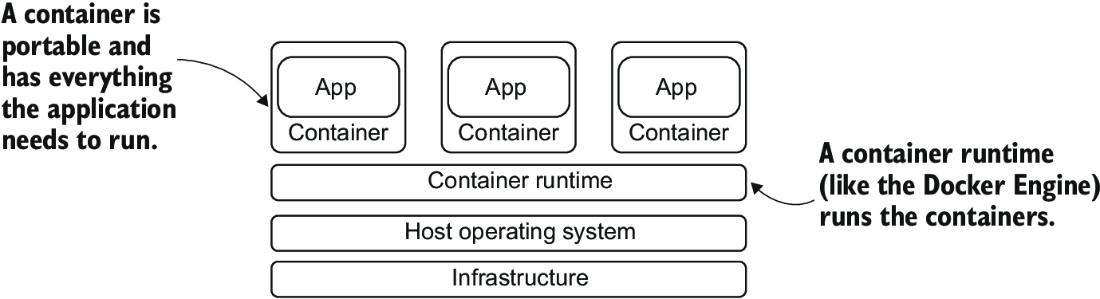
Figure E.2 Kubernetes architecture showing the control plane and worker nodes
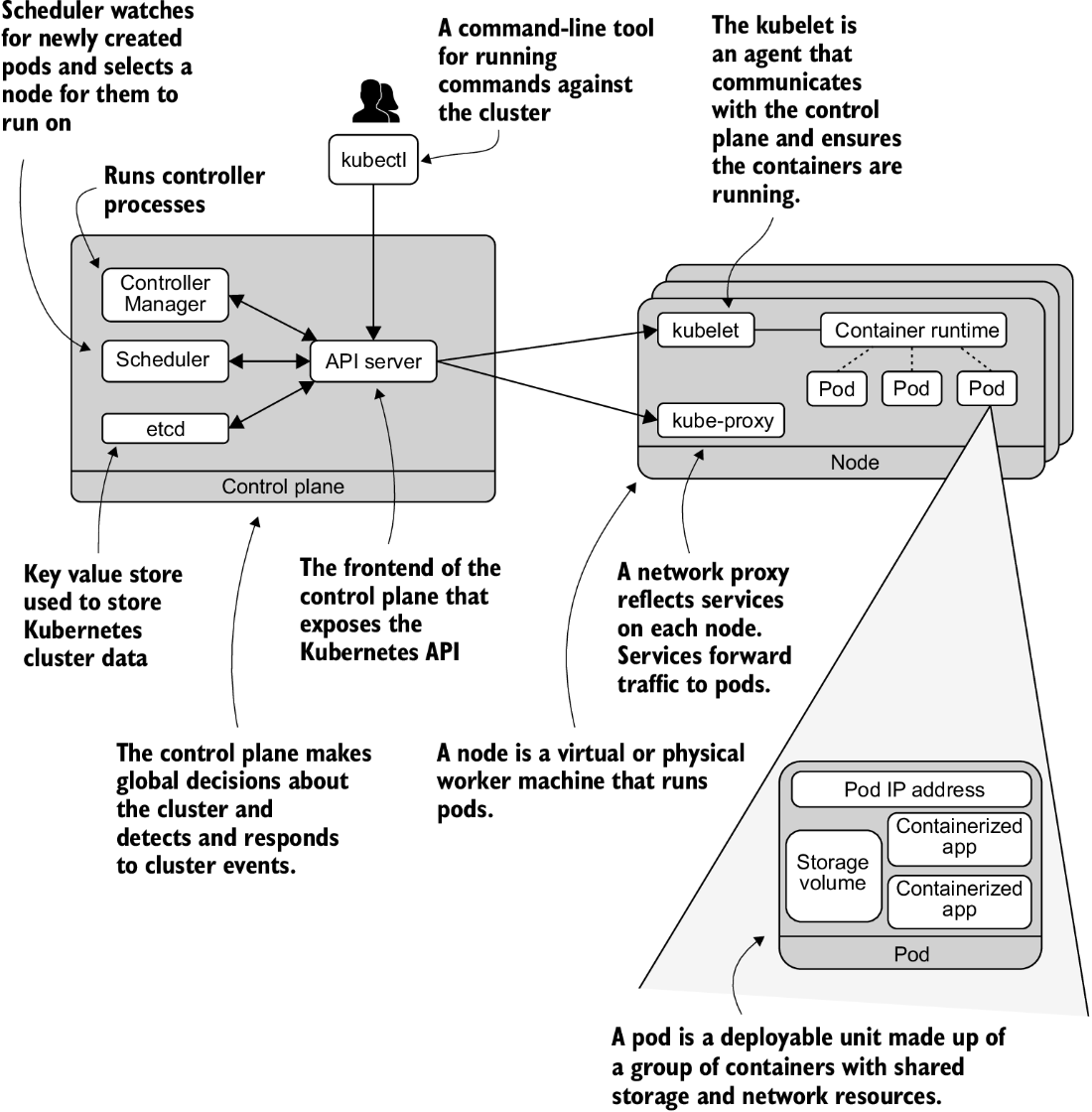
Figure E.3 Ingress and service objects route traffic to pods.
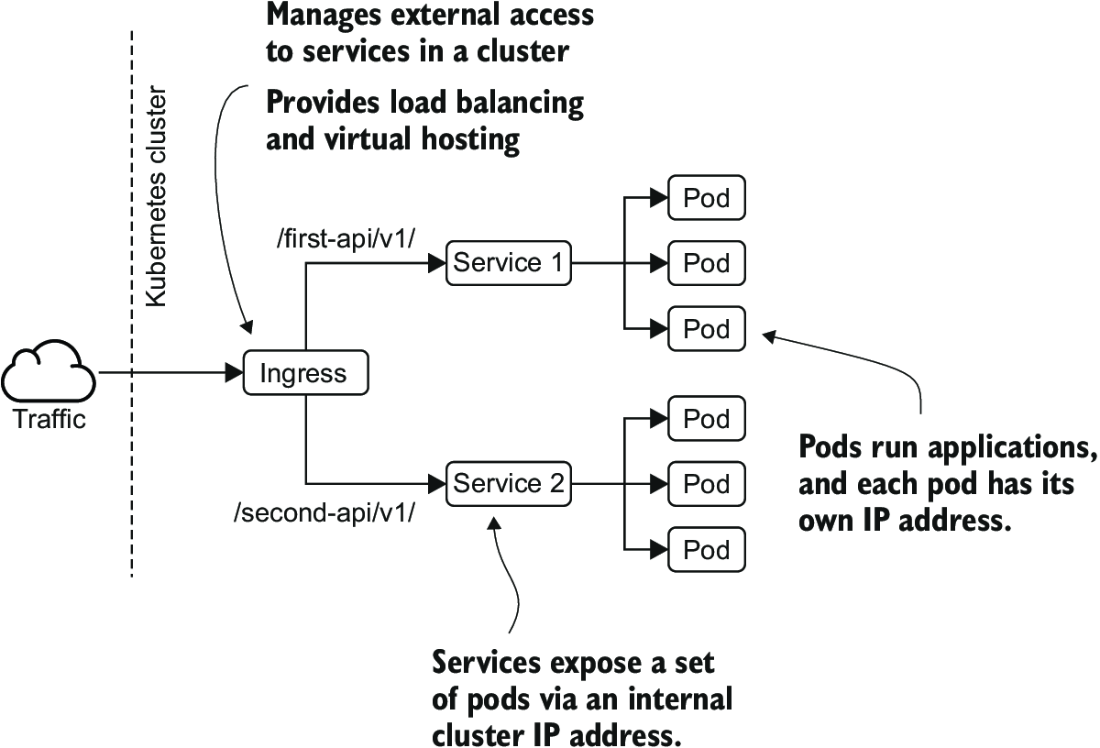
Figure E.4 Controllers reconcile the desired and actual states of Kubernetes objects.
E.6 Installing a local Kubernetes cluster with minikube
minikube (https://github.com/kubernetes/minikube) is a simple way to get started with Kubernetes for local development. It deploys a simple Kubernetes cluster containing only one node on your local machine. minikube runs on macOS, Linux, and Windows. Make sure you’ve installed Docker before you install minikube.
For macOS, you can install minikube with Homebrew by running brew install minikube. For Windows, install it using the Chocolatey package manager by running choco install minikube. For Linux, see https://minikube.sigs.k8s.io/docs/start for instructions on how to install minikube for your flavor of Linux.
After installation, start minikube by running minikube start. Now you can check that minikube is running by opening the minikube dashboard, which is a web-based Kubernetes user interface that gives you an overview of applications running in your cluster. Do so by running the command minikube dashboard, and the dashboard should open up in your browser.
FAQ
What is Docker in the context of API delivery?
Docker is an open platform that uses OS-level virtualization to package software into containers. Each container includes the code, system tools, libraries, and settings needed to run an application consistently across environments.How is a container different from a virtual machine?
Containers virtualize the operating system rather than the underlying hardware. This makes them lighter and faster than virtual machines, while still isolating CPU, memory, storage, and network resources.What is a container image?
A container image is a static file that contains everything needed to create a running container, including application code, libraries, tools, and configuration settings.What is Docker Compose used for?
Docker Compose is used to manage multiple Docker containers together. It lets you define services in a YAML file and start, stop, inspect, and view logs for them with simple commands.How do you start the services defined in the chapter’s Compose file?
You can start the services in the background with:docker compose --file chapter9/compose.yaml up --detachHow do you list and stop Docker Compose services?
To list running services, use:docker compose --file chapter9/compose.yaml lsTo stop services and remove their containers, use:
docker compose --file chapter9/compose.yaml downWhat is Kubernetes?
Kubernetes, or K8s, is an open source platform for orchestrating the distribution, scheduling, and execution of applications in a computer cluster. It helps users deploy and manage containerized applications across multiple machines.What are the main parts of a Kubernetes cluster?
A Kubernetes cluster has a control plane and worker nodes. The control plane manages the cluster, while worker nodes run the containerized applications. Each node has a kubelet and a container runtime.What is the difference between a pod, deployment, and service in Kubernetes?
A pod is the basic unit that runs one or more containers with shared resources. A deployment defines the desired state of pods, including replica count and update strategy. A service provides a stable internal IP and routes traffic to a set of pods.What are the required fields in a Kubernetes manifest?
A Kubernetes manifest must includeapiVersion, kind, metadata, and spec. These define the API version, object type, identifying information, and desired state of the resource.
 Automating API Delivery ebook for free
