appendix D Tools for API conformance and analytics
This appendix serves as a practical setup guide for the tools needed in the book’s API conformance and analytics examples. It notes that most of the required software is already included in the provided Docker container, with Moesif being the main exception because it requires a separate signup and account configuration. The emphasis is on preparing either a local machine or the container environment so readers can follow the later exercises without installation issues.
The first major focus is Kong, which is presented as a high-performance API gateway used here in DB-less mode. Readers are shown how to install and verify Kong on macOS with Homebrew, or run it through Docker on systems that do not support direct installation, especially Windows. The text explains the role of Kong’s configuration files, how to start and stop the gateway, and how to confirm that requests are correctly routed through a mock endpoint.
The remaining tools support Java-based generation, documentation, testing, mocking, and analytics workflows. The appendix instructs readers to install a JDK and Maven, then add the OpenAPI Generator CLI, Redocly CLI, Schemathesis, Portman, Prism, and a simple HTTP server, each via the appropriate package manager. It concludes with Moesif setup instructions for API analytics, including creating a free account, retrieving the correct collector key, and storing it as a GitHub repository secret so the book’s monitoring examples can run properly.
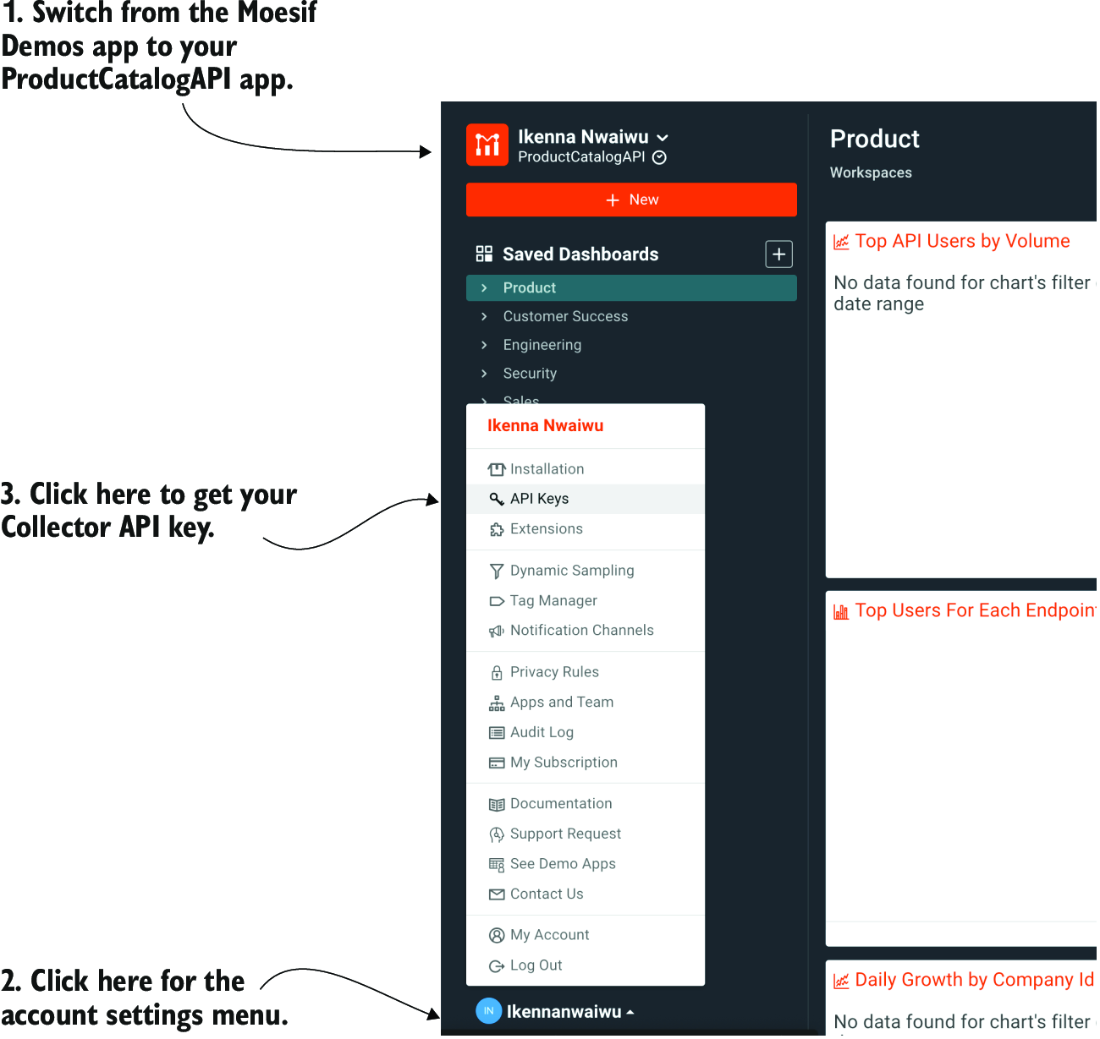
Figure D.1 Click on your profile menu to get your Moesif API keys.
FAQ
What tools do I need to install for appendix D of Automating API Delivery?
Most tools used in appendix D are already included if you use the provided Docker container from appendix B. The main exception is Moesif, which you need to sign up for separately. If you install locally, the appendix covers Kong, JDK, Maven, OpenAPI Generator CLI, Redocly CLI, Schemathesis, Portman, Prism, and Moesif setup.How do I install Kong on macOS?
On macOS, install Kong with Homebrew usingbrew tap kong/kong followed by brew install kong. After that, you can test it in the appendix directory with kong start --conf kong.conf.Can I install Kong directly on Windows?
No. Kong does not support direct installation on Windows. If you are on Windows, you need to run Kong through Docker instead.How do I run Kong in DB-less mode with Docker?
Use the provided Docker script to create and start a container namedkong-dbless by running ./run_kong_docker.sh. On Windows, run run_kong_docker.bat instead.How do I stop or restart Kong after running it in Docker?
To stop the running Kong container, usedocker stop kong-dbless. To restart it later, use docker start kong-dbless; you do not need to rerun the setup script.What versions of Java and Maven are required?
You need Java Development Kit 20 or above to run the Java code in the book and the OpenAPI Generator tool. Maven is also required for Java build automation, and you should verify it withmvn --version after installation.How do I install the OpenAPI Generator CLI?
Install it globally withnpm install -g @openapitools/openapi-generator-cli. It requires Java to already be installed, and the Java executable must be on your PATH.What is Redocly CLI used for?
Redocly CLI is used for managing OpenAPI definitions. It provides linting, filtering, splitting, bundling, statistics, and can generate a responsive API reference. Install it withnpm install -g @redocly/cli.How do I install and upgrade Schemathesis?
First install Python, then runpip install schemathesis. If you already have an older version, upgrade it with pip install schemathesis --upgrade.What do I need to set up Moesif for the chapter 11 examples?
Sign up for a free Moesif account, create an app namedProductCatalogAPI, and copy the Collector Application ID from your account settings. Then add the trusted-app Collector Application ID to your GitHub repository secrets as MOESIF_API_KEY.
 Automating API Delivery ebook for free
