appendix B Installing API linting and OpenAPI diff tools
This appendix explains how to prepare a development environment for the book’s examples by installing the command-line utilities and editor integrations used throughout the chapters. It begins with an optional Docker-based setup that bundles the CLI tools into a container, while noting that separate desktop tools such as VS Code and AI assistants still need to be installed on the host machine. The instructions also point readers to the book’s repository so they can verify that everything is working correctly.
The core setup starts with Node.js, since several of the tools are installed through npm. After that, the appendix introduces Spectral as a JSON and YAML linter for OpenAPI and AsyncAPI files, shows how to install it globally, and demonstrates a sample lint run that produces warnings for a minimal API definition. It then covers VS Code installation and adds two extensions: the Spectral plugin for inline linting in the editor and the 42Crunch OpenAPI editor, which provides IntelliSense, schema checks, previews, and a path to running security audits from within VS Code.
The remaining tools support data transformation, diffing, rendering, and AI-assisted development. The appendix shows how to install jq and yq for JSON and YAML processing, jpp for JSONPath-based extraction, oasdiff for comparing OpenAPI 3.x definitions, and swagger-ui-cli for rendering API specs locally in a browser. It closes by describing GitHub Copilot and Copilot Chat as optional AI assistants for coding help, code generation, explanations, and test creation, emphasizing that a subscription or trial is required to use them in VS Code.
Figure B.1 Using the 42c button to run a Security Audit
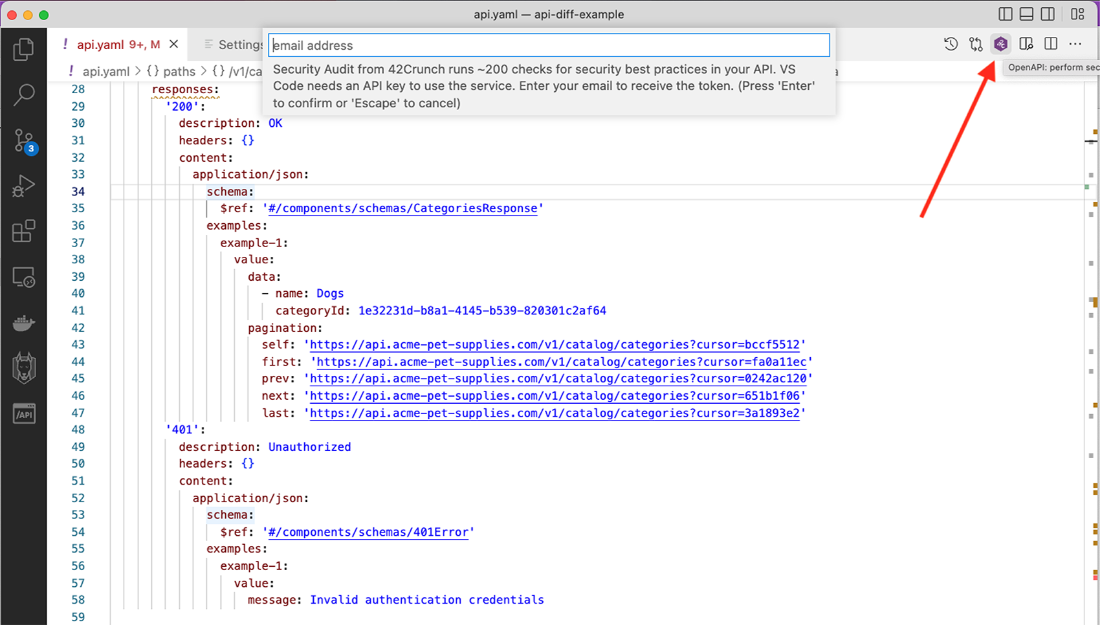
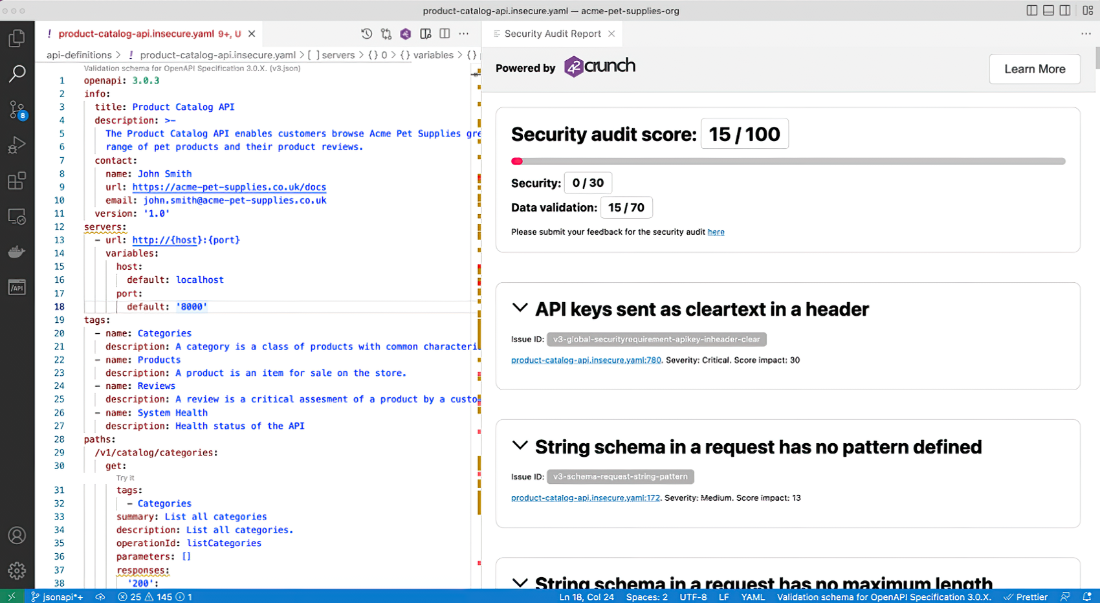
Figure B.2 Running an open Security Audit on an API definition file gives you a security audit score, notifying you of possible vulnerabilities with your API definition file.
B.11 Sign up for Anthropic Claude
Claude is an AI chatbot from Anthropic. Like other chatbots (e.g., OpenAI’s ChatGPT and Google’s Bard), Claude has a messaging interface for receiving questions and gives detailed and relevant responses. Claude aims to be safe, helpful, and honest. The way it does this is by using AI feedback to evaluate its outputs. The AI feedback is based on a set of principles around themes called a “constitution,” so Anthropic describes this approach as Constitutional AI.
To sign up, go to https://claude.ai, follow the sign-up instructions, and use its interface to chat with Claude in your browser. Note that at the time of writing, Claude isn’t available in some parts of Europe. To see the regions Claude is available for, see www.anthropic.com/claude-ai-locations.
FAQ
What is the purpose of Appendix B in Automating API Delivery?
It guides you through installing the tools needed to run the examples in the book, including command-line tools and editor plugins used for API linting, diffing, and rendering.Can I use Docker instead of installing all the tools locally?
Yes. The appendix provides a Docker image with the command-line tools already installed. You still need to install non-CLI tools such as VS Code, GitHub Copilot, and Anthropic Claude separately.How do I set up the book’s Docker-based APIOps environment?
Clone the repository, change into the project directory, run./2_create_apiops_container.sh, and then run ./3_attach_to_apiops_container.sh to attach to the container terminal.How do I verify that Node.js and npm are installed correctly?
Runnode -v and npm -v in your terminal. These commands should display the installed versions.What is Spectral and how do I install it?
Spectral is a JSON and YAML linter for OpenAPI and AsyncAPI definition files. Install it with npm usingnpm install -g @stoplight/spectral-cli.How can I test whether Spectral is working?
Runspectral lint minimal.oas.yaml in the appendix directory. The sample file is valid but intentionally triggers three warnings so you can see Spectral’s output format.How do I install the Spectral extension and OpenAPI plugin in VS Code?
Install the Spectral extension withcode --install-extension stoplight.spectral. Install the 42Crunch OpenAPI (Swagger) Editor with code --install-extension 42Crunch.vscode-openapi.What can the 42Crunch OpenAPI (Swagger) Editor do?
It adds IntelliSense, linting, schema enforcement, code navigation, preview support, and the ability to run an API Security Audit on your OpenAPI files.How do I install jq, yq, and jpp?
Use your platform’s package manager for jq and yq, such asbrew install jq, choco install jq, or sudo apt install -y jq, and similar commands for yq. Install jpp with npm install -g @jsware/jsonpath-cli.How do I install and test Tufin/oasdiff and swagger-ui-cli?
For Tufin/oasdiff, use Homebrew on macOS orgo install github.com/tufin/oasdiff@latest, then test with oasdiff -help. For swagger-ui-cli, install with npm install -g swagger-ui-cli and test with swagger-ui products-api.json, which should open a browser at http://127.0.0.1:8080.
 Automating API Delivery ebook for free
