7 Make the safest path the path of least resistance
The chapter argues that identity and security tasks should be designed around real human capabilities, not around idealized assumptions about memory, speed, vision, dexterity, or access to a second device. Common flows such as registration, authentication, verification, account management, recovery, CAPTCHA, and session timeout can easily become barriers when they add friction, require transcription, depend on puzzles or gestures, or force people to prove they are “human” in ways that exclude assistive technology users and people with disabilities. The central message is that accessibility and security are not opposing goals; when systems make legitimate use too difficult, people are more likely to abandon tasks, make mistakes, or resort to insecure workarounds.
To reduce resistance, the chapter recommends making security mechanisms work with the browser and platform instead of against them. Practical techniques include password reveal toggles, preserving copy-and-paste, using autocomplete correctly, and supporting password managers so users can avoid unnecessary recall and transcription. It also encourages alternative sign-in methods that reduce or eliminate cognitive load, such as magic links, passkeys, federated identity, and single sign-on, while emphasizing that these solutions are only accessible if the full journey, including enrollment, fallback paths, and recovery, is designed inclusively. For two-factor authentication, the chapter stresses that all factors must be accessible and that at least one option should avoid cognitive function tests.
The chapter closes by broadening the focus to recovery and timeouts, arguing that these are not edge cases but critical parts of the user journey. Account recovery should never depend on the same method that caused the lockout, and security questions and other knowledge-based checks are discouraged because they are both insecure and exclusionary. Likewise, session timeouts should preserve user effort whenever possible by saving progress, restoring state after re-authentication, and warning users before data loss occurs. Overall, the chapter calls for security that verifies identity without punishing users, and for designs that make the safest path the easiest path to take.
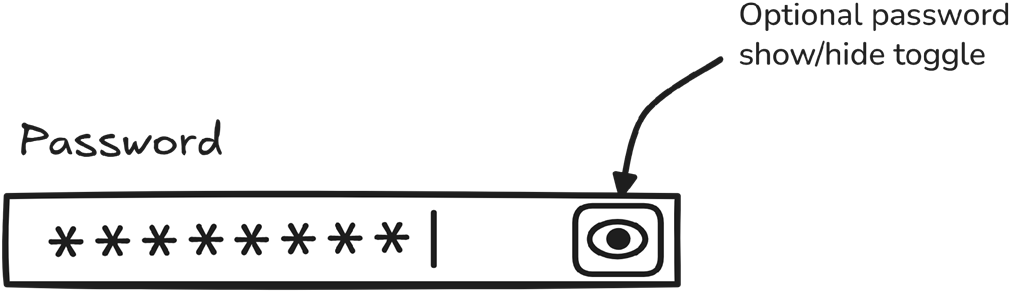
```An optional password show/hide toggle can be used to reveal and hide a masked password value to check for typing errors before submission.
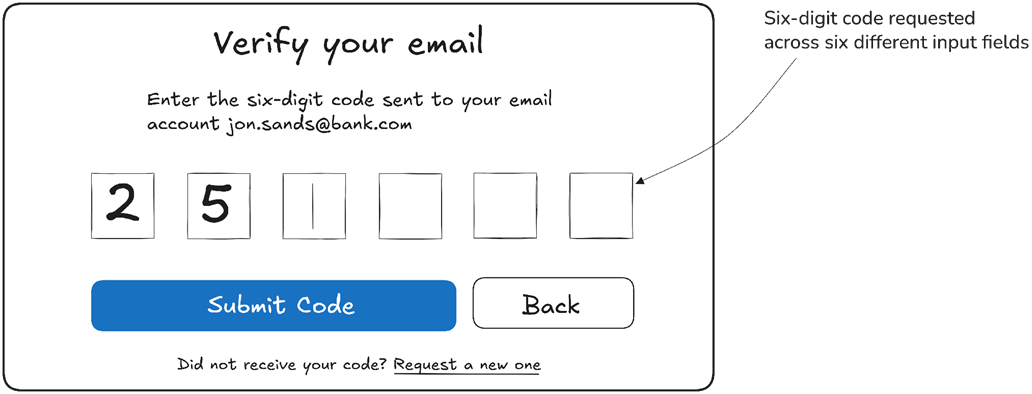
This image shows a situation where a code presented to the user as one value is requested back as six different digits over six input fields, changing its original format. This is an accessibility barrier unless the entire code can still be pasted into the first field and the remaining fields populated correctly.
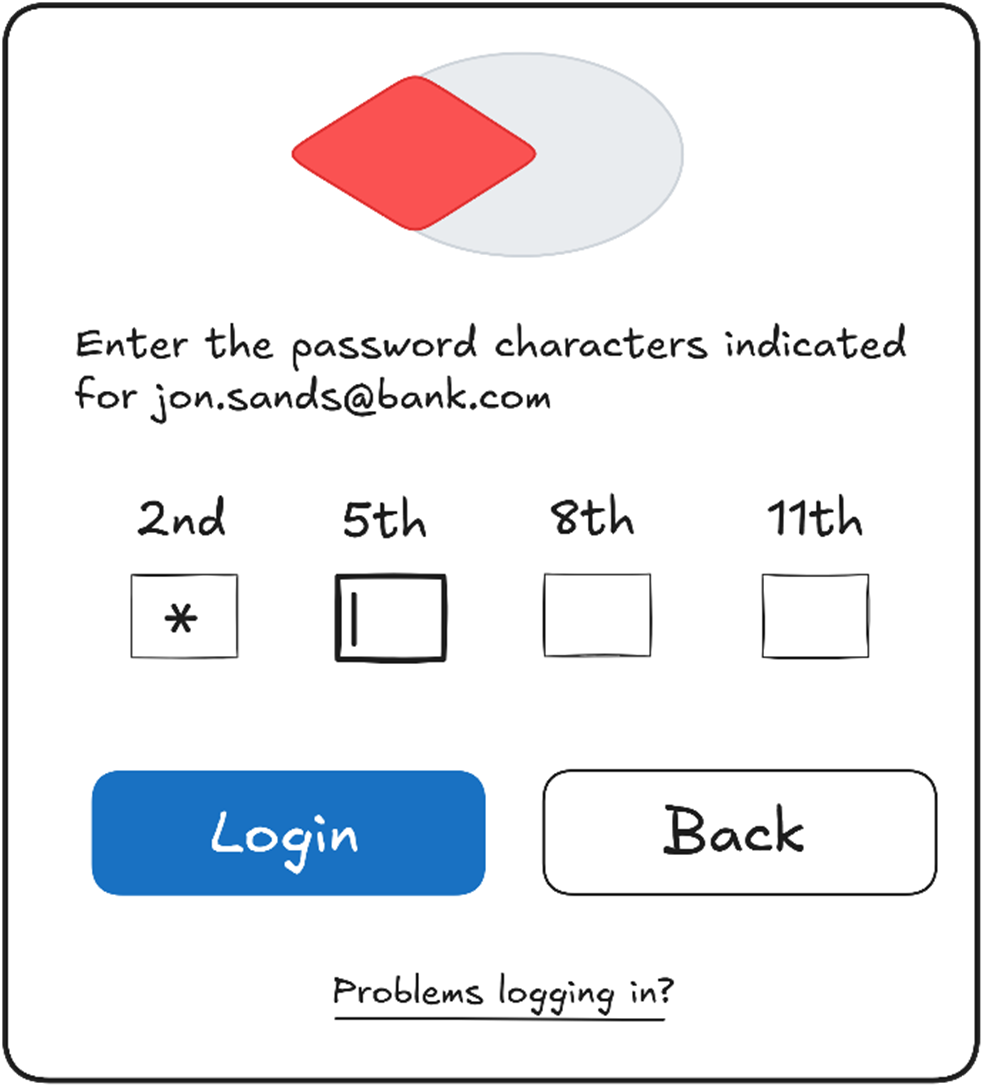
This image shows an example of partial password authentication for an online bank, where users are asked to identify and transcribe randomly selected characters from their password. This often involves mentally counting and recalling character positions.
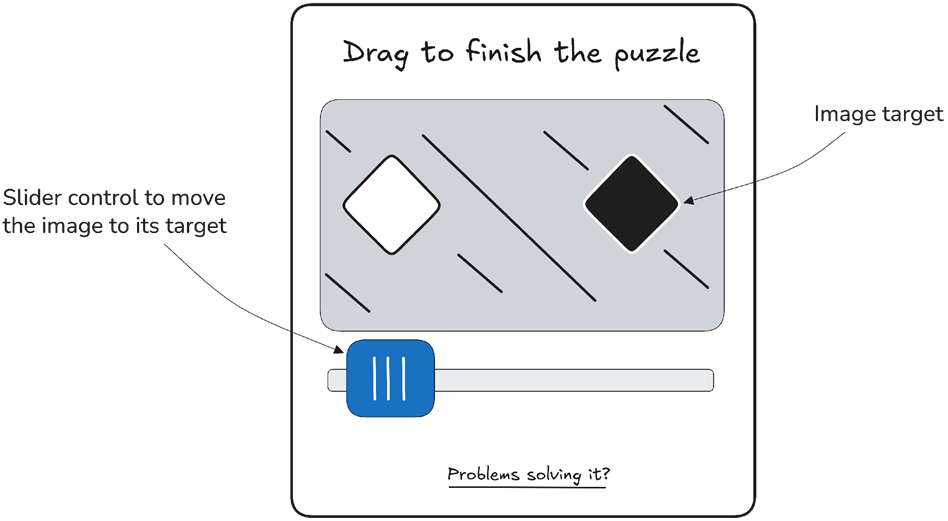
Challenge requiring the user to drag a puzzle piece onto a target location, using a pointing or touch device. When alternatives are not available, this method creates barriers to persons with motor disabilities.
Summary
- There are various identity and security tasks that users face daily, including registration, authentication, recovery, verification, proof-of-presence, and account management tasks. These are gatekeeping tasks, and if they fail people from an accessibility perspective, they can create significant barriers that discriminate against portions of the population.
- When the effort to access a system exceeds the perceived value of the system or the risks involved, it can create friction that leads users to act in an insecure way or even abandon the task altogether. Inaccessible security mechanisms create barriers that may lead people to seek ways to circumvent (or cope with) them. Accessible security processes should be the default option to encourage secure behavior.
- Secure behavior can be encouraged by making the safest path, the path of least resistance. HTML comes with built-in mechanisms that can help reduce resistance, such as browser autofill (including one-time codes), copy-and-paste, input hints for virtual keyboards, and password manager hints to aid users with credential generation, recall, and input tasks.
- A default security method or process may not always suit the needs, abilities, and circumstances of all users at all times. For this reason, alternative methods should be provided to ensure users can find a way in with as little cognitive and physical effort as possible.
- When verifying our users, focus should be on ensuring they are who they claim to be, not on testing whether they can perform a cognitive or physical task. This includes CAPTCHA challenges, account recovery processes, and proof-of-presence challenges.
- When adopting two-factor or multi-factor authentication, users should always have an accessible authentication path without relying on a particular technology (such as GSM connectivity or a biometric-enabled device) or on sensory, physical, or cognitive abilities.
- When users find themselves locked out, for any number of reasons, they should have an accessible way back in. This is typically handled through the account recovery process. Whenever possible, and as a best practice, allow users to configure one or more backup recovery methods before they need them.
- For security reasons, sessions may need to be terminated after a long period of inactivity. Where applicable, users should be given sufficient warning and opportunities to extend the session before it expires. Session timeouts should be handled gracefully to preserve user effort, and, wherever possible, previously entered data should be restored after the user signs back in.
FAQ
What does it mean to make the safest path the path of least resistance?
It means designing security and identity flows so the secure option is also the easiest and most natural one for users to complete. Instead of forcing people through extra friction, the system should support them with accessible, low-effort mechanisms.
Why is adding more security not always better for accessibility?
Extra security steps can create cognitive, physical, temporal, and interaction barriers. When the effort becomes disproportionate to the task or context, users may become frustrated, abandon the process, or take insecure shortcuts.
What are the main identity and account tasks that need accessibility consideration?
The chapter highlights registration, authentication, recovery, verification, proof-of-presence, and account management. Each of these can create barriers if they depend too heavily on memory, transcription, switching devices, or complex interactions.
Why should password reveal toggles be provided?
A password reveal toggle helps users check for typing errors before submitting, reducing lockouts and repeated attempts. It is especially helpful for people with cognitive or motor disabilities, and it should be keyboard accessible with a clear state and name.
Why should copying and pasting be allowed in password and code fields?
Because users often rely on password managers or email clients to handle credentials and verification codes. Blocking paste adds unnecessary friction and can make authentication harder, especially when a code or password is already available in another app.
How do autofill and password managers improve both accessibility and security?
They reduce memory burden, minimize typing, and help users create and use unique strong passwords. That lowers the chance of insecure workarounds like password reuse, written notes, or abandoned sign-in attempts.
What makes partial password authentication a bad practice?
Partial passwords require users to remember, count, and transcribe selected characters from their password, which is a cognitive function test. Password managers usually cannot help with this, and the method creates unnecessary accessibility barriers.
What are accessible alternatives to cognitive-function-heavy authentication methods?
Examples include magic links, passkeys, federated identity, and single sign-on, provided they are implemented accessibly. The key is to offer at least one method that does not require remembering, transcribing, or solving puzzles.
Why must 2FA and account recovery be designed carefully together?
Because if recovery depends on the same factor or device that caused the lockout, users can remain stuck. Account recovery should provide a separate, accessible route back in, with backup methods configured before they are needed.
What should happen when a session times out during a long form or task?
The system should preserve the user’s effort by saving data, restoring the form after re-authentication, and returning users to where they left off. If timeouts are necessary, they should be handled gracefully with warnings and recovery options so users are not punished for taking longer.

 Architecting Accessibility ebook for free
