1 Understanding web accessibility
Web accessibility is presented as a fundamental way of building technology that works for the widest possible range of people, including those with permanent, temporary, or situational limitations. Rather than treating accessibility as a special add-on, the text frames it as sound engineering that helps users perceive, understand, and operate content and functionality in real-world conditions, whether they are using a keyboard, screen reader, magnifier, voice control, or simply dealing with glare, noise, fatigue, or limited attention.
The chapter explains that accessibility belongs at every stage of a project, from requirements and design through development, testing, content management, support, and maintenance. It emphasizes that inaccessible products accumulate technical debt and become harder and more expensive to fix later, while accessible products are generally more usable, more maintainable, and more predictable. It also distinguishes accessibility from universal and inclusive design, showing how all three contribute to better user experiences, with accessibility forming the technical foundation.
A major focus is WCAG and the wider legal and standards landscape that shapes accessibility practice worldwide. The text outlines the four POUR principles, explains how success criteria, conformance levels, techniques, and supporting documents work, and notes that Level AA is the common target in law and practice. It also stresses that accessibility matters not only for compliance and ethics, but also for reaching more users, improving search and machine readability, supporting AI systems, and building stronger, more future-ready products.
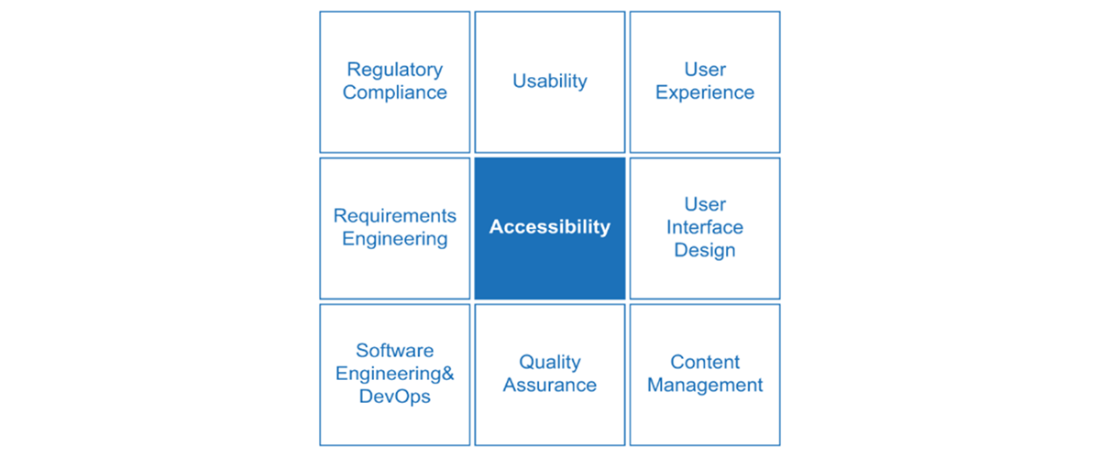
Accessibility affects nearly every aspect of software development, from planning and design to post-launch content management and support. Everyone has a responsibility to ensure users can actually access content and functionality.
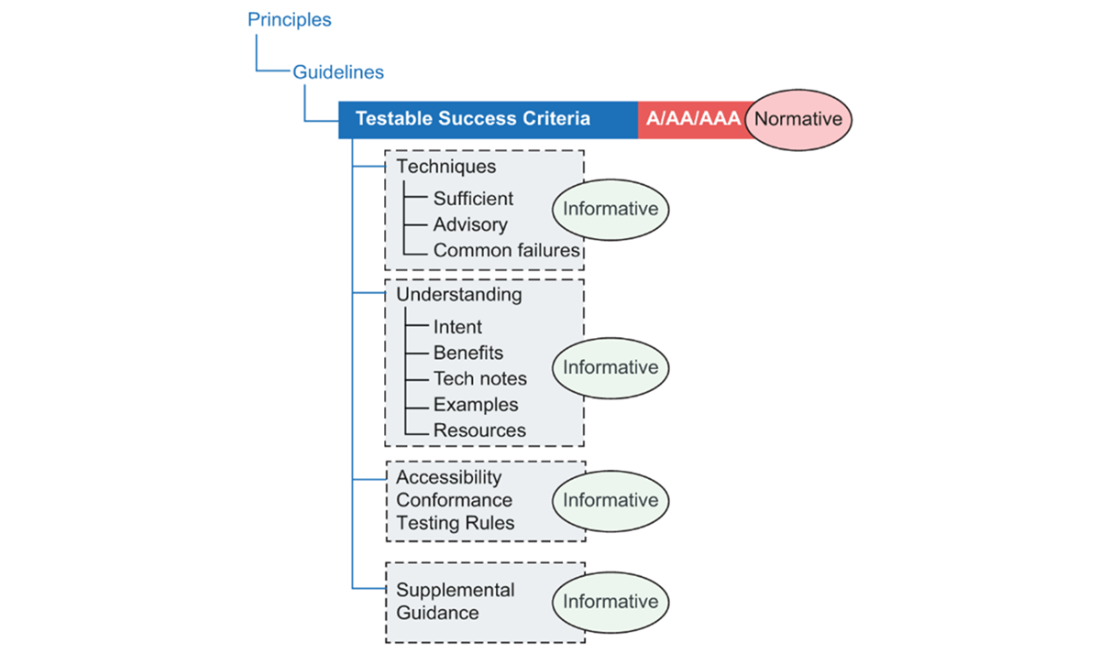
This image illustrates the various components in WCAG 2.2. Guidelines are organized under four principles. Each of the 13 guidelines includes normative success criteria: the requirements used to determine conformance at levels A, AA, or AAA. WCAG also provides informative supporting material, including techniques, understanding documents, testing rules, and additional guidance to help explain and apply those requirements.
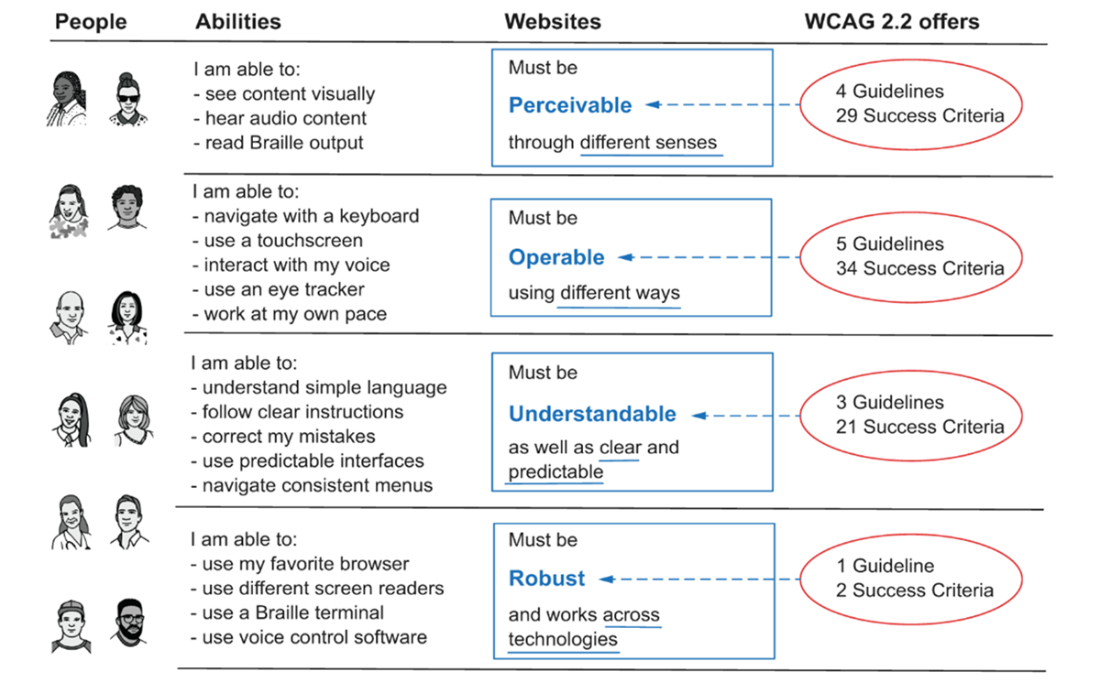
The four principles underpinning WCAG 2.2 – and the associated guidelines and success criteria – ensure that technology is accessible to the widest range of people, regardless of differences in ability, whether permanent, temporary, or situational. Content and functionality must be perceivable through different senses, operable in different ways, understandable and predictable, and robust across a wide range of technologies, including assistive technologies.
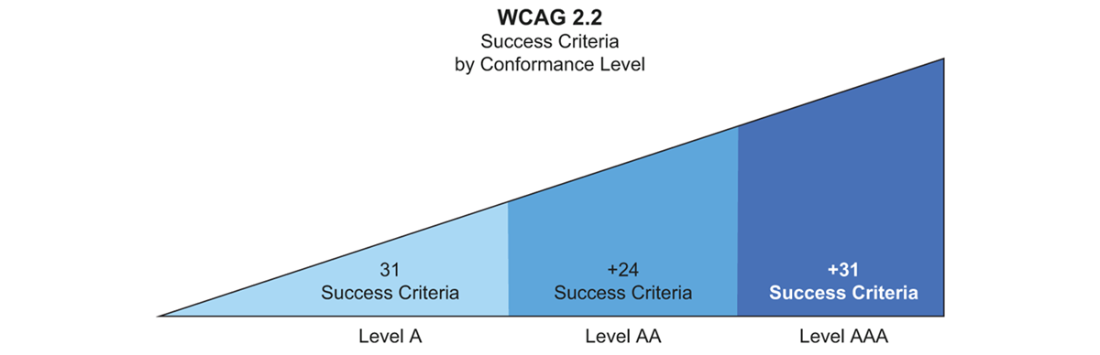
Distribution of WCAG 2.2 success criteria across conformance levels (A, AA, AAA). This highlights the relative size and complexity of higher conformance levels.
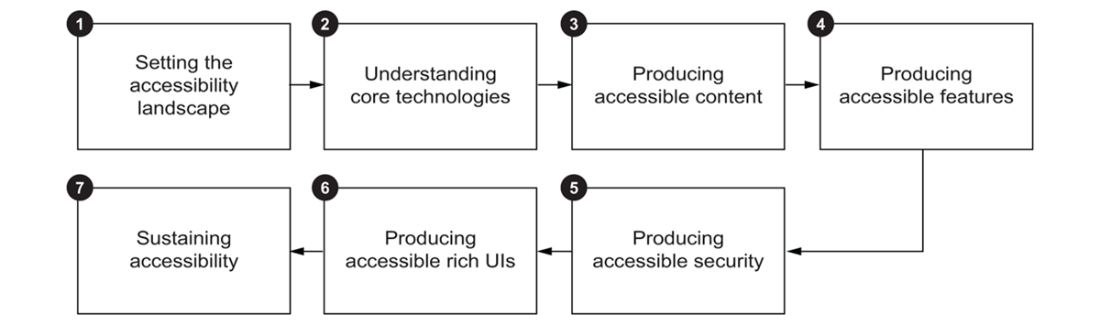
The stages of building accessible web applications: understanding accessibility standards and regulations, determining core web technologies for accessible content and functionality, designing inclusive security, addressing modern web-app challenges, and sustaining accessibility over time.
Summary
- Accessibility is not just for people with disabilities – it improves usability and experience for everyone.
- Accessibility is not another step in your QA processes; it reflects core engineering competence and responsible product development and management. It belongs at the heart of your process, not at the end.
- Accessibility matters for societal, commercial, legal, and technical reasons – it’s the right thing to do, and doing it well means you’re building things the right way.
- In many jurisdictions around the world, accessibility is not optional – it is a legal requirement.
- Most accessibility laws worldwide reference or align with the W3C’s Accessibility Guidelines (WCAG), the globally recognized standard for digital accessibility. WCAG is created through a rigorous, collaborative process involving hundreds of contributors from industry, government, academia, and accessibility communities, with the goal of providing a single, widely accepted set of guidelines.
- WCAG 2.2 is organized around 4 principles, which are broken down into 13 guidelines. Each guideline includes a set of testable success criteria (normative), defined at three conformance levels: A, AA, and AAA. WCAG also provides additional informative documentation to help interpret and meet the success criteria, including sufficient and advisory techniques, as well as common failures.
- Accessibility conformance is not a one-and-done activity – but an ongoing process. Embedding it into your workflow helps ensure quality, reduce risk, and keep your product future-proof.

 Architecting Accessibility ebook for free
