Overview

9 Consuming messages

This chapter explains Kafka’s end-to-end message consumption workflow. It introduces the fetch-based model in which consumers discover partition leaders via metadata and issue fetch requests that specify a partition and starting offset. It covers practical defaults and knobs—consumers typically read from the end unless auto.offset.reset is set to earliest—and notes the risk of always restarting from the beginning. It also describes consuming from the closest replica using rack awareness (client.rack and broker.rack), and how brokers serve fetches efficiently via network and I/O threads, the page cache, and latency/throughput controls such as fetch.min.bytes and fetch.max.wait.ms.

The chapter then dives into offsets—the per-partition progress marker that consumers advance—and options for managing them. Depending on needs, offsets may be ignored (ephemeral caches), kept locally, stored transactionally alongside sink writes for exactly-once behavior, or, most commonly, committed to Kafka’s compacted __consumer_offsets topic. Offsets are associated with consumer groups, enabling horizontal scaling and centralized progress tracking. Operationally, lag is the key health metric, while choosing and consistently using the correct group.id is critical to prevent offset theft and unintended message reprocessing.

Finally, it details consumer groups and the Kafka Rebalance Protocol. A broker acts as group coordinator; consumers FindCoordinator, JoinGroup, the first joiner becomes leader, computes assignments, and SyncGroup distributes them; heartbeats and session timeouts detect failures. Partition assignment strategies include Range (aligns same-index partitions across topics, useful for joins but can be uneven), RoundRobin (balances load), Sticky (minimizes churn), and Cooperative Sticky (incremental, two-phase rebalances that avoid stop-the-world). Because rebalances are costly and triggered by membership or partition changes, the chapter recommends Cooperative Sticky and, in automated environments, Static Memberships with stable group.instance.id and longer session.timeout to prevent unnecessary rebalances during restarts. It also notes forthcoming simplifications with the next-generation rebalance protocol and the need for all group members to use the same assignment strategy.

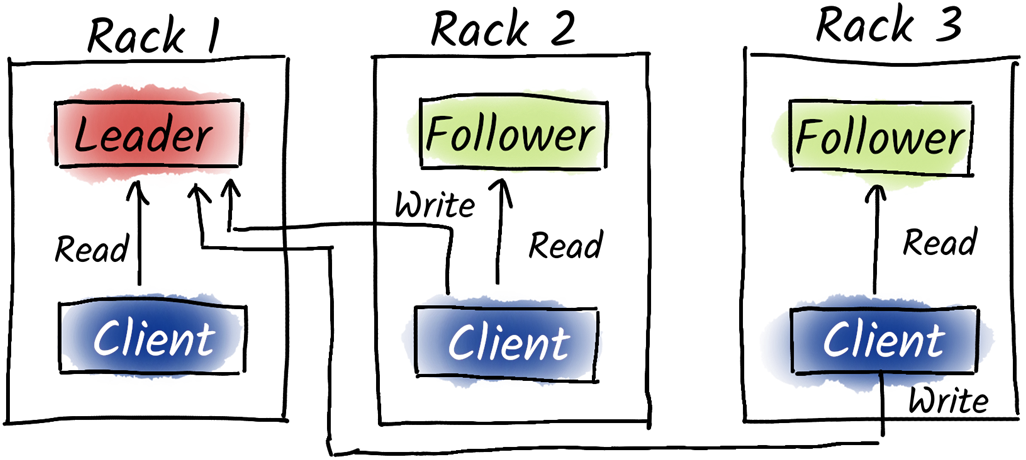
The consumers are consuming from the nearest replica (in the same rack) but they still have to produce to the leader of the partition.
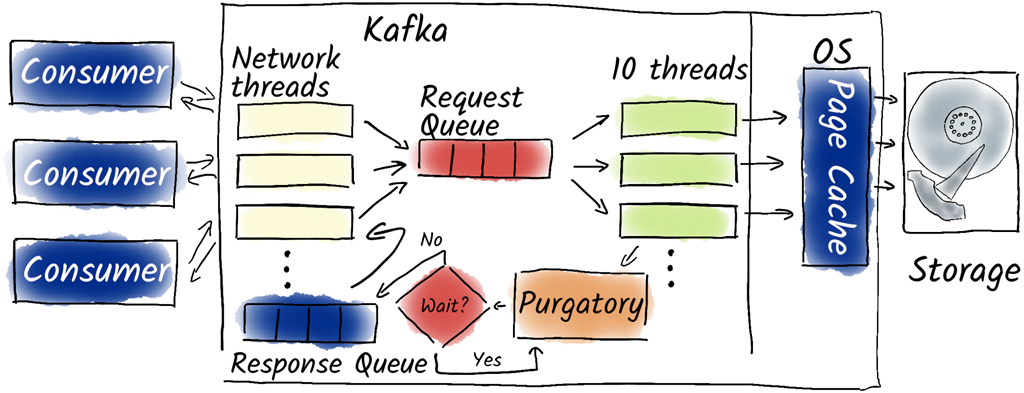
The broker undergoes a similar process when receiving a fetch request as that of when receiving a produce request. However, instead of writing data to the disk, we need to read from it. Additionally, we do not need to wait for other brokers, but rather for more messages depending on the fetch.max.wait.ms and fetch.min.bytes settings.
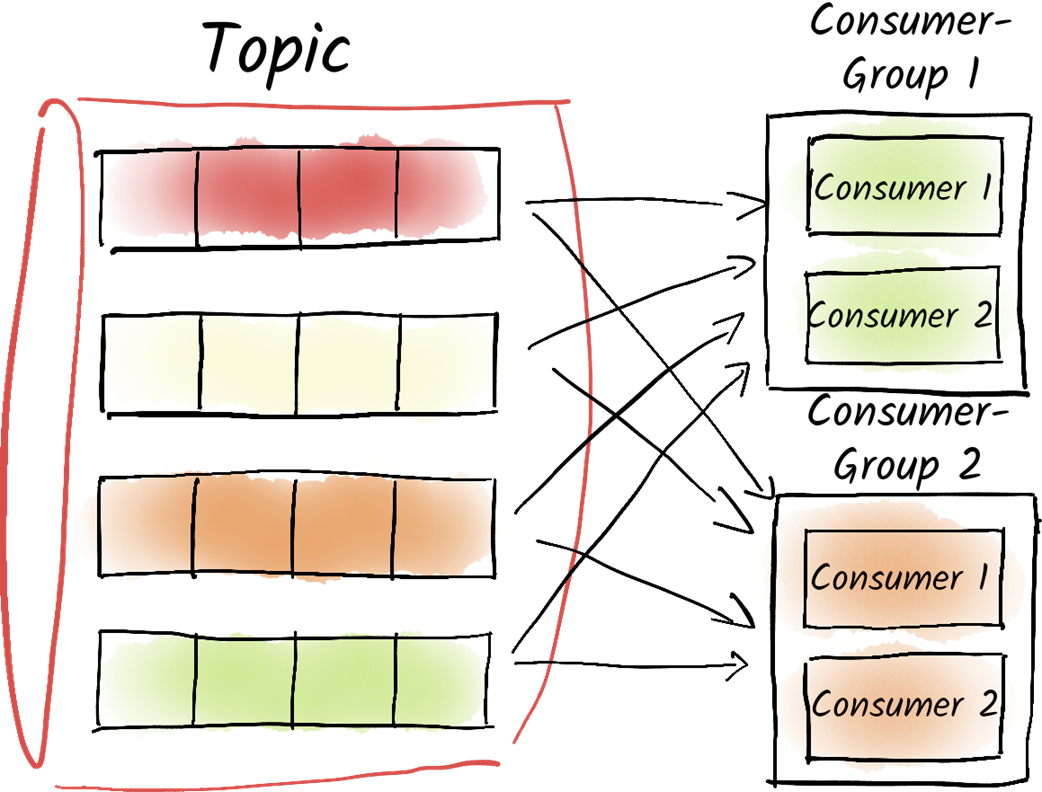
A consumer group consists of any number of consumers that divide the desired partitions among themselves. Different consumer groups are isolated and unaware of each other. The Kafka brokers assist consumers in coordinating the task distribution.
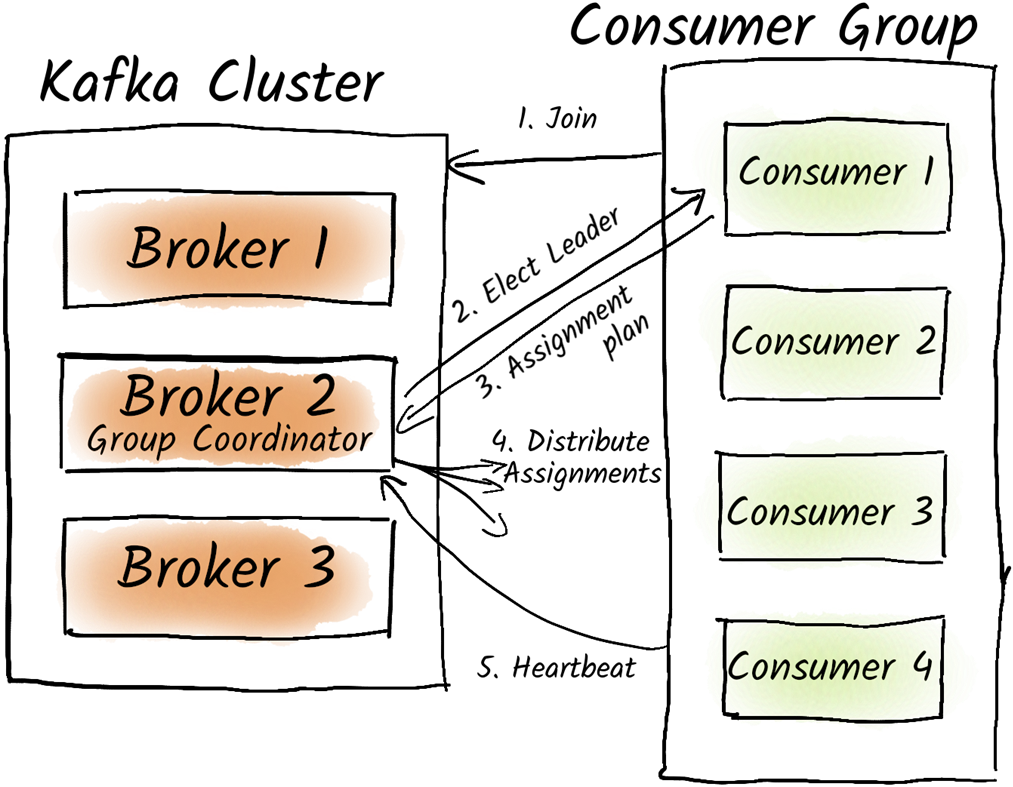
The Kafka Rebalance Protocol allows a group to distribute certain resources among its members. For example, consumer partitions. In this process, a broker acts as the group coordinator, and one of the consumers serves as the group leader.
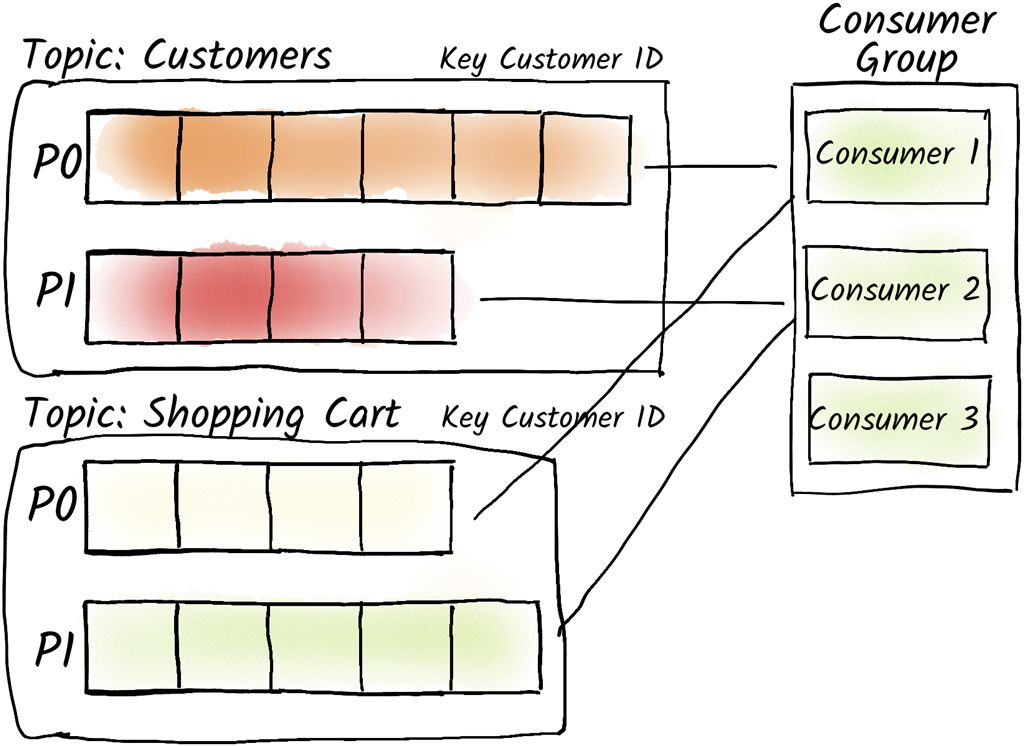
By default, partitions in a consumer group are assigned in such a way that the same partition across different topics is always consumed by the same consumer. While this may not be the most resource-efficient allocation, it allows us to easily perform joins across multiple topics.
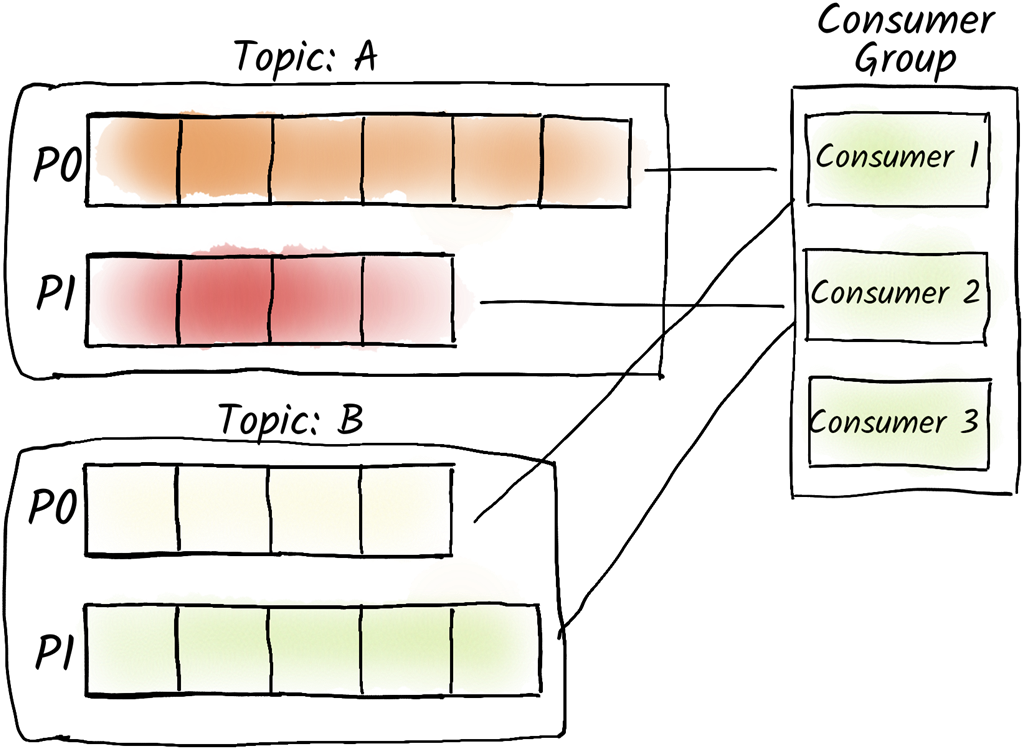
The RoundRobin (and the more advanced Sticky, and Cooperative Sticky) assignor distributes the load evenly across the consumers of our consumer group.
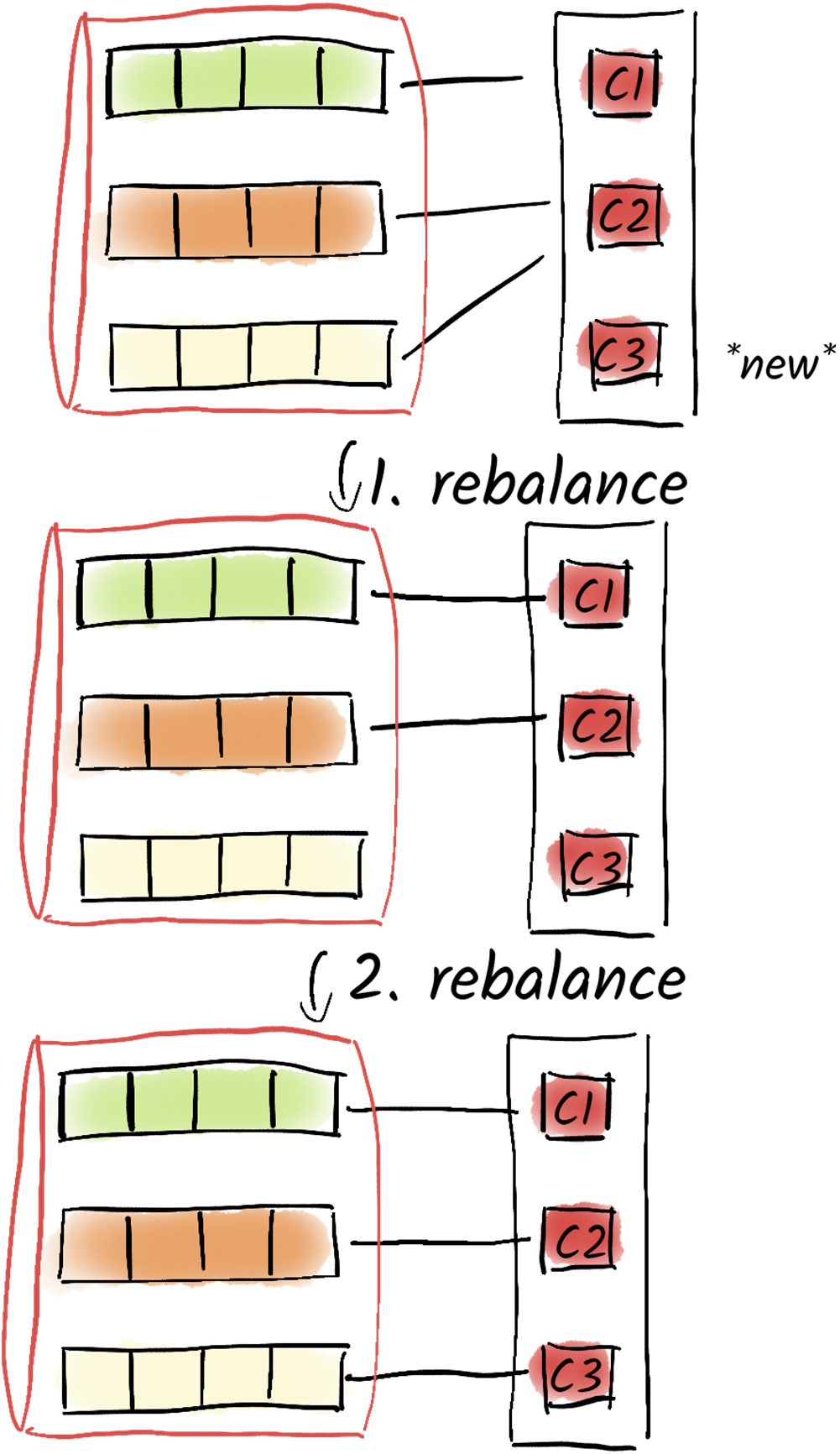
The Cooperative Sticky Assignor avoids stopping the world rebalances by replacing a single rebalance by two consecutive ones. During the first rebalance, consumers are asked to let go of the partitions that should be moved to another consumer and in the second rebalance the now dangling partitions are assigned to the consumers.
Summary

  • Kafka uses a fetch-based approach for consumers to retrieve messages.
  • Kafka brokers handle most of the coordination work, minimizing overhead.
  • Kafka brokers support rack IDs for fault tolerance and load distribution.
  • Consumer Groups help manage offsets and distribute workload among consumers.
  • Offsets are stored in Kafka as part of the consumer group's metadata in a special internal topic called __consumer_offsets.
  • Offsets are crucial for consumers to keep track of which messages they have already consumed.
  • The Kafka Rebalance Protocol coordinates task distribution among consumer group members.
  • Rebalances are triggered by changes in group membership, topic partitions, or consumer failures.
  • Static Memberships and Cooperative Sticky Assignor optimize rebalance behavior.
  • Range Assignor and Round Robin Assignor are strategies for partition assignment.
  • Range Assignor ensures that the same consumer handles the same partitions across topics.
  • Static Memberships reduce rebalance frequency by extending session timeouts and using unique group instance IDs.
  • Cooperative Sticky Assignor improves rebalance efficiency by iteratively approaching the desired state.
  • Consumer groups facilitate parallel processing by distributing partitions among consumers.
  • Round Robin Assignor evenly distributes partitions among consumers when joins across topics are not required.

FAQ

How do Kafka consumers fetch messages from a topic?Consumers issue fetch requests to the broker that is leader for a partition, specifying the partition and the starting offset. Libraries handle the details: by default consumers start at the end (latest). Using tools like kafka-console-consumer.sh you can override this (for example, --from-beginning), or in applications set auto.offset.reset to control the starting position.
What does auto.offset.reset control, and what are the defaults?auto.offset.reset determines where a consumer starts when it doesn’t have an offset for a partition. latest (default) starts from the end; earliest starts from the beginning. Caution: with earliest a consumer may start from the beginning on restart, effectively re-reading all data from each partition.
What is “fetch from the closest replica” and when should I use it?Since KIP-392, consumers can read from the nearest in-sync replica instead of only the leader. Brokers can be tagged with broker.rack and clients with client.rack so the consumer selects a replica in the same rack/zone to reduce latency and cross-zone traffic, while producers still write to the leader.
How does a broker handle fetch requests, and which settings affect latency and throughput?Fetch handling mirrors produce: network threads enqueue requests; I/O threads read batches from disk or page cache; responses are enqueued and sent. The broker may wait for more data based on consumer-side settings: fetch.min.bytes (minimum bytes before responding, default 1) and fetch.max.wait.ms (max wait for data, default 500 ms). Tuning these can balance latency versus throughput.
What are offsets in Kafka and can there be gaps?Offsets are per-partition monotonically increasing numbers assigned to records starting at 0. Deletions (for example, due to retention/cleanup) do not renumber existing records, so gaps can appear. Consumers track the next offset to read per partition.
Where should I store consumer offsets?Options include: not storing (for disposable consumers like cache warmers), storing locally on the service host, storing in an external system alongside processed data (often transactionally for exactly-once semantics), or using Kafka’s built-in compacted topic __consumer_offsets, which persists offsets per consumer group and supports horizontal scaling.
How do consumer groups coordinate membership and partition ownership?Consumers discover the Group Coordinator via FindCoordinator, then JoinGroup to synchronize membership. The first joiner becomes group leader and computes partition assignments, sends them to the coordinator via SyncGroup, and members receive their assignments. Members send periodic heartbeats; missed heartbeats beyond session.timeout.ms cause removal and trigger a rebalance. heartbeat.interval.ms controls heartbeat frequency.
What triggers a rebalance and why is it costly?Rebalances occur when members join or leave (intentionally or due to failure), or when subscription/partition counts change. During a rebalance, consumers pause work and may receive different assignments, forcing state resets and offset commits. Even a rolling restart can cause multiple rebalances, increasing disruption.
How do partition assignment strategies differ (Range vs Round Robin)?partition.assignment.strategy controls assignment. Range Assignor groups partitions by topic index so partition 0 of all subscribed topics goes to the same consumer, which is helpful for correlating data across topics (for example, joins). Round Robin Assignor balances partitions evenly across consumers without aligning by partition index, which is useful when cross-topic correlation isn’t needed. All consumers in a group must use the same strategy.
What are Sticky and Cooperative Sticky assignors, and what should I use?Sticky Assignor balances partitions while minimizing movement across rebalances to reduce cache/state churn. Cooperative Sticky Assignor further reduces disruption by rebalancing in two phases so only the partitions being moved are paused; others keep consuming. Until the next-generation rebalance protocol (KIP-848) is available in your installation, prefer the Cooperative Sticky Assignor.
What are Static Memberships and how do they help in cloud/Kubernetes?Static Memberships assign each consumer a stable identity via group.instance.id and increase session.timeout.ms (for example, minutes). Short restarts won’t trigger rebalances because the coordinator waits for the member to return with the same identity. This greatly reduces unnecessary rebalances during automated restarts and improves availability.

pro $24.99 per month

  • access to all Manning books, MEAPs, liveVideos, liveProjects, and audiobooks!
  • choose one free eBook per month to keep
  • exclusive 50% discount on all purchases
  • renews monthly, pause or cancel renewal anytime

lite $19.99 per month

  • access to all Manning books, including MEAPs!

team

5, 10 or 20 seats+ for your team - learn more


choose your plan

team

monthly
annual
$49.99
$499.99
only $41.67 per month
  • five seats for your team
  • access to all Manning books, MEAPs, liveVideos, liveProjects, and audiobooks!
  • choose another free product every time you renew
  • choose twelve free products per year
  • exclusive 50% discount on all purchases
  • renews monthly, pause or cancel renewal anytime
  • renews annually, pause or cancel renewal anytime
  • Apache Kafka in Action ebook for free
choose your plan

team

monthly
annual
$49.99
$499.99
only $41.67 per month
  • five seats for your team
  • access to all Manning books, MEAPs, liveVideos, liveProjects, and audiobooks!
  • choose another free product every time you renew
  • choose twelve free products per year
  • exclusive 50% discount on all purchases
  • renews monthly, pause or cancel renewal anytime
  • renews annually, pause or cancel renewal anytime
  • Apache Kafka in Action ebook for free
choose your plan

team

monthly
annual
$49.99
$499.99
only $41.67 per month
  • five seats for your team
  • access to all Manning books, MEAPs, liveVideos, liveProjects, and audiobooks!
  • choose another free product every time you renew
  • choose twelve free products per year
  • exclusive 50% discount on all purchases
  • renews monthly, pause or cancel renewal anytime
  • renews annually, pause or cancel renewal anytime
  • Apache Kafka in Action ebook for free
