This chapter introduces Kafka’s core data model and workflow through topics and messages. Topics act as the logical channels that structure and route data, while messages are the byte-array records flowing through them. Kafka is optimized for very high throughput of many small messages, not large payloads, and it stays agnostic to message content to preserve performance and flexibility. With that foundation, the chapter frames how data is organized, read, and written so you can reason about streaming behavior at a high level.
It then shows how to inspect and manage topics using Kafka tooling: listing existing topics, describing their configuration, and understanding broker-level details such as leaders, replicas, and in-sync replicas that govern reliability and performance. You learn how partitions enable parallelism, how replication improves fault tolerance, and how Kafka spreads leaders and replicas across brokers for balanced load. Practical workflows include creating, deleting, and altering topics (e.g., increasing partitions), recognizing internal topics like __consumer_offsets that track consumer positions, and key constraints such as not reducing partition count and keeping replication factor within the number of brokers.
The chapter concludes with messages: common types (states, deltas, events, commands), data formats (e.g., human-readable JSON vs. compact binary formats), and the importance of consistent schemas for interpretation over time. It explains the message structure—value, optional key, headers, and timestamp—and the role of keys in partitioning to preserve per-key ordering while allowing parallelism across keys. Operational guidance includes using headers only for technical metadata, managing key parsing/printing at the client, and keeping messages small for efficiency. Together, these practices let you model data flows clearly, choose appropriate formats, and enforce ordering where it matters.
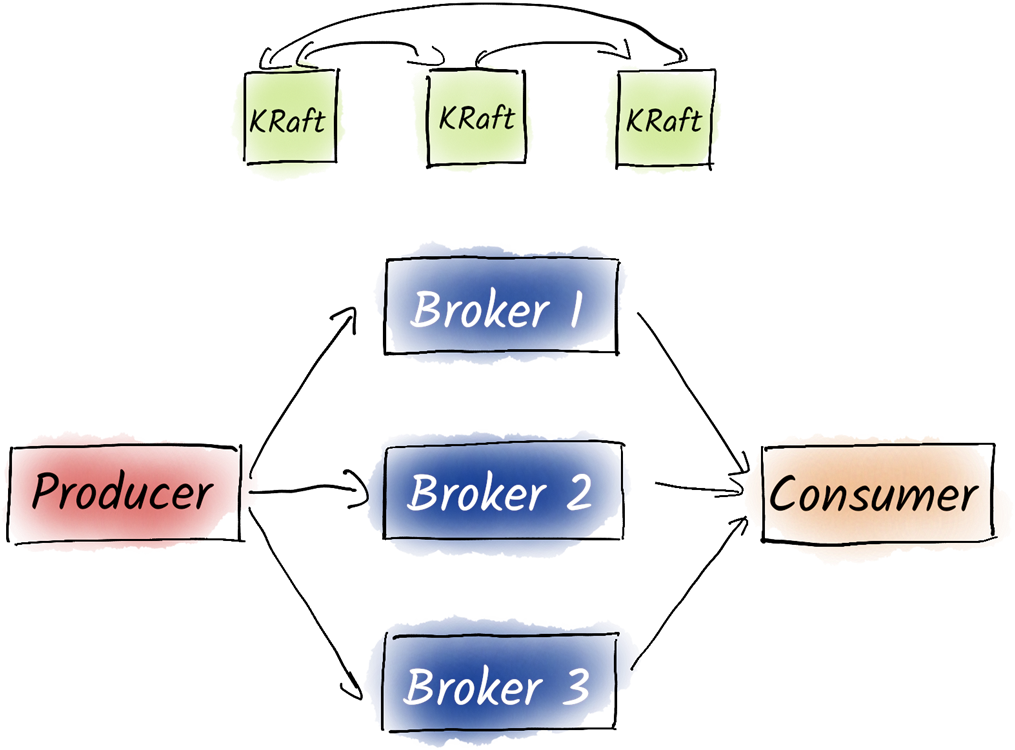
A typical Kafka environment consists of the Kafka cluster itself and the producers and consumers that write and read data to Kafka. This is joined by a coordination cluster based on KRaft.
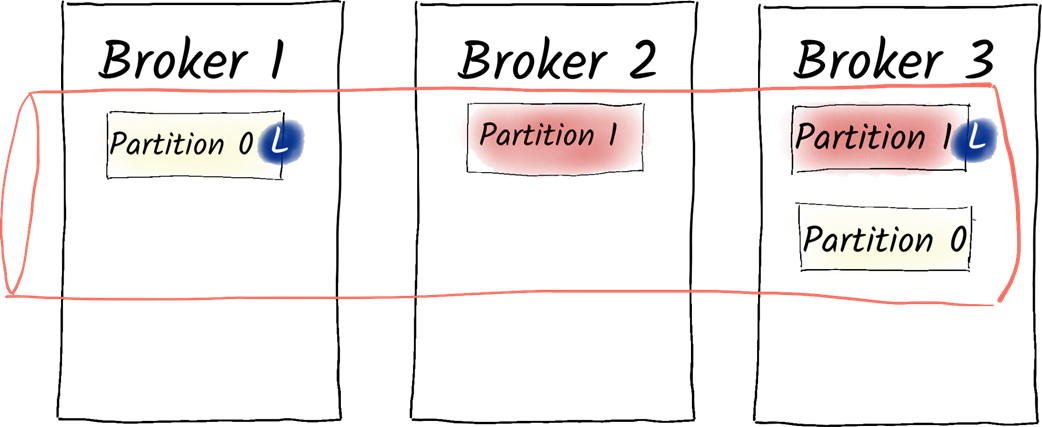
The replicas and partitions of the product.prices.changelog topic are distributed among our brokers. Broker 3 is the leader of partition 0 and broker 1 is the leader of partition 1.
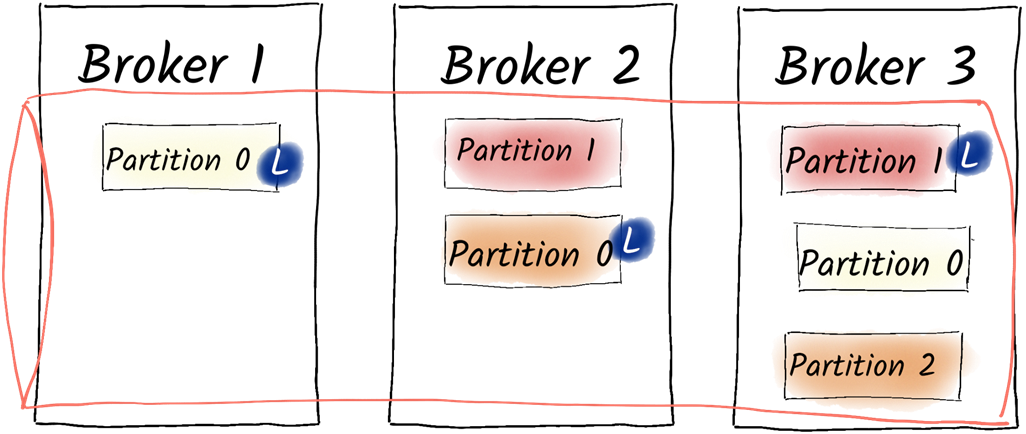
The replicas and partitions of the product.prices.changelog topic after we increased the partitions to 3. Broker 2 is now the leader of the additional partition 2.
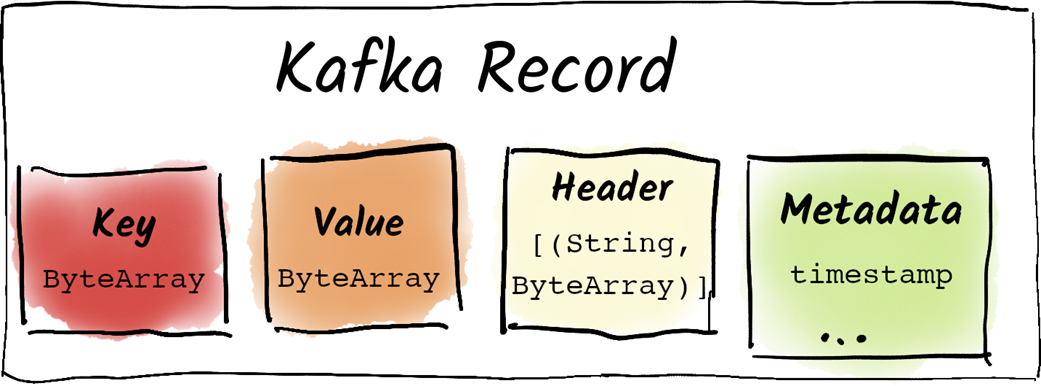
A Kafka message or record consists of a timestamp, a value, an optional key and optional custom headers to represent metadata.
Summary
Kafka organizes data in topics.
Topics can be distributed among partitions for increased performance.
Topics can be replicated among different brokers to improve reliability.
Topics can be created, viewed, altered, and deleted with the kafka-topics.sh script.
The number of partitions of a topic can never be decreased.
Partitions can be reassigned among brokers to redistribute load.
Complex partition reassignments can be performed with the kafka-reassign-partitions.sh script.
Kafka is optimized to exchange many (trillions of) small messages of 1 MB or less.
Kafka messages can be classified into states, deltas, events, and commands
States contain the complete information about an object.
Deltas consist only of the changes and are therefore very data-efficient, but a single delta is often not very useful. They require either a context or a complete state.
Events add context to a message and describe a business event that happened.
Commands are used to instruct other systems to perform actions.
Data formats and schemas play a crucial role in Kafka to ensure consistency.
Messages in Kafka consist of technical metadata including a timestamp, optional custom headers (metadata), an optional key, and a value which is the main payload.
Messages with the same key are produced to the same partition and therefore the order of those messages is guaranteed for a single producer.
Keys can also be used for log compaction to clean up deprecated data.
FAQ
What is a Kafka topic and how does it structure the flow of data?Topics are logical channels (similar to database tables) that organize and distribute messages. Each topic can be split into partitions for parallelism and assigned replicas for reliability. Properly structuring topics helps manage different data streams efficiently.How do I list all topics and inspect a topic’s configuration?- List topics: kafka-topics.sh --list --bootstrap-server localhost:9092
- Describe a topic: kafka-topics.sh --describe --topic your.topic --bootstrap-server localhost:9092
Use --describe to see partitions, leaders, replicas, and other configuration details.What do the fields in kafka-topics.sh --describe mean (TopicId, PartitionCount, ReplicationFactor, Leader, Replicas, ISR, ELR, LastKnownElr)?- TopicId: Unique ID Kafka assigns to the topic.
- PartitionCount: Number of partitions in the topic.
- ReplicationFactor: Number of copies of each partition across brokers.
- Leader: Broker currently responsible for reads/writes for that partition.
- Replicas: Brokers that host copies of the partition.
- ISR (in-sync replicas): Replicas currently up-to-date.
- ELR (eligible leader replicas): Brokers eligible to become leader in addition to ISR.
- LastKnownElr: Previously eligible replicas that had an unclean shutdown.
Kafka strives to balance leaders and replicas evenly across brokers.What is the __consumer_offsets topic and should I create topics with double underscores?__consumer_offsets is an internal, auto-created topic that stores consumers’ reading positions (offsets). Do not manually create topics with double underscores; this naming is reserved for Kafka internals and can cause conflicts.Where does a consumer start reading, and what does --from-beginning do?By default, kafka-console-consumer.sh starts at the end (only new messages). Adding --from-beginning makes it read from the earliest offset, including historical messages. Offsets serve as bookmarks; when a topic is deleted, related offsets are cleaned up from __consumer_offsets.How do I create, alter, and delete topics? Can I reduce the number of partitions?- Create: kafka-topics.sh --create --topic t --replication-factor N --partitions P --bootstrap-server ...
- Alter partitions: kafka-topics.sh --alter --topic t --partitions NEW_COUNT
- Delete: kafka-topics.sh --delete --topic t --bootstrap-server ...
You can increase partitions but cannot reduce them, because moving data between partitions would break Kafka’s intra-partition ordering guarantees.How can I change the replication factor or reassign partitions?Use kafka-topics.sh with --replica-assignment for simple cases, or kafka-reassign-partitions.sh for complex/multi-topic reassignments. The replication factor cannot exceed the number of brokers.What is a Kafka message and how big should it be?Kafka messages are byte arrays. Kafka is optimized for many small messages; the default maximum size is 1 MB. Increasing it can hurt performance, so avoid sending large payloads (e.g., big files) through Kafka.What kinds of messages should I model: states, deltas, events, or commands?- States: Full current representation of an entity (can combine with compaction when only latest is needed).
- Deltas: Only the changes since the last state, reducing data volume and highlighting what changed.
- Events: Answer “what happened?” (e.g., deliveries, promotions, corrections); often derived from states/deltas.
- Commands: Requests to perform an action (introduces coupling as another system must act).What is the structure of a Kafka message (key, value, headers, timestamp), and how do keys affect ordering?- Components: timestamp, value (payload), optional key, optional headers.
- Keys: Determine partitioning; messages with the same key go to the same partition, preserving order per key. Without a key, distribution is round-robin.
- Console tools with keys:
- Produce with keys: kafka-console-producer.sh --property parse.key=true --property key.separator=:
- Consume with keys: kafka-console-consumer.sh --property print.key=true --property key.separator=":"
- Headers: Use only for technical metadata (e.g., tracing IDs), not business data.
- Key handling is configured on clients, not on brokers or topics.
pro $24.99 per month
access to all Manning books, MEAPs, liveVideos, liveProjects, and audiobooks!

 Apache Kafka in Action ebook for free
