This chapter explains what it really takes to run Kafka well in production. Beyond brokers and coordination, it highlights the broader ecosystem you’ll typically need: reliable producers and consumers (with attention to partitioning compatibility across languages), Kafka Connect to integrate systems without custom code, stream processing with Kafka Streams or Flink, and deliberate schema governance. It introduces practical tooling such as kcat for fast, script-friendly CLI work; read-only GUIs for exploration and troubleshooting; and GitOps-based, automated, declarative management of topics, users, and ACLs (including kcctl for Kafka Connect). For ongoing cluster health, Cruise Control is presented as the standard way to analyze broker load and execute safe rebalance plans, including scaling workflows, with the caveat that partition moves are resource-intensive and must be scheduled carefully.
The deployment guidance compares self-managed setups on bare metal, virtualized environments, Kubernetes (with Strimzi as a reference architecture), and fully managed cloud services. The core message is that robust infrastructure and an in-house team that understands Kafka operations and automation matter more than the hosting substrate. On-premise and virtualized options emphasize automation, careful broker placement, and fast local SSDs over fragile shared storage. Kubernetes users are steered toward Strimzi’s operators for lifecycle management, security, and resource administration, with anti-affinity to avoid co-locating brokers. In the cloud, self-managed clusters generally work well; managed offerings reduce operational burden but come with limits and potentially higher costs at scale. Even with managed services, teams still need Kafka expertise for automation, governance, and platform enablement.
Hardware recommendations focus on broker storage and memory. Start with at least three brokers; favor multiple fast SSDs and avoid slow parity RAID levels, while considering Tiered Storage (from Kafka 3.9) to offload older data. Size JVM heaps modestly (often 1–6 GB) and dedicate the remaining RAM to page cache, calculated from expected consumer lag and data rates; use a fast, reliable network and prefer many smaller CPU cores for parallelism. Strike a balance between few large and many tiny brokers, typically targeting 32–64 GB RAM per broker, and spread brokers across racks or availability zones with rack awareness; keep inter-broker latency below roughly 30 ms and avoid multi-region clusters in favor of regional clusters with replication only when necessary. Coordination nodes (Zookeeper or KRaft) need low-latency networking more than large machines, and are run in odd counts (commonly three or five) for quorum resilience.
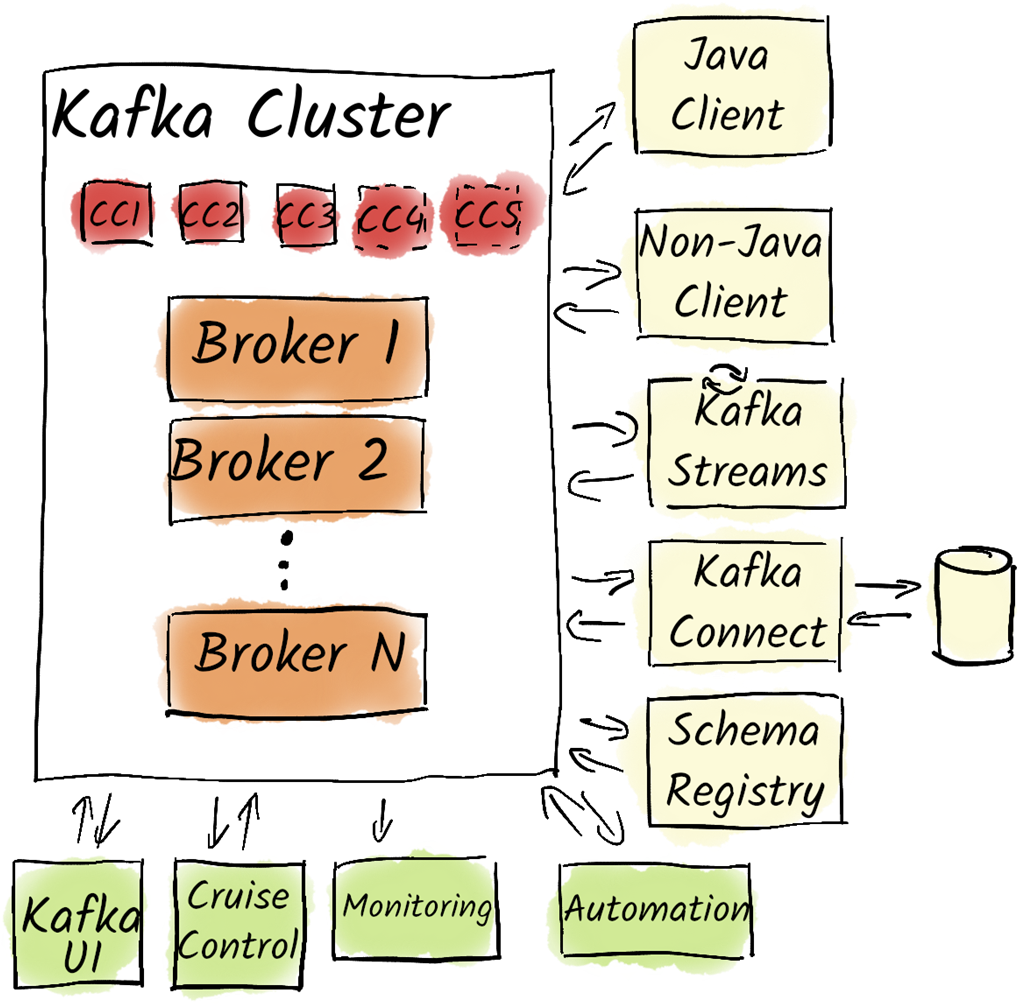
A typical structure of a Kafka installation with additional tools.
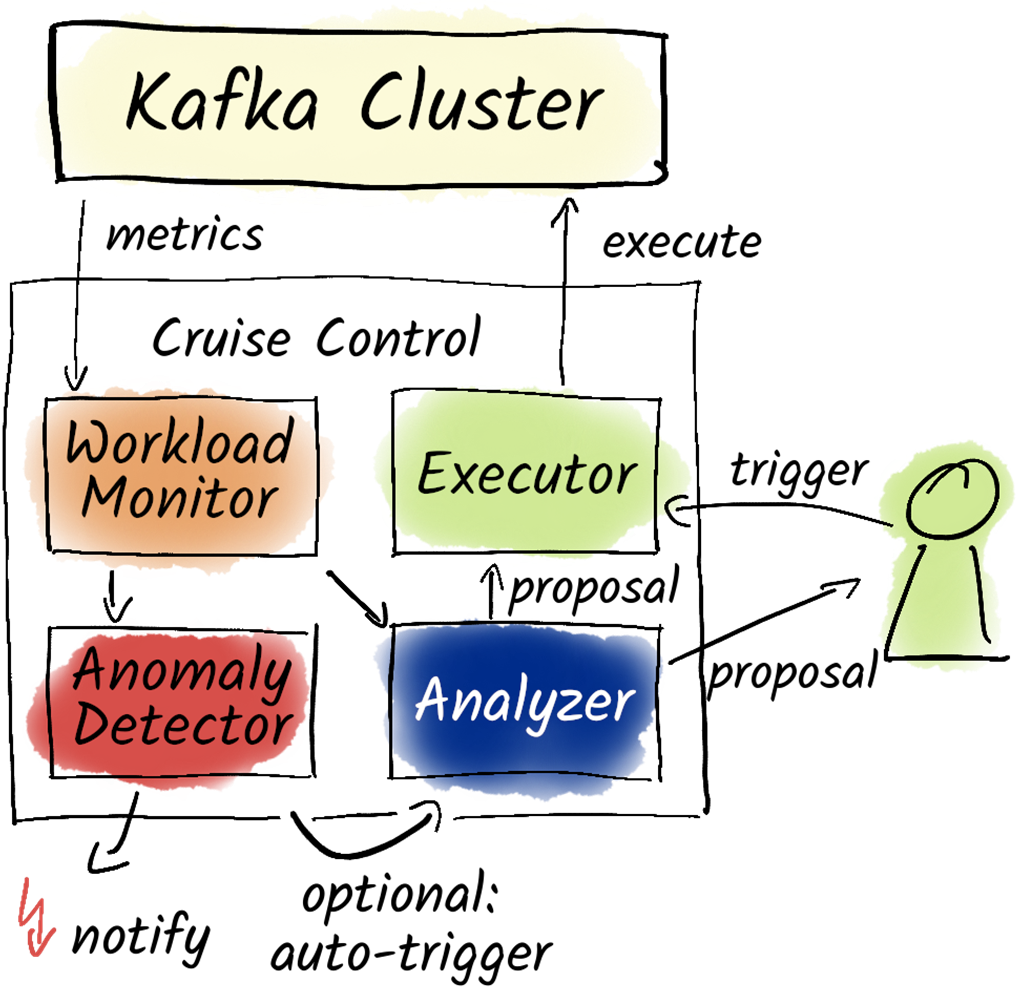
Cruise Control monitors and optimizes the load of a Kafka cluster.
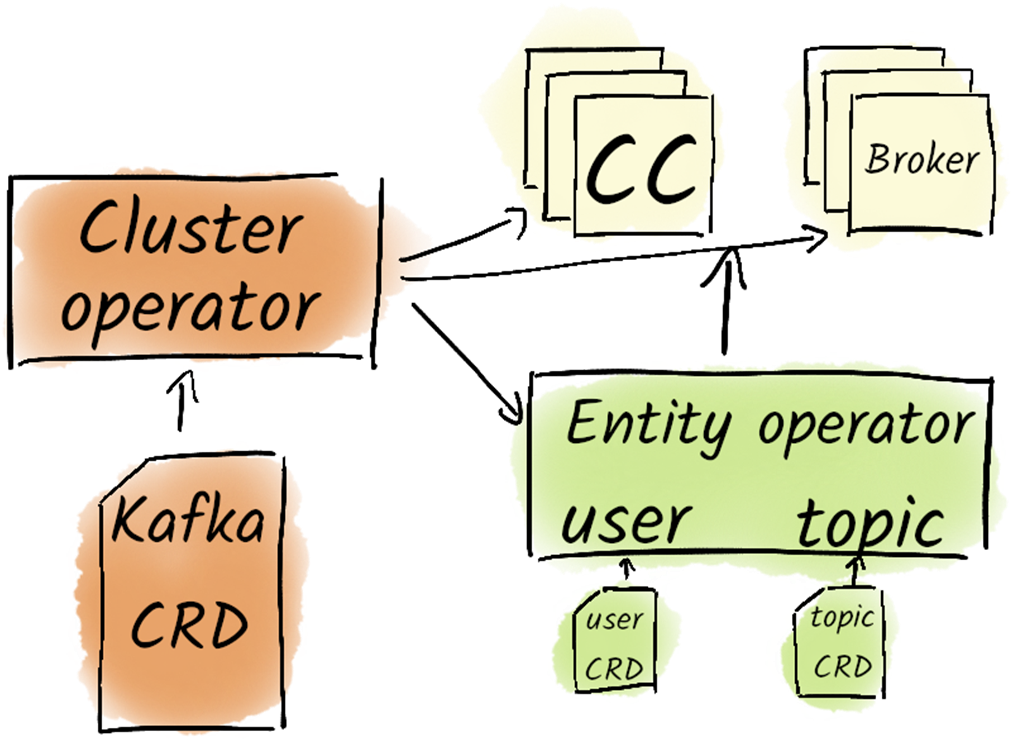
The architecture of Strimzi.
Summary
Kafka management can benefit from automated and declarative approaches, although it is not a strict requirement.
Manual creation of topics in production is strongly discouraged, as is the use of graphical interfaces for such tasks.
The GitOps approach is recommended for managing Kafka resources, treating a Git repository as the source of truth.
Kafka resources like topics, users, and ACLs should be created and modified through Pull/Merge Requests in the Git repository.
Automated solutions, like kcctl, simplify the management of Kafka Connect connectors compared to using the REST API directly.
Cruise Control is essential for balancing broker loads by redistributing partitions based on resource consumption.
Kafka administrators should monitor broker load and manually trigger Cruise Control's analyzer for load balancing.
Automatic failure detection is available in Cruise Control, enabling proactive load balancing when targets are not met.
Kafka can be deployed on various infrastructures, including self-managed clusters, Kubernetes, and managed services.
The performance and reliability of Kafka are contingent on a well-planned infrastructure and a knowledgeable team.
It’s recommended to start with at least three brokers to ensure reliability and allow for scalability based on workload.
Storage solutions should prioritize reliable and fast disks, preferably multiple smaller SSDs over a few large ones.
Kafka supports Tiered Storage, allowing older data to be offloaded to more cost-effective storage solutions.
Sufficient RAM is critical, with a recommended minimum of 1 GB for JVM heap per broker and appropriate Page Cache based on data production rates.
Network performance is vital for Kafka, with a minimum recommendation of 1 GBit/s Ethernet and the use of independent storage networks to avoid performance drops.
The physical separation of brokers across different VM hosts or racks is essential to prevent data loss during hardware failures.
FAQ
What is kcat and when should I use it instead of Kafka’s console tools?kcat (formerly kafkacat) is a fast, non-Java CLI built on librdkafka. It starts quickly, has concise flags (-b for bootstrap servers, -t for topic, -P/-C for producer/consumer), and supports features like headers. It’s great for scripting, troubleshooting, and local testing. Do not use it to write production data—that should be handled by your application producers.Should I use a GUI to manage Kafka in production?Use GUIs primarily for read-only exploration in production: browsing topics, inspecting messages, viewing consumer groups, Connect, or Schema Registry state. Grant only read permissions and avoid producing data or changing configs via the UI. A UI does not replace proper monitoring. Popular options include Kafbat Kafka UI (open source), and commercial tools like kpow, kadeck, and Conduktor; cloud providers also offer consoles.How should Kafka resources (topics, users, ACLs) be managed in production?Adopt a GitOps approach: treat a Git repository as the source of truth and roll out changes via CI/CD. Avoid manual topic creation—especially via GUIs—in production. Store desired topics, users, and ACLs declaratively, review via pull/merge requests, and apply automatically. For Kafka Connect, kcctl simplifies managing connector configs (e.g., kcctl apply -f file.json).What is Cruise Control and how does it work?Cruise Control automates Kafka cluster balancing. A metrics agent on each broker publishes load metrics to a Kafka topic. Cruise Control analyzes these metrics against goals, generates a rebalance proposal, and can execute it via an executor. Start with manual review and execution through its REST API/UI; an automatic mode can detect imbalances and run rebalances without manual steps.Which goals and operations does Cruise Control support, and what are the caveats?Goals include capacity limits (keep CPU/RAM/disk/network under a threshold) and resource distribution (spread load evenly). It can rebalance after adding brokers and decommission brokers gracefully before shutdown. Moving partitions is resource-intensive—avoid running large rebalances during peak load.What Kafka deployment models are available and how do I choose?Options include: on your own hardware, in virtualized environments, on Kubernetes (commonly with Strimzi), self-managed in public cloud, or fully managed services (e.g., AWS MSK, Azure HDInsight, Confluent Cloud, Aiven). The key success factors are robust infrastructure and an in-house team experienced with Kafka. Managed services reduce operational burden but have limitations and can become expensive at scale—you still need Kafka expertise for automation and guidance.What are key hardware recommendations for Kafka brokers?Start with at least three brokers. Prioritize fast, reliable storage—multiple smaller SSDs often beat fewer large ones. Kafka replication removes the need for RAID (avoid RAID 5/6). Since Kafka 3.9, Tiered Storage lets you offload older data to cheaper object storage. Use at least 1 Gbps networking and a dedicated storage network if using networked storage. Favor more, smaller CPU cores (many operations parallelize) and size brokers around 32–64 GB RAM; choose memory-optimized instances and derive CPU from RAM needs.How do I estimate broker RAM (heap vs. page cache)?Kafka heap typically ranges from 1–6 GB; the rest should be OS page cache. Size page cache so consumers can lag without hitting disk. Example: a 3-broker cluster ingesting 30 GB/hour means ~10 GB/hour per broker. If you allow 2 hours of lag, target ~20 GB page cache per broker. With a 6 GB heap, that’s ~26 GB total; 32 GB RAM per broker fits this scenario.How should I place brokers for fault tolerance and latency?Avoid co-locating brokers on the same host or rack; use rack awareness and spread across availability zones. In Kubernetes, enforce anti-affinity so two brokers don’t land on the same node/VM. Keep inter-broker latency below ~30 ms; don’t stretch a single cluster across regions. For global setups, run independent regional clusters and replicate only if needed (e.g., with MirrorMaker).What are the requirements for the coordination cluster (ZooKeeper or KRaft)?It’s lightweight in terms of CPU/RAM (4–8 GB RAM often suffices) but sensitive to network latency. Use an odd number of nodes: 3 for smaller environments (tolerates 1 failure), 5 for larger (tolerates 2 failures).
pro $24.99 per month
access to all Manning books, MEAPs, liveVideos, liveProjects, and audiobooks!

 Apache Kafka in Action ebook for free
