11 Integrating external systems with Kafka Connect
Kafka Connect is presented as Kafka’s built-in, scalable, and fault-tolerant framework for integrating external systems, covering both source connectors that ingest into Kafka and sink connectors that export from Kafka. It treats external data as partitioned streams with offsets to ensure parallelism and progress tracking, aligning naturally with Kafka’s topic partitions. The chapter explains how Connect runs best in Distributed Mode—backed by Kafka topics for configs, offsets, and status—where multiple workers with the same group.id form a rebalance-driven cluster that spreads tasks for throughput and resilience. A lightweight Standalone Mode suits local development. Management happens through a JSON-based REST API that creates, inspects, pauses/resumes, and restarts connectors and their tasks.
Configuration is split between worker-level settings and per-connector configs. Workers define the Kafka cluster, internal topics, converter defaults (String/JSON/Avro/Protobuf), plugin path, listeners, and policies like auto topic creation and exactly-once source support; operational levers include timeouts, flush intervals, and producer/consumer overrides, with config providers to externalize secrets. Connector configs specify class, tasks.max, topic selection (explicit or regex), consumer group overrides for sinks, and whether exactly-once is required. Robust operations hinge on error-handling controls: skipping or logging malformed records, routing to a dead-letter topic, and retry/backoff for transient failures (plus connector-specific retry knobs like JDBC connection attempts). The chapter stresses naming conventions, recommended replication factor for internal topics, cautious use of the minimal FileStreamSource in production, and limiting human access to the REST API—favoring CI/CD automation.
The chapter illustrates Connect in practice: a simple file-to-topic example that tails appended lines and remembers offsets; a JDBC source that ingests relational tables using modes like incrementing, timestamp, or combined—paired with topic prefixes for clear ownership—while noting limitations (missed updates/deletes without suitable, monotonically increasing columns and the inefficiency of bulk mode). To capture changes reliably, it introduces CDC with Debezium for PostgreSQL, which reads transaction logs and emits events describing operations (create/update/delete), including before/after images and metadata; an SMT like ExtractNewRecordState can streamline payloads to just the latest state. Finally, Single Message Transformations (e.g., ReplaceField, ValueToKey + ExtractField, MaskField) let teams perform light, in-line shaping and routing of messages, with a clear recommendation to use purpose-built connectors over custom producers/consumers and to reserve complex transformations for Kafka Streams or similar frameworks.
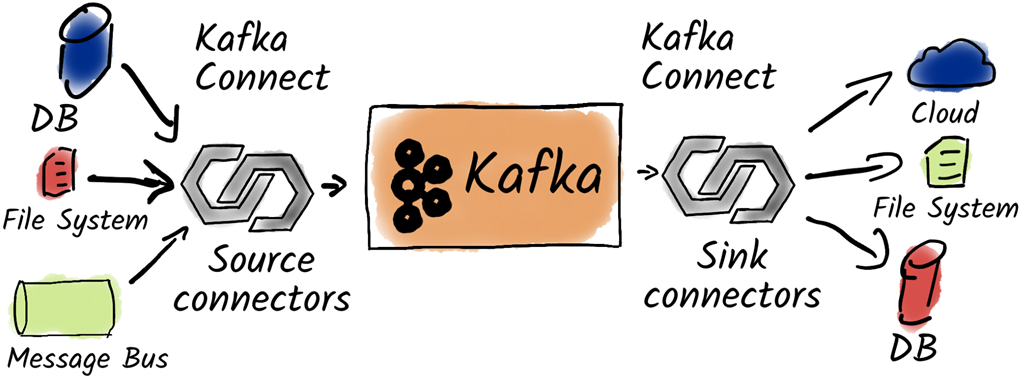
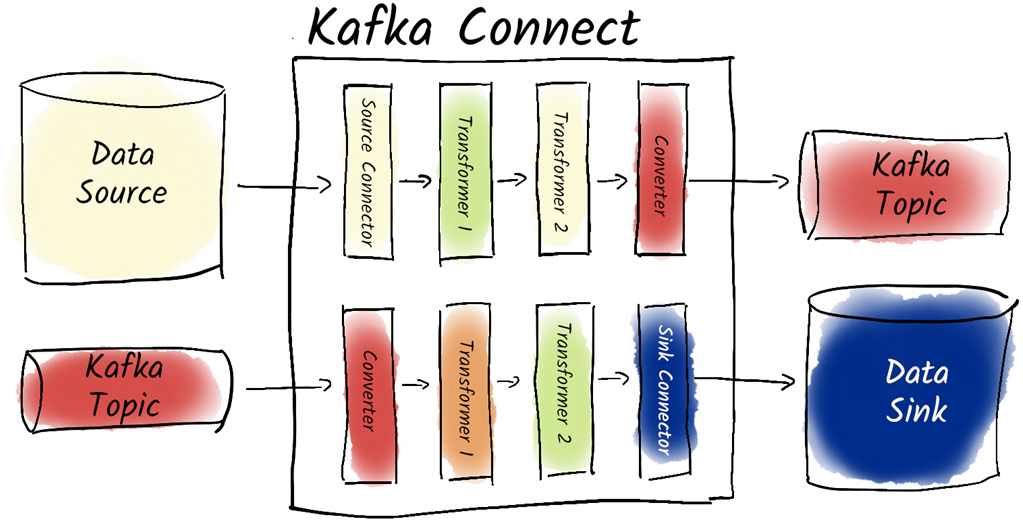
Kafka Connect integrates third-party systems with Kafka.
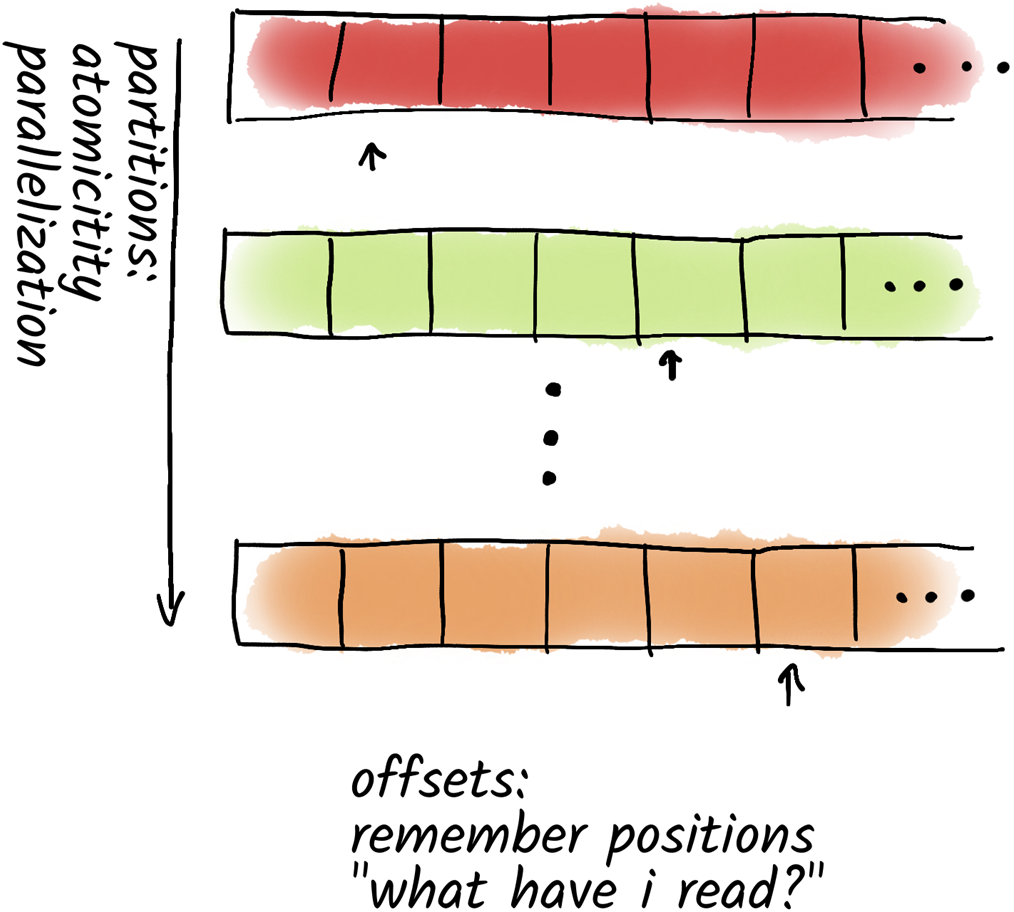
A partitioned stream uses partitions for parallelization and offsets to remember the last read message.
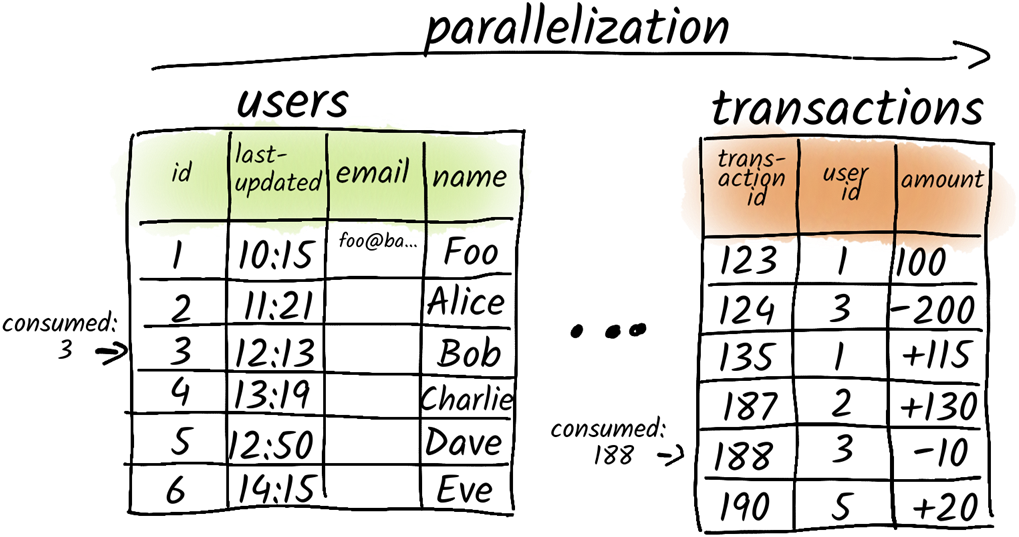
Partitioned streams in databases: We can view tables as independent data streams and use, for example, sequential id-columns to track which rows have been already seen by Kafka Connect.
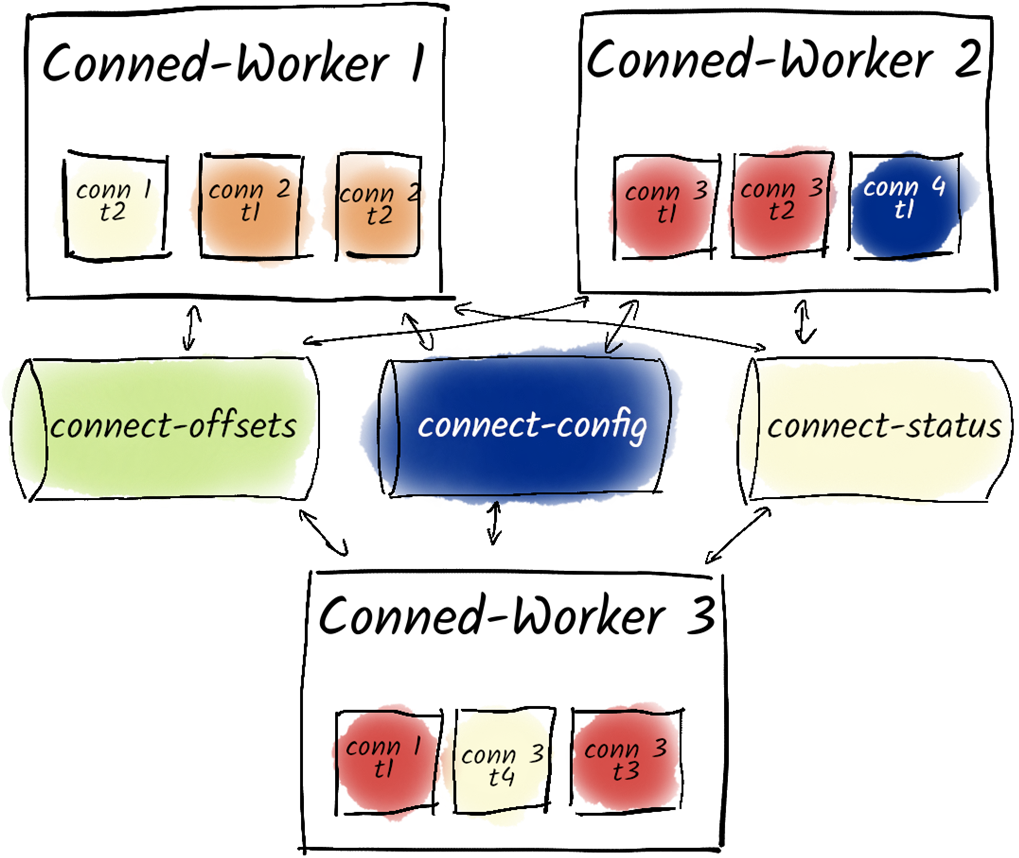
A Kafka Connect Cluster consists of one or multiple workers. Tasks are distributed across workers and Kafka Connect uses three topics to store its internal state.
Single Message Transformations can be used for both, source and sink connectors.
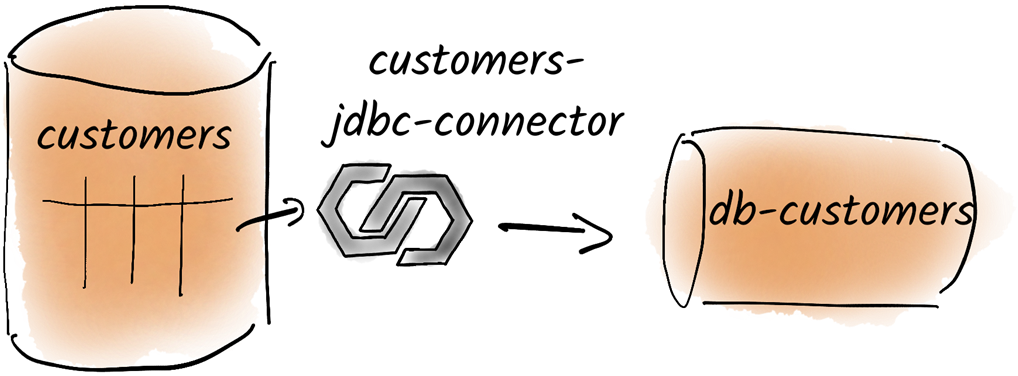
We want to move customer data from a relational database to Kafka
Summary
- Kafka Connect is a framework designed for scalable and reliable data integration between Kafka and other systems.
- It enables the movement of large amounts of data into and out of Kafka effortlessly using connectors.
- Connectors can be classified as source connectors (importing data into Kafka) or sink connectors (exporting data from Kafka).
- Each connector can be configured with various parameters to meet specific requirements.
- Kafka Connect uses a REST API for managing connectors and worker configurations, and can also be configured using a properties file at startup.
- The REST API can be used to create, update, and delete connectors, as well as to check their status.
- Worker configurations play a vital role in determining how Kafka Connect operates, including aspects like resource allocation, task distribution, and the overall resilience of the integration process.
- Error handling in Kafka Connect can be configured, including options for ignoring problematic entries via the errors.tolerance parameter.
- Logging errors is essential for troubleshooting, achieved through the errors.log.enable parameter.
- For sink connectors, data can be directed to a dead-letter queue for handling unprocessable records.
- Retry mechanisms can be configured for transient errors using parameters like errors.retry.timeout and errors.retry.delay.max.ms.
- JDBC connectors have specific configurations for managing database connection retries and backoff strategies.
- The operational mode of connectors can be set to either incrementing, timestamp-based, or both, depending on change tracking requirements.
- Change Data Capture (CDC) can be implemented using connectors like Debezium to monitor database changes.
- PostgreSQL requires specific configurations (e.g., setting wal_level to logical) for effective change data capture.
- Kafka Connect can automatically create Kafka topics based on database tables, ensuring seamless integration.
- The topic.prefix parameter organizes topics generated by connectors and prevents naming conflicts.
- Connector configurations can specify database connection details and table filtering using parameters like table.include.list.
- Single Message Transformations (SMTs) enable simple data modifications like renaming fields, masking data, or moving values to keys during data transfer.
- SMTs work for both source and sink connectors but aren't suited for complex ETL tasks.
- SMTs are set up via JSON in the Connect API, specifying transformation order, Java class types, and configurations. Common SMTs include ReplaceField, ValueToKey, ExtractField, and MaskField.
- The framework’s flexibility allows for tailored solutions for various data integration scenarios, enhancing data flow management.
FAQ
What is Kafka Connect, and how do source and sink connectors differ?
Kafka Connect is a framework (part of Apache Kafka) for moving data between Kafka and external systems. Source connectors read from external systems and produce to Kafka; sink connectors consume from Kafka and write to external systems. It’s scalable, fault-tolerant, and emphasizes correctness and performance, with many ready-made connectors (databases, object stores, MQs, data warehouses, and more).When should I use Distributed Mode vs Standalone Mode?
Use Distributed Mode for production: workers form a Connect cluster via a sharedgroup.id, store configs and offsets in Kafka topics, and rebalance tasks for scalability and fault tolerance. Use Standalone Mode primarily for development or special cases (for example, local file access). It does not store offsets/configs in Kafka and does not scale.What are the key Kafka Connect worker settings and internal topics?
Important worker configs include:-
bootstrap.servers (Kafka cluster) and group.id (logical Connect cluster ID).- Internal topics:
config.storage.topic (connector configs), offset.storage.topic (source offsets), status.storage.topic (status/monitoring). Use a replication factor of 3 in production.- Converters:
key.converter, value.converter (for example, JSON, Avro, Protobuf); prefer setting converters in each connector. -
plugin.path (where connectors/SMTs/converters are loaded from).- Other useful settings:
listeners (REST API bind), topic.creation.enable (auto topic creation), exactly.once.source.support (enable source EOS with a two-step prepare/enable process).How do tasks, scaling, and fault tolerance work in Kafka Connect?
Each connector splits work into one or more tasks (tasks.max is the upper bound). Tasks are distributed across workers in the Connect cluster and rebalanced using Kafka’s rebalance protocol. Add more workers (with the same group.id) to scale out; if a worker fails, tasks are reassigned to remaining workers.How do I create, modify, pause/resume, restart, and delete connectors via the REST API?
The REST API is JSON-based. Common endpoints:- List/info:
GET /connector-plugins, GET /connectors, GET /connectors/<name>, GET /connectors/<name>/status. - Create:
POST /connectors with {"name": "...", "config": {...}}. - Update:
PUT /connectors/<name>/config. - Pause/Resume:
PUT /connectors/<name>/pause, PUT /connectors/<name>/resume. - Restart:
POST /connectors/<name>/restart?includeTasks=true&onlyFailed=true. - Delete:
DELETE /connectors/<name>. Note: the API lacks fine-grained auth; manage via CI/CD in production.How does error handling work, and how can I configure retries and dead-letter queues?
By default, connectors fail on the first error. Configure tolerance witherrors.tolerance=all (skip bad records) and enable errors.log.enable=true (optionally include payloads with errors.log.include.messages—mind sensitive data). For sink connectors, route bad records to a DLQ via errors.deadletterqueue.topic.name. Transient failures can be retried with errors.retry.timeout and errors.retry.delay.max.ms. Connector-specific options exist (for example, JDBC: connection.attempts, connection.backoff.ms; JDBC sink: max.retries, retry.backoff.ms). Set alerts if skipping records.Which converters should I use, and how do schemas fit in?
Converters define how keys/values are serialized:StringConverter, JsonConverter, or schema-aware formats like Avro/Protobuf/JSON Schema (require a Schema Registry). In production, prefer JsonConverter or a Schema Registry-backed converter; explicitly set converters in each connector. Useful options include value.converter.schemas.enable (for JSON) or Schema Registry URL for Avro/Protobuf converters.What are Single Message Transformations (SMTs), and when should I use them?
SMTs are lightweight, per-message transformations applied by Connect before producing to Kafka (sources) or before writing to sinks. Configure viatransforms and per-transform transforms.<alias>.type plus options. Common SMTs: ReplaceField (rename/drop fields), ValueToKey + ExtractField (build concise keys), MaskField (null out sensitive fields). Apply in listed order. Don’t overuse SMTs—use Kafka Streams or a stream processor for complex ETL.How does the JDBC Source Connector detect new or changed rows, and what are the trade-offs?
JDBC Source modes:-
incrementing with incrementing.column.name (emits only inserts; requires strictly increasing IDs).-
timestamp with timestamp.column.name (captures updates but can miss concurrent changes with identical timestamps).-
timestamp+incrementing combines both; columns must be monotonic. Use
table.whitelist (or blacklist), and prefix topics via topic.prefix. Bulk mode reloads entire tables and is inefficient; avoid in most cases.Why use Debezium (CDC) connectors, and what do their messages look like?
CDC connectors like Debezium read database change logs (for example, PostgreSQL WAL) to capture inserts, updates, and deletes reliably. Prepare the DB (for PostgreSQL:wal_level=logical, a user with REPLICATION privilege). Debezium messages include before, after, source, op (c, u, d, or r for snapshot), and ts_ms. To keep just the current row state, use the ExtractNewRecordState SMT.
 Apache Kafka in Action ebook for free
