Overview

10 Cleaning up messages

Managing the lifecycle of messages is critical in Kafka to avoid unbounded storage growth, performance degradation, and legal noncompliance. This chapter explains Kafka’s two cleanup strategies—log retention and log compaction—which can be applied individually or together. Retention deletes data by age or size at segment boundaries, providing simple, predictable controls for data that only needs to live for a fixed period. Compaction, by contrast, keeps the latest record per key and discards older versions, making it ideal for datasets like customer profiles where only the current state matters.

Retention operates at the segment level: when a partition exceeds retention.bytes or when the newest record in a segment is older than retention.ms (seven days by default), Kafka removes the entire segment. Because deletion is segment-based, effective retention depends on rolling segments regularly (segment.ms) and on the periodic background check interval (log.retention.check.interval.ms). The chapter shows how to tune these settings to satisfy precise retention windows and cautions against accidental loss of important, older data. It also covers cluster/topic defaults (cleanup.policy, log.cleanup.policy) and offset retention for consumer groups via offsets.retention.minutes, typically kept at seven days or longer since offsets consume little space.

Compaction requires keyed messages and is driven by the log cleaner, which periodically evaluates partitions (log.cleaner.backoff.ms), prioritizes compaction based on the dirty ratio (min.cleanable.dirty.ratio), and respects minimum and maximum compaction lags to balance resource cost and consumer needs. Compaction never processes the active segment, so creating new segments (for example via max.compaction.lag.ms or segment.ms) helps older data become eligible. Compaction preserves offsets and order while removing superseded entries; selective, permanent deletions are achieved with tombstones (null values) that are themselves retained for a period (delete.retention.ms) so consumers can observe deletions. The chapter emphasizes the trade-offs—compaction’s overhead versus its ability to maintain authoritative state—and notes that retention and compaction can be combined for robust, space‑efficient data governance.

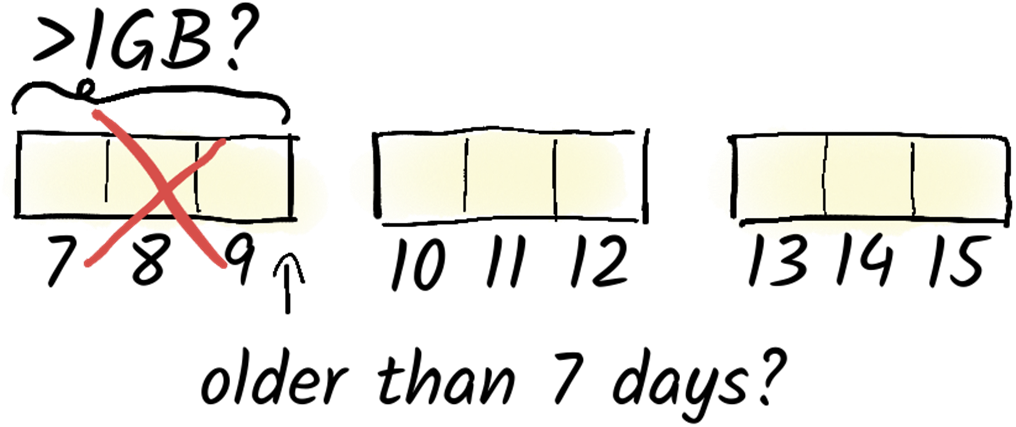
The log cleaner always operates on a segment-by-segment basis. With the delete policy, an entire segment is deleted once the newest message in the segment is older than a predefined value. If we use the compact policy, the log cleaner only deletes messages with a key for which there is a newer message with the same key. It's also possible to employ both methods simultaneously.
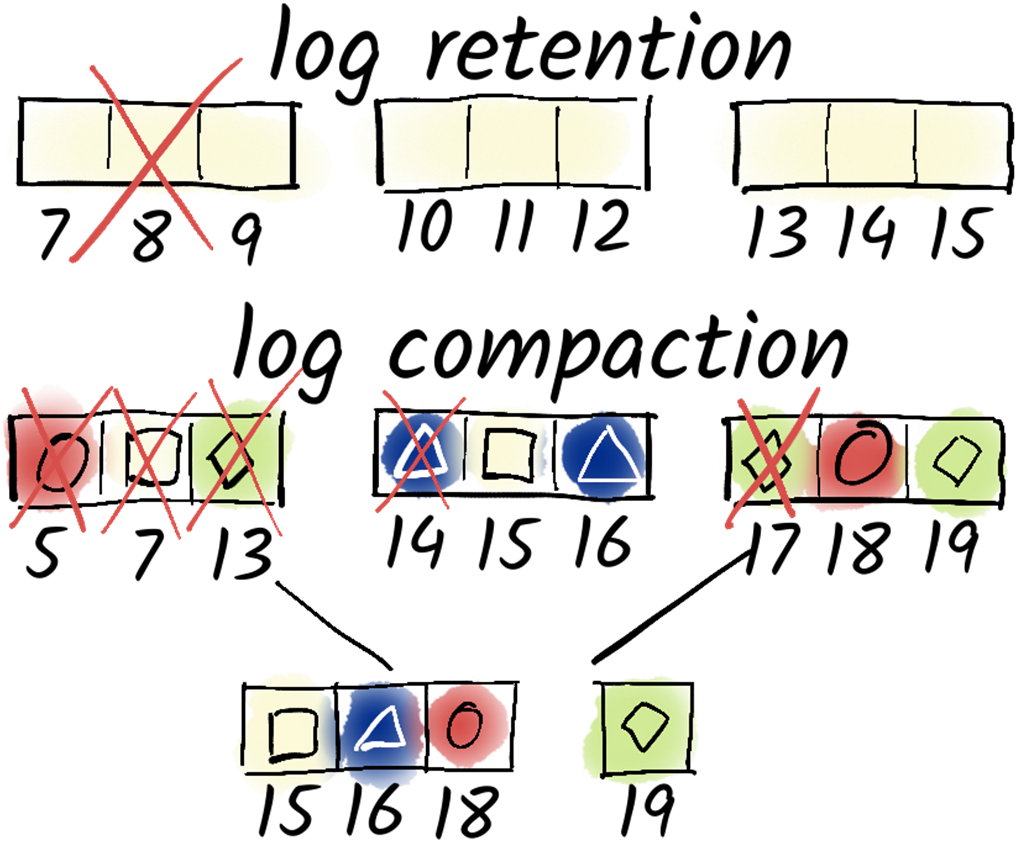
Log Retention checks whether a segment is larger than 1GB or whether the newest message is older than 7 days. If so, the whole segment is deleted.
Log Compaction reduces the amount of disk space used by deleting old messages for those there is a newer message with the same key.
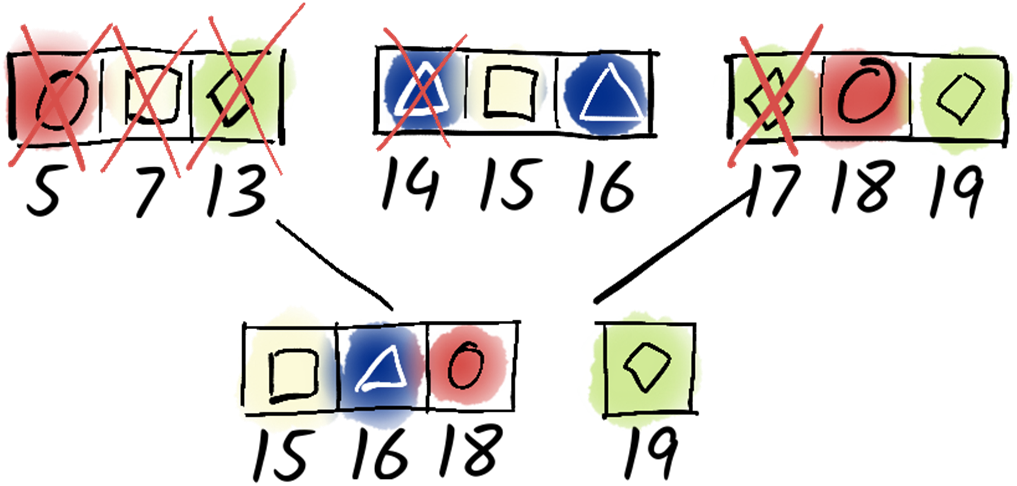
By default, compaction is triggered when the number of dirty segments is larger than the number of clean segments. Often it is also useful to set the max compaction lag, too.

Summary

  • Kafka offers two main approaches for message cleanup: log retention and log compaction.
  • Log retention deletes messages based on age, while log compaction removes outdated data based on keys.
  • Log compaction ensures that only the latest message for each key is retained, suitable for scenarios like updating customer data.
  • Log retention is simpler to implement, clearing messages based on age and supporting various use cases such as data privacy compliance and changelog data management.
  • Both methods have trade-offs; log retention is easier but less precise, while log compaction requires more effort but ensures data accuracy.
  • Log retention can be configured based on partition size or time, offering flexibility in managing storage space.
  • Log compaction parameters determine the threshold for segment cleaning and ensure that only outdated data is removed.
  • Log compaction maintains message order and offsets, preserving data consistency.
  • If a consumer tries to fetch messages which do not exist, the brokers simply return the next messages.
  • Kafka's log cleaner periodically checks for outdated data and optimizes log storage by removing unnecessary segments.
  • Regular segment rotation ensures efficient log management, preventing log bloat and optimizing storage usage.
  • Kafka's flexibility in message cleanup allows for tailored data management strategies based on specific use cases.
  • Tombstone messages facilitate selective deletion in log compaction, ensuring efficient data cleanup.
  • Tombstones are eventually removed to prevent log inflation, with configurable retention periods.

FAQ

What cleanup methods does Kafka offer, and how do they differ?Kafka provides two cleanup strategies: log retention and log compaction. Log retention deletes entire segments when messages are older than a configured age (retention.ms) or when a partition exceeds a size limit (retention.bytes). Log compaction keeps at least the latest record per key by removing older records with the same key; it requires keyed messages. You can use either method or both together via the topic setting cleanup.policy (cluster default via log.cleanup.policy).
When does Kafka delete data with time/size-based retention?Retention deletes a whole segment when either condition is met: the newest record in the segment is older than retention.ms, or the partition size exceeds retention.bytes (disabled by default with -1). Kafka checks for deletions periodically (log.retention.check.interval.ms, default ~5 minutes). Because retention is segment-based, data won’t be deleted until the segment rolls.
How should I set retention.ms and segment.ms to meet a strict retention limit (for example, 7 days)?Because Kafka deletes by segment, not per record, you must roll segments frequently enough. Ensure segment.ms + retention.ms is no greater than your maximum retention window (subtract the retention check interval for precision). Rolling segments more frequently (smaller segment.ms) narrows the age spread of records at deletion time.
Why are my messages without keys rejected on a compacted topic?Compaction depends on keys to identify and remove older versions. On topics with cleanup.policy=compact, brokers reject messages with a null key. Produce with a key (for example, console producer properties parse.key=true and key.separator) so each message carries a key.
When does log compaction run, and what controls it?The log cleaner wakes periodically (log.cleaner.backoff.ms, default ~15 seconds) and compacts partitions that qualify. A partition is eligible when the ratio of dirty (never-compacted) data to total log exceeds min.cleanable.dirty.ratio (default 0.5), and records are older than min.compaction.lag.ms (default 0). You can also bound staleness with max.compaction.lag.ms so low-throughput partitions get compacted regularly.
Why isn’t the newest segment compacted, and how can I trigger compaction sooner?Kafka never compacts the active (current) segment to avoid inconsistencies while new data is being appended. To allow compaction, force a segment roll using segment.ms or by setting max.compaction.lag.ms; after a new segment is created and enough dirty data accumulates (or lag thresholds are hit), the cleaner can compact the older segment(s).
How does the log cleaner actually compact data?The cleaner scans un-compacted segments to map each key to its latest offset, then rewrites only the non-obsolete records into new segment(s). Old segments are atomically replaced by the cleaned ones. Offsets and record order are preserved; if a consumer fetches a deleted offset, Kafka serves the next existing record.
What’s the recommended way to purge all messages in a topic?Older guidance suggested setting retention.ms=0 temporarily. The recommended approach now is to use the Kafka Admin API to delete records explicitly, rather than toggling retention to zero.
How are consumer group offsets cleaned up?Offsets are stored in a Kafka topic and are also subject to cleanup. The broker setting offsets.retention.minutes controls how long offsets for inactive consumer groups are kept (default 7 days). It’s generally unwise to shorten this, since groups paused for longer maintenance might lose their positions; offsets take little space, so increasing the value can be safer.
What are tombstones in compaction, and when are they removed?A tombstone is a record with a key and a null value that signals deletion for that key. Compaction removes older records for the key as usual and later removes the tombstone itself after delete.retention.ms (topic) or log.cleaner.delete.retention.ms (cluster), default 1 day. The delay lets consumers process the deletion before Kafka prunes the tombstone.

pro $24.99 per month

  • access to all Manning books, MEAPs, liveVideos, liveProjects, and audiobooks!
  • choose one free eBook per month to keep
  • exclusive 50% discount on all purchases
  • renews monthly, pause or cancel renewal anytime

lite $19.99 per month

  • access to all Manning books, including MEAPs!

team

5, 10 or 20 seats+ for your team - learn more


choose your plan

team

monthly
annual
$49.99
$499.99
only $41.67 per month
  • five seats for your team
  • access to all Manning books, MEAPs, liveVideos, liveProjects, and audiobooks!
  • choose another free product every time you renew
  • choose twelve free products per year
  • exclusive 50% discount on all purchases
  • renews monthly, pause or cancel renewal anytime
  • renews annually, pause or cancel renewal anytime
  • Apache Kafka in Action ebook for free
choose your plan

team

monthly
annual
$49.99
$499.99
only $41.67 per month
  • five seats for your team
  • access to all Manning books, MEAPs, liveVideos, liveProjects, and audiobooks!
  • choose another free product every time you renew
  • choose twelve free products per year
  • exclusive 50% discount on all purchases
  • renews monthly, pause or cancel renewal anytime
  • renews annually, pause or cancel renewal anytime
  • Apache Kafka in Action ebook for free
choose your plan

team

monthly
annual
$49.99
$499.99
only $41.67 per month
  • five seats for your team
  • access to all Manning books, MEAPs, liveVideos, liveProjects, and audiobooks!
  • choose another free product every time you renew
  • choose twelve free products per year
  • exclusive 50% discount on all purchases
  • renews monthly, pause or cancel renewal anytime
  • renews annually, pause or cancel renewal anytime
  • Apache Kafka in Action ebook for free
