Appendix B. Monitoring setup
This appendix presents a concise, practical path to establishing a basic monitoring stack for Kafka using Prometheus and Grafana. It explains how metrics are scraped, labeled, and stored for querying with PromQL, and how alert rules translate metric conditions into actionable notifications. The emphasis is on a minimal yet functional setup that helps operators gain immediate visibility into broker health, latency, and availability, with room to expand as needs grow.
The guide walks through installing Prometheus and tailoring its configuration: setting global scrape and evaluation intervals, defining jobs for Kafka brokers and Prometheus itself, and adding an initial alert that fires when Kafka metric endpoints are unreachable for a sustained period. It shows how to expose Kafka metrics via the Prometheus JMX Exporter by running it as a Java agent on each broker and verifying endpoints before scraping. It also highlights complementary exporters: the Blackbox Exporter for active probing and end-to-end availability insights, and the Node Exporter for host-level metrics such as CPU, memory, network, and filesystem, including extensibility via a textfile collector.
Alert handling is covered through Prometheus Alertmanager, which groups, routes, silences, and inhibits alerts to reduce noise and focus on root causes, with guidance on avoiding port conflicts in a Kafka environment. Finally, Grafana is introduced as the visualization and alerting layer, enabling rich dashboards across data sources, variables for fast context switching, and fine-grained access controls and plugins. A simple Kafka dashboard is suggested that surfaces broker availability alongside critical indicators like under-replicated partitions, underscoring the value of clear, well-crafted visuals as the basis for effective alerting and rapid troubleshooting.
Figure B.1 The Prometheus web interface is accessible by default on port 9090. Through the web interface, we can query and visualize Prometheus data using PromQL.
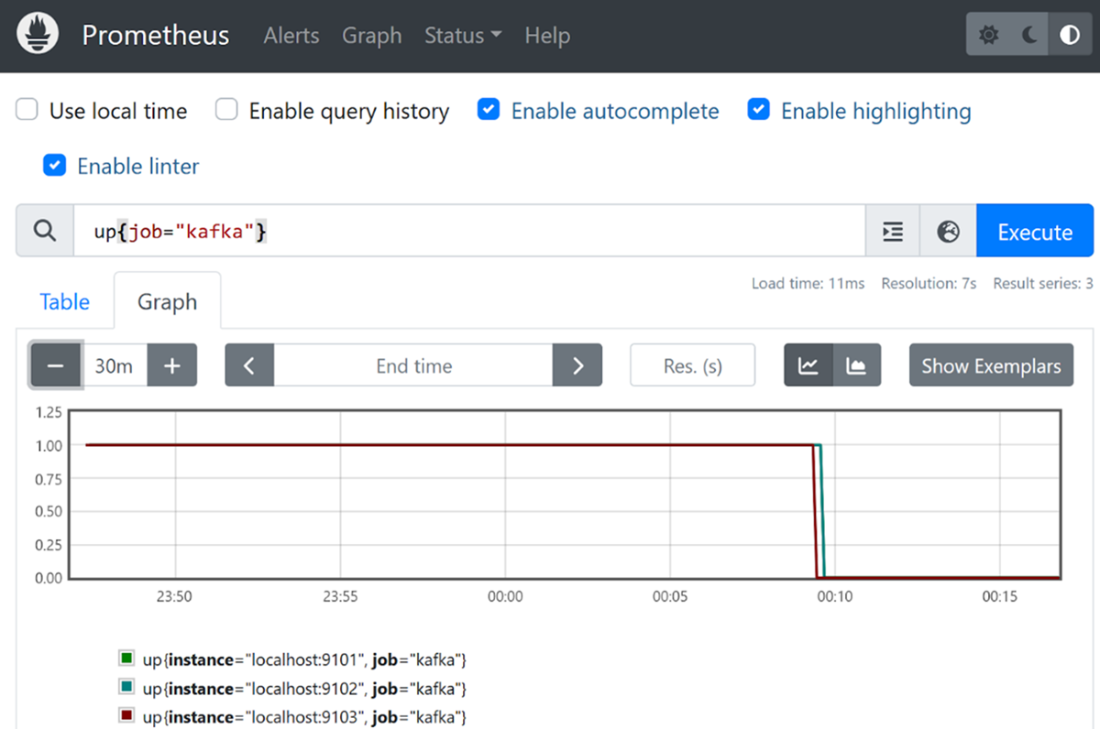
Figure B.2 Under Alerts, we find a list of all alerts. Alerts can be in one of three statuses: inactive (expression is false), pending (expression is true, but the minimum duration has not yet been reached), or firing (expression is true and has been true for at least the specified duration).
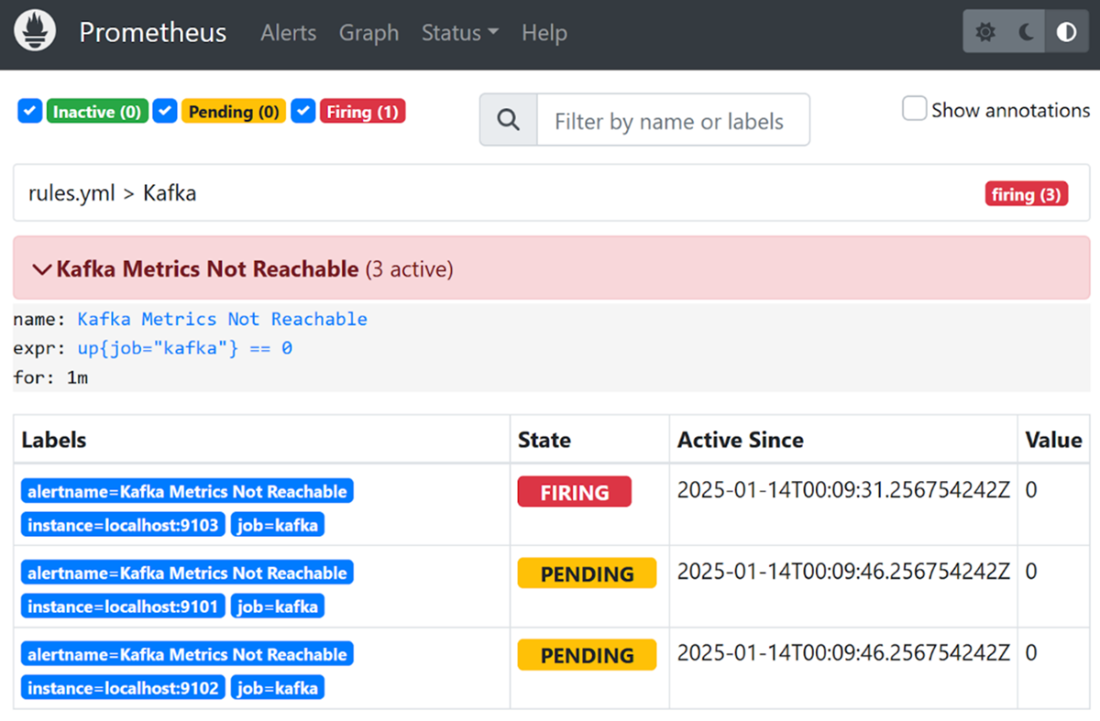
Figure B.3 The web interface of the Alertmanager is accessible on port 9095 (the default is 9093) and displays a list of active alerts. Additionally, through the web interface, we can temporarily silence alerts or notifications.
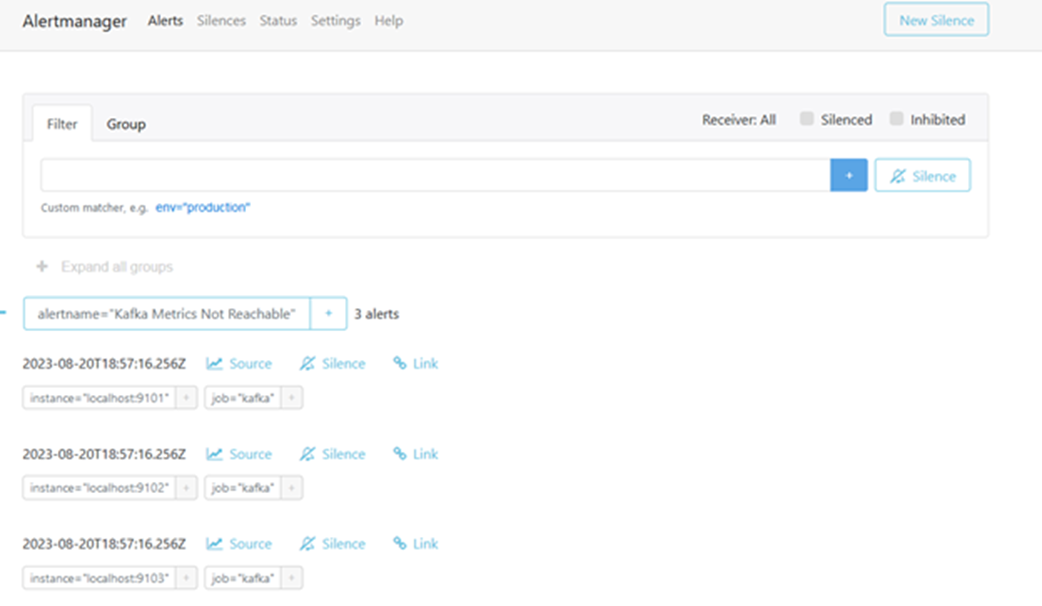
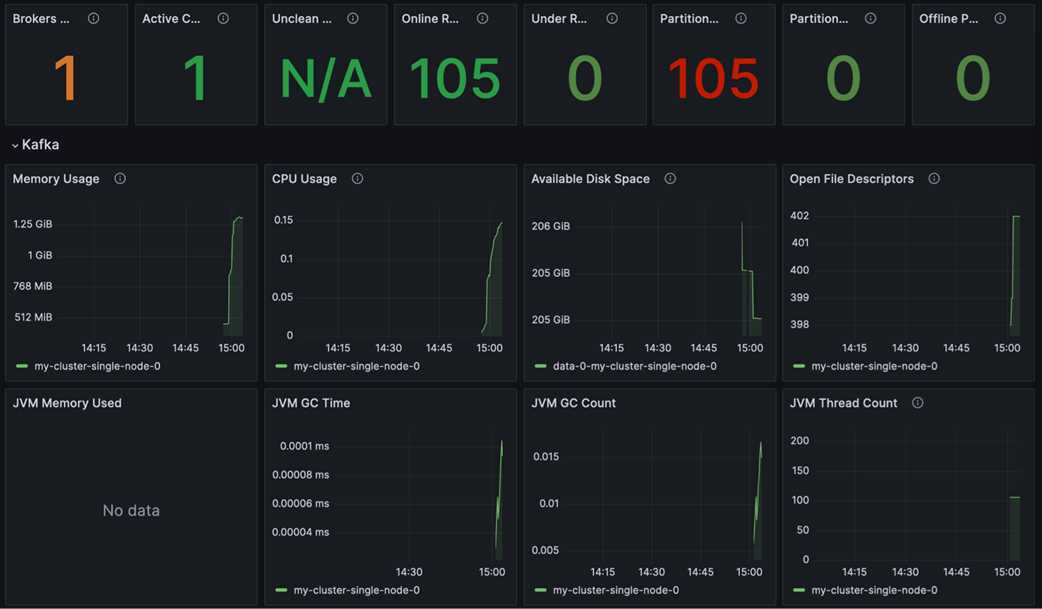
Figure B.4 A simple Kafka dashboard with the most important metrics.
FAQ
What is Prometheus and how does it monitor Kafka?
Prometheus is an open-source monitoring and alerting system that periodically scrapes metrics from HTTP endpoints, stores them as labeled time series, and lets you query/aggregate them with PromQL. It can auto-discover targets or scrape statically configured endpoints. For Kafka, Prometheus collects broker metrics exposed via a JMX exporter and can trigger alerts based on PromQL expressions.How do I install and minimally configure Prometheus for a Kafka cluster?
Download and extract Prometheus from the official site, then editprometheus.yml to set global scrape/evaluation intervals, configure the Alertmanager address, include your alert rule_files, and define scrape_configs for your Kafka brokers and Prometheus itself. Example endpoints used in the appendix: Kafka brokers on 9101/9102/9103 and Prometheus on 9090. Start Prometheus and open the web UI on port 9090 to run PromQL queries and view metrics.How can I create a basic alert if Kafka metrics become unreachable?
Create a rule file (for example,rules.yml) and add an alert that evaluates up{job="kafka"} == 0 with a hold time (for example, for: 1m). This fires if a Kafka metrics endpoint remains down for at least one minute. In the Prometheus UI, alerts can be in three states: inactive (false), pending (true but under the minimum duration), and firing (true for the configured duration).Which ports are used in the example setup?
- Prometheus UI and self-scrape: 9090 - Kafka JMX exporter endpoints: 9101 (broker 1), 9102 (broker 2), 9103 (broker 3) - Alertmanager web UI: 9095 (overridden from the default 9093 to avoid conflicts with Kafka)What are Prometheus exporters and which ones are relevant for Kafka?
Exporters translate existing metrics into Prometheus format. For Kafka: the JMX Exporter exposes broker JMX metrics; the Blackbox Exporter probes endpoints (TCP/HTTP/HTTPS) and reports availability viaprobe_success; and the Node Exporter collects host-level metrics (CPU, memory, network, filesystem) with optional Textfile Collector support.How do I expose Kafka broker metrics to Prometheus using the JMX Exporter?
- Download the JMX exporter JAR and a Kafka JMX config file. - Stop the brokers. - SetKAFKA_OPTS to include the Java agent, e.g. -javaagent:/path/jmx_prometheus_javaagent-1.1.0.jar=9101:/path/kafka-kraft-3_0_0.yml (adjust port per broker).
- Restart each broker with its respective port (9101/9102/9103). Prometheus will then scrape these endpoints.How do I verify that Prometheus is scraping Kafka metrics correctly?
Usecurl against each exporter endpoint (for example, curl localhost:9101) to see metrics output. In the Prometheus UI (port 9090), search for series such as up{job="kafka"} or broker-specific metrics. Metrics should appear a few seconds after starting the brokers and Prometheus.What is the Prometheus Alertmanager and how do I run it alongside Kafka?
Alertmanager receives alerts from Prometheus, groups/labels them, routes notifications, and supports silences and inhibit rules. Start it with non-conflicting ports, e.g.--web.listen-address=:9095. Configure routing and receivers in alertmanager.yml (SMTP or other integrations) as needed.How can the Blackbox Exporter help monitor Kafka availability?
The Blackbox Exporter probes endpoints (e.g., TCP for broker ports or HTTPS for APIs) and emitsprobe_success plus timing metrics (DNS, TCP connect, TLS, etc.). This provides end-to-end availability and latency insight beyond internal broker metrics and can be visualized in Grafana dashboards.Why use Grafana with Prometheus for Kafka, and where can I find good dashboards?
Grafana builds rich, multi-panel dashboards from Prometheus (and other data sources), supports variables for fast filtering, and can manage alerts and permissions. A practical Kafka dashboard includes availability (e.g., Blackboxprobe_success) and critical broker metrics like under-replicated partitions. The Strimzi community provides high-quality Kafka dashboards you can adapt to your environment.
 Apache Kafka in Action ebook for free
