This chapter explains how AI elevates the IT service desk by augmenting both people skills and technical execution. It positions the service desk as a frontline function that benefits from conversational AI to triage, resolve, and escalate issues while also recognizing and responding to user emotions. The narrative moves from high-level use of large language models to practical workflows, showing how AI can shorten time-to-resolution, improve consistency, and lay the groundwork for a more integrated, data-driven support operation.
On the human side, AI helps agents de‑escalate tense interactions, acknowledge service failures, and deliver empathetic follow-ups. It assists with identifying problems by translating colloquialisms and bridging language gaps, and it helps craft clear, jargon-free explanations—often via analogies that make complex issues accessible. The chapter emphasizes practicing real-time scenarios with role-play and structured prompts, enabling agents to develop soft skills alongside troubleshooting discipline while avoiding canned, impersonal responses.
On the technical side, the chapter shows how retrieval‑augmented generation and document attachments give chatbots immediate access to proprietary knowledge, enabling rapid troubleshooting and analysis of historical tickets to surface proven fixes. It demonstrates building custom GPTs tailored to service desk tasks, with focused instructions, curated knowledge, optional code execution, and careful privacy controls. Looking ahead, it anticipates native platform integrations that blend chatbots, NLP-driven routing, document analysis, predictive and sentiment analytics, and modern knowledge management to deliver faster, more proactive, and more satisfying support.
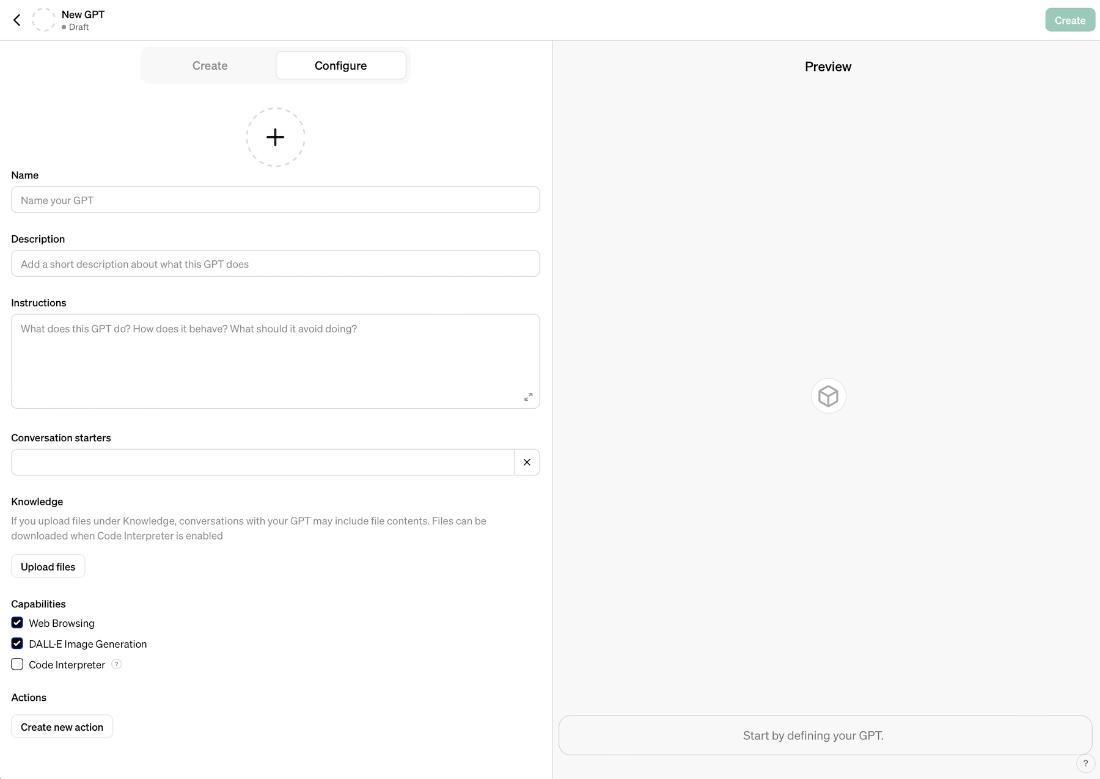
Custom GPT interface
Prompts used to write this chapter
Create a real-life scenario where a caller may be having communication issues with the representative and illustrate how the representative can ask AI to help clarity
Simulate a technical issue being faced by a non-technical customer. The job of the help desk is to explain the issue in non-technical terms, appropriately translating jargon with analogies that the customer can understand.
Generate an adoc table with 2 columns, "Task" and "Prompt". Create 5 rows for the table. Each row should be a task useful to a helpdesk representative that can be used to disarm upset customers, provide emotional support and increase satisfaction during difficult situations.
Create up to 8 bullet point summaries from this chapter that outline what the reader has learned. The bullet points should be full sentences.
FAQ
How can AI help a service desk agent de-escalate tense or emotional interactions?AI can suggest empathetic language, structure a calming response, and propose next steps. A practical approach is to: acknowledge the user’s frustration, apologize without deflecting, restate the problem in your own words to show understanding, offer an immediate workaround if possible, set a clear expectation for resolution time, and commit to follow-up. This blends emotional support with progress toward a fix.What prompts can I use to practice empathy and conflict resolution for the service desk?Try role-play prompts such as: 1) “Draft a reply that validates the customer’s frustration and offers a short-term workaround.” 2) “Write a message that acknowledges a service failure, apologizes, and outlines prevention steps.” 3) “Create a follow-up note after a tough incident to check satisfaction and offer more help.” 4) “Act as an upset user based on this complaint; I’ll respond as the agent and you’ll give feedback on de-escalation and troubleshooting.”How can AI assist when users describe issues with slang or unclear language?AI can interpret colloquialisms and propose clarifying questions. Ask specific, non-technical questions like: “When you say it’s ‘fuzzy,’ is the picture blurry or are colors distorted?”, “Does it happen only with certain apps or videos?”, “Does it start after the device heats up or after a long session?”, “Have you changed settings or updated software recently?”, and “What fixes have you already tried?” This reduces misunderstandings and speeds diagnosis.How do I craft customer-friendly explanations of technical problems without jargon?Use plain language and relatable analogies. For example, describe bandwidth congestion as a traffic jam on a highway and an infrastructure upgrade as widening lanes. Include: brief, non-technical cause; everyday analogy; estimated time to resolution; immediate steps the user can take; and reassurance that the issue is prioritized.What is Retrieval-Augmented Generation (RAG) and why does it matter for service desks?RAG combines a retriever (finds relevant documents) with a generator (creates answers using those documents). For service desks, it means you can attach policies, SOPs, product guides, and ticket histories so the chatbot answers with company-specific, up-to-date information—without training a model from scratch. It improves accuracy, consistency, and onboarding speed.How can I use AI and historical tickets to troubleshoot recurring technical issues?Export ticket data (for example, CSV), upload it, and ask the AI to: identify the most common symptoms and resolutions, cluster issues into categories, propose a decision tree for first-line triage, and flag anomalies or spikes over time. This turns past resolutions into a playbook for faster, more consistent fixes.How do I set up a custom GPT for my service desk team?Steps: 1) Create a custom GPT and write focused instructions (scope, categories, expected outputs). 2) Upload “Knowledge” files (ticket samples, SOPs, troubleshooting guides). 3) Enable only necessary capabilities (e.g., Code Interpreter for data analysis). 4) Add conversation starters (“Analyze this ticket,” “Suggest a resolution path”). 5) Keep sharing restricted (e.g., “Only me” or your team). 6) Test with real examples and refine instructions.What privacy and security practices should I follow with custom GPTs?Best practices: keep bots private if they contain sensitive content; opt out of model training where available; avoid uploading documents that shouldn’t be downloaded; limit capabilities that could expose files; use least-privilege access and clear data-retention rules; and review vendor privacy options or submit privacy requests if needed.How can agents practice real-time scenarios with AI before handling live users?Use “Act as” role-play prompts. Provide a real complaint, ask the chatbot to behave as the customer, and request feedback on empathy, clarity, troubleshooting flow, and follow-up. Combine emotional de-escalation with technical triage in the same session, then iterate your prompts and scripts based on the AI’s feedback.What does the future of the AI-enabled service desk look like?Expect deeper platform integration: 24/7 virtual assistants for first contact; NLP that routes issues and surfaces the right docs; document analysis over large knowledge bases; predictive analytics to detect patterns and prevent incidents; sentiment analysis that guides tone and urgency; and smarter knowledge management that identifies gaps and pushes relevant content to agents and users.
pro $24.99 per month
access to all Manning books, MEAPs, liveVideos, liveProjects, and audiobooks!

 AI for Everyday IT ebook for free
