6 Document handling
Modern IT work is document-heavy, spanning manuals, reports, logs, tickets, and more. This chapter shows how AI—often via a simple chatbot—can streamline that workload by summarizing long texts, converting formats, extracting text from images, and improving organization through consistent metadata. It emphasizes preparing content for AI, crafting clear instructions, and refining outputs to turn scattered, complex files into actionable, searchable information.
To get reliable results, the chapter recommends breaking large files into manageable chunks, extracting plain text before processing, and being explicit about scope and deliverables. It encourages structured outputs (e.g., bullets or JSON), iterative prompting, and multi-step workflows that begin with a summary before deep questions. Equally important are ethics and governance: protect privacy, ensure transparency and human oversight, watch for bias and IP concerns, and prioritize company-approved, enterprise-grade tools—especially with sensitive data—while always verifying AI-produced results.
The chapter surveys core applications: rapid summarization; robust format conversion (such as PDF to Markdown/HTML); OCR for screenshots, scans, and whiteboards; version-aware document comparison; scalable classification and tagging to improve retrieval; and anonymization workflows, with strong cautions for regulated data. It also covers multilingual translation using LLMs that maintain terminology and style, aided by glossaries and human review. Combined, these capabilities accelerate workflows, reduce manual toil, improve searchability and metadata consistency, and enhance collaboration without compromising accuracy or security.
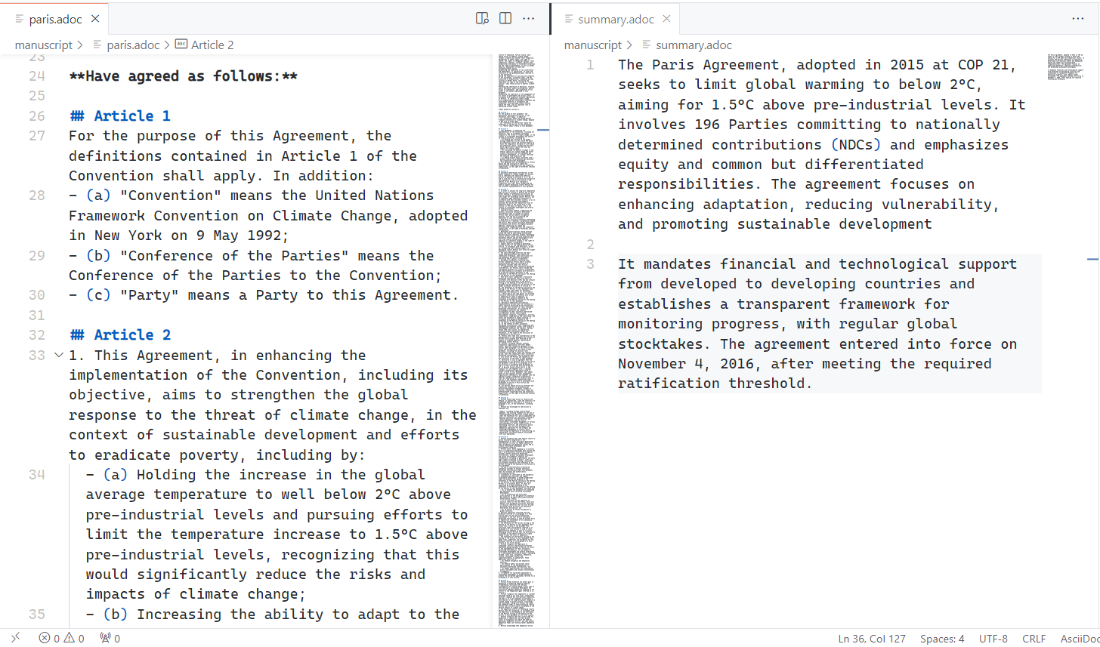
Summarize this in 2 short paragraphs
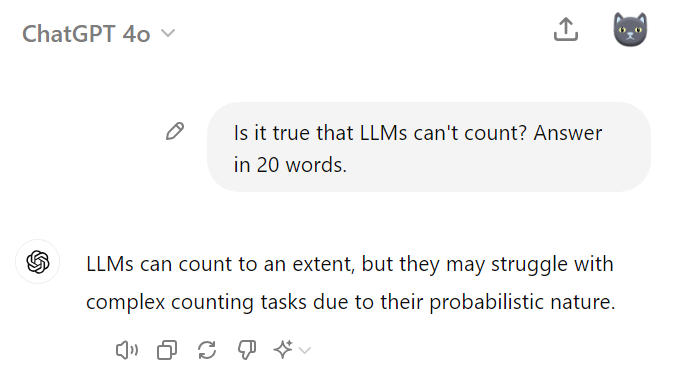
Chatbots can’t always count
Prompts used in this chapter
- Create a prompt that can generate a comprehensive summary of a 50-page technical report, focusing on key findings, methodologies, and recommendations.
- This chapter should be more conversational and engaging while keeping it business casual. can you help? Let’s go paragraph by paragraph.
- What considerations should be made when using AI for translating technical documentation between languages? Provide a list of best practices.
FAQ
How should I prepare long documents for AI processing?
Break long files into smaller, labeled chunks and feed clean text, not binaries.
- Split into 10–20 page sections; use clear names like NetworkSecurity_Section1_Firewall.pdf.
- Extract and clean text first; remove boilerplate and sensitive data.
- Tell the AI to read the entire section before answering.
- Start broad (e.g., summarize) before drilling into specifics.
Why should I extract text before uploading PDFs/Word files, and how do I do it?
Clean text reduces formatting noise, lowers token use, and improves accuracy.
- Copy/paste for short docs.
- OCR for scans/images.
- PDF-to-text converters (watch for lost formatting).
- Command-line tools (pdftotext, PowerShell Get-Content) for batch jobs.
- Ask the chatbot to extract/process text if supported.
What is multi-shot prompting and when should I use it?
It’s a two-step approach: prime with a summary, then ask targeted questions.
- Step 1: “Summarize this report, focusing on goals, methods, findings, and takeaways.”
- Step 2: Ask detailed questions (e.g., “List Q2 2023 high-severity network incidents.”)
- Benefits: Better context, more relevant and accurate answers—especially for long documents.
How do I get usable outputs and handle token limits?
- Request structure: bullets, tables, or JSON for easy integration.
- Iterate: verify, refine, and correct with follow-up prompts.
- Plan for length: “Give the full output; if you hit limits, I’ll ask for more.”
- If truncated, ask to continue or start a new chat and paste the essential context.
What format conversions can AI handle, and what are the limits?
- Common conversions: PDF→Markdown/HTML, HTML→plain text, Word→LaTeX, JSON↔CSV, XML→JSON.
- Strengths: Quickly preserves much of the structure and content.
- Limits: Complex layouts, specialized formats, or intricate tables may need manual touch-ups.
- Tips: Start with simpler docs; specify handling for images, headings, tables.
How can I extract text from images, scans, or screenshots effectively?
- Use OCR for screenshots, scanned manuals, whiteboards, terminal captures.
- Ask to preserve line breaks, indentation, and special characters.
- Improve inputs: good contrast, minimal glare; consider preprocessing.
- Try specialized models for handwriting or complex layouts.
What ethical, privacy, and anonymization practices should I follow?
- Use company-approved/enterprise AI for sensitive documents; avoid public tools.
- Be transparent about AI use; keep human oversight on critical outputs.
- Watch for bias and IP issues; you remain accountable.
- For anonymization of sensitive/regulated data, prefer enterprise tools (e.g., Microsoft Purview, ARX) and consult security/compliance.
- Run secondary checks; note re-identification risk in complex datasets.
How can I compare two document versions with AI?
- Provide both versions and request a change summary: added, modified, deleted.
- Ask for a Markdown change log categorized as Major, Minor, Editorial.
- Highlight critical areas (e.g., security directives, RTOs).
- Benefit: Seconds instead of hours, across formats like Word/PDF.
How can AI help classify and tag large document collections?
- Options: build a custom classifier via APIs (fine-tuned to your corpus) or use cloud services (Azure Document Intelligence, Google Document AI, AWS Textract, OpenAI APIs).
- Best practices: pilot on a sample set, evolve your taxonomy, add human review for sensitive docs, and update models as content changes.
- Use tags to spot trends and improve findability.
How do I get accurate technical translations with AI?
- Provide a glossary of approved terms; enforce consistent terminology.
- Preserve code snippets, URLs, version numbers, and placeholders.
- Ask the model to flag ambiguous or context-specific terms for human review.
- Maintain formatting; always perform a human check for critical content.

 AI for Everyday IT ebook for free
